
You've probably seen the symptoms already. GA4 reports fewer purchases than your order system, Meta's conversion totals don't line up with revenue, and a browser debugger shows events firing in testing while production data vanishes. Meanwhile, every new marketing vendor adds another script, another consent condition, and another failure point to the page.
That's why the benefits of server-side tracking deserve a more practical treatment. Moving collection to a server can improve signal completeness, reduce browser workload, and give your team tighter control over what reaches vendors. It also creates a system you now own, which means hosting, monitoring, privacy enforcement, and incident response become part of the measurement job.
What Server-Side Tracking Actually Means
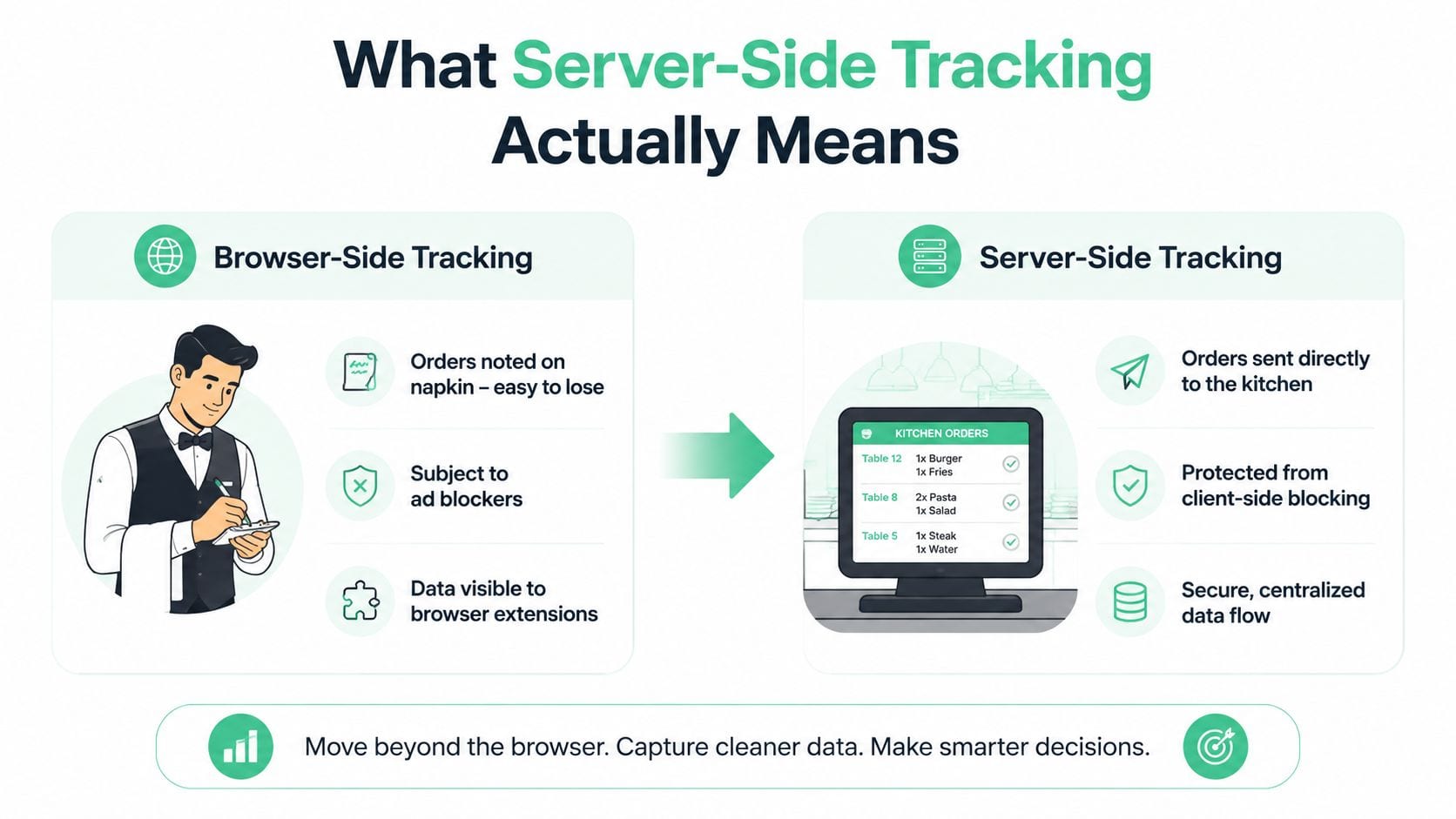
Think of browser-side tracking as a waiter writing orders on a napkin at the table. The waiter reads the customer's request, contacts several stations independently, and hopes the napkin doesn't get lost before the meal is prepared. A browser executes vendor scripts, reads cookies, fires pixels, and sends requests to analytics and advertising platforms one by one.
Server-side tracking moves that work into the kitchen. The browser sends an event to a first-party endpoint under your domain. A server container receives it, enriches or transforms the payload, applies consent and privacy rules, and decides which destinations should receive the approved data. That container might be Google Tag Manager Server, a managed service such as Stape, or a custom Node service.
The destination can still be familiar. Your server can forward approved events to Google Analytics 4, Meta Conversions API, a CRM, a warehouse, or another vendor. The key change is the collection and routing layer. Instead of allowing every vendor script to communicate directly with the visitor's browser, your infrastructure becomes the controlled intermediary.
Why the browser is an unreliable measurement layer
Browser collection now operates in an environment designed to limit tracking. Safari's Intelligent Tracking Prevention limits JavaScript-set cookies to 7 days, while server-set first-party cookies can persist for 90 to 400 days, according to this practical guide to server-side tracking in a privacy-first environment. Server-side requests can also be less exposed to browser ad blockers because they travel through a first-party endpoint rather than directly to known tracking domains.
Consent adds another dependency. A tag may be configured correctly yet still fail because the page didn't pass a valid consent signal, the user left the page, a browser extension blocked the request, or a client-side script crashed. Server-side collection doesn't remove the need for consent. It gives you a central place to enforce it consistently.
This is why the migration is bigger than a compliance adjustment. It's an operational decision about who owns the measurement layer. With browser-side tagging, vendors and browsers influence what you collect. With server-side tracking, your team owns more of the routing, transformation, and failure surface. A well-designed customer experience data layer can help connect behavioral events with structured customer feedback before those signals enter the server pipeline.
The Core Benefits That Move the Needle
The strongest case for server-side tracking isn't that it makes every metric magically accurate. It's that it gives you more control over the points where data can be lost, changed, or exposed.
A SaaS team might receive a signup event in the browser with a session identifier but no durable user identifier. The server can enrich that event from trusted first-party context, attach a transaction or account identifier, and forward only the fields each destination needs. An e-commerce team can use the same pattern for purchase events, provided the server receives a reliable order payload from the application or checkout flow.
Better completeness and reliability
Events sent through a first-party server endpoint are less vulnerable to ad blockers and browser restrictions. One industry dataset recorded GTM Server-Side Tracking on 482 active domains in March 2024 and 17,239 by April 2025, with the technology first appearing in its detection data in August 2020. The figures come from Stape's overview of server-side tagging benefits, and they indicate accelerating adoption, not a guaranteed result for every implementation.
The practical improvement is most visible around high-value events. If a buyer closes the tab immediately after submitting payment, a browser request may never complete. A server event generated from the application's order confirmation can still reach the destinations, subject to consent and correct implementation.
Less browser work
Moving vendor processing away from the page can reduce the number of scripts that execute in the browser. Industry guidance from Osano on server-side tracking and page performance describes the mechanism clearly: fewer client-side scripts mean less browser workload and less potential drag during page load.
That doesn't mean server-side tracking automatically improves Core Web Vitals. A bloated data layer, inefficient endpoint, or poorly managed client bootstrap can still create problems. The reliable win comes from removing unnecessary vendor scripts, not from adding a server container while leaving the original stack untouched.
Stronger privacy controls
A server can validate incoming fields, remove personal data, anonymize identifiers, and enforce consent before forwarding an event. This makes the data flow easier to govern than a collection of independent browser tags. CM.com's explanation of server-side tracking covers the central control model, including redacting personal data and applying consent rules before data reaches vendors.
The important distinction is between control and compliance. Server-side tracking gives you a stronger control point, but your legal basis, retention policy, vendor agreements, regional requirements, and implementation decisions still determine whether the system is compliant.
More consistent attribution
First-party server requests can improve attribution continuity when browser cookies or client-side requests are restricted. Server-set first-party cookies may persist for 90 to 400 days, compared with the 7-day limit applied to JavaScript-set cookies under the Safari behavior described by Fresh Egg's guide. That can help preserve return-visit context and conversion windows, but it doesn't override consent requirements or guarantee that advertising platforms will match every conversion.
| Benefit | Typical Client-Side Result | Typical Server-Side Result |
|---|---|---|
| Data completeness | Events depend on browser scripts, cookies, and extensions | Events enter through a controlled first-party endpoint |
| Reliability | Requests can fail when a user leaves or a script is blocked | Application or server events can continue after the browser handoff |
| Performance | Multiple vendor scripts add browser work | Fewer vendor scripts run on the page |
| Privacy | Each tag may access more browser context than intended | The server can filter fields before forwarding |
| Attribution | Return visits can lose continuity under browser restrictions | First-party server handling can preserve approved context longer |
| Governance | Consent logic is distributed across tags | Consent and routing rules can be centralized |
For a deeper comparison of the implementation models, see server-side tracking versus pixel-based tracking. The core question is not whether server-side is superior in every situation. It's whether recovering and governing important signals is worth the additional system your team will need to operate.
The Honest Trade-Offs Most Guides Skip
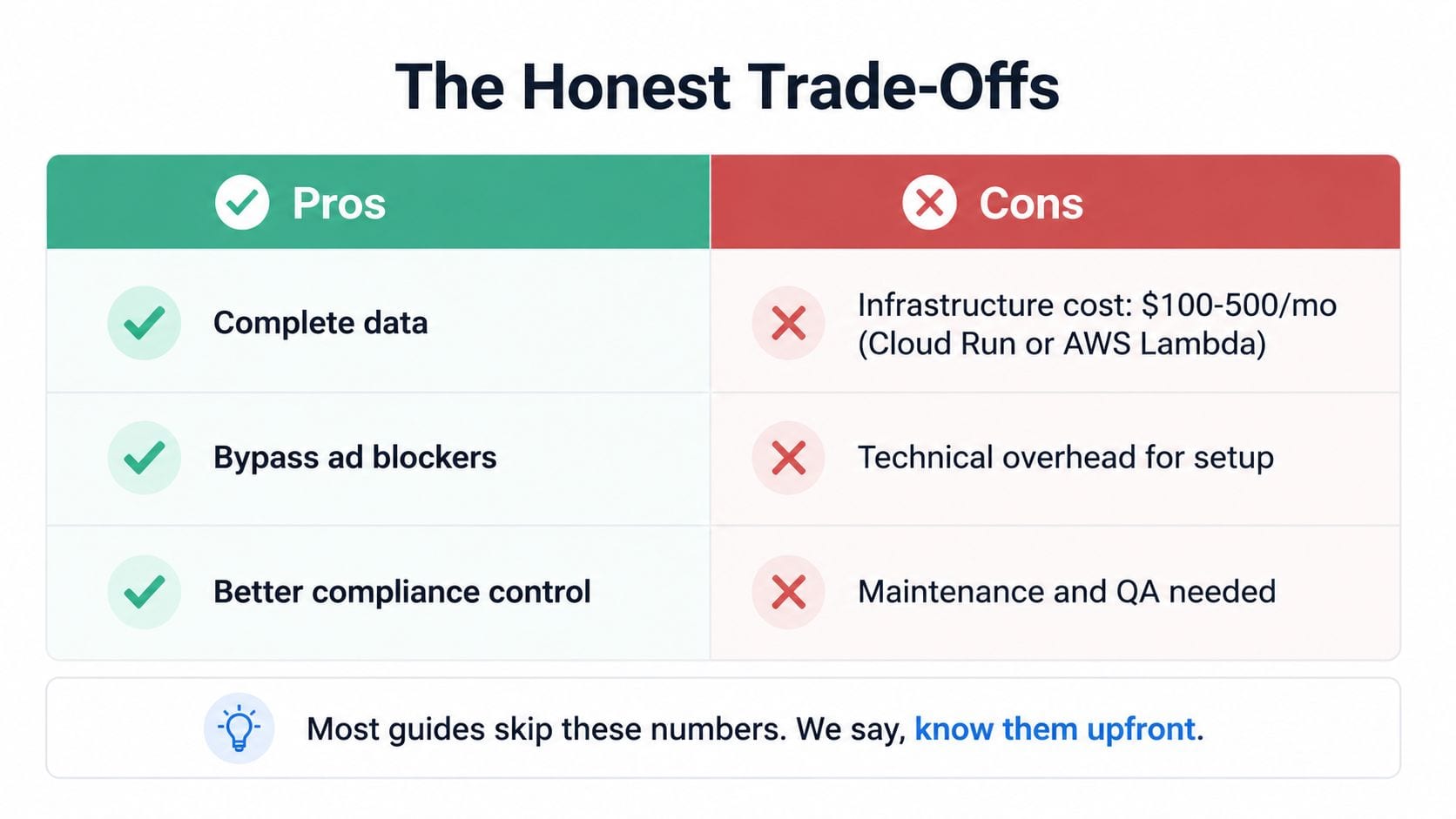
Server-side tracking isn't a free upgrade. It replaces some browser limitations with infrastructure and operational responsibilities.
The hosting bill depends on architecture, event volume, scaling behavior, and the number of downstream vendor calls. Managed runtimes such as Cloud Run or AWS Lambda can keep the platform flexible, but you'll still need to account for hosting, egress, logging, and monitoring. Any exact budget should come from your own traffic and routing model, not from a universal benchmark.
The new failure modes
Client-side tagging exposes failures in places engineers can often inspect quickly, such as the browser network panel or console. Server-side failures can be quieter. A vendor may change its schema, reject a payload, or return an error that nobody reviews. The dashboard then looks normal until someone reconciles it against orders or signups.
Common failure modes include:
- Silent delivery loss: The server accepts an event, but a destination rejects it.
- Schema drift: A changed field name or type breaks downstream processing.
- Incorrect consent routing: Events reach a vendor despite an opt-out state.
- PII leakage: Enrichment adds an email, IP address, or user ID to a destination that shouldn't receive it.
- Operational dependency: A domain, container, certificate, or vendor integration fails.
- Engineering backlog: Analysts can't make simple tag changes without developer support.
Operational rule: Treat every server-side destination as a production integration, not as a hidden replacement for a browser pixel.
The privacy benefit also carries a privacy risk. Raw customer data now exists in another system, even if only briefly. That system needs access controls, retention rules, logging, and review. Centralization improves governance only when somebody actively governs the centralized layer.
When the economics make sense
The return is strongest for teams with meaningful paid media dependence, high-value conversion events, or clear evidence that blockers and browser restrictions are damaging measurement. It's harder to justify for a small site with low event volume, limited vendor usage, and no internal owner for the pipeline.
Personalization also needs careful evaluation. A server round-trip can be the wrong architecture for a trigger that must respond immediately in the browser. Server-side tracking works best when the additional control and completeness outweigh the latency, engineering, and governance burden.
Real-World Use Cases and What Teams Gain
A DTC brand discovers that purchase reporting is lower than its payment system. The team's browser pixel fires during checkout, but the request depends on the customer's browser completing the handoff. Safari restrictions, blocked tracking requests, and navigation away from the confirmation page create gaps.
The team routes an approved purchase event through GTM Server and sends it to Meta Conversions API alongside a browser event identifier for deduplication. The operational change isn't merely “adding CAPI.” Engineers make the order system the dependable source for the purchase payload, while the server controls enrichment, consent checks, and destination delivery.
A publisher faces a different problem. Meta, GA4, and a first-party CRM each receive events through separate client-side pathways, so consent states and regional behavior drift between implementations. The publisher moves the routing decision to one server endpoint. That endpoint checks the consent state once, then allows or blocks each destination according to the organization's policy.
For implementation context, this guide to Facebook Conversions API is useful because deduplication and event quality matter as much as transport.
| Scenario | Stack | Metric | Before | After |
|---|---|---|---|---|
| DTC purchase recovery | Web events, GTM Server, Meta Conversions API | Purchase reconciliation and paid attribution | Browser-dependent purchase delivery | Server-routed purchase delivery with deduplication controls |
| Publisher consent routing | CMP, server endpoint, Meta, GA4, first-party CRM | Non-consented vendor delivery | Separate client-side consent decisions | Centralized consent gating before forwarding |
| SaaS enrichment | Product events, server container, GA4, CRM | Identified account activity | Anonymous or partially identified events | Approved first-party identifiers added before routing |
These scenarios produce three repeatable patterns.
- Paid media recovery: Use application or server events for revenue-critical conversions, then deduplicate carefully.
- Consent-gated routing: Make the server the enforcement point so destinations receive only permitted events.
- First-party enrichment: Add trusted identifiers and business context before sending data to analytics or advertising tools.
The gains come from changing ownership of the event flow. If the underlying event is never generated, server-side tracking can't recover it. If the server receives poor data, it will distribute poor data more reliably.
A Practical Rollout Path Teams Can Follow
A controlled migration starts small. Don't move every tag at once. Select a revenue or signup path, define the expected payload, and make the result reversible before expanding coverage.
Build the foundation
Phase 1, deploy the container. The platform owner provisions a GTM Server container on Cloud Run or a comparable managed runtime. The deliverable is a working server endpoint with access controls, logging, and a custom domain. The validation gate is a successful test request and a documented owner for uptime.
Phase 2, map the current system. An analytics engineer inventories browser events, destinations, parameters, consent states, and deduplication identifiers. Prioritize purchase, lead, signup, and subscription events. The validation gate is a signed event map that says which source owns each field and which destination may receive it.
Phase 3, centralize consent. The privacy or product owner connects consent state to the endpoint and documents what each destination can receive under each state. Test both consent granted and consent denied paths. A server that forwards everything and relies on downstream vendors to discard it hasn't solved the governance problem.
Validate before switching
Phase 4, configure destinations. Implement GA4 Measurement Protocol, Meta Conversions API, and first-party endpoints with stable event identifiers. Confirm that required fields, timestamps, user identifiers, and consent signals survive transformation.
Phase 5, shadow-run both paths. Run browser and server collection in parallel for 14 days, then compare payloads, event counts, identifiers, consent outcomes, and destination responses. The migration should have a written threshold for acceptable differences, not a vague feeling that reports look close.
Phase 6, cut over gradually. Retire browser tags only after the server path passes reconciliation. Keep a rollback plan, record the deployment version, and assign an owner for future tag changes.
The server-side tagging migration best-practices guide can support the planning process. The key deliverables are simple: an event inventory, a consent matrix, a destination map, a QA report, and a rollback procedure. Those documents prevent a migration from becoming an undocumented rewrite that only one engineer understands.
Where Observability and QA Fit In
Server-side tracking changes the failure mode. When a browser tag breaks, a developer may see a console error or a missing network request. When a server destination breaks, the endpoint can continue accepting events while a downstream integration quietly rejects them.
That makes observability part of the architecture, not an optional reporting layer. Your monitoring needs to answer three questions for every important event:
- Did the server receive the event?
- Did the payload satisfy the expected schema and privacy rules?
- Did the intended destination accept it?
What to validate continuously
Schema validation catches missing fields, renamed properties, invalid types, and unexpected values. Privacy checks look for identifiers that shouldn't leave the infrastructure, while consent checks verify that blocked states stop forwarding. Delivery monitoring watches destination responses, latency, retries, and dropped events.
Trackingplan can serve as one observability option in this layer. It can discover events emitted by a server container, monitor event and property behavior, identify schema changes, surface unexpected identifiers, and flag missing deduplication keys. That gives engineering, marketing, and data teams a shared view instead of separate QA spreadsheets.
For a broader explanation of the discipline, this guide explains data observability as the practice of monitoring data behavior and quality across a system. Server-side implementations need that same mindset applied to event intake, transformation, consent, and delivery.
Once tracking lives in your infrastructure, you own both the data and the breakage.
A useful operating model separates responsibilities. Developers own endpoint health and deployment safety. Analytics engineers own schemas and transformations. Privacy teams own consent and field policies. Marketing validates destination behavior and campaign impact. No single team should be left guessing whether a missing conversion is a product issue, a consent rule, or a vendor rejection.
Observability also protects the business case. Without it, a team may pay for hosting and engineering maintenance while an integration degrades unnoticed. The benefits of server side tracking only persist when the organization can detect, explain, and correct failures.
Monitoring and QA Practices That Keep It Working
Launch is the beginning of the operating cycle. A server-side pipeline needs checks that connect technical health with business truth.
Four pillars for a durable setup
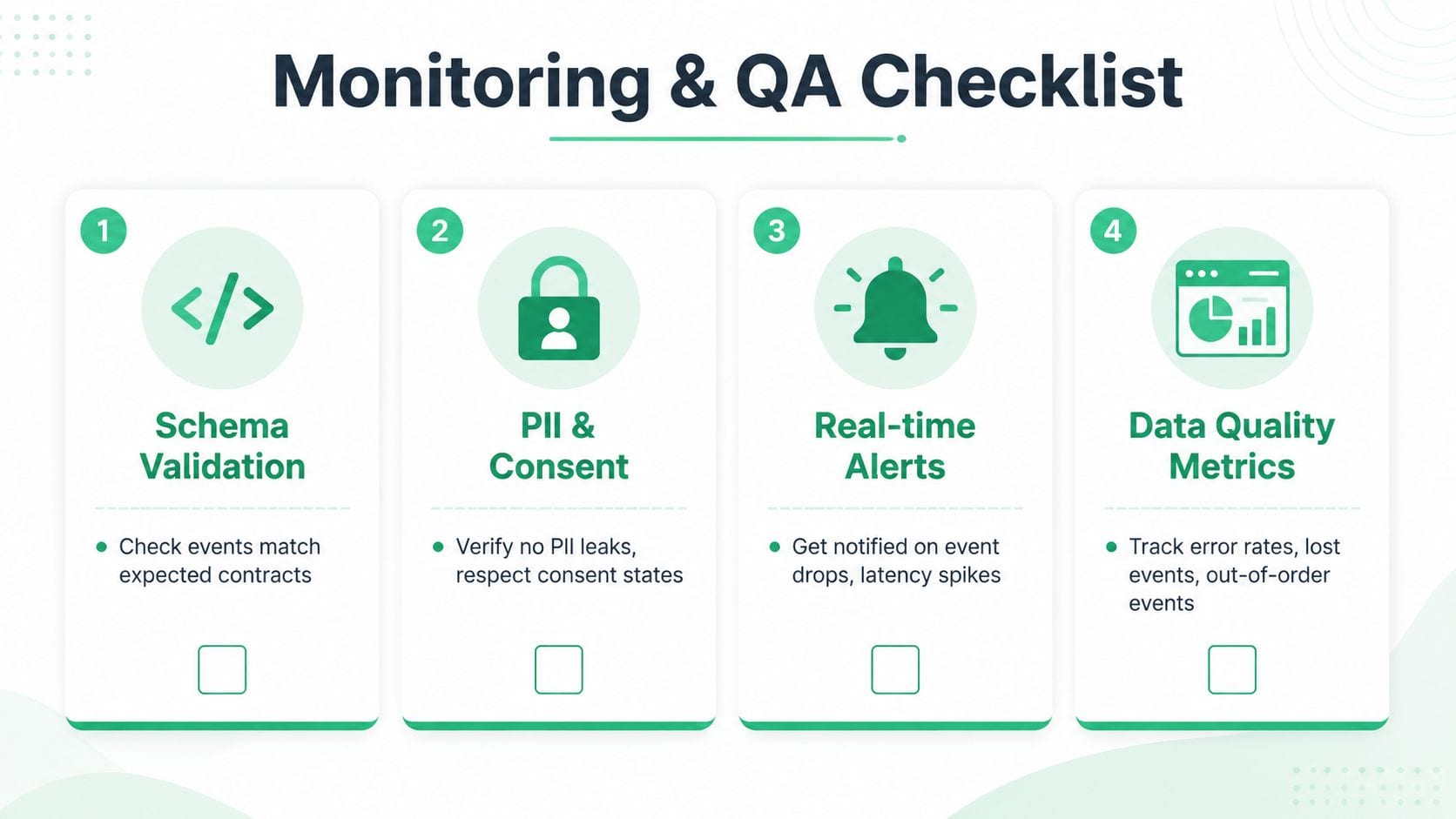
- Schema validation: Compare every important event with its expected contract. Check required fields, data types, consent properties, identifiers, and destination-specific mappings.
- PII and consent auditing: Inspect outbound payloads for personal data and verify that opt-outs propagate through every route. Test denied states, regional rules, and changes to consent configuration.
- Endpoint monitoring: Track uptime, delivery responses, retries, and latency for GA4, Meta Conversions API, Segment, and other destinations. Alert when events drop or response behavior changes.
- Business reconciliation: Compare server-collected purchases with the order system and signups with the source application. A technically successful request isn't proof that the business event is complete.
The metrics should expose both loss and delay:
- Client-to-server match rate
- Dropped event volume
- Average enrichment latency
- Consent opt-out propagation time
- Downstream delivery success rates
- Differences between analytics conversions and source-of-truth records
Use automated tests for every tagging change, weekly schema reviews, monthly attribution reconciliation, and quarterly vendor audits. The precise alert thresholds should reflect your normal traffic and contractual requirements. What matters is that someone owns the alert and knows the response procedure.
Automated event validation for server-side tagging can reduce the manual work involved in these checks. Automation doesn't replace ownership. It makes regressions visible before they become a reporting dispute or a missed optimization cycle.
Monitoring is part of the total cost of ownership. If your organization budgets for the container but not schema review, privacy audits, reconciliation, and incident response, the apparent savings are misleading. Server-side tracking pays off when the recovered signal and control are greater than the cost of operating the layer that provides them.
Trackingplan helps teams continuously validate server-side events, monitor schemas and destinations, and surface consent, PII, delivery, and attribution issues as they occur. Visit Trackingplan to see how automated analytics QA can support a server-side tracking rollout without relying on brittle spreadsheets and occasional manual audits.