
When you boil it down, the server-side tracking vs pixel debate is all about one thing: where data collection actually happens. The answer to that single question ripples out to affect everything from data accuracy and site performance to privacy compliance.
On one hand, you have traditional pixel tracking, which runs in the user's browser. It's a familiar approach but exposed to ad blockers and a growing list of privacy settings. On the other, server-side tracking moves the whole operation to your own server, giving you back control and bypassing those pesky browser-level roadblocks.
The Core Difference Between Server-Side and Pixel Tracking
At its heart, the choice comes down to control and environment. Once you get your head around this distinction, all the other trade-offs in data quality, cost, and implementation effort will start to make perfect sense.
Client-Side Pixel Tracking Explained
Most marketers cut their teeth on client-side pixel tracking. This is the classic method where you place small snippets of JavaScript code—often called "pixels" or "tags"—directly onto your website. When a user lands on a page, their browser runs this code.
This process collects event data, like a page_view or a button_click, and sends it straight from the user's device (the "client") to a third-party platform like Google Analytics or Meta. If you want a deeper dive, our guide on what pixel tracking is breaks it all down.
The problem? It all happens in an environment you don’t own: the user’s browser. This makes it incredibly vulnerable to disruption, which is exactly why so many teams are now looking at server-side alternatives.
Server-Side Tracking Explained
Server-side tracking, as the name implies, shifts data collection from the browser to your own web server. Instead of a dozen different pixels firing off the user's device, your website sends a single, unified stream of data to your server first.
Key Insight: With server-side tracking, your server becomes a middleman. It receives raw event data, cleans or enriches it, and then securely forwards it to your analytics and marketing tools through stable server-to-server APIs.
This entire process bypasses the browser environment. Because the data originates from your server, it’s invisible to ad blockers and unaffected by browser privacy protocols like Intelligent Tracking Prevention (ITP). The result is a much cleaner, more reliable data pipeline.
High-Level Comparison Server-Side vs Client-Side (Pixel) Tracking
To put it all into perspective, this table breaks down how that core difference—where the tracking happens—impacts the things that matter most.
| Dimension | Client-Side (Pixel) Tracking | Server-Side Tracking |
|---|---|---|
| Data Collection Point | The user's web browser (the client). | Your own web server. |
| Vulnerability to Blockers | High. It’s easily blocked by ad blockers, ITP, and iOS privacy features. | Very low. It's completely invisible to browser-level blockers. |
| Data Accuracy & Gaps | Prone to significant data loss—we've seen it as high as 30-40%. | Provides a far more complete and accurate source of truth for your data. |
| Website Performance | Can seriously slow down page loads as more third-party scripts are added. | Minimal impact on site speed because it offloads script execution to the server. |
| Data Control & Ownership | Limited. Data is sent directly to third-party vendors without any oversight. | Full control. You can govern, enrich, and filter all data before it goes anywhere. |
| Implementation Complexity | Simple. It's often just a copy-and-paste job for a JavaScript snippet. | More complex. It requires initial server setup and developer resources to manage. |
As you can see, client-side is easier to get started with, but server-side offers a durability and level of control that's becoming essential in 2026. The right choice depends entirely on your resources, technical maturity, and how much you're willing to compromise on data quality.
How Ad Blockers and Privacy Features Affect Data Accuracy
The big push from pixel to server-side tracking boils down to one critical problem: massive, systematic data loss. Traditional client-side pixels, which execute directly in a user’s browser, are incredibly fragile. They operate in an environment you have zero control over, making them a shaky foundation for any serious analytics strategy.
The digital world has become a minefield for pixel-based tracking. A potent mix of user behavior and big tech policies is systematically gutting its effectiveness. This isn’t some minor glitch; it’s a rapidly accelerating trend that leaves pixel-only data dangerously incomplete.
Key Takeaway: Your marketing dashboards are likely showing a heavily distorted picture. If you rely solely on client-side pixels, you are making budget and strategy decisions based on incomplete and inaccurate information.
The Forces Blocking Your Data
The assault on pixel tracking is happening on multiple fronts, creating a perfect storm for data loss. Each piece of the puzzle chips away at your ability to get a complete picture of user behavior and campaign performance.
Here are the main culprits:
- Ad-Blocking Extensions: Tools like AdBlock Plus and uBlock Origin are everywhere. They are explicitly designed to stop tracking scripts from ever firing. With a huge percentage of users running these extensions, a significant slice of your audience is invisible to your pixels right from the start.
- Browser-Native Privacy Features: Modern browsers have declared war on third-party tracking. Safari’s Intelligent Tracking Prevention (ITP) and Firefox’s Enhanced Tracking Protection (ETP) are aggressive, limiting cookie lifespans and blocking known trackers by default.
- Google’s Third-Party Cookie Phase-Out: Chrome is finally getting rid of third-party cookies, which have been the backbone of pixel-based attribution and retargeting for over a decade.
- Mobile Privacy Initiatives: Apple’s App Tracking Transparency (ATT) framework on iOS demands explicit user consent for cross-app tracking. Most users say no. This single change has had a profound impact on the effectiveness of any mobile ad campaign that depends on pixel data.
This convergence of privacy tech creates a huge gap between what’s really happening on your site and what your analytics platforms are telling you. For a deep dive, check out our guide on how server-side tagging helps overcome ad blockers.
Quantifying the Data Discrepancy
This isn't some theoretical issue; it has a very real and costly impact. Imagine you’re running an eCommerce store and your ad platforms consistently underreport conversions by 30-40% compared to your actual sales numbers. That’s the harsh reality for many digital analysts stuck with pixel tracking. The gap appears because pixels get blocked by ad blockers, ITP, and iOS privacy settings—and sometimes they don’t even load before a user closes the tab after a purchase. To see the full scale of this problem, read the full findings on pixel vs server tracking on AdLeaks.com.
This discrepancy is about more than just missing a few conversion numbers. It poisons the learning algorithms of ad platforms like Meta and Google, which need complete conversion data to optimize ad delivery. When they only see a partial picture, their ability to find your next best customer is crippled. This leads to inefficient ad spend and a much lower return on investment (ROI).
The battle of server-side tracking vs pixel is, at its core, a fight for accurate ROI measurement.
Beyond the obvious differences in data accuracy, the server-side tracking vs pixel debate digs into core operational questions that directly affect your team's budget, resources, and even your website's user experience. Choosing between them isn't just a technical decision; it's about implementation effort, maintenance costs, site performance, and who truly owns your data. Getting a handle on these practical trade-offs is essential before you commit.
Client-side pixels have long been the default for a reason: they're incredibly easy to get started with. For many marketers, it’s as simple as copying a JavaScript snippet and pasting it into a site's header or deploying it through a client-side Google Tag Manager container. The barrier to entry is low, making it a go-to for teams without immediate developer access.
Server-side tracking, on the other hand, requires a more deliberate setup. You'll need developer support to configure a server environment, like a Google Tag Manager server container hosted on a cloud platform. This initial investment in time and technical skill is a major factor for smaller teams and is often the first hurdle to clear.
Implementation and Maintenance Costs
The cost models for each approach couldn't be more different. Pixel tracking is often seen as "free" since the scripts themselves don't carry a price tag. But this ignores the very real, hidden costs of data gaps, which often lead to misinformed ad spend and missed revenue.
Server-side tracking comes with a direct cost: server hosting fees. These can range from a small monthly fee for sites with low traffic to a more significant expense for larger operations. It’s better to frame this not as a cost, but as an investment in data integrity and control—one that almost always delivers a strong return. For a real-world look at how pixel tracking works within ad platforms and its data accuracy challenges, this guide to Walmart Facebook ads offers some valuable context.
The Cost Reframe: Instead of viewing server costs as an expense, consider them an investment. The improved data fidelity from server-side tracking directly translates to more efficient ad spend and accurate ROI measurement, often far outweighing the hosting fees.
The infographic below shows exactly what that investment buys you by illustrating the data gap that server-side tracking closes. Incomplete pixel data is a much larger hidden cost than most realize.
This visual drives the point home, showing the 30-40% discrepancy that typically arises from pixel blockers. This is a gap that server-side tracking all but eliminates by operating beyond the reach of the browser.
Website Performance and User Experience
When it comes to website performance, the two methods are worlds apart. Every client-side pixel adds another piece of JavaScript that a user's browser has to download, parse, and run. As you add more tags for analytics, advertising, and other third-party tools, the collective weight drags your site down, hurting Core Web Vitals and frustrating users.
Server-side tracking offers a dramatic performance boost. By consolidating data into a single stream sent to your server, you offload the heavy lifting of communicating with every third-party vendor. This slashes the script burden on the user's browser, leading to a faster, smoother experience that can directly improve bounce rates and conversions.
Data Ownership and Governance
Perhaps the most powerful argument for server-side tracking is data ownership. With pixels, you're essentially firing raw data directly to third-party platforms with little to no oversight. You have no real control over what information is collected or how it’s used once it leaves the browser.
Server-side tracking puts you back in the driver's seat. Your server becomes a central gateway where you can inspect, enrich, and filter all data before it's passed along to any destination. This unlocks several critical capabilities:
- Enrich data by adding valuable first-party information, like customer IDs from your CRM.
- Filter sensitive information to ensure Personally Identifiable Information (PII) never reaches third-party vendors.
- Control data flow by deciding precisely which events and properties are sent to each specific platform.
This level of control and governance is simply not possible with traditional pixel tracking, making the server-side approach the clear winner for privacy-focused organizations looking to build a reliable first-party data asset.
Choosing Your Model with a Hybrid Approach
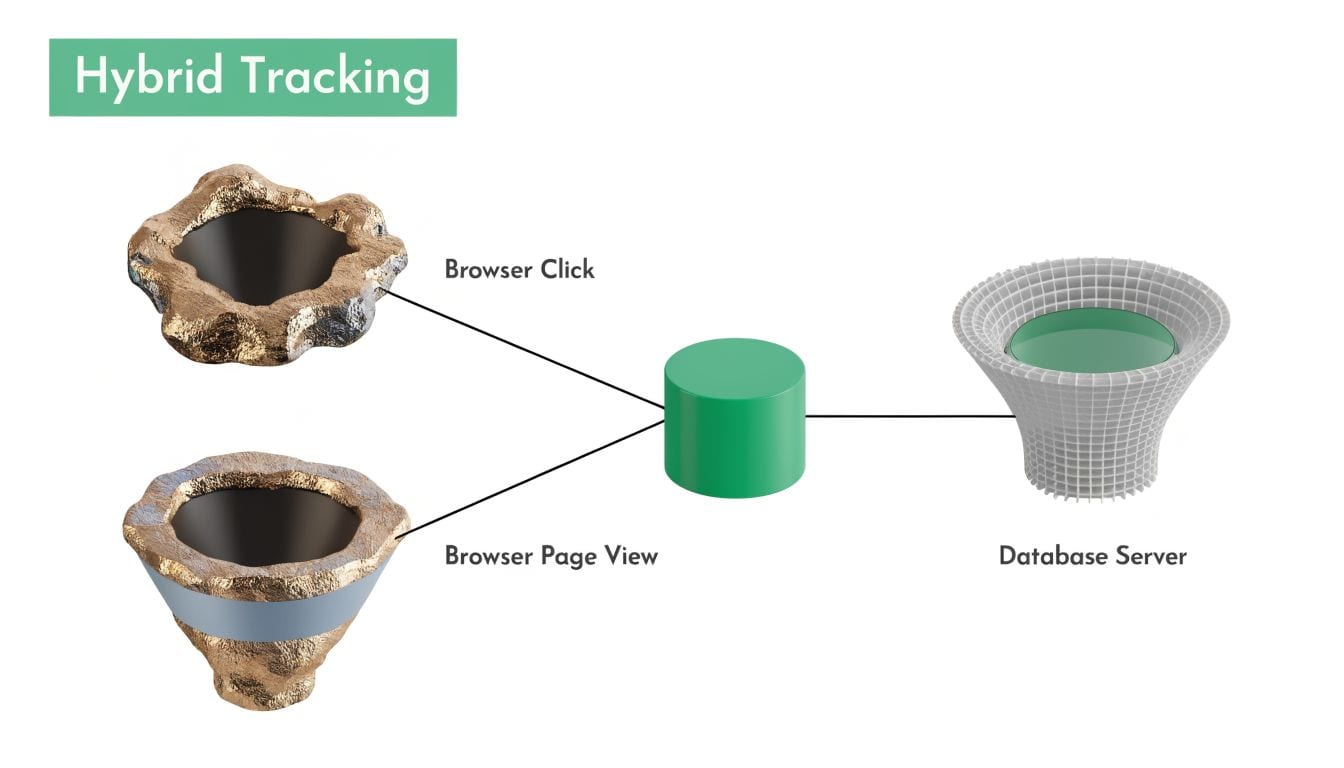
The conversation around server-side tracking vs pixel often feels like an all-or-nothing decision, but it doesn't have to be. For most businesses building a durable data strategy in 2026, the answer isn’t choosing one over the other. The smart move is a hybrid approach.
This model combines the strengths of both methods, creating a tracking system that’s far more resilient and complete than either could be on its own.
The Best of Both Worlds
A hybrid setup isn’t about running two separate, competing systems. Think of it as a single, unified framework designed for redundancy and completeness. Each method is assigned a role it’s best suited for.
Client-side pixels are perfect for capturing broad, top-of-funnel behavioral signals in real-time. Events like page_view or add_to_cart are their bread and butter, feeding the data needed for retargeting audiences and mapping user engagement.
At the same time, server-side tracking is reserved for your mission-critical conversion events. These are your high-value actions—purchases, lead submissions, and new sign-ups—that must be captured without fail. This is your ultimate source of truth.
Audits consistently show that relying on a single tracking method leaves significant gaps. For example, pixels often fail to capture events from privacy-conscious users, leading to a potential loss of up to 40% of conversions in markets heavy with iOS and Safari users.
Conversely, a pure server-side approach can miss the upper-funnel behavioral signals essential for building effective retargeting campaigns. You can find a deeper analysis of this hybrid strategy in Cometly's 2026 guide on server-side tracking vs pixel.
How Deduplication Creates a Fail-Safe System
The secret that makes a hybrid model work so seamlessly is event deduplication. Both your client-side pixel and your server-side setup send data to platforms like Meta or Google. To avoid double-counting, each event is tagged with a unique event ID.
The ad platform uses this ID to recognize and process only the first instance of that event it receives, automatically discarding the duplicate. This creates an elegant fail-safe system:
- If the pixel fires successfully: The platform gets the conversion data instantly from the browser. When the server event arrives a moment later, it’s recognized as a duplicate and simply discarded.
- If the pixel is blocked: Ad blockers or browser privacy settings don't matter. The server-side event, which is immune to these blockers, acts as a guaranteed backup, ensuring the conversion is still recorded accurately.
Key Insight: Deduplication transforms your tracking from a single point of failure (the pixel) into a redundant, self-healing system. It’s a safety net that guarantees your most important conversion data always makes it through.
Building a Resilient Data Framework
By adopting a hybrid model, you assign clear roles to each tracking method to build a far more robust and comprehensive data collection strategy.
Pixels handle the high-volume, lower-stakes engagement signals, while your server-side implementation is reserved for the high-stakes conversion events that drive your business decisions.
This layered approach ensures you capture the maximum amount of data possible. You get the real-time behavioral insights from pixels for audience building, backed by the accuracy and reliability of server-side tracking for your core business metrics. This is the blueprint for a modern, future-proof analytics infrastructure.
Implementation and QA to Ensure Data Integrity
Talking about the benefits of server-side tracking is one thing; putting it into practice is another. A successful move to a server-side or hybrid model needs a solid plan for both the rollout and, just as importantly, the quality assurance that follows. You have to be sure the data you're collecting is rock-solid.
Flipping the switch to server-side tracking isn't enough. You need a process. The migration involves auditing your current tags, picking the right tools, and planning a phased rollout to keep things running smoothly and validate every single step.
A Checklist for Migrating to Server-Side Tracking
Moving to server-side tracking can feel like a huge project, but breaking it down into clear steps makes it far more manageable. Think of this less as a technical swap and more as a strategic upgrade to your entire data infrastructure.
Here’s a checklist to guide you through it:
- Audit Your Current Setup: Before you even think about building something new, you need a complete picture of what you have now. Document every pixel, tag, and data point you're collecting. Pinpoint what’s critical, what’s just noise, and where your biggest data gaps are. A thorough server-side tracking audit is the foundation for everything that follows.
- Choose Your Server-Side Solution: Next, select the tech that will power your new setup. The most common route is using a server container from Google Tag Manager, hosted on a platform like Google Cloud. Make sure the solution fits your team’s technical expertise and budget.
- Plan a Phased Rollout: Don't try to move everything over at once. That’s a recipe for disaster. Start with one, high-value conversion event, like
purchase. Run your new server-side event in parallel with the existing pixel and use deduplication to avoid double-counting. - Validate and Monitor: As soon as an event is live, you have to confirm it’s firing correctly and that the data is showing up as expected in all your destination platforms. This is where manual checks start to fail and automated monitoring becomes non-negotiable.
- Expand and Iterate: Once you’ve successfully launched and validated that first event, you can start migrating other key events, one by one. Just follow the same "plan, validate, expand" cycle.

Why Manual QA Is Not Enough
In any modern marketing stack, trying to handle quality assurance manually is a losing game. Relying on browser developer tools and "Tag Assistant" to check a handful of events is slow, error-prone, and simply doesn't scale. A single code deployment, a CMS update, or a change from a third-party vendor can silently break your tracking, and you’d never know.
Sure, you might confirm a pixel fires, but is the data schema correct? Are you accidentally leaking Personally Identifiable Information (PII)? Are campaign parameters being captured properly? Answering these questions manually for every event, across every platform, is practically impossible.
Key Insight: Data integrity isn't a one-time setup task; it's a continuous process. Without automated observability, you are effectively flying blind, making critical business decisions on data you can't fully trust.
This is precisely where a dedicated observability platform becomes essential. Instead of relying on periodic spot-checks, you need a system that acts as a single source of truth by continuously monitoring your entire data flow—from the moment an event is generated on your site to its arrival at its server-side destination. An automated platform like Trackingplan detects issues in real time that manual audits will always miss. It helps teams instantly flag problems like:
- Broken or missing pixels that stop firing after a new release.
- Schema mismatches where event properties are malformed or missing entirely.
- PII leaks that create massive compliance risks.
By moving from manual audits to automated monitoring, marketing and development teams can guarantee data integrity across both client-side and server-side implementations. This keeps the data pipeline reliable without the endless manual work, making automated governance the final, critical piece of the puzzle.
Future-Proofing Your Analytics Strategy
The long-running debate over server-side tracking vs pixel tracking is, for all intents and purposes, over. The path forward is clear. Shifting to a server-side or hybrid model is no longer a simple exercise in patching data gaps from ad blockers; it's a fundamental, strategic move to get your entire analytics operation ready for a world without third-party cookies.
Your first-party data, when collected and managed through a solid server-side setup, becomes your most valuable asset. This gives you the clean, reliable foundation you need for accurate reporting, sharp analysis, and effective ad platform optimization. As platforms like Google and Meta increasingly lean on direct server-to-server data via their Conversion APIs, having this infrastructure moves from "nice-to-have" to absolutely critical for success.
The New Competitive Advantage
Building a resilient, privacy-first data infrastructure is the new name of the game. The conversation has shifted from if you should adopt server-side tracking to how you can manage it effectively. This is where data governance becomes so important.
When you control the data flow from your server, you get the power to enrich it with valuable internal information—like CRM data or product details—while also filtering out sensitive user details to stay compliant. This gives you the best of both worlds: better data and better privacy. You can learn more about how tools like Google Tag Gateway can help manage this server-side flow.
The ultimate takeaway is a clear call to action: start building. The organizations that thrive in the coming years will be those that move beyond the debate and invest in the resilient, privacy-first data infrastructure needed to succeed.
Looking Ahead at Data and AI
To truly future-proof your analytics strategy, you have to keep an eye on broader tech trends. The server-side data you collect today is the fuel for the advanced machine learning models of tomorrow. How AI and data processing evolve will directly shape what you can do with this first-party asset.
For example, new developments in AI are opening up ways to analyze complex user behavior from enriched server-side data streams. Staying informed on these shifts, including understanding multimodal AI and RAG, is key to making sure your data strategy doesn't fall behind future capabilities.
The Role of Governance and Observability
As your data stack becomes more powerful, it also gets more complex. This is where automated governance and observability stop being optional. A platform that gives you continuous monitoring and validation is the only way to manage this new reality at scale.
It’s what ensures your first-party data asset remains accurate, complete, and trustworthy. By automatically flagging issues like broken tracking, schema mismatches, or PII leaks in real-time, you can protect data integrity without drowning in manual audits. This frees up your team to focus on what matters: pulling value from your data, confident that it’s right and ready for whatever comes next.
Frequently Asked Questions
As you weigh the differences between server-side tracking and client-side pixels, you’re bound to have questions about how it all works in practice. Let's clear up a few of the most common ones.
Does Server-Side Tracking Replace Google Tag Manager?
Not at all—in fact, it makes Google Tag Manager even more powerful. You’ll still use the familiar GTM interface, but with a crucial new component: a server container.
Instead of your web container sending data directly to dozens of third-party platforms, it sends a single, clean data stream to your server container first. From there, your server securely processes, enriches, and forwards the data to your analytics and advertising destinations. This gives you complete control over the entire data flow.
Is Server-Side Tracking More Expensive Than Pixel Tracking?
Yes, there's an initial cost. Server-side tracking requires server hosting, and those costs can range from minor to significant depending on your traffic volume. In contrast, client-side pixels are technically "free" to place on your site.
Think of this as an investment in data quality, not just an expense. The improved accuracy from server-side tracking leads to far more efficient ad spend and helps you reclaim lost revenue. In most cases, the ROI easily outweighs the hosting fees because you're paying to fix a very expensive data problem.
Can Server-Side Tracking Be Blocked?
It’s far more resilient to blocking than traditional pixels. Because data requests are sent from your server to another server—say, from your infrastructure to Google's or Meta's—they are invisible to browser-based ad blockers and privacy tools like ITP.
When you use a first-party domain for your tracking endpoint, the data stream looks like an essential part of your website’s normal operations. This makes it incredibly difficult for any tool to identify and block it without risking breaking your site's core functionality. It's a fundamentally more durable setup.
Ready to stop flying blind and start trusting your data? Trackingplan offers automated observability to monitor and validate your entire data flow, from client-side pixels to server-side destinations. Get a single source of truth for your analytics today.