
Struggling with ad blockers, browser restrictions, and privacy rules gutting your analytics? You're not alone. Google sGTM (Server-side Google Tag Manager) is the modern answer to these challenges, shifting data collection from the user's browser to a secure server that you own and operate. It’s all about taking back control over your data.
The New Rules of Digital Data Collection

The way we've collected digital data for years is simply breaking down. For a long time, the standard was client-side tagging. This meant dozens of scripts from Google Analytics, Meta, and other marketing platforms ran directly inside a visitor's web browser. While it was easy to set up, this method has created some major headaches.
The Old Way Is Broken
Think of traditional, client-side tagging like trying to mail sensitive packages through a chaotic, public mailroom. Every package—each piece of your data—is handled by many different parties. It's exposed to interference and can easily get lost, delayed, or just flat-out blocked.
That's exactly what's happening in your users' browsers. Ad blockers, Intelligent Tracking Prevention (ITP) in Safari, and other privacy tools are designed to stop these scripts in their tracks. The result? Incomplete and inaccurate analytics. Worse yet, loading all these scripts directly on your site tanks page speed, hurting both the user experience and your SEO.
A Modern Solution for Data Control
Google sGTM offers a completely different model. It’s less like a public mailroom and more like your own secure, private courier service. Instead of sending countless individual data packets from the browser, your website sends a single, consolidated data stream to your own server-side container.
Server-side tagging acts as a secure intermediary. It collects all your data "packages" in one safe place before reliably processing and delivering them to their final destinations.
From this central server hub, you get to decide exactly what information is sent to which platform. This fundamental shift brings several immediate and powerful advantages:
- Improved Data Accuracy: By moving collection logic away from the browser, you can bypass most client-side blockers. This helps you reclaim lost conversion data and build a much more complete picture of user behavior.
- Enhanced Site Performance: Taking all those heavy marketing and analytics scripts off the client side dramatically cuts down your website’s load time. It makes for a faster, smoother experience for your users.
- Greater Privacy and Security: You gain the power to inspect, clean, and even anonymize data before it ever reaches third-party vendors. This strengthens your privacy posture and makes compliance much easier to manage.
As the digital world evolves, it's not just about collecting data, but ensuring its integrity and reliability. Knowing how to improve data quality is more important than ever for compliance and effective analytics. Adopting a Google sGTM strategy is a critical first step in that direction, putting you firmly back in command of your data pipeline.
Client-Side GTM vs Server-Side GTM
To really get why Google sGTM is such a big deal, you have to compare it to what most of us have been using for years: the traditional, client-side Google Tag Manager. For a long time, client-side tagging was the standard way to get analytics and marketing pixels running on a website.
At its heart, client-side GTM does all its work inside the user's web browser. When someone visits your site, their browser loads your GTM container, which then starts downloading and running a whole collection of other scripts—one for Google Analytics, one for the Meta Pixel, another for TikTok, and the list goes on.
Think of the user’s browser as a small, busy office. Every new tag you fire is like cramming another person into that office. While it’s easy to get the first few people in, the room quickly gets overcrowded, loud, and inefficient.
The Familiar World of Client-Side Tagging
The biggest draw of client-side tagging has always been how easy it is to get started. Marketers who aren't developers can add, test, and publish tracking tags without having to wait on a developer for every little change. This is what made GTM so popular in the first place.
But that convenience has a price. The more tags you pile into your container, the more JavaScript you force the user's browser to download and execute. This directly hits your website’s performance, causing slower page loads that frustrate users and hurt your SEO rankings.
Worse yet, because these scripts run in the browser, they're completely exposed to ad blockers and privacy tools like Apple's Intelligent Tracking Prevention (ITP). It’s not uncommon for standard client-side tracking to miss up to 30-50% of events because of this, leaving huge gaps in your data.
The Strategic Shift to Server-Side Tagging
Google sGTM flips this model on its head. Instead of loading dozens of scripts in the browser, you usually only need one: the GA4 tag. This single tag gathers all the event data and sends it in one lightweight stream to a server-side GTM container that you control.
You can think of your sGTM container as a secure, central processing hub. Once the data arrives from the browser, the server takes over. From here, you get to decide what data to clean up, enrich, or even redact before sending it on to third-party tools like Google Analytics, the Facebook Conversions API, or your own data warehouse.
With server-side GTM, you move the heavy lifting from the user's browser to your own server. This creates a more performant, secure, and reliable data collection pipeline.
This approach immediately fixes many of the headaches from client-side setups. Since the communication with vendors now happens from your server to theirs, it's invisible to ad blockers and less affected by browser restrictions. The result? Much more accurate and complete data.
A Head-to-Head Comparison
To make the differences crystal clear, let’s put the two approaches side-by-side. The strategic trade-offs become pretty obvious when you compare them directly.
Client-Side GTM vs Google sGTM Key Differences
Here’s a breakdown of how client-side and server-side GTM compare across the most important dimensions for any analytics setup.
| Feature | Client-Side GTM | Server-Side GTM (sGTM) |
|---|---|---|
| Performance | Slower page load times due to numerous browser-based scripts. | Faster page speeds as heavy scripts are moved to the server. |
| Data Accuracy | Vulnerable to ad blockers and browser restrictions, leading to significant data loss. | Bypasses most blockers, leading to more complete and accurate event data. |
| Security | Less control over what data third-party scripts can access from the browser. | Full control to inspect, redact PII, and hash data before sending to vendors. |
| Privacy | Relies on browser-based consent and is exposed to third-party cookies. | Centralizes privacy controls and facilitates a first-party data context. |
| Cost | The GTM tool is free; no direct hosting costs. | Requires a paid cloud server (e.g., Google Cloud), with costs scaling with traffic. |
| Complexity | Easier initial setup, manageable by non-developers for basic tagging. | Requires technical expertise for server setup and maintenance. |
Ultimately, deciding between client-side and server-side GTM comes down to your priorities. While client-side tagging is fine for getting started, Google sGTM offers a far more robust, scalable, and future-proof foundation for any organization that takes its data seriously.
How the Google sGTM Architecture Really Works
To get the most out of server-side GTM, you have to understand what’s going on under the hood. While moving tagging to a server might sound intimidating, the architecture is surprisingly straightforward. Think of it as a three-part data assembly line that you own and control.
Let's break down this flow. Imagine your sGTM setup is a private, highly efficient warehouse. Data arrives, gets sorted and processed according to your rules, and is then shipped out to its final destinations. Each stage has a very specific job.
Component 1: The Client
The first stop is the Client. Think of the Client as the receiving dock manager at your warehouse. Its job is to accept incoming HTTP requests, figure out what they are, and get them ready for processing inside your server container. It’s the gatekeeper.
In a typical server-side GTM setup, the most common Client you'll see is the one built specifically for GA4. When your website sends a GA4 data stream to your server, this Client is the first thing it talks to. It takes that raw request, standardizes it into an event data object, and hands it off to the next stage. Other Clients exist for different kinds of data, but the GA4 Client is the workhorse for most setups.
Component 2: The Server Container
From there, the data moves into the heart of the operation: the Server Container. This is the central processing hub of your warehouse, running on a cloud environment you control, like the Google Cloud Platform. This is where you define all the rules for what happens to your data.
Inside the container, you’ll find the same tools you’re used to in client-side GTM:
- Tags: These are the instructions for sending your processed data out to different platforms.
- Triggers: These rules determine when your tags should fire based on the data that came in.
- Variables: These hold the specific pieces of information you want to work with, like a user ID or purchase value.
This is where the real magic happens. You can enrich data by pulling in information from a CRM, strip out sensitive PII before it ever leaves your control, or reformat data to meet the specific needs of different marketing platforms. All your business logic lives here. For a detailed walkthrough of the initial configuration, our comprehensive Google Tag Manager server-side setup guide has you covered.
Component 3: The Server-Side Tags
Finally, once the data has been processed in the container, the server-side Tags take over. These are your shipping clerks, packaging the data and sending it off to its final destination. You might have one tag for Google Analytics, another for the Meta Conversions API, and a third for your data warehouse.
Each tag is built to communicate directly with a specific endpoint. The GA4 tag sends data to Google's servers, while the Facebook CAPI tag sends it straight to Meta's. This direct server-to-server communication is what makes the system so reliable, as it completely bypasses ad blockers and other browser-level interference.
The core of sGTM architecture is the flow: a Client receives the data, the Server Container processes it according to your rules, and Tags send it to its final destinations.
This entire flow is powered by the GA4 Measurement Protocol, the technology that allows you to send raw event data directly to Google Analytics servers. Its evolution has been a game-changer. The old Measurement Protocol for Universal Analytics was clunky, but the new version for GA4 is a precision tool. After the UA sunset, studies found 82% of GA4 users reported major data discrepancies without server-side tracking, which led to a 300% jump in Measurement Protocol usage. You can find a full GA4 Measurement Protocol tutorial on OptimizeSmart.com to see how these changes impact data collection. This shift has cemented server-side GTM’s role in building a dependable data pipeline by moving the heavy lifting off the user's browser.
Key Business Benefits of Server-Side Tagging
Moving to Google sGTM is much more than a technical task—it’s a strategic business move. The shift in architecture delivers real, measurable results that directly affect everything from your marketing ROI to your compliance posture. Let’s walk through the four core benefits you can expect from server-side tagging.
This diagram shows how data moves from a user's browser, passes through your server container, and is then forwarded to various destination tags.
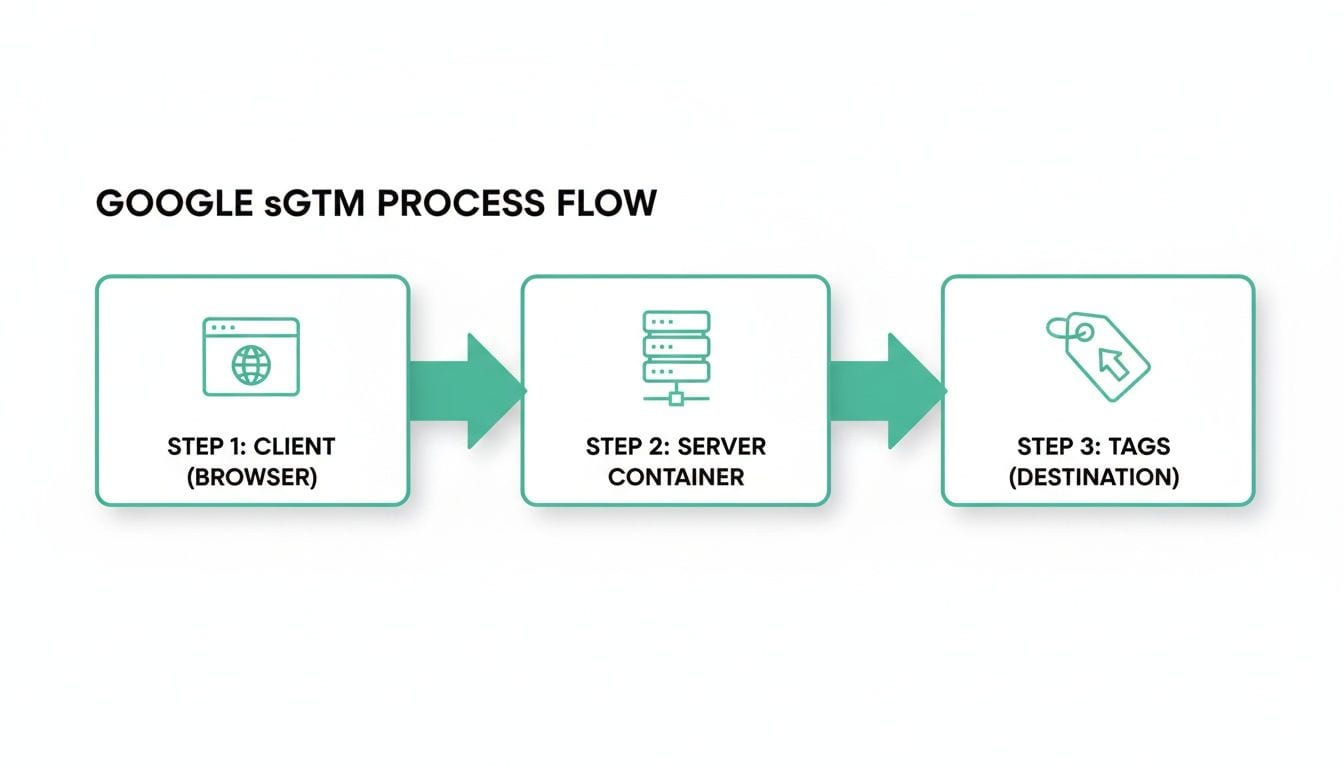
Think of the server container as a central checkpoint. It insulates your marketing vendors from having direct, uncontrolled access to your users' browsers, putting you back in control.
1. Superior Data Accuracy
The biggest win with Google sGTM is the data you get back. In a typical client-side setup, your analytics are constantly fighting a losing battle against ad blockers, browser privacy features like ITP, and basic network issues that prevent tracking scripts from loading.
This isn't a small problem. It's common for standard client-side tracking to miss up to 30-50% of all events. By using the Measurement Protocol in Google sGTM, you send HTTP requests directly from your server to Google's, completely bypassing these browser-level interruptions. In tests following the 2023 cookie changes, GA4 properties using this method saw a 20-25% lift in conversion tracking—a massive gain for any performance marketer. You can find more details in the GA4 Measurement Protocol from Google documentation.
By taking data collection server-side, you turn your analytics from a rough estimate into a far more reliable source of truth. This leads to better reporting, more accurate attribution, and smarter decisions based on a complete view of what your users are actually doing.
2. Enhanced Website Performance
Page speed isn't just a "nice-to-have" anymore; it's a core part of user experience and a known SEO ranking factor. Client-side tagging is often a major performance killer, forcing your visitors' browsers to download and run dozens of heavy JavaScript files from all your different marketing tools.
Google sGTM dramatically reduces this burden. Instead of loading countless scripts, you're just sending a single, lightweight data stream to your own server.
This change has a direct, positive impact on key performance metrics like First Contentful Paint (FCP) and Time to Interactive (TTI), resulting in a noticeably faster site.
The business impact is twofold:
- A Better User Experience: Faster pages mean lower bounce rates and higher engagement. Users stick around when a site feels fast and responsive.
- Improved SEO Rankings: Search engines reward speed. A faster website can lead directly to better visibility in search results.
3. Strengthened Security and Privacy
With data privacy regulations getting stricter every year, controlling what you share is non-negotiable. When you use client-side tagging, you have almost no control. Third-party scripts can potentially scrape all sorts of data from the browser, creating huge security and compliance risks.
Google sGTM gives you back that control. Since every piece of data passes through your own server container before going anywhere else, you have a single point of governance.
This setup lets you:
- Redact Personally Identifiable Information (PII): You can inspect data as it comes in and automatically remove or hash sensitive information like emails or names before forwarding it.
- Mask User IPs: Anonymize user IP addresses on the server to improve privacy and help with GDPR compliance.
- Control Vendor Data: You get to decide exactly which data points each vendor receives, stopping them from collecting more than they need.
This architecture acts as a powerful governance layer, making it much simpler to comply with regulations like GDPR and CCPA while building trust with your users. For a deeper look at managing data privacy and quality, the video on building a single source of truth from Trackingplan's channel is an excellent resource.
4. Extended Cookie Lifespan
The "cookiepocalypse" is making long-term attribution and user journey analysis a real headache for marketers. Browsers like Safari are already aggressive, shortening the lifespan of client-side cookies to as little as 24 hours in some cases.
Google sGTM offers a powerful workaround by operating in a first-party context. When you run your tagging server on a subdomain of your own website (e.g., metrics.yourdomain.com), any cookies set by that server are treated as first-party.
Browsers trust these cookies, giving them a much longer lifespan that can extend for months or even years. This allows you to accurately track returning visitors, map out long-term customer journeys, and maintain attribution models that would otherwise fall apart. In short, it gives you a clear, sustained view of your marketing effectiveness over time.
Your sGTM Migration Roadmap
Making the move to Google sGTM is a serious project, but the payoff in data quality and site performance is well worth the effort. Before you jump in, it’s best to go in with a clear picture of the challenges. The two main hurdles you'll face are cost and complexity.
Unlike the free client-side GTM, sGTM needs a cloud server. This comes with monthly hosting fees that grow with your website traffic. The initial setup and ongoing maintenance also demand some real technical skill, often needing a developer to get the server running and handle the network configuration. But with a solid plan, these hurdles are completely manageable.
A Phased Approach to Migration
A successful migration isn't something you do overnight by flipping a switch. It’s a careful, methodical process that ensures a smooth transition without losing data or causing downtime. This roadmap gives you a proven project plan—not a line-by-line tutorial—to guide your team.
For a more granular walkthrough of the implementation, check out our guide on migrating to server-side tagging with best practices.
The whole idea is to build and test the new server-side system alongside your current client-side setup. Only after everything is validated should you start removing the old tags.
Your Step-by-Step Project Plan
Follow these six strategic steps to make sure your move to Google sGTM is structured, thoroughly tested, and ultimately successful. This phased rollout is all about minimizing risk and building confidence as you go.
-
Audit Your Current Tags: First things first, take a full inventory of your existing client-side tags. Figure out which ones are critical, which are redundant, and which you can just get rid of. This cleanup is crucial for designing a clean, efficient server-side container.
-
Provision Your Tagging Server: Time to set up your server environment. For most people, this means creating a new project in Google Cloud Platform and deploying the sGTM container. This is the most technical part of the process and usually requires help from a developer.
-
Configure the Server Container and Client: With the server live, create a new server container in your GTM account. You’ll then set up the GA4 Client to accept incoming data and connect your tagging server URL to your web container.
-
Transition Your GA4 Tag First: Always start small. The very first tag to move over should be your main GA4 configuration tag. In the web container, change its settings to send data to your new server-side endpoint instead of sending it straight to Google. Leave all other tags as they are for now.
-
Test and Validate the Data Flow: This step is absolutely critical. Use GTM’s preview mode in both the web and server containers to trace the data from end to end. You need to confirm that events sent from the browser are being received correctly by the server container and then passed along successfully to Google Analytics.
-
Decommission Client-Side Tags Systematically: Only after you’ve confirmed your GA4 data is flowing perfectly through the server should you start migrating other vendor tags, like the Meta Pixel or TikTok tag. As you get each one working in the server container, you can then safely delete its old client-side version.
This careful, step-by-step approach ensures your analytics foundation stays solid through the entire migration.
Automating Monitoring for Your sGTM Setup
So, your Google sGTM implementation is finally up and running. You've shifted your tags to the server, and the data is flowing. But how do you know it will stay that way? A server-side environment introduces new, often invisible, points of failure—from server glitches to misconfigured data streams—that make spot-checking a losing game.
This is where automated observability stops being a nice-to-have and becomes an essential part of your analytics stack. The reality is, a Google sGTM setup is too complex to leave to chance. You need a safety net that actively watches your entire data pipeline, from the moment a user acts on your site all the way to the final payload sent to vendors like Google Analytics or Meta.
Introducing a Single Source of Truth
A platform like Trackingplan provides this critical safety net. It’s designed to automatically discover and map out every single piece of your Google sGTM environment. This means it doesn't just see the data leaving the browser; it follows the entire journey through your server container and out to each marketing and analytics destination.
Automated monitoring creates the single source of truth for your entire analytics stack. It cuts through the guesswork and gives you a real-time window into the health of your server-side data, ensuring you can always trust it for business decisions.
Instead of discovering broken dashboards days after a problem began, you get ahead of issues with proactive alerts.
Eliminating Blind Spots with Continuous QA
This screenshot from Trackingplan's video on sGTM integration shows a real-time dashboard monitoring event traffic.
A visual like this is so important because it immediately highlights how an observability platform catches anomalies. Sudden drops or spikes in event volume are often the first sign of a deeper problem in your Google sGTM implementation, and a dashboard gives you that instant, high-level view of your data's health.
By continuously scanning for problems, an automated QA solution can instantly flag critical issues that might otherwise fly under the radar for weeks:
- Data Gaps and Traffic Anomalies: Get an alert the second specific events stop firing or if traffic volume suddenly plummets, pointing you straight to a break in the data stream.
- Schema and Property Errors: Catch malformed event properties or incorrect data types before they can contaminate your analytics platforms and skew your reporting.
- PII Leaks and Privacy Risks: Automatically detect when personally identifiable information is accidentally passed through your server, helping you uphold strict privacy compliance.
- Broken Marketing Pixels: Find out the moment a server-side tag for a key platform like Meta or TikTok stops sending valid data, protecting your ad spend and attribution.
With this kind of automated oversight, your team can fix errors before they ever impact the business. You no longer have to cross your fingers and hope your Google sGTM data is accurate—you have a system in place to guarantee it.
Frequently Asked Questions About Google sGTM
Switching to server-side tagging is a big move, and naturally, it comes with a lot of questions. As teams consider if Google sGTM is the right fit, a few key concerns about cost, implementation, and technical needs always come up. Let's clear the air and give you some straight answers.
Is Google sGTM a Free Tool?
The Google Tag Manager software is free, but the server it runs on is not. This is a critical point many people miss. Most companies host their server container on Google Cloud Platform, which comes with monthly fees based on your site's traffic and how many requests your container processes.
For an average business, you should budget at least $40-$50 per month for server costs. While Google does have a free tier, it's really only for very low-traffic sites, and most businesses will outgrow it quickly. Expect costs to go up as your traffic and data collection needs grow.
Can sGTM Completely Replace My Client-Side Setup?
Not quite. The best approach, and the most common one, is a hybrid model. You’ll still need a lightweight client-side tag—usually your main GA4 tag—to grab event data from the user’s browser and send it to your server container first.
The real win comes from shifting all your other marketing and analytics tags—think pixels for Meta, TikTok, or LinkedIn—off the client side. Firing them from your server is what unlocks the major performance and data quality improvements that make Google sGTM so valuable.
How Does sGTM Improve GDPR and Privacy Compliance?
Google sGTM acts as a central checkpoint for all your data. Before any information gets passed along to third-party vendors like Google or Meta, your server container can step in to inspect, change, or even block it.
This centralized control means you can:
- Anonymize user IP addresses before they ever leave your environment.
- Remove or hash Personally Identifiable Information (PII) like email addresses.
- Enforce consent choices from a single point, guaranteeing you only share data you’re supposed to.
By managing everything from one place, you ensure that you only send what's necessary and compliant with regulations like GDPR and CCPA.
Do I Need a Developer to Manage Google sGTM?
For the initial setup and any server maintenance, yes, you'll need a developer. Tasks like spinning up the server on Google Cloud, configuring DNS records, and sorting out infrastructure issues are definitely developer territory.
But once that foundation is built and stable, the day-to-day work inside the Google sGTM interface is very familiar. Marketing and analytics teams can take over managing tags, triggers, and variables, much like they already do with the client-side version of GTM.
Ready to stop worrying about broken tracking? Trackingplan provides a fully automated safety net for your entire analytics stack, including your Google sGTM implementation. It continuously monitors your setup to catch data errors, PII leaks, and broken pixels in real time, so you can fix issues before they impact your business. Get started with Trackingplan today.