
You're checking a checkout release. The purchase event fires, the value looks right, and GA4 receives the hit. Then you expand the page URL in the network request and find the buyer's email address inside a query parameter.
Nothing on the page looks broken. Your tags are still sending personal data to systems that weren't supposed to receive it. A PII audit of your tags starts with inspecting what leaves the page, what the server adds, and what someone can reconstruct from the combined fields.
Where PII hides in your tags and exports
An ordinary page-view tag can copy the full checkout URL before anyone reviews its contents. If a form placed an email address in that URL, the tag can send it alongside an otherwise valid event.
Personally identifiable information (PII) is broader than names and identification numbers. NIST's guidance on protecting PII confidentiality includes information that distinguishes or traces an individual, plus information linked or linkable to that person, including financial, medical, educational, and employment records.
PII locations in analytics data and the check for each
Treat these examples as inspection targets, not an exhaustive denylist. Edge cases such as phone numbers get their own answer in is a phone number PII?.
| Where it appears | Example value | Why it matters | Check to run |
|---|---|---|---|
| Email address or its hash in event parameters | jane.doe@example.com or a hash of it | Direct identifier; a hash stays personal if a lookup table exists | Confirm no raw or hashed email reaches any hit or parameter in the general analytics schema |
| Customer or user ID | customer_checkout_test | Stable pseudonym that links sessions to a person | Confirm the ID is internal and not a login name or email |
| Full URL with query string | /checkout?email=jane%40example.com | Campaign and form values can carry identifiers | Strip unnecessary parameters and scan remaining values for names, emails, and IDs |
| Free-text search or form field | Search text describing a condition or debt | Can reveal health, financial, or employment details | Block free-text content from event parameters |
| Order details | Full basket with name and street address | Combines identifying and linkable details in one record | Send order totals and product categories only |
| IP address and device identifiers | Client IP and a persistent device ID | Can link visits across sessions and sites | Check collection settings and retention periods |
| Server-side forwarded payload | Request body sent to an ad or analytics API | Client-side checks never see the final forwarded body | Inspect the forwarded body, not only the browser hit |
| CSV exports from CRM or analytics | Rows with user ID, date, and page | Can be reidentified when joined with other files | Review columns before any export leaves the team |
An internal ID isn't automatically safe because it looks random. Record which system can resolve it, who can access that system, and whether the destination needs the ID at all. Keep deliberate customer-matching integrations separate from your general event schema.
Inspect values, not just parameter names
Open browser developer tools, preserve the network log, and complete the journey with synthetic customer details. Search request URLs and bodies, then inspect the dataLayer that supplied them. A property called label can contain more personal information than one called customer_id.
For URL-specific remediation, use a PII-in-URLs audit to trace the value from the form or redirect into the outbound hit. Fix the source as well as the tag configuration, so another vendor doesn't collect the same contaminated URL.
Practical rule: A field is safe only when it stays safe next to every other field it travels with.
Why combinations matter more than single fields
Say a retailer exports city, age band, product category, and device model. Each column looks ordinary. Together, they may describe the only buyer of a specialist product in a small town.
These are quasi-identifiers: attributes that become identifying through combination. Location, dates, employment details, and health attributes deserve particular attention because another person may already know them. Removing the name doesn't remove that knowledge.

Work through the join
Consider an exported event containing a product-page path with a postcode, an exact timestamp, and a stable client ID. An analyst removes the client ID and labels the file anonymous. A colleague with order-system access can still match the postcode and time to a known purchase.
Singling out means distinguishing one person's records from others. Linkability means connecting records about the same person, even before attaching a name. In this example, the remaining fields support both operations.
Ask what an interested outsider or insider could reasonably combine with the file. This motivated intruder test should document the likely auxiliary records, access permissions, tooling, time, and cost. Don't assume an attacker has unlimited resources, but don't pretend colleagues lack access to your CRM.
Removing a join key doesn't help if the remaining columns provide another way to make the same join.
Record the risk that remains
A pseudonymous ID remains personal when your organization holds its identity mapping. Restricting that mapping reduces exposure, but it doesn't turn the operational dataset into anonymous information.
An older export also needs reassessment when a new external dataset makes its records easier to connect. A published analysis of reidentification risk illustrates why combinations of quasi-identifiers need dataset-specific testing rather than blanket assurances.
Label exports with residual risk and permitted use. Record who may receive them, what joins are prohibited, and when access expires. Reserve an anonymous classification for data that has passed a documented assessment, not merely a name-removal script.
How to run a PII audit on your tags
Start with a complete user journey, not a container export alone. A container shows intended configuration. A captured hit shows what the implementation sent after variables, templates, and server transformations ran.
The ICO's guidance on effective anonymisation recommends assessing singling out and linkability. Apply those tests to actual values and destinations, not just schema documentation.
Build a field-level audit record
-
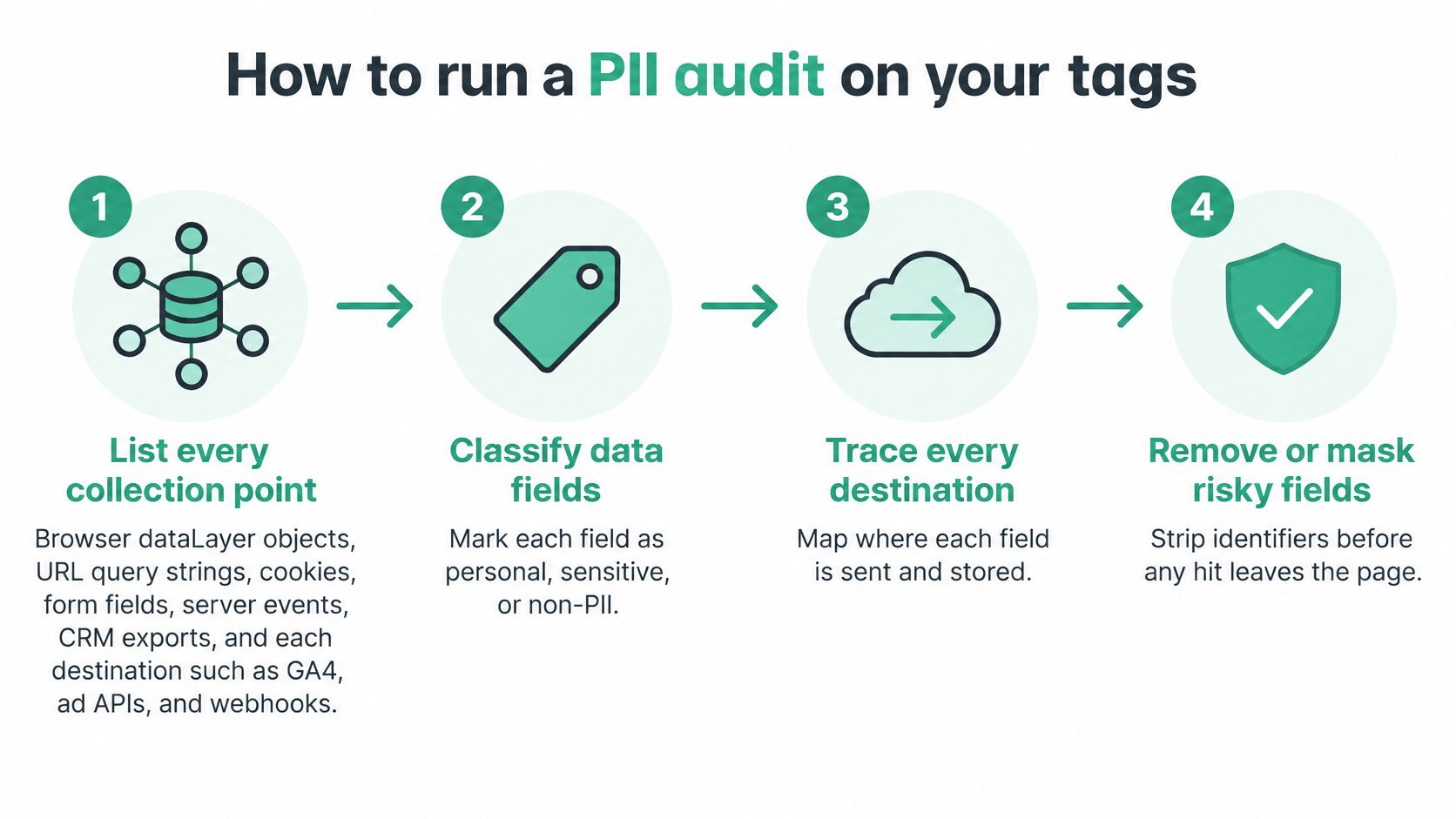
List every collection point. Include browser dataLayer objects, URL query strings, cookies, form fields, server events, and CRM exports. Map each destination, including GA4, ad APIs, and webhooks. Follow redirects and background requests, not just the landing page.
-
Classify each field. Mark direct identifiers, quasi-identifiers, and sensitive attributes. Inspect representative values before assigning a classification. A product category might be ordinary retail information in one implementation and reveal health information in another.
-
Record why each field travels. Capture its purpose, lawful basis, consent dependency, retention period, recipient, and owner. Avoid purposes such as reporting or optimization without naming the actual task. If nobody can explain why a recipient needs the field, remove it pending review.
-
Run automated detection rules. The trade-offs between network inspection, vendor diagnostics and live monitoring are compared in how to detect PII leaks in marketing tracking. Scan for email, phone, postal address, IP address, order identifiers, free text, and URL parameters. Apply rules to parameter values and nested objects. Give order identifiers contextual rules, since arbitrary strings don't reliably reveal their meaning.
-
Sample hits manually. Decode URL-encoded values and inspect nested JSON. Use synthetic records with recognizable test markers to trace propagation. Review login, checkout, account recovery, validation errors, and search, where application code can copy user input into events.
-
Turn findings into release checks. Save the failing payload, expected result, destination, and responsible owner. Convert each fix into a regression test rather than closing the ticket after a configuration edit. Use the release gate and recurring schedule under monitoring to keep those tests active.
Separate a clean pattern match from a clean dataset
Automated rules catch recognizable shapes. They won't reliably identify a rare occupation, an unusual purchase sequence, or a custom identifier whose meaning exists only in your CRM. Manual review must assess those combinations.
Keep these common slips in the audit checklist:
- Uncontrolled email hashes. Hashing email while leaving a lookup table broadly accessible preserves an easy identity path.
- Browser-only inspection. A clean browser request doesn't prove that server-side forwarding omitted CRM enrichment.
The acceptance test is practical: a reviewer outside the implementation team shouldn't be able to name a person using the proposed deidentified dataset and reasonably available information. Where identification is intentional, require explicit approval, a documented purpose, and restricted handling instead of claiming the data is anonymous.
Consent checks before marketing tags fire
A banner can display the right words while tags send data before the visitor chooses. Consent QA is a timing and routing test, not just a review of the CMP interface.
Use a clean browser session to inspect the first request, then repeat the journey for each state below. Treat this table as a strict, consent-gated implementation baseline. Any permitted cookieless measurement exception needs its own approved specification and payload test.
Consent states and what each path must do
| Consent state | Browser tags | Server-side forwarding | What to verify |
|---|---|---|---|
| Banner not yet answered | Non-essential tags wait | Forwarding held until a decision | Check the first page load before the banner responds |
| All categories denied | No marketing or analytics tags fire | No user-level identifiers forwarded | Reject all in the CMP, then inspect network hits |
| Analytics granted, marketing denied | Analytics tags fire, ad pixels stay blocked | Analytics payloads only, no ad conversion calls | Confirm each vendor fires only in its permitted category |
| Marketing granted | Approved tags fire | Conversion APIs send only permitted data | Check the consent flag on every outbound request |
| Consent withdrawn mid-session | Tags stop on the next page view | Queued forwarding stops | Confirm the change propagates and keep the evidence |
Before the banner is answered, inspect requests triggered by page initialization. A default consent update that arrives after a marketing request can't undo that transmission.
After rejection, check both vendor requests and identifiers in any remaining traffic. For an analytics-only grant, verify that marketing vendors stay blocked even when a shared purchase event enters the dataLayer.
Test the server as a separate enforcement point
A server event doesn't pass through the browser trigger that blocks the Meta Pixel. Server-side GTM, CAPI handlers, and background queues need their own consent decisions. Missing or unknown consent shouldn't automatically become permission.
Inspect the CMP's Consent Mode v2 signals, including analytics_storage, ad_storage, ad_user_data, and ad_personalization. Compare the recorded state with the actual recipient and payload. A correctly populated flag doesn't compensate for forwarding data to an unauthorized destination.
When marketing is granted, verify the approved fields rather than treating consent as permission to send everything. On withdrawal, test immediately and on the next page view; ensure queued requests don't use a stale permission snapshot.
GDPR and associated European cookie rules generally require opt-in for non-essential marketing tags. CCPA generally uses an opt-out model for sale and sharing, with additional conditions and exceptions. Have privacy counsel approve the jurisdiction-specific behavior rather than applying one banner configuration everywhere. What each law requires is summarized in this PII compliance checklist.
Use a pre-consent tag-firing audit to preserve the test date, consent state, tags that fired, and a screenshot or request log proving the result.
Implementation controls that keep identifiers out of hits
Put controls where the risky value enters the pipeline. Removing a field from a dashboard doesn't remove it from vendor storage. A browser transformation won't protect a server request that later adds the same identifier.
NIST's de-identification guidance supports separating identifying information from operational datasets and assessing whether remaining attributes permit identification. Build that separation into the implementation.
Payload and configuration controls
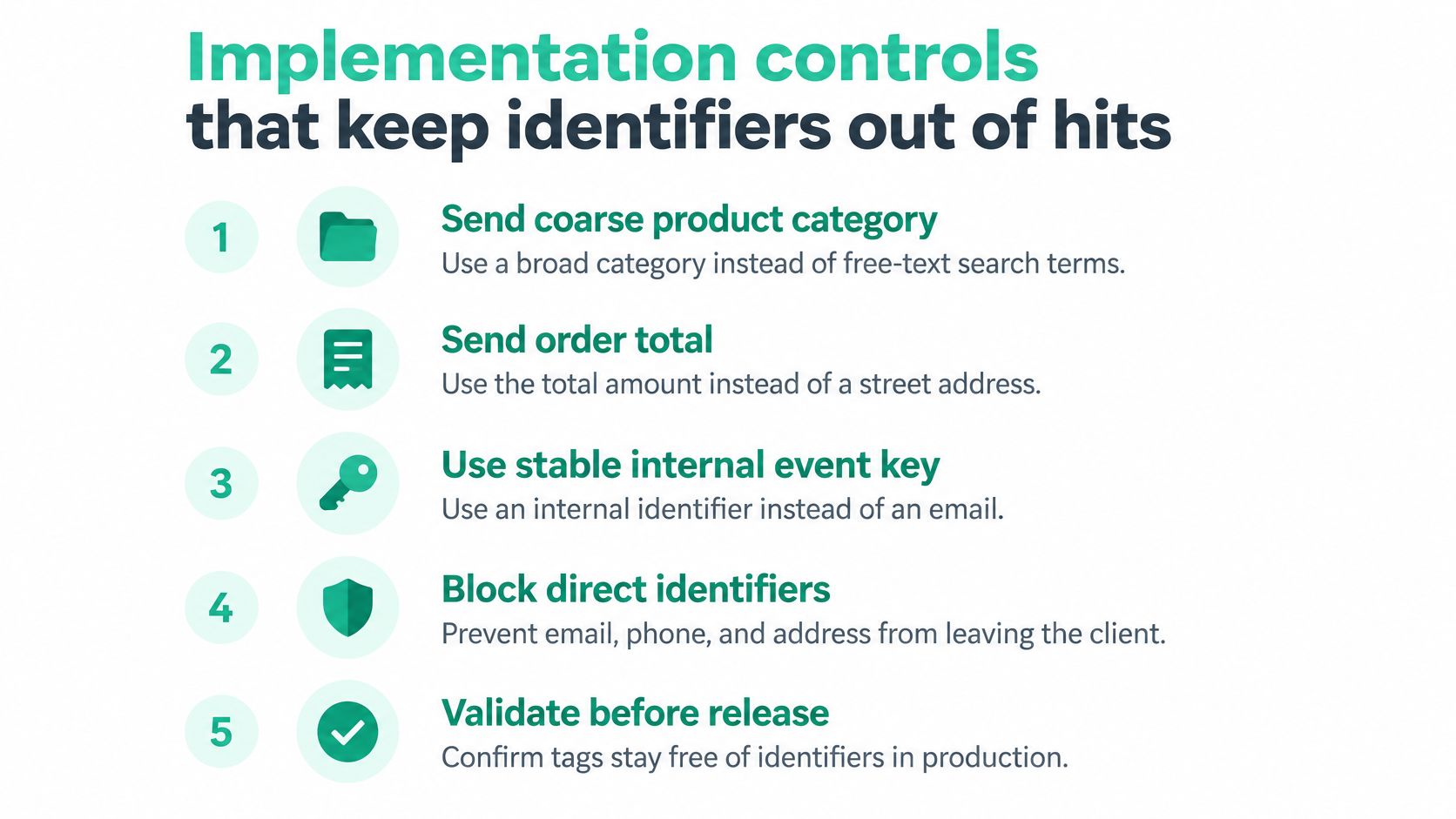
- Reduce detail at the source. Send a coarse product category instead of free-text search terms.
- Limit purchase context. Send the order total instead of a street address.
- Separate event identity from customer identity. Use an internal event key rather than an email.
- Allowlist destination fields. Reject unapproved properties instead of forwarding the full source object.
Define these contracts in the dataLayer before building vendor mappings. Follow dataLayer implementation practices that make field ownership and expected types explicit. Keep raw identifiers out of event names, general parameters, debug logs, tickets, and routine exports.
Deliberate customer matching needs a separate approved contract. Meta's Event Match Quality documentation describes a 0-to-10 score calculated from the previous 48 hours of data. It prioritizes email and click ID as high; phone number, country, and external ID as medium; and first name, last name, city, and postal code as low.
For eligible website CAPI events, the score measures matching information quality, not privacy compliance. Send only approved fields the platform uses. Don't add personal attributes merely to raise the score, and don't mistake ordinary analytics rules for an approved customer-matching policy.
Access and escalation controls
Use a keyed cryptographic construction or a vault-backed surrogate when an operational identifier is necessary. Keep the mapping service behind narrowly defined roles. Log each lookup and rotate secrets through your security process.
Release gate: A fix isn't complete until the destination stops receiving the prohibited field.
When you find an exposure, assign distinct actions:
- Quarantine the destination. Disable the affected forwarding path while preserving essential, approved processing.
- Request deletion. Ask vendors to delete historical hits and propagated copies where possible.
- Rotate exposed credentials. Replace any secrets included in the leaked payload.
- Preserve evidence. Store redacted request details and the privacy assessment in a restricted location.
Verify the corrected event in Events Manager Test Events or the analytics debug view. Inspect the final server body as well. Record each deletion request, vendor response, and unresolved copy in the evidence log, without pasting the original PII into a broadly accessible ticket.
Monitoring after each release
A removed field can return without any visible page change: a shared event object gets edited, an agency template collects the full URL, or server forwarding starts copying a header that was previously dropped. Treat the dangerous change as a changed combination, not a renamed field. An email hash plus click ID plus order value can identify a person even when each property looks acceptable alone.
Make tracking QA part of the release step that breaks it. Before deploy, compare the candidate build with the approved event schema, recipient list, purposes, and consent behavior. After deploy, rerun the critical journeys in production because published containers, environment variables, and server-side routes can differ from staging.
Then keep watching production traffic, not a sample of it. A field that returns on Tuesday afternoon should be caught on Tuesday afternoon, not at the next quarterly audit. Low-traffic paths such as account recovery can still need a scripted run to produce hits at all.
A useful diff flags:
- Unexpected fields. Properties absent from the approved schema, especially query, path, fragment, or header values.
- Changed values. A stable field that starts carrying free text, full URLs, IDs, or hash-like strings.
- New recipients. Destinations added by templates, integrations, or server forwarding.
- Consent mismatches. Requests sent when the visitor state should have blocked or limited them.
- Linkable combinations. Fields that are harmless alone but become identifying when joined in one hit or across vendors.
This is the work Trackingplan’s Compliance module automates. It reads the hits your site and apps already send to more than 170 analytics and ad providers, flags PII leaks, cookies and consent breaches on websites, apps and server-side implementations, and links each finding to the hit behind it. It is CMP-agnostic, and it never stores personal data or builds user profiles. How detection works on real traffic is in PII leak detection in analytics.
Do not close a finding only because the next run is clean. Reproduce the original journey, verify the fix at the destination, and keep the regression case. Low-traffic account or checkout paths may not produce a new hit for days.
Keep human review and evidence ownership
Automation can show that a request carried a consent flag or that two fields now travel together. A reviewer still has to judge consent-screen copy, vendor contracts, permitted purposes, retention settings, and whether the recipient's intended use is allowed.
Give the DPO an evidence log with the finding, field or field combination, owner, date found, date fixed, preceding release, destination, reproduction steps, restricted evidence reference, and deletion status. Keep the original finding linked to its remediation test. If the same linkage returns after another release, reopen the control failure rather than file it as a new alert; that tells the lead whether to repair a variable mapping or redesign the shared collection contract.
Run your first PII audit this week
Choose the three destinations receiving the most hits and audit the journeys affected by the last release. Capture their outbound requests, classify the fields, document the purpose and owner, and test the consent paths. Keep the scope small enough to finish, but follow each selected event through its server-side destination.
Fix the highest-risk field first. A direct identifier in a URL or forwarded payload usually deserves attention before an ambiguous classification issue. Save the failing test, deploy the correction, and verify the destination's result. Where no single field identifies a person, check the pairings: a campaign parameter next to a session timestamp, or an internal reference next to an IP-derived region, can reconstruct identity at the destination even though each value passed your field-level review.
Assign the next decision
- Name each field owner. Assign someone who can approve, remove, or change the field.
- Book the second run. Set a review date after the next release, since that is the point where mappings tend to regress.
- Choose the sign-off owner. Give a named privacy or compliance reviewer responsibility for the evidence log.
Don't measure completion by the number of scanned tags. Measure it by whether the team can explain each selected field, control its recipients, and prove the fix. The decision to make this week is concrete: who owns each field, and who signs off the evidence log?