
Yes, phone numbers are generally considered PII under major privacy frameworks and U.S. guidance, but their operational risk depends on context, linkage, and where they flow through your stack. If a phone number can identify, contact, or reconnect a record to a real person, your team should treat it as controlled personal data.
That answer usually becomes urgent when someone spots a raw phone number in an event payload, a CRM sync, a dataLayer variable, or a marketing pixel request. At that point, the actual question isn't just "is phone number PII." It's whether that value is leaking into tools that were never meant to store it, whether consent covers that use, and whether anyone can still explain where the number came from and where it went.
For analysts, developers, and marketers, simple FAQ answers are no longer sufficient. A phone number might look like a routine contact field, but in production systems it often behaves like a durable identifier. It can travel from web forms into tag managers, from mobile apps into attribution tools, and from support systems into warehouses.
That makes phone numbers a governance issue, not just a legal definition issue. Teams need clear classification, detection, remediation, and policy. Otherwise, one field inadvertently turns into a cross-system identity key with compliance, security, and trust consequences.
The Short Answer Is Yes Phone Numbers Are PII
A familiar scenario: an analyst opens a debugging view and sees a customer phone number sitting in an event property. Nobody added it intentionally. It probably came from a form field, a JavaScript variable, or a third-party script reading page content. The debate starts immediately. Is that really PII, or just contact information?
The short answer is yes. Phone numbers are generally treated as PII (see what is PII for the definition and more examples). Major definitions used in U.S. federal guidance and industry practice treat a phone number as information that can distinguish, trace, identify, or at least directly contact an individual. If your team needs a broader field-level reference, this list of personally identifiable information is a useful way to review how similar identifiers are commonly handled in analytics and marketing environments.
Why the simple answer isn't enough
The operational problem starts after classification. Once a phone number enters analytics tooling, teams often treat it too casually because it doesn't feel as obviously sensitive as a government ID or payment detail. That's where mistakes happen.
A phone number may be publicly listed in some cases, or shared willingly by a user for support or transactional contact. That doesn't make it harmless inside your stack. In practice, teams use phone numbers for account recovery, fraud checks, customer matching, and marketing contact. Those uses make the field valuable, reusable, and risky.
Practical rule: If a field can identify, contact, or reconnect a person across systems, don't treat it like routine metadata.
What cross-functional teams should do next
When a phone number appears in collected data, treat it as a signal to check three things:
- Collection path: Find out whether the number came from a form submit, a page scrape, a mobile event, or a server-side enrichment step.
- Destination spread: Check whether it reached analytics tools, ad platforms, data warehouses, replay tools, or logs.
- Policy fit: Verify whether your privacy notice, consent setup, and internal collection rules allow that use.
This is why the phrase is phone number PII matters beyond legal trivia. For a data team, it's a classification decision that determines masking rules, access controls, logging standards, retention, and incident response.
How Phone Numbers Qualify as PII
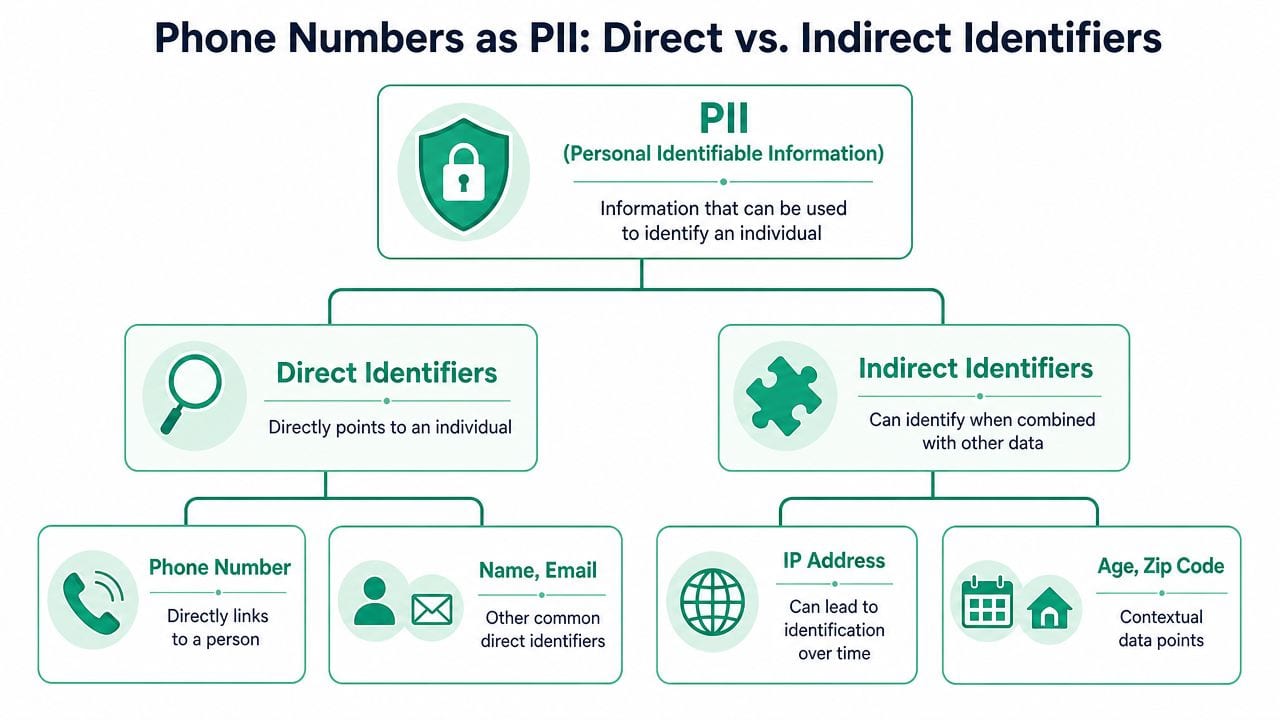
A useful way to explain this to mixed teams is to think in terms of a house key versus a street address. A house key gives direct access to one place. A street address points you toward a place, but usually needs context, lookup, or additional information. Privacy classification works in a similar way.
Some data points are direct identifiers. They point straight to a person or let a system act on that person immediately. Others are indirect identifiers. They become identifying when combined with more data. A phone number usually lands in the direct category because it can identify or contact a person without much additional work.
Why the classification matters
U.S. federal guidance generally treats a phone number as PII because PII includes information that can be used to distinguish or trace an individual's identity, either alone or when combined with linked information. NIST-based guidance also distinguishes non-sensitive PII, and publicly listed phone numbers may fall into that lower-risk category, but they're still PII because they can identify or contact a person, as explained in this overview of PII meaning and classification and in the underlying NIST-based discussion of PII and personal data.
That distinction between sensitive and non-sensitive often causes confusion. Teams hear "non-sensitive" and assume "safe to send anywhere." That's the wrong takeaway. Lower sensitivity affects control design. It doesn't remove the field from privacy scope.
Direct identifier in practice
In operational systems, a phone number behaves like a direct identifier for a few reasons:
- Immediate reachability: A system can call or text the person tied to that number.
- Stable account linkage: Customer records often store phone number as a recurring identifier.
- Support and authentication use: Teams use it for verification, recovery, and service workflows.
- Matching utility: It often survives across channels better than browser-based identifiers.
A field doesn't need to be globally unique in every context to qualify as PII. It only needs to identify or be linkable to an individual in the context where your team stores and processes it.
Publicly visible doesn't mean operationally harmless. A directory-listed number can still identify someone when it's attached to a CRM profile, event stream, or customer support record.
Where teams get tripped up
The hardest cases aren't consumer mobile numbers. They're edge cases like business lines, household numbers, shared family devices, and role-based contacts. That's where governance needs nuance. If your organization is also reviewing higher-risk categories beyond ordinary identifiers, these special category data insights are a useful companion because they help teams separate ordinary personal data from fields that trigger stricter handling.
A practical classification approach looks like this:
| Data type | Typical classification | Operational question |
|---|---|---|
| Personal mobile number | PII | Who can collect, store, and export it? |
| Shared household line | PII in many contexts | Does it identify one person or a household record? |
| Role-based business line | Context dependent | Is it tied to a named person or only a function? |
| Public switchboard number | Lower risk, still context matters | Does your system link it to an individual profile? |
That last column matters most. Classification shouldn't stop at the field name. It should reflect how the data is used.
The Legal Landscape GDPR vs US Privacy Laws
Legal language differs, but the practical result is consistent. In the EU, the term is usually personal data. In the U.S., teams often talk about PII or personal information. For phone numbers, those labels converge in day-to-day handling.
Under the GDPR framework, personal data covers information relating to an identifiable person. U.S. federal definitions of PII focus on information that can distinguish or trace identity. Both approaches can include phone numbers when they identify or link to an individual. For analytics and ad-tech teams, that makes phone numbers a high-sensitivity field for collection rules, masking, consent checks, and downstream destination audits, as described in this overview of personally identifiable information under GDPR and U.S. practice.
Phone numbers under major privacy laws
| Aspect | GDPR (General Data Protection Regulation) | CCPA / CPRA (California Privacy Rights Act) |
|---|---|---|
| Core term | Personal data | Personal information |
| Basic test | Relates to an identified or identifiable person | Identifies, relates to, or can reasonably be linked with a consumer or household |
| Phone number treatment | Can qualify when it identifies or links to a person | Commonly falls within personal information when linked to a person or household |
| Compliance impact for data teams | Focus on lawful basis, minimization, access control, and purpose limitation | Focus on notice, consumer rights workflows, and controls around disclosure and sharing |
| Practical handling | Restrict collection to necessary uses and audit flows | Apply the same disciplined handling rather than treating it as routine metadata |
Why teams should build one standard
Most organizations create risk by maintaining separate mental models. Legal says "personal data," marketers say "contact field," engineering says "string," and analytics says "event property." That fragmentation leads to inconsistent treatment across tools.
A better operating model is to define one internal standard: if a phone number can be tied to a person or household in any business system, it gets controlled handling across all systems. That makes implementation cleaner for tag management, warehouse ingestion, QA, and vendor review.
What this means for workflow design
For cross-functional teams, legal alignment usually turns into a small set of recurring controls:
- Notice and consent checks: Verify whether the collection purpose matches what users were told.
- Data minimization: Don't pass phone numbers into analytics or ad tools unless there's a documented need.
- Access restrictions: Keep broad internal audiences away from raw identifiers when they don't need them.
- Destination reviews: Validate where the field is forwarded after collection.
Teams building internal checklists often benefit from a practical view of GDPR compliance requirements, especially when translating privacy language into engineering and analytics tasks. For broader implementation discipline across the stack, it's also worth aligning this work with your existing approach to privacy and compliance in data collection and with a PII compliance checklist that covers your tags.
If one team classifies a phone number as regulated and another exports it freely, the policy doesn't exist in practice.
The Technical Risks of Phone Numbers in Analytics
The legal answer matters, but the technical answer is what creates incidents. In analytics systems, a phone number isn't just a contact field. It can act as a stable join key.
In identity graphs, CRM matching, and marketing attribution pipelines, a phone number can serve as a stable join key that enables cross-dataset re-identification when paired with cookies, device IDs, email hashes, or address data, as noted in Cloudflare's explanation of how PII enables identity linkage across systems.

Why phone numbers are dangerous in event data
Event streams are messy by design. They aggregate page state, user inputs, campaign context, app metadata, and tag output. That means one leaked phone number doesn't stay isolated for long.
A number captured in a sign-up flow can end up in:
- Client-side analytics payloads: Sent to platforms like GA4, Adobe Analytics, Mixpanel, or Amplitude.
- Tag manager variables: Read by multiple tags once exposed in the dataLayer or page state.
- Session replay and debugging tools: Stored in logs or replayed if masking isn't configured correctly.
- Server-side collectors: Forwarded downstream after enrichment or routing.
Common leak paths teams miss
The most common failures aren't dramatic breaches. They're ordinary implementation shortcuts.
Form interactions and page scraping
A developer binds analytics to a submit event and serializes the full form payload. Or a third-party script reads DOM content that includes a phone number confirmation. Nobody intended to collect PII, but the tag now does it anyway.
URL parameters and logs
Phone numbers sometimes appear in query strings, callback URLs, or redirect flows. Once they land there, they can spread into browser history, edge logs, analytics parameters, and vendor request logs.
DataLayer overexposure
Teams often push a rich customer object into the dataLayer "for flexibility." That flexibility becomes risk when every tag can read the same object.
The moment a phone number becomes available to generic tracking code, the problem stops being one event and becomes a distribution issue.
The re-identification problem
A lot of teams still describe web analytics data as anonymous or pseudonymous. That description breaks down quickly when phone numbers enter the picture. A single identifier can reconnect browsing behavior to a CRM profile, support history, or ad audience record.
That creates practical risks beyond regulation:
| Risk area | What happens |
|---|---|
| Data sprawl | Raw phone numbers propagate to tools that don't need them |
| Re-identification | "Anonymous" events become attributable to known individuals |
| Vendor exposure | External processors receive more personal data than intended |
| Debugging leakage | Engineers and marketers see raw identifiers in interfaces and exports |
The key technical lesson is simple. A phone number raises the sensitivity of every system it touches.
Detecting and Remediating Phone Number Leaks
Manual audits don't scale well once you have web, app, server-side routing, multiple agencies, and a growing list of destinations. By the time someone notices a phone number in an event debugger, the field may already have reached several systems.
A workable response usually follows three stages: detect, analyze, remediate. Teams that rely only on spreadsheet reviews and occasional tag inspections tend to miss intermittent leaks, environment-specific bugs, and changes introduced by third-party scripts. That's why many teams add automated monitoring. For example, Trackingplan detects silent tracking errors and can be used to monitor analytics implementations, destination behavior, and potential PII leaks across web, app, and server-side setups.
Detect where the phone number appears
Start with discovery. Look for phone numbers in payloads, network requests, query parameters, dataLayer objects, SDK event properties, warehouse ingestion logs, and vendor mappings.
Use a mix of methods:
- Regex-based scanning: Helpful for catching common number formats in events and logs.
- Destination-level inspection: Check whether numbers appear only in internal streams or also in external tools.
- Environment comparison: Verify whether the leak exists in production only, or also in staging and QA.
- Consent-aware review: Confirm whether collection changes depending on user consent state.
If your issue begins earlier in the lifecycle, such as user input quality or malformed entries, this guide on how to validate phone numbers is useful. Validation won't solve privacy governance by itself, but it can reduce bad inputs and make detection logic cleaner.
Analyze the source, not just the symptom
Once you've confirmed leakage, don't stop at the destination where it was found. Find the earliest point where the number became available.
Typical root causes include:
- A form submit listener capturing all fields.
- A customer object pushed into the dataLayer without field filtering.
- A mobile SDK event including support or profile metadata by default.
- A server-side enrichment job merging CRM fields into analytics events.
- A vendor template or custom pixel reading values from the page automatically.
The point is to remove the number before it fans out further.
A useful walkthrough on implementation monitoring and issue investigation is below:
Remediate with the least risky option
The safest fix is usually to stop collecting the phone number entirely in analytics flows that don't require it. If the business use case is legitimate, choose the narrowest workable control.
- Block at source: Remove the field before it enters the dataLayer, event schema, or request builder.
- Mask in transit: Replace part of the value before logging or forwarding.
- Hash with caution: Hashing can reduce exposure, but it doesn't automatically remove privacy risk if the value remains usable for matching.
- Limit destinations: Allow the field only in the system that needs it.
Don't jump straight to hashing because it feels technical. First ask whether the number needs to be in that flow at all.
Building Your PII Governance Framework
Cleaning one leak is useful. Preventing the next ten matters more. Phone numbers force teams to confront a bigger issue: most privacy incidents come from ordinary implementation drift, not from one dramatic mistake.
Some guidance explicitly lists business telephone numbers alongside other personal data, while other definitions focus on whether the data can identify or trace an individual. That leaves real ambiguity for shared lines, call-center numbers, household records, and role-based contacts. A governance framework needs to account for that ambiguity, as discussed in CivicPlus's explanation of PII, sensitive PII, and PHI distinctions.
Policy has to answer edge cases
A useful governance model doesn't just say "phone numbers are PII." It answers operational questions your teams face every week.
Examples:
| Scenario | Governance decision needed |
|---|---|
| Personal mobile number collected on checkout | Whether analytics can see it at all |
| Call-center number tied to a location | Whether it identifies a person, workplace, or both |
| Shared family contact number | Whether downstream systems treat it as individual or household data |
| Sales rep direct line | Whether business context lowers risk or still requires masking |
If your policy can't answer these cases, developers will make local decisions and each tool will behave differently.
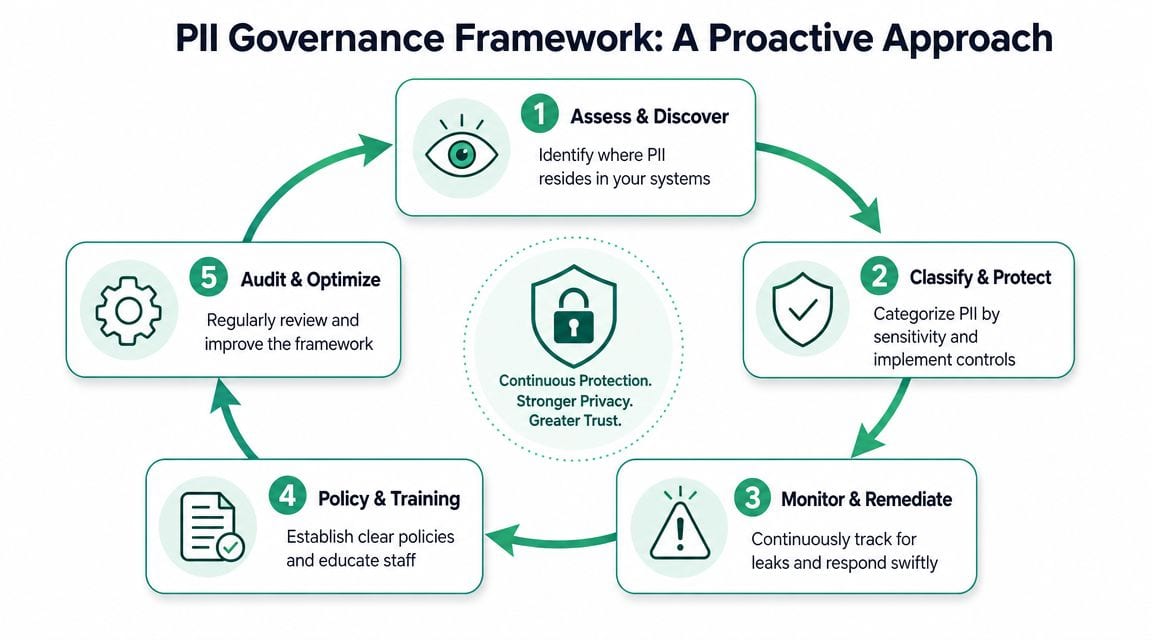
Five controls that actually hold up
Data minimization by default
Don't expose phone numbers to analytics, ad-tech, or QA tools unless the use case is documented and approved. Collection should be explicit, not inherited from a broad customer object.
Classification tied to usage
The same field may need different handling depending on system context. A number used in support operations isn't automatically appropriate in behavioral analytics.
Consent and purpose enforcement
Consent banners and privacy notices need to line up with actual routing logic. If a phone number is collected for transactional contact, that doesn't automatically justify marketing or measurement distribution.
Continuous monitoring
PII governance isn't a one-time audit. Teams need ongoing checks for schema drift, rogue tags, new destinations, and unexpected payload changes.
Training for builders
Analysts, developers, marketers, and agency partners need the same playbook. Most leaks happen because someone thought a field was "just metadata."
Governance works when it changes implementation behavior. If engineers still have to guess, the framework is incomplete.
What a mature workflow looks like
A mature workflow is boring in the best way. New tracking requests include field review. Tag changes are tested before release. Raw identifiers are restricted. Destinations are documented. Exceptions require approval. And when a phone number appears unexpectedly, the team already knows who investigates, who decides, and how the fix gets deployed.
That level of discipline is what turns privacy from reactive cleanup into normal engineering practice.
If your team needs a practical way to monitor event payloads, destination flows, schema changes, and potential PII leakage across web, app, and server-side tracking, Trackingplan is one option to evaluate. It fits best for teams that want automated observability around analytics quality and privacy-related implementation drift, instead of relying on periodic manual audits.