
A Meta Ads audit tool is an automated platform that hunts down and diagnoses tracking errors lurking in your Meta (Facebook) advertising campaigns. These tools are no longer a nice-to-have; they’re essential. Why? Because bad data on a platform like Meta Ads means wasted budgets, flawed optimization, and reports you just can’t trust.
Why Your Meta Ads Data Is Lying to You
Let's be real for a minute: your Meta Ads data probably isn't telling you the whole truth. Even with Meta’s enormous infrastructure, hidden tracking errors are surprisingly common, and they are quietly bleeding your return on investment (ROI). These aren't just minor glitches—they're fundamental flaws that cost you real money.
You might be making huge budget decisions based on information that’s either incomplete or flat-out wrong. This uncertainty trickles into every part of your performance marketing, from which campaigns to scale to which ones to kill. When you can't verify your data, you're essentially flying blind.
The High Cost of Hidden Errors
The problem usually starts somewhere in the complex journey your data takes from your website or app to Meta's servers. A tiny break in that chain can cause a massive ripple effect. Just think about these common headaches:
- Broken or missing pixels that don't capture critical conversions like a purchase or a lead submission.
- Inconsistent campaign tagging where UTM parameters are missing or messy, turning attribution into a guessing game.
- Consent-related data gaps that stop pixels from firing for a chunk of your audience, completely skewing your performance metrics.
These issues paint a distorted picture of your campaign performance. You could end up pouring more budget into a campaign that looks like a winner, when in reality its numbers are just inflated by duplicate events.
Data integrity issues are notorious for throwing a wrench in even the most well-planned Meta Ads campaigns. Here’s a quick look at some of the most frequent data leaks we see and the damage they can do.
Common Meta Ads Data Leaks and Their Impact
| Data Issue | What It Looks Like | Business Impact |
|---|---|---|
| Missing Pixels | Zero or very few conversion events firing for specific pages or user actions. | You’re blind to valuable conversions, leading to under-reporting of ROI and prematurely pausing good campaigns. |
| Duplicate Events | The same purchase or lead event is counted two or three times for a single user action. | Inflated conversion counts make underperforming campaigns look successful, causing you to waste budget on them. |
| Campaign Tagging Errors | UTM parameters are missing, inconsistent, or incorrectly formatted across your ads. | Attribution breaks down completely. You can't tell which campaigns, ad sets, or ads are actually driving results. |
| Consent & PII Leaks | The pixel fires before a user gives consent, or it sends personally identifiable information (PII) to Meta. | Serious compliance risks (GDPR, CCPA), potential platform suspension, and damage to your brand's reputation. |
As you can see, these aren't just small technical glitches. They directly impact your bottom line and your ability to make smart marketing decisions.
A Meta Ads audit tool is how you get that trust back. It moves you from a state of constant guessing to one of data-driven confidence, making sure every dollar you spend is working as hard as it can.
This need for solid data is more critical than ever. In 2026, Meta's ad ecosystem is operating on a scale that’s hard to comprehend, with 3.58 billion daily active people across its apps. With ad impressions up 12% and the average price per ad climbing 9%, every click and conversion must be accounted for. That makes a thorough Meta Ads audit non-negotiable for any marketer serious about ROI.
Choosing and Implementing Your Audit Tool
Now that we understand just how damaging bad data can be, it's time to build our defense. The right Meta Ads audit tool shouldn't be a massive, complex project that drains your resources. Modern solutions are built for speed, letting marketers get up and running without needing deep technical skills or weeks of developer time.
The key is finding a tool that operates with a lightweight tag or SDK (Software Development Kit). You can usually pop this small piece of code onto your website or app in minutes, especially if you’re already using a tag manager. This simple step unlocks powerful, automated data observability across your entire marketing stack.
Getting Started in Minutes, Not Weeks
A fast, painless setup is everything. The real value of an audit tool comes from the immediate insights it provides. Look for a platform, like Trackingplan, that automatically discovers your entire analytics setup the moment it's installed.
What this means is that moments after the tag goes live, the tool should start mapping out all your existing tracking—every event, property, and destination. This includes your Meta Pixel and Conversions API. This auto-discovery process completely sidesteps the need for manual configuration or long onboarding calls. You can literally go from signing up to actively monitoring your Meta Ads data integrity in a single afternoon.
This flowchart shows the simple journey from identifying data issues to restoring confidence using an automated audit tool.
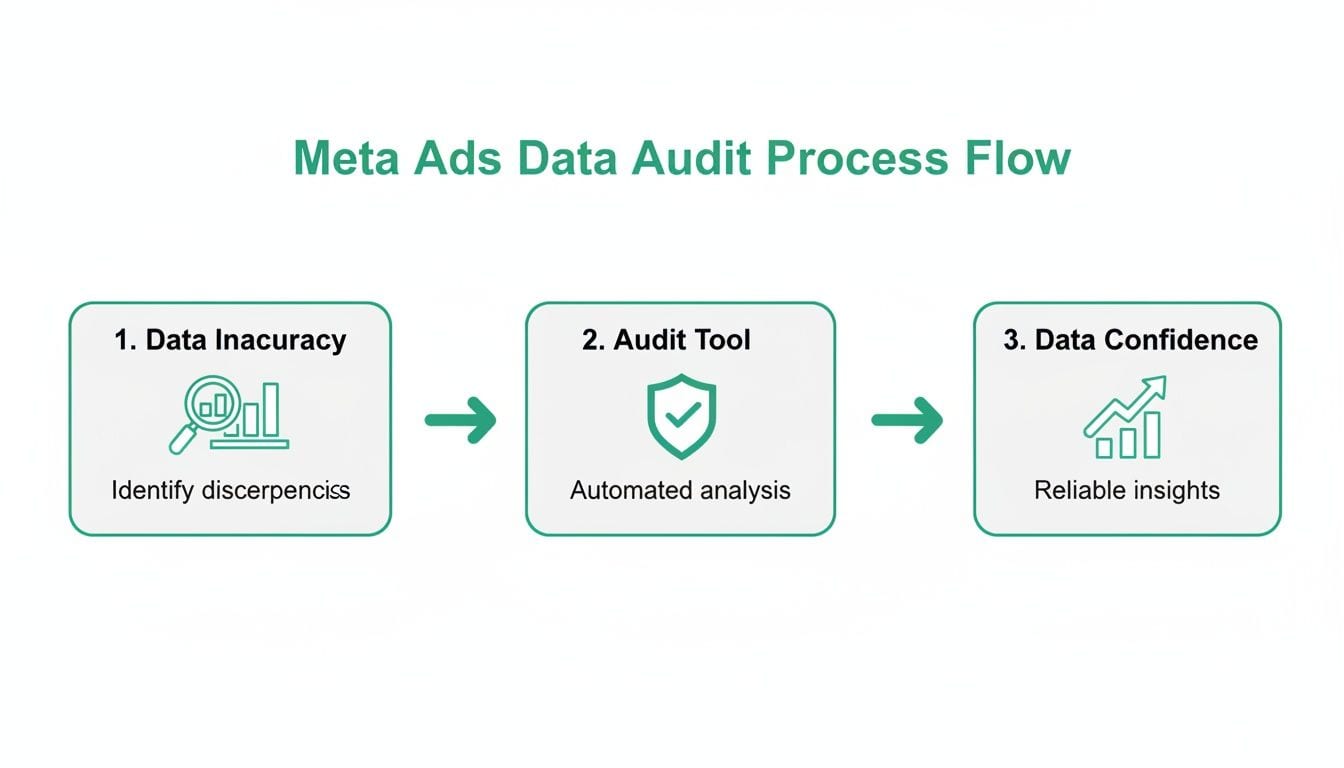
The diagram makes it clear: a good audit tool acts as a protective shield, turning data chaos into reliable insights you can actually trust for making decisions.
Key Factors for Selecting a Tool
When you're looking at different options, focus on the platforms that offer the clearest, fastest path from installation to insight. The selection process doesn't have to be a grind.
Zero in on these essential characteristics:
- Ease of Use: The platform should be built for marketers, not just developers. You want intuitive dashboards, reports, and alerts that present information clearly so you can act on it.
- Dedicated Auditing Features: Make sure the tool is purpose-built for auditing analytics and marketing tags. Generic monitoring software won't catch the specific nuances of Meta Ads tracking, like event schema mismatches or broken UTM parameter conventions.
- Actionable Insights: A great tool doesn't just flag what's broken; it tells you why and helps you fix it. Look for root-cause diagnostics that pinpoint the source of an error, which can save your team hours of frustrating detective work.
A strong Meta Ads audit tool should feel like gaining a new team member—one who works 24/7 to validate your data, requires minimal supervision, and delivers clear, concise reports directly to your inbox or Slack channel.
Choosing the right platform is all about empowering your team with a system that works quietly in the background, continuously verifying your data. This frees you up to focus on what really matters: strategy and growth. With your tool in place, you’re ready to move on to the critical step of defining what "good" data looks like for your business.
Building Your Single Source of Truth
An automated audit tool is an incredible asset, but it only reaches its full potential when you teach it what "correct" looks like for your business. This is where you transform a generic error detector into a true guardian of your data strategy, creating a reliable single source of truth for both your marketing and analytics teams. It's all about translating your unique business logic and campaign goals into a set of concrete, enforceable rules.
Without this layer of customization, your Meta Ads audit tool will only catch common, universal errors. But once you define your own rules, you give it the power to flag issues specific to your operations. Think of it catching a new campaign that launched without a mandatory utm_adgroup tag or a purchase event missing your custom product_category property. That's where the real value lies.
Establishing Custom Validations and Event Schemas
First things first, you need to define the exact structure—or schema—for every critical event you send to Meta. This isn't just about tracking a "purchase"; it’s about specifying every single piece of data that absolutely must come with that event.
Your tracking plan should lay out rules like these:
- The
purchaseevent must always includevalue,currency, andtransaction_idproperties. - The
valueproperty must be a number, not a string. - The
add_to_cartevent must contain anitemsarray withitem_idandprice.
Once you codify these rules in your audit tool, it will instantly alert you the moment an event shows up that doesn't match this perfect structure. This proactive validation is critical for maintaining clean data, especially when you're working with the Meta Conversions API, which demands precise formatting. To get a better handle on this, check out our guide on the Meta Conversion API.
Enforcing Strict UTM Tagging Conventions
Inconsistent UTM tagging is one of the quickest ways to make your attribution data completely useless. A single typo or a forgotten parameter can shatter the connection between your ad spend and your results. This is where your audit tool becomes your enforcer, allowing you to create and maintain a strict UTM convention across every single campaign.
By setting firm rules for your campaign tagging, you ensure every dollar spent is tracked accurately from the first click to the final conversion. This transforms your attribution reports from a collection of fragmented data points into a clear, reliable map of what’s actually working.
To get the most out of your Meta Ads audit, it helps to understand the bigger picture of running successful campaigns. For example, a comprehensive guide on Paid Ads Marketing can offer valuable strategies that your audit tool will then help you measure and optimize. By defining your ideal UTM structure—such as requiring utm_source, utm_medium, and utm_campaign on all ad URLs—the tool will instantly flag any ad that goes live without meeting those standards.
From Real-Time Alerts to Root-Cause Diagnostics
This is where the real value of an automated Meta Ads audit tool materializes. Defining your tracking rules is the foundation; acting on real-time alerts is how you stop wasting money. The faster you can spot and fix a tracking error, the more ad budget you save. It's that simple.
Imagine getting a Slack or email notification the instant your purchase event breaks after a new code push. Instead of finding out days later when you’re staring at a disastrous revenue report, you know immediately. This is the difference between proactive data governance and reactive damage control.
Acting on Instant Notifications
An automated tool isn't just a one-time scanner. It’s a 24/7 watchdog for your data, constantly monitoring the flow of information and flagging any deviation from your expected setup.
Here are some of the most common alerts that give your team an edge:
- Critical Event Failures: A notification triggers the moment a high-value event like
purchaseoradd_to_cartsuddenly drops off or stops firing completely. - Campaign Tagging Errors: You get an alert when a new campaign goes live with missing or malformed UTM parameters, which lets you fix attribution chaos before it even starts.
- Schema Mismatches: Your team is notified if an event is sent with a broken structure—for instance, a
valueproperty sent as a "string" instead of a "number," which can break your reporting.
These alerts aren't just vague warnings. They come with the context you need to understand the urgency and potential impact, helping you prioritize what to fix first.
The goal is to shrink the time between an error occurring and your team starting the fix. A five-minute response time can literally save thousands of dollars that would have otherwise been spent on a campaign with broken conversion tracking.
For example, this kind of alert shows exactly how a tool can visualize schema differences, highlighting what changed, what’s new, and what went missing.

This level of detail gets your team past the "something is wrong" phase and straight to understanding that a specific property like product_category was removed, causing the data break.
Pinpointing the Root Cause
Once you're alerted, the next step is diagnostics. A great audit tool doesn’t just tell you what broke; it helps you figure out why. It acts as a much-needed bridge between marketing and development by providing clear, actionable information.
Think about a scenario where purchase events are firing twice. Instead of a vague ticket to your developers, the tool can generate a report showing the duplicate event is only happening on iOS devices running a specific app version. That kind of precision turns hours of frustrating debugging into a quick, targeted fix.
This same diagnostic power extends to campaign performance. Creative fatigue is a silent budget killer, with frequency thresholds often exceeding optimal levels by 25-50% in unmonitored accounts. This can cause CTR to drop by up to 30% in a matter of weeks. Get more insights into how auditing improves Meta Ads performance on vaizle.com. Your audit tool can monitor video view-through rates at key milestones—25%, 50%, 75%—to catch this drop-off in engagement early, allowing you to refresh creatives before performance tanks.
Your Essential Meta Ads Audit Checklist
We’ve walked through the fundamentals of auditing your Meta Ads data. Now it's time to bring it all together into a practical checklist built for a modern Meta Ads audit tool. This isn't just another to-do list; think of it as a strategic framework for configuring automated monitoring to ensure nothing important ever slips through the cracks.
This checklist is designed to be versatile. You can follow it for a one-off manual review, but its real power comes from using it as a blueprint to set up rules and alerts in your audit tool. Doing so transforms a periodic check into a constant, 24/7 data governance system that works for you.
Pixel and Tag Health
This is ground zero. If your Meta Pixel isn't firing correctly, none of the downstream data can be trusted. Your audit tool should be set to continuously verify that your pixel is present and performing as expected across every critical user journey.
Here’s what your checks need to cover:
- Pixel Presence: Is the Meta Pixel actually loading on all your key pages? Don't just check the homepage; look at landing pages, product pages, every step of the checkout flow, and especially the thank-you pages.
- Correct Pixel ID: Are you positive you’re firing the right Pixel ID? In agency settings or businesses with multiple accounts, it’s surprisingly common to accidentally deploy a client's pixel on the wrong site.
- No Duplicate Pixels: Is the same pixel firing more than once during a single page load? This is a classic mistake that inflates your traffic metrics and can seriously disrupt your event tracking.
Event Integrity and Schema Validation
Once you’ve confirmed your pixel is healthy, the focus shifts to the quality of the data it sends. Event integrity means making sure every user action is captured once, captured correctly, and includes all the necessary information. An automated audit tool is practically a necessity for maintaining this level of detail.
Just as a product launch requires careful preparation, ensuring the accuracy of your Meta Ads data benefits from a structured approach, like following a comprehensive 10-point checklist. Your audit tool helps automate this precision.
Your validation rules should focus on these key areas:
- Critical Event Firing: Are your core conversion events like
ViewContent,AddToCart, andPurchaseactually firing when users perform those actions? You'd be surprised how often they don't. - No Duplicate Events: Is a single user action, like a customer clicking "Complete Purchase," triggering multiple
Purchaseevents? This is a notorious budget-waster that leads to wildly inflated conversion numbers. - Schema Adherence: Does every event consistently match its predefined schema? For instance, does your
Purchaseevent always includevalueandcurrencyproperties with the correct data types?
To give you a clearer picture, here’s a prioritized list of critical checks and how an automated tool helps manage them.
Automated Meta Ads Audit Checklist
| Audit Checkpoint | Common Problem | Automated Solution |
|---|---|---|
| Pixel Presence | Pixel fails to load on key conversion pages or new landing pages. | Continuously scans all site pages and alerts if the pixel is missing from any defined user journey. |
| Duplicate Events | A single user action triggers the same event multiple times, inflating metrics. | Monitors event streams in real time and flags any duplicate event instances for immediate investigation. |
| Schema Mismatch | An event fires but is missing a critical property (e.g., Purchase without a value). | Validates every event against a predefined schema and sends an alert if properties are missing or have the wrong data type. |
| UTM Compliance | New ad campaigns are launched without mandatory UTM parameters. | Scans all inbound traffic from ads and flags any URL that doesn’t adhere to your established UTM conventions. |
| Consent Violations | Tracking fires before a user gives consent, risking non-compliance. | Integrates with your consent management platform to verify that pixels only fire after consent is granted. |
This table illustrates how automation turns a reactive, manual process into a proactive, reliable data governance system.
Campaign Tagging and Attribution
Inaccurate campaign tagging makes reliable attribution a fantasy. Your Meta Ads audit tool should act as the strict enforcer of your UTM conventions, alerting you the moment a non-compliant ad goes live. This is absolutely critical for connecting your ad spend to real business outcomes.
Make sure your automated rules are set up to verify:
- Required UTM Parameters: Are all your ads properly tagged with mandatory parameters like
utm_source,utm_medium, andutm_campaign? - Consistent Naming Conventions: Do your campaign, ad set, and ad names follow the logical structure your team agreed on? Consistency is key for clean analysis later.
By methodically working through these checkpoints, you can build a foundation of clean, reliable data. For a deeper dive, you can learn more about how to audit marketing pixels to ensure truly accurate analytics. This checklist gives you the framework for creating a trustworthy data engine for all your Meta Ads activities.
Questions About Meta Ads Audit Tools
Switching from manual spot-checks to a dedicated Meta Ads audit tool is a big step, and it’s smart to have questions. This isn't just another dashboard; it's a shift toward continuous, automated data governance.
Let's walk through some of the most common questions we hear from marketers, analysts, and developers. Getting these answers upfront will help you understand the real value and feel confident you're making the right investment for your team and budget.
How Is an Automated Audit Tool Different From Meta's Events Manager?
This is a great question, and the difference is fundamental. Think of Meta's Events Manager as a receiver. It’s useful for confirming what data successfully arrived at Meta's servers, but it's completely blind to what was supposed to be sent from your site.
An end-to-end audit tool works differently. It acts as an independent referee, checking the data that leaves your website's dataLayer against what platforms like Meta and Google Analytics actually receive.
This unique position allows it to:
- Validate the entire data journey, from the browser all the way to the ad platform.
- Spot mismatches between what you send to Meta versus Google Analytics or other destinations.
- Enforce your own custom tracking plan and business rules, not just Meta’s standard event formats.
In short, it gives you a single source of truth that Events Manager, by its very design, cannot provide.
Will an Audit Tool Slow Down My Website?
No, not if it's built for modern web performance. A tool like Trackingplan, for example, uses a tiny, asynchronous JavaScript tag. This means it loads entirely in the background and independently of your page content, so it never gets in the way of your site rendering for the user.
The performance impact is virtually zero. It’s a small price to pay for catching data errors that could be costing you thousands in wasted ad spend. You’re trading a negligible amount of load time for a massive return in data accuracy.
Can This Tool Help with Privacy and GDPR Compliance?
Absolutely. In fact, privacy monitoring is a core feature of any serious audit platform in 2026. You can set up rules to automatically flag any Personally Identifiable Information (PII) that might be leaking into your analytics events, like an email address accidentally sent as a product SKU.
It can also monitor your consent management platform. This ensures your tracking pixels fire only after a user has given proper consent, adding a critical layer of automated oversight to help you avoid costly GDPR violations and maintain trust.
How Much Technical Knowledge Do I Need to Use This Tool?
While a developer will need a few minutes to add the initial code snippet to your site, the tool itself is built for marketers and analysts. You won't need to be a technical wizard to get value from it every day.
The dashboards and alerts are designed to be straightforward. Instead of code, you'll see clear, actionable messages like "Campaign tag mismatch" or "Missing required property: value." It effectively translates technical problems into plain language, creating a shared source of truth that helps bridge the gap between marketing and development.
Ready to stop guessing and start trusting your Meta Ads data? With Trackingplan, you can automate your audits, get real-time alerts on tracking errors, and ensure every dollar of your ad spend is measured accurately.
Start your free trial today and gain full visibility over your marketing data.