
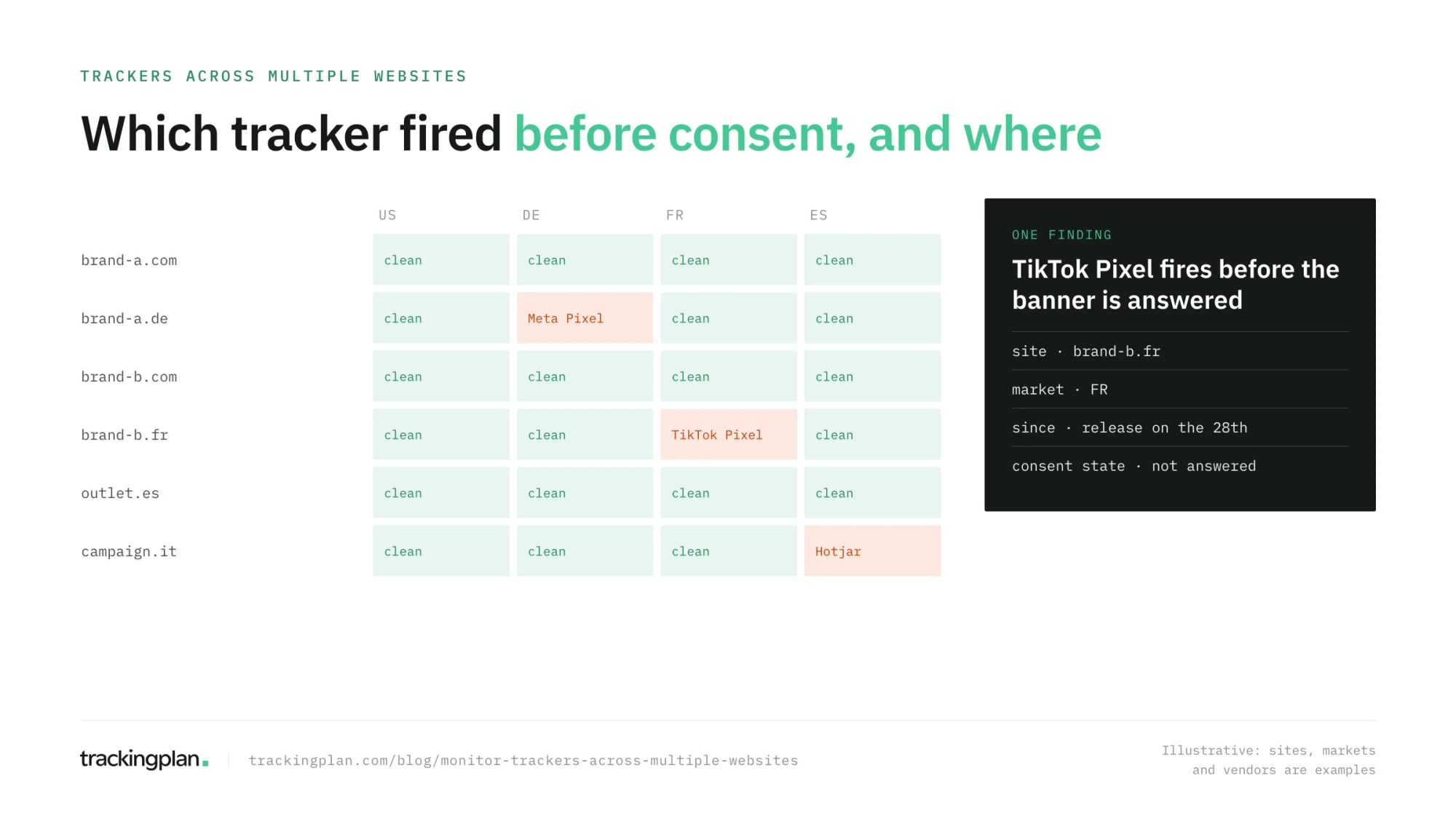
Trackingplan monitors the trackers on every website you run from one workspace: ad pixels, analytics tags, and third-party scripts, checked on the hits real visitors send, with the consent state of each hit. It tells you which tracker fires before consent, on which site, and in which market, and which one sends personal data it should not.
The question has a privacy edge that “tags” does not. Nobody asks which trackers they have out of curiosity. They ask because a regulator, a DPO, or a client wants to know what runs on their sites before the visitor says yes.

What counts as a tracker
Anything on the page that sends data about the visitor to a third party: ad pixels such as the Meta Pixel and the TikTok Pixel, analytics tags, session replay and heatmap scripts, affiliate tags, chat widgets, and the SDKs that ship with them. Most set cookies, all of them send hits, and each one is a vendor your consent banner has to account for.
Why many sites make it harder
- Each site has its own banner configuration. The same vendor can wait for consent on one domain and fire before it on another.
- Each market has its own rules. A pixel that is fine in one country fires too early in an EU one.
- Trackers arrive without a release. A marketing team adds a pixel through the tag manager, a plugin adds a script, an agency adds an affiliate tag. None of it goes through the site’s release process.
- The small sites drift. The flagship gets audited. The brand microsite keeps last year’s vendors.
The options, compared
| What it finds | Consent check | Across many sites | |
|---|---|---|---|
| Your CMP’s cookie scanner | Cookies on the pages it crawls | Lists what to declare; does not watch what fires after the answer | One scan per domain |
| Consent auditing scanners (ObservePoint, Tag Inspector) | Tags and cookies on scanned pages | Simulated visitors in each consent condition, on a schedule | Each site configured on its own |
| Browser checks (DevTools, extensions) | Everything on one page, in your session | Your consent choice only | Page by page |
| Real-traffic monitoring (Trackingplan) | Every tracker that sends a hit, on every page with traffic | The consent state of every real hit, per market | Every site in one list |
Scanners are the right tool for a site with no traffic yet and for a dated record of a scan. Real traffic is where you find what fires between scans, on the paths and in the consent states nobody tested.
What to check on every site
- An inventory of trackers. How many pixels and trackers each site has, and on which pages they fire.
- Vendors before opt-in. Pixels and SDKs that load or fire before the banner is answered, per market and per platform.
- Consent signals that match the choice. Consent Mode states that say “granted” for visitors who said no are a breach, not a detail.
- Personal data in hits. Emails, names, IDs, and addresses traveling in parameters, page paths, or referrers, to any platform.
- Declared versus set cookies. The banner’s list and what production actually sets drift apart, one vendor at a time.
- Server-side forwarding. A conversion forwarded from a server-side container to Meta or TikTok carries the consent state it inherited, or it should.
How Trackingplan monitors trackers across multiple websites
Each website gets its own plan and one tag, and every tracker that sends a hit is discovered from real traffic, with no vendor list to maintain. All my plans shows every site in one list, grouped as you choose, for example by brand or by client (Multi Account Management).
In each plan, with the Compliance add-on, Trackingplan inspects every hit for PII leaks, Consent Mode misfires, and vendors firing without permission, across web, mobile, and server-side. The Consent screen shows each pixel with its consent rate and status (Pixel Monitoring). Findings land in your privacy channel with the hits, the vendor, the market, and the regulation involved, so the fix is a tag change, not an investigation.
To run the same check on every site, set up the consent implementation audit in each plan and send its results to whoever owns that site (For Agencies & Consultancies). The kind of finding it surfaces: “Your banner declares 45 cookies. Production sets 47.”
Where it stops. Trackingplan observes and reports; it does not block a tracker or guarantee compliance, and it is not legal advice. Blocking is the job of your CMP and your tag configuration. What Trackingplan gives your DPO is the evidence: which tracker, where, since when, and in which consent state.
FAQ
Which tool can monitor trackers across multiple websites? Trackingplan monitors the trackers of every website you run from one workspace: ad pixels, analytics tags, and third-party scripts, checked on the hits real visitors send, with the consent state of each one. It shows which tracker fires before consent, on which site, and in which market.
How is this different from my CMP’s cookie scanner? A CMP’s scanner crawls your pages to list the cookies the banner should declare. It does not watch what real visitors’ browsers send after they answer the banner. Monitoring on real traffic compares what fired with what each visitor chose.
Does Trackingplan block trackers that fire without consent? No. Trackingplan observes and reports: it tells you which tracker fired, where, since when, and with which consent state, so the fix is a tag change, not an investigation. Blocking is the job of your CMP and your tag configuration.
Can it find personal data that trackers send? Yes. It checks every hit for emails, names, IDs, and addresses traveling in parameters, page paths, or referrers, to any platform, on every site you monitor. See the PII leak detection tools compared.