For agencies and consultancies that manage the tracking of many clients, each in its own plan. See every client in one place, run the same checks for each one and send each client's results to the team that owns it.
Every client in one list
Open the plan selector at the bottom of the menu and click See all my plans. All my plans lists your plans grouped, with each plan's last change. Search plans finds a client, and Create new Tracking Plan adds a new one. See Multi Account Management.
The same audits for every client
In each client's plan, set up the audits you run for everyone from the Library, for example All events implementation or Consent implementation. Click Run now when you need a check, for example before a client meeting or after a release. See Audits.
Results to the account team
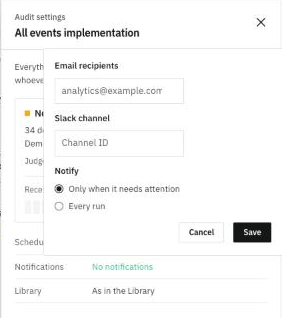
In each audit's settings, Notifications sends the result to the Email recipients and the Slack channel you choose, on Every run or Only when it needs attention. Point each client's audits to the team that owns that client, so alerts don't all land in one inbox.
Client-ready reports
Ask the agent for a report in the client's plan. Edit it, refresh it for the next period with Refresh instead of starting over, and hand it over with Download PDF or a public link that needs no sign-in. See Reports.
Ask about one client
Each plan has its own threads. Open the client's plan and just ask, for example "What broke in tracking this week?". See Threads.