
Trackingplan monitors the marketing and analytics tags of every website you run from one workspace. Each site sits in its own plan, every plan sits in one list, and every hit real visitors send is checked: GA4, Google Ads, Meta, TikTok, your consent vendor, and the rest of the 170+ analytics and ad providers it reads.
Tags, pixels, trackers, SDKs: the question is the same whatever you call them, and so is the answer. A Meta Pixel, a GA4 tag, a TikTok tracker, and a consent vendor’s script all send hits, and Trackingplan reads the hits.
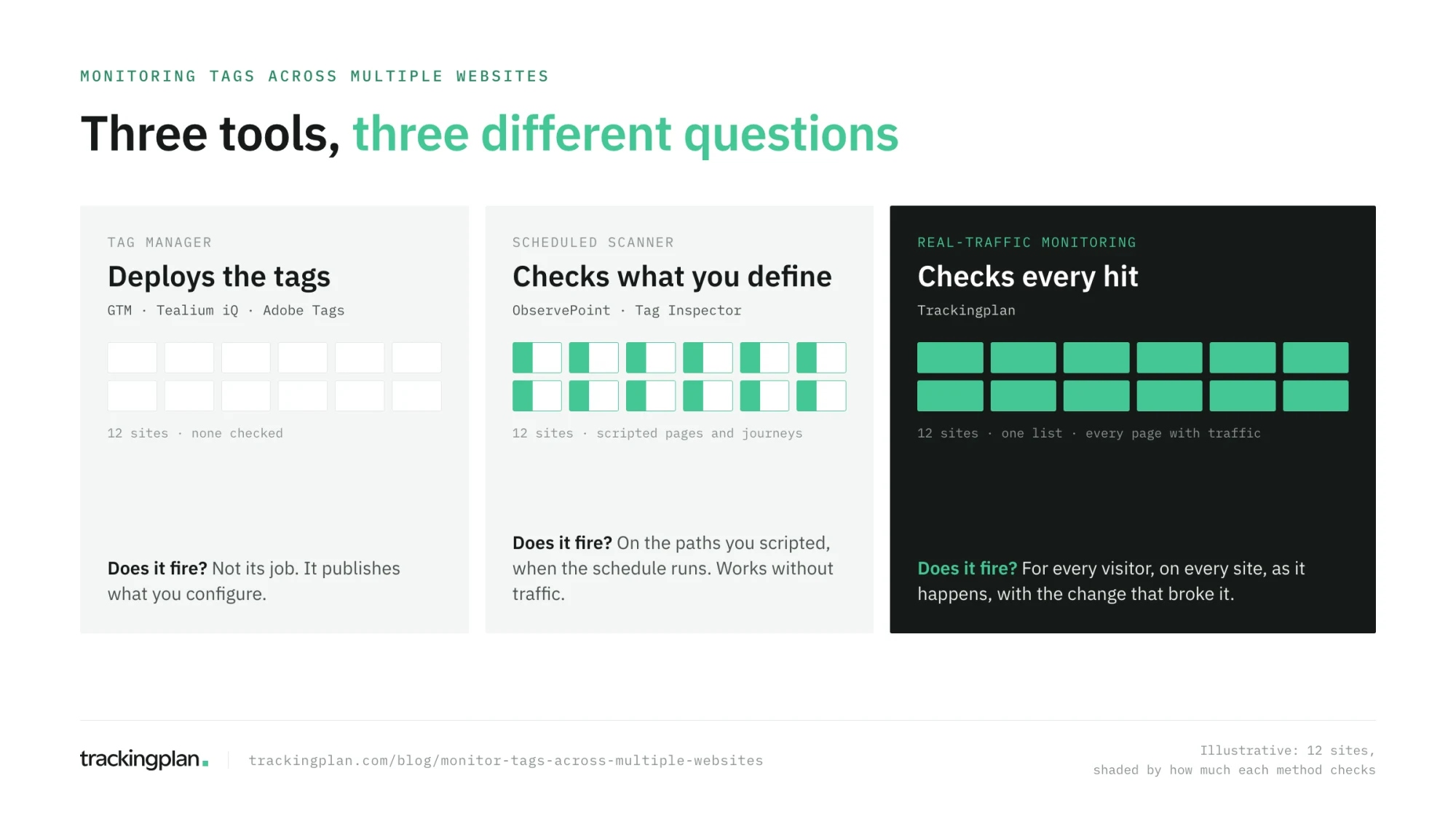
That is one of three kinds of tool people mean when they ask this question. The other two are scheduled scanners, such as ObservePoint and Tag Inspector, and tag managers, such as Google Tag Manager. They answer different questions, and the difference matters more with every site you add.
The short answer
| Tag manager | Scheduled scanner | Real-traffic monitoring | |
|---|---|---|---|
| Examples | Google Tag Manager, Tealium iQ, Adobe Experience Platform Tags | ObservePoint, Tag Inspector, DataTrue | Trackingplan |
| What it does | Deploys tags | Crawls the pages and replays the journeys you define | Reads the hits real visitors send |
| Tells you a tag broke | No | On the pages and paths it scans, when the schedule runs | On any page that gets traffic, as it happens |
| Works without traffic | Not applicable | Yes | No |
| Effort per new site | A container | Pages and journeys to define and maintain | One tag, SDK or server-side hook |
A tag manager is where tags live, not where they are checked. Google Tag Manager will happily publish a container that sends purchase without a value to every site that loads it. That is why it needs a monitor next to it.
Why many sites break differently
One site breaks when someone changes it. Many sites break when anyone changes any of them, and those people rarely talk to each other.
- Each site has its own release calendar. A front-end deploy on one brand’s site removes a dataLayer key that the shared GTM container still reads.
- Each site has its own owners. In-house developers, an external agency, a media partner adding a pixel. Fact, an agency that looks after 35+ clients, found that changes by clients’ development agencies and media partners broke tracking without anyone being told.
- The same bug spreads. A container template, a consent banner or a CMS plugin shared by ten sites breaks all ten the same day.
- Nobody checks the small sites. The flagship gets a test before every release. The microsite for last year’s campaign gets nothing, and still sends conversions to Google Ads.
Before Trackingplan, Fact’s issues “could easily go unnoticed for two or three weeks”, until they showed up in a client’s report (Fact’s story).
What to look for in a multi-site tag monitor
Monitoring one site well is not the same as monitoring forty. Check for these:
- Every site in one view, grouped the way you work. By client, by brand, by market.
- Coverage that does not depend on what you scripted. A path nobody defined is where a tag breaks quietly.
- The same checks on every site, without rebuilding them for each one.
- Alerts that reach the team that owns the site, not one shared inbox nobody reads.
- Separate accounts inside one site. Two GA4 properties or two GTM containers on the same domain should not blur into one stream.
- Consent per market. A pixel that waits for consent in Spain and fires before it in Germany is one finding, not an average.
How Trackingplan monitors tags across multiple websites
One plan per site, one list for all of them. Install Trackingplan on each site with the GTM template, a script tag, or the CDN snippet. Events, properties, and destinations are discovered from traffic, so there is nothing to define per site. All my plans then shows every plan you have access to, grouped, for example one group per client, with each plan’s last change (Multi Account Management).
Separate accounts, kept separate. When one site sends to several GA4 properties, ad accounts or GTM containers, Split Destinations by Account ID shows each one as its own destination, groups them, or keeps one out entirely (Split Destinations).
The same audits for every site, routed to its owner. Set up the audits you run for everyone, such as consent implementation or all events implementation, in each plan, and send each plan’s results by email or Slack to the team that owns it (For Agencies & Consultancies).
Issues caught on real traffic, with the evidence. Missing properties, dead tags, duplicate fires, broken triggers, and vendors firing before opt-in arrive as they appear, with the hits behind them and the change that caused them. Then ask across the portfolio: “Which of my clients are affected by the same bug?”
Where it stops. A page nobody visits sends no hits. A staging site before a release, a landing page before launch, and an accessibility audit are a scanner’s job. Many teams run both: a scanner before the release, Trackingplan after it.
When a scanner is the better fit
Scanners earn their place where there is no traffic to read and where a dated record matters. ObservePoint scans a site’s pages and replays scripted journeys, with privacy and accessibility checks in the same run. Tag Inspector inventories tags and cookies across your sites and audits consent with simulated visitors. Both work on a site the day it goes up.
Their cost grows with what you define. Every new site, funnel, device, or consent state is one more journey to script and keep in step with the pages. Across forty sites, that upkeep is the work. The ObservePoint comparison covers where each method fits.
The result for a team with many sites
Fact keeps analytics accurate for 35+ clients with three people who focus on data. Their founder put the setup problem plainly: with browser-side and server-side tracking, “sandboxed Shopify environments, Consent Mode, and such a variety of setups”, it is not easy to know that what you believe is correct. Monitoring every site on real traffic is how a small team stops finding out from the client.
FAQ
Which tool can monitor tags across multiple websites? Trackingplan monitors the marketing and analytics tags of every website you run from one workspace, on the hits real visitors send. Scheduled scanners such as ObservePoint and Tag Inspector crawl the pages and journeys you define on each site. Google Tag Manager deploys tags across many sites, but it does not monitor whether they fire correctly.
Does it also monitor pixels and trackers across multiple websites? Yes. Ad pixels such as the Meta Pixel, the TikTok Pixel, and the Google Ads tag, analytics trackers, and third-party scripts are all monitored the same way, from the hits they send on every site. For pixels that disappear from the pages you send paid traffic to, see ad pixel monitoring; for trackers that fire before consent, see how to monitor trackers across multiple websites.
Can Google Tag Manager monitor tags across multiple websites? No. Google Tag Manager deploys and manages tags, one container per site or a shared one, but it does not tell you whether a tag stopped firing, sends the wrong value, or fires before consent. Pair it with a scanner or with real-traffic monitoring.
Do I need one Trackingplan account for each website? No. Each website or client gets its own plan, and All my plans shows every plan you have access to in one list, grouped as you choose, for example one group per client.
When is a scanner better than real-traffic monitoring? When the site has no traffic yet, such as a staging site before a release or a landing page before launch, or when you need an accessibility scan. A page nobody visits sends no hits to monitor. Many teams run a scanner before the release and Trackingplan after it.