
TL;DR:
- AI integration in websites varies from code automation to full content generation, affecting tracking and SEO. Detecting AI involvement relies on technical fingerprints, visual cues, and framework patterns, with automated tools providing probability scores. Proper semantic HTML and structured data are crucial for AI agents to effectively interpret and navigate your site.
When your website uses AI, it means machine intelligence is actively shaping its code, content, or behavior. That could be a chatbot trained on your knowledge base, a personalization engine serving different content to different visitors, or a site generated entirely from a prompt. For analytics professionals, the distinction matters because each form of AI integration creates distinct tracking challenges, attribution gaps, and data quality risks.
AI website integration spans a wide spectrum. At one end, a developer uses GitHub Copilot to write boilerplate. At the other, a tool like Framer or Lovable generates the entire front end from a text description. Between those poles sits the majority of 2026 websites: AI-assisted builds where humans made deliberate choices, and AI-dominant builds where defaults shipped as design.
- AI-built code fingerprints: CDN domains, meta generator tags, and HTTP headers that reveal the originating tool
- AI-enhanced interactions: chatbots, recommendation engines, and personalization modules
- AI-friendly structure: semantic HTML, Schema.org markup, and accessibility tree compatibility
- SEO implications: structured data now determines whether AI answer engines cite your content
Pro Tip: AI assistance is not the problem. “Pure slop,” a site where every choice reflects a model’s first guess rather than human judgment, is. Combine AI generation with deliberate editorial decisions to produce work that actually differentiates.
Table of Contents
- How to tell if your website uses AI
- How to make your site readable by AI agents
- How to add AI capabilities to an existing website
- Keeping your analytics accurate on AI-enhanced websites
- What AI technologies are actually running on websites
- How AI is reshaping website SEO and digital marketing
- Key Takeaways
- FAQ
How to tell if your website uses AI
Detecting AI involvement starts with technical fingerprints: CDN domains like framerusercontent.com, meta generator tags, unique data attributes such as data-framer-*, and HTTP response headers like x-vercel-id. Automated detection tools analyze 80+ technical signals and return a probabilistic confidence score, not a binary verdict.
Visual signals are nearly as reliable. AI-generated sites consistently show three-card grids using rounded-2xl and shadow-md, violet-to-pink gradients from #8b5cf6 to #ec4899, and the Tailwind blue-500/purple-500 pairing. The framework choice narrows the candidate generator: v0 produces almost exclusively Next.js, Lovable uses React with Vite, and Claude Artifacts typically output single-file React with Tailwind via CDN.
- Builder fingerprints:
data-v0-*attributes, unmodified shadcn/ui class strings, and “Built with Lovable” footer links - Infrastructure signals: Vercel or Netlify hosting with identifiable response headers
- Content patterns: polished but generic copy, predictable hero-to-features-to-CTA layouts, stock imagery
- Framework artifacts: Next.js build patterns, StackBlitz container artifacts, or single-file inlined React
The distinction between AI-built and AI-assisted has direct analytics implications. An AI-built site may ship without proper event tracking, missing consent layers, or broken pixel implementations because no human developer audited the output before launch.
Detection coverage note: Automated scanners achieve 85–99% accuracy for platforms with clear fingerprints like Framer, Lovable, and WordPress. Sites deployed to custom domains with minimal builder artifacts score on stack heuristics, making the result a probability estimate rather than a certainty.
How to make your site readable by AI agents
AI agents navigate websites through the accessibility tree, the same simplified DOM structure that screen readers use. ChatGPT Atlas, Microsoft Playwright MCP, and Perplexity Comet all rely on accessibility data rather than visual rendering. If your semantic markup is poor, your content is effectively invisible to these agents.
Practical steps for AI-agent compatibility:
- Use semantic HTML elements:
<header>,<nav>,<article>,<section>, and<main>instead of nested<div>stacks - Add Schema.org markup: sites with strong schema receive significantly more citations in AI responses than those without
- Annotate actions with PotentialAction: expose search, reservation, and checkout flows to AI agents explicitly
- Minimize JavaScript blocking: AI crawlers like PerplexityBot and OAI-SearchBot often skip client-side JavaScript; server-side rendering keeps content visible
- Implement WebMCP: supported in Chrome 149 origin trial as of May 2026, it lets sites expose callable tools directly to agents via
navigator.modelContext - Test with screen readers: if VoiceOver on macOS or NVDA on Windows can navigate your site cleanly, AI agents likely can too
Pro Tip: Fixing accessibility delivers the highest ROI for AI-agent readiness. Every semantic HTML fix and ARIA label you add for screen reader compliance simultaneously improves how AI agents parse and act on your content.
Treating content as machine-readable data rather than visual decoration is the architectural shift that separates AI-native sites from sites with AI widgets bolted on. The former lets agents query and act reliably; the latter creates friction at every interaction point.

How to add AI capabilities to an existing website
Adding AI to an existing site rarely requires a rebuild. A one-line asynchronous script tag connecting to a custom knowledge base deploys in under five minutes with no DNS changes or framework modifications. The widget loads asynchronously, so it does not block rendering or degrade Core Web Vitals.
- Chatbots: connect to FAQs, PDFs, and product documentation to answer visitor questions accurately
- Personalization engines: adapt content blocks based on scroll depth, repeat visits, or inferred intent
- Recommendation systems: surface related products or content using behavioral signals
- Real-time content adaptation: integrate with headless CMS collections to serve AI-selected content variants
Deployment best practices matter as much as the feature itself. Load AI widgets asynchronously, test against Lighthouse scores before and after, and stage the rollout to a subset of traffic first. Privacy considerations apply immediately: any AI feature that processes user behavior or queries must comply with GDPR, CCPA, and your consent management platform’s configuration. Tracking implications are real. A chatbot interaction that triggers a conversion event needs a corresponding tracking call, or that conversion disappears from your attribution model.
Pro Tip: Roll out AI features incrementally and monitor your analytics immediately after each deployment. A sudden drop in tracked events after adding a new AI widget almost always means the widget’s asynchronous load is firing before your tag manager initializes. Catching this in week one costs far less than diagnosing it in month three.
For a deeper look at how AI agents affect marketing workflows, the integration patterns that preserve tracking integrity are worth reviewing before you deploy.
Keeping your analytics accurate on AI-enhanced websites
AI features break traditional tracking in predictable ways. Dynamic content swaps bypass page-view tags. Asynchronous widget loads fire before the data layer initializes. Autonomous agent sessions inflate traffic metrics without corresponding conversion signals. Each of these creates attribution errors that compound over time.
Trackingplan addresses this directly. Its automated monitoring detects pixel errors, schema mismatches, and campaign misconfigurations in real time across web, app, and server-side environments, then sends alerts via Slack, email, or Teams the moment an anomaly appears. Root-cause analysis identifies whether a tracking failure stems from a broken event, a missing consent signal, or a misconfigured tag.
- Synchronize AI-driven UI changes with tracking: every new component that can trigger a conversion needs a corresponding event before it ships
- Monitor for traffic anomalies: sudden spikes or drops in sessions often indicate bot traffic from AI crawlers, not real user behavior
- Audit consent layer compatibility: AI widgets that load before consent fires will silently drop tracking data in regulated markets
- Use server-side tracking as a fallback: client-side tags are vulnerable to AI-generated DOM changes; server-side implementations are not
Monitoring impact: Automated anomaly detection catches tracking failures within minutes of deployment rather than days, which is the window where bad data corrupts campaign optimization decisions.
Privacy-compliant AI tracking requires mapping every AI-generated data flow to your consent categories. If a personalization engine reads cookie data, that processing must be declared and consented to before it runs. Trackingplan’s privacy compliance checks surface these gaps automatically. For teams managing digital analytics data quality across multiple properties, automated monitoring is the only practical way to keep pace with AI-driven site changes.
What AI technologies are actually running on websites
The most common AI technologies on websites in 2026 fall into a few clear categories, each with distinct tracking and data quality implications.
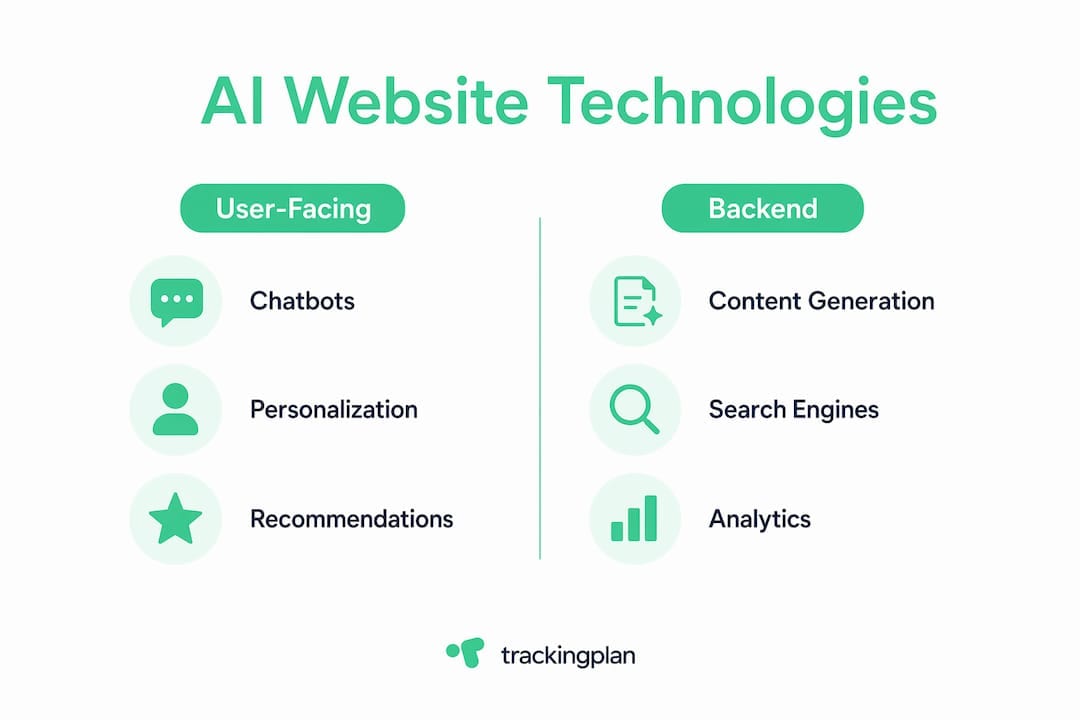
Chatbots and virtual assistants are the most visible. They connect to custom knowledge bases and handle support, lead qualification, and product discovery. When a chatbot interaction leads to a purchase, that conversion path needs explicit tracking or it vanishes from attribution.
Personalization engines observe micro-behaviors like scroll depth, hesitation, and exit intent, then adapt layouts and content blocks in real time. The tracking challenge is that A/B test variants and personalized content blocks create multiple DOM states, each of which may trigger different tag configurations.
Recommendation systems surface related products or content using collaborative filtering or embedding-based similarity. These generate click events that must be tagged distinctly from organic navigation clicks to preserve funnel accuracy.
AI-generated content covers everything from product descriptions written by a language model to entire landing pages built by tools like v0 or Lovable. Content quality varies widely, and optimizing it for AI search requires the same structured data and semantic clarity that benefits human SEO.
AI search and answer engines are changing how traffic arrives. Visitors who reach your site via AI Overviews or Perplexity arrive with specific intent and convert at higher rates than classic organic visitors, according to Semrush data. That shift makes accurate source attribution more critical, not less.
How AI is reshaping website SEO and digital marketing
AI Overviews and zero-click search have fundamentally changed the traffic equation. Bain & Company found in February 2025 that 80% of consumers relied on AI-powered search summaries at least 40% of the time, reducing organic site visits by an estimated 15–25%. Pew Research reported in July 2025 that users clicked on search results only 8% of the time when an AI summary appeared.
The sites that still earn clicks are the ones AI answer engines trust enough to cite. That trust comes from structured data, semantic clarity, and fast load times. Schema.org markup is no longer an SEO bonus; Microsoft and Google confirmed in 2025 that their AI systems rely on structured data to interpret web content accurately. Sites without it are increasingly invisible to the AI layer of search.
For digital marketing teams, the implication is direct: AI-driven marketing analytics must account for traffic that arrives pre-informed and converts faster. Attribution models built for classic organic sessions undercount the value of AI-referred visits. Adjusting your measurement framework to capture AI referral sources separately gives a more accurate picture of channel performance.
Key Takeaways
Websites that integrate AI without updating their tracking and semantic structure create data quality problems that compound with every new feature deployed.
| Point | Details |
|---|---|
| AI detection uses many signals | Automated tools analyze CDN domains, meta tags, HTTP headers, and DOM patterns to score AI involvement probabilistically. |
| Accessibility tree drives agent compatibility | Semantic HTML and ARIA roles determine whether AI agents like ChatGPT Atlas can read and act on your content. |
| One-line script deploys AI features | Asynchronous chatbot widgets go live quickly without DNS changes or Core Web Vitals degradation. |
| AI features break traditional tracking | Dynamic content, async widget loads, and agent sessions create attribution gaps that require real-time monitoring to catch. |
| Structured data is now required for SEO | Microsoft and Google confirmed in 2025 that their AI systems rely on Schema.org markup to interpret and cite web content. |
FAQ
How can I tell if my website was built with AI?
Use an automated scanner that checks for 80+ technical fingerprints, including CDN domains like framerusercontent.com, meta generator tags, and HTTP headers like x-vercel-id. Visual signals such as three-card grids with rounded-2xl and violet-to-pink gradients are also reliable indicators.
Does using AI on my website hurt SEO?
No. AI-native design practices like semantic HTML, Schema.org markup, and fast load times improve both traditional SEO and AI search visibility. The risk comes from AI-generated content that lacks structured data or specificity, which answer engines are less likely to cite.
How do AI features affect my analytics tracking?
AI features introduce dynamic content, asynchronous loading, and autonomous agent sessions that can break standard tag firing sequences. Real-time monitoring tools like Trackingplan detect pixel errors and tracking mismatches as they occur, preventing bad data from corrupting campaign decisions.
What is the fastest way to add AI to an existing website?
Paste a single asynchronous script tag before the closing </body> tag. The widget connects to your knowledge base and goes live in under five minutes with no framework changes required.
Why do AI agents need semantic HTML to read my site?
AI agents parse the accessibility tree, a stripped-down version of your DOM that exposes only interactive elements, roles, and states. Without semantic HTML, the accessibility tree is sparse or misleading, and agents cannot reliably navigate or extract content from your pages.