
TL;DR Google doesn’t publish an MCP server for Search Console, and neither Claude’s directory nor ChatGPT has a Search Console connector built by Google. The official route for ongoing work is the bulk data export to BigQuery, read through Google’s BigQuery connector in Claude or the BigQuery app in ChatGPT. For a one-off question, export the Performance report to Google Sheets and let the assistant read it.
Search for this and you get a page of “Search Console MCP” results: video tutorials, connector services, open-source repositories. None of them come from Google. That doesn’t mean you can’t get your search data into Claude or ChatGPT. It means you lay the pipe yourself, with parts Google does publish.
This guide is part of a series on connecting AI assistants to marketing data. It covers the routes that work today, which ones Google documents, and what each one can read.
Is there an official Search Console connector?
No. Three places to check, and Search Console is missing from all of them:
- Google’s MCP servers. Google’s MCP repository lists its remote and open-source servers: Google Analytics, BigQuery, Workspace, Firebase and many Cloud products. Search Console isn’t there, and neither is it on Google Cloud’s list of products with a remote MCP server.
- Claude’s directory. The connectors Google publishes there are Gmail, Google Calendar, Google Drive, Google Cloud BigQuery and Compute Engine. The listings that mention Search Console belong to connector services that pull data from many marketing sources.
- ChatGPT. OpenAI’s help pages name Google Drive and BigQuery among the Google apps ChatGPT supports. They don’t mention Search Console.
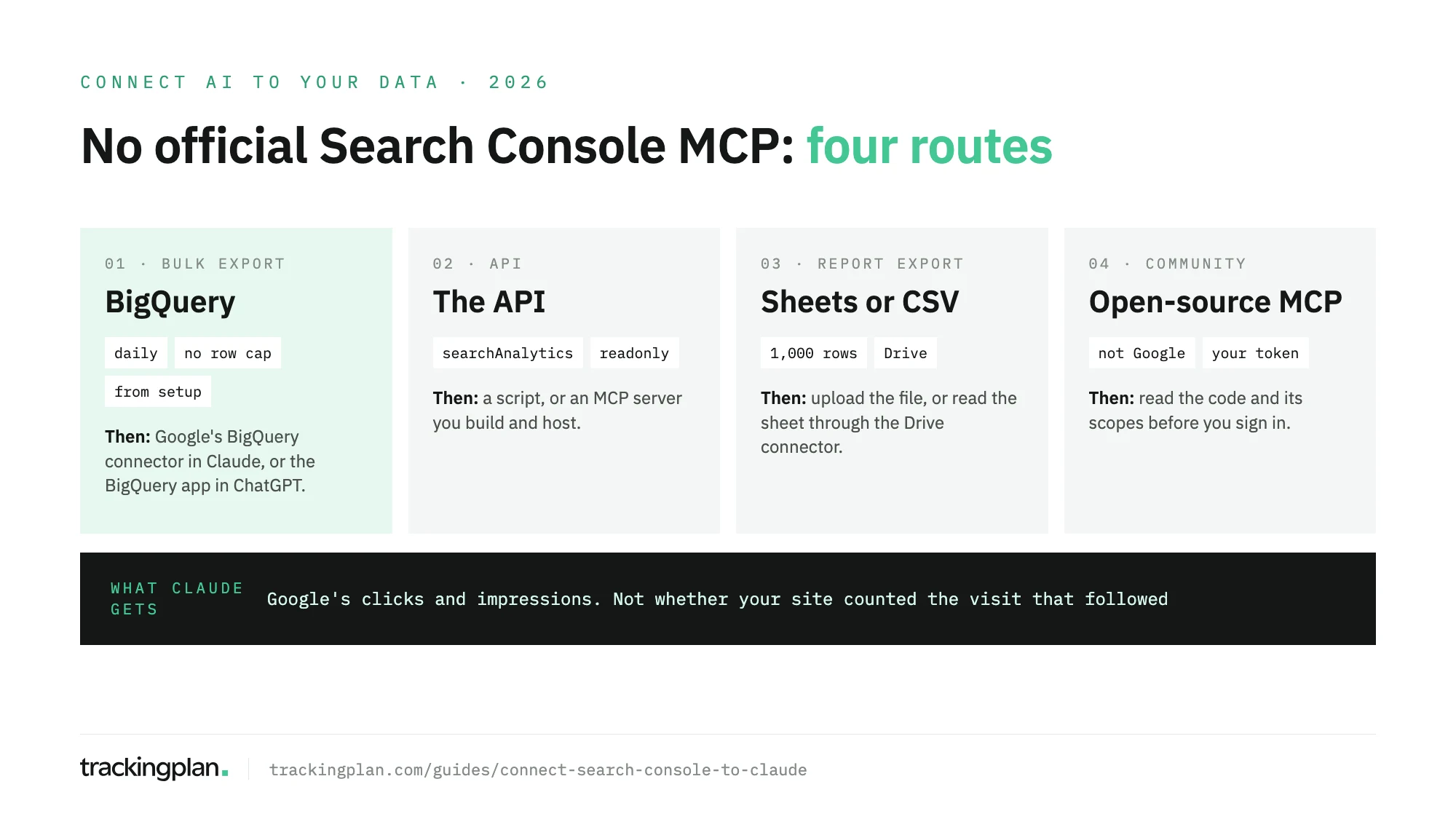
Route 1: bulk export to BigQuery
This is the route to pick if you’ll ask about search data every week. Google exports your performance data to BigQuery every day, and Google’s own BigQuery connector lets Claude query it.
It exports all the performance data Search Console has for the property, except anonymized queries. The help center’s comparison of export methods puts it plainly: “no 50K limit”.
It doesn’t export history: the export starts on the day you set it up. For older data, Google points you to the API or the reports.
You pay for BigQuery storage and queries, with a free usage level. Data piles up indefinitely unless you set a partition expiration.
Set it up as Google’s bulk export guide describes:
- In the Google Cloud console, open the project you’ll export to.
- Go to APIs & Services > Enabled APIs & Services and enable the BigQuery API and the BigQuery Storage API if they’re off.
- Go to IAM and Admin, click + GRANT ACCESS and add
search-console-data-export@system.gserviceaccount.comwith the roles BigQuery Job User and BigQuery Data Editor. - In Search Console, go to Settings > Bulk data export.
- Enter the Cloud project ID, the ID and not the number, and a dataset name. The default is
searchconsole. - Choose the dataset location, which is hard to change later, and click Continue.
The first export lands within 48 hours.
Then connect the assistant. In Claude, go to Customize > Connectors > Discover, search for Google Cloud BigQuery and select Connect to Claude. It’s the remote server Google runs at bigquery.googleapis.com/mcp. Google Cloud’s docs list the roles your account needs: MCP Tool User, BigQuery Job User and BigQuery Data Viewer. The server has a read-only SQL tool, execute_sql_readonly, and caps each query at three minutes and 3,000 rows. In ChatGPT, the BigQuery app works the same way, though some workspaces need an admin to approve it. The BigQuery guide in this series covers both in detail.
Route 2: export a report to Sheets
For a single question, this is the fast one. The Performance report has an export button, and Google’s export help lists the formats: Google Sheets, Microsoft Excel and CSV.
- Open Performance in Search Console.
- Set the date range, filters and the tab you need: queries, pages, countries or devices.
- Click the export button and choose Google Sheets.
- In Claude, read the sheet through the Google Drive connector, or upload the CSV to the chat. In ChatGPT, use the Google Drive app or upload the file.
The limit is the catch: “Data is truncated to 1,000 rows”. That’s fine for the top pages of a small site. It’s not fine for a long tail of queries.
If you already report in Looker Studio, its Search Console connector reads the same data through the Site Impression and URL Impression tables, per Google’s Looker Studio docs. It’s a dashboard, though, not a feed an assistant can query.
Google also added an AI-powered configuration to the Performance report, announced on Google’s Search Central blog as experimental. You describe what you want in plain language and it sets the filters, comparisons and metrics. It doesn’t analyse anything or export, and it doesn’t cover the Discover or News reports.
Route 3: the Search Console API
The API is what every Search Console MCP server is built on. Use it if you want a script that refreshes a sheet on a schedule, or if you’d rather build and host your own MCP server than trust someone else’s.
- Method:
searchAnalytics.query, documented in Google’s API reference. It groups bydate,hour,country,device,page,queryandsearchAppearance. - Rows: up to 25,000 per request, paged with
startRow. Google’s help center adds a limit of 50K rows per day per search type. - Access: OAuth 2.0 only. The scope
webmasters.readonlyreads data;webmastersreads and writes. - Quotas: 1,200 queries per minute per site and per user for Search Analytics, per Google’s usage limits.
If you build a server, Claude adds it at Customize > Connectors > Add > Add custom connector on every plan; Free accounts get one. It must be reachable on the public internet, because Claude connects from Anthropic’s cloud. A server that only runs on your machine goes in Claude Code with claude mcp add. In ChatGPT, add it on the web at Plugins > + > Add custom MCP server. Full support needs Business, Enterprise or Edu; Pro gets read and fetch only.
Route 4: community MCP servers
Open-source Search Console servers exist, and some are well maintained. They are not from Google, and they ask for a Google token on your property. Before you sign in:
- Read the code, or have someone who can read it look.
- Check the scope. Reading performance data needs
webmasters.readonly. A server that asks forwebmasterscan also make changes. - Know where your token lives. A server you run locally keeps it on your machine. A hosted one keeps it on someone else’s.
What to ask once it’s connected
- “Which queries had the most impressions last month with a CTR under 1%? Group them by landing page.”
- “Which pages rank between positions 8 and 15 for queries with at least 500 impressions?”
- “Compare clicks this month with last month by device and country. Where did we lose the most?”
- “Split clicks into brand and non-brand queries, using our brand name and its misspellings, for the last 90 days.”
- “Which queries send clicks to more than one of our pages?”
Before you trust the answers
Search Console counts clicks and impressions on Google’s side, so a broken tag on your site doesn’t change them. The trouble starts when you ask the assistant to join them with GA4, which is the next question everyone asks. Then a template that lost its tag, a redirect that drops the referrer, or a consent banner that blocks analytics on one market shows up as “organic traffic fell” or “CTR is fine but sessions dropped”. The assistant can’t tell which. Why the two tools differ covers the normal gaps; rankings or tracking? helps you tell an abnormal drop from a broken tag.
Trackingplan watches the hits your site sends on real traffic, along with the dataLayer and consent, so a page that lost its analytics tag or a banner that blocks it shows up as an issue, not as a fall in organic traffic. An AI agent can only reason about what it can see. You can ask Trackingplan from Claude or ChatGPT too: the MCP endpoint adds Ask Trackingplan next to whichever route you chose for Search Console.
FAQ
Is there an official Google Search Console MCP server?
No. Google’s own list of its MCP servers covers Google Analytics, BigQuery, Workspace and many Cloud products, but not Search Console, and neither does the list of Google Cloud products with a remote MCP server. Every Search Console MCP server you find is built by someone other than Google.
Can Claude read my Google Search Console data?
Yes, through a detour. Set up the bulk data export to BigQuery and connect Google’s BigQuery connector from Claude’s directory, or export a Performance report to Google Sheets and let Claude read it through the Google Drive connector. Exports from the report stop at 1,000 rows; the BigQuery export has no row cap.
How do I get Search Console data into ChatGPT?
The same way: the BigQuery export with ChatGPT’s BigQuery app, or a Performance report exported to Sheets and read through the Google Drive app or uploaded as a file. A server you build on the Search Console API can be added as a custom MCP server on ChatGPT web, with full support on Business, Enterprise and Edu.
Are community Search Console MCP servers safe to use?
They aren’t from Google, so read the code before you sign in with your Google account. Check which scope it asks for: webmasters.readonly is enough to read performance data, while webmasters also allows changes. Prefer a server that runs on your machine over one that stores your token on someone else’s.