
TL;DR To connect GA4 to Claude, use Google’s own Google Analytics MCP server. In Claude Desktop and Claude Code it runs on your computer: one config entry or one command. For claude.ai on the web or your phone, you host the same server over HTTPS and add its URL as a custom connector. It’s read-only unless whoever starts it adds
--allow-write. No time for setup? Export the report to Google Sheets and let the Drive connector read it.
Search for this and you’ll find two kinds of answers: connector services that hold a Google token on your behalf, and threads asking why there’s no Google Analytics button in Claude. The short version: Google wrote the server, Anthropic didn’t write a connector, and the Claude app you use decides how much work the setup is.
This guide is part of a series on connecting AI assistants to marketing data. It covers the official route in each Claude app, what the server can read and change, and the fallback when you can’t install anything.
Pick the route by Claude app
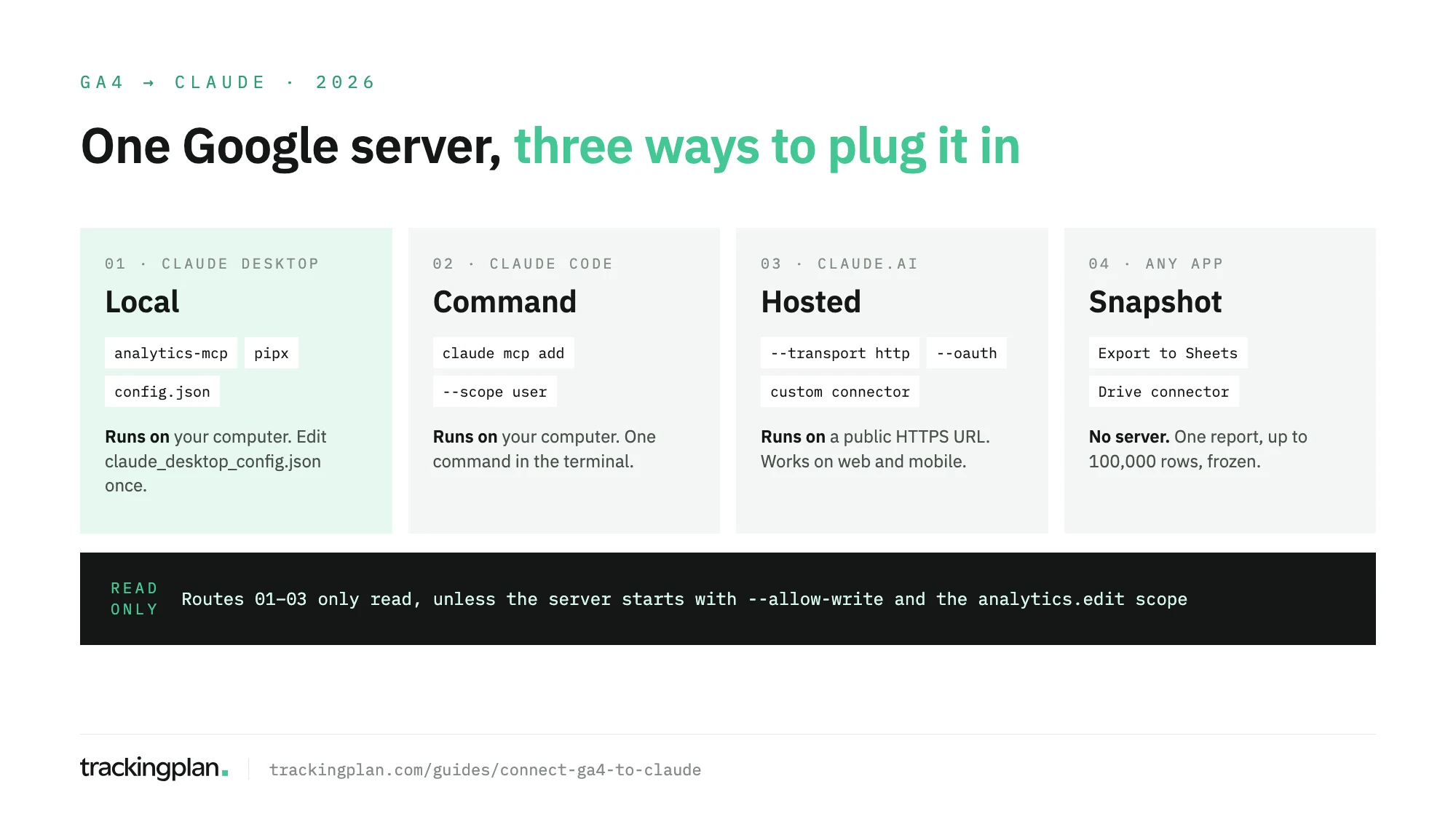
| Claude app | Route | What you need |
|---|---|---|
| Claude Desktop | Google’s server, running locally | Python, a Google Cloud project, Viewer on the property |
| Claude Code | The same server, added with claude mcp add | The same |
| claude.ai (web and mobile) | The same server, hosted, added as a custom connector | A public HTTPS URL and an OAuth client |
| Any | A report exported to Google Sheets | The Drive connector |
Why the split: Anthropic’s help center says custom connectors connect from Anthropic’s cloud, not from your device. A server on your laptop works in the desktop app and in Claude Code, never in the browser.
Before any route: the Google side
Google’s developer docs list four prerequisites:
- Python 3.10 or higher, and
pipxoruvto run the server. - A Google Cloud project with the Google Analytics Admin API and the Google Analytics Data API enabled.
- At least the Viewer role on the GA4 property, for your user or for a service account.
- Application Default Credentials with the scope
https://www.googleapis.com/auth/analytics.readonly. With your own user, that’sgcloud auth application-default loginwith that scope. Copy the path of the credentials file it prints.
Viewer is enough to read. The server sees the properties that account can see, and nothing else.
Claude Desktop: the server on your computer
Google documents this route directly. Add the server to claude_desktop_config.json, which lives in ~/Library/Application Support/Claude/ on macOS and %APPDATA%\Claude\ on Windows:
{
  "mcpServers": {
    "analytics-mcp": {
      "command": "pipx",
      "args": ["run", "analytics-mcp"],
      "env": {
        "GOOGLE_APPLICATION_CREDENTIALS": "PATH_TO_CREDENTIALS_JSON",
        "GOOGLE_CLOUD_PROJECT": "YOUR_PROJECT_ID"
      }
    }
  }
}
Replace the two values with the credentials path and your project ID. To check it loaded, ask Claude “what can the analytics-mcp server do?”, the first test prompt in Google’s README.
Claude Code: one command
In a terminal, from Google’s repository:
claude mcp add analytics-mcp \
  --scope user \
  -e "GOOGLE_APPLICATION_CREDENTIALS=PATH_TO_CREDENTIALS_JSON" \
  -e "GOOGLE_CLOUD_PROJECT=YOUR_PROJECT_ID" \
  -- pipx run analytics-mcp
--scope user makes it available in every project on your machine. Claude Code is the better fit when the GA4 answer feeds something else: a SQL query, a dashboard file, a tracking fix in the same repository.
claude.ai on the web: host it, then add a custom connector
This is the route with the most work, and the only one that reaches the browser and the mobile app.
Host the server. Google’s README documents an HTTP mode with a built-in OAuth 2.1 server, so each person signs in with their own Google account. You start it with --transport http --oauth, a Google OAuth web client ID and secret, and an issuer URL. The README walks through a Cloud Run deploy. One limit to plan for: the built-in OAuth provider keeps registrations and refresh tokens in memory, so you run a single instance, and a restart means everyone signs in again.
Add it to Claude. On Free, Pro, Max or Ultra, per Anthropic’s connector docs:
- Go to Customize > Connectors, then Add > Add custom connector.
- Enter a name and the server URL, then select Continue.
- Choose the authentication settings.
- Select Add, then Connect, and sign in with Google.
Free accounts can add one custom connector. On Team, only Owners and Primary Owners add one, from Organization settings > Connectors; members then connect with their own login. In a chat, turn it on from + > Connectors.
Read-only, until someone turns writes on
Google’s docs page and its GitHub README seem to disagree. Both are right; they describe different starts.
- Google’s setup page says the server “is available for read requests only”. That describes the server as you install it.
- The README lists three write tools:
create_property_annotation,create_custom_dimensionandcreate_key_event. Each needs the--allow-writeflag and theanalytics.editscope. Custom dimensions also need the Editor role; key events need Marketer or Editor. - Without the flag,
ANALYTICS_MCP_ALLOW_WRITEdefaults tofalse, and no write tools are offered.
So: read-only by default, three narrow writes by choice. None of the tools deletes anything.
On the Claude side, each connector has Tool permissions: set write tools to Needs approval or Blocked. Do it before you use Research, which can call connector tools without asking.
No setup: Sheets and the Drive connector
When you can’t install Python or create a Cloud project, take the report to Claude instead:
- In GA4, open the report from Reports (not in Customize report mode).
- Select Share this report > Download File > Export to Google Sheets. Google’s export help caps it at 100,000 rows.
- In Claude, connect the Google Drive connector, which Google builds and runs, and ask about the sheet.
It’s a snapshot: no new dates, no new dimensions without another export. If your team already exports GA4 to BigQuery, query the raw events instead; our guide to connecting BigQuery to Claude covers that, and the GA4 BigQuery export schema explains the tables.
What to ask once it’s connected
Each prompt maps to a tool the server exposes:
| Ask | Tool it uses |
|---|---|
| Which landing pages lost the most sessions from Organic Search in the last 28 days? | run_report |
Where do users drop between view_item, add_to_cart and purchase this month? | run_funnel_report |
| What’s ROAS by campaign for the last 30 days, under data-driven attribution? | run_conversions_report |
| How many users are on the site right now, by country? | run_realtime_report |
| Which custom dimensions exist, and which key events are defined? | get_custom_dimensions_and_metrics, list_key_events |
| Is this property linked to a Google Ads account? | list_google_ads_links |
Ask Claude to name the dimensions, metrics and date range it used. GA4 has several ways to count the same thing, and the answer changes with them.
Before you trust the answers
Claude gets what the Data API returns, which is what GA4 recorded. It doesn’t get how the hit was collected. If purchase stopped firing on Safari after a release, fires twice on the thank-you page, or arrives without its consent state, run_report hands Claude the damaged total, and Claude explains it as fluently as a correct one.
Trackingplan watches the hits, the dataLayer and the consent signals your site sends to GA4 on real traffic, and catches missing properties, duplicate fires and consent breaches as they appear. An AI agent can only reason about what it can see. Its agent also works inside Claude, as the Ask Trackingplan tool, through the plan’s MCP endpoint: one connector for the numbers, one for whether to believe them.
FAQ
Is there an official Google Analytics connector for Claude?
Google publishes an official Google Analytics MCP server and documents it for Claude Desktop and Claude Code. Anthropic’s docs don’t list a Google-built Google Analytics connector in the directory, so for claude.ai on the web you host Google’s server yourself and add its URL as a custom connector.
Can Claude change my GA4 settings through the MCP server?
Not by default. Google’s server starts read-only. Three write tools, for annotations, custom dimensions and key events, appear only if the server is started with --allow-write and the credentials carry the analytics.edit scope, plus the right role on the property.
Does connecting GA4 to Claude work on the Free plan?
Claude Desktop and Claude Code run the server on your computer. For claude.ai, custom connectors work on every plan, and Free accounts are limited to one. On Team plans only Owners can add a custom connector.
How do I see visits from Claude in GA4?
That is a different job: check Session source / medium in the Traffic acquisition report and add claude.ai to a custom AI channel, because GA4’s AI Assistant channel may not include it. Our guide to tracking ChatGPT and AI traffic in GA4 has the steps.