
TL;DR Through a connector, Claude can read only what the account you sign in with can see in that service: it inherits your permissions, campaign by campaign and property by property. Most ad and analytics platforms now publish an official MCP server you add to Claude or ChatGPT by URL or command: Google Analytics, Google Ads, BigQuery, Meta Ads, TikTok Ads and Adobe Analytics. Search Console doesn’t. Before you move budget on an assistant’s answer, Trackingplan MCP adds what the platforms can’t: whether the pixel, click ID and consent signals behind each number hold. What no other connector gives you is how each number was produced, so a broken tag reaches the assistant as a fact.
This series covers one platform per guide: how to connect it, what the assistant can read and change, and what to ask once it works. This page is the map. It answers the questions that apply to all of them, and links each guide.

What data can Claude access through connectors?
Exactly what your own account can access in the connected service, and nothing more. Anthropic’s help center says Claude “inherits each person’s permissions from the connected service”: if you can’t open a file, channel or record there, the connector can’t reach it either.
Three details change the answer in practice:
- Shared credentials. A custom connector set up with one account for the whole team reaches whatever that account can reach. If an admin connects it with a login that sees every ad account, everyone using it does too.
- Write access. Connecting grants Claude permission to read and, when the server exposes write tools, to change data in that service. Ad platform servers often do.
- Where the data goes. The connected service processes requests on its own infrastructure, under its own terms. For Google Workspace, Anthropic says it doesn’t train its models on Gmail, Drive or Calendar connector data.
ChatGPT works the same way. OpenAI’s help center says its app permissions only change when ChatGPT asks before acting. They “do not grant an app new access”.
How connectors work in Claude and ChatGPT
Both assistants connect to outside services through the Model Context Protocol (MCP). The platform runs an MCP server, and the assistant calls the tools that server exposes. You add servers in one of two ways: from a directory, or by pasting the server’s URL.
| Claude | ChatGPT | |
|---|---|---|
| Where | Customize > Connectors | Settings > Plugins |
| From a directory | Discover, then Connect to Claude | Select the app, then Connect |
| Your own server by URL | Add > Add custom connector, on every plan (Free: one) | + > Add custom MCP server, on web only |
| Plans for custom servers | Free, Pro, Max, Ultra, Team, Enterprise | Business, Enterprise, Edu; Pro is read and fetch only |
| Who adds them in a company | Owners on Team; Owners and permitted roles on Enterprise | Admins and owners publish them |
| Control over actions | Always allow, Needs approval or Blocked, per tool | Always ask, Allow read actions, Allow low-risk actions, Allow all actions |
Sources: Anthropic’s guide to custom connectors and OpenAI’s article on custom MCP servers.
Two details catch people out. Claude’s custom connectors connect from Anthropic’s cloud, so the server must be reachable on the public internet; a server that only runs on your laptop goes in Claude Desktop as an extension or in Claude Code with claude mcp add. And in ChatGPT, a custom server is web only: you can’t add one from the mobile app.
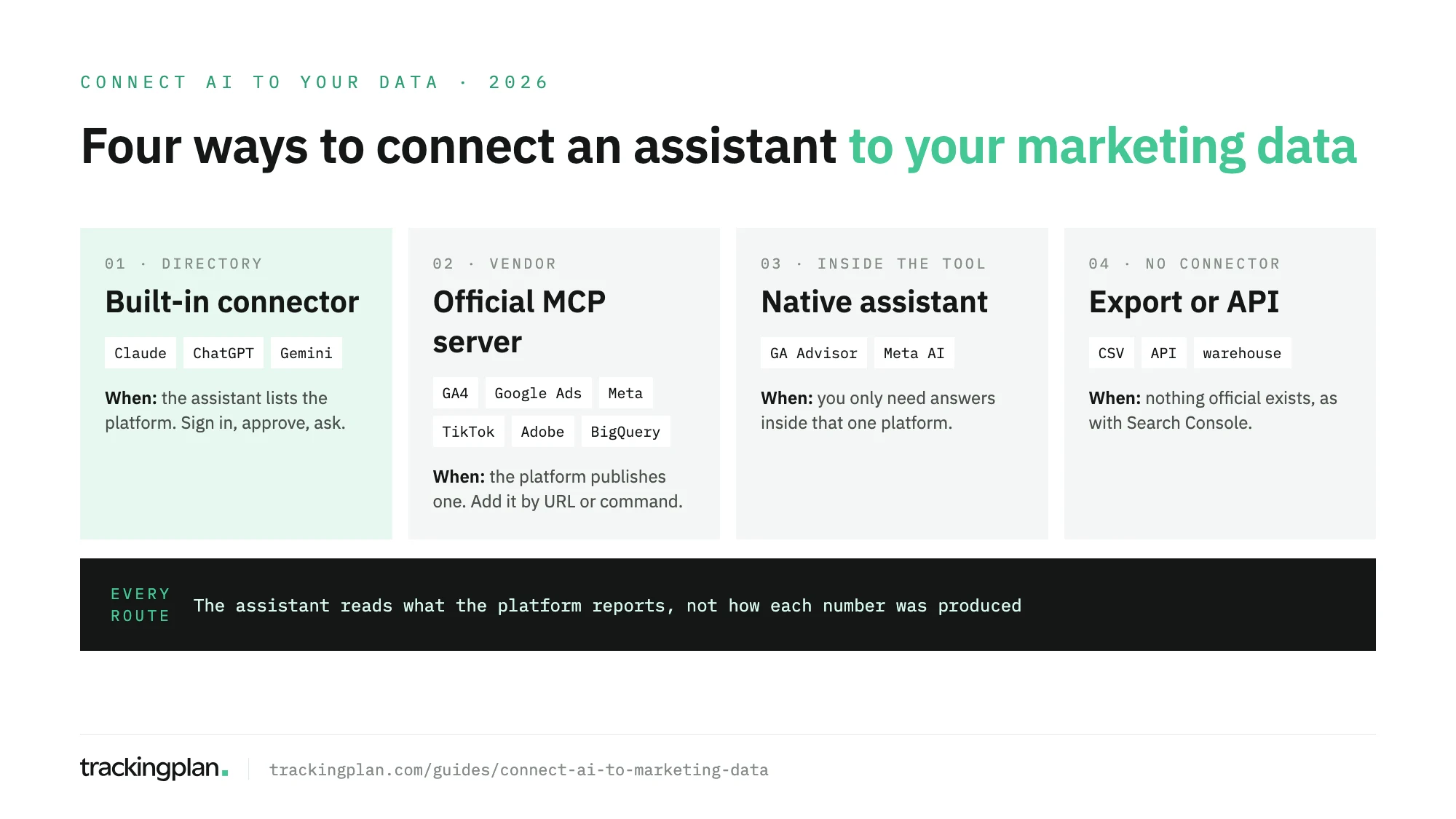
Which platforms have an official route
Six of the platforms in this series publish their own MCP server. One doesn’t.
| Platform | Official MCP server | Reads | Changes | Guide |
|---|---|---|---|---|
| Meta Ads | Yes, hosted by Meta | Reporting, catalogs, datasets | Campaigns, ads, budgets | Meta Ads |
| Google Ads | Yes, run by you | Reporting through the Google Ads API | Assets and labels, with confirmation | Claude · ChatGPT |
| TikTok Ads | Yes, hosted by TikTok | Reporting, audiences, catalogs | Campaigns and creatives | TikTok Ads |
| Google Analytics 4 | Yes, run by you | Reports and property settings | Only with an opt-in flag | Claude · ChatGPT · Gemini and Copilot |
| Adobe Analytics | Yes, hosted by Adobe | Reports, segments, metrics | With full MCP access only | Adobe Analytics |
| BigQuery | Yes, hosted by Google | Datasets and SQL results | SQL that writes, unless you use the read-only tool | BigQuery |
| Search Console | No | Nothing directly | Nothing | Search Console |
Before you move budget: Trackingplan MCP
Every server in that table hands the assistant what the platform reports. If a purchase is counted twice, a pixel stopped firing after a release, or a click ID is lost on a redirect, the assistant recommends where to put the budget anyway, and the platform’s bidding learns the same wrong lesson. Your ad platforms are only as smart as the conversion data you feed them.
Trackingplan is the other half of the answer. It monitors every conversion, UTM and consent signal on real traffic, continuously: where match rate is lost, where value is missing, where CAPI double-counts, with each gap quantified in money and sent to whoever owns the tag before bidding acts on it. It keeps attribution under watch through the click IDs, event_id and UTMs that connect a conversion to its ad. And its audits, on demand or scheduled daily or weekly, check what each pixel receives and end with the fix to ask for, so the signals you send get better.
Trackingplan MCP brings that into Claude, ChatGPT, Cursor or your IDE, together with spend, clicks and reported conversions per campaign from eleven ad networks: Google Ads, Meta Ads, LinkedIn Ads, TikTok Ads, Snapchat Ads, Pinterest Ads, Microsoft Ads, X Ads, Amazon Ads, Apple Search Ads and Reddit Ads. An admin connects the accounts once (Ad Platforms), each person signs in as themselves, and it never bids or changes a campaign.
“Hosted” servers live on the vendor’s own domain and you add them by URL. “Run by you” means the vendor publishes the code and you start it on your machine or in your cloud project, with your own credentials. The guides give the exact steps for each.
Set permissions before the first question
Ad platform servers can spend money. Meta’s server can create and edit ads, and TikTok’s packages around 400 endpoints of its API for Business, campaign creation included. Before you ask anything:
- Connect with the least access that answers your questions. A login with read rights on one ad account is enough for most reporting.
- Make write tools ask first. In Claude, set the connector’s write and delete tools to Needs approval. In ChatGPT, keep the app on Always ask or Allow read actions.
- Watch Research mode in Claude. Anthropic notes that during Research, Claude can call connector tools without asking, so turn write tools off before you start one.
- Use the platform’s own limits. Meta lets anyone with full control of a business portfolio block agent actions per ad account, or cap budgets, under Business Suite settings.
What a connector can’t tell you
Every route in this series gives the assistant the numbers the platform reports. None of them shows how a number was produced. If a tag stopped firing after a release, a purchase is counted by both the Pixel and the Conversions API, or consent signals are dropped, the platform reports the result and the assistant analyses it with the same confidence as a correct one.
That is the gap Trackingplan covers. It watches the requests your site and apps send to analytics and ad platforms, the dataLayer underneath them, and the consent signals, on real traffic. Its agent answers from that evidence, and every answer shows the queries behind it. Through Trackingplan MCP, Claude, ChatGPT or Cursor get that evidence and the ad data in the same answer: which campaigns spend with no tracked conversions, which clicks arrive without UTMs, and which conversions a platform counts that your site never sent. As the home page FAQ puts it, an AI agent can only reason about what it can see. For the longer version of that argument, see warehouse agents vs tracking agents.
The guides in this series
- Connect an AI assistant to Meta Ads Manager
- Connect Claude to Google Ads
- Connect ChatGPT to Google Ads
- Connect TikTok Ads to Claude or ChatGPT
- Connect GA4 to Claude
- Connect GA4 to ChatGPT
- Connect Google Analytics to Gemini or Copilot
- Connect Search Console to Claude
- Connect Adobe Analytics to ChatGPT or Claude
- Connect BigQuery to Claude
If what you want to measure is the traffic that AI assistants send to your site, that is a different job: see how to track ChatGPT and AI traffic in GA4.
FAQ
What data can Claude access through connectors?
Only what the account you sign in with can see in the connected service. Claude inherits each person’s permissions from that service, so a file, campaign or property you can’t open there is out of reach. A custom connector set up with a shared credential reaches whatever that credential can access.
Do I need a paid plan to use connectors?
Not in Claude: connectors from the directory work on every plan, and Free accounts can add one custom connector. In ChatGPT, connected apps depend on the plan and the workspace, and custom MCP servers need Business, Enterprise or Edu for full support; Pro gets read and fetch only.
Can a connected assistant change my campaigns?
It can if the server exposes write tools and your account has the rights. Meta’s and TikTok’s official servers can create and edit campaigns. Set write tools to need approval in Claude, or keep ChatGPT on Always ask, and grant read-only access where the platform offers it. Trackingplan MCP reads eleven ad networks, checks the signals behind their numbers, and never changes a campaign.
Which marketing platforms have an official MCP server?
Google Analytics, Google Ads, BigQuery, Meta Ads, TikTok Ads and Adobe Analytics publish their own. Google Search Console doesn’t, so the routes there are exports, the Search Console API or a community server you review yourself.