
TL;DR To connect BigQuery to Claude, add the Google Cloud BigQuery connector from Claude’s directory: Google built it, it talks to Google’s remote MCP server, and you sign in with your Google account. If your organization can’t use the directory, add the same server as a custom connector with an OAuth client you create, or run Google’s open-source MCP Toolbox on your machine. Whichever you pick, set it up read-only and cap the bytes it can scan before the first question.
BigQuery is the easy platform in this series. Google publishes the server, Anthropic lists it, and the sign-in is your normal Google account. The work is on the Google Cloud side: which identity Claude uses, what that identity can write, and how much a curious question can scan.
This guide is part of a series on connecting AI assistants to marketing data. It covers the three routes into Claude, the roles, and cost control. Whether a raw MCP connection is the right tool, or a data agent with your context behind it, is covered in BigQuery agents in your code.
Pick a route
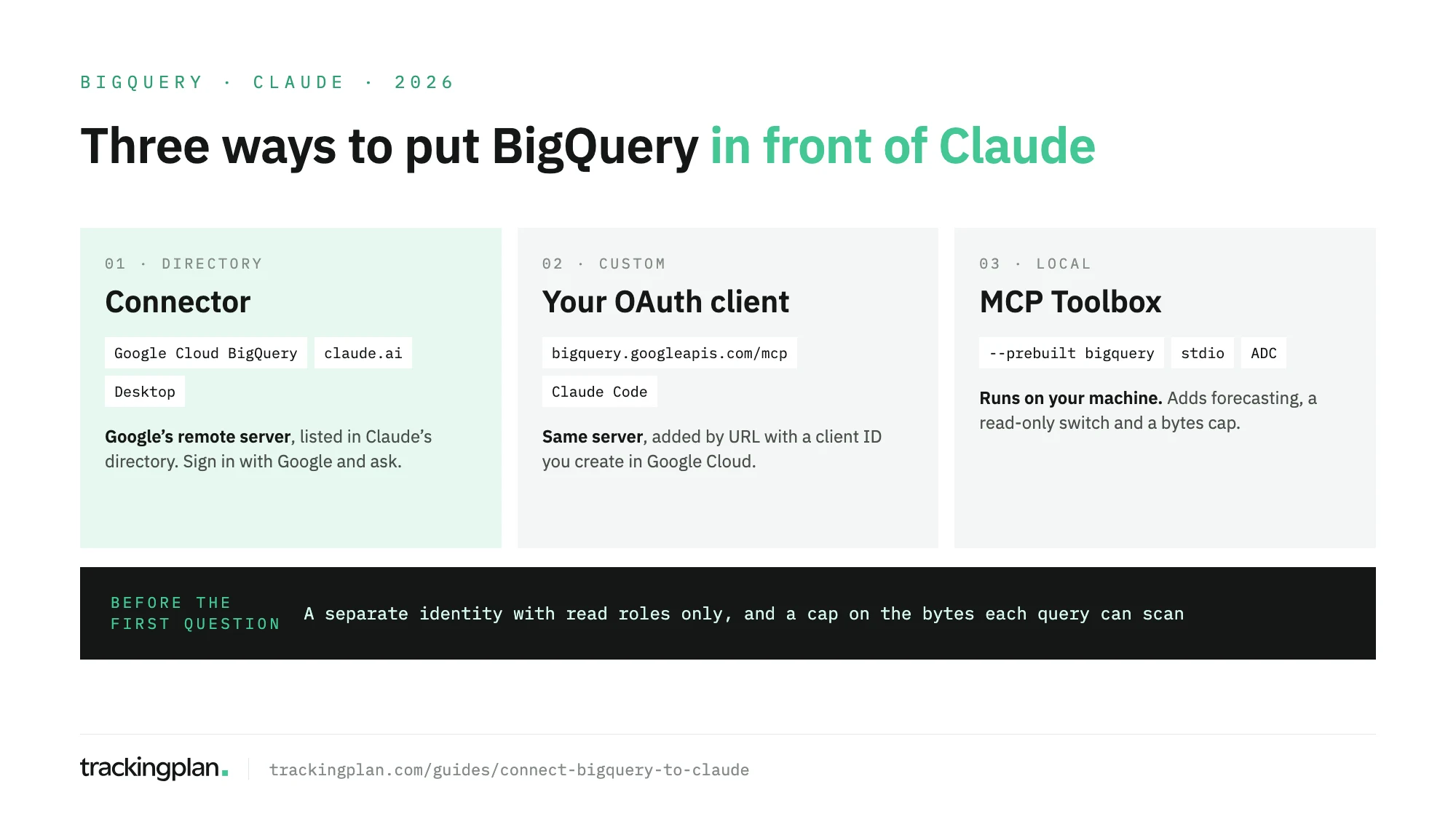
| Route | Where it works | Best for |
|---|---|---|
| Directory connector | claude.ai, Desktop, mobile, Claude Code | Most people |
| Custom connector, your OAuth client | Same | Organizations that can’t use the directory listing |
| MCP Toolbox | Claude Desktop, Claude Code | Analysts who want a bytes cap and a read-only switch |
Before any route: the Google Cloud side
Google’s setup page for the remote server sets three conditions.
- The API is on. The remote MCP server is enabled with the BigQuery API, which new projects have by default.
- The identity has three roles on the project: MCP Tool User (
roles/mcp.toolUser) to call tools, BigQuery Job User (roles/bigquery.jobUser) to run queries, and BigQuery Data Viewer (roles/bigquery.dataViewer) to read tables. - The scope is BigQuery. The server authenticates with OAuth 2.0 and the scope
https://www.googleapis.com/auth/bigquery.
Google recommends a separate identity for agents. Use one: a Google account or group whose only grants are the read roles on the datasets you want Claude to see. Claude inherits that identity’s permissions, nothing more and nothing less.
Route 1: the directory connector
Claude’s directory lists Google Cloud BigQuery, marked Made by Google and Anthropic verified. It connects to https://bigquery.googleapis.com/mcp. Anthropic’s connector guide gives the steps:
- In claude.ai or the desktop app, open Customize > Connectors > Discover.
- Search for BigQuery and select Connect to Claude.
- Sign in with the Google identity from the previous section and approve.
The connector then shows as Connected. It works on the web, desktop and mobile, and in Claude Code when you sign in with your Claude account. On Team and Enterprise plans, an Owner enables it for the organization first, and each member still signs in as themselves.
The listing shows five tools: list_dataset_ids, get_dataset_info, list_table_ids, get_table_info and execute_sql. The first four read metadata. The last one runs SQL, and Google’s page notes it’s the only one that isn’t read-only.
Route 2: the same server, with your own OAuth client
If your organization won’t enable the directory listing, or wants the sign-in tied to its own Google Cloud project, add the server by URL. Google’s remote servers don’t register clients on their own, so you create one. Google’s client setup page has the Claude values:
- In the Google Cloud console, go to Google Auth Platform > Clients > Create client.
- Set Application type to Web application.
- Add
https://claude.aiunder Authorized JavaScript origins andhttps://claude.ai/api/mcp/auth_callbackunder Authorized redirect URIs. - Select Create and copy the client secret. It’s shown once.
Then, in Claude, go to Customize > Connectors > Add > Add custom connector, enter a name and https://bigquery.googleapis.com/mcp, and select Continue. Under OAuth client, choose Use your own OAuth client and paste the ID and secret, then Add and Connect. On Team, only Owners and Primary Owners add custom connectors. Free accounts get one.
In Claude Code, the command takes the client directly. Anthropic’s Claude Code docs say to register http://localhost:PORT/callback as the redirect URI for this flow:
claude mcp add --transport http \
  --client-id YOUR_CLIENT_ID --client-secret --callback-port 8080 \
  bigquery https://bigquery.googleapis.com/mcp
Run /mcp inside Claude Code to sign in.
Route 3: MCP Toolbox on your machine
MCP Toolbox for Databases is Google’s open-source server, in Google’s mcp-toolbox repository. It runs locally, uses your Application Default Credentials, and adds tools the remote server lacks: forecast, analyze_contribution, search_catalog and ask_data_insights. Google’s Toolbox setup page covers the install; for Claude Desktop, the config goes under Settings > Developer > Edit Config.
What makes it worth the extra setup is two environment variables listed in the Toolbox repository’s docs:
BIGQUERY_READONLY=trueenforces read-only mode across every tool.BIGQUERY_MAXIMUM_BYTES_BILLEDcaps the bytes each query can scan. A query over the cap fails before it runs and costs nothing.
In Claude Code, after gcloud auth application-default login:
claude mcp add --env BIGQUERY_PROJECT=your-project \
  --env BIGQUERY_READONLY=true \
  --env BIGQUERY_MAXIMUM_BYTES_BILLED=10000000000 \
  --transport stdio bigquery \
  -- npx -y @toolbox-sdk/server --prebuilt bigquery --stdio
That cap is 10 GB a query. Pick yours from the size of the tables Claude will read.
Read-only and cost control
Three controls, from the server outwards.
- Tools. Google’s server also offers
execute_sql_readonly, which rejects DML and DDL. In Claude, open the connector’s Tool permissions and setexecute_sqlto Blocked or Needs approval. Google’s page adds an IAM deny policy onexecute_sqlfor a block Claude can’t override. - Roles. Data Viewer and Job User can’t modify tables. A role such as BigQuery Data Editor can. If the identity has it,
execute_sqlcan use it. - Bytes. Google doesn’t document a per-query bytes limit on the remote server. Set BigQuery’s custom quota Query usage per day per user under IAM & Admin > Quotas & System Limits, so a runaway question fails with
quotaExceeded. The full set of limits, with partitions and the jobs history, is in data agents in production. Google labels MCP jobsgoog-mcp-server:true, so you can find their cost in that history.
Results are capped at 3,000 rows, and queries stop after three minutes by default. Ask for aggregates, not raw events.
What to ask once it’s connected
GA4 export tables are where most marketing teams start. The traps in that schema are in inside the GA4 BigQuery export. If you’d rather query GA4’s own reports than the export, connect GA4 to Claude instead.
| Ask | What it uses |
|---|---|
“List the datasets in my-project and describe the tables in analytics_123456.” | list_dataset_ids, get_table_info |
“Which columns hold traffic source and campaign in events_*? Don’t query yet.” | get_table_info |
“Purchases and revenue by day for the last 14 days. Filter on _TABLE_SUFFIX and show me the SQL first.” | execute_sql_readonly |
| “Sessions by source and medium, this week against last week.” | execute_sql_readonly |
| “Find days in the last 30 where purchases fell by more than a third.” | execute_sql_readonly |
Asking for the SQL before the result is a habit worth keeping. It shows you the date filter, and that filter sets the bill.
Before you trust the answers
Claude reads your tables. It doesn’t read the hits that filled them. If the checkout tag lost its value parameter in last Tuesday’s release, if a consent change dropped one country, or if purchase fires twice on one payment method, the export holds those rows, and Claude sums them into a confident revenue trend.
Trackingplan watches the hits, the dataLayer, the consent state and the pixels on real traffic, before any of it reaches BigQuery, and flags missing properties and duplicate fires when they start. An AI agent can only reason about what it can see. Its agent answers inside Claude too, as the Ask Trackingplan tool through the plan’s MCP endpoint, next to the BigQuery connector. Which question goes to which is covered in warehouse agent or tracking agent.
FAQ
Is there an official BigQuery connector for Claude?
Yes. Claude’s directory lists Google Cloud BigQuery, made by Google and marked Anthropic verified. It points at Google’s remote MCP server, https://bigquery.googleapis.com/mcp, and you sign in with your Google account. That identity needs MCP Tool User, BigQuery Job User and BigQuery Data Viewer on the project.
Can Claude change or delete data in BigQuery?
It can if the identity it uses has write roles, because the execute_sql tool runs any statement those roles allow. Give the identity only BigQuery Data Viewer and Job User, set execute_sql to Blocked in Claude’s tool permissions or deny it with an IAM policy, and in MCP Toolbox set BIGQUERY_READONLY to true.
How do I limit what Claude’s BigQuery queries cost?
Google doesn’t document a per-query bytes setting for the remote server, so cap the identity with BigQuery’s custom quota for query usage per day per user. If you run MCP Toolbox, set BIGQUERY_MAXIMUM_BYTES_BILLED: a query over the limit fails before it runs and costs nothing.
Do I need a paid Claude plan to connect BigQuery?
No. Directory connectors are available on every plan, and custom connectors too, with Free limited to one. On Team and Enterprise an Owner has to enable the connector first. MCP Toolbox runs locally in Claude Desktop or Claude Code.