
TL;DR Inside Adobe, the Data Insights Agent works in Customer Journey Analytics only, and Coworker reads both CJA data views and Adobe Analytics report suites. Outside Adobe, Claude, ChatGPT, Cursor and Copilot Studio reach both products through Adobe’s own MCP servers, at no extra cost. All of them read what Adobe processed. None of them sees the hits.
Adobe’s agentic AI lineup for analytics keeps changing, and the names change with it. AI Assistant, Agent Orchestrator, Data Insights Agent, CX Enterprise Coworker, two MCP servers. Some work in Adobe Analytics, some only in CJA, some need a license you may not have.
This post sorts them by where they run, what they read and what they can change, from Adobe’s own documentation as it stands today. For the definition of the category, start with what agentic analytics is.

Which AI agents work with Adobe Analytics or CJA?
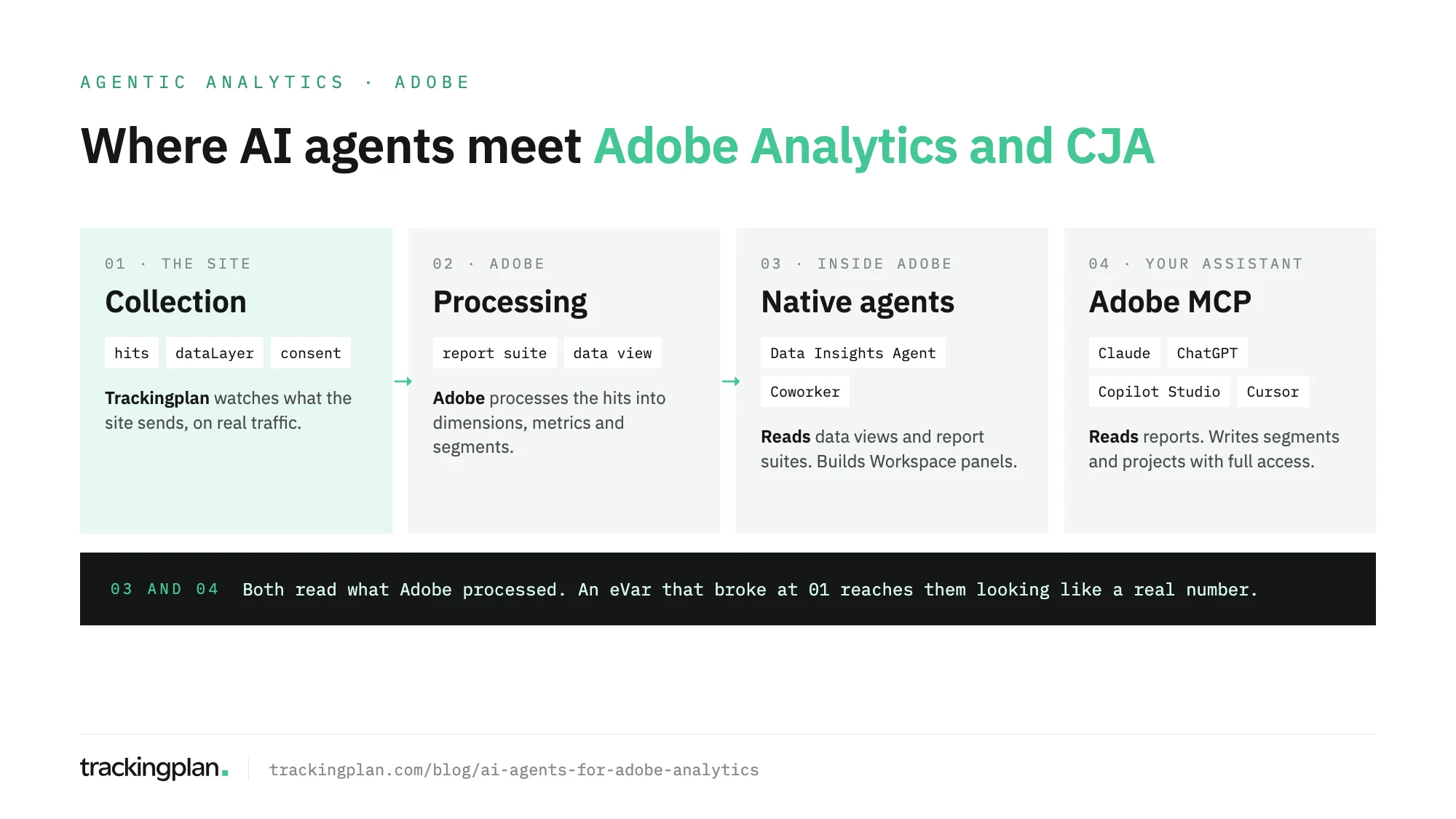
Three groups work with Adobe’s analytics data today:
- Adobe’s native agents. The Data Insights Agent (CJA only) and Coworker (CJA and Adobe Analytics), coordinated by Agent Orchestrator.
- General assistants through Adobe’s MCP servers. Claude, ChatGPT, Cursor and Microsoft Copilot Studio, connected to
aa-mcp.adobe.ioorcja-mcp.adobe.io. - Agents that work before Adobe. Trackingplan reads the hits, the dataLayer and the consent state your site sends to Adobe, which none of the others see.
Adobe’s own agents
Agent Orchestrator
Adobe’s Agent Orchestrator page calls it “the new agentic layer in Adobe Experience Platform”. It runs behind the AI Assistant chat, picks the specialized agents a request needs and combines their answers. The agents it lists are Audience, Data Insights, Experimentation, Journey, Product Support, and an Adobe Marketing Agent for Microsoft 365 Copilot that brings Experience Platform insights into Teams, Word, PowerPoint and Excel.
Only one of them answers analytics questions: the Data Insights Agent. On licensing, the same page says access “may require an additional license” and points you to your Adobe representative.
Data Insights Agent
The Data Insights Agent turns a question into a freeform table and a chart in Analysis Workspace: line, bar, donut, summary number or multi-line. Follow-up prompts change the last visualization. Adobe’s Data Insights Agent page is explicit on two points that decide whether you can use it:
- It works in Customer Journey Analytics, not in Adobe Analytics.
- It is “available to eligible customers for a limited time”. Continued use goes through an Agent Orchestrator license.
Before it answers, three things must be in place: your organization has accepted Adobe’s generative AI terms, an admin has added the Data Insights Agent permission under Reporting Tools in the Admin Console, and the data view is enabled for the agent (up to 50 per organization). It reads the components and data of that data view. It doesn’t export, share, or build flow, fallout or cohort views, and it can’t reply with a written summary in the chat rail. The answer is always a visualization.
Coworker
Coworker is the newest piece and the one that reaches Adobe Analytics. Adobe’s Coworker Chat page says it analyzes “Customer Journey Analytics data views or Adobe Analytics report suites”, connecting through the same aa-mcp and cja-mcp integrations as the MCP servers below. It inherits your permissions and builds visualizations you can open in Analysis Workspace.
Inside CJA there is also an in-product Coworker panel in Workspace. Adobe’s in-product Coworker page puts it in Limited Testing, disabled by default until a CJA admin enables it. It reads the open project and can add panels, change date ranges, and create segments, date ranges, simple calculated metrics and whole projects. Before deleting panels, it lists them and waits for your confirmation. Adobe’s CJA pages for AI Assistant now lead to this panel.
Coworker is part of Adobe CX Enterprise Coworker and runs on AI Credits. Adobe’s trial page describes a trial of 10,000 credits for eligible customers, after which Coworker Chat needs credits bought separately. Pricing on request.
Claude, ChatGPT and Copilot Studio through Adobe’s MCP servers
If your team already works in a general assistant, Adobe’s MCP servers are the shortest route. There is one for each product: https://aa-mcp.adobe.io/mcp for Adobe Analytics and https://cja-mcp.adobe.io/mcp for CJA. Adobe’s MCP guides cover Claude, ChatGPT, Cursor and Copilot Studio, and the Adobe MCP FAQ says they come “at no extra cost” for all Adobe Analytics and CJA customers.
What they need is an MCP permission in the Admin Console: MCP Read-only Access to find components and run reports, or MCP Full Access to also create and update segments, calculated metrics, date ranges and Workspace projects. The CJA server can also create and update audiences. Neither server edits admin settings, report suites or data views, and neither deletes anything.
Two limits shape every answer: runReport returns up to 100 rows per call, and each call counts toward your monthly report request allowance.
In Copilot Studio, Adobe’s Copilot Studio guide has you create a Model Context Protocol tool with the server URL, set OAuth 2.0 with dynamic discovery, add the tool to an agent and sign in with your Adobe ID. Adobe Analytics and CJA are separate tools. The step-by-step for Claude and ChatGPT, with the Admin Console path, is in our guide to connect Adobe Analytics to ChatGPT or Claude.
The agents side by side
| Agent | Where it runs | What it reads | What it can change | What it needs |
|---|---|---|---|---|
| Data Insights Agent | AI Assistant in CJA | Components and data of enabled CJA data views | Adds a table and a chart to a Workspace panel | CJA, generative AI terms, permission, enabled data view; Agent Orchestrator license after the limited-time access |
| Coworker Chat | Adobe CX Enterprise Coworker | CJA data views and Adobe Analytics report suites you can access | Creates visualizations you open in Workspace | AI Credits (trial, then purchase); pricing on request |
| Coworker in Workspace | Chat panel in CJA Analysis Workspace | The open project and your data views | Panels, segments, date ranges, simple calculated metrics, projects; deletes after confirmation | Limited Testing; a CJA admin enables it |
| Claude, ChatGPT, Cursor, Copilot Studio via Adobe MCP | Your assistant | Report suites or data views, components, reports up to 100 rows | With Full Access: segments, calculated metrics, date ranges, projects; audiences in CJA | MCP Read-only or Full Access; no extra Adobe cost; your assistant’s plan |
| Trackingplan | Its own panel, Slack, and Claude, ChatGPT or Cursor via MCP | Hits, dataLayer, consent state and GTM releases on real traffic | Plan changes only after you approve them | Trackingplan installed on the site |
What every Adobe agent has in common
Each agent above, native or through MCP, starts from the report suite or the data view. That is the right place to ask how many orders came from paid search. It is the wrong place to ask whether the number is true.
If an eVar stopped being set after a release, if the products string lost its revenue on one checkout path, or if a consent change cut a market, the report suite holds the damaged numbers and nothing more. The agent sees a drop, builds a confident chart and looks for a business cause. It is reasoning correctly about the wrong data.
Our Adobe Analytics audit walks the layers where that damage starts: the SDR, the hits, the Adobe Tags rules, the report suite settings and consent. Only the last two are visible from inside Adobe.
Where Trackingplan fits for Adobe
Trackingplan is a digital analytics agent, and Adobe is a supported integration. An AI agent can only reason about what it can see, so Trackingplan works one step earlier: it watches the hits, the dataLayer and the consent state your site sends to Adobe Analytics on real traffic, and flags missing properties, duplicate fires and broken triggers as they appear.
When you ask it why a metric moved, it investigates before it answers. It names a cause only when two independent pieces of evidence agree, shows the queries behind every answer, and says when it can’t conclude. Changes to the tracking plan wait for your approval.
It also works next to Adobe’s own route. Connect Adobe’s MCP server and Trackingplan’s MCP endpoint to the same Claude or ChatGPT, and one chat can ask Adobe for the number and Trackingplan whether the tracking behind it held. Agencies with several Adobe clients can get one digest per client every morning. For how it compares with the other agents that read marketing data, see AI analytics agents compared.
FAQ
Which AI agents work with Adobe Analytics or Customer Journey Analytics?
Three kinds. Inside Adobe: the Data Insights Agent, which works in Customer Journey Analytics only, and Coworker, which reads CJA data views and Adobe Analytics report suites. Outside Adobe: Claude, ChatGPT, Cursor or Copilot Studio through Adobe’s own MCP servers for each product. Trackingplan sits before all of them and watches the hits, the dataLayer and the consent state that feed Adobe.
Does the Data Insights Agent work with Adobe Analytics?
No. Adobe’s page says it is not available in Adobe Analytics. It works in Customer Journey Analytics, on data views an admin has enabled for it, and builds a freeform table and a visualization in Analysis Workspace.
Do Adobe’s AI agents cost extra?
The Adobe Analytics and CJA MCP servers don’t: Adobe includes them for all customers, and each report counts toward the monthly report request allowance. Agent Orchestrator may require an additional license, and Coworker Chat runs on AI Credits that are bought separately. Adobe doesn’t publish prices for either; they are on request.
Can an AI agent change my Adobe Analytics setup?
Some can. Through the MCP servers with MCP Full Access, an assistant can create or update segments, calculated metrics, date ranges and Workspace projects, and audiences in CJA. Coworker in Workspace can create segments and projects and asks for confirmation before deleting panels. The MCP servers don’t edit admin settings, report suites or data views.
Can an AI agent tell me if my Adobe tracking is broken?
Not from the report suite alone. Adobe’s agents and the MCP servers read what Adobe processed, so an eVar that stopped being set looks like a real drop. Checking the tracking needs the hits themselves: the Debugger for one page, or monitoring of real traffic such as Trackingplan’s.