
Tuesday afternoon arrives, your front-end team pushes a checkout release, and someone on analytics opens a fresh browser window to check the cookie banner. You click reject, open the network tab, take three screenshots, and paste a dozen vendor domains into a shared spreadsheet. By Thursday, a marketing manager updates a tag trigger in Google Tag Manager, and those screenshots are already out of date.
Many organizations still handle marketing privacy as a quarterly legal review or a one-time setting inside a consent management platform (CMP). Enforcement data shows why that approach breaks down in production. Since the GDPR began applying on 25 May 2018, European data protection authorities have issued more than 6,680 fines totaling approximately €4.2 billion, according to a European Commission GDPR enforcement report.
A settings export answers the wrong question. When regulators ask what your site sent to an ad vendor last month, they want evidence of what fired in the browser, hit by hit, not what the CMP was configured to allow. The banner makes a promise; the tags either keep it or break it, and that can change with every release.
Automated compliance reporting treats privacy as a repeatable technical test of what your tags do against what your banner promises. Instead of a yearly review of documents, the comparison runs continuously on live production hits: consent state on every request, vendors firing before a choice, parameters carrying personal data. Each release gets tested the day it ships, and each finding reaches the tag owner with the evidence attached.
Which compliance checks still run by hand
Every analytics team knows the gap between a privacy policy page and live browser network traffic. For how to run the audit itself, see how to audit analytics tag compliance. Most of the checks that catch real leaks still depend on manual test sessions, screenshots, and spreadsheets repeated after every release.
| Check | Manual method today | Automated comparison | Evidence kept |
|---|---|---|---|
| Cookie banner against cookies set | Test session, screenshot of the banner, cookie list copied into a spreadsheet | Cookies declared in the banner against cookies set in production, per release | Cookie names, domains, page and release version |
| Vendors firing before the visitor answers | Network tab review before and after clicking accept | Vendor requests counted before any consent choice on each page | Hit, vendor, timestamp and consent state |
| Consent state on each hit | Manual match of the consent cookie against the tag list | Consent signal on every hit compared with the tags that fired | Hit ID, consent signal, tag and destination |
| PII in parameters, page paths or referrers | Ad hoc search of URLs for emails or IDs | Every hit inspected for PII patterns and classed by sensitivity level | Hit, field, sensitivity level and market |
| Collection after consent is withdrawn | Repeat test session after each release | Hits compared with the withdrawn state during the same session | Hit sequence, withdrawal event and vendor |
Three of those five checks account for most of the manual QA burden on privacy and analytics teams. Each one compares what the site claims with what production runs.
Three manual checks that break between releases
Comparing the cookie banner to live cookies. Say your consent banner declares 45 cookies across analytics and advertising categories, while production sets 47 after a third-party widget update. A manual walkthrough catches those two extra cookies only if an analyst tests that exact page, in that browser, after that release. Automated checks compare the declared cookie list against every cookie observed in production on every hit.
Checking which vendors fire before a choice. Under the UK Information Commissioner's Office storage and access guidance, PECR applies whenever scripts or tags access or store information on a visitor's device, even without conventional cookies. Non-exempt advertising tags need clear, informed, affirmative prior consent, with only limited exemptions for strictly necessary technologies. Checking this by hand means loading a fresh session, pausing before touching the banner, and reading raw network logs line by line.
Matching consent signals against fired tags. A single consent string inside a cookie doesn't prove that downstream tags respected it. Say a visitor grants analytics consent and denies advertising, yet a retargeting pixel still fires on the product page because its trigger checks the wrong dataLayer variable. Reading one test session won't reveal whether that failure happens across regional templates or only on specific checkout steps.
According to Google's website consent guidance, compliance requires three separate controls: collect the visitor's choice, communicate that choice to Google, and make Google and third-party tags behave according to it. A manual test session with screenshots documents one visit at one moment. It doesn't verify production hits or prove how tags behave after the next code push.
How an automated consent check runs
Moving consent checks out of spreadsheets starts with defining the exact browser and server behavior expected for every visitor choice. The GDPR compliance guide for websites turns the same states into eight tests. Instead of checking a CMP dashboard, automated compliance reporting validates each consent state against live network requests.
| Consent state | Expected hits | Finding if violated |
|---|---|---|
| No consent | Strictly necessary cookies only, no analytics or advertising requests | Any analytics or advertising hit or cookie |
| Analytics consent only | Analytics hits, no advertising pixel or conversion request | An advertising tag or pixel firing |
| Advertising consent | Advertising tags fire with the consent signal attached to each hit | Missing consent signal on an advertising hit |
| Reject after the banner | No non-essential hits after the reject click, including server-side requests | Any hit sent after the reject |
| Consent withdrawn mid-session | Collection stops from the withdrawal event onward | Hits that continue after withdrawal |
| Regional default state | Default consent state matches the rule for each market | Default that differs from the legal setting for that market |
The diagram below shows how a single compliance rule moves from plain-English definition through a structured test pipeline and into a report.
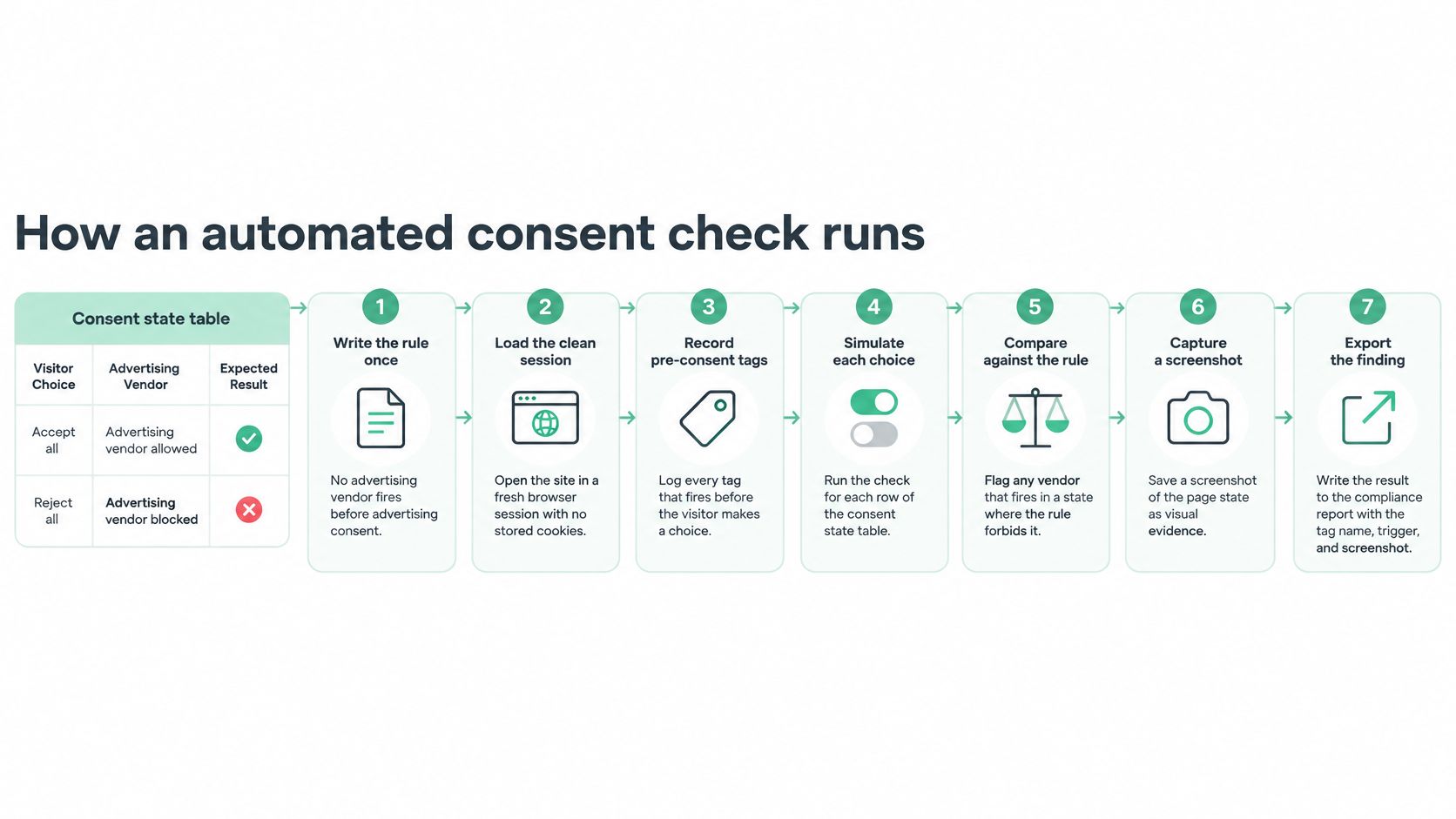
Standardized, embedded validation rules are not a new idea in regulated industries. A chapter of the BIS's IFC Bulletin on granular data describes how those rules replaced manual spreadsheet assembly and reduced reporting errors. Marketing tag governance can apply the same pipeline discipline to websites and server-side implementations.
Seven steps from rule to tag owner
- Write the rule once in plain English. Start with a clear test condition, such as "no advertising vendor fires before advertising consent." That single rule becomes the check run against every row in the consent table.
- Schedule daily or weekly runs. Automated checks don't need real-time alerting to be effective. Running them daily or weekly across no consent, analytics consent, and advertising consent states catches regressions right after releases without flooding your team with noise.
- Capture the initial consent state at page load. Record the exact purposes granted, the regional default state, and the timestamp or consent version before any tags execute.
- Log every network hit before and after the choice. Walk a fixed journey across key templates and record dataLayer events, cookies, local storage entries, Meta Pixel hits, and server-side requests, noting the tag, event name, endpoint, and destination.
- Compare each hit against the approved purpose inventory. Separate strictly necessary technologies from analytics and advertising requests. Any hit that fires without matching permission triggers a failed test showing both the prohibited request and the consent condition that allowed it.
- Attach the release version and an evidence link. Tie the failure to the exact deployment and preserve the underlying request payload so an auditor or engineer can verify the state without trying to reproduce it by hand.
- Route the failure straight to the tag owner. Send the ticket or alert to the person who maintains Google Tag Manager, server-side GTM, or the front-end template, rather than letting it sit inside a passive dashboard.
Understanding how consent signals and tag execution interact matters because browser tags and server endpoints often read different variables. Trackingplan runs this type of check automatically on a daily or weekly schedule, inspecting every hit for PII leaks, Consent Mode misfires, and vendors firing before opt-in across websites and server-side pipelines.
Why Consent Mode alone is not proof
Many teams assume enabling Google Consent Mode settles their compliance obligations. Production audits show the opposite. A 2026 governance audit of 435 European websites found that only 205 sites (47.1%) sent any Google Consent Mode signal at all, and among those sites, just 71.2% correctly signaled a denied choice.
Enforcement bodies are testing live opt-out behavior directly rather than accepting configuration screenshots. In 2022, California's Attorney General settled with Sephora over third-party trackers on its site and opt-outs sent through Global Privacy Control that it ignored, a case about what the site did rather than what it promised. A passing scheduled run where every recorded hit matches its consent state provides the actual proof.
Findings that reach the tag owner with evidence
A compliance summary that says "14 consent warnings detected this week" creates work instead of closing it. Someone still has to open developer tools, hunt for the broken page, guess which container caused it, and figure out who owns the fix. Reports become usable audit evidence only when every row points directly to production traffic.
Five evidence fields behind every finding
Before a finding leaves the reporting tool, it needs five specific fields attached to it:
- The source hits: Direct links to the exact network requests that violated the rule, complete with payloads and timestamps.
- The receiving vendor or destination: The endpoint domain or ad platform that received the data.
- The cookie or property involved: The specific cookie name, query parameter, or dataLayer property carrying the unconsented value or personal data.
- The market and regulation: The geographic region where the hit fired and the applicable legal framework, such as GDPR, ePrivacy, or CCPA.
- The share of hits and sessions affected: How wide the leak is, separating an edge-case bug from a site-wide failure.
Those five fields answer the four questions every GDPR, ePrivacy, or CCPA reviewer asks: which request happened, who received it, under what consent condition, and since when. The same structured record can go out to your Data Protection Officer (DPO) by email every week while feeding engineering remediation tickets directly.
Five issues one tag change resolves
Not every finding belongs in a weekly summary. Five high-signal failures should route immediately to the privacy channel with the hits, the vendor, the regulation, and the tag owner assigned.
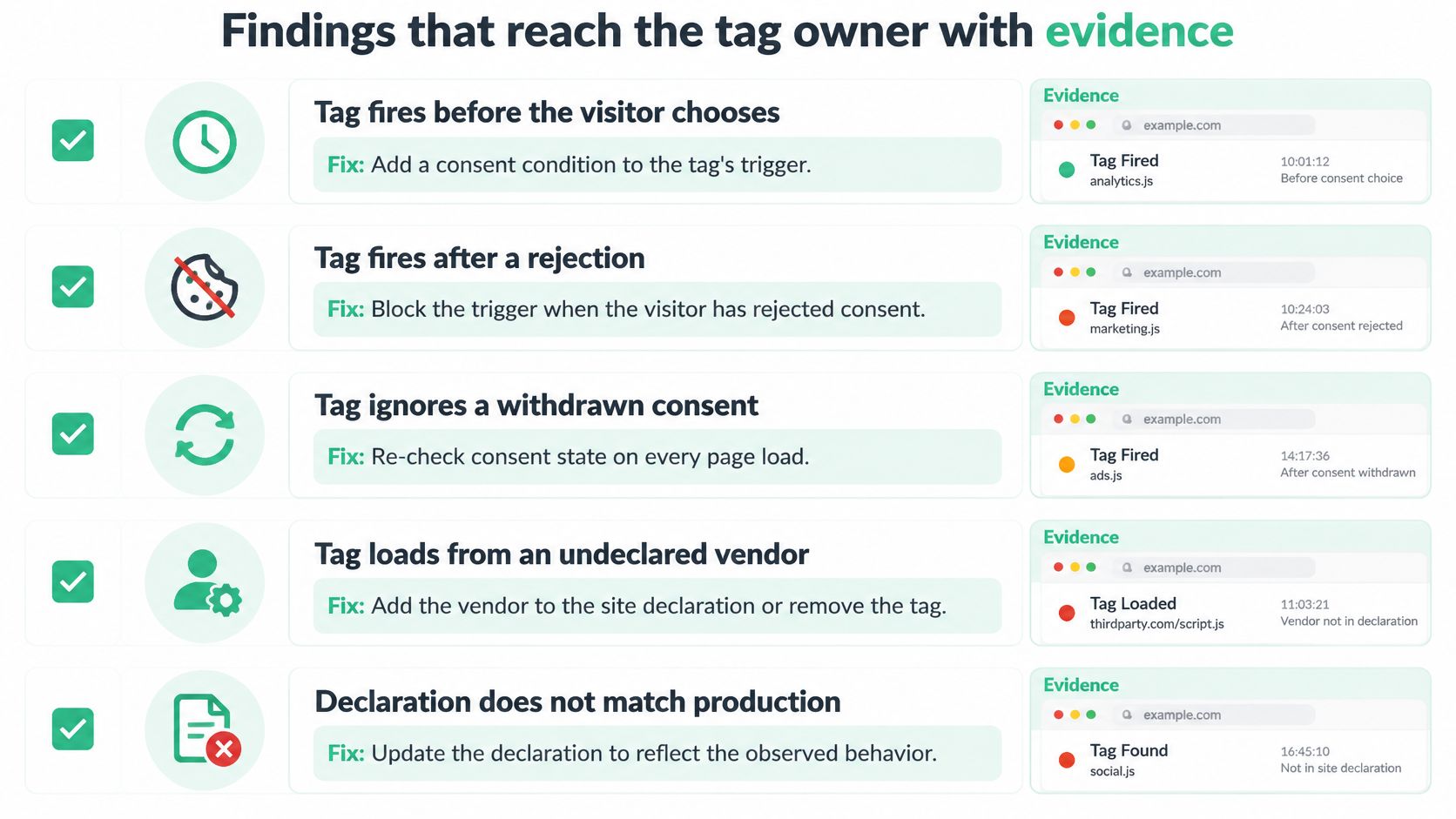
Each of these five issues maps to a single, direct technical fix:
- Tag fires before the visitor chooses: Add an explicit consent condition to the tag's trigger so it stays dormant until an affirmative choice exists.
- Tag fires after a rejection: Gate the trigger on the stored consent choice rather than firing on a generic page-view event when the banner closes.
- Tag keeps collecting after consent is withdrawn: Wire the CMP's consent-withdrawal event directly into the tag manager and re-evaluate consent state on subsequent hits.
- PII travels in a parameter, page path, or referrer: Strip or replace the sensitive value inside the dataLayer push or tag template before the hit leaves the browser or server container.
- Vendor loads before opt-in: Move the third-party script behind the consent gate or remove undeclared scripts from the template entirely.
Lower-urgency discrepancies, such as minor cookie description mismatches on low-traffic pages, stay in the weekly audit report so engineers don't suffer alert fatigue.
From broken hit to verified fix
Say a developer ships a password-reset confirmation page that appends the visitor's email address as a URL query parameter. That same afternoon, a scheduled check catches the email string inside an analytics page-view hit and sends an alert to the privacy channel. The message names the parameter, links the exact hits, shows the analytics destination, notes the affected market, and tags the front-end owner.
The engineer strips the query parameter from the redirect URL before the next release. On the following daily check, the rule runs against the same template, sees zero email patterns in production hits, and logs a dated confirmation in the audit trail. Look at your current compliance report right now and verify whether all five evidence fields appear on every line. If any field is missing, your team is reading a summary, not an audit trail.
How to rank privacy findings by risk
Once automated checks run across every page and server container, more than one issue can surface at the same time. Fixing them in random order wastes engineering hours and leaves serious exposure open longer than necessary. For personal data leaks, teams can sort each finding into three sensitivity tiers, from most sensitive to least sensitive.
| Level | Examples | What it means for the fix |
|---|---|---|
| Highly Sensitive Personal Information | Card numbers, national IDs, health data | Highest priority; remove the value at the tag or parameter before the next release |
| Sensitive Personal Information | Email, name, phone, IP | Remove or hash the value before it is sent; confirm the destination is permitted |
| General Information | Country | Review the destination and the consent basis for the hit |
Sorting PII into these three tiers helps an exposed payment or health field jump ahead of routine parameter cleanup. Teams looking to tighten parameter hygiene can pair these tiers with clear internal standards for identifying and safeguarding personally identifiable information before it reaches third-party endpoints.
What technical severity can and cannot decide
Automated tools should stay inside their lane. They can show sensitivity, scope, destination, and affected templates. They should avoid pretending to make legal calls.
A PII leak, a missing consent signal, and an unauthorized vendor load each need a different kind of judgement. Sensitivity tiers help with the first category. They do not settle the order across all three. Setting that order belongs to the DPO, with the evidence already attached.
The practical input for that call is the scale of each finding. Useful evidence includes the share of hits and sessions affected, the destination that received the data, and whether the issue appears across the whole site or only on one template. A card number leaking on a single checkout path carries a different legal weight than an email address travelling in a referrer across every landing page.
Consent violations and unauthorized vendor loads should be described with the same evidence fields: affected hits, affected sessions, vendor or consent signal, and the template where the issue appears. That gives the DPO one comparable view without turning a technical check into a legal ruling. The tag owner still gets a fixable problem. The privacy owner still controls priority.
Conversion data checks behind the reports
Privacy governance and paid media performance run through the exact same tags, dataLayer events, and server containers. When consent gates break or identifiers drop, the damage doesn't stop at a compliance warning. Bad signals flow straight into automated bidding engines like Google Smart Bidding and Meta Advantage+, training algorithms on duplicated purchases, missing values, or unconsented events.
Data quality gaps are widespread across marketing organizations. In a 2025 survey of 200 CMOs across the United States, United Kingdom, Germany, Austria, and Switzerland, monitoring ranked as the second-highest data-governance priority at 24%, while 45% of marketing data was reported as incomplete, inaccurate, or out of date.
Before calling a channel discrepancy a tracking bug, verify platform reporting rules first. Google Analytics may apply a last-click model on the conversion date, while Google Ads credits conversions to the date of the ad click. Always compare the conversion action, attribution model, reporting window, timezone, and conversion date first, and confirm whether each Google Ads action is set to Primary (used by Smart Bidding) or Secondary (observation only).
Testing enhanced conversions and offline pipelines
Modern conversion measurement depends on first-party data pipelines that need end-to-end validation. As detailed in Google's enhanced conversions documentation, web enhanced conversions supplement browser tags with SHA-256 hashed first-party customer data, such as an email address or phone number, to match conversions to signed-in users who interacted with an ad.
Offline pipelines add another layer of failure points. Under Google's enhanced conversions for leads guide, teams combine hashed lead-form data from the website with later offline outcomes like qualified leads or closed sales. Those offline uploads require the conversion action source to be configured for manual uploads or another valid offline source, and conversion-action names must match the ones in the account.
A reliable audit tests every link in the chain independently:
- Click identifier survival: Confirm
gclidandfbclidparameters persist from landing page through checkout or lead submission. - Consent status on every conversion hit: Verify that browser tags, Meta Pixel, Conversions API (CAPI) events, and offline upload rows carry valid consent signals.
- Conversion ID, value, and deduplication: Check that transaction IDs match across Meta Pixel and CAPI so purchases aren't double-counted or missing revenue values.
- Normalization, hashing, and upload diagnostics: Validate SHA-256 formatting on eligible fields, check conversion timestamps, and separate rejected uploads from delayed batches.
Running structured conversion tracking validation alongside your consent rules ensures campaigns are optimized on conversion data the team can trust.
Run the first audit before the next release
Waiting for a formal privacy audit or a sudden drop in ad match rate is the most expensive way to discover a broken tag trigger. A faster route exists. Treat compliance as a repeatable test of what your tags do against what the banner promises, and run that test after every release instead of once a year in a legal review. You can move from ad hoc screenshots to that repeatable model before your next code push in three steps:
- Establish a manual baseline on one release. Walk through the six consent states from the table above by hand once on your current production build so your team knows which vendors and cookies fire today, before any automation takes over.
- Schedule the same rules daily or weekly. Move those checks onto an automated daily or weekly schedule covering your websites and server-side containers. The point is coverage after every release, not a one-off pass, so a regression introduced on Tuesday gets flagged before Friday's traffic amplifies it.
- Assign one clear owner per finding type. Route broken triggers and parameter leaks to the tag owner, send consent and PII breaches to the privacy channel, and deliver the weekly scale summary to your DPO for risk ranking.
Trackingplan runs these scheduled checks across more than 170 analytics and ad providers, inspecting every hit for PII leaks, Consent Mode misfires and vendors firing before opt-in, and linking production hits directly to every finding so teams catch problems before they reach legal. Its Compliance module covers PII, cookies, and consent monitoring, and works independently of your CMP.
Start with one concrete test this week: open your highest-traffic landing page in a clean session, click reject on the cookie banner, and list every network hit your site still sends after that click. Anything on that list is a finding your first automated audit would have caught for you.
Trackingplan automates daily and weekly compliance and conversion audits across websites and server-side implementations, delivering hit-level evidence directly to your tag owners and DPO in Slack, Teams, or email. Whether you need to stop pre-consent vendor leaks, catch PII in production hits, or keep conversion data trustworthy for bidding, the next step is straightforward. Visit Trackingplan to see how your tags behave in production.