
The banner went live in March. Legal approved the cookie policy, the consent platform is wired into Google Tag Manager, and the team moved on to the next campaign launch. Six weeks later a developer ships a new landing page template, an agency adds a TikTok tag for a two-week test, and the weekly report still looks fine.
That's the pattern worth naming. GDPR compliance for websites isn't a setting you switch on. It's a behaviour that has to hold on every page load, in every region, after every release, and the network panel shows whether it does.
The gap between the two is where most consent problems live, and it widens with each deploy.
Which website tags need consent before they fire
Start with the uncomfortable default. Any tag that reads or writes something on a visitor's device, or sends an identifier about that visitor to a third party, needs a lawful basis. For advertising tags and most measurement, that basis is consent. The places personal data travels are wider than the cookie list many teams keep: advertising identifiers, IP-derived metadata, device signals, and event parameters carried in a dataLayer push.
Location doesn't settle it either. Under Article 3 of the GDPR, an organisation outside the EU falls inside the regulation when it offers goods or services to people in the Union or monitors their behaviour there. A US or UK store running Meta campaigns into Germany is in scope, and the administrative-fine framework reaches €20 million or 4% of worldwide annual turnover, whichever is higher.
Here's how the common requests sort out.
| Tag or request | Consent needed? | Why | Evidence to keep |
|---|---|---|---|
| Strictly necessary cookies (login, cart, load balancing) | No | Needed to deliver the service the user asked for | Cookie inventory entry with stated purpose |
| Own-domain audience measurement (page statistics, A/B tests) | Only if every exemption condition is met | Single site, user informed, objection available, measurement use only | Written exemption check for each tag |
| GA4 with advertising or cross-service features | Yes, treat as consent-dependent | Combines data beyond the publisher's own measurement | Consent state recorded at each hit |
| Meta Pixel | Yes | Advertising identifiers and cross-service matching | Consent record and a blocked-hit test result |
| Google Ads conversion and remarketing tags | Yes | Behavioural advertising identifiers | Consent record and a blocked-hit test result |
| TikTok, LinkedIn and Pinterest insight tags | Yes | Advertising identifiers | Consent record and a blocked-hit test result |
| Server-side forwarding (CAPI, server-side GTM) | Yes, when it carries data from consent-dependent tags | The same data reaches the vendor through another route | Server log showing the consent gate |
The exemption that trips teams up
There is one narrow case where measurement can run without consent, and it gets quoted far more broadly than it applies. CNIL's guidance on analytics cookies allows an exemption only when the user is informed, an objection mechanism exists, the data use stays limited to audience measurement or A/B testing, and the scope stays inside a single site or application editor.
Fail any one condition and consent is back on the table. A tag that ships campaign IDs or conversion events to your own analytics service sits near the edge of that exemption. A Meta Pixel, a Google Ads remarketing tag, or any vendor that combines data across services sits well outside it. So does a server-side request carrying the same identifiers.
Mark every row before the next release
Build the inventory once, then keep it honest. For each tag record the vendor, purpose, destination, storage behaviour, identifiers sent, retention period and legal basis. That list is what your DPO signs, the first item of a wider GDPR compliance checklist, and what your release checks compare against observed network requests, because a newly installed script can bypass a correctly configured consent platform while the banner still looks fine.
Enforcement is not theoretical. The EDPB's 2024 annual report recorded €1,254,684,666 in fines issued by national authorities during the year. Spain recorded 281 fines totalling €35,592,200, Italy recorded 140 totalling €145,332,449, and the Netherlands recorded 16 totalling €328,030,000, which comes to 437 decisions across those three countries alone.
How consent must gate each tag in order
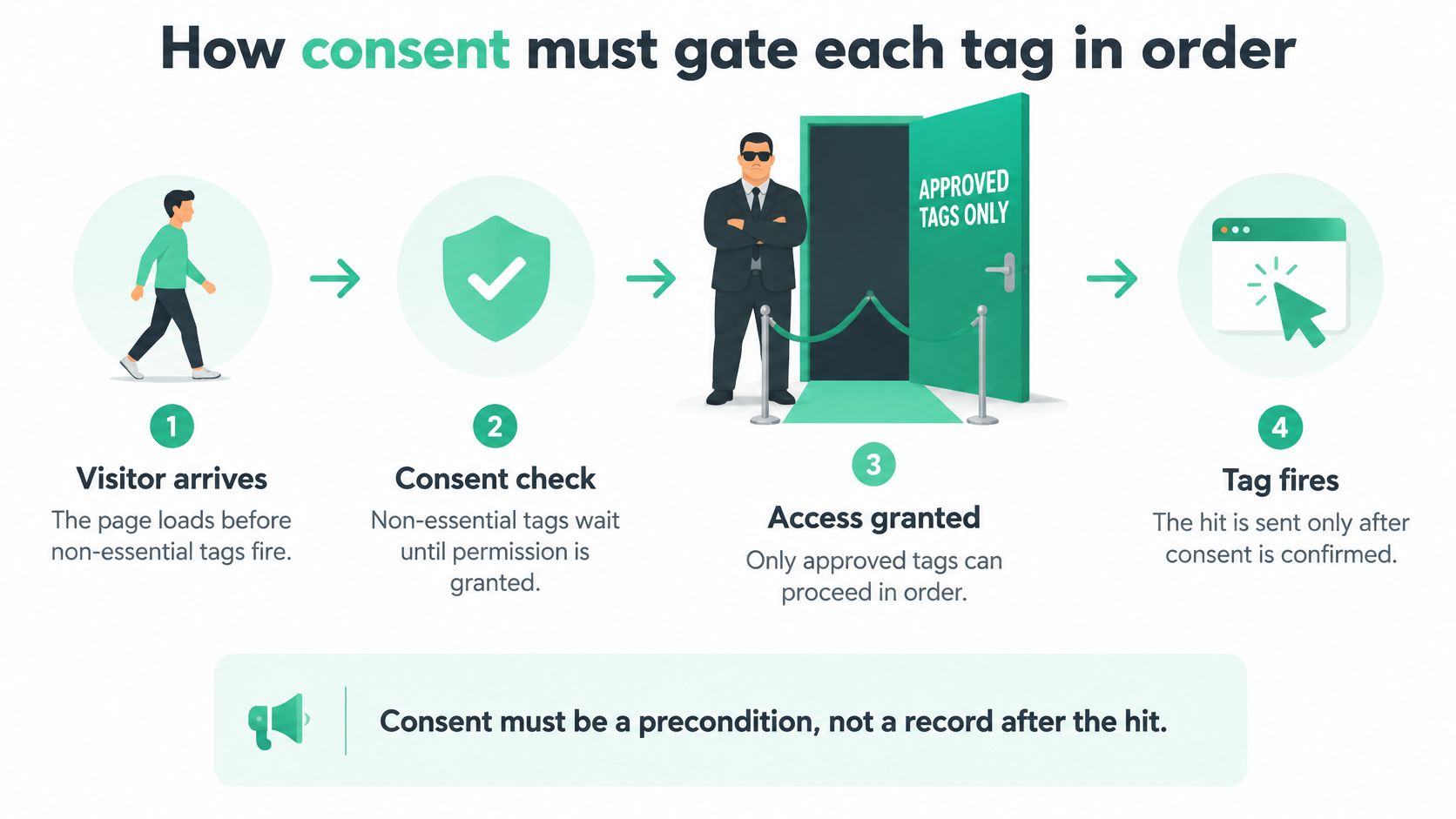
Website consent has an order: the state of the choice is read first, and the tag either gets through or it doesn't.
That ordering is the part implementations get wrong. Plenty of sites write a consent record and send the hit in the same breath, which means the record documents something that already happened. The EDPB frames purpose limitation as part of valid consent: a visitor has to understand what each processing operation is for before agreeing to it, per the EDPB's 2020 consent guidelines. A single "accept everything" switch can't carry four different purposes.
The sequence, step by step
- Load the page with no choice recorded. Only essential tags run at this point.
- Offer purpose-level options. Analytics, advertising, social media tracking and essential storage each need their own switch, not one umbrella button.
- Let the container read live state. Google Tag Manager or server-side GTM should check the current consent state before any non-essential tag, pixel or audience tag loads.
- Fire on matching purpose only. An advertising tag waits for advertising consent, even when analytics consent was granted a second earlier.
- Store the decision properly. Timestamp, policy or vendor version, purposes selected, and jurisdictional context.
- React to withdrawal. When the visitor changes their mind, update the state so later hits stop.
That sequence, drawn out:
Where the gate breaks in practice
Say a visitor rejects everything in March, comes back in June and buys a product. The Meta Pixel fires on the purchase. Nothing was edited to cause it: the tag trigger reads a consent cookie written during an earlier visit and never re-reads the live state.
The fix is boring and effective. Read consent from the current consent platform state on every page render, and treat any cached value as untrusted until it's refreshed. For a plain-language walkthrough of the underlying model, our guide to consent and how it maps to tags covers the definitions most marketing teams skip.
Server-side forwarding needs the same discipline. A Conversions API call, or any server-side GTM request that carries identifiers from a consent-dependent tag, has to check the state before it sends anything. And a browser's Do Not Track preference doesn't excuse you: the EDPB's letter on Do Not Track confirms that the operator's duty to take the required consent steps remains.
Cookie banner rules that make consent valid
A choice has to be real before it can be recorded. The EDPB's guidelines on consent set the bar: consent must be freely given, specific, informed and unambiguous, and it has to come from a clear affirmative action. Continued browsing doesn't count, a pre-ticked box doesn't count, and cookies that need consent must not be set before that consent arrives.
Compare two banners. In the first, accept is a single green button and reject hides behind a preferences panel four clicks deep. In the second, accept and reject sit side by side with the same visual weight. Only the second gives a genuine choice.
Name purposes in the words a visitor would use. "Ad measurement and retargeting" tells someone what they're agreeing to. "We use cookies to improve your experience" tells them nothing.
Failure patterns to fix first
- The pre-ticked box. A visitor has to untick their way out of tracking. That inverts the whole rule.
- The cookie wall. The EDPB's plain-language guidance on consent interfaces uses the example of blocking content until someone clicks "Accept cookies" and concludes the choice isn't genuine when access depends on acceptance.
- The decorative banner. The banner appears, the visitor hasn't chosen anything, and the advertising tags fire anyway.
These rules follow the tracking technology, not the file type. A pixel, a local storage key and an SDK identifier all count.
Withdrawal and the cookie list
Make saying no as easy as saying yes. A footer link that reopens the settings panel, plus a written record of the change, is the minimum.
For the operational side, keep one list with category, expiry and owner for every cookie and storage key you set, review it at each release, and renew consent when a purpose changes. A structured data protection compliance checklist helps you confirm the policy side matches the technical side before you audit.
Then prove the banner works: accept analytics only, reload, and confirm every advertising destination stays blocked.
Personal data in hits, dataLayer and server requests
A thank-you page can leak more than a conversion. If its URL contains ?email= with the customer's address, that value may then feed a retargeting rule built from the URL. The same problem appears in a crowded dataLayer push when a purchase event includes an email, phone number and full delivery address because form fields were mapped in one go. A free-text field used as an event label can carry whatever the visitor typed into analytics. A server request can forward a raw identifier even when the browser tag respects consent.
Click IDs belong in this list too. A gclid or fbclid identifies a single click, and once it is joined to a person it works like any other identifier. IP-derived metadata and device signals do the same job in the background. Treat these as payload fields, not cookie names. A cookie audit that only lists storage keys will miss them.

The technical scope is what makes this a legal question, not just a data-quality one. ePrivacy rules cover storing information on, or accessing information already stored in, a user's device, so the issue reaches beyond browser cookies. A server request carrying marketing data after a user action belongs in the same review. That still leaves legal interpretation to the people responsible for it, but it gives the technical team a clear place to look.
Controls that hold
Strip at the source. Remove email, phone and name fields before the dataLayer push, not after they have been sent.
Use an allowlist per tag. Define the parameters each destination may receive, then reject anything outside it. Our breakdown of identifying and safeguarding personally identifiable information walks through the field-level checks.
Map every field to a stated purpose. A field with no purpose behind it has no reason to leave.
Set retention limits on stored event data. Old payloads are still personal data.
Hashing an email before sending it to a Conversions API lowers exposure but does not make the value anonymous. The hash still matches the same person when someone holds the email list.
Run the check at your next release: list every field each tag receives, then strike out anything the stated purpose does not need.
Why a banner check fails and how to test consent at runtime
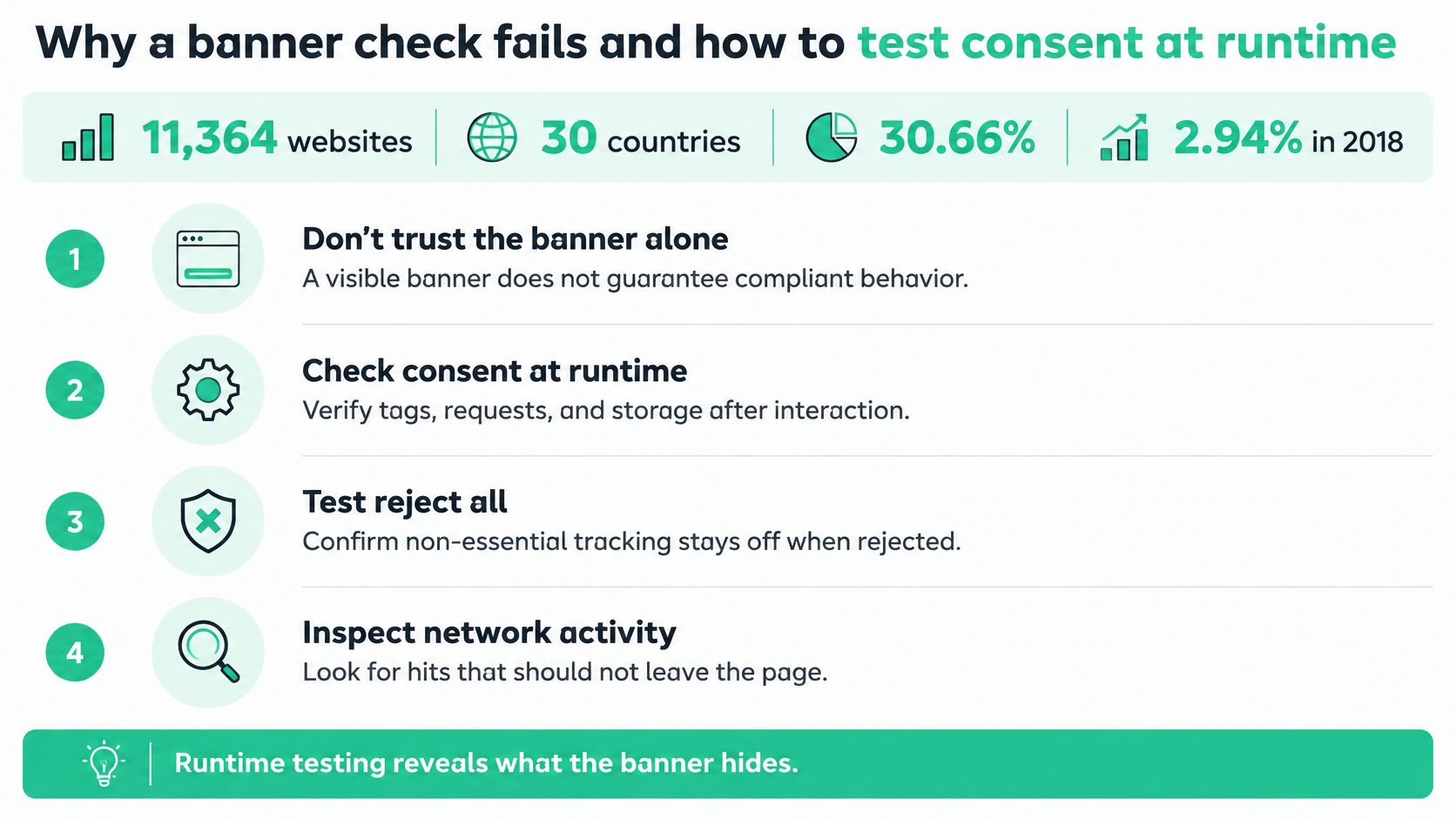
A study of 11,364 websites across 30 countries followed the 2,479 sites that showed a cookie banner throughout, and found that the share offering both accept and reject rose from 2.94% in 2018 to 30.66% in 2024, published by the researchers. That pattern describes a market problem, not your site. It explains a familiar release habit: teams treat the banner as the deliverable, then discover later that the tags never listened to it.
Marketing sees a banner. A DPO sees requests, cookies and payloads that happened before anyone chose anything.
Four beliefs that need correcting
- "The consent platform is installed, so we're compliant." A configuration review shows what the banner was set up to do. Runtime behaviour shows what the site did.
- "Our analytics tag is exempt." The measurement exemption is narrow. It doesn't extend to the advertising pixel sitting in the same container, and it doesn't cover a tag that joins data across services.
- "Consent from the first visit still holds." Stale cookies carry old choices forward. Read live state instead of trusting a value written months ago.
- "The agency's new script follows the banner." A script added outside the container can bypass the consent gate entirely. The Irish Data Protection Commission guidance on cookies and other tracking technologies is blunt on the point: consent is normally required before cookies or similar technologies are used at all.
Eight tests that prove consent at runtime
Run these on landing pages, checkout and form pages, and repeat them after every release.
| Test | Steps | Pass condition |
|---|---|---|
| Fresh session, no choice | Load the page in a clean browser and record network requests | No non-essential request and no advertising cookie |
| Reject all | Choose reject, browse three pages and submit a form | No marketing hit and no CAPI call |
| Analytics only | Grant analytics consent, reload, then trigger a conversion | Advertising destinations stay blocked |
| Withdrawal | Grant all purposes, withdraw from the footer, then trigger a conversion | Later hits stop and the consent record updates |
| Cookie wall check | Load the page without accepting and open a content page | Content loads without accepting advertising purposes |
| dataLayer and URL scan | Complete a form and a purchase | No email, phone number or name in any payload or URL |
| Server-side gate | Trigger a conversion with consent denied | No server-side forward carries identifiers |
| Regional variant | Run the tests with EU and non-EU settings | The banner and the gate follow the same rules in each region |
Treat the browser panel and the network panel as one test. The banner state tells you what the visitor chose. The request list tells you what the site did. Watch both before consent, after reject, after partial consent, after withdrawal and after a conversion. The interesting failures are usually small: one pixel that fires on page load, one CAPI call that waits for a form submit, or one URL that carries a value the purpose never needed.
For each test, keep the banner state, the consent record, the request, the event payload and the withdrawal action. That bundle is what turns "we have a banner" into something a DPO can hand to a regulator. If you want the inspection steps in more detail, our guide to cookie testing for accurate tracking results covers the browser-side mechanics.
Why this has to repeat
A release can change a tag trigger, an event parameter or a consent default without changing a single visible element on the page. The banner still looks right. The privacy policy still matches. The pixel now fires 400 milliseconds earlier, before the state resolves.
That's why a one-off audit dates quickly and why scheduled checks belong in the release process. Trackingplan runs these checks daily or weekly across websites and server-side implementations, inspecting every request to more than 170 analytics and ad providers and linking each finding to the underlying hit and consent state.
Confirm consent tests before your next release
Five decisions to settle this week:
- Give every row of the tag inventory a named owner. One person answers for each tag, and that person is in the release channel.
- Fix the hits your tests exposed. Anything firing before consent, or carrying a field its purpose doesn't need, comes out before the next deploy.
- File the evidence with the release record. Banner state, consent record, request, payload and withdrawal action, stored together.
- Schedule the checks. Daily or weekly, plus after every release, because the release is what breaks them.
- Get DPO sign-off on purposes and legal bases. Before the release, not after the audit request.
None of these five is a one-time job. Consent is runtime behaviour, so the checklist only holds if the tests repeat on every release, the same way you would never ship code on the strength of a QA pass from last quarter.
One product note. Trackingplan's Compliance module covers PII monitoring, cookie monitoring and consent monitoring for websites and server-side implementations. It is CMP-agnostic, so it works with whatever banner you already run, and it catches PII leaks and consent breaches before they reach legal. For paid media teams, the point is that campaigns are optimized on conversion data the team can trust.
None of this is legal advice. Your DPO or counsel should confirm the purposes, legal bases and any exemption you plan to rely on for each tag. The engineering part, making the browser and the server behave the way the policy says, is yours.
Trackingplan monitors websites and server-side tracking across more than 170 analytics and ad providers, inspects every hit for PII leaks, Consent Mode misfires and vendors firing before opt-in, and reports each finding with the request behind it. Checks run on a daily or weekly schedule, so a release that breaks the consent gate surfaces as a finding routed to the team that owns the tag, not as a surprise during a review. It only observes data your site already sends to analytics or marketing tools, so nothing new leaves your stack. If you'd rather see this on real traffic than take our word for it, you can try Trackingplan on sample data before connecting your own site.