
Consent is the recorded permission that decides whether a marketing or analytics tag may store an identifier and send a hit, not the banner design. Google separates that permission into four consent signals, so one accept button can affect several different data uses.
You've published a new checkout, and the cookie banner looks right. Yet Google Ads conversions have dropped, GA4 still records purchases, and a developer says the server container hasn't changed. The useful question isn't whether the banner appeared. It's which permission applied when each hit left the browser or server.
What consent means on a tagged page
A shopper opens a product page. Before they add anything to the cart, a consent banner appears over the product photo. Behind that graphic, GA4, Google Ads and the Meta Pixel may already be waiting for a page event.
The shopper's choice needs to control those tags. A marketing permission can allow an advertising identifier to travel with a purchase value. An analytics permission can allow a client identifier to connect page views within site measurement. Neither permission should be inferred from the shopper viewing the page.
Follow the purchase, not the button
Say the shopper allows analytics but refuses advertising. They browse a product, add it to the cart and complete checkout. Your site can record the purchase for the analytics purpose they granted, but that doesn't make the purchase available for every advertising use.
The distinction matters to several people:
- The paid media lead needs to know whether an absent ad conversion reflects a denied purpose or a broken tag.
- The analyst needs to distinguish an event in the dataLayer from a hit sent to a provider.
- The privacy lead needs evidence that the destination received only the data its purpose allowed.
A purchase event is a business fact. Sending that event to a particular provider is a separate processing decision. Putting an event into the dataLayer shouldn't automatically authorize every tag listening for it.
This is consent explained at the implementation level: identify the purpose, read the current permission, then decide whether the request and its fields are allowed. Apply that test to the browser request and to any server-side copy. A clean front end can't establish what a server container forwarded afterward.
How each choice changes collected data
Consent choice and the data a tag may collect
| Choice | Storage | Hits allowed | Identifiers | Effect on conversions |
|---|---|---|---|---|
| No choice yet, EEA or UK default | Denied | No storage-writing marketing or analytics hits; cookieless Google pings only if Consent Mode is on | No stored client or advertising identifiers | No identifier-linked observed conversion |
| Accept all | Ads and analytics cookies allowed for granted purposes | GA4, Google Ads, Meta Pixel and other granted vendors | Client ID, gclid or fbclid; user data if ad_user_data is granted | Observed conversions with value |
| Reject all | No optional cookies | Optional tags blocked; exempt audience measurement only within narrow limits | No ad identifiers | No observed ad conversion; modeling may estimate if eligible |
| Analytics only | Analytics cookies only | Site measurement tags yes; remarketing and Meta Pixel no | Analytics client ID only | Site analytics, not ad-platform conversions |
| Withdraw after accepting | Future optional storage off | Later optional hits stop | New optional hits must not reuse identifiers | Future optional conversion collection stops; past hits remain |
Use this table as a conservative implementation policy for a marketing site, not as a claim that every analytics product has identical settings. A consent category needs a defined purpose and a matching tag configuration.
Google separates advertising storage from personalized advertising. Its consent requirements for measurement and remarketing explain that, when consent is denied, tags stop storing cookies and send pings instead, and its Consent Mode reference gives advertising storage (ad_storage) and personalized advertising (ad_personalization) separate signals. One blanket allow flag can't express that distinction safely.
Before a choice and after acceptance
For visitors in the EEA or UK, establish the denied default before optional tags execute. Don't let a page-view trigger run first and then correct the state after the banner loads. That sequence can send an identifier before the shopper has made a choice. An audit of tags that fire before consent catches it.
Google's advanced Consent Mode implementation may send restricted cookieless pings under a denied state. Cookieless doesn't mean no request or no data. Inspect the payload and use the implementation approved for your site. Basic blocking and advanced Consent Mode don't produce the same network behavior.
Accept all permits the purposes presented to the visitor. It doesn't authorize an unlisted vendor or unrelated use. A purchase hit can include value and permitted identifiers only when its destination and purpose match the recorded choice.
Rejection, partial permission and withdrawal
Reject all should block optional tracking. A narrow audience-measurement exemption isn't a general exception for analytics software: CNIL's tracker guidance limits it to the publisher's own audience measurement or testing, prohibits combining it with other processing, and requires controls including IP truncation and a maximum 13-month tracker lifetime.
For an analytics-only choice, keep the site-measurement route separate from advertising routes. Check GA4 configuration as well as triggers. Allowing an analytics event shouldn't authorize remarketing, user-data uploads or a Meta Pixel request.
Withdrawal changes future processing. Stop optional requests and prevent tags from reading or recreating relevant identifiers. Withdrawal doesn't automatically recall a conversion already stored by a platform; deletion and other data rights require their own handling.
What makes that choice legally valid
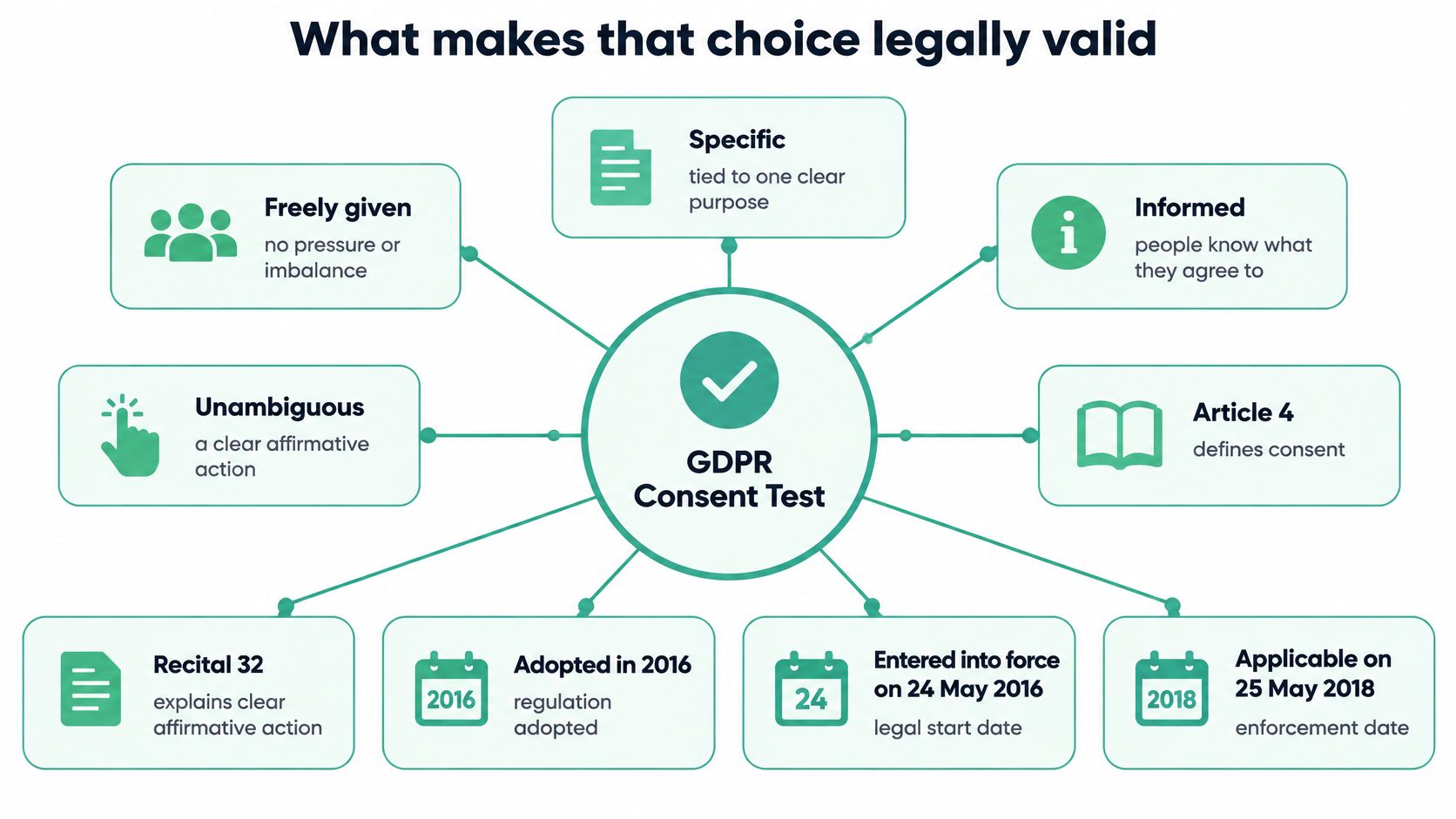
Freely given, specific, informed and unambiguous are the legal qualities of valid consent under Article 4 and Recital 32 of the General Data Protection Regulation, which was adopted in 2016, entered into force on 24 May 2016, and became applicable on 25 May 2018.
Those qualities describe a real decision, not merely a successful button click. A site needs to explain the processing clearly enough for the person to understand what they're allowing. It must also avoid treating unrelated data uses as one indivisible agreement.
What a valid decision requires
- Freely given: The person has a meaningful choice, without pressure that undermines it.
- Specific: The permission relates to a defined processing purpose, rather than an open-ended bundle.
- Informed: The explanation lets the person understand the relevant processing before deciding.
- Unambiguous: A clear affirmative action communicates agreement.
Ticking an empty box or deliberately choosing a setting can express consent. Silence, inactivity and preselected boxes don't. A tag must not interpret an unanswered banner as an affirmative decision.
The GDPR also requires withdrawal to be as easy as giving consent. A persistent privacy-settings control gives visitors a practical way to revisit their decision. Hiding that control behind an account login or an unrelated support request creates a different experience from accepting on the page.
Scope and implementation evidence
The GDPR applies across the European Economic Area. Organizations outside Europe can also fall within its scope when they offer goods or services to people in the EU or monitor their behavior. An overseas headquarters doesn't remove the need to assess a website's European tracking activity.
For an implementation team, the legal language becomes a mapping problem. Does the purpose described to the visitor match the purpose used by the tag? Does the saved choice remain effective after navigation? Can the server identify the permission that governed the event?
A vague marketing label isn't enough to evaluate an analytics cookie or an advertising upload. Document the purpose, destination and permitted data fields together. Use a GDPR compliance checklist to connect those implementation checks with the wider privacy review, rather than treating a banner configuration as the entire compliance exercise.
How consent moves from banner to hit
The consent management platform, or CMP, collects the decision. The tag manager needs that decision early enough to control execution. The server needs it too, because moving collection away from the browser doesn't create permission.
Make the handoff explicit
- Record the choice in the CMP. Save the selected purposes and the information needed to interpret that choice later. Don't reduce a partial choice to a generic accepted flag.
- Expose the state to the tagging layer. Make purpose-level state available through the dataLayer and the consent APIs your implementation uses. A custom dataLayer event alone doesn't necessarily update Google's consent state.
- Gate the outgoing request. Configure Google Tag Manager and server-side GTM to enforce the required permission. Check both whether a tag runs and which fields it sends.
- Restore the choice before later events. On another page view, initialize from the saved decision before optional tags execute. Otherwise, navigation can recreate the same early-hit problem.
Google's Consent Mode guidance recommends a CMP to collect consent and Consent Mode to pass it to Google's tags, and says advertisers must collect consent from end users in the EEA and share consent signals with Google, data uploads included. The Consent Mode reference marks ad_user_data as required for measurement uses such as enhanced conversions and tag-based conversion tracking.
Consent Mode signals and what a denial blocks
| Signal | What it gates | If denied | Where to look |
|---|---|---|---|
| analytics_storage | Analytics cookies and client identifiers | Cookieless ping at most, no stored analytics client ID | GA4 collect request |
| ad_storage | Advertising cookies | No ads cookie written or read | Google Ads tag and Floodlight |
| ad_user_data | User data for measurement, including enhanced conversions | Don't send hashed email, phone or address | Tag hits and offline uploads |
| ad_personalization | Remarketing and personalized advertising | No personalized audiences from this user | Remarketing tags |
Check the payload, not just the trigger
Suppose a form submission enters the dataLayer with an email address. The Google Ads tag may wait for consent correctly, while a separate server process uploads the same address later. The browser check passes, but the full processing path still fails if that upload lacks the required permission.
Hashing doesn't turn a denied user-data upload into an allowed one. Inspect enhanced-conversion fields, not just the visible cookie settings. Keep the applicable permission with the event as it moves into a queue, a customer system or an offline upload.
For server implementations, document what happens when consent is missing, malformed or stale. Don't treat an absent field as granted. A consent-aware server-side tracking design should define the default, the forwarding rules and the evidence retained for each destination.
Test a fresh load and a returning visit separately. The first checks initialization order. The second checks whether saved preferences control the next hit.
What measurement remains after a denial
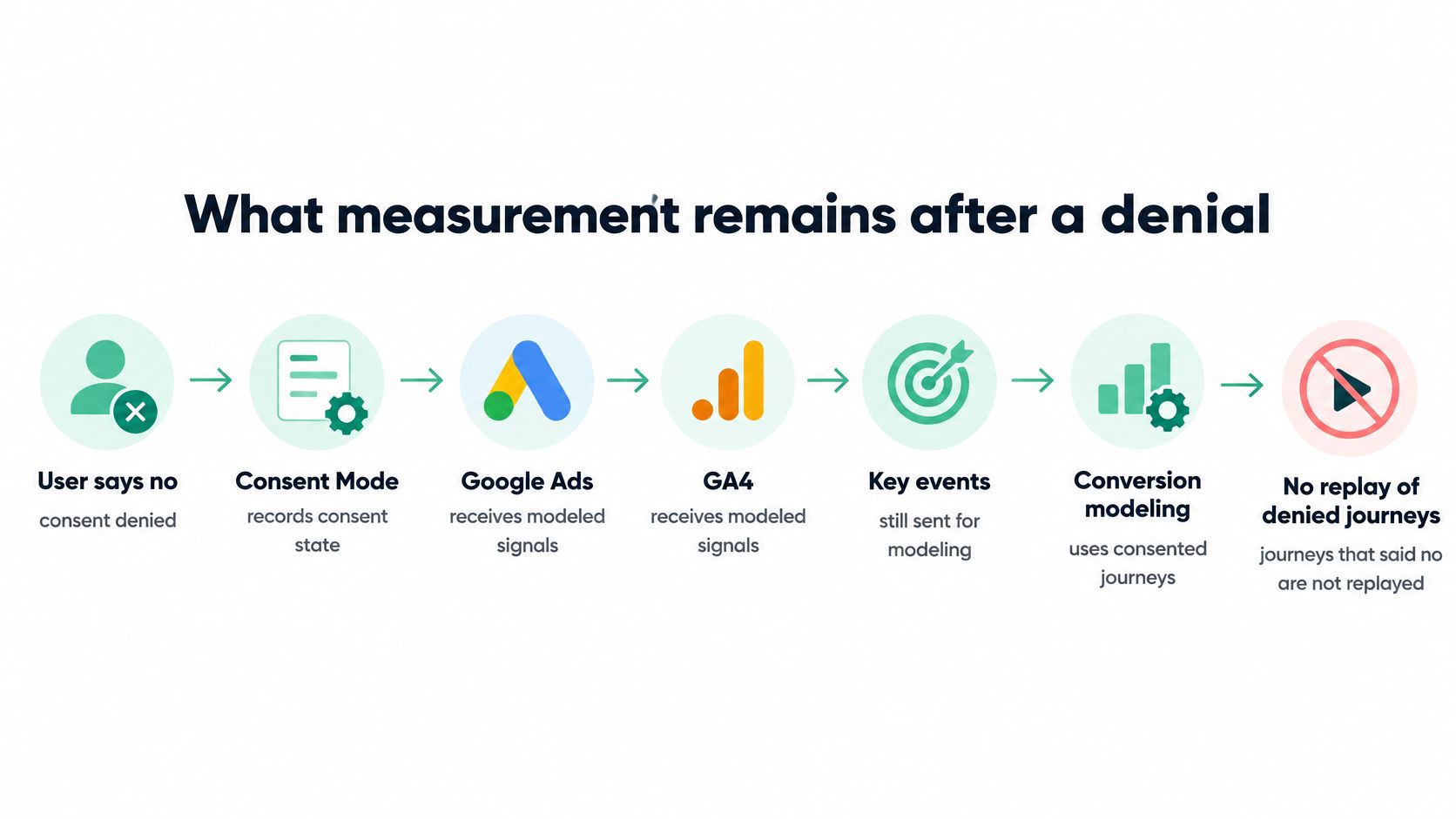
Consent enforcement and conversion modeling solve different problems. Enforcement limits what the site may collect or send. Modeling estimates missing measurement from permitted observations and historical patterns; it doesn't replay the journeys of people who refused.
Google's conversion modeling documentation says eligibility includes a correct Consent Mode or IAB TCF v2.0 implementation and at least 700 ad clicks over seven days for each country-and-domain grouping. Eligible modeled conversions appear in the Conversions column and downstream reports.
An estimate isn't an individual conversion record
A modeled result doesn't give the analyst a recovered user-level journey. It provides an estimate within the platform's measurement system. Don't use a modeled conversion total as evidence that a particular denied visitor's purchase was observed.
Also distinguish the platform's modeled output from the signals it receives. Consent Mode communicates state and permitted event information; Google performs the modeling. The presence of a modeling feature doesn't authorize the Meta Pixel, an advertising cookie or an upload that the person's choice prohibited.
That trade-off is deliberate. The advertiser may retain less directly observed attribution while still receiving useful aggregate estimates. More complete reporting isn't a reason to bypass the collection boundary.
Diagnose a reporting drop before changing bids
Say Google Ads conversions fall after a checkout release, but completed orders haven't changed. Start with the implementation and eligibility evidence before concluding that the campaign attracted worse traffic.
- Consent parameters: Confirm that the outbound request carries the intended state rather than a default left behind by a failed update.
- Event timing: Compare the purchase timestamp with consent initialization and update timing.
- Conversion identifiers: Check the destination and conversion action, not just the event name displayed in a dashboard.
- Regional volume: Assess the relevant country-and-domain grouping rather than assuming sitewide traffic proves eligibility.
A daily or weekly automated comparison can join these checks with conversion totals and route exceptions to the tag owner. Keep the underlying requests available so the owner can distinguish a measurement failure from a business change.
Don't label every shortfall as lost demand. A missing signal, broken sequence or insufficient modeling volume can change reported conversions without an equivalent change in purchases. Equally, don't assume modeling will compensate for an implementation error. Validate the inputs before relying on the output.
Why a tidy banner can still breach consent
Withdrawal took 21 times longer than giving consent in a usability study with 20 participants, according to the study on consent withdrawal, which also cites a review of 10,000 websites where only 12.6% offered a reject-all option. A polished banner can sit on top of a poor refusal experience.
The same gap opens behind the interface. A preference center may show advertising as disabled while a vendor still receives purchase events. The banner is the interface; the permission still has to reach each request, so the visible setting and the actual hit need separate checks.
Look for concrete leak paths
- An early Meta Pixel request: a page trigger runs before the dataLayer consent update becomes available.
- A repeated CAPI event: the Conversions API sends a purchase that the browser-side permission should have excluded.
- An unrestricted server route: a server container forwards an event even though the web container blocked the corresponding vendor.
- A stale analytics configuration: after rejection, a tag keeps reading or refreshing an analytics cookie because it never processes the changed state.
Each bug has a different fix. An early request needs initialization changes. A CAPI leak needs permission enforcement in the server workflow. A stale cookie needs investigation into both tag behavior and storage handling.
Saving only the final consent state can hide the cause. Keep the state that applied when the request occurred, so a later accepted state cannot make an earlier unauthorized hit look permitted.
Keep monitoring separate from appearance
Trackingplan monitors consent behavior across websites and server-side implementations, inspecting every hit for PII leaks, Consent Mode misfires and vendors firing before opt-in. Its Compliance module is CMP-agnostic and covers PII, cookie and consent monitoring.
A finding belongs to whoever owns the failing layer. The banner owner can fix wording, but the CAPI integration that kept sending purchase events sits with a different team, so the request evidence needs to travel with the report.
Keep a visible control for changing preferences, then test what that control governs. The evidence should show the user's revised choice shaping subsequent processing.
Verify consent before bidding learns from it
Make consent verification a release gate: no tag change ships until each test state produces a saved result. Use a clean browser context for initialization tests and an existing accepted context for withdrawal tests. Old cookies can otherwise hide what the release changed.
Run the release gate
- Load without a choice. Inspect browser storage and network requests. Confirm that the Meta Pixel and other optional tags write no identifiers, and classify any permitted cookieless requests separately so they aren't mistaken for a breach.
- Accept all. Check that the intended providers receive the correct event, conversion action and value. A tag that fires proves nothing if the purchase value is missing or the event is counted twice.
- Reject all. Inspect the browser and the server destination. Search for a forwarded purchase or CAPI copy, because a blocked browser tag tells you nothing about whether the server stopped.
- Withdraw after acceptance. Reload, trigger another test event, and confirm the implementation reuses no identifiers for optional processing. Don't mistake an old platform conversion in the ad account for a newly collected hit.
Keep enough payload evidence to reproduce each failure without retaining personal data the test doesn't need, and attach a retest requirement so a fix gets verified rather than assumed.
Route evidence before changing campaigns
Distinguish three situations before anyone touches a bid strategy. When modeled volume is too thin to read, label that reporting limitation explicitly. When a conversion action is broken, log a tracking defect rather than a performance problem. Both look like a drop in conversions, yet each demands a different decision from a genuine fall in sales.
A daily or weekly check delivers exceptions to Slack, Teams, email or a webhook, with the hits behind each finding attached. Build it into your PPC automation routine so the team reviews the evidence before automated bidding learns from incomplete conversion signals.
The release passes when the permissions, the requests and the downstream copies agree.
Trackingplan monitors websites and server-side hits across more than 170 analytics and ad providers, making sure campaigns are optimized on conversion data the team can trust. Visit the site to see how consent monitoring checks the consent state behind your next release's conversion hits.