
You probably know the feeling. A launch looks clean in the dashboard, the new campaign is live, and the team is celebrating, then privacy counsel spots an email address in a custom field nobody meant to send. That's the moment sensitive data detection stops being a compliance phrase and turns into a practical safety net for analytics, marketing, and product systems that move fast.
The useful mental model is simple. If data can leak into a tag, event payload, export, log, or warehouse table, detection has to watch for it before someone else finds it in a report. In practice, that means looking for risky fields continuously, not waiting for a quarterly audit, and routing the result to the people who can fix the source quickly. For a related perspective on how exposed analytics fields surface in real-world setups, Trackingplan's write-up on sensitive data exposure in tracking flows is a useful companion.
This is also where observability thinking helps. The same discipline that catches broken events and schema drift can catch PII leaking from pixels, dataLayer pushes, or server-side events. If you're also comparing security controls around documents and tokenized systems, the discussion of tamper-proof checks for tokenization platforms is a helpful adjacent reference, because both problems depend on proving that sensitive values didn't slip through an untrusted path.
The Moment Detection Matters
A marketer changes a form, a developer ships a tag update, and a new custom dimension starts carrying what looks like a harmless string. Then someone notices an email address sitting where a campaign ID should be. That is not a theoretical privacy issue, it is a production mistake that can move through dashboards, exports, and downstream tools before anybody notices.
Sensitive data detection exists for that exact moment. It watches live data flows and flags content that should not have been sent, stored, or shared, so the fix happens while the blast radius is still small. That is a better model than a one-time audit because analytics and marketing pipelines change constantly, and the only reliable source of truth is the traffic moving through production systems.
Why reactive reviews keep failing
Manual checks always lag behind the system they are meant to protect. A team can review a schema, approve a dashboard, and still miss a leaked field because the problem only appears in a specific campaign path, browser, or server-side transform. That is why observability-style monitoring is replacing isolated scans.
The practical shift is from “Did we ever check this?” to “What is entering the pipeline right now?” Data-quality tooling already works this way for metrics drift, where snapshots are useful but insufficient once production traffic starts changing. Detection needs to sit where the data moves.
Practical rule: if a field can be created by a tag manager, SDK, or server event, it should be checked before it reaches the destination.
The governance value is broader than one bad event. The same scanning habit helps analysts, developers, and privacy reviewers talk about risk in operational terms, not vague policy language. For a related framing, what data classification is pairs naturally with this because classification gives detection a shared vocabulary. It also matches the pattern used in tamper-proof checks for tokenization platforms, where teams need to prove that sensitive values did not slip through an untrusted path.
What Sensitive Data Detection Means
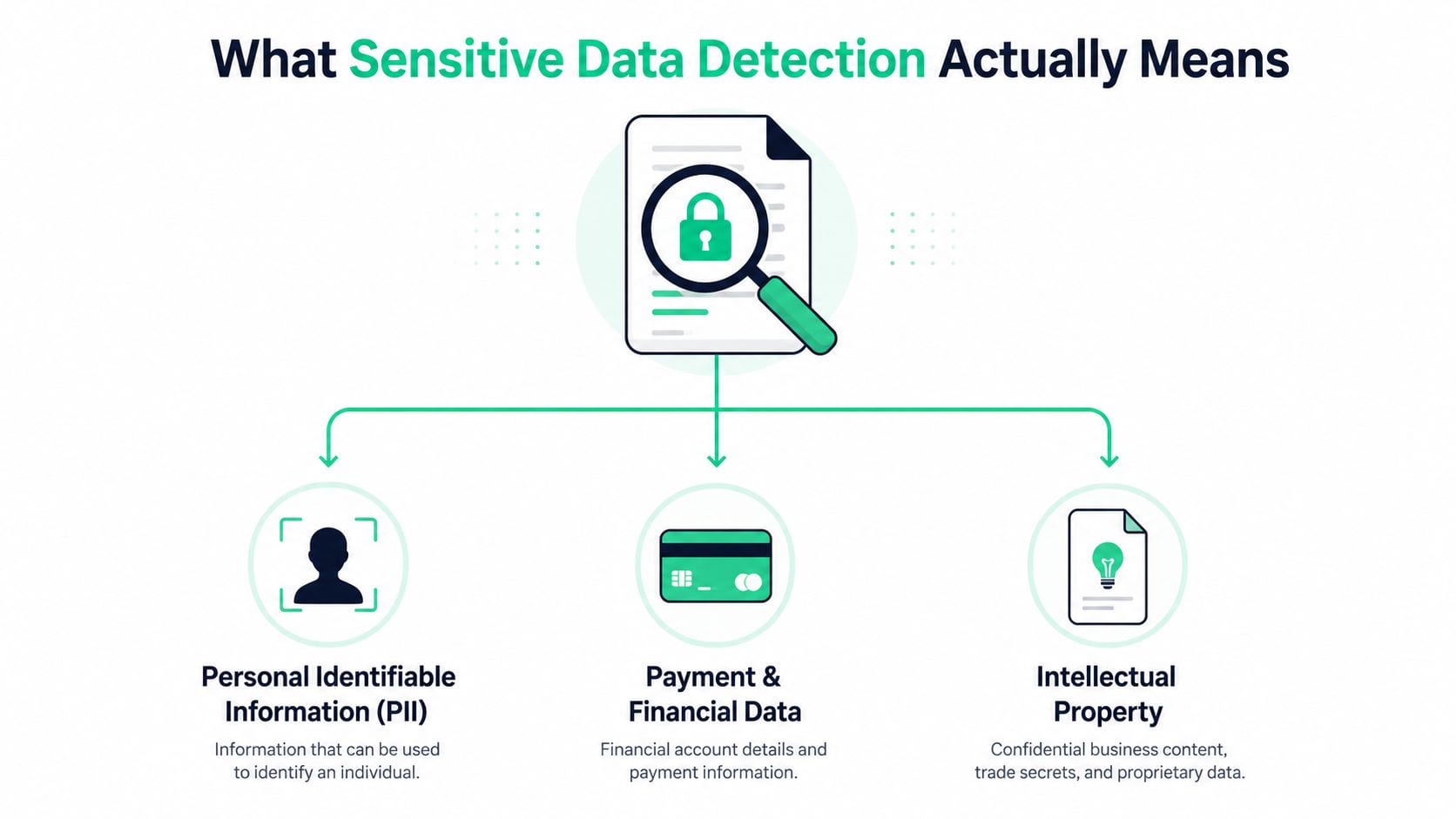
Sensitive data detection works like an airport checkpoint, where the goal is to spot anything that should not move downstream unnoticed. The system is not trying to “protect the suitcase” by itself. It is scanning what passes through. In practice, sensitive data detection is the automated discovery and flagging of confidential or regulated information in files and unstructured data, including PII, PHI, financial data, credentials, contracts, and custom patterns (Komprise glossary).
The same pattern logic also shows up outside classic storage systems. A marketing pixel can push an email into a dataLayer event, a browser SDK can attach a phone number to a click payload, and a server-side event can forward a customer identifier into analytics. The fields move fast, so the detection layer has to inspect the payload before it becomes a warehouse row, a dashboard metric, or a third-party export.
A simple taxonomy teams can use
Start with four buckets. Direct identifiers are things like names, email addresses, account numbers, or card data. Quasi-identifiers are fields that may not identify someone alone, but can do it when combined with other values, such as location, device traits, or timestamps. Sensitive attributes are fields that reveal health, finances, or other protected context. Secrets are tokens, credentials, and keys that should never appear in ordinary analytics or logs.
That structure gives analysts, security teams, and engineers a shared vocabulary. Legal can focus on regulated categories. Security can focus on secrets and access risk. Analytics and engineering can focus on field behavior, event payloads, and where data crosses from collection into storage. A practical way to keep those categories aligned is to pair the taxonomy with what data classification is, so the labels stay consistent across review, routing, and enforcement.
The taxonomy matters because a field can be harmless in one dataset and sensitive in another.
For teams building prevention controls, the practical DLP guide from F1Group gives a useful companion frame. Detection is the signal, not the finish line. Once a value is flagged, the next step is deciding whether it needs masking, redaction, retention limits, or tighter access controls.
Comparing the Main Detection Techniques
Different techniques solve different parts of the problem, and the best production setups combine more than one. A regex is a quick gatekeeper. A statistical model is better at judging context. Schema or metadata inference is useful when the content itself is incomplete or the exact source keeps changing.
| Detection Techniques at a Glance | |||
|---|---|---|---|
| Technique | Signal type | Best at | Common failure mode |
| Regex and dictionary matching | Exact patterns and known words | Known formats like IDs, emails, or internal terms | False positives on test data or lookalike strings |
| Entropy and randomness scoring | Character randomness and structure | Suspicious tokens, secrets, and unusually noisy values | Missing legitimate structured values |
| Classical machine learning | Content, context, and column behavior | Ambiguous fields that need context | Depends on training data and labels |
| Schema and metadata inference | Field names, distributions, and surrounding structure | New datasets and unseen tables | Can miss values when naming is misleading |
What each method gets right
Regex and dictionary matching are the fastest to understand. If the field looks like a card number or a known internal code, pattern logic can catch it immediately. The trade-off is that the same pattern can fire on test strings, synthetic examples, or harmless IDs.
Entropy scoring works like a suspicious-noise detector. It's good at highlighting values that look token-like or machine-generated, but it doesn't know intent. Machine learning is stronger when context matters, because it can learn that one column behaves like a sensitive field while another with a similar shape does not. Schema and metadata inference help when the exact dataset is new, because they look for distributional clues rather than just string matches.
That pattern, infer risk from the column, is important. A peer-reviewed PHI detection study reported 99% accuracy on unseen datasets and found that PHI and non-PHI fields often have materially different metadata distributions, which makes field-level signals useful even when the source changes (PMC study). In structured environments, that idea lines up with the CASSED work, where weighted F1 improved from 0.84 with SIMON to 0.996 with CASSED on Faker, and micro F1 rose from 0.51 to 0.72 while macro F1 rose from 0.66 to 0.80 on WikiTables (CASSED study).
How teams should think about the trade-off
Use deterministic patterns for what you already know. Use statistical or context-aware methods for what you don't. That's why mature pipelines don't treat these methods as competitors, they compose them into a funnel.
The question isn't which method wins. It's which method should fire first, and which one should only run when the earlier step says the data is worth a closer look.
Anatomy of a Modern Detection Architecture
A production detection system usually works like a layered filter, not a single scanner. The first layer removes obvious non-matches at low cost, the middle layer estimates whether there is any real risk, and the last layer inspects content only when the earlier steps say the payload deserves more attention. Soveren describes that cascade with a rule-based first stage, a structured classifier second, and a more resource-intensive ML step last.
A layered pipeline teams can reason about
A doorbell camera, a doorman, and an investigator is a useful way to picture the flow. The camera sees everything quickly. The doorman asks a few targeted questions. The investigator only steps in when something still looks suspicious. That shape fits live traffic because most payloads are harmless, and you do not want your most expensive logic running on every request.
A simple implementation might look like this:
- Ingestion and buffering, collect the event, log line, or payload without blocking the request path.
- Pre-filtering, reject obvious safe traffic with a rule engine or allowlist.
- Pattern and regex checks, look for known identifiers and formats.
- Contextual or ML analysis, score the remaining candidates.
- Alerting and storage, emit the result with ownership metadata and remediation hints.
That same layered pattern also fits analytics and QA work. The browser or tag manager can catch mistakes early, the server-side endpoint can inspect transformed events, and marketing pixels can surface issues that never appear in the app UI. A payload can look clean inside the product and still leak sensitive fields once it reaches external destinations, so each layer needs its own checks.
Where instrumentation belongs
Start at the client. Then instrument the server-side collector, SDK, and any transformation layer. Finish with the outbound marketing and ad destinations, because that is often where a clean internal payload becomes a risky external one. Cloudflare's managed Sensitive Data Detection shows the kind of boundary teams also need to consider, since it inspects response bodies for common PII, financial data, and secrets only up to 1 MB and across text, HTML, JSON, and XML. The same architectural idea appears in the Soveren architecture guidance, where detection is treated as a staged process instead of a single pass.
Coverage, speed, and payload size stay in tension. If you tune for maximum depth, production paths can slow down. If you tune too hard for performance, long documents, nested objects, or unusual fields can slip past the detector. The practical goal is to place light checks early, reserve heavier analysis for the suspicious subset, and keep enough visibility at each hop to explain why a field was flagged.
Building Detection Rules That Work
The strongest rules are rarely just a regex. They work like a layered check, with a primary pattern, supporting keywords, a confidence threshold, and a proximity window. That structure is common in enterprise detection systems because it helps separate a real signal from a harmless example, a test fixture, or copied documentation. Microsoft Purview's sensitive information types follow the same shape, with a primary element, supporting elements, confidence level, and proximity. Microsoft also recommends a 300-character proximity limit for new custom sensitive information types rather than unlimited distance, as described in the Purview overview and the false-positive tuning guidance.
A starter rule pattern
Email is the simplest place to start. A bare email regex will catch a lot, but it will also catch test fixtures, embedded documentation, and fake examples. Add words that signal business context, such as invoice, shipping, account, or receipt, and the alert becomes far more actionable.
A plain-language rule might read like this:
- Primary pattern: match something shaped like an email address.
- Supporting terms: require one nearby word from a context list.
- Confidence: raise the score when both elements appear together.
- Remediation hint: tell the owner to remove the field, hash it, or route it to a safe destination.
That same structure extends cleanly to other sensitive fields. For card numbers, pair the number pattern with words like payment or card. For tax IDs, combine format checks with a nearby legal or billing clue. For internal employee codes, use a known prefix together with the event source so you can separate real records from test data. The same pattern logic also helps outside traditional databases, since PII can leak through marketing pixels, dataLayer pushes, and server-side events where the original app view looked harmless.
Pseudocode for a practical rule
if matches(email_pattern, value):score = base_scoreif nearby(value, ["invoice", "shipping", "receipt", "account"], window=300):score = score + support_scoreif confidence(score) >= threshold:alert(type="sensitive_data",field=current_field,severity="high",hint="Remove the value, hash it, or block the destination.")The syntax is not the point. The decision shape is. A rule that only knows match or do not match is noisy. A rule that can score context is much easier to trust, and it behaves more like analytics QA than a blunt security check. It can explain why a field was flagged, which is the difference between a detector teams keep and a detector they turn off.
Performance, Sampling, and Alerting Playbooks
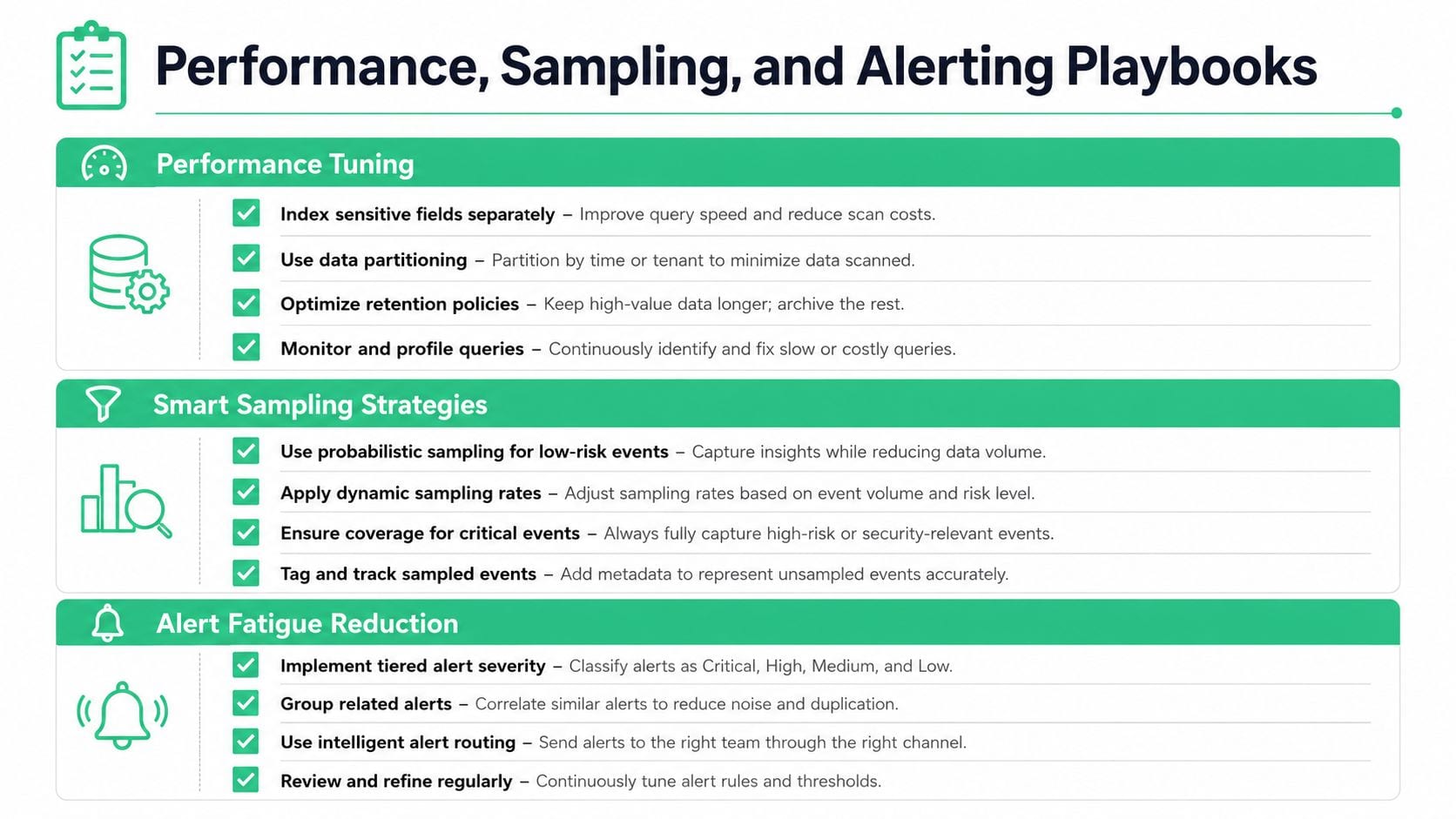
Detection breaks down fast if it sits in the hot path and slows every request. That's why production teams split the work between cheap filters, sampled deep inspection, and asynchronous alerting. High-risk paths such as auth, checkout, and support forms deserve tighter scrutiny than bulk analytics traffic, because the consequences of a leak are different and the traffic shape is different too.
What to tune first
Start with the cheapest wins. Use prefilters to skip obvious safe payloads. Keep expensive inspection off the request path. Sample low-risk flows more lightly, but inspect high-risk paths more aggressively. If you're working with large payloads, remember that some edge services bound deep inspection to the first 1 MB of a response, which is a good reminder that throughput limits are part of the design, not an afterthought (Cloudflare edge model).
Alerting needs the same discipline. A hard alert should page a human only when the issue is both real and urgent. A soft alert should enrich a ticket or dashboard when the team needs visibility but not immediate interruption. If every questionable field becomes a page, on-call will ignore the signal.
Operational rule: every sensitive-data alert should answer who owns it, what was exposed, where it came from, and what should happen next.
A simple response playbook
- Contain quickly. Stop the source, disable the tag, or block the destination.
- Triage the path. Check whether the leak came from a form, SDK, server transform, or destination mapping.
- Fix the origin. Remove the field, mask it, or change the collection rule.
- Document the lesson. Save the event, the root cause, and the prevention step.
That workflow keeps the team focused on remediation, not detective work. It also keeps privacy and engineering in the same loop instead of turning the issue into a handoff chain nobody owns.
Privacy by Design and the Access Question
Detection alone doesn't make a system private. It only tells you that risky data exists somewhere in the flow. The harder question is who can reach it, and whether that access is appropriate, which is the part many basic scanners leave out. A good security guide says the output should show “who has access to it and whether that access is appropriate,” and that's the boundary between discovery and governance (DataStealth guide).
Detection needs guardrails around it
A museum inventory tells you what's in the collection. It doesn't tell you who gets into the archive room. Sensitive-data programs need both views, because a field that is discoverable but broadly accessible is still a risk.
That's why privacy-by-design controls matter around detection itself. Hashing tokens before they hit analytics, redacting on device, propagating consent state, and minimizing what gets retained all reduce the amount of sensitive material that ever needs to be scanned in the first place. If your governance program also needs a broader framing of consent handling, the privacy and consent in egocentric data page has a useful conceptual angle, even though the data context is different.
What to keep separate
Don't confuse detection with compliance. Detection finds the issue. Minimization limits how much can leak. Retention policies decide how long it can live. Access control decides who can touch it. Those are reinforcing layers, not substitutes for one another.
The same applies to reporting. If a team needs metrics on sensitive activity, use privacy-preserving approaches where possible, not raw copies of the data. That keeps governance useful without turning the control plane into another exposure point. For teams formalizing their privacy program, the privacy by design principles outline the mindset that makes those trade-offs easier to reason about.
Operationalizing Detection With an Observability QA Platform
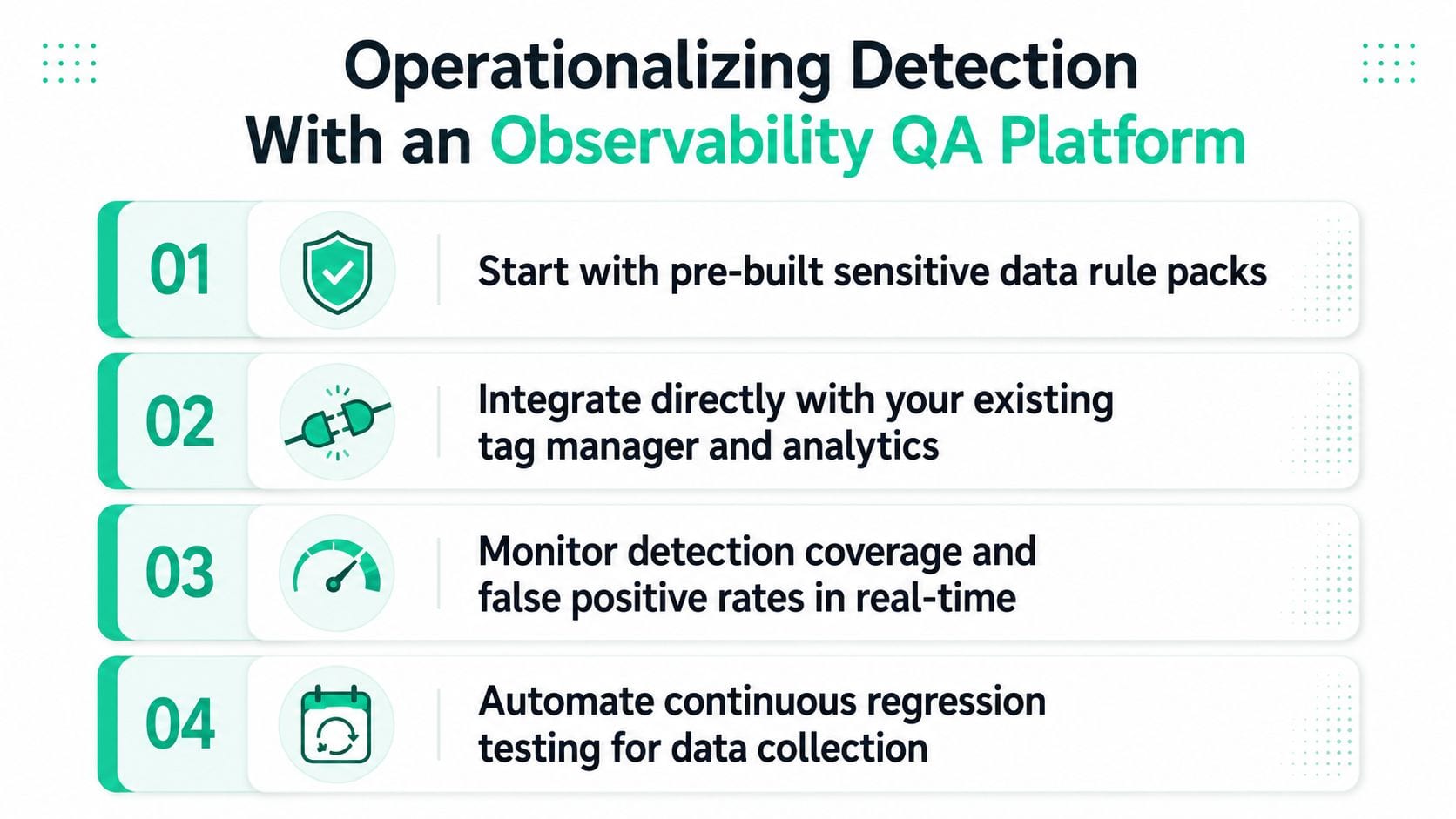
A lot of teams don't need a six-month security build. They need a way to monitor analytics, marketing, and server-side events continuously, catch leaks as they happen, and route them to the people who own the source. That's where an observability and analytics QA platform can help, because detection becomes part of the tracking workflow instead of a separate audit process.
How the rollout fits a real stack
Trackingplan is one example of this category. It continuously discovers Martech implementations from dataLayer to destinations, monitors analytics, marketing, and attribution pixels in real time, and can surface potential PII leaks or consent misconfigurations alongside schema and event issues. That matters because the leak often originates in the same system that tracks campaigns, funnels, or attribution.
The useful pattern is straightforward. Detection rules plug into the tracking plan. Alerts go to Slack or Microsoft Teams. Root-cause analysis links the issue to a specific tag, event, or property mismatch so the owner doesn't have to reverse-engineer the whole path.
A practical 30-day rollout usually looks like this:
- Week 1, inventory the event sources, tags, and destinations that can carry sensitive fields.
- Week 2, enable the highest-confidence detection rules on browser, server-side, and destination traffic.
- Week 3, route alerts to the right owners and add remediation notes.
- Week 4, review false positives, refine thresholds, and add more specific rules for risky flows.
The platform also fits common analytics tooling, including Google Analytics, Adobe Analytics, Amplitude, Mixpanel, Segment, Snowplow, and major ad platforms, so the detection layer sits where the data already moves. If you want a broader framing of how those moving pieces fit together, the what is data observability article is a useful companion.
What usually goes wrong
Teams over-alert before they tune. They scan too broadly before they know which fields matter. They treat detection as a one-time cleanup instead of a continuous regression test for data collection.
A better rollout keeps the first version small, ties every alert to an owner, and treats each leak as a tracking defect that should be fixed at the source.
If you're building or cleaning up this kind of workflow, visit Trackingplan to see how observability QA can monitor sensitive fields across web, app, and server-side events and turn leaks into actionable issues. It's a practical way to keep detection continuous, reduce noisy audits, and give marketers, analysts, and developers one shared view of what's flowing through the stack.