
When privacy teams talk about DSARs, many marketing teams still hear “legal paperwork.” That's outdated. Statista found that 36% of internet users worldwide had exercised their right to a Data Subject Access Request in 2024, up from 24% in 2022, a 12-point increase and a 50% relative rise according to Statista's 2024 DSAR survey. For any business that runs analytics, ad tech, CRM journeys, product telemetry, and server-side tracking, that changes the discussion.
A data subject access request is the operational moment when a person asks a very simple question: What data do you have about me, where did it go, and what are you doing with it? If your answer depends on asking five teams to export spreadsheets, searching inboxes manually, and hoping your vendor list is current, the problem isn't just compliance. It's data governance.
Marketing and analytics teams sit close to the hardest part of this work. They manage identifiers, event streams, destination tools, enrichment layers, and third-party sharing. That means DSAR fulfillment is often less about legal interpretation and more about whether your data stack is visible, documented, and controlled.
The Rise of the Data Subject Access Request
A DSAR stops being a policy topic the moment an actual request lands in the queue. The teams that feel it first are usually marketing, analytics, CRM, and data engineering, because that is where personal data spreads fastest and where documentation tends to lag behind implementation.
The trend is significant because DSARs expose the underlying condition of your data operations. A polished privacy notice does not help much if no one can tell whether a person's data sits in GA4, Mixpanel, Salesforce, Braze, ad platform conversions, warehouse models, support tools, or CSV exports in shared storage.
What a DSAR means in practice
For operational teams, a DSAR is a retrieval and tracing exercise. You need to find a person across multiple identifiers, reconstruct how data moved between systems, and explain the business context around that use. In a modern stack, that often means stitching together email addresses, device IDs, cookies, CRM records, event streams, reverse ETL syncs, and vendor destinations that were added by different teams at different times.
Manual coordination breaks down quickly here. One team searches the CRM. Another checks analytics. Someone emails a vendor. Someone else exports a spreadsheet from the warehouse and hopes the joins are correct. The process is slow, hard to audit, and easy to get wrong.
Mature teams treat DSAR fulfillment as an operational workflow with defined owners, search methods, and evidence. They ask practical questions early:
- Can you match the requester to the right records across email addresses, cookie IDs, mobile app IDs, CRM contacts, and warehouse identities?
- Can you search systems that are not in the usual privacy playbook such as support platforms, ad audiences, enrichment tools, and internal file storage?
- Can you isolate the requester's data safely so you do not expose another person's information in the response?
- Can you document what was searched, what was found, and what was excluded if legal, audit, or a regulator asks later?
Practical rule: If your DSAR process starts with “who owns this tool?”, your data map is already behind your stack.
Why marketing teams should care
A large share of DSAR friction comes from normal marketing and analytics decisions. Teams add pixels, duplicate events, server-side forwarding rules, enrichment feeds, audience syncs, and spreadsheet exports to keep campaigns running. Each step can create another copy of personal data or another destination that must be searched later.
That is why DSAR readiness is tied to data governance, not just privacy operations. If event collection is inconsistent, naming is unclear, and destination routing is poorly documented, access requests become slow investigations. If tracking changes are monitored, schemas are visible, and downstream destinations are known, the same request is much easier to fulfill and defend. Teams working to reduce that risk usually combine privacy process with better tracking controls, including operational controls that prevent privacy fines in GDPR and CCPA tracking setups.
In distributed data stacks, the hard part is rarely drafting the response letter. The hard part is proving you found the data. That is why DSAR volume has pushed observability from a nice-to-have into day-to-day compliance infrastructure.
DSARs Under GDPR and CCPA Explained
GDPR and CCPA or CPRA push teams toward the same operational discipline, but they don't use the same language or structure. For marketing and analytics teams, the easiest way to think about them is this: both require you to know what data you collect, where it moves, and how to answer requests without improvising.
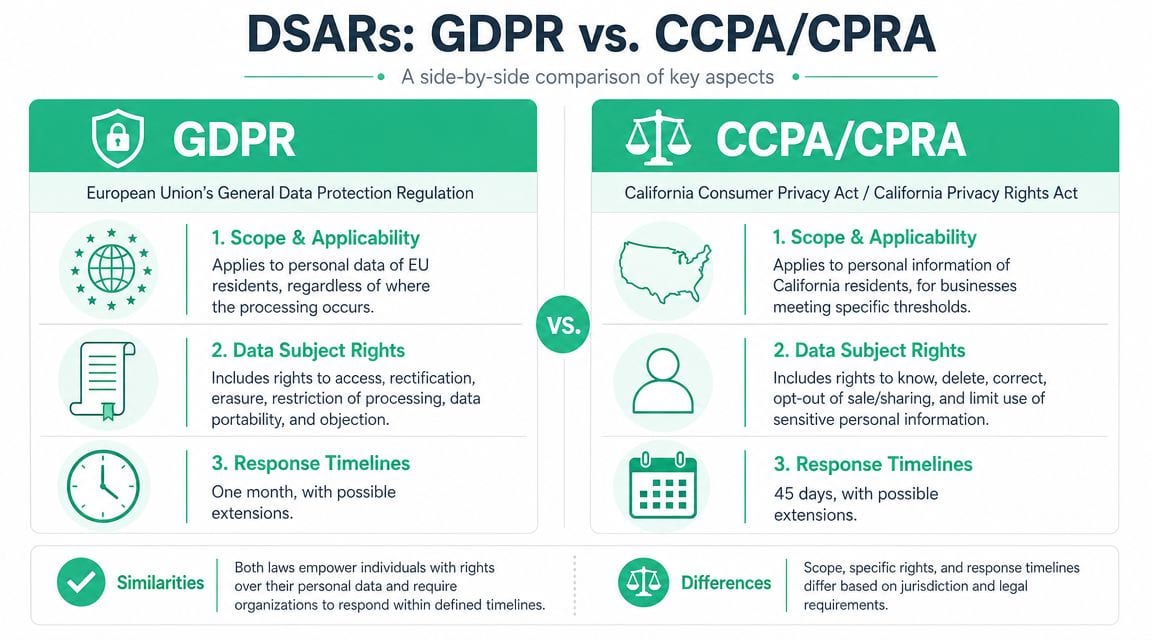
The core operational difference
Under GDPR, the benchmark is tighter and more explicit. Organizations have a standard response window of 30 calendar days from receipt of a DSAR and should maintain an audit trail of the request, actions taken, and response timing according to this GDPR DSAR guide.
CCPA and CPRA are commonly handled through a broader “consumer request” workflow. In practice, that means many US-based teams combine access, deletion, correction, and opt-out handling into a single intake process. The legal packaging differs, but the data problem is the same: fragmented systems make every request slower and riskier.
If you're trying to align both regimes in one workflow, design to the stricter operational standard. Build identity verification, request scoping, search logging, review, and secure delivery once. Then adapt the output and decision logic by jurisdiction.
Side-by-side view for teams
| Area | GDPR | CCPA and CPRA |
|---|---|---|
| Who it concerns | People whose personal data is processed in GDPR scope | California residents in CCPA or CPRA scope |
| What teams need to locate | Personal data plus context around processing | Personal information and related consumer-right outputs |
| What matters operationally | Completeness, auditability, lawful handling, disclosure context | Reliable retrieval, deletion or correction support, opt-out coordination |
| Workflow pressure point | Broad discovery across systems and records | Consistent intake and fulfillment across consumer request types |
What this means for analytics and growth teams
For most digital businesses, the legal comparison is less important than the implementation consequence. The same event may appear in several places: browser tools, server-side endpoints, destination logs, identity resolution systems, CRM syncs, and warehouse tables. If teams can't trace one event and its identifiers across that path, they won't handle access or deletion requests cleanly either.
That's why privacy compliance and tracking governance are linked. A useful operational reference is this guide on preventing privacy fines under CCPA and GDPR with better tracking governance. The value isn't just risk reduction. It's reducing uncertainty when a request lands and nobody wants to guess which systems matter.
A defensible DSAR process isn't built in the legal team's intake form. It's built in the quality of the data map behind it.
Validating Scope Verification and Security
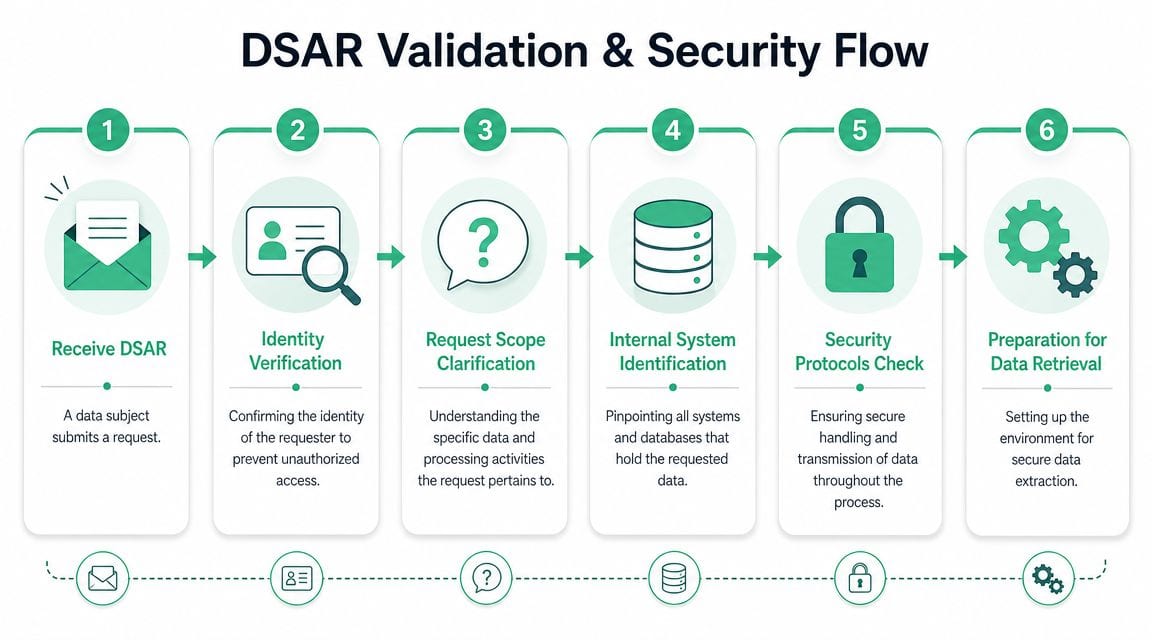
Most DSAR mistakes happen before retrieval starts. Teams either over-collect identity evidence, respond to the wrong person, or launch a broad search before clarifying what the requester needs. All three create unnecessary risk.
A request can be valid and still need clarification. A person can have rights and still need to prove identity. A broad request can require careful scoping before anyone exports a file. Those aren't blockers. They're part of responsible handling.
Start with identity, but keep it proportional
The safest verification process is usually the one that relies on information you already hold, not a fresh pile of sensitive documents. If the request comes through an authenticated account area, use that context. If it comes by email, match it against known records and assess whether additional proof is necessary.
What doesn't work is making every requester submit more personal data than the request itself justifies. That creates another privacy burden and another store of sensitive material to protect.
A practical approach looks like this:
- Use existing account signals first if the request comes through a signed-in flow.
- Ask for minimal additional evidence when the identity match is weak or the data is particularly sensitive.
- Document why verification was sufficient so the decision is reviewable later.
Clarify scope before you search everything
Under GDPR Article 15, a DSAR requires a broad discovery and disclosure workflow. The organization must identify personal data across structured databases, emails, and documents, and return it with metadata on purposes, recipients, and retention periods according to the Irish Data Protection Commission's explanation of subject access requests.
That doesn't mean every request should trigger a blind sweep through every repository on day one. Clarifying scope can help teams understand whether the requester is asking about account history, ad targeting, support interactions, location data, or a specific period. That often reduces risk because the team can search more precisely and avoid over-disclosure.
Build security into the workflow
Once retrieval starts, the risk changes. Now the danger is misdelivery, inclusion of third-party data, or insecure export handling. Marketing and analytics teams often underestimate this part because they're used to moving CSVs around internally. A DSAR response needs more discipline than an ad hoc export.
Use a documented workflow that covers:
- Timestamped intake and ownership
- Identity-verification record
- Scope notes and clarifications
- System list for search
- Review and redaction
- Secure packaging and delivery
For teams tightening personal-data handling in event pipelines and tags, this piece on PII data compliance in tracking systems is a useful companion to DSAR planning.
Operational Checklist for Analytics and Marketing Teams
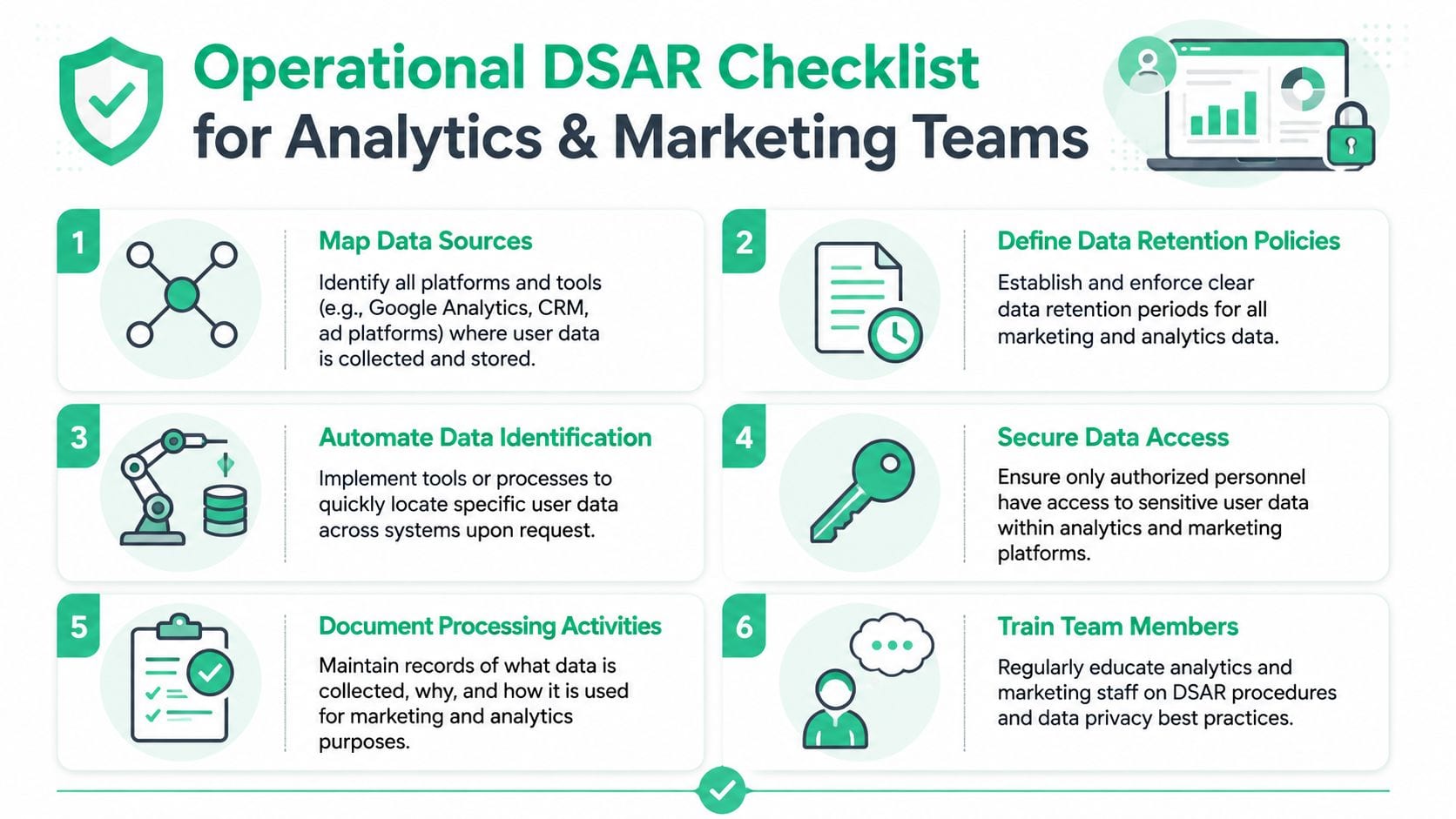
DSAR fulfillment is a demanding process. Privacy counsel can define requirements, but analytics and marketing teams usually know where event data is created, enriched, duplicated, and forwarded. If that knowledge stays tribal, fulfillment will stay slow.
Map identifiers, not just systems
A tool inventory is not enough. You need an identifier inventory.
A person may be known by email in Salesforce, a user ID in Amplitude, a device or app instance ID in mobile analytics, a client ID in web analytics, a hashed identifier in audience tools, and another surrogate key in the warehouse. The DSAR process breaks if nobody knows how those records relate.
Start with a short matrix:
| System | Main identifiers | Data type | Owner |
|---|---|---|---|
| GA4 or Adobe Analytics | Client or device identifiers, user ID if set | Event and attribution data | Analytics team |
| CRM and marketing automation | Email, account ID, lead ID | Contact and campaign history | Lifecycle marketing |
| CDP or warehouse | Unified profile key, source IDs | Joined customer records | Data team |
| Support tools | Email, ticket ID, account reference | Conversation records | Support ops |
Pull data in a controlled order
Teams often start with the easiest export. That's understandable, but it causes gaps. Begin with the systems most likely to anchor identity. Usually that means account systems, CRM, CDP, and warehouse layers before advertising or analytics endpoints.
Then work outward:
- Anchor records first such as account profiles, CRM contacts, subscription records, and known customer IDs.
- Event systems second including GA4, Adobe Analytics, Amplitude, Mixpanel, Segment, or Snowplow data stores.
- Activation tools after that such as Braze, HubSpot, Meta, Google Ads, LinkedIn, or audience-sync platforms.
- Unstructured sources last including Zendesk, Intercom, Slack exports where appropriate, emails, attachments, and shared documents.
This order reduces duplicate work because each earlier layer helps resolve identity in the next one.
If your team can't explain how an email address maps to a cookie-based event stream, your DSAR response will either miss data or include the wrong data.
Review for third-party data and context
Exports are rarely response-ready. Support tickets can include another person's name. Email threads may contain internal commentary. Event logs can expose internal fields the requester doesn't need in raw engineering form. Review matters.
The point isn't to polish the file. The point is to remove data that would affect others' rights and present the requester's information in an accessible format.
Useful review checks include:
- Third-party references in tickets, email chains, or shared account records
- Internal-only fields that need explanation or contextual labeling
- Duplicate records across source and destination systems
- Retention and recipient context needed to explain processing
Package the response like a controlled disclosure
A DSAR isn't a casual export. It's a formal disclosure. That means the file structure, naming, and delivery method should be consistent. Teams should know who approves the package, where it's stored temporarily, and how access is removed after delivery.
One practical improvement is to audit your analytics implementation before a request forces the issue. A structured web analytics audit often reveals undocumented destinations, inconsistent parameters, and schema drift that later complicate DSAR searches.
The trust angle matters here. Legal commentary highlighted by DLA-type industry analysis notes that the right of access helps people understand how and why data is used, and whether processing is lawful. That makes a DSAR response a real trust moment, not just a compliance task, as discussed in this analysis of DSARs as a trust and discovery test.
Why Modern Data Stacks Make DSARs So Hard
Older privacy playbooks assumed a manageable number of systems. Many digital teams don't live in that world anymore. They work across websites, apps, server-side gateways, consent platforms, CDPs, warehouses, reverse ETL tools, product analytics, ad networks, and support systems. A single customer interaction can touch many of them.
Fragmentation breaks manual discovery
The core problem isn't that any one platform is impossible to search. It's that no single person sees the whole path. Marketing owns tags and pixels. Product owns SDK events. Data engineering owns pipelines. CRM ops owns customer records. Agencies may still control parts of the implementation. Vendors receive copies through destinations nobody has reviewed recently.
That fragmentation creates three recurring failures:
- Invisible duplication because the same event lands in several systems under different schemas
- Weak lineage because teams know what they collect but not where it ends up
- Low confidence because nobody can prove the response is complete
The hard part is proving completeness
This is the gap many legal guides don't solve. They explain rights and timelines well, but they rarely show teams how to search across tags, pixels, SDKs, warehouses, logs, and identity graphs in a way that's defensible. That operational blind spot is exactly what SailPoint's DSAR guidance flags as a major challenge in distributed data stacks.
In practice, manual DSAR handling tends to fail in one of two ways. Either the team searches only the systems it remembers, or it over-collects and creates a review nightmare. Neither outcome is good. One risks omission. The other raises security and redaction exposure.
The more distributed your stack becomes, the less realistic it is to rely on memory, screenshots, and stale spreadsheets.
Automating DSAR Readiness with Data Observability
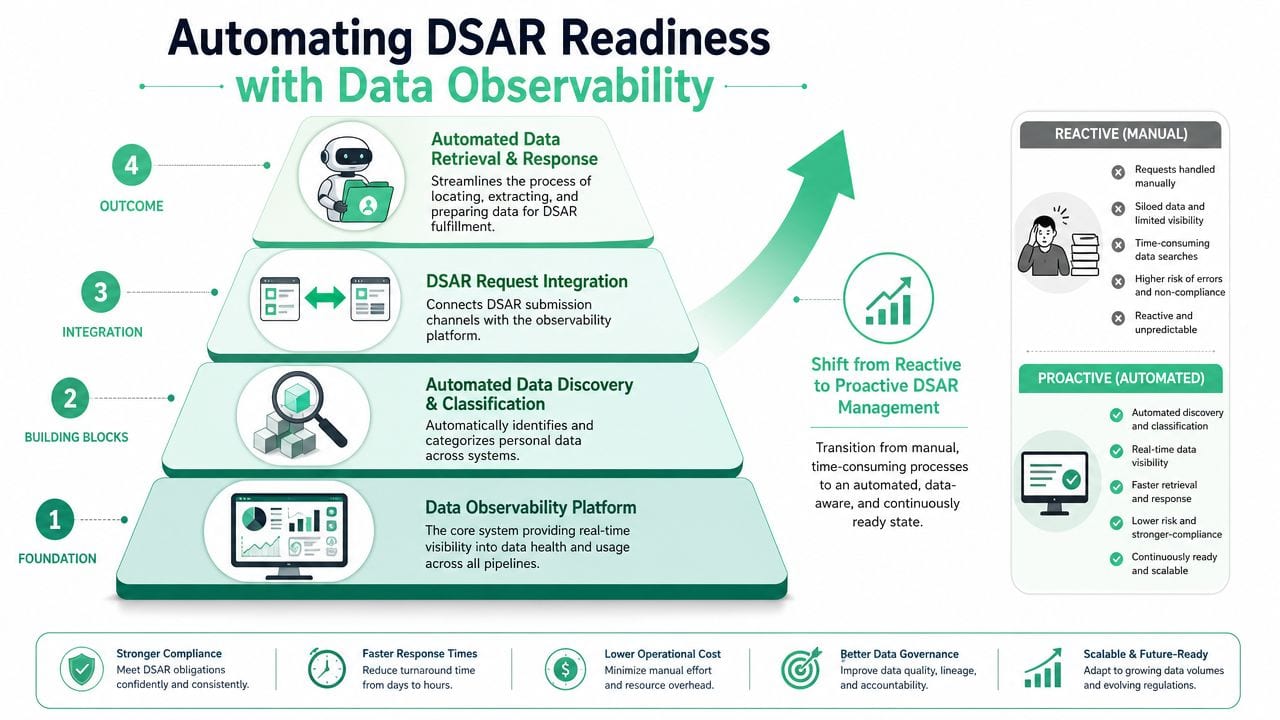
Manual discovery breaks first in stacks that change every week. DSAR readiness improves when teams maintain a live record of what they collect, which identifiers appear in those records, where events are routed, and what changed since the last review. Data observability supports that work by turning tracking and pipeline behavior into something teams can inspect continuously instead of reconstructing under deadline.
What observability changes
In a manual process, the request triggers the search. In an observable stack, the search groundwork is already in place because collection points, schemas, and destinations are being tracked as the implementation changes.
That shifts the DSAR job from open-ended discovery to controlled execution. Legal and privacy teams still set the response standard, but marketing ops, analytics, and engineering can answer practical questions faster and with better evidence.
A useful observability layer helps teams answer questions like:
- Which events are being sent from web, app, and server-side sources?
- Which properties contain personal or potentially sensitive data?
- Which destinations receive those events?
- When did a new parameter, pixel, or data flow appear?
- Which team owns that implementation?
That visibility improves DSAR operations for a simple reason. It reduces the gap between "we think this data exists somewhere in the stack" and "we know which systems and flows need review."
What to automate first
Full DSAR orchestration is not the first purchase I recommend for many teams. The bigger operational win usually comes from automating the messy foundation that slows every request down.
Start with:
- Continuous discovery of tags, SDKs, events, and destinations
- Schema monitoring for new or changed properties
- Alerts for PII leakage or consent misconfiguration
- Up-to-date tracking documentation tied to actual implementation
A practical example is data observability for marketing and analytics implementations. Used well, it gives teams a current inventory of what is firing across web, app, and server-side environments, plus notice when a new field or destination appears without review.
A short product walkthrough helps make the idea concrete:
Why this approach works better
The practical advantage is speed with evidence. Teams spend less time chasing screenshots, old implementation docs, and partial tribal knowledge. They spend more time validating identity matches, reviewing edge cases, and preparing a response that can survive internal scrutiny.
Observability also exposes the problems that tend to derail DSAR fulfillment: a pixel added by an agency, an event copied into a second destination, a user identifier passed in a field nobody classified, or a consent setting that changed without anyone updating the documentation.
Shared visibility changes team behavior. Marketing can see what is being collected. Analytics can see where schemas drifted. Engineering can trace where data moved after collection. Privacy can review a system map based on current implementation rather than assumptions. That is a stronger position than hoping the response is complete.
Frequently Asked Questions About DSARs
What if the data has been anonymized
If the data is completely anonymized and no longer relates to an identifiable person, teams generally treat it differently from personal data. The operational caution is simple: don't assume data is anonymous just because direct identifiers are absent. Aggregated reports can still be fed by underlying identifiable records elsewhere in the stack.
A safe internal rule is to ask whether the record can still be linked back through keys, joins, device identifiers, or adjacent systems. If it can, handle it as personal data in your search logic.
What about backups
Backups create confusion because they're designed for resilience, not active retrieval. The practical answer is to define a policy with legal, security, and infrastructure teams before requests arrive. Teams should know whether backup data is searchable in the ordinary course, how restoration is controlled, and how deletions or suppression are managed if backup restoration happens later.
The worst approach is inventing a backup policy during a live request. Document the rule now and align it with your broader retention practices.
How should teams handle children's data
Treat children's data as a higher-sensitivity case. Verification, lawful-basis review, internal approvals, and disclosure checks should all be tighter. Marketing teams should also review whether any audience building, profiling, or enrichment related to minors exists in practice, not just on paper.
If your organization serves mixed audiences, make sure product, lifecycle marketing, and privacy teams agree on escalation criteria. Don't leave that decision to whichever analyst received the request.
What about emails, tickets, and other unstructured records
Unstructured data is where DSAR work gets messy fast. Search terms can be incomplete. Threads include multiple people. Attachments may sit outside the core system. This is why ownership matters. Support, HR where relevant, legal, and operational system owners need a search protocol that's specific about repositories, date ranges, and review steps.
The broadest search is not always the best search. The defensible search is the one you can explain, reproduce, and review safely.
How do we keep the process from becoming chaotic
Use one intake path, one case owner, one system list, and one delivery standard. Even if several teams do the searching, a single owner should manage timing, notes, handoffs, and approvals. DSARs become chaotic when every team runs its own mini-process.
The companies that handle requests well usually don't have simpler data. They have clearer ownership, better documentation, and fewer unknowns in their stack.
If your team needs a better handle on where analytics and marketing data is flowing, Trackingplan is worth evaluating. It gives teams continuous visibility into tags, events, properties, destinations, tracking changes, and potential privacy issues across web, app, and server-side implementations, which makes DSAR preparation far more manageable than relying on manual audits and tribal knowledge.