
You're probably seeing it already. Retargeting pools don't match what they used to. Assisted conversions look thinner. A campaign that should have a clear path from impression to visit to sale now has missing steps.
That usually triggers a tactical question first: how do you block third party cookies in the browsers your team uses for testing, QA, consent checks, and troubleshooting? But the better question is broader. Once third-party cookies are blocked, what still works, what breaks, and what should analytics and marketing teams change immediately?
A lot of cookie guides often fall short. They treat blocking as a consumer privacy setting and stop there. In practice, blocking third-party cookies is also a diagnostic tool, a governance requirement, and a preview of the measurement conditions your campaigns increasingly operate under.
The End of an Era for Cross-Site Tracking
A marketing analyst notices that a retargeting audience has narrowed. A paid media manager sees less continuity between ad clicks and downstream behavior. An analytics lead compares browser segments and finds uneven attribution patterns. Those aren't isolated anomalies. They're part of a structural change in how browsers handle cross-site tracking.
Third-party cookies were the mechanism that let companies follow users across different websites. That made retargeting, cross-site profiling, and some forms of attribution possible. Once browsers block those cookies, the whole chain becomes less reliable.

Why this became the baseline
This didn't happen overnight. Google originally planned to phase out third-party cookies in Chrome by 2022, later shifted the timeline, and in 2024 moved toward asking users to make an informed choice across web browsing, as described in Supermetrics' overview of the Chrome timeline and market impact. That matters because Firefox and Safari had already been blocking or limiting these cookies for years, while Chrome's scale makes its behavior especially consequential for advertisers and analysts.
The practical implication is simple. Blocking third-party cookies is no longer a niche privacy preference. It's now a normal operating condition for digital measurement.
Practical rule: If your reporting depends on uninterrupted cross-site identity, your reporting is already more fragile than it looks.
For teams working on governance, this changes the operating model. You can't assume browser behavior will preserve the same attribution logic that ad platforms and analytics implementations were built around. You have to test under blocked-cookie conditions and design around partial visibility.
What this means for analysts and marketers
The old mindset was technical. Turn the setting on or off. The current mindset has to be strategic. What measurement depends on cross-site persistence? Which tags fail unnoticed? Which audiences shrink when browser storage gets cut off?
That's why the right response isn't just learning the toggle path in each browser. It's also understanding why first-party data has become central to durable measurement. Trackingplan's take on the death of third-party cookies and the shift toward first-party data is useful context if you're aligning analytics governance with marketing execution.
Browser Instructions for Blocking Third Party Cookies
The phrase sounds universal, but browser interfaces aren't. Chrome, Firefox, Safari, and Edge use different labels, different menu paths, and different exception models. That's one reason cookie troubleshooting often gets messy. Someone says they “blocked cookies,” but they changed a different setting, or only changed it in one browsing mode.
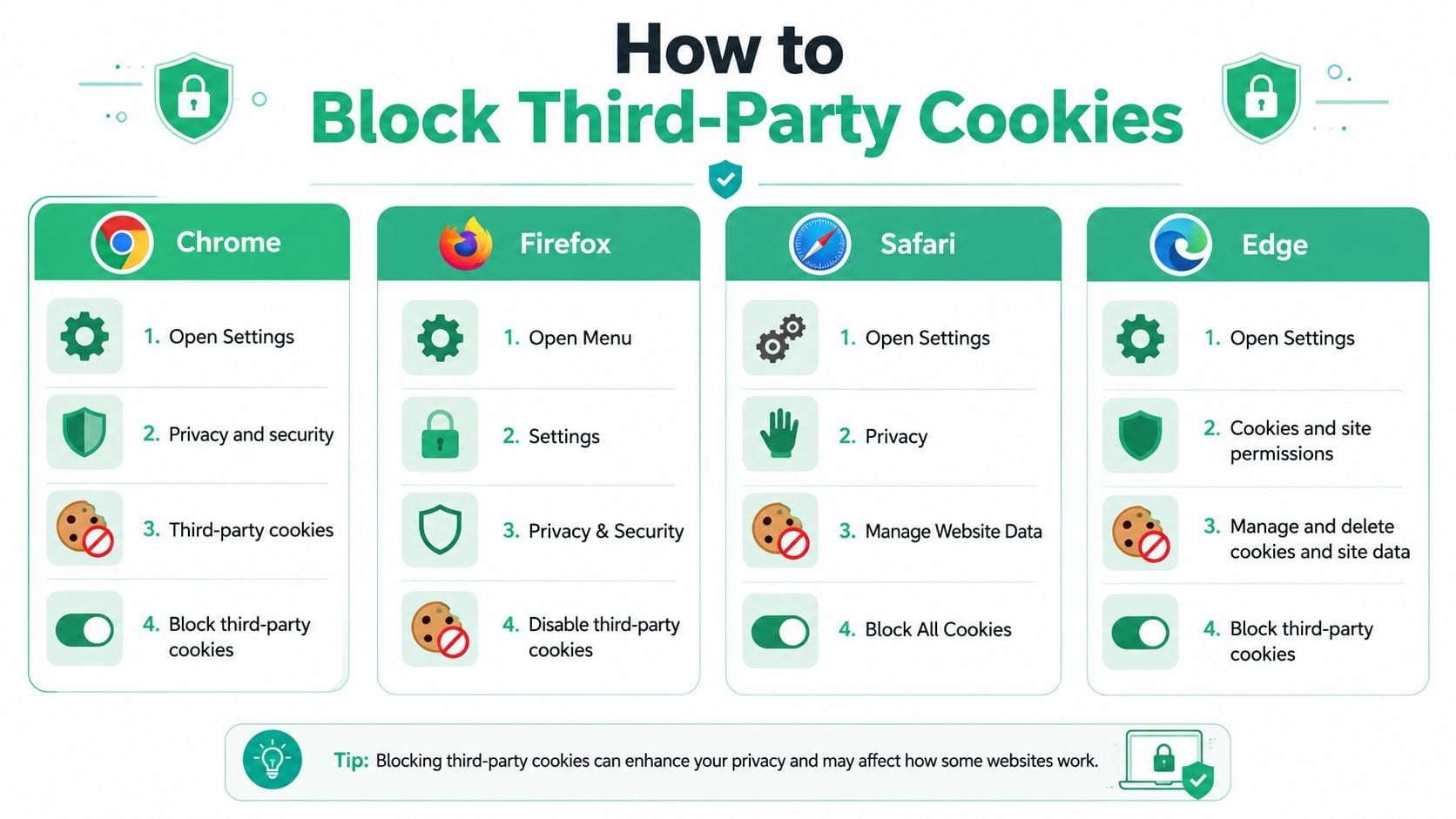
Google's own documentation shows the fragmentation clearly. Chrome uses Block third-party cookies, Firefox uses Enhanced Tracking Protection, Safari uses Prevent cross-site tracking, and Chrome on Android includes Block third-party cookies in Incognito mode and site-specific controls, as outlined in Chrome's Android help documentation. If you're trying to learn how to block third party cookies accurately, you need browser-specific instructions.
Chrome on desktop
In Chrome, the control is explicit.
- Open Settings.
- Go to Privacy and security.
- Select Third-party cookies.
- Choose Block third-party cookies.
Google also documents a dedicated settings page for cookie controls, including deletion, allowing, or blocking cookies site by site. For QA work, that matters because you may need to confirm both the global setting and any domain-level exceptions.
A few practical notes help here:
- Check exceptions first. A tester can think third-party cookies are blocked while an allow-list keeps a vendor functioning.
- Use a fresh session. Existing cookies may still affect what you observe until storage is cleared or a new session starts.
- Test the actual browser profile. Enterprise-managed Chrome profiles sometimes behave differently from personal ones.
Later, if you need a privacy cleanup beyond blocking, Trackingplan also has a plain-language guide on how to remove a tracking cookie and reclaim your privacy.
Firefox and Safari
Firefox doesn't present this as a cookie-only switch. It frames the setting through tracking protection.
For Firefox:
- Open Settings
- Go to Privacy & Security
- Review Enhanced Tracking Protection
- Use the mode that blocks third-party tracking behavior according to your needs
For Safari:
- Open Safari settings or preferences on your device
- Go to the privacy controls
- Turn on Prevent cross-site tracking
These labels matter operationally. Analysts often document “block third-party cookies” in a test plan, then a QA teammate opens Safari and can't find that wording. Safari's terminology points to the same outcome, but the interface language is different.
If your runbook uses one browser's wording for all browsers, someone will misconfigure the test.
Edge and browser-by-browser reality
Edge follows the Chromium pattern closely enough that teams usually find it familiar. In practice, you'll look for privacy settings related to cookies and site permissions, then verify whether exceptions are in place. This is especially relevant in organizations where Chrome is used for debugging and Edge is the managed corporate default.
A simple comparison helps during rollout:
| Browser | Main wording to look for | What to watch for |
|---|---|---|
| Chrome | Block third-party cookies | Site-specific exceptions |
| Firefox | Enhanced Tracking Protection | Protection mode differences |
| Safari | Prevent cross-site tracking | Different UI by device |
| Edge | Cookie/privacy settings and permissions | Allow-lists and managed policies |
This video is also useful if your team wants a walkthrough format instead of text instructions:
Mobile changes the procedure
Desktop instructions don't translate cleanly to mobile. Chrome on Android uses its own path and includes settings that differ from desktop behavior. Safari on iPhone and iPad sits inside Apple's settings model, not a Chrome-style browser settings flow. Firefox also handles privacy controls in its own way.
For teams doing consent QA or campaign verification, that means one thing. Never sign off on “cookie blocking tested” unless the device and browser are named in the test evidence. “Tested in Chrome” isn't enough if the user journey heavily skews mobile.
Verifying Cookie Blocking and Managing Exceptions
Turning the setting on isn't proof. It only tells you what the browser is supposed to do. For engineering teams, privacy teams, and analytics QA, the important question is whether third-party cookies are successfully blocked in the scenario you care about.

The reliable verification method
The most reliable validation approach is a controlled HTTPS test on a separate third-party domain using a hidden iframe. Inside that iframe, set a test cookie with SameSite=None; Secure, then report the result with postMessage. Smashing Magazine's technical guide to detecting third-party cookie blocking describes this as the most browser-compatible method because it avoids the false positives that show up when teams only inspect first-party storage or rely on static scans.
That distinction matters. A lot of teams still “verify” cookie blocking by opening DevTools, checking storage, and assuming the result tells the full story. It doesn't. You can miss iframe behavior, browser-specific restrictions, or edge cases where storage appears normal in one context but fails in another.
Verification advice: Test the behavior from a separate third-party context, not just from the page you control.
If your organization needs a marketing-focused validation workflow, Trackingplan also documents cookie-blocking verification for marketing data teams, including how to inspect requests and identify whether third-party tracking behavior persists after consent rejection.
When exceptions are the right answer
Full blocking is clean in theory and messy in production. Embedded chat tools, identity providers, payment flows, consent frameworks, and certain widgets may fail when every third-party cookie is blocked without exceptions.
That's why site-by-site controls matter.
- Use allow-lists surgically. Add only the domains required for a broken login, embedded service, or consent flow.
- Document every exception. If a browser exception exists, your analytics and privacy teams should know why it was approved.
- Re-test after changes. A login that starts working after an exception doesn't prove all other tracking behavior is acceptable.
Chrome and Edge both allow users to manage site-specific exceptions. In practice, this is how teams debug necessary functionality without reopening the door to broad cross-site tracking. The governance mistake is treating exceptions as permanent fixes instead of controlled accommodations.
What doesn't work well
A few verification habits create more confusion than clarity:
- Static checklist testing misses runtime behavior.
- One-browser validation ignores inconsistent behavior across browser engines.
- Assuming consent equals blocking overlooks implementations where the banner says one thing and network activity says another.
For analysts, this is a key mindset shift. Cookie blocking is not a binary policy item. It's a behavior that needs technical verification.
The Impact on Analytics and Marketing Attribution
Once third-party cookies are blocked, the first casualty is usually confidence. The dashboard still loads. Campaign metrics still populate. But the continuity between touchpoints gets weaker, especially when a user moves across domains, devices, or ad environments.
Attribution gets less stable
Attribution models depend on identifiable touchpoints. When third-party cookies are unavailable, multi-touch attribution loses some of the connective tissue that links early engagement to later conversion. Upper-funnel influence becomes harder to observe. A user may still convert, but the measurable path is shorter and less complete.
That affects familiar models in different ways:
| Model | What changes when third-party cookies are blocked |
|---|---|
| First-touch | Earlier discovery sources are easier to miss |
| Last-touch | It often over-credits the final visible interaction |
| Multi-touch | Cross-site continuity weakens, so credit splits become less trustworthy |
This doesn't mean attribution becomes useless. It means teams need to treat it as directional evidence, not perfect reconstruction.
Attribution still helps. It just helps under tighter visibility constraints.
Retargeting and audience building lose reach
Third-party cookies were a major mechanism behind cross-site retargeting. When they're blocked, audience pools built from that behavior become narrower and less consistent. That hits paid media execution directly.
Common symptoms include:
- Smaller retargeting pools that no longer mirror site traffic trends
- Weaker frequency controls when the browser won't maintain the same cross-site identifier
- Less dependable suppression of users who already converted
- Platform discrepancies between what the ad platform expects and what the browser allows
For marketing teams, this creates a planning problem. Media buyers may still launch campaigns using old audience logic, while analysts know the underlying identity layer has changed. That mismatch leads to arguments about whether the campaign underperformed or the measurement model degraded.
Reporting needs new expectations
Leaders often ask for continuity even when the environment no longer supports it. That's where governance matters. Analysts need to reset reporting expectations early, especially for cross-channel attribution and remarketing performance.
A practical response is to separate metrics into two groups:
- Stable enough to use operationally, such as first-party behavioral metrics on owned properties
- More conditional and model-dependent, such as cross-site journey reconstruction
If your team is mapping that transition, Trackingplan's perspective on cookieless attribution strategy is a useful operational reference.
Practical Alternatives in a Cookieless Future
The strongest teams aren't trying to preserve every old tracking pattern. They're rebuilding measurement around signals they can govern. That usually means three things working together: stronger first-party data collection, more controlled server-side delivery, and consent operations that are tested instead of assumed.
Start with first-party data
First-party data is the foundation because it comes from direct interactions on properties you control. That includes authenticated sessions, declared preferences, transaction data, lead capture, and on-site behavioral events gathered under your own governance rules.
This doesn't mean “collect everything.” It means collecting what has a clear purpose, a clear legal basis, and a clear downstream use. Teams that need a structured planning lens should spend time on developing a first-party data strategy, especially if their current setup still leans too heavily on vendor-managed identifiers.
Use server-side tracking carefully
Server-side tracking doesn't magically replace third-party cookies, and it shouldn't be sold that way. What it does provide is greater control over data flow, transformation, enrichment, and delivery between your systems and downstream tools.
Used well, server-side setups can help teams:
- Reduce client-side fragility caused by browser restrictions and script conflicts
- Standardize event handling before data reaches analytics or ad platforms
- Apply governance controls around fields, consent state, and destination routing
Used badly, server-side tracking just moves bad tracking upstream and makes it harder to notice. You still need validation, schema control, and consent-aware logic.
Treat consent management as operational infrastructure
A consent management platform isn't just a legal banner. It's the control layer that determines whether tags fire, storage is permitted, and downstream collection should happen at all. If the CMP is misconfigured, every analytics discussion that follows is compromised.
A mature setup usually includes:
- Clear category mapping so analytics, advertising, and functional technologies aren't lumped together
- Environment-specific QA across desktop, mobile, and embedded contexts
- Ongoing monitoring for tags that bypass or ignore consent state
One practical option for that monitoring is Trackingplan, which teams use to observe analytics and marketing implementations, detect missing or rogue events, and catch issues such as broken pixels or consent misconfigurations across web, app, and server-side environments.
Better measurement in a cookieless environment comes from tighter control, not from trying to recreate unrestricted tracking by other means.
Build for resilience, not nostalgia
The old model rewarded easy data collection. The next model rewards disciplined data design. Teams that win here document their events, limit unnecessary dependencies, verify browser behavior, and align media reporting with what can be measured.
That requires more coordination between marketing, analytics, engineering, and privacy. But the result is better than the status quo. You get fewer silent failures, fewer false assumptions, and a measurement stack that reflects current browser reality.
Frequently Asked Questions About Cookie Management
What's the difference between first-party and third-party cookies
A first-party cookie is set by the site the user is actively visiting. It usually supports things like login state, preferences, or cart persistence on that same site.
A third-party cookie is set in a cross-site context, usually by embedded advertising, tracking, or external service infrastructure. That's the mechanism historically used for cross-site tracking and retargeting.
Does Incognito mode block all third-party cookies automatically
Not always, and not in the same way across browsers. Some browsers offer specific third-party cookie restrictions in private browsing modes, while others separate private browsing from cookie controls. Teams shouldn't assume that Incognito or private mode equals a full third-party cookie block.
Can a website still track me if I block third-party cookies
Yes. Blocking third-party cookies limits one major cross-site tracking method, but it doesn't stop all data collection. A site can still observe behavior on its own pages, use first-party storage, process server-side events, and apply consented analytics methods on owned properties.
Why do logins or embedded tools sometimes break after blocking cookies
Because some services still rely on cross-site cookie behavior for authentication, session continuity, or embedded workflows. That's why exception handling exists in browsers like Chrome and Edge. The right fix is usually a narrow allow-list, not disabling protections entirely.
Is checking browser storage enough to confirm blocking works
No. Storage inspection can be misleading. Reliable verification needs behavior-based testing in a true third-party context, especially when engineering or QA teams are validating consent and analytics controls.
If your team is trying to block third-party cookies, validate consent behavior, and understand what those browser changes are doing to analytics quality, Trackingplan can help you monitor implementation issues across web, app, and server-side data flows so you can spot broken pixels, missing events, and consent-related tracking errors before they distort reporting.