
TL;DR:
- Cookie blocking causes significant data loss, impacting marketing attribution and campaign decisions.
- Manual and automated verification processes are essential to detect and fix tracking leaks across browsers and devices.
- Layering client-side enforcement with server-side tracking enhances resilience against evolving privacy restrictions.
Cookie blocking is quietly draining your marketing data, and most teams don’t catch it until campaign budgets have already been wasted on decisions built on incomplete numbers. Ad blockers, browser privacy updates like Safari ITP, and tightening regulations mean the gap between real user behavior and what your analytics platform records is growing every month. Without a structured verification process, even a technically compliant consent banner can leak data or over-block legitimate tracking. This guide gives you a practical, step-by-step framework to verify cookie blocking accurately, protect attribution integrity, and make marketing decisions grounded in real data.
Table of Contents
- Understand the impact of cookie blocking on marketing data
- What you need to verify cookie blocking
- How to run a step-by-step cookie blocking verification
- Troubleshooting tracking failures and advanced verification techniques
- Why most guides underestimate cookie blocking risks and what actually works
- How Trackingplan helps you automate cookie compliance and tracking accuracy
- Frequently asked questions
Key Takeaways
| Point | Details |
|---|---|
| High data loss risk | Unverified cookie blocking can result in losing up to 50% of marketing analytics data. |
| Essential verification steps | Manual and automated checks are vital for compliance and tracking data integrity. |
| Advanced solutions needed | Hybrid and server-side tracking methods minimize data loss from ad blockers and browser restrictions. |
| Continuous monitoring best | Regularly verify cookie blocking status and automated solutions to ensure compliance and optimize marketing efforts. |
Understand the impact of cookie blocking on marketing data
Cookie blocking refers to any mechanism that prevents tracking cookies from being set or read in a user’s browser. This includes browser-native restrictions like Safari’s Intelligent Tracking Prevention, Firefox’s Enhanced Tracking Protection, third-party ad blockers, and consent management platforms that are supposed to block cookies when users reject them. The problem is layered: each of these mechanisms works differently, interacts with your stack differently, and creates gaps at different points in the data pipeline.
The importance of tracking for marketing cannot be overstated when attribution depends on connecting touchpoints across sessions and devices. If cookie blocking silently removes those connections, you’re optimizing campaigns against a distorted picture. You might cut a high-performing channel because it appears to underperform, or scale spend on one that looks good only because its losses are masked.
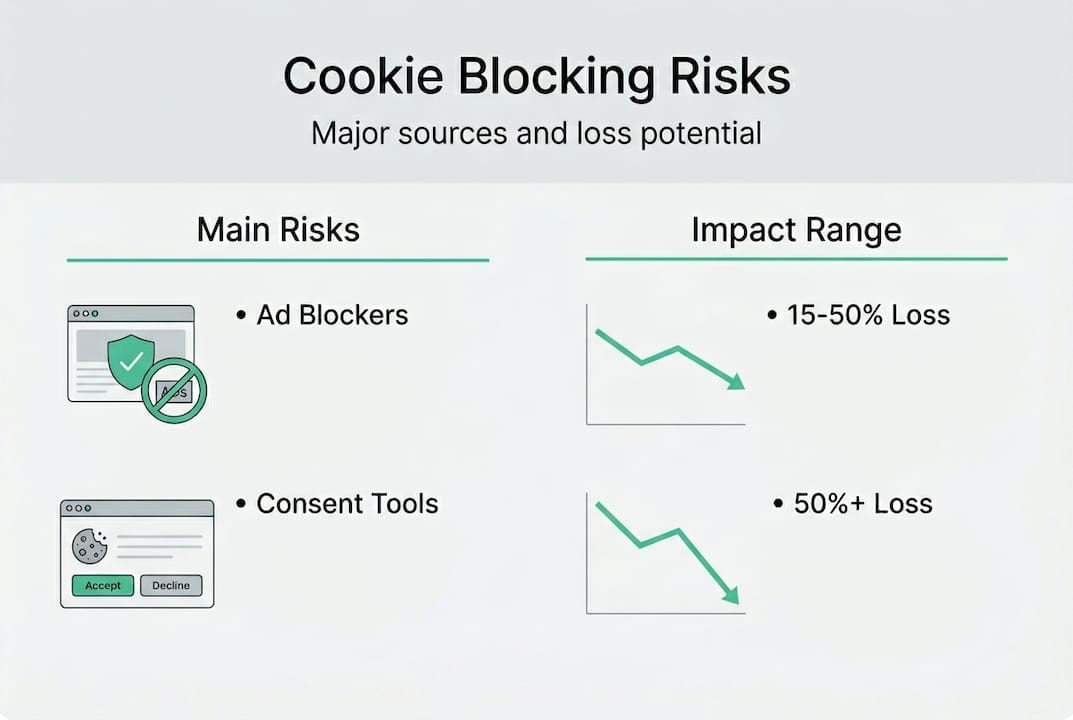
The numbers are stark. Ad blockers cause 15-50% client-side data loss, and server-side GTM recovers 24-36% more conversions while improving PageSpeed by up to 39 points. That’s not a rounding error. That’s a material portion of your conversion data disappearing before it ever reaches your analytics tool.
“90% of cookie banners fail to block tracking per audits.”
This is the central irony: consent tools are supposed to protect user privacy, but most fail to block tracking reliably. The result is a double failure. Users who reject cookies still get tracked, creating compliance risk. And teams who assume their banner is working never audit the data quality downstream. Understanding how unlocking marketing ROI depends on clean tracking data makes the verification step non-negotiable.
| Effect | Impact range | Recovery potential |
|---|---|---|
| Data loss from ad blockers | 15-50% | Partial, via server-side |
| Conversion recovery (server-side GTM) | +24-36% | High with proper setup |
| PageSpeed improvement | Up to +39 points | Significant |
| Cookie banners failing to block | ~90% of audits | Requires manual fix |
With the stakes clearly outlined, it’s crucial to examine what you’ll need before verifying cookie blocking.
What you need to verify cookie blocking
Before running a single test, you need the right environment and tools. Jumping straight into verification without preparation leads to false negatives where you think blocking is working correctly when it isn’t.
Here’s what to have ready before you start:
- Browsers: Chrome, Firefox, and Safari at minimum. Each handles cookies differently, so single-browser testing will miss real-world gaps.
- Incognito or private mode: This prevents previously set cookies from contaminating your test results.
- Browser DevTools: The Application tab for inspecting stored cookies and local storage, and the Network panel for monitoring outbound requests to tracking domains.
- A test user account: Separate from your production analytics so test events don’t pollute live data.
- Multiple devices: Desktop and mobile behave differently, especially on Safari/iOS where ITP restrictions are strictest.
- Your consent management platform (CMP) credentials: You’ll need access to configure and test different consent states.
The website audit checklist approach applies here too: thorough coverage beats speed every time. The standard test methodology starts with opening an incognito window, checking the Application tab for cookies before any interaction (only essential cookies should be present), rejecting all cookies, and then verifying that no non-essential cookies are set and no network requests fire to domains like google-analytics.com.
Pro Tip: Use browser automation tools like Cypress or Selenium to script repeat verification runs. Instead of manually clicking through your consent flow on six browsers weekly, you can trigger automated tests on every deployment and catch regressions the moment they appear.
| Attribute | Manual verification | Automated verification |
|---|---|---|
| Ease of setup | High | Medium |
| Coverage | Limited | Broad |
| Speed | Slow | Fast |
| Accuracy | Moderate | High |
| Scalability | Low | High |
With the right tools and setup in place, you’re ready for step-by-step verification.

How to run a step-by-step cookie blocking verification
This is the core process. Follow each step carefully, document what you find, and repeat across all target browsers and devices.
- Open an incognito window in your chosen browser and navigate to your website’s homepage.
- Clear all storage via DevTools (Application > Storage > Clear site data) to ensure a completely clean state.
- Inspect the Application tab before interacting with the consent banner. Only essential cookies like session identifiers should exist at this point.
- Interact with the consent banner by explicitly rejecting all non-essential cookies.
- Check the Application tab again. Any analytics, advertising, or third-party cookies appearing after rejection is a failure.
- Open the Network panel and filter by tracking domains (google-analytics.com, doubleclick.net, facebook.net). No requests should fire to these after rejection.
- Document your findings with screenshots of both the Application and Network tabs. Note which cookies appear, from which domain, and at what point in the flow.
- Repeat on additional pages, especially checkout flows, blog posts, and landing pages where tracking tags often load differently.
This method mirrors what CNIL and ICO enforcement teams use in their audits. The ICO’s 2025 action resulted in 95% of top 1,000 UK sites becoming compliant after intervention, with 564 sites improving. CNIL levied 486M€ in fines for non-functional reject buttons in 2025. The business stakes for skipping this verification step are real and measurable.
Pro Tip: Cross-check results in at least two browsers before concluding anything. A tag that fires correctly after rejection in Chrome may still trigger in Firefox due to different storage partitioning behavior.
For any team investing in accurate tracking implementation, this manual walkthrough is the baseline. Everything else builds on it.
Understanding the core verification process, you’ll need to troubleshoot pitfalls and address advanced issues.
Troubleshooting tracking failures and advanced verification techniques
Even after running the standard process, failures slip through. Here are the most common reasons cookie blocking breaks down:
- Stealth cookies: Some vendors set cookies via workarounds such as localStorage or IndexedDB that bypass consent checks entirely.
- Misconfigured consent categories: A tag assigned to the wrong consent category will fire even when users reject the category it should belong to.
- Browser inconsistencies: Safari’s ITP behaves fundamentally differently from Chrome’s SameSite rules, creating gaps that look fine in one browser and fail in another.
- Ad blocker interference: Ad blockers may block some tracking requests but not others, creating partial data that looks accurate but is missing key segments.
- Tag manager race conditions: Tags loading before the CMP has resolved the user’s consent state can fire before restrictions are enforced.
For third-party cookie detection specifically, navigator.cookieEnabled fails in cross-site contexts. The reliable approach uses an iframe combined with a postMessage probe to detect whether third-party cookies are actually accessible, since the browser’s own API gives misleading results in partitioned storage environments.
Client-side data loss is substantial. Methods that rely purely on browser-based tracking can lose 15-50% of data to ad blockers and browser restrictions alone. This isn’t a fringe case for power users with ad blockers. It’s mainstream behavior across a growing share of your audience.
Server-side tracking can extend cookie life to 400+ days and resist ad blockers by routing data through first-party infrastructure.
The server-side tracking approach addresses this directly. By moving data collection to a first-party server, you sidestep browser restrictions entirely. Server-side tracking mitigates blocking using first-party servers, extending cookie life to 400+ days with IP alignment and making the setup resistant to ad blockers. For teams managing multi-platform tracking accuracy, combining client-side consent enforcement with server-side data collection is the most resilient architecture available.
Having mastered the full lifecycle of verification, it’s important to see the bigger strategic picture.
Why most guides underestimate cookie blocking risks and what actually works
Most cookie blocking guides stop at “check your consent banner and move on.” That’s not wrong, but it’s dangerously incomplete. The real risk isn’t that your banner is missing. It’s that your banner is present, technically functional, and still leaking data in ways you’re not measuring.
We’ve seen teams pass internal compliance reviews and then discover their analytics were undercounting conversions by 30% because a tag was miscategorized in their CMP. A passing consent audit doesn’t equal accurate data. Those are two separate tests.
The industry still treats client-side verification as sufficient. But client-side tracking loses 15-50% of data to blockers, while server-side methods achieve 99%+ accuracy with proper setup. The tradeoff is setup complexity, which is why hybrid architectures are the practical recommendation: client-side for consent enforcement and user-facing interactions, server-side for reliable data capture.
Future-proofing your analytics means recognizing that browser privacy restrictions will keep tightening. Waiting until data loss is visible in your dashboards means you’ve already lost weeks of clean data. Verify proactively, layer in server-side accuracy where it matters most, and treat cookie blocking verification as a recurring operational task, not a one-time setup check.
How Trackingplan helps you automate cookie compliance and tracking accuracy
Manual verification is essential, but it doesn’t scale. Every new tracking script, CMP update, or browser privacy change introduces new failure points that manual spot-checks miss entirely.
Trackingplan continuously monitors your analytics and marketing implementations, automatically flagging broken pixels, misconfigured consent categories, and tracking gaps in real time. Instead of discovering data loss weeks after the fact, you get alerts the moment something breaks. By integrating with digital analytics tools you already use, Trackingplan adds an automated audit layer that keeps your data clean without adding manual workload. See how Trackingplan works and turn cookie blocking verification from a periodic task into a continuous safeguard.
Frequently asked questions
What counts as a non-essential cookie for compliance testing?
Any tracking, analytics, or advertising cookie not required for core website functionality is non-essential and must be blocked after rejection. Session cookies that keep users logged in are essential. Google Analytics cookies are not.
How do I test for stealth tracking methods beyond visible cookies?
Check for network calls to tracking domains in the Network panel and use DevTools or automation scripts to monitor all storage types including localStorage and IndexedDB, not just cookies.
Why doesn’t navigator.cookieEnabled reliably detect third-party cookie blocking?
navigator.cookieEnabled fails cross-site because browser security partitions storage between contexts. Use an iframe with postMessage probes to accurately detect third-party cookie accessibility.
How can server-side tracking improve cookie blocking resilience?
Server-side tracking routes data through first-party servers, bypassing browser restrictions entirely and extending cookie lifetime to 400+ days for more complete analytics capture.
How often should I repeat cookie blocking verification?
Run verification monthly and immediately after any changes to your CMP, tracking scripts, or applicable data privacy regulations to catch regressions before they affect your data quality.