
A martech audit is a review of every marketing tool you pay for and of the data that runs through them. Most guides treat it as a cost exercise: list the tools, find the overlap, cut the ones nobody uses. That part matters. It’s also the easy part.
The hard part is the data. A tool can look useless because it was fed broken data. Another can look essential while it reports numbers no other tool agrees with. Cut on the first impression and you remove the wrong one.
This checklist runs in four steps: the inventory, the data flow, the integrations between tools, and the outcome, where you decide what to keep, cut, or consolidate.

What a martech audit covers
A martech audit reviews four layers, each checked against the next.
| Layer | What you check | Where you look |
|---|---|---|
| Inventory | Every tool, its owner, its cost, its contract date, and what it overlaps with | Finance, procurement, SSO logs, the tag manager |
| Data flow | What each tool collects on the site or app and what it sends out | Analytics, the tag manager, the CDP, ad pixels, the consent banner |
| Integrations | Where data passes between tools: UTMs, click IDs, user IDs, CRM syncs | Landing pages, redirects, form handlers, CRM fields |
| Outcome | Whether the same number agrees across tools, then keep, cut, or consolidate | Analytics, ad platforms, CRM, backend |
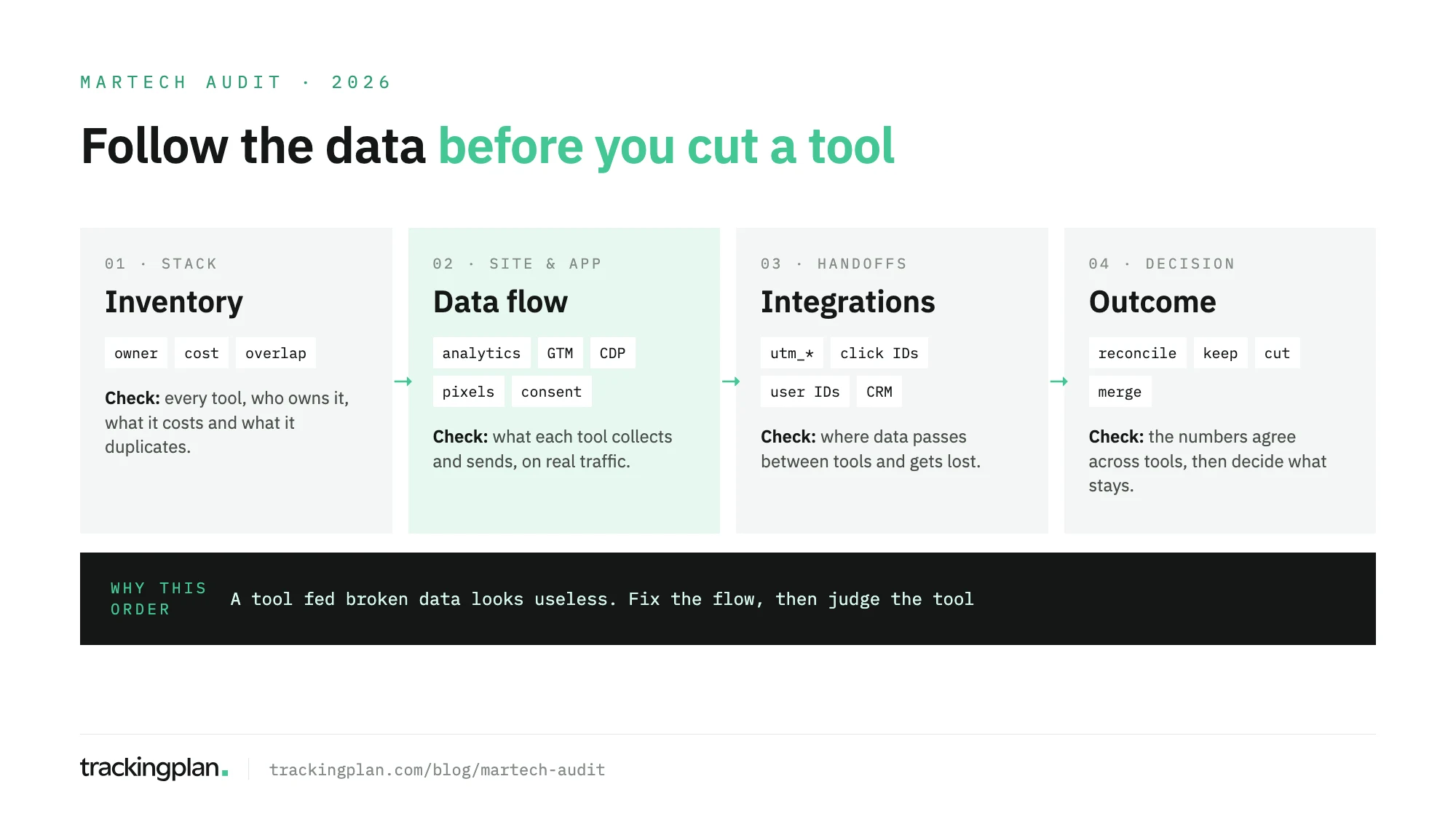
If your audit is part of a broader review of strategy and channels, the digital marketing audit checklist covers that wider scope. This post stays on the stack.
Step 1: take the inventory
Start with a list. Every tool goes in one table with the same columns.
- Name and category. Analytics, tag manager, CDP, ad platform, consent, email, CRM, testing, heatmaps, enrichment.
- Owner. A person, not a team. If nobody claims a tool, mark it. That is your first candidate to cut.
- Cost and renewal date. Licence, seats, overage, and the date you can still exit the contract.
- Where it runs. Site, app, server, or only inside another tool.
- What it overlaps with. Two session replay tools, two A/B testing tools, a CDP and a tag manager both sending to the same ad platform.
Finance and procurement give you what you pay for. They miss what you don’t pay for. Free pixels, trial tools that were never removed, and tags an agency added two years ago live only on the site. Open the tag manager and the site’s network requests and add everything you find there to the list.
The gap between the two lists is a finding in itself. A tool that sends data from your site without an owner or a contract is a privacy question before it’s a cost question.
Step 2: audit the data flow
Now follow the data. For each tool on the list, answer two questions: what does it collect, and where does it send it?
- Analytics. Are the key events there, with the right names and properties? A web analytics audit goes through this layer in depth.
- Tag manager. Which tags fire, on which pages, and on which triggers? Look for tags that fire on every page when they should fire on one, and paused tags that still load a script.
- CDP. What goes in, what comes out, and what gets dropped on the way. A CDP that receives a purchase with its value and forwards it without one is a common, quiet break.
- Ad pixels. Does each pixel send the same conversion with the same value? If you run a pixel and a server-side copy, is each conversion counted once?
- Consent. Does every tool respect the visitor’s choice? A tool that fires before consent is a compliance problem. A tool that stays blocked after consent is granted is a measurement problem.
Look at real traffic. The implementation spec says what should happen. The network requests say what does. They drift apart with every release.
Step 3: audit the integrations
This is where most stacks lose data, and where most audits don’t look. Each handoff between tools is a place where an ID, a parameter, or a value can disappear.
- UTMs. Campaign parameters must survive every redirect and reach analytics intact. Google’s Analytics help notes that parameter values are case sensitive:
utm_source=googleandutm_source=Googleare two sources. One naming convention, checked on every new campaign. The UTM tracking audit covers the cleanup. - Click IDs.
gclid,fbclid,ttclidand their equivalents must reach the landing page, and the server events that depend on them. - User IDs. The same person should carry the same ID from the site to the CDP to the CRM. When analytics, the CDP, and the CRM each mint their own, nothing can be joined later.
- CRM syncs. Check that form fields map to CRM fields, that source and campaign land somewhere, and that offline conversions sent back to ad platforms carry the IDs they need.
Test each handoff end to end. Click a tagged link, fill the form, and follow the record from the browser to the CRM. Every field that arrives empty is a finding.
Step 4: reconcile the numbers and decide
Pull the same metric from every tool that reports it, for the same date range: purchases from analytics, each ad platform, and the backend; leads from analytics, the CRM, and the ad platforms that optimize on them.
Some gap is normal. Each tool counts by its own rules and credits by its own model. What isn’t normal: an ad platform reporting more purchases than you have orders, a gap that jumps from one week to the next, or a value that differs from the order total. Those go back to Step 2 or Step 3.
Only now decide.
- Keep a tool that has an owner, sends correct data, and answers a question no other tool answers.
- Cut a tool with no owner, no use, or numbers that never reconcile and nobody will fix.
- Consolidate two tools that do the same job. Keep the one whose data agrees with the backend.
- Fix before deciding when a tool’s numbers are off because of a broken tag or handoff. Judge it again once the data is right.
Write each decision down with its owner and its date. If the same data problems keep surfacing across tools, a marketing data quality audit goes deeper on the root causes.
Keeping it true after the audit
An audit describes one day. The next release can drop a UTM on a redirect, break the CDP’s purchase value, or load a pixel before consent. None of the tools in the stack will flag it, because each one only sees its own data.
Trackingplan watches that flow on real traffic. If it leaves the browser, the app, or the server, it sees it: analytics, ads, CDPs and tag managers, and consent, across 170+ analytics and ad providers. It parses each payload per platform, so it can check that the same purchase reaches every tool with the same value, and see what goes into a CDP or tag manager, what comes out, and what got lost in between.
It also reads spend, campaigns, and platform-reported conversions from eleven ad networks, which is how it flags clicks that arrive without UTMs and conversions a platform counts that the site never sent. Gaps go to whoever owns the tag. Scheduled checks run daily or weekly, so the questions from this audit, like UTM naming or whether destinations match the data layer, keep getting asked after the audit is over. The coverage page shows what it reads, platform by platform.
FAQ
What is a martech audit?
A martech audit is a structured review of the marketing technology stack: which tools you pay for and who owns them, what data each tool collects and sends, where that data passes between tools and gets lost, and whether the numbers agree across tools. It ends with a decision for each tool: keep, cut, or consolidate.
How is a martech audit different from a marketing audit?
A marketing audit reviews strategy, channels, and results. A martech audit reviews the tools and the data underneath them. The two meet at measurement: if the stack sends broken data, the marketing audit judges channels on numbers that aren’t true.
Who should run a martech audit?
Marketing operations usually leads it, with the analytics team for the data flow, the paid media team for pixels and click IDs, and whoever owns the CRM for the handoffs. Each tool needs a named owner by the end, or it goes on the list to cut.
How often should you audit your martech stack?
Run a full audit once a year, before a contract renewal, and after a site migration or a new tool goes live. Between audits, check the data flow continuously or at least weekly, because a release can break a tag or a handoff without anyone noticing.