
You know the symptoms. Paid media says one thing, GA4 says another, the CRM shows fewer qualified leads than the form platform, and nobody wants to approve budget shifts because the reporting layer feels fragile. The team keeps talking about “cleaning up the data,” but what usually happens is a short project, a burst of fixes, and then another slow slide back into mistrust.
A marketing data quality audit should stop that cycle. But only if you treat it as the start of a program, not the end of a cleanup exercise.
The teams that get value from an audit do three things well. They define what “good” means before they touch the data. They map the full collection and delivery path instead of checking dashboards in isolation. And they build monitoring so the same problems don't return after the next site release, consent update, pixel change, or CRM sync tweak.
Laying the Groundwork for Your Data Quality Audit
Most failed audits don't fail on SQL. They fail in planning. Marketing wants cleaner attribution, BI wants stable reporting, engineering wants fewer last-minute bug tickets, and nobody has written down which systems, fields, or events matter most.
Start with the business risk, not the dataset. If your paid team can't trust campaign naming, the problem isn't “bad data” in the abstract. It's wasted optimization cycles, weak audience decisions, and constant reconciliation work. If lifecycle reporting is broken, the issue isn't just missing fields. It's that sales and marketing are using different realities.
Define trust in operational terms
A useful audit charter names the data domains under review and the thresholds that determine whether those domains are healthy. That matters because the common dimensions are well established: completeness, accuracy, consistency, uniqueness, timeliness, and validity. In practice, teams usually set explicit thresholds and SLAs rather than relying on subjective reviews. One 2026 framework recommends email validity of at least 98%, duplicate rate at or below 2%, record freshness within 90 days, and remediation SLA compliance at 90% or better according to Pedowitz Group's marketing data quality metrics guidance.
That single sentence changes the tone of the audit. Instead of “the CRM is messy,” you get questions like these:
- Validity check: Are contact emails structurally valid enough for activation?
- Uniqueness check: Is the duplicate rate acceptable for sales routing and segmentation?
- Freshness check: Are records recent enough for outreach and suppression logic?
- Operational check: Are owners fixing flagged issues within the agreed SLA?
Practical rule: If a stakeholder says data is “mostly fine,” ask what metric would prove that.
Set scope before the project spreads
Teams often start with “let's audit marketing data” and end up trying to fix every table, every connector, and every dashboard. That approach burns time and creates little accountability.
Pick one of these scope models:
Journey scope
Audit a specific path such as ad click to landing page to form fill to CRM to revenue reporting.Channel scope
Focus on one high-spend or high-risk channel, such as paid search, paid social, or email.Platform scope
Review one system cluster, such as web analytics plus tag management, or CRM plus marketing automation.Use-case scope
Center the audit on a decision, like attribution, lead routing, audience building, or consent compliance.
For first audits, journey scope usually works best. It gives marketers, developers, and analysts a shared frame. Everyone can see where collection, transformation, and activation break down.
Build a small tiger team
You don't need a committee. You need a working group with clear ownership.
A practical team usually includes:
- Marketing ops or growth lead who defines activation needs and campaign standards
- Analytics lead who writes audit logic and translates findings into measurable impact
- Developer or implementation owner who can inspect tags, APIs, and release history
- BI or data engineer who validates transformations, joins, and downstream model behavior
- Privacy or compliance partner when consent and PII risk are in scope
Keep the group small, but make ownership explicit. Every issue should have an owner, a business impact statement, and a next action.
Write the audit charter down
A one-page charter is enough if it includes the essentials:
- Objective: what business decision or workflow needs trustworthy data
- In-scope systems: web, app, CRM, MAP, warehouse, ad platforms, consent tool
- Critical entities: sessions, users, leads, opportunities, purchases, campaigns
- Core KPIs and thresholds: the health rules you'll audit against
- Cadence: one-time review, weekly scorecard, or continuous monitoring path
- Decision owner: who approves fixes and prioritization
If the team needs outside perspective before committing to a larger effort, broader digital marketing audit services can help frame where data quality fits inside the larger measurement stack. That's useful when stakeholders are mixing channel performance questions with implementation problems.
A data audit gets traction when it becomes a prerequisite for decision-making, not a side project owned by analysts alone.
Discovering Your Complete Marketing Data Footprint
The discovery phase feels less like reporting work and more like mapping an unfamiliar city. You know the main roads. You don't yet know the alleyways, the dead ends, or the unofficial shortcuts people have built over time.
Organizations often underestimate how many places marketing data originates. They think in terms of GA4, Meta, the CRM, and maybe a CDP. Then they start digging and find old pixels from a prior agency, duplicate conversion tags, a server-side forwarding setup nobody documented, custom JavaScript writing to the dataLayer, and a form vendor posting leads through a path that bypasses standard validation.
Build the map from collection to destination
Don't start with dashboards. Start where events are born.
For a credible inventory, list each of these:
- Client-side collection points such as tag manager containers, hardcoded scripts, SDKs, and custom event listeners
- Shared data structures such as the dataLayer or equivalent event payload object
- Server-side paths such as conversion APIs, backend event forwarding, webhook relays, and ETL jobs
- Destinations such as analytics platforms, ad networks, attribution tools, CRM, MAP, warehouse, and BI
- Control systems such as consent managers, identity resolution logic, and enrichment tools
IBM frames a robust audit as a staged workflow: define objectives and scope, profile source systems and event streams, quantify issues with KPIs and SLAs, then remediate and re-audit. It also notes practical thresholds like pipeline uptime at 99%, critical refreshes under 2 hours old, and customer-field completeness above 98%, tracked daily in strong implementations, as outlined in IBM's data quality issues guidance.
That's useful here because source discovery is not documentation theater. It's how you establish which event streams and integrations need profiling first.
Do the digital archaeology
A first pass usually combines manual inspection and automated discovery.
Manual work still matters:
- Browser developer tools show which requests fire on key pages and user actions
- Tag manager review exposes dormant tags, duplicate triggers, and conflicting variables
- App implementation review reveals SDK versions, event naming drift, and platform-specific behavior
- Warehouse lineage checks show where source fields are transformed, overwritten, or dropped
Then add automation where possible. Crawlers and observability tools are particularly useful for large sites, multi-brand environments, and stacks with server-side routing.
A practical document for this phase is a system map with five columns: trigger, event name, payload fields, transport path, destination. If you can't fill in one of those columns, the audit isn't ready for validation yet.
For teams refining event design, this guide to data layer structure and implementation patterns is a useful reference because weak data layer design tends to create recurring quality issues across multiple destinations.
When teams say “tracking is implemented,” they often mean “some tags are firing.” Those are not the same thing.
Expect surprises in old implementations
The most common discovery findings are mundane, not dramatic. That's why they're dangerous. A hidden script from an old campaign. A thank-you page firing two conversions. A consent update that blocks one analytics library but not another. A backend event with a different field name than the front-end event it's supposed to mirror.
These issues rarely live in one team's territory. Marketing may own naming. Developers may own release changes. Analysts may own detection. Agencies may own parts of the tag container. Nobody sees the whole picture until the audit forces it into one view.
If you want to show this process visually, a Trackingplan channel video such as “How to Discover All Your Martech Implementations in One Place” fits well here as an embedded example of implementation discovery.
Produce one source-of-truth inventory
By the end of discovery, you should have a living inventory, not a slide deck. At minimum, include:
| Inventory element | What to capture |
|---|---|
| System | Site, app, CRM, MAP, warehouse, ad platform, consent manager |
| Owner | Named person or team |
| Events or records | What data is produced or modified |
| Key fields | Identifiers, campaign parameters, revenue, consent, user attributes |
| Destination path | Where the data is sent and how |
| Failure risk | What breaks if this source drifts or stops |
That inventory becomes the control plane for the rest of the audit. Without it, validation becomes guesswork.
Executing Core Validation Checks on Your Marketing Data
Once the footprint is mapped, the audit gets concrete. Teams then stop debating whether there's a problem and start identifying exact failure modes.
The shift that matters is moving from “find errors” to measure data health in repeatable ways. Historical audit guidance started with simple measures like the ratio of known errors to total records and the count of empty values, then expanded into formalized benchmarks for dimensions such as completeness and attribution accuracy, as described in Improvado's guide to data quality audits.
Start with schema and payload validation
Every critical event should have a defined shape. That means required properties, allowed types, accepted value patterns, and destination-specific mappings.
A few examples:
purchaseshould include transaction identifier, value, currency, and product context if your reporting depends on them.generate_leadshould distinguish test traffic from production traffic if lead routing or performance reporting depends on that separation.- Consent fields should be present where downstream behavior changes based on user permission state.
What usually fails here isn't the existence of the event. It's drift inside the payload. A field switches from string to array. A revenue value arrives as text. A destination receives campaignName while another receives campaign_name. Dashboards still populate, but trust erodes because dimensions no longer reconcile cleanly.
Normalize campaign tagging before you analyze attribution
UTM quality issues are a classic source of false disagreement between teams. They don't look severe in isolation, but they fragment the same campaign into multiple rows and weaken every channel-level readout.
These are common examples:
- Bad:
utm_source=Google - Bad:
utm_source=google - Bad:
utm_source=google-ads - Good:
utm_source=google
And similarly:
- Bad:
utm_medium=PaidSocial - Bad:
utm_medium=paid_social - Good:
utm_medium=paid-socialif that's the standard you publish and enforce
You don't need a perfect universal taxonomy. You need a documented one that marketers can follow and systems can validate.
Clean attribution doesn't come from smarter dashboards. It comes from stricter input rules.
Check for PII leakage and consent mismatches
This is one of the few validation areas where a “small” mistake can create outsized risk. Analysts often focus on missing events and duplicate conversions first, but accidental PII leaks and consent misfires deserve equal priority.
Inspect:
- Query parameters and form fields that might pass emails, phone numbers, or names into analytics fields
- Custom dimensions and event properties where free text may contain user-entered data
- Page URLs and referrers that can unintentionally expose sensitive information
- Consent flags to confirm they're captured, updated, and respected consistently across tools
If one destination honors consent state and another still fires, your problem isn't just implementation quality. It's a governance failure.
A good supplemental resource here is this article on data validation for digital analytics, especially for teams trying to formalize validation rules beyond dashboard spot checks.
If you want a video example in this part of the article, embed Trackingplan's “How to Prevent PII Leaks in Real Time”.
Marketing Data Audit Validation Checklist
| Validation Area | Check | Example of 'Bad' Data |
|---|---|---|
| Event schema | Required properties are present on critical events | purchase fires without transaction ID |
| Data types | Property type matches the tracking plan | Revenue sent as "199.99" text in one flow and numeric in another |
| Naming conventions | Event names and properties follow one standard | add_to_cart, AddToCart, and cart_add all used |
| UTM taxonomy | Source, medium, campaign, and content values match approved rules | utm_source=Google and utm_source=google treated as different |
| Attribution fields | Source-channel mappings are populated and consistent | Conversion arrives with blank source fields |
| CRM sync | Required lead fields make it from form to CRM | Lead record created without campaign identifier |
| Duplicate detection | Same action isn't counted multiple times | Thank-you page and button click both send the same conversion |
| PII controls | Sensitive values don't appear in analytics payloads | Email address passed in a custom event property |
| Consent handling | Destination behavior matches consent state | Ad pixel fires after consent is denied |
| Freshness | Data arrives within the expected operational window | Daily report built from stale source extracts |
Score issues by impact, not annoyance
Not every bad value deserves the same reaction. A typo in utm_content matters less than a purchase event losing revenue or a CRM integration dropping source fields.
A useful prioritization model is:
- Revenue and lead impact
- Compliance or privacy risk
- Attribution distortion
- Segmentation and activation damage
- Reporting hygiene
That order keeps the audit grounded. Teams waste a lot of time fixing visible but low-impact messes while systemic issues sit untouched.
From Findings to Fixes Root Cause Analysis and Remediation
The audit report is not the deliverable that creates value. The fixes do. More precisely, the fixes that remove the underlying cause do.
A bad audit backlog reads like a symptoms list. Missing property. Duplicate event. Wrong source. Stale field. That's useful for triage, but it doesn't tell you why the issue keeps returning.
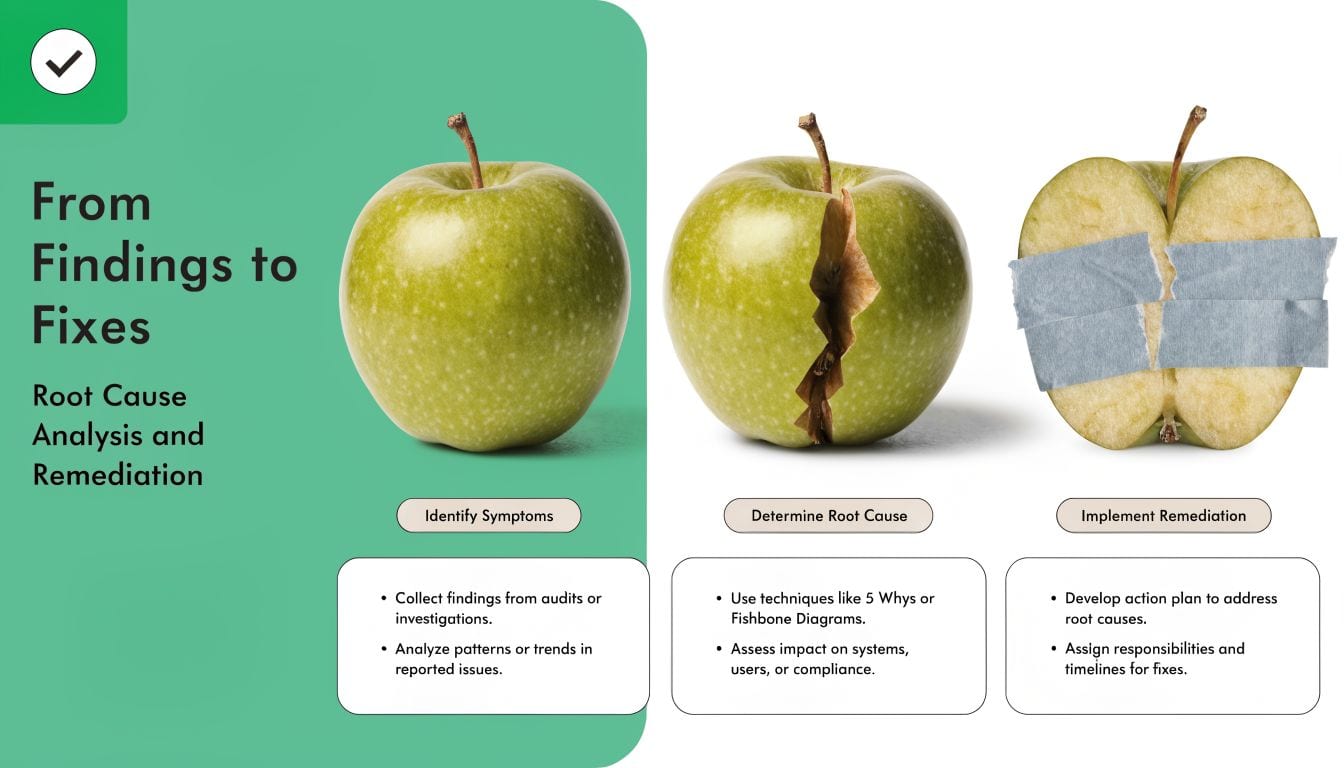
Separate one-time cleanup from systemic repair
Some findings need cleanup. Others need engineering or process changes. Don't confuse them.
Examples help:
- One-time cleanup: Merge duplicate CRM records created by an import error.
- Systemic repair: Add duplicate prevention rules and clear ownership for source-of-truth fields.
- One-time cleanup: Correct a batch of malformed UTMs in a campaign log.
- Systemic repair: Enforce naming rules before links go live.
This distinction matters because teams often celebrate the visible cleanup while leaving the generating mechanism untouched.
Use root-cause categories that people can act on
Most marketing data defects fall into a small number of buckets:
| Root cause type | What it usually looks like |
|---|---|
| Implementation bug | Tag trigger changed, payload field renamed, SDK update introduced drift |
| Process gap | Campaigns launched without QA, naming rules not reviewed, no release checklist |
| Ownership ambiguity | Marketing assumes dev owns it, dev assumes analytics owns it |
| Integration mismatch | CRM field mapping differs from MAP or warehouse model |
| Technical debt | Legacy tags, overlapping scripts, undocumented server-side forwarding |
Once you classify issues this way, remediation stops feeling abstract. Each category points toward a different kind of response.
The question isn't “who made the mistake?” It's “what allowed this mistake to reach production?”
Build issue playbooks
For recurring issue types, create short remediation playbooks. They don't need to be long. They need to be usable by the people doing the work.
A solid playbook includes:
- Trigger condition such as missing required property on a production event
- Detection method such as validation alert, warehouse query, or destination discrepancy
- Business impact such as broken revenue reporting or audience suppression failure
- Likely causes such as recent release, container change, or field mapping drift
- Owner by layer such as developer, analyst, marketing ops, BI
- Verification step that proves the fix worked in source and destination
For teams dealing with web and tag issues repeatedly, this root cause guide for fixing tracking problems is a helpful reference because it pushes the conversation beyond “the event is broken” and toward how to isolate where the break occurred.
Prioritize the backlog by business damage
Don't rank issues by how easy they are to explain in a meeting. Rank them by the decision quality they damage.
A practical order looks like this:
Critical
Revenue loss, lead-routing failure, privacy exposure, major destination outageHigh
Attribution corruption, audience qualification errors, key dashboard unreliabilityMedium
Naming inconsistency, stale non-critical dimensions, isolated taxonomy driftLow
Cosmetic metadata issues, old tags with no active downstream usage, minor formatting noise
An SLA matters. If a problem affects paid optimization or compliance, it should behave like an incident. If it affects a long-tail descriptive dimension, it can sit in normal sprint planning.
Beyond the Audit Automating Continuous Data Governance
A one-time audit is useful. A one-time audit without follow-up monitoring is usually a temporary gain.
That's the core problem with most marketing data quality work. Teams clean the stack, document the fixes, and assume the hard part is done. But the stack keeps moving. New landing pages go live. Pixels get added for experiments. Consent tools are reconfigured. CRM fields change. Agencies launch campaigns with naming variations. A mobile release changes event payloads. Data quality starts decaying the next day.
MarTech's guidance reflects this reality. It notes that many discussions still frame the audit as a one-time hygiene project, while actual stacks keep changing across CRM, ad platforms, pixels, and consent tools. It explicitly recommends mapping systems and integrations and points to AI-driven continuous monitoring as a follow-up, which is a strong signal that static audits aren't enough, as described in MarTech's guide to data quality issues.
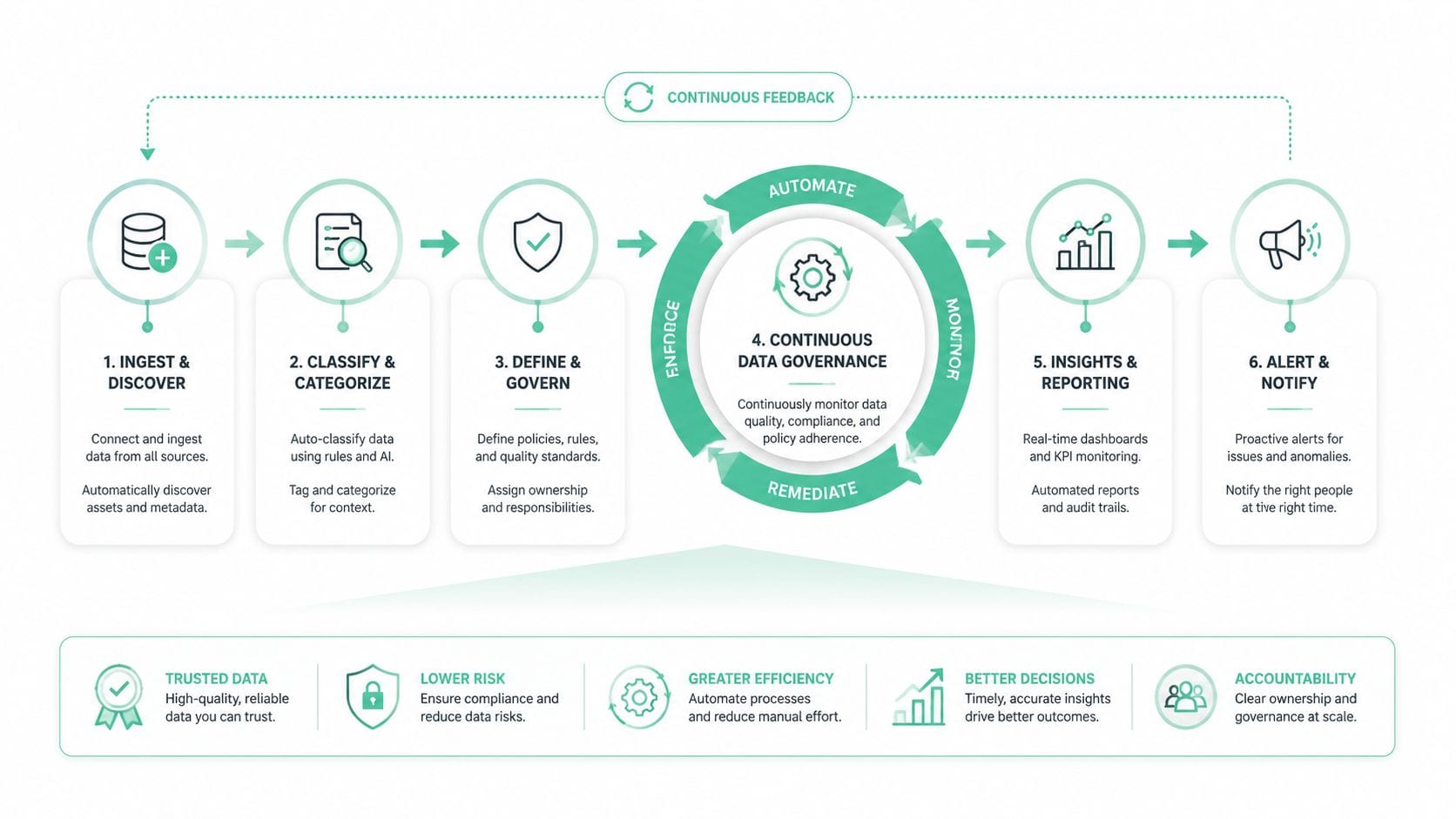
Turn audit rules into always-on controls
The strongest move you can make after an audit is simple: convert each high-value manual check into an automated rule.
That includes alerts for:
- Schema drift when required fields disappear or change type
- Traffic anomalies when a key event drops or spikes unexpectedly
- Broken pixels and destinations when expected calls stop firing
- UTM convention failures when campaigns arrive outside the taxonomy
- PII leakage patterns in URLs, event properties, or free-text fields
- Consent misconfigurations when tool behavior doesn't match user permission state
When those checks run continuously, the audit becomes a baseline instead of a one-off inspection.
Put alerts where teams already work
Data governance fails when alerts live in a dashboard nobody opens. The right destination for a warning is the place the owning team already pays attention to.
In practice, that usually means:
- Slack or Microsoft Teams for operational alerts
- Email for lower-priority summaries and weekly scorecards
- Jira, Linear, or backlog tooling for issues that need tracked remediation
- BI dashboard scorecards for trend visibility and stakeholder reporting
The point isn't more notifications. It's shorter time between drift and response.
Good governance doesn't mean catching every issue instantly. It means the right team sees the right issue quickly enough to prevent bad decisions.
Define a weekly operating rhythm
Continuous governance still needs human review. The best pattern is light but disciplined.
A weekly routine often includes:
- Review open issues by severity and owner
- Confirm newly introduced drift from releases, campaigns, or integrations
- Track repeated failure patterns that suggest process rather than isolated mistakes
- Close the loop on resolved issues by validating source and destination behavior
- Update the tracking plan and standards so documentation matches reality
A platform approach can address this challenge. Tools in this category can automatically discover tags and destinations, monitor analytics implementations, and alert on anomalies instead of relying on manual QA after every release. One example is automated data audits for enterprise analytics, which outlines how automation shifts teams from periodic inspection to ongoing oversight. Trackingplan is one option in that observability layer for teams that need cross-channel monitoring across web, app, and server-side implementations.
If you want a concrete product walkthrough in this section, embed Trackingplan's “How to Automate Your Analytics QA in Minutes”.
Make governance measurable
Governance gets ignored when it sounds abstract. It gets funded when it produces an operating scorecard people can read quickly.
A practical scorecard tracks:
| Governance view | What the team needs to see |
|---|---|
| Implementation health | Missing events, rogue events, property mismatches |
| Destination reliability | Which tools are receiving expected payloads and which are not |
| Campaign hygiene | UTM and naming convention compliance issues |
| Privacy controls | Potential PII leaks and consent-related exceptions |
| Remediation flow | Open issues, aging items, owner status, revalidation status |
This is also where the earlier audit thresholds stop being paperwork and start becoming management tools. A threshold defines when a data issue is tolerable, when it's not, and who has to act.
A strong marketing data quality audit doesn't end with a report. It ends when the team has a repeatable way to detect drift, assign ownership, and prove the data can still be trusted after the next change.
If your team is tired of finding tracking issues only after dashboards break, Trackingplan is worth evaluating. It's built for continuous analytics QA and observability across web, app, and server-side stacks, with automated discovery, validation, and alerting that help marketing, BI, and engineering teams keep audit findings from going stale.