
You open GA4 to review campaign performance and see the same traffic split across email, Email, e-mail, and one mystery source nobody recognizes. Paid social is showing up under the wrong medium. A launch campaign drove real traffic, but part of it landed in (direct)/(none). The dashboard still looks polished, but nobody in the room fully trusts it.
That's the moment a UTM tracking audit stops being an analytics hygiene task and becomes a governance problem.
Marketing organizations rarely struggle with just one UTM issue. Instead, they face a chain of small decisions made by various individuals across paid media, lifecycle, content, agencies, and web teams. One person hand-builds links in a spreadsheet. Another copies an old campaign URL and tweaks only half the parameters. A third adds UTMs to an internal banner because it seems harmless. The result is fragmented attribution, avoidable reporting noise, and difficult conversations about channel performance that should have been straightforward.
A solid audit fixes the current mess. Beyond that, it gives you the raw material to build a repeatable system. That's where you find value. Manual review is the reset. Governance is the operating model.
Defining the Scope and Inventorying Your UTMs
A useful audit starts with boundaries. If you skip that step, the exercise turns into a loose search for bad links, and loose searches miss the exact things that later break attribution.
Start by deciding what the audit includes. For many organizations, that means all campaign-driven traffic touching your site or app: paid search, paid social, email, affiliate, influencer, partner campaigns, QR codes, sales collateral, and agency-managed campaigns. If your team uses vanity URLs, redirects, or shorteners, include those too. If a link can carry a UTM and affect reporting, it belongs in scope.
One fact should sharpen the urgency. Companies fail to implement UTM markup in over 30% of their campaigns, which creates attribution gaps, and in GA4 that untagged traffic often falls into (direct)/(none), hiding the true channel contribution, according to advanced UTM tracking best practices from Improvado.

Set the audit perimeter first
I usually define scope on three axes:
Time window
Pick a review window that includes both evergreen traffic and recent launches. Quarterly is a practical baseline for manual review because it captures current habits and legacy naming residue.Traffic sources
List every team or platform that can generate tagged URLs. Google Ads, Meta Ads Manager, LinkedIn Campaign Manager, CRM email tools, affiliate platforms, partner co-marketing, offline QR code campaigns, and agency-created landing page links should all be explicit.Systems of record
Decide where you'll validate existence versus usage. Ad platforms tell you what links were intended. Analytics tools tell you what traffic arrived. Your audit needs both.
Practical rule: If a team can publish a URL without analytics review, assume it has created audit risk.
Build the inventory before you judge quality
Don't start by cleaning. Start by collecting. A thorough inventory is more valuable than a fast partial cleanup.
Use a master spreadsheet or database with one row per URL or UTM pattern. Include fields such as channel owner, destination URL, utm_source, utm_medium, utm_campaign, optional parameters, platform, campaign status, launch date, and notes about redirect behavior. This becomes your working register and later your governance reference.
A practical collection workflow looks like this:
- Export from ad platforms: Pull final URLs and tracking templates from Google Ads, Meta, LinkedIn, and any DSP or affiliate platform in use.
- Export from marketing automation: Pull links from HubSpot, Marketo, Salesforce Marketing Cloud, Klaviyo, Mailchimp, or whichever email system your team uses.
- Pull analytics dimensions: In GA4, review session source/medium and campaign combinations tied to landing pages so you capture what entered the property, not just what was intended.
- Crawl the site and templates: Search your CMS, page builder modules, blog templates, and navigation components for hardcoded UTMs. These often hide in banners, PDFs, and outdated campaign pages.
- Check redirects and shorteners: If your team uses Bitly, Rebrandly, branded short domains, or redirect rules, inventory the destination URLs behind them.
Interview the people who create links
The spreadsheet won't tell you everything. The people will.
Ask marketing managers, agency contacts, sales enablement, partner marketing, and lifecycle teams a simple set of questions: how do you build campaign URLs, where do you store them, who approves names, and which campaigns run outside the normal process? That's how you find event QR codes, PDF links, webinar partner promotions, influencer one-offs, and copied legacy links that never pass through the analytics team.
This is also where governance problems show up early. If three teams each have a different naming logic, your audit won't be a typo-fix exercise. It will be a taxonomy redesign.
For teams that haven't documented standards yet, a campaign naming reference like this campaign naming convention guide helps frame the inventory around controlled values instead of ad hoc labels.
Organize findings into workable buckets
Once the inventory is assembled, classify entries without trying to solve everything at once.
A simple triage model works well:
| Bucket | What belongs here | Why it matters |
|---|---|---|
| Active and compliant | Links currently in market that match expected structure | Preserve and use as examples |
| Active but suspect | Live links with missing parameters, naming drift, or unclear ownership | Highest remediation priority |
| Legacy and low risk | Old links, expired campaigns, archived assets | Document, then decide whether to retire or redirect |
| Unknown origin | Traffic or URLs nobody can clearly attribute to a team or process | Usually signals governance gaps |
If you can't identify the owner of a campaign tag, you probably can't prevent that issue from recurring.
The output of this phase should be boring in the best possible way: a complete inventory, clear scope, assigned owners, and enough context to move from discovery into validation without guessing. That's the point where the audit becomes operational instead of investigative.
Validating Tag Syntax and Convention Consistency
Once the inventory exists, the audit gets technical. At this point, you stop asking “what links are out there?” and start asking “which of these links produce reliable data?”
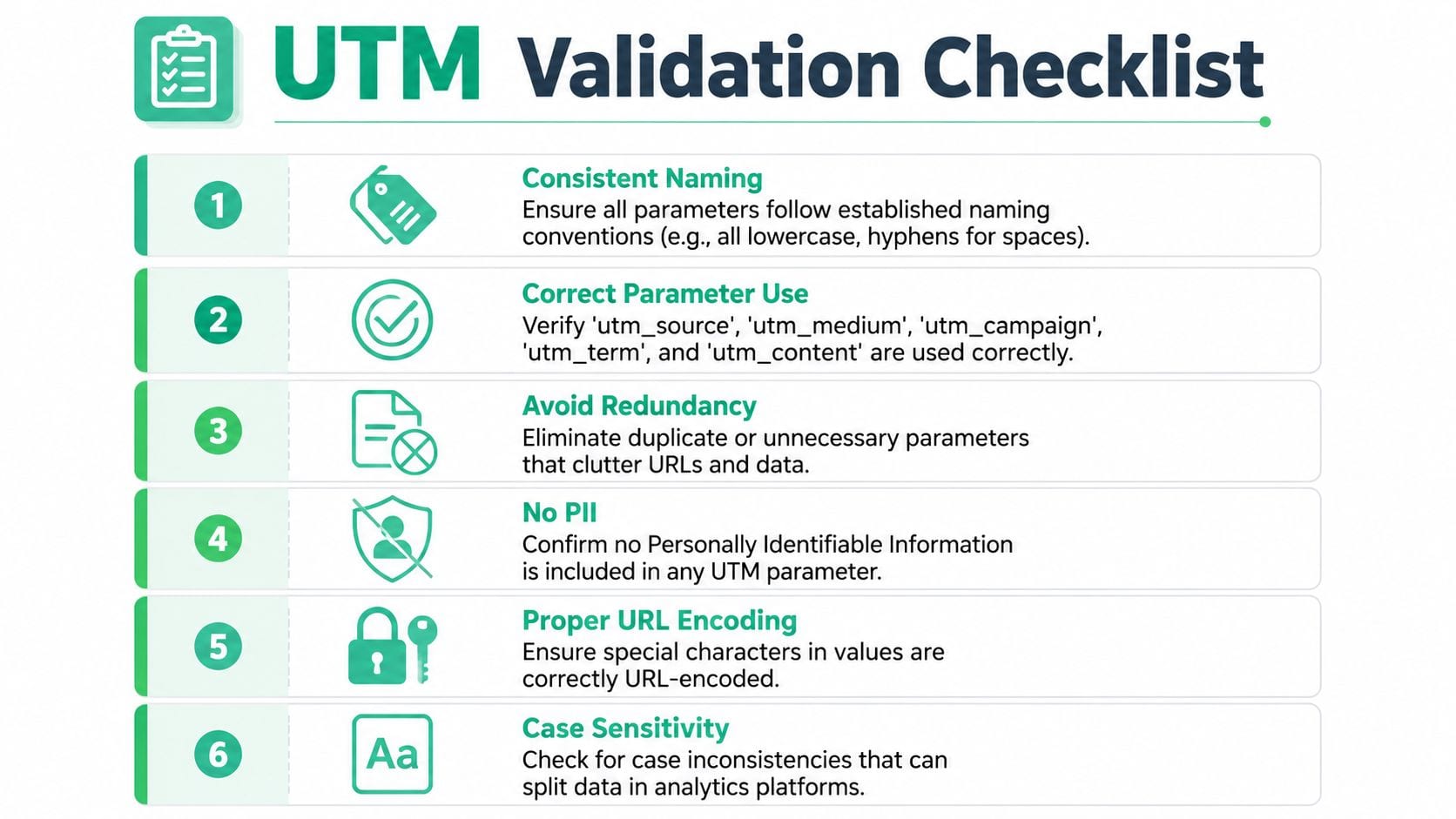
The biggest source of noise is usually naming inconsistency, not outright absence. Inconsistent UTM naming conventions account for up to 40-50% of analytics problems, and simple variations such as Google Ads versus google_ads can fracture reporting into phantom sources and mediums, according to this UTM tag audit analysis from Marketing Mojo.
What to validate first
Syntax review sounds simple until you do it across hundreds or thousands of URLs. Don't review tags in random order. Check them in layers.
Start with required parameter presence. Then move to formatting consistency. After that, inspect semantic correctness. A technically valid UTM can still be analytically wrong if utm_medium=facebook and utm_source=paid-social have been swapped.
I separate findings into five categories:
Missing required parameters
External campaign links withoututm_source,utm_medium, orutm_campaign.Case inconsistency
Variants such asEmail,EMAIL, andemail.Separator drift
Mixed use of hyphens, underscores, spaces, and camelCase across values.Encoding issues
Raw spaces, unescaped special characters, or broken query strings after redirects.Semantic misuse
Source values used as mediums, campaign names overloaded with audience or ad IDs, or internal links carrying UTMs.
Use regex to find patterns at scale
If your inventory is in Sheets, Excel, BigQuery, a warehouse, or even exported CSV files, regex helps you detect repeatable mistakes far faster than manual scanning.
Here are practical examples you can adapt:
| Check | Regex example | What it catches |
|---|---|---|
| Uppercase characters | [A-Z] | Any value that breaks lowercase-only rules |
| Spaces in parameter values | \s | Raw spaces that should be encoded or replaced |
| Underscore detection | _ | Values violating hyphen-only conventions |
Missing utm_source | `(^ | [?&])utm_source=` |
Missing utm_medium | `(^ | [?&])utm_medium=` |
Missing utm_campaign | `(^ | [?&])utm_campaign=` |
| Bad URL encoding candidates | [^\w\-\.%] | Characters that often need review in parameter values |
Regex won't tell you business intent. It will tell you where to look.
For example, if you run a case check and only one business unit keeps producing uppercase values, that's no longer a data quality mystery. It's a process problem tied to one workflow, one builder, or one agency template.
A good validation routine doesn't just catch broken tags. It identifies where broken tags are being created.
Inspect anomalies in GA4, not just in spreadsheets
Inventory data tells you what was built. GA4 tells you what the site received.
Open Traffic acquisition and review session source/medium and session campaign combinations. You're looking for unnatural fragmentation. One paid social effort should not appear under five slightly different source values. One newsletter program should not split across capitalization variants and alternate medium labels. Add landing pages to the view so you can spot whether the problem is campaign-wide or tied to a specific destination or content module.
This is also where internal tagging mistakes surface. If a landing page suddenly appears as the “source” for later pageviews or conversions, someone may have used UTMs on internal navigation, banners, or CTA modules. That doesn't create a tracking enhancement. It overwrites attribution context.
A reference on UTM parameter best practices is useful here because it anchors validation in controlled definitions, not personal preference.
Validate the meaning, not just the formatting
A link can pass technical checks and still degrade reporting. That's why semantic validation matters.
Review each parameter against a documented purpose:
utm_sourceshould identify the platform, publisher, or origin.utm_mediumshould describe the channel type.utm_campaignshould represent the marketing initiative, not a random free-text memo.utm_termandutm_contentshould only be used when they add analytical distinction.
I've seen teams use utm_campaign=social and utm_medium=spring-launch-paid-social-retargeting-audience-1. That isn't a syntax issue. It's a taxonomy reversal. Reports still populate, but nobody can segment meaningfully without rebuilding the logic by hand.
Create a remediation-ready error log
Don't leave validation findings as loose notes. Create an error log that can be assigned and fixed.
Include:
- The original URL or observed value
- The rule violated
- The impacted parameter
- Where it was found
- The suspected owner
- The recommended correction
- Whether the issue affects live traffic
That last column matters. A malformed UTM buried in an expired PDF is not the same priority as a broken paid campaign link consuming budget today.
Clean reports come from strict inputs. Analytics tools won't standardize your intent after traffic arrives.
By the end of validation, you should know which issues are isolated mistakes, which ones are systemic, and which teams need a better build process rather than another reminder to “be consistent.”
Verifying Data Across GA4, Adobe, and CDPs
A clean URL structure doesn't guarantee aligned reporting. The same campaign can look different in GA4, Adobe Analytics, and a CDP even when the UTMs are correct. That's normal up to a point. Your job during a UTM tracking audit is to determine whether the gap is expected platform behavior or evidence of an implementation problem.
Start with one campaign, not the full stack. Pick a campaign with clear UTMs, recent traffic, and a known destination path. Pull the same campaign view in each platform using the exact source, medium, and campaign values. Then compare how each system records traffic, conversions, and identities across the same period.
Why platforms disagree
GA4, Adobe, and CDPs answer different questions and apply different logic.
GA4 is session and event oriented, with its own attribution and processing behavior. Adobe often reflects a different implementation model and can apply different visit or attribution treatment. A CDP may store event streams or user profiles in ways that don't mirror either analytics interface exactly. Add processing latency, consent filtering, app and web stitching, and identity resolution differences, and you'll almost always see some variance.
The key is to compare the right things:
| Platform | Best first comparison | Common reason for variance |
|---|---|---|
| GA4 | Sessions, users, conversions by campaign | Sessionization and attribution settings |
| Adobe Analytics | Visits, visitors, campaign variables, conversions | Variable mapping and visit logic |
| CDP | Event counts, identified users, downstream audience membership | Identity stitching and event forwarding rules |
When teams struggle with attribution outside standard web analytics, resources that explain how Podmuse improves ad spend ROI are helpful because they show how measurement logic changes once campaigns span channels and listening environments that don't behave like a normal clickstream.
Run a parallel investigation
Don't compare dashboards at a glance. Build a structured side-by-side review.
Use this sequence:
Lock the campaign definition
Identify the exactutm_source,utm_medium, andutm_campaignvalues under review.Match the date range
Keep the reporting window identical across tools, including timezone assumptions.Compare landing pages
If one tool shows the right campaign but the wrong destination concentration, your issue may be redirect handling or page-level implementation.Compare conversions carefully
A conversion event in GA4 may not map one-to-one with an Adobe success event or a CDP trait update.Inspect raw or near-raw event records if available
If your CDP or warehouse stores inbound parameters, use that data to confirm what entered the stack before each tool transformed it.
A detailed implementation walkthrough like this GA4 campaign tracking setup and analysis guide helps teams separate campaign tagging issues from platform configuration issues.
Use video review for technical alignment
When teams are trying to reconcile analytics behavior across implementations, a walkthrough can speed up discussions with marketers, analysts, and developers.
What counts as a red flag
Some discrepancy is acceptable. Certain patterns aren't.
Treat these as investigation triggers:
Only one platform receives the campaign at all
That suggests broken collection, mapping, or forwarding.Campaign traffic appears, but conversions disappear in one system
Usually a downstream implementation or attribution scope issue.Source and medium values mutate between systems
This often points to transformation rules, channel classification overrides, or ingestion mapping errors.The CDP captures the raw UTM values, but analytics reports don't
That usually means the problem is in analytics configuration, not the campaign link itself.
Cross-platform verification is where teams learn whether they have a tagging problem, a collection problem, or a reporting problem. Those are different fixes.
The point isn't to force every number into perfect agreement. It's to prove that campaign identity survives the trip from URL to analytics interface to customer data workflows without being lost, remapped, or reinterpreted.
Executing Remediation and Building Your Governance Framework
Audit findings only matter if they change live behavior. Once you've identified broken, inconsistent, or misused UTMs, fix the traffic that's still flowing first. Then lock in a governance model so the same issues don't come back next quarter under different campaign names.
The practical mistake teams make here is trying to rewrite everything at once. That usually stalls. A better approach is staged remediation: active campaigns, high-traffic assets, templates, then legacy cleanup.
Fix what's in market now
Your first pass should focus on links that are still affecting attribution or user experience.
Use a triage order like this:
Live paid campaigns first
Update destination URLs or tracking templates in Google Ads, Meta, LinkedIn, and any active media platform. These links affect spend decisions immediately.Email and lifecycle flows next
Review recurring newsletters, nurture sequences, and automated CRM sends. Old naming drift tends to persist in templates longer than teams realize.Partner and affiliate assets after that
These usually require coordination, so start early if third parties need replacement URLs.High-traffic broken destinations
If malformed UTMs are attached to outdated URLs, use redirects where appropriate so the user still reaches a valid page and the campaign remains interpretable.
Document the fix in an operational log
Every remediation item should have an owner, status, and implementation date. If your team updates a campaign but doesn't record the change, future analysts won't know whether a split in reporting reflects an old issue, a partial fix, or a new regression.
A short remediation log should capture:
| Field | Example use |
|---|---|
| Issue ID | Unique tracker for follow-up |
| Impacted campaign | The affected initiative or channel |
| Problem type | Missing parameter, bad casing, semantic misuse, internal UTMs |
| Owner | Marketing ops, paid media, lifecycle, agency, analytics |
| Fix applied | Updated link, template change, redirect, builder rule |
| Effective date | When the corrected version went live |
Governance starts the day you log the first fix. Before that, you're just cleaning.
Build a naming system people can actually use
A governance framework fails if it's too abstract. Teams need a controlled taxonomy that's rigid where it matters and flexible where marketing reality requires variation.
The structure usually needs five components:
Approved parameter definitions
Everyone should know what belongs inutm_source,utm_medium,utm_campaign,utm_term, andutm_content.Allowed values for recurring fields
Source and medium need controlled vocabularies. Campaign usually needs a naming pattern rather than a finite list.Formatting standards
Lowercase only, one separator style, no spaces, no informal abbreviations unless documented.Creation workflow
Define who can create links, where they build them, and whether approval is required for new values.Exception handling
New channels appear. Agencies have constraints. Offline campaigns need redirects. Your framework should allow controlled additions, not shadow systems.
Here's a practical template teams can adopt.
Sample UTM Naming Convention Template
| Parameter | Purpose | Required? | Format | Example |
|---|---|---|---|---|
| utm_source | Identifies the platform, publisher, or origin of traffic | Yes | lowercase, hyphens only, controlled vocabulary | |
| utm_medium | Identifies the marketing channel type | Yes | lowercase, controlled vocabulary | cpc |
| utm_campaign | Identifies the initiative or promotion | Yes | lowercase, hyphenated naming pattern | spring-product-launch |
| utm_term | Distinguishes keyword, audience, or targeting detail when needed | No | lowercase, concise descriptive value | crm-audience |
| utm_content | Distinguishes creative, link placement, or variant | No | lowercase, hyphenated detail | hero-banner-a |
Assign clear roles or the framework won't hold
This part matters more than many organizations expect. Naming conventions don't break because the document was unclear. They break because nobody owns enforcement.
A simple role split works:
Marketing ops owns the taxonomy
They approve new values and maintain the reference sheet or builder rules.Channel teams own usage
Paid, lifecycle, content, and partner teams build links within the allowed system.Analytics or data governance owns validation
They audit incoming values, review drift, and escalate recurring issues.Developers or web teams own implementation-sensitive fixes
Redirects, internal module cleanup, and template changes usually sit here.
Replace free-text link building with controlled generation
If people handwrite URLs in chats, docs, and campaign briefs, inconsistency will return. The lowest-friction fix is a governed builder, even if it starts as a spreadsheet with dropdowns and validation rules.
A useful builder should:
- enforce lowercase formatting
- restrict source and medium to approved values
- generate the final URL consistently
- store campaign history
- surface who created the link
Teams don't need a perfect enterprise workflow on day one. They need fewer opportunities to improvise.
Add review gates to campaign launches
A governance system only works if it's tied to release behavior. Add campaign tracking checks to launch checklists, QA routines, and agency handoffs.
Review at least these items before launch:
- destination resolves correctly
- required UTM parameters are present
- values match the naming framework
- no internal links on-site overwrite acquisition attribution
- shortened or redirected links preserve parameters correctly
Evidence that remediation worked isn't a cleaner dashboard next week. It's that new campaigns stop introducing fresh entropy. That's when your UTM tracking audit turns from a cleanup project into an operating standard.
From Manual Audits to Automated Monitoring
A manual audit is necessary. It's also temporary.
The minute someone launches a new paid campaign, duplicates an email template, changes a redirect, or hands link creation to an agency, your clean state starts drifting again. That's why mature teams stop treating the UTM tracking audit as a periodic rescue operation and start treating it as the training set for automated governance.
Why manual review stops scaling
Manual audits are good at deep cleanup. They're bad at persistence.
They depend on exports, meetings, tribal knowledge, and scheduled reviews. That means errors can sit in production until the next audit cycle. By then, the bad tags have already entered dashboards, informed channel decisions, and possibly fed downstream audiences or attribution models.
This is the same pattern teams see in adjacent governance work. Anyone building broader operational discipline around social and campaign workflows will recognize that ongoing visibility matters more than occasional cleanup, which is why resources on mastering X strategy are useful context for thinking beyond point-in-time audits.
What automated monitoring changes
Automation shifts the question from “What broke last month?” to “What changed today?”
Instead of waiting for an analyst to notice odd campaign rows in GA4, a monitoring system watches live traffic and validates incoming UTMs against the rules you defined during remediation. That includes malformed parameters, naming drift, unexpected new values, missing campaign fields, and cases where internal or rogue traffic starts polluting acquisition reporting.
Trackingplan's guide to monitoring UTM naming conventions fits operationally into this process. It describes a rules-based approach to validating campaign naming consistency as traffic happens, which is the practical extension of a manual audit.
Manual audits identify the policy. Automated monitoring enforces it in the real environment.
What to automate first
You don't need to automate every edge case immediately. Start with the controls that prevent the highest reporting damage.
Prioritize alerts for:
Unknown
utm_sourcevalues
Good for catching agency drift, copy-paste errors, and unapproved new channels.Invalid
utm_mediumvalues
Important because medium drives grouping logic and reporting consistency.Missing required parameters
Especially on paid, email, and partner traffic.Case and separator violations
Easy to validate automatically, high payoff for data cleanliness.PII and unsafe payload checks
UTM fields should never become a backdoor for sensitive data handling mistakes.
One body of traffic can then trigger multiple workflows. Marketing ops may need to fix the builder. An analyst may need to annotate data quality windows. A developer may need to review redirect handling. Automation doesn't remove people from the process. It routes the problem to the right people faster.
Use the manual audit as the baseline
The strongest automation setups don't start from generic rules. They start from your audited taxonomy.
That means:
| Governance asset from the audit | Automation use |
|---|---|
| Approved source list | Alert on any new or non-compliant value |
| Approved medium list | Validate channel classification inputs |
| Campaign format rules | Catch malformed or incomplete campaign names |
| Ownership map | Route alerts to the correct team |
| Known exceptions | Reduce noise and avoid false positives |
Without that baseline, automated alerts become noisy. With it, alerts become actionable.
See the workflow in practice
For teams moving from spreadsheet QA to continuous observability, this walkthrough is a useful reference:
Where automation earns trust
The main benefit isn't convenience. It's confidence.
When campaign naming is monitored continuously, analysts spend less time cleaning dimensions after the fact. Marketers can launch faster because they're working inside known constraints. Developers and QA teams get earlier signals when redirects, consent behavior, or tag deployment changes start affecting attribution data. Agencies get clearer feedback loops because the rules are explicit and violations are visible.
I'd still keep periodic human review. Automated systems catch rule violations well. Humans are better at spotting taxonomy drift, duplicated business meaning, and reporting structures that no longer match how the company markets. The right model is not manual or automated. It's manual to establish the standard, automated to preserve it.
That's the shift marketing departments need. Your next UTM audit shouldn't begin with a multi-week scramble through broken exports and contradictory dashboards. It should begin with a monitored environment, a governed taxonomy, and a short list of exceptions worth human attention.
If your team is tired of finding UTM issues after they've already polluted reports, Trackingplan is worth evaluating. It monitors analytics and attribution implementations in real time, helps teams detect campaign naming and data quality issues as traffic arrives, and gives marketing, analytics, and QA teams a shared view of what changed before those problems become dashboard debt.