
A campaign review is going sideways. The dashboard says paid social is performing well, but finance doesn't trust the revenue numbers, product analytics shows a different conversion path, and someone has just posted a Slack alert about a potential email address leaking through an event property. Nobody planned for this. The tracking was added in pieces, the schema changed over time, and sensitive fields rode along because no one clearly defined what data was allowed to go where.
That kind of failure rarely starts with one bad tag. It starts much earlier, when a team treats all data as if it has the same value, the same risk, and the same allowed use. Analysts need wide access to work quickly. Marketers want rich audience and attribution data. Developers need flexibility to ship. Without a shared system for categorizing data, those goals collide.
Data classification is that shared system. Its purpose is to organize data into categories so teams can decide how to handle it consistently. That sounds administrative until you're the person trying to explain why a supposedly simple pageview event included a user identifier, or why a dashboard built for broad sharing pulled in fields that should never have left a restricted workspace.
The practical point is simple. Classification isn't just for security teams or compliance audits. It's what makes analytics reliable, privacy controls enforceable, and downstream tooling usable at scale. If you're dealing with broken attribution, inconsistent schemas, or unexplained privacy risk, you're already dealing with a classification problem, whether you call it that or not.
Poor classification also sits very close to broader analytics quality failures. The same teams that struggle with rogue PII often struggle with inconsistent event names, duplicate properties, and undocumented tracking changes. Trackingplan's guide to business risks of poor data quality captures that overlap well. Trust breaks in small ways first, then all at once.
Practical rule: If a team can't answer "what kind of data is this, who can use it, and where is it allowed to flow," they don't have governance. They have hope.
Introduction Why Data Classification Is No Longer Optional
A campaign goes live on Friday. By Monday, the analytics team is trying to explain why a signup event started sending an email field to multiple downstream tools, attribution numbers no longer match across platforms, and a dashboard that looked safe to share now includes data that should have stayed restricted. That sequence is common. The root problem is usually the same. The business moved faster than its rules for handling data.
Lightweight conventions break first in analytics.
A naming spreadsheet, a few Slack messages, and tribal knowledge can hold for a small setup. They fail once data moves across web tracking, mobile SDKs, server-side pipelines, ad platforms, warehouses, consent tools, and reverse ETL. The issue is not only scale. It is change. New vendors get added, properties get renamed, forms collect new fields, and event schemas drift without anyone intending to create risk.
That is why data classification matters beyond compliance. It gives teams a working system for deciding what data they have, how sensitive it is, where it can go, and who should use it. Without that system, analysts spend time validating fields they should already understand, marketers build audiences on top of shaky assumptions, and developers implement tracking rules with missing context.
The day-to-day failure modes are familiar:
- PII leaks happen when fields are captured or forwarded without a clear label and handling rule.
- Schema mismatches spread when teams change event names or properties without understanding downstream dependencies.
- Broken attribution follows when channels, identifiers, or consent states are classified inconsistently across tools.
These are governance problems, but they show up as operational pain. Teams feel them in delayed launches, reworked dashboards, audit scrambles, and loss of trust in reporting. Trackingplan's breakdown of the business risks of poor data quality maps closely to what many analytics teams see after classification slips.
Why the question matters to every team
Analysts need classification so they know which fields are approved for modeling, reporting, and sharing. Marketers need it so activation, audience building, and measurement stay inside consent and privacy rules. Developers need it because instrumentation is easier to maintain when each field carries a clear handling expectation instead of an assumption buried in a ticket or wiki.
The practical shift is simple. Classification stops being a policy document and becomes an operating rule for the stack. A field marked as restricted should trigger different behavior than a field approved for internal reporting. A property that is acceptable in the warehouse may still be blocked from ad destinations. An event that looks harmless on its own may become sensitive once combined with an identifier.
What changes when classification is done well
Good classification reduces repeat debates and catches problems earlier. Teams stop asking vague questions like "can we use this?" and start working from explicit labels, owners, and flow rules.
That creates three concrete benefits:
- Shared labels give analysts, marketers, developers, and legal teams the same language for risk and usage.
- Handling rules make access, retention, activation, and sharing more predictable.
- Automation turns classification into enforcement through alerts, monitoring, and blocking rules instead of relying on memory.
Here, many programs either hold up or fail. Policy alone does not protect an analytics stack that changes every week. Teams need observability in the loop. Tools like Trackingplan help enforce classification in real time by detecting unexpected fields, monitoring tracking changes, and surfacing issues before they spread through reporting and activation systems.
Data classification is no longer optional because modern analytics stacks are connected systems. If teams cannot classify data as it is collected and moved, they will end up classifying the damage after the fact.
The Four Levels of Data Classification Explained
A tracking spec says an event is safe to send. Two weeks later, marketing sees customer IDs in an ad platform, analytics finds a schema mismatch in the warehouse, and legal asks who approved the field. In practice, this is the problem classification is meant to solve. It gives teams a shared way to decide what data can move, where it can go, and what controls need to follow it.
Most organizations keep that system manageable with four labels: public, internal, confidential, and restricted. The labels are simple on purpose. Analysts need them to make reporting decisions quickly. Developers need them during implementation. Marketers need them before data is activated in downstream tools. The value is not the taxonomy itself. The value is that each level drives a different handling rule.
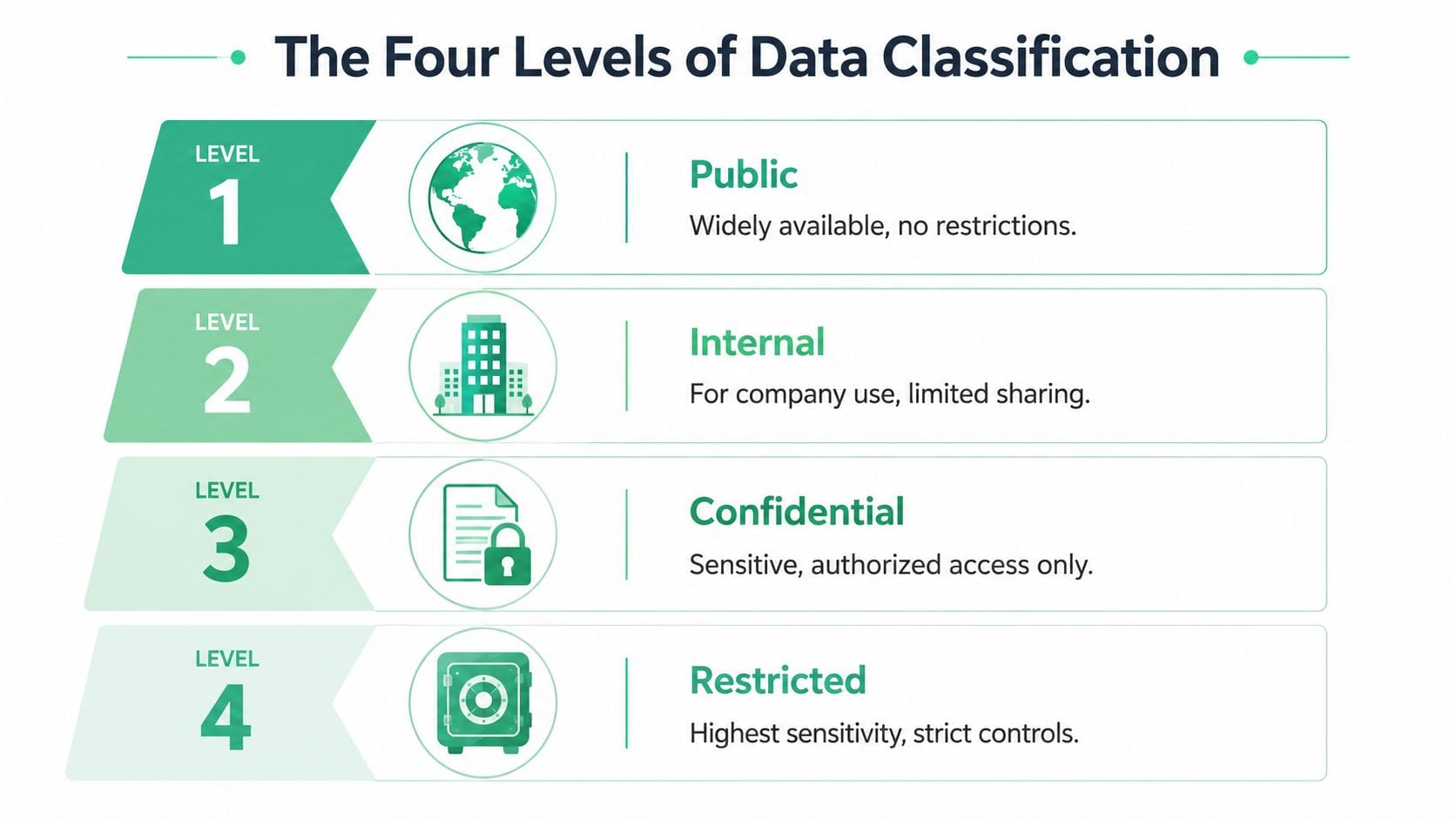
A simple office-access comparison still works here. Public data belongs in the lobby. Internal data stays inside the workspace. Confidential data is limited to approved teams. Restricted data gets the tightest controls because exposure would create real privacy, legal, or commercial risk.
The important point is that the label describes handling, not format. A JSON payload can contain public product metadata and restricted personal data in the same request. A warehouse table can mix harmless event counts with fields that should never reach a marketing destination. That is why mature programs classify as close to the field level as they can.
Data classification levels at a glance
| Level | Description | Examples | Handling Requirement |
|---|---|---|---|
| Public | Safe for broad sharing | Blog posts, public product pages, published press materials | Minimal restriction, but integrity still matters |
| Internal | Meant for company use | Team wikis, internal reporting definitions, routine operational docs | Limit external sharing and control access by business need |
| Confidential | Sensitive business information | Financial forecasts, sales pipeline details, internal performance reports | Restrict access to authorized roles and monitor sharing |
| Restricted | Highest sensitivity | User PII, credentials, regulated personal data, trade secrets | Apply strict access, logging, and downstream use controls |
Where analytics teams get tripped up
The hard part is rarely classifying an obvious password or tax ID. The hard part is the gray area. A user ID may be acceptable in product analytics and unacceptable in ad tech. A free-text field may look operational until someone enters an email address or phone number. Campaign parameters can seem routine, then break attribution logic or expose more user context than intended once they are joined with other identifiers.
This is why classification has to be tied to data flow, not just storage. Teams need to know what a field is, where it travels, and which systems are allowed to receive it. For analytics teams working through those decisions, this guide to PII data compliance for event tracking and marketing data is a useful reference.
Here's a short explainer video that helps make the tiering idea more concrete:
Public does not mean low value. Restricted does not mean unusable. The label tells teams what controls apply before data is collected, shared, queried, or activated.
A practical way to choose a level
Teams usually get better results when they stop debating abstract definitions and ask three operational questions:
- Can this be shared outside the company without creating risk or confusion? If yes, it is usually Public.
- Does access need to stay inside the company or within specific teams because exposure would create business harm? That usually points to Internal or Confidential.
- Would exposure create privacy, legal, contractual, or trust issues for customers, employees, or partners? Treat it as Restricted until a data owner approves a lower level.
One final trade-off matters. Broad labels are easier to roll out, but they miss mixed datasets and create exceptions later. Field-level classification takes more setup, yet it is far more useful in analytics because that is where collection errors, destination mismatches, and accidental PII leaks happen.
How Data Classification Is Performed
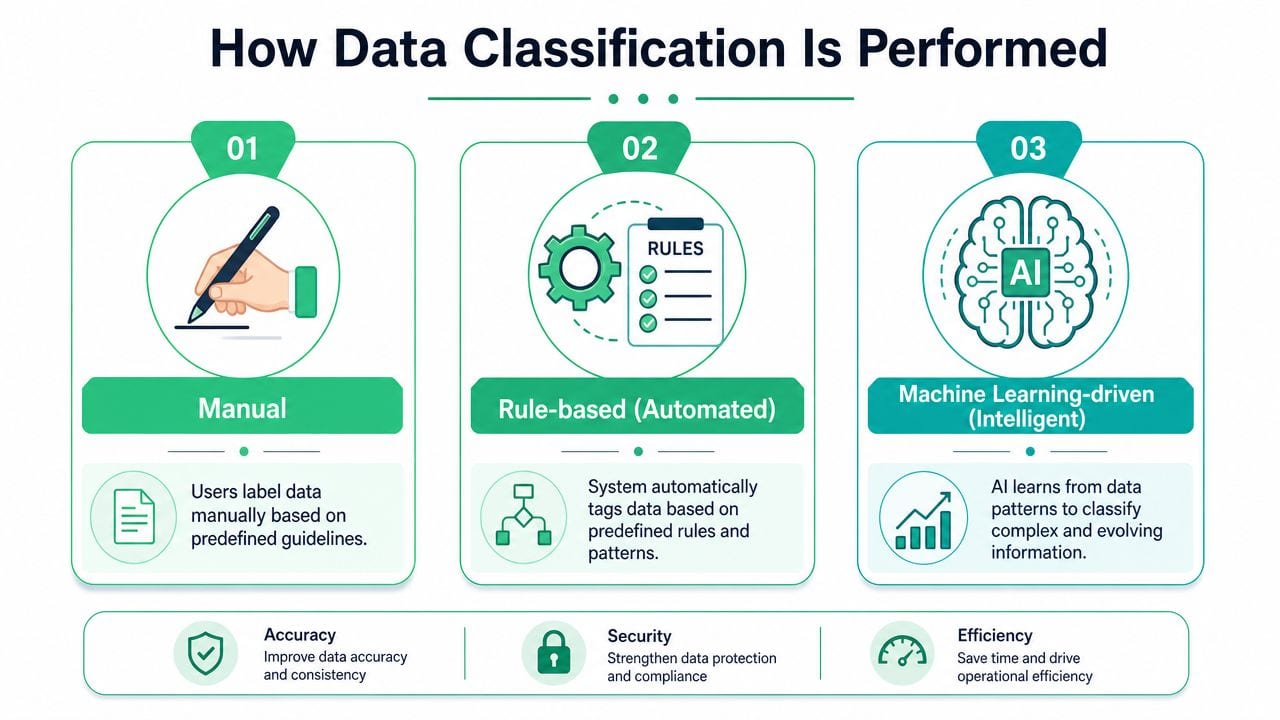
Many organizations don't adopt classification in one leap. They move through stages. First they label data manually. Then they automate obvious cases with rules. Then they add more intelligent methods to handle context and ambiguity. Each stage solves a real problem, but each has limits.
Manual classification
Manual classification is where most organizations start. A data owner, analyst, engineer, or steward reviews a field, event, table, or document and applies a label based on policy. This approach is intuitive because humans understand business context better than any pattern-matching system.
It also breaks down quickly. Manual reviews are slow, inconsistent, and easy to skip when release pressure rises. They work for policy design and exception handling. They don't work as the only control in a fast-moving analytics environment.
Rule-based automation
Rule-based classification applies labels when predefined conditions are met. That can mean matching field names, scanning for patterns, or checking known destinations and payload structures. Many privacy controls begin with this approach because it's a practical way to identify obvious risk.
Rule-based methods are strong when the data is predictable. They are weaker when naming conventions drift, schemas change, or meaning depends on surrounding context. A property called name might be a product name, a campaign name, or a person's name. Rules help, but they can be brittle.
Machine learning-driven methods
Machine learning-driven classification is useful when the system needs more context than simple matching can provide. It can help surface sensitive or business-critical data that doesn't fit neat naming patterns, especially across messy or evolving environments.
That doesn't mean human judgment disappears. It means teams use automation to do continuous discovery and initial labeling, then rely on people for policy decisions, edge cases, and validation.
Working advice: Use humans for policy and exceptions. Use automation for scale. Use intelligent methods where meaning depends on context.
NIST's NCCoE frames the bigger picture clearly. In modern data-centric security models, classification acts as the control plane. The objective is to define classifications and handling rules that apply regardless of where data resides or who it's shared with. In practice, that means discovery, labeling, and enforcement stay connected, with downstream controls such as access restrictions and DLP tied to the label. That model is laid out in NIST's guidance on data classification and handling rulesets.
What works and what doesn't
A useful comparison for analytics teams looks like this:
- Manual only works for early inventory and policy workshops. It doesn't scale.
- Rules only work for known patterns and recurring controls. They struggle with ambiguity.
- Hybrid automation works best for living systems because it combines persistent scanning with human review.
If you're trying to answer the question "what is data classification" in a real implementation sense, this is the answer that matters most: it isn't just assigning labels. It's building a repeatable way to discover, tag, and enforce handling rules across changing data flows.
Implementing a Data Classification Policy for Analytics
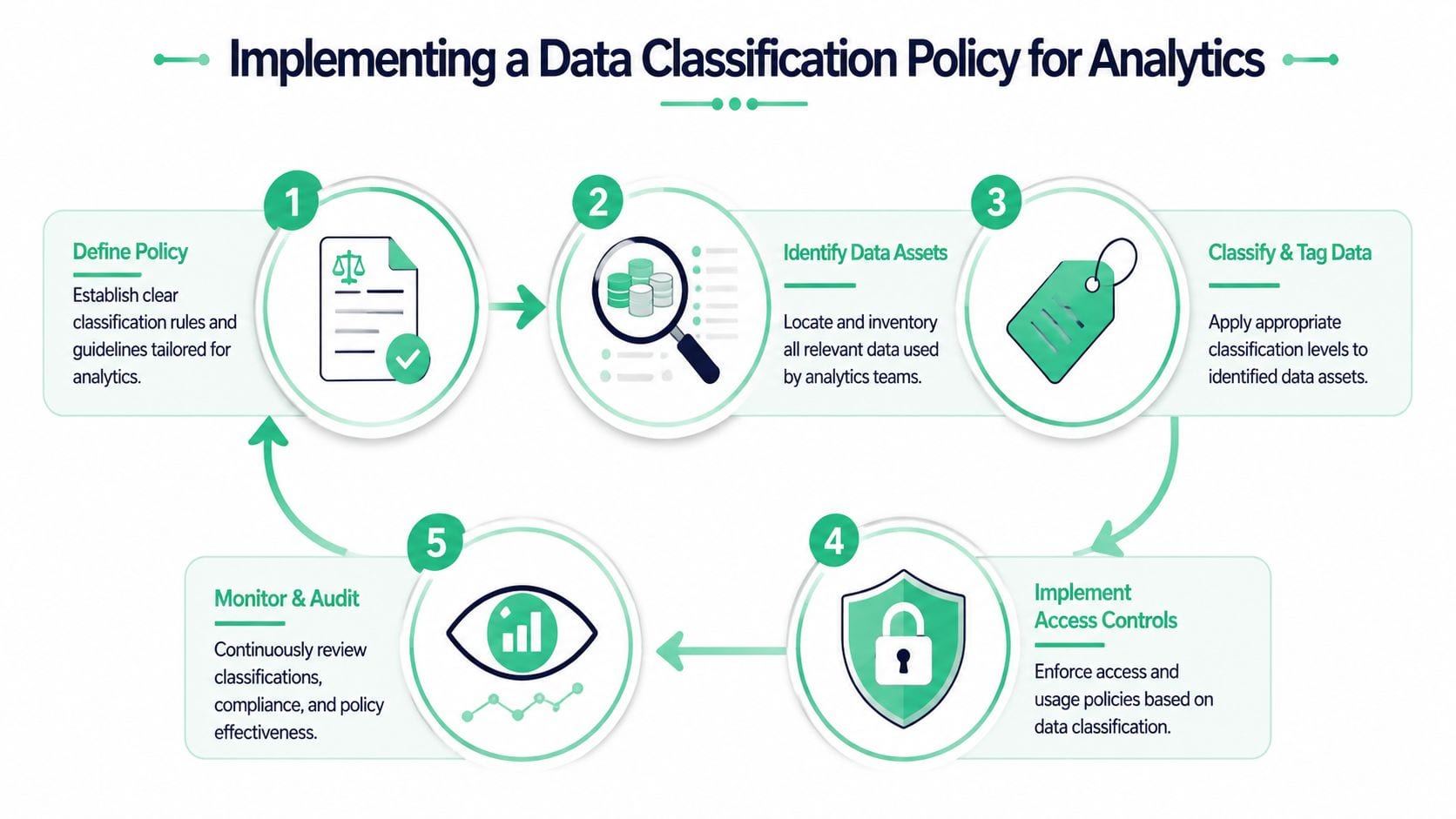
Analytics teams don't need a giant governance program before they start. They need a usable policy tied to actual events, properties, tables, audiences, and destinations. The strongest programs begin with high-risk data, bake labels into metadata, and connect those labels to tools people already use.
Alation notes that enterprise-scale classification has to work across structured and unstructured data, often with a mix of manual and automated methods, and that labels are commonly embedded as persistent metadata so they can drive retention, sharing, and security controls. That's the key implementation idea for analytics stacks too. The underlying explanation is covered in Alation's overview of data classification for modern environments.
Start with your actual data footprint
Don't begin with a theoretical list of data types. Begin with what your stack is already collecting.
- Inventory collection points such as web tags, mobile SDKs, server-side events, CRM syncs, ad pixels, and warehouse ingestion jobs.
- Inspect the payload level by reviewing event names, properties, user traits, query outputs, exported audiences, and destination mappings.
- Mark risky fields first including direct identifiers, free-text inputs, financial details, support content, and anything that could expose a person or a sensitive business process.
A lot of teams underestimate how mixed their analytics data is. One event can contain operational metadata, campaign details, and a restricted field added by accident.
Define a taxonomy your teams can apply
Your policy should be short enough for marketers and developers to use without asking legal every time. A practical taxonomy usually includes:
- Classification label such as Public, Internal, Confidential, or Restricted.
- Allowed destinations for each class.
- Approved use cases such as reporting, activation, experimentation, fraud review, or support.
- Handling rules for masking, retention, access, and review.
Many teams benefit from a governance playbook built around analytics rather than generic enterprise policy. Trackingplan's article on data governance for analytics is a helpful example of that more operational approach.
Make the label persistent
If classification lives only in a wiki, it won't survive implementation drift. Labels need to travel with the asset as metadata. In practice, that means attaching classification to event definitions, schema registries, catalogs, tracking plans, and warehouse documentation.
A workable rollout often looks like this:
| Action | Why it matters in analytics |
|---|---|
| Label events and properties | Prevents "safe event, unsafe field" mistakes |
| Tag destination rules | Stops restricted data from being sent where it shouldn't go |
| Connect labels to access controls | Keeps broad reporting separate from sensitive data use |
| Review changes continuously | Captures new fields, renamed properties, and accidental drift |
The policy only becomes real when a developer can see the label during implementation and an analyst can see it during consumption.
Keep the first version narrow
Teams often fail because they try to classify everything perfectly. Start with the highest-risk flows. For many organizations, that means user identifiers, contact details, consent-related fields, and audience export logic. Once those controls are stable, expand into retention classes, business sensitivity labels, and contextual use rules.
The Role of Observability in Data Governance
A documented policy is necessary. It isn't sufficient. Teams need a way to see whether production data matches the policy they wrote. That is where observability becomes operationally important.

Why policy fails without monitoring
Most classification failures don't happen because the policy was missing. They happen because the implementation changed after the policy was approved. A form field gets repurposed. A developer adds a parameter. A tag manager update introduces a new payload. An agency launches a campaign with a pixel that collects more than expected.
By the time someone notices, the data may already be in GA4, Adobe Analytics, Mixpanel, Amplitude, a warehouse, and one or more ad platforms. Cleanup becomes hard because the problem isn't just collection. It's propagation.
What observability adds
Observability closes the gap between classification intent and production behavior. It continuously checks what is being sent, where it's being sent, and how that differs from the expected schema and privacy rules.
For analytics teams, that means monitoring can catch issues such as:
- Potential PII leaks showing up in event properties or query parameters
- Schema mismatches where a field changes meaning or type
- Broken attribution inputs caused by missing campaign parameters or malformed tags
- Rogue events and pixels introduced outside the approved plan
- Consent misconfigurations where data flows don't match the allowed state
Trackingplan is one example of this category. It automatically discovers analytics traffic across web, app, and server-side implementations and monitors events, pixels, schema changes, campaign tagging errors, and potential PII leaks in real time. If you're comparing approaches, it's useful to understand the broader category first through this overview of data observability.
A concrete demonstration helps more than abstract policy language. This kind of workflow is easiest to understand when you see how a team identifies and blocks sensitive fields before they spread downstream. One practical place to look is Trackingplan's YouTube channel, especially videos focused on identifying and blocking PII in analytics implementations.
Classification without observability becomes a periodic audit. Classification with observability becomes an active control.
That distinction matters because analytics environments don't stay still. Real enforcement has to be continuous too.
Data Classification in the Real World
A team usually feels the need for classification after something breaks. A dashboard meant for a broad audience includes an email field. A new signup event ships with an unexpected property. Campaign reporting goes off because attribution parameters changed format halfway through the quarter. In each case, the problem looks different, but the fix starts in the same place. Teams need clear labels for data and a way to enforce them in production.
The analyst
An analyst is building a dashboard for marketing, sales, and external partners. Accuracy matters, but distribution matters too. If the dataset mixes approved reporting fields with restricted attributes, the reporting layer becomes a governance risk.
With classification in place, the analyst can work from approved tables, approved fields, and approved audiences. Public and internal fields may be suitable for a shared report. Confidential metrics may need tighter access. Restricted data stays out of the dashboard, even when it would help explain an edge case.
That saves time later. The team avoids rebuilding reports after a privacy review or pulling back a dashboard that already circulated.
The marketer
A marketer wants better personalization and cleaner attribution. Those goals often pull against each other. A field may be acceptable for aggregate campaign analysis, require consent for activation, and be off-limits for ad platform syncs.
That is where classification becomes operational instead of theoretical. It gives the marketing team a way to separate reporting use, audience use, and targeting use before data reaches downstream tools. As HBS notes in its discussion of why data classification matters, the same field can carry different levels of risk depending on context, purpose, and access.
For analytics teams, this matters every day. A mislabeled field can create a privacy issue, but it can also distort attribution logic or push unusable data into campaign workflows.
The developer
A developer is instrumenting a signup completion event and adds a property to help support investigate failures. That decision is reasonable in isolation. It becomes a problem when the property contains personal data, changes the expected schema, or gets forwarded to tools that were never meant to receive it.
A stronger setup gives the developer guardrails at the point of implementation. Event definitions specify which property classes are allowed, which values are restricted, and which destinations can receive them. Modern observability tools close the gap between policy and enforcement by checking live payloads against those rules. In a platform like Trackingplan, that means teams can catch unexpected fields, schema drift, and possible PII exposure before the issue spreads across analytics, warehousing, and activation tools.
That is the part many classification guides miss.
The common pattern
These examples lead to the same conclusion:
- Classification speeds up decisions because analysts, marketers, and developers know the handling rules before data is shared or activated.
- Context changes the risk because one field can be acceptable for reporting and inappropriate for identity-level use.
- Automation keeps the policy credible because manual review does not keep up with production changes, new events, and implementation drift.
For analytics teams, "what is data classification" is only the starting point. The practical question is whether classification still holds when tags change, schemas drift, attribution breaks, and sensitive values appear in live traffic. That is where governance becomes real.
Conclusion Building a Culture of Data Awareness
Data classification starts as a labeling exercise, but it becomes something larger when teams use it well. It gives analysts clearer reporting boundaries, gives marketers safer activation rules, and gives developers a practical framework for implementation decisions. It turns vague caution into specific handling rules.
The cultural part matters as much as the taxonomy. Teams need to stop treating privacy, governance, and analytics quality as separate conversations. In practice, they overlap constantly. A field that breaks consent rules can also break trust in dashboards. A schema mismatch can become both a reporting problem and a governance problem.
The organizations that handle this well don't rely on annual reviews and tribal knowledge. They define labels, attach them to metadata, and use automation to watch real data flows continuously. That is how data classification becomes manageable instead of burdensome.
If you're trying to build a more reliable analytics practice, this is one of the most practical foundations you can put in place. Not because policy documents look good in audits, but because classified data is easier to trust, safer to share, and far easier to govern as your stack grows.
If your team needs a practical way to enforce data classification inside real analytics implementations, Trackingplan is worth a look. It helps teams monitor analytics traffic, detect schema drift, spot potential PII leaks, and keep tracking plans aligned with what's taking place across web, app, and server-side data flows.