What's New
Trackingplan now gives you full visibility into how user consent impacts your data collection — and alerts you the moment something doesn't add up.
Here's what Consent Warnings do for you:
- Detects consent violations automatically — when data is sent without the required user consent
- Monitors acceptance and rejection rates across your entire stack
- Identifies which cookies and destinations require consent — intelligently, using AI
- Alerts you in real-time when consent isn't collected, new cookies appear, or pixels behave unexpectedly
And here's the best part: it monitors real user interactions, not synthetic tests.
That means you see how consent actually behaves in production — across different browsers, devices, countries, and user journeys. If something only breaks for Safari users in Germany on a specific landing page after your latest CMP update… you'll know.
Why It Matters
Every new pixel, cookie, or destination you add is another opportunity for consent to break.
And when consent breaks, you don't just have a data problem — you have a legal problem, a trust problem, and potentially a very expensive problem.
But here's the challenge: your CMP might be working perfectly on your homepage, but what happens when a real user navigates to checkout and a rogue pixel fires without consent? Or when a new cookie appears after a release and nobody notices?
That's exactly what Consent Warnings catch.
Instead of guessing whether your setup is behaving correctly, you can actually see it, monitor it, and act on it fast.
How It Works
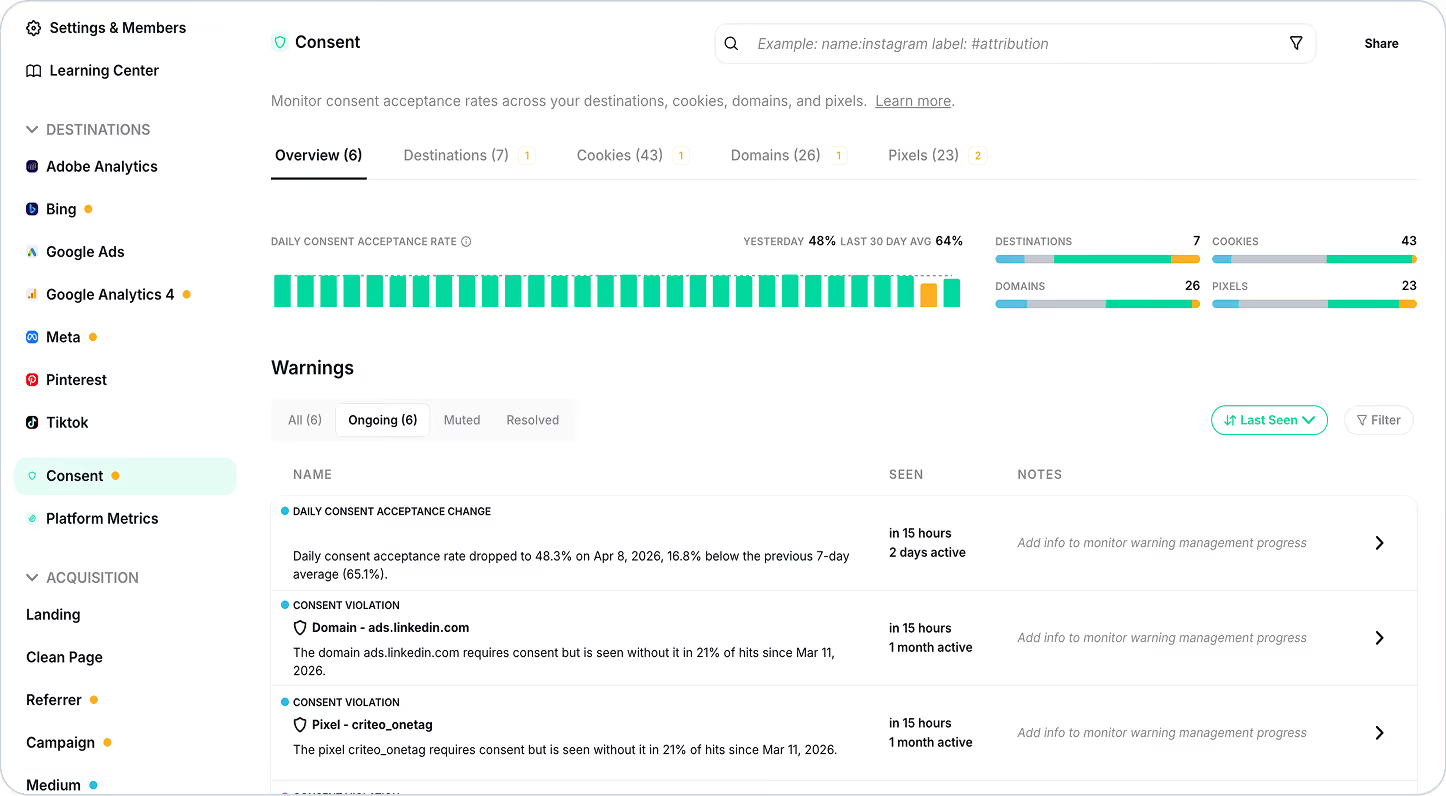
Your Consent Command Center
The Consent Monitoring dashboard is where you monitor acceptance rates, spot issues, and drill into the details across your destinations, cookies, domains, and pixels.
At a glance, you'll see:
- Daily consent acceptance rate — how often things are happening under the right conditions
- Blue = New — recently detected entities that need your attention
- Grey = Optional — no consent required
- Green = Healthy — consent is being properly collected
- Yellow = Needs Attention — something that requires consent isn't respecting it consistently
Real-Time Warnings
Scroll down and you'll find active consent-related warnings that surface two types of issues:
- Possible consent violations — data being sent without proper authorization
- Sudden changes in consent acceptance rates — suggesting something broke in your banner, tagging logic, or CMP configuration
Each warning gives you:
- What's happening
- Which elements are affected
- When it was first and last seen
- Notes and status tracking for team collaboration
These warnings are also included in Trackingplan Digests, so your team stays informed even when they're not actively in the platform.
AI-Powered Analysis
Click any warning to open Warning Management, where Trackingplan's AI debugger kicks in.
Instead of forcing you to piece together logs manually, you get:
- A detailed trend graph showing the issue over time
- Clear explanations of what's happening and why
- Business impact assessment
- Actionable next steps
In just a few clicks, you go from "something's wrong with consent" to "here's exactly what's happening and how to fix it."
Intelligent Classification
Here's the clever part: Trackingplan automatically learns which cookies and destinations require consent.
During a self-learning period:
- If consent is consistently granted above a certain threshold → classified as "Consent Required"
- If no consent activity is detected → classified as "Consent Optional"
You can always override this manually if needed. Full control, less busywork.
Deep Dive When You Need It
For those moments when you need to understand why something is happening in a specific scenario, use Data Explorer and Tracks Explorer to:
- Review consent at the event or track level
- Filter and segment by consent status
- Analyze discrepancies across pages, destinations, or user paths
- Correlate consent with browser, country, device, or any other attribute
What You Get
With Consent Warnings, you get:
Peace of mind — catch violations before they become compliance issues
Proactive protection — monitor real user behavior, not just synthetic tests
Faster debugging — AI-powered analysis tells you what's wrong, why, and what to do
Complete transparency — see exactly which requests are firing, when, and with what consent status
Effortless monitoring — intelligent classification that adapts as your stack evolves
Because consent is no longer just a legal requirement.
It's a core part of shipping quality data.
Ready to stay compliant without slowing down?
Learn more about Consent Monitoring →