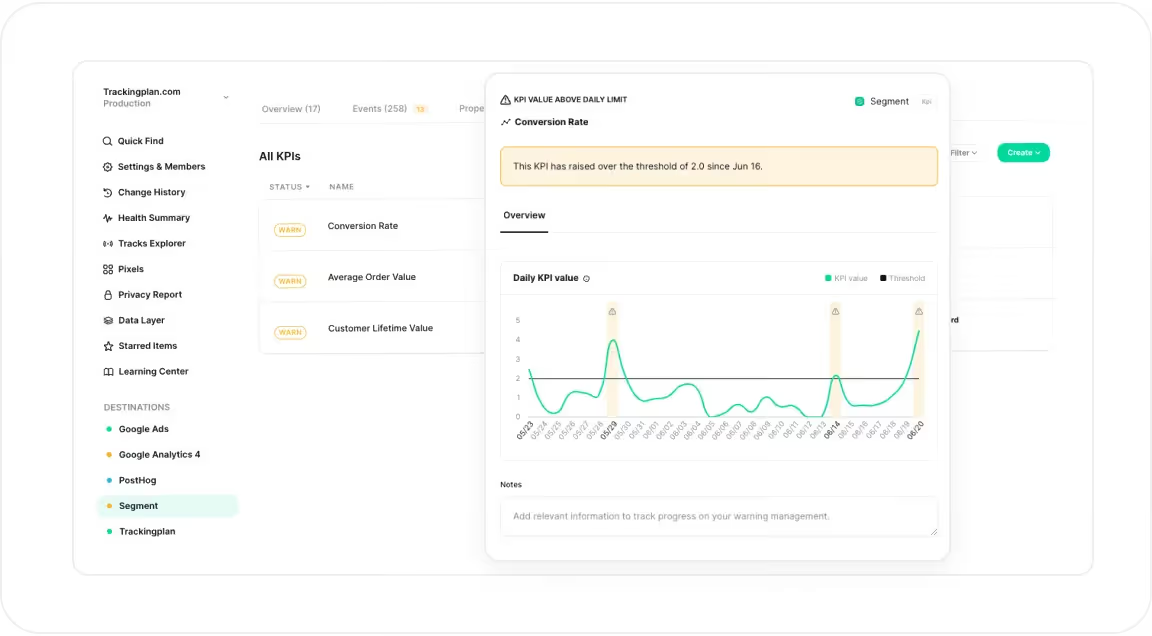
At Trackingplan, we know how important it is for digital analysts to know if their KPIs are reliable to confidently demonstrate the credibility of their reports.
To enhance this process, now Trackingplan allows analysts to define a series of KPIs and receive warnings if Trackingplan detects abnormal variations, making it easy for them to determine the reliability of the data they're viewing.
New possibilities
Define KPIs and monitor them automatically
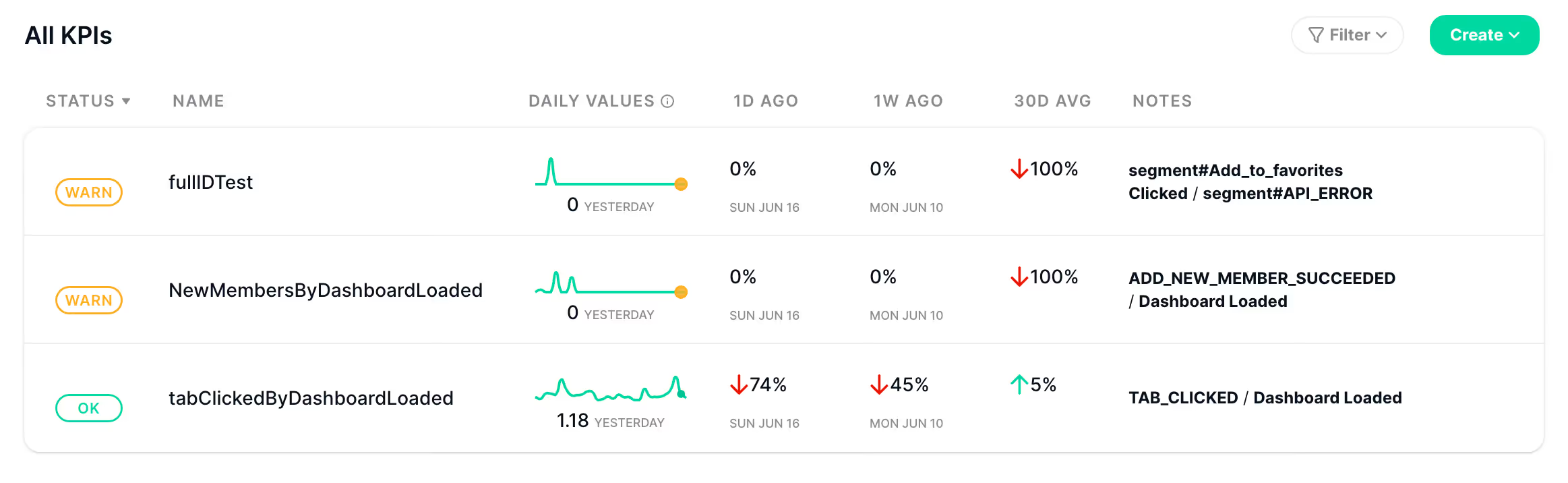
This new advancement allows you to define your KPIs based on your existing events and metrics. Trackingplan will automatically monitor all your KPIs providing warnings over their value changes, categorizing your KPIs to provide you with a quick overview of their current state:
- OK: KPIs marked as "OK" are performing within acceptable parameters, certifying the reliability of the reports using these metrics.
- Warn: KPIs flagged as "Warn" indicate that the performance of the associated metric is deviating from the expected range, whether because Trackingplan has detected missing KPI values, KPI value drops/peaks, or KPI values below or above your custom thresholds. Moreover, Trackingplan will also flag as a warning those KPIs whose associated events have warnings.
- Off: KPIs will show an OFF status if any of their related events are offline.
Investigate warnings in your KPIs
If Trackingplan detects abnormal variations in your KPIs, it will automatically issue a warning.
Trackingplan will establish a baseline based on your KPI values and will automatically send you a warning if the value increases or decreases below or above expected levels inferred by our algorithm.
Moreover, for any of your KPI warnings, you’ll be able to investigate them further by clicking directly on the warning tooltip. This will redirect you to your Warning Management View, where you’ll be able to add any relevant information to see the warning evolution and track its progress.
KPI Warnings
Let’s see what type of KPI warnings you’ll be notified about with Trackingplan:
Missing KPI values: Trackingplan will notify you if any of your KPIs show no values for one or more days.
KPI value drops: Trackingplan will notify you if our system detects a significant drop in your KPI values.
KPI value peaks: Oppositely, Trackingplan will also generate a warning if it detects a significant peak in the KPI value.
Custom Thresholds: As we’ve said, Trackingplan will always propose predefined alerts based on what it automatically learns from your data, but you can always customize your KPI warning settings and specify your own thresholds to receive real-time alerts based on your specifications.
- KPI Value Below Daily Limit: Triggered when the KPI value falls below a user-configured threshold.
- KPI Value Above Daily Limit: Triggered when the KPI value exceeds a user-configured threshold.
To learn more about all the all the issues and updates Trackingplan automatically informs you about, refer to our documentation.
How This Will Benefit You
Enhanced Data Reliability
By receiving immediate alerts for any abnormal variations in your KPIs, you can quickly identify and address data issues. This ensures the accuracy and reliability of your reports.
Proactive Issue Resolution
Early detection of potential issues allows for timely corrective actions, minimizing the impact on your data analysis and reporting.
Customizable Alerts
Tailor alerts to fit your specific needs, ensuring that you receive relevant and actionable notifications that are crucial for your analysis.
Improved Decision Making
With reliable KPIs and timely warnings, you can make better-informed decisions and gain strategic insights, enhancing the overall effectiveness of your data analysis efforts.