Add UTM parameters to a URL
Our UTM builder tool is designed for ease and accuracy. Simply fill in each field, and get a custom campaign URL that helps you track where your traffic is coming from.
Only use alphanumeric characters, underscores or hyphens to separate words. Don't use special characters and spaces as they can cause UTM tracking issues. For more best practices, refer to our section “Common Mistakes and Best Practices in UTM Tracking”.
What is a UTM parameter?
A UTM parameter is a tag added to a URL to tell analytics tools where a click came from. Each parameter has a name (like utm_source) and a value (like newsletter). When someone clicks the link, your analytics platform records those values and attributes the visit to the right campaign, channel, and creative.
UTMs originated with Urchin, the analytics company Google acquired in 2005 to build what became Google Analytics. The parameter names have not changed since.
How to build a UTM URL
- Paste your destination URL — the page you want users to land on.
- Set the campaign source — where the traffic is coming from (e.g.,
newsletter,linkedin). - Set the campaign medium — the channel type (e.g.,
email,cpc,social). - Name the campaign — a unique identifier you will recognize in reports (e.g.,
q2_product_launch). - Add term and content if needed — only for paid search keywords (
utm_term) or A/B test variants (utm_content). - Click Build URL, copy, and use it in your campaign.
A correctly built UTM looks like this:
https://example.com/landing?utm_source=newsletter&utm_medium=email&utm_campaign=q2_launch
UTM parameters explained
| Parameter | Required | Purpose | Example value |
|---|---|---|---|
utm_source |
Yes | The specific origin of the traffic | newsletter, linkedin, partner-blog |
utm_medium |
Yes | The marketing channel type | email, cpc, social, referral |
utm_campaign |
Yes | The campaign name | q2_launch, black_friday_2025 |
utm_term |
No | Paid search keyword | utm-builder-tool |
utm_content |
No | A/B test or creative variant | cta_blue_v1, headline_b |
utm_id |
No | Campaign ID (required for GA4 data import) | ga_camp_482 |
utm_source, utm_medium, and utm_campaign are mandatory in Google Analytics 4. Without them, sessions get lumped into "direct" or "(not set)" and your attribution is gone.
The 5 UTM mistakes that break campaign attribution
1. Inconsistent capitalization
Email and email are two different sources to Google Analytics. Mixing them splits one campaign across two rows in your reports, and neither row tells the full story.
Fix: Lowercase everything. Set a rule and enforce it.
2. Spaces and special characters
A space inside utm_campaign becomes %20 in the URL. Some platforms strip it, some don't, and the result is silent data corruption.
Fix: Use hyphens or underscores. Never spaces. No &, ?, #, or accented characters.
3. Swapping source and medium
We see this constantly: utm_source=email&utm_medium=newsletter. It's backwards. Source is where specifically (a vendor, a partner, a publication). Medium is what type of channel (email, cpc, social).
Fix: Source answers "from whom?". Medium answers "through what?".
4. UTMs on internal links
Tagging links inside your own site with UTMs overwrites the original session attribution. A user who arrived from a paid ad ends up credited as internal_promo once they click the homepage banner.
Fix: UTMs are for inbound traffic only. For internal CTAs, use a different mechanism (custom event, button click tracking).
5. One-off naming
spring-promo, Spring_Promo_2025, springpromo25 — three campaigns or one campaign tracked three different ways? In your analytics dashboard, three rows. In reality, the same effort.
Fix: Define a naming convention before the first campaign goes out. Document it. Validate against it automatically if you can.
There is no formal UTM-specific limit, but browsers and platforms enforce general URL length limits (typically 2,048 characters). Long parameter values rarely cause issues in practice. If a URL gets unwieldy, use a link shortener after generating the UTM, not before.
UTM naming convention cheat sheet
A workable convention has four properties: lowercase, no spaces, descriptive, and consistent across the team.
Recommended structure:
| Parameter | Convention | Examples |
|---|---|---|
utm_source |
vendor or platform name | linkedin, hubspot, partner-acme |
utm_medium |
channel type | email, cpc, social, organic-social, affiliate |
utm_campaign |
campaign-name_year-quarter | product-launch_2026-q2 |
utm_content |
creative-variant_format | hero-blue_static, hero-red_video |
utm_term |
paid-keyword | utm-builder-tool |
Rules to enforce:
- Always lowercase.
- Hyphens between words, underscores between concepts (
black-friday_2025-sale). - Use a fixed vocabulary for
utm_medium— don't invent new mediums per campaign. - Date-stamp campaigns that recur seasonally so historical data stays separable.
| Good | Bad | Why |
|---|---|---|
linkedin |
LinkedIn, Linkedin, LI | Mixed case + abbreviation = three rows |
paid-social |
Paid Social | Space breaks the URL |
q2-launch_2026 |
Q2 Launch 2026! | Special characters and spaces |
email |
Email, e-mail, EDM | Pick one, stick to it |
When a UTM builder is not enough
A free builder works for a solo marketer building five links a month. It stops working when:
- Multiple people on multiple teams generate UTMs (consistency drifts within weeks).
- Agencies and freelancers build links on your behalf without seeing your conventions.
- Paid platforms auto-generate UTMs that don't match your taxonomy.
- A typo from three months ago is fragmenting last quarter's attribution and nobody noticed.
At that point, the bottleneck is not URL generation — it's validation and monitoring. Trackingplan watches every UTM hitting your analytics in real time and alerts you when one breaks your convention, before it pollutes the report your CMO sees.
See how Trackingplan validates UTMs
Frequently asked questions
What does UTM stand for?
UTM stands for Urchin Tracking Module. The name comes from Urchin Software, the analytics company Google acquired in 2005 to build what is now Google Analytics. The parameters added to URLs (utm_source, utm_medium, utm_campaign, etc.) carry that name today, even though the original Urchin product no longer exists.
Are UTM parameters case-sensitive?
Yes. Google Analytics treats Email and email as different sources, splitting your campaign data across multiple rows. The UTM parameter names (utm_source) are not case-sensitive, but the values you assign to them are. Use lowercase consistently across every campaign to avoid fragmented reports.
Do UTM parameters affect SEO?
No. Search engines understand that UTM parameters are for tracking and ignore them when indexing. Pages with UTMs are not penalized, deduplicated, or treated as separate URLs for ranking purposes. The canonical version of the page still receives all SEO signals.
Can I edit a UTM parameter after sharing the link?
No. Once a URL with UTM parameters has been distributed, the parameters cannot be changed without breaking the link. Editing them server-side does not retroactively fix the data already collected. The only fix is to generate a new URL and replace the old one wherever you can.
What is the difference between utm_source and utm_medium?
utm_source identifies who sent the traffic (a specific platform, partner, or publication: linkedin, the-verge, acme-newsletter). utm_medium identifies how the traffic was delivered (the channel type: social, referral, email, cpc). Source is granular; medium is the category that source belongs to.
Should I use UTMs on internal links?
No. Adding UTMs to links inside your own website overwrites the original attribution stored in the user's session. A visitor who arrived from a paid Google ad will be re-attributed as the internal campaign the moment they click an internal link. Use UTMs only on inbound external links.
Why do my UTM campaigns show as "(not set)" in Google Analytics?
This usually means one of the three required parameters (utm_source, utm_medium, or utm_campaign) is missing or malformed. Check that all three are present, that there are no spaces or special characters, and that the URL uses ? for the first parameter and & between subsequent ones.
Is there a maximum length for a UTM URL?
There is no formal UTM-specific limit, but browsers and platforms enforce general URL length limits (typically 2,048 characters). Long parameter values rarely cause issues in practice. If a URL gets unwieldy, use a link shortener after generating the UTM, not before.
Ensure error-free UTM tracking with Trackingplan
Define custom UTM naming conventions rules and let Trackingplan take care of the rest. Get instant alerts whenever UTM parameters don't follow your standards to address issues before they affect your campaign performance.
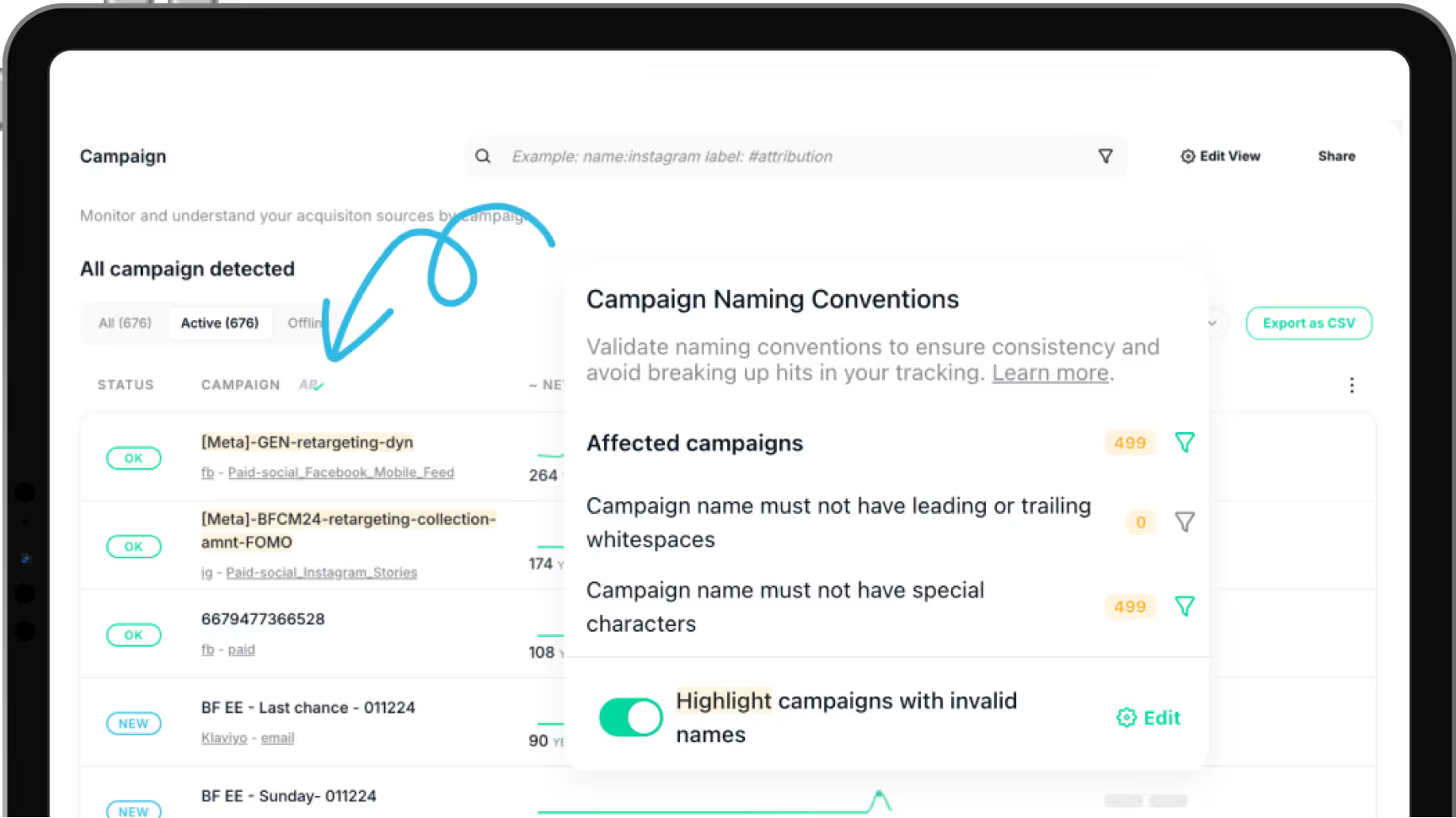
Preventing UTM Naming Convention Errors with Trackingplan
Trackingplan helps you ensure consistency and accuracy in the naming conventions used across your campaigns, mediums, and sources by detecting and highlighting discrepancies, such as duplicate or improperly formatted names, that may compromise data quality and campaign attribution.
For it, Trackingplan enables you to create customized naming convention rules for your UTMs to seamlessly validate that your campaigns consistently adhere to your established naming standards.
With them, any element—whether it's a campaign name, medium, or source—that breaches the rules will be highlighted, providing you with instant visibility into where corrections are needed. Think of it as a “spellchecker” for your campaign data that visually pinpoints which elements are not meeting the required standards.
To learn more, visit our documentation.
Frequently Asked Questions About UTM Parameters
?Why is having consistent UTM naming conventions crucial in tracking marketing efforts?
UTMs allow you to measure the effectiveness of your paid media efforts, as it allows marketing teams to look for trends and patterns that work in order to be able to allocate resources effectively. This is how you’ll will be able to reliably credit conversions to the correct traffic source to know the true Cost Per Acquisition (CPA) and the Return On Ad Spend (ROAS) for each of your marketing efforts.
However, while this might sound like the ultimate solution to cut off wasted ad spend, it’s important to consider that, just as it is impossible to credit a conversion to its source without first knowing how a visitor got to a website, it is also impossible without truly knowing if you're measuring your UTMs correctly.
Therefore, even though setting parameters to identify the source, the medium, or the campaign inside your inbound strategies is key, accurate analyses require organizing traffic to help you prevent errors in the attribution of your campaigns.
Identification is not organization; a disorganized system of UTM parameters can easily ruin the integrity of your analysis data, and here is precisely where campaign naming convention monitorization comes in to ensure the proper functioning and attribution of your marketing campaigns.
Mistakes in UTM parameters are permanent, and this explains why consistency in naming conventions is so important. A single misplaced character can ruin valuable data to the extent of making it useless.
Leverage Naming Conventions for Campaign Precision with Trackingplan
With Trackingplan, you can ensure you’ll never let another campaign go out of control by using naming convention alerts to set rules to monitor campaign tagging.
Trackingplan’s validation functions on Acquisition allow marketing teams to validate that the campaigns they run comply with their naming conventions.
Moreover, with Trackingplan’s UTM Builder Tool, you can create UTM-tagged URLs that align with your campaign’s objectives. This tool not only streamlines UTM creation but also sends alerts if parameters deviate from your naming conventions, preventing tracking errors before they affect your data.
If you’re interested in trying Trackingplan’s validation functions on Acquisition to prevent errors in the attribution of your campaigns and ensure error-free UTMs and ROAS calculation, get started for free or book a demo to unleash its full potential.
?Can UTM parameters be edited after a URL is created and shared?
Once a URL with UTM parameters has been created and shared, you cannot modify these parameters without generating a new URL.
Unfortunately, this also means that mistakes in UTM parameters are permanent—once a URL with UTM tags is created and shared, any errors embedded in those parameters can’t be corrected without generating a new URL.
Attempting to alter UTM parameters on an already-distributed link may result in broken URLs or compromised tracking data, potentially obscuring valuable insights about your campaign’s performance.
To avoid these issues, double-check your UTM parameters for accuracy and consistency before sharing. Even small errors, such as inconsistent capitalization or typos, can disrupt data continuity, leading to fragmented reports and incomplete insights. If changes are needed after sharing, the best practice is to create a new URL with corrected UTM tags, ensuring your data remains reliable and actionable.
To help ensure accuracy, consider using Trackingplan’s UTM Builder Tool, a Free Campaign URL Generator that simplifies UTM setup and includes alert features to catch errors before they impact your tracking.
?What should I do if my UTM parameters are not tracking correctly?
If your UTM parameters aren’t working as expected, consider these troubleshooting steps:
- Check URL Structure: Ensure URLs begin with “https://” and that UTM parameters are structured correctly.
- Confirm Parameter Accuracy: Double-check for any typos or inconsistencies in your UTM tags, as these can disrupt tracking.
- Avoid Special Characters: Refrain from using spaces or special characters in UTM parameters, as they can break links.
- Test URLs Before Launching: Always test your URLs before launching a campaign to verify that all UTM parameters are tracked correctly in your analytics tool.
Following these steps can help you maintain accurate tracking and avoid common UTM issues.
?What factors should be considered when creating a campaign name?
When creating a campaign title, several factors should be considered to ensure effectiveness, clarity, and consistency in campaign tracking and analysis. In this regard, understanding how to name a campaign and establishing strong naming conventions is key for effectively leveraging your marketing campaigns.
Here are some best practices:
1. Clarity and Relevance
“A clear campaign title ensures your team can immediately understand the campaign’s goals.”
A campaign naming convention should clearly represent the purpose or theme of the campaign. It should be relevant to the content or the objective of the marketing effort. A clear and relevant campaign name is crucial for team members to easily understand and associate the campaign with its intended goals.
Examples:
- Good: Specific campaign names, such as
"Winter_Sale_2024", allow for efficient categorization and analysis, helping teams quickly identify the campaign’s objective. - Bad: A vague campaign name like
"Promo_2024"lacks the necessary detail for clear understanding and effective tracking.
2. Specificity and Descriptiveness
Specific and descriptive campaign names help in understanding the campaign’s focus without requiring further explanation. Opting for specific campaign names not only improves understanding but also enhances the efficiency of categorizing and analyzing data.
Examples:
Good: "Email_MarchNewsletter_2024"clearly indicates type, timing, and year.- Bad: In contrast,
"Newsletter_Promo"could be regarded as a vague and non-descriptive campaign name, as it lacks lacks timing and specificity.
3. Uniformity in UTM Naming Conventions
Establishing and adhering to a consistent UTM naming convention taxonomy is crucial. A standardized format in UTM naming conventions ensures that all campaign names are uniform, making it easier to track, sort, and analyze data. This might include elements like identifying the source, medium, campaign type, or dates within the campaign name.
Examples:
- Good:
GoogleAds_Search_April2024_NewProductLaunchclearly identifies the platform (Google Ads), channel (Search), date (April 2024), and campaign focus (New Product Launch). - Bad:
NewCampaign_AprilGooglelacks a clear structure, making it difficult to analyze or compare with other campaigns.
For more detailed guidance on establishing effective UTM naming conventions, our blog post, Effective Monitoring of UTM Naming Conventions: Best Tracking Practices, offers in-depth insights and practical tips.
4. Avoidance of Ambiguity and Confusion
Using vague or ambiguous campaign names can lead to confusion when analyzing data. A clear and unambiguous campaign name reduces the chances of misinterpretation or misattribution of campaign results.
Examples:
- Good:
Email_Summer2024_Promoclearly indicates campaign type, season, and purpose - Bad:
SummerCampaignlacks specificity, making it difficult to understand the campaign's focus or track its performance.
5. Alignment with Tracking Parameters (UTMs)
Ensuring that the campaign name aligns with the UTM parameters is also key for error-free attribution. This involves consistent use of source, medium, campaign term, content, and possibly other UTM parameters to accurately track and attribute traffic.
6. Future Scalability and Reporting
Design campaign names with scalability and long-term reporting in mind. They should accommodate future campaigns without causing naming conflicts or data confusion.
Examples:
SocialMedia_Summer2024_FitnessChallengeallows for future campaigns likeSocialMedia_Fall2024_FitnessChallengewithout overlap.
7. Ease of Communication
An effective campaign name should be easily communicated and understood among team members. Clear communication about campaign names minimizes errors and ensures everyone is on the same page.
By considering these factors, marketers can create campaign names that facilitate effective tracking, analysis, and understanding of marketing efforts, leading to more accurate reporting and better-informed decision-making.
Examples:
- Good:
Email_Newsletter_July2024is simple and straightforward - Bad:
Newsletter2024lacks context and clarity, leading to potential misunderstandings.
Summary
When creating a campaign title, several key factors ensure clarity, consistency, and effective tracking. The following table summarizes the most important best practices, along with examples of good and bad campaign titles:
| Factor | Why it Matters | Example |
|---|---|---|
| Clarity & Relevance | Helps your team quickly understand the campaign’s goal | Good: Winter_Sale_2024 Bad: Promo_2024 |
| Specificity & Descriptiveness | Makes the campaign’s focus clear without extra explanation | Good: Email_MarchNewsletter_2024 Bad: Newsletter_Promo |
| Consistency in UTM Naming | Ensures all campaign titles follow a standard format for easy tracking and analysis | Good: GoogleAds_Search_April2024_NewProductLaunch Bad: NewCampaign_AprilGoogle |
| Avoid Ambiguity | Reduces misinterpretation or incorrect attribution of results | Good: Email_Summer2024_Promo Bad: SummerCampaign |
| Alignment with UTM Parameters | Guarantees accurate tracking and attribution | Use the same terms in campaign title and UTM fields (source, medium, campaign, content) |
| Scalability & Reporting | Allows future campaigns without naming conflicts | SocialMedia_Summer2024_FitnessChallenge → allows SocialMedia_Fall2024_FitnessChallenge |
| Ease of Communication | Minimizes errors among team members | Good: Email_Newsletter_July2024 Bad: Newsletter2024 |
By considering these factors, marketers can create campaign names that facilitate effective tracking, analysis, and understanding of marketing efforts. This approach leads to more accurate reporting and better-informed decision-making. For more information about campaign tagging, campaign parameters, and UTM naming conventions, keep exploring our FAQ resources.
?What data is Google Analytics goals unable to track?
With the introduction of Google Analytics 4 (GA4), the traditional concept of Goals, as used in Universal Analytics (UA), has been removed. In GA4, the tracking system has been streamlined to focus primarily on events, which can be marked as conversions.
Here's a summary of how this works:
1.Goals vs. Events in GA4: Unlike Universal Analytics, where both goals and events were used, GA4 exclusively uses events for tracking user interactions. If something is deemed important enough to count as a conversion (like form submissions or video clicks), it can be set up and marked as a conversion event in GA4
2. Setting Up Conversions in GA4: To configure conversions in GA4, you need to navigate to the "Configure" section, then to the "Events" tab. Here, you can create custom events that are relevant to your tracking needs. Once an event is created, you then go to the "Conversions" tab to mark this event as a conversion, ensuring it matches the name of the event you've created.
This change in Google Analytics reflects a shift towards a more streamlined, event-focused approach to tracking user interactions and conversions. It's important for users migrating from Universal Analytics to GA4 to understand this fundamental change in how goals and conversions are managed.
For an in-depth understanding of event-based analytics, consider exploring resources like Google's Analytics Help Center or practical insights from our Google Analytics 4 series. From beginner tips to advanced strategies, we've curated content that will empower you to Master GA4's full potential, ensuring your analytics efforts lead to actionable insights and measurable success.
?Which three campaign parameters are recommended to manually track campaigns?
If you want to manually track campaigns, there are three key campaign parameters you should pay special attention to: medium, source, and campaign. Let's have a look at each of them to ensure nothing essential is overlooked in your campaign tracking efforts.
Medium (utm_medium)
Essentially, this parameter defines which medium your visitors are using when visiting your website. This could be “paid-social”, in case you’re planning to launch a paid campaign on one of your social networks, “email”, or “cpc”.
This parameter is key to identifying which medium drives the most valuable traffic to your website and answering where you acquired your users from.
Source (utm_source)
The source parameter complements the medium by offering more granularity about the origin of website traffic. For instance, given that 'social' can represent various platforms, the source parameter is where you’ll be able to specify and narrow down the specific platform your visitors originated from (Facebook, Twitter, LinkedIn, Instagram, etc.). Combining source and medium facilitates filtering and grouping of traffic for better analysis, allowing you to compare different marketing forms within the same platform.
Campaign (utm_campaign)
The campaign parameter is crucial for accurately tracking website traffic, indicating the specific marketing campaign, promotion, or ad that triggered your visitors’ clicks. Given the multitude of campaigns that marketing teams typically handle simultaneously, this parameter provides the necessary detail to track and compare individual campaign performance.
However, managing campaign parameters can be challenging due to the potentially vast number of campaigns. That is why using unique and consistent naming conventions is key in getting their full reporting value, as this allows the whole team to understand and use them correctly and consistently, rather than falling into that vicious cycle of disorganization.
Fortunately, with support for UTM campaigns, mediums, sources, referrers, landings, and pages, Trackingplan helps you ensure error-free ROAS calculation by monitoring the correct functioning and attribution of your campaigns and marketing strategies.
?What campaign parameter is not available by default in Google Analytics?
Before answering what campaign parameter is not available by default in Google Analytics, let’s take some seconds to understand what campaign parameters are and why these are crucial to tracking the effectiveness of your campaign paid media efforts.
These parameters are used for marketing teams to credit conversions to their source, medium, and other details, allowing them to look for trends and patterns that work to be able to allocate resources effectively in their next online campaigns.
Consequently, by the following parameters to your URLs, Google Analytics will be able to identify which sources drive the most valuable traffic to your website to help you answer where have you acquired your users from.
The common campaign parameters used in Google Analytics are:
- utm_source: Identifies the source of the traffic (e.g., search engine, newsletter, etc.).
- utm_medium: Specifies the medium of the traffic (e.g., CPC, email, etc.).
- utm_campaign: Identifies a specific product promotion or strategic campaign.
- utm_term: Used for paid search campaigns to identify specific keywords that triggered the ad.
- utm_content: Used for A/B testing and content-targeted ads to differentiate ads or links that point to the same URL.
- utm_id: Campaign ID used to identify a specific campaign or promotion, required for GA4 data import.
- utm_source_platform: Specifies the platform directing traffic to an Analytics property, such as Search Ads 360 or Display & Video 360.
What Campaign Parameter Is Not Available By Default In Google Analytics?
However, it's important to note that the 'Utm_adgroup' campaign parameter is not included in the default settings of Google Analytics.
The absence of this specific parameter highlights the significance of customization for in-depth tracking of campaigns. This customization enables website owners to gain detailed insights from the platform, empowering them to optimize their website strategies accordingly. Now that you are aware of the campaign parameter not present by default in Google Analytics, you can explore how to leverage other available parameters for making informed, data-driven decisions.
With Trackingplan, you can ensure you’ll never let another campaign go out of control by using naming convention alerts to set rules to monitor campaign tagging.