
You're in a budget review with Meta Ads Manager open beside GA4 and the CRM. Each screen shows a different purchase count, and someone wants to move money before the meeting ends. The tempting answer is to trust the biggest number. The better answer starts with checking what each number counts.
A worked attribution bias example in paid media
An online shop runs a Meta Ads prospecting campaign and a Google Ads search campaign during the same week. Meta Ads Manager reports 120 purchases and €12,000 in revenue. A GA4 last-click report credits 96 purchases to paid social. The CRM records 88 paid orders for the same period.
These are three counts of what appears to be the same outcome. The team treats Meta's highest count as proof that prospecting won and raises its budget by 40%. Yet the counts may reflect different rules, timing, or duplicate events. The bias begins when the team chooses a number before checking whether it fits the decision.
Three sources, three purchase counts for the same week
| Source | Why it differs | Use it for |
|---|---|---|
| Meta Ads Manager, 120 reported purchases | Pixel and Conversions API events may count the same order twice if they lack a shared event ID | Comparing ad sets after checking for duplicates |
| GA4, 96 purchases credited to paid social | The report applies last-click credit; some sessions with denied consent may be modelled or missing | Reviewing site journeys under the selected reporting rules |
| CRM, 88 paid orders | Includes paid orders without applying an attribution rule | Checking paid-order totals |
The table shows where to investigate. For example, an order may fall into different reporting periods, or Meta may claim a purchase that GA4 credits to another channel.
Identity is another link in the data chain. A recognized visitor is not necessarily a verified buyer, and recognition alone does not establish which campaign influenced a sale. Stamina's guide to visitor identification explains the distinction.
Choose the count for the decision
Start by matching the question to the measure. The CRM count answers how many orders were paid. GA4 describes the recorded site journey according to its reporting rules. Meta Ads Manager reports conversions its system credits to ads.
Then check whether the counts refer to the same period and whether duplicate purchase events are possible. Only after those checks can the team decide whether the difference is an attribution effect, a tracking issue, or both. Write down each source, its count and its rule before comparing channels.
What attribution bias means and how to review it
Attribution bias occurs when people draw a confident conclusion about a cause from incomplete evidence. In psychology, it can mean judging someone's behavior by their character while overlooking the situation around them. In marketing, the same reasoning can turn a visible touchpoint into a confident claim about what caused a purchase.
A colleague misses a deadline, and an observer calls them careless. Workload, unclear requirements or a failed deployment may offer a different explanation. The visible outcome is real; the explanation needs testing.
A visible output isn't a complete explanation
Correspondence bias is the tendency to infer someone's underlying attitude from what they appear to express. An essay can look like a statement of belief even when the writer was assigned its position. The distinction is between observing an output and knowing why it exists.
Marketing reports invite a similar leap. A team sees an ad touchpoint before a purchase and treats the sequence as proof that the ad caused the sale. Sequence establishes order, not how much influence the ad had.
A buyer might already know the brand, receive an email, ask a colleague, then click a search ad. That recorded touchpoint is useful evidence, but it doesn't account for everything the system couldn't observe.
Context changes the explanation
Teams can apply different standards to wins and losses. Strong results become proof of excellent creative; weak results become evidence of a poor audience or an unreliable platform.
Either explanation could be right. Bias enters when a convenient story is accepted without checking alternatives. A campaign may have underperformed, or a broken purchase event may have hidden its results. Those causes call for different responses.
The Open Textbook chapter on attribution biases explains that people in individualistic cultures tend to emphasize personal traits, while people in collectivistic or interdependent cultures give more weight to situational causes. It also describes how making constraints salient can reduce correspondence bias.
Use that idea to make relevant context visible to everyone, rather than to stereotype colleagues by market. A regional analyst who knows about a consent-banner change may interpret a result differently from a central media team looking only at campaign totals.
Keep a review record that can be challenged
Write down the proposed explanation before changing creative, blaming an operator or moving budget. Include four fields:
- Claim: State the proposed cause in a sentence that could be disproved.
- Situational alternatives: List plausible constraints, such as consent loss, a broken dataLayer, a release or a reporting delay.
- Disconfirming evidence: Specify which observation would change the conclusion.
- Owner: Name who will inspect the evidence and report back.
For a hypothetical conversion drop, the record could look like this:
| Review field | Filled-in example |
|---|---|
| Claim | Prospecting creative has stopped attracting buyers |
| Situational alternatives | The checkout release removed the purchase value; the consent update changed tag behavior; reporting hasn't finished processing |
| Evidence that would change the conclusion | Paid orders remain steady while purchase hits disappear immediately after the release |
| Owner | The analytics engineer checks the purchase hit and release history; the media lead holds the creative decision |
Separate observations from interpretations. “Purchase hits stopped after the release” is an observation to verify. “The developer broke attribution” is a conclusion that still needs evidence.
When report definitions differ, the guide to comparing GA4 and ad platform conversions can help frame the comparison. Record the conversion event, reporting period and attribution settings alongside the review.
The goal is a decision whose reasoning can be inspected. Attribution bias concerns conclusions drawn from visible outputs, not bad intent.
Six ways attribution bias enters channel reports
Ad platform dashboards, GA4 and the CRM describe different parts of the transaction. Each distortion below can shift apparent credit between channels, and each deserves a check before a budget decision.
Six distortions that shift credit between channels
| Distortion | What the report shows | Channel it misleads |
|---|---|---|
| Last-click credit | The final touch gets every conversion assigned under that rule | Email and brand search |
| Platform self-credit | Each ad platform claims the same order | Meta Ads and Google Ads |
| Duplicate purchase hits | Counts above actual orders | Any channel with Meta Pixel plus Conversions API |
| Missing click IDs | Paid clicks can appear as direct traffic | Google Ads and Meta Ads |
| Consent loss | Conversions missing or modelled in GA4 | Paid social and display |
| Offline sales not imported | Lead campaigns show no sales | Lead generation campaigns |
Last-click credit favors the interaction nearest the purchase. Check the report's attribution rule before concluding that email or brand search created demand. The final visit may have captured demand built elsewhere.
Platform self-credit makes platform totals unsafe to add together. Match transaction IDs across exports to see whether Meta Ads and Google Ads claim the same paid order. Overlap isn't an extra sale.
Duplicate purchase hits require a payload inspection. A browser event and a server event can describe the same purchase, rather than separate transactions. Count distinct orders, not just incoming requests.
Inspect what disappeared as well as what appeared
Missing click IDs can break the connection between an ad interaction and a purchase. Follow redirects and checkout transitions, and inspect the identifiers retained downstream. A direct label doesn't establish that advertising had no role.
Consent loss changes what a report can observe. Google's Consent Mode documentation explains that tags adjust to visitors' choices and can send pings instead of storing cookies when consent is denied, supporting modelling of some measurement gaps. Check the implementation rather than assuming every denied visit disappears identically.
Offline sales not imported leave lead reports incomplete. A form submission and a closed deal are different outcomes. Check the CRM stage, import status and conversion-action mapping before declaring a lead campaign commercially weak.
A clean implementation screenshot doesn't settle either issue. The request must leave the browser or server, arrive at its destination and meet the report's inclusion rules.
How to trace one conversion from click to CRM
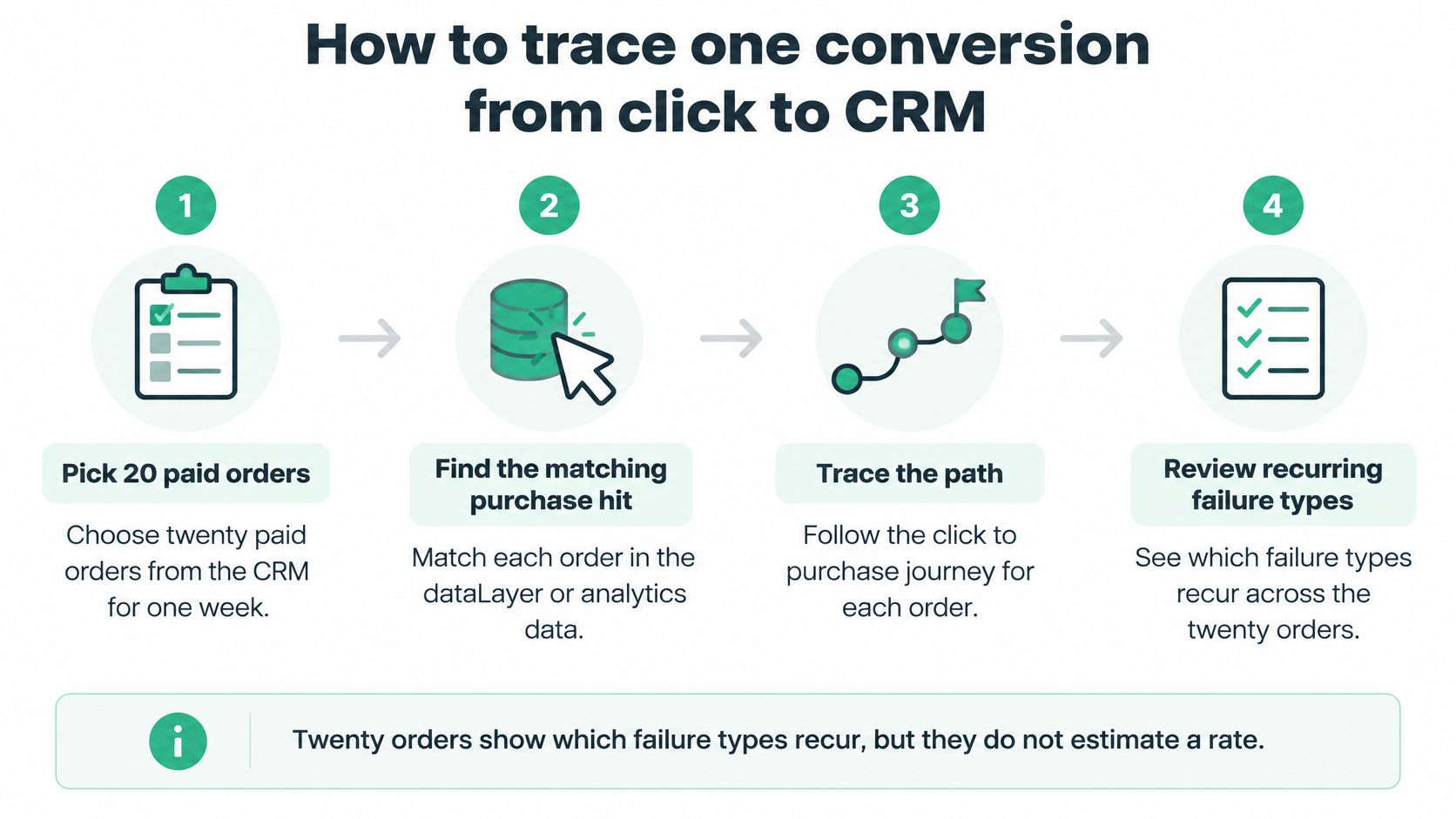
Start with the order record, not the channel leaderboard. In this illustrative audit, select 20 paid orders from one week and inspect their paths individually. Twenty orders show which failure types recur, but they don't estimate a rate.
Follow the evidence in order
- Export the paid orders. Retain transaction ID, payment time, currency and paid value. Exclude test orders and distinguish payment status from order creation.
- Find the purchase event. Match the transaction ID to an exported event log, dataLayer capture or network record. Use a test purchase to inspect current behavior if historical request logs aren't available.
- Trace the click identifier. Check whether the gclid for Google Ads or fbclid for Meta Ads survives the journey and reaches the relevant tracking path. Inspect supported downstream identifier fields too, since a raw URL parameter isn't the only matching mechanism.
- Inspect consent on the hit. Record the consent state at dispatch. A correctly recorded denial is not itself a tracking defect.
- Check deduplication. Compare the Meta Pixel and Conversions API event_id for the same order. Browser and server copies need a shared identifier for deduplication.
- Inspect offline imports. Confirm that the CRM outcome reached Google Ads, with the intended conversion action and value.
- Count logical matches. After deduplication, one purchase per order is clean, two indicate a duplicate, and zero indicate a missing event in the records examined.
Google's offline conversion guidance describes how GCLID connects ad clicks to later outcomes and how enhanced conversions for leads uses hashed advertiser-provided data with imported events. For identifier troubleshooting, the GCLID guide helps you inspect where that connection breaks.
Pass and failure signals for each check
| Check | Pass signal | Failure signal |
|---|---|---|
| Transaction ID | One logical purchase hit per order | No matching hit |
| Click ID | gclid or fbclid present on the relevant hit, or preserved through its supported identifier path | Known paid click appears as direct without its identifier |
| Consent state | Consent state recorded on the hit | Consent state missing from the hit |
| Deduplication | Same event_id on Meta Pixel and Conversions API | Two counted purchases for one order |
| Offline import | Upload on schedule with a value | Lead or sale absent in Google Ads |
| Match count | One logical purchase per order | Two means duplicate, zero means missing |
For a setup review before inspecting payloads, Silva Marketing on tracking ad conversions provides useful implementation context. Keep the audit evidence tied to actual orders rather than stopping at tag configuration.
Trackingplan runs recurring checks daily or weekly and names a cause only when two independent pieces of evidence agree. For manual reviews, apply that same standard: a release timestamp plus a missing field is stronger evidence than a chart dip alone.
Finish with the sample split. In this hypothetical worksheet, record 20 checked, 20 matched, zero unmatched only if the logs support it. If they don't, enter the observed matched and unmatched counts and list duplicate and identifier failures separately, without extrapolating a failure rate.
Why biased conversion data reaches bidding
A purchase discrepancy isn't confined to a dashboard. Google's conversion tracking documentation connects reported conversions to Smart Bidding strategies including Maximize Conversions, target CPA and target ROAS. These strategies use conversion signals to pursue the advertiser's selected goal.
The practical risk is straightforward. If the team supplies an incorrect count or value, it changes the evidence available to bidding. The system doesn't have the CRM's payment record available as an automatic correction for every bad event.
A correct order with an incorrect value
Take a hypothetical €50 paid order recorded with a conversion value of €0. The customer paid, but the submitted event reports no revenue. That signal can encourage target ROAS bidding to bid less for similar opportunities than it would with the correct value.
The reverse fault points in the opposite direction. If the same purchase is accepted twice with its full value, the apparent return doubles for that order. A team that trusts the inflated return may reinforce spending toward the wrong audience.
| Hypothetical event record | What the team should challenge |
|---|---|
| Paid order with zero submitted value | Whether the value field reached the conversion action |
| Same purchase accepted twice | Whether distinct event records represent a distinct sale |
| Correct purchase with wrong currency | Whether the reported return is comparable with spend |
These examples describe the direction of the error, not a guaranteed immediate bid change. Smart Bidding responds to more than an isolated purchase. The team still needs to correct the underlying input rather than predict an exact response from a single event.
Check every route into the conversion action
Google's enhanced conversion guidance explains how hashed first-party customer data can supplement website measurement and connect imported lead outcomes to ad interactions; its offline-import guidance recommends consistent uploads and conversion values for the relevant bidding strategies. Better matching doesn't excuse an incorrect order value.
Inspect the route from the CRM field to the upload payload. Check whether refunds, qualified leads and completed sales are mapped to the intended actions. Confirm which actions the selected bidding strategy uses.
The operational connection between these checks and bid strategies is explained in the Smart Bidding guide. Treat measurement QA as a prerequisite to a strategy change, not a reporting cleanup afterward.
Before changing bids, compare conversion count, conversion value and duplicate rate against the CRM for the same period.
Use compatible time boundaries and payment definitions. Counts alone won't expose a purchase sent with the wrong value, and revenue alone won't reveal whether duplicate and missing events happen to offset each other.
Check the data before moving budget between channels
A channel that leads the report should receive more budget only after its reported conversions reconcile with the order record. Reconciliation makes the measurement usable; it does not prove that the channel caused incremental sales.
Set a clear decision rule. The platform, GA4 and CRM may report different totals because they use different attribution rules. The team should be able to explain which orders, attribution windows and event conditions account for the gap.
Turn reconciliation into a release gate
- Choose a comparison window. For the illustrative shop, compare platform, GA4 and CRM records across two weeks, checking one platform at a time. Keep the date basis and paid-order definition consistent.
- Set a review threshold. Flag platform totals that exceed the comparable CRM order count beyond the team's agreed tolerance. Treat the difference as a question to investigate, not proof that a platform is wrong.
- Assign technical ownership. Name an owner for each failing tag, missing identifier or rejected import. The media lead should know who will investigate and report back.
- Pause budget changes based on disputed conversions. Before approving an increase, require a named cause and fix date. If the business proceeds despite unresolved uncertainty, document the reason.
- Repeat checks after website releases. Add checkout, CMP, redirect and server-side changes to the release checklist. A previous pass does not confirm that the current implementation still works.
Make the handoff explicit
Marketing may own the report, engineering the tracking hit, and sales operations the paid-order field. Assign someone to reconcile those boundaries rather than just forwarding screenshots.
When responsibility crosses departments, Revenue Nomad's RevOps consultant guide provides context for defining cross-functional ownership. The handoff should name a decision owner, a technical owner and an acceptance test.
Close each fix with evidence: the corrected payload, its matched CRM order and the report result after processing. Record any remaining attribution or modelling difference so the next review can distinguish an explained gap from a new tracking problem.
A channel can lose a budget decision because its sales are missing from the comparison. Another can appear to win because duplicate records inflate its count. Check the transaction chain before treating either report as a reason to move budget.
Visit Trackingplan to set up daily or weekly conversion checks, with links to the tracking hits behind each finding. It helps teams make sure campaigns are optimized on conversion data they can trust.