
You opened Google Ads this morning and purchases look stronger than last week. The checkout release went out on Thursday. Finance's order export does not show the same lift. Smart Bidding has already started treating the higher count as a real result.
That gap is the part PPC automation cannot see on its own. A rule can raise a budget, pause a keyword, or shift bids. It cannot tell a duplicate purchase from a real one, or a consent gap from a broken tag. The checks below are the ones to run before any bidding system learns from the data.
What PPC automation covers in practice
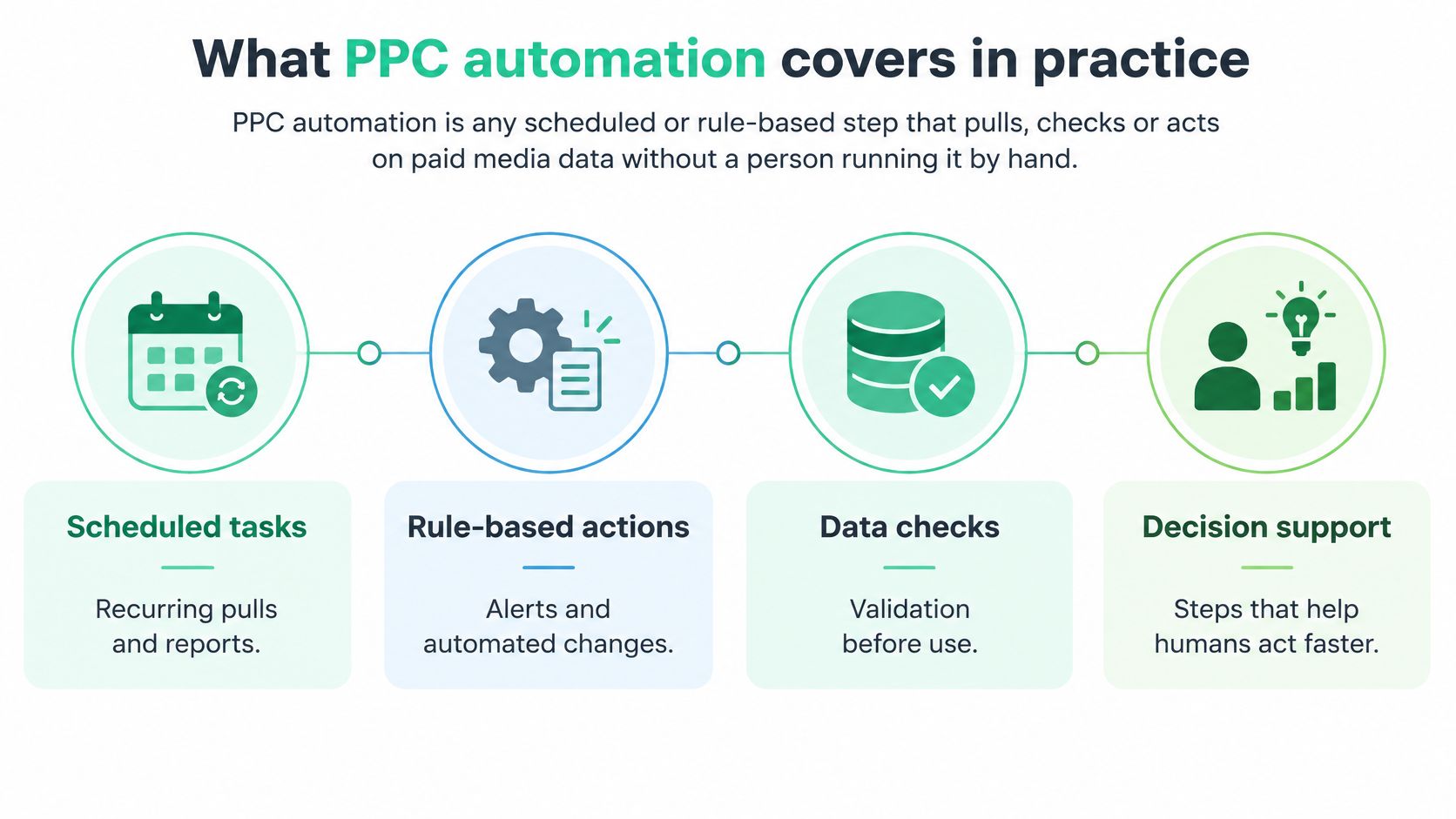
PPC automation is any scheduled or rule-based step that pulls, checks, or acts on paid media data without a person running it by hand.
An autopilot holds a course only when the instruments send true readings. Bidding automation is the autopilot. Conversion tracking is the instrument panel. Reporting and campaign monitoring sit under that panel. Many of those jobs run on a schedule, so a Friday checkout bug may sit unseen until the next scheduled pull.
The four layers
| Layer | What runs automatically | Check it needs | Typical owner |
|---|---|---|---|
| Reporting | Scheduled pulls of spend, clicks and conversions into one report | Platform totals match the source system | Paid media lead |
| Campaign monitoring | Alerts on spend pacing, cost per acquisition shifts and volume drops | Alert thresholds set against a normal range | Paid media lead |
| Conversion tracking | Tag and server events sent to Google Ads, Meta and GA4 | Each purchase counted once, with the right value | Analytics or tag owner |
| Bidding and budgets | Smart Bidding, Advantage+ and budget rules change spend | Conversion signals verified before bids learn from them | Media team |
Read the table from the bottom up if you want the failure that matters. Bidding and budgets change spend, and they inherit whatever the conversion layer sends. A cost per acquisition alert will not say whether traffic got cheaper or a purchase was counted twice. A report will publish the number. It will not repair the hit.
A 2025 Adverity survey of 200 CMOs across the US, UK, Germany, Austria, and Switzerland found that respondents estimated 45% of the marketing data used for decisions was incomplete, inaccurate, or outdated, naming data completeness (31%) and data consistency (26%) among the problem areas. The same body of findings also records that an analysis of more than 15,000 Google Ads accounts found 29% recorded zero conversions during a 90-day period, with missing or incorrectly configured conversion tracking cited as one possible explanation.
The first automation to build is a validation layer, because every other layer inherits its errors. Use the table to see which layer breaks first. If platform totals do not match the source system, stop there before a bid rule treats the gap as performance.
Conversion checks to run before bidding uses the data
Each row below compares one signal with a second source. A warning sign is a pattern to investigate, not proof of a fault. Small gaps can come from attribution windows, time zones, or refunds, so agree a band for the account before any alert fires.
Conversion checks before automated bidding
| Check | Compare against | Warning sign | Owner |
|---|---|---|---|
| Purchase count per platform | Google Ads, Meta and GA4 purchases for the same day | Platform counts above CRM order volume | Analytics lead |
| Google Ads vs analytics totals | Google Ads conversions vs GA4 and CRM orders | Gap that widens after a release | Paid media lead |
| Offline conversion imports | Imported rows vs closed deals in the CRM | Rows without click IDs or with the wrong value | CRM owner |
| Click IDs | gclid and fbclid on landing URLs and in order records | Click ID lost at checkout or on a redirect | Tag owner |
| UTMs and campaign names | UTM naming convention vs live campaign names | Unmatched or misspelled source and medium values | Paid media lead |
| Purchase value and currency | Order total in the CRM vs event value | Value in another currency or a tax-inclusive mismatch | Analytics or tag owner |
Run them in this order on the same calendar days. The full method for each one is in the guide to conversion tracking validation.
- Purchase counts. Pull Google Ads, Meta, and GA4 purchases and set them next to CRM orders. A platform sitting above order volume is the first place a double fire shows up.
- Google Ads against analytics and the CRM. If the gap was stable and then widens after a release, the tag or the import changed, not demand.
- Offline imports. Match imported rows to closed deals. A row with no click ID, or the wrong value, still enters bidding as if it were a clean sale.
- Click IDs. Confirm
gclidandfbclidsurvive the landing URL, the dataLayer, and the order record. A redirect that strips the parameter breaks the join even when the purchase itself is real. - UTMs and names. Compare live campaign names with the naming convention. A misspelled medium sends spend into an unmatched bucket.
- Value and currency. Compare the event value with the order total. A tax-inclusive payload, or a currency the account does not bid in, pulls the bid toward the wrong order.
Practical rule: After every release that touches checkout, tags, or server pipelines, compare a seven-day window before the release with seven days after it.
A pass looks dull, which is what you want. Totals sit inside the agreed band. Each failure is traced to one named owner, with the date range and the campaign attached. The checks are only useful if the team has already agreed who fixes each failure. An unowned gap just becomes another spreadsheet tab.
How deduplication keeps browser and server purchases to one count
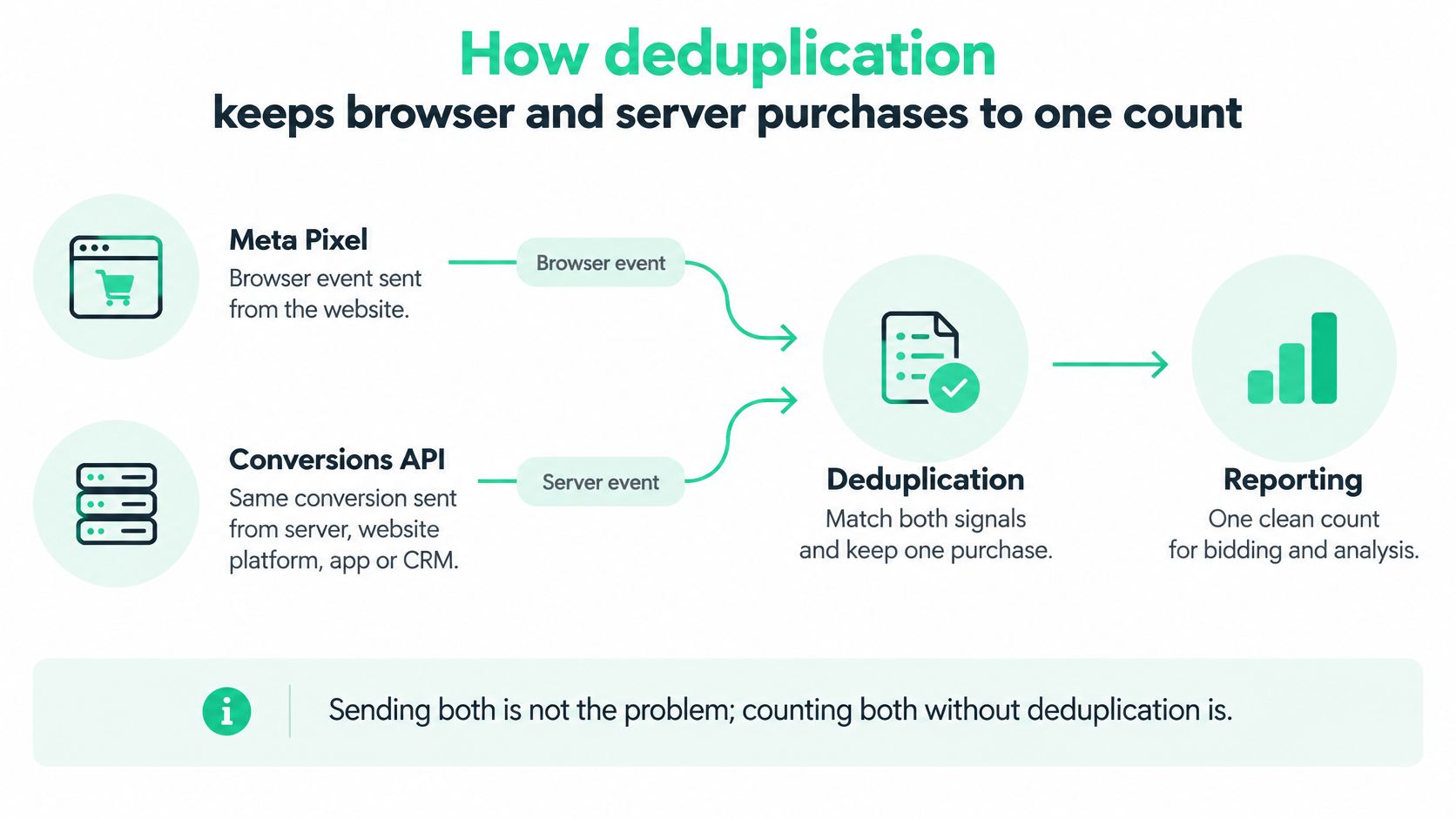
Two paths can carry the same purchase. The Meta Pixel sends the web event from the browser. The Conversions API (CAPI) sends that conversion from a server, a website platform, an app, or a CRM. Sending both is not the risk. Losing the shared identity between them is. Without that identity, advertising reports can count one action twice and inflate purchases, leads, or revenue.
Meta's deduplication guidance recommends matching the browser eventID with the server event_id, and matching the event names as well. When the same event_id and event name reach the same pixel, Meta can identify the events as duplicates and discard the later one within a 48-hour window. Each conversion needs its own ID. Reusing one ID across separate orders or leads makes real conversions look like duplicates, so legitimate purchases get dropped.
Five steps on one order
- Generate one ID at checkout. Create a unique ID per order or lead and store it with the order. A shared ID is what lets the later event be recognized as the same purchase.
- Send that ID on both paths. Put the same ID and the identical event name on the browser hit and the server event. A renamed event, such as
Purchaseon one path andpurchase_completeon the other, will not match. - Compare ID counts with CRM orders. For a sample day, set Events Manager ID counts next to orders. Extra IDs mean a second fire. Missing IDs mean a path never sent the event.
- Check value, currency, and timestamp. Both paths should carry the same purchase value, currency, and a timestamp that lines up with the order. A matching ID with a different value still corrupts revenue.
- Repeat after each release. Checkout code, server pipelines, and consent logic are the three changes that most often drop or rewrite the ID. Run the sample day again after each of them.
A clean result is one counted purchase per order. When Meta drops an event, the report back to the tag owner should include the affected event IDs, not only a platform total. When the counts still disagree, CAPI deduplication issues walks through the causes one by one.
Event Match Quality and the identifiers behind it
Deduplication and match quality are different tests. Deduplication asks whether one conversion is counted once. Event Match Quality asks whether Meta can attach the server event to an account.
Meta's Conversions API best practices describe Event Match Quality as a score out of 10 in Events Manager. Only matched events can support ad attribution and delivery. Missing or weak customer information reduces the events Meta's systems can use. Meta lists the score for web events. The guidance does not treat it as a measure for every event type, so confirm which events your setup scores before you treat a blank as a failure.
Say a server event carries the correct event_id and the same event name as the browser hit. Deduplication can pass. If hashed email, phone, and external_id are empty, matching still fails. The purchase is counted once and still poorly attributed.
Identifiers behind deduplication and matching
| Identifier | Test it supports | Check |
|---|---|---|
| event_id | Deduplication | One stable ID per order or lead, shared by browser and server |
| event_name | Deduplication | Identical name on both paths |
| fbp and fbc | Identity matching | Present on browser events where the visitor has them |
| external_id | Identity matching | Matches the customer record in the CRM |
| Hashed email and phone | Identity matching | Sent only where legally permitted, hashed and complete |
| Event time, value and currency | Validation | Equal to the order on both paths |
| Click context | Attribution | Links the order to the ad click |
fbp and fbc come from the browser. external_id should match the customer record. Hashed email and phone go only where the law and your consent state allow them, and they need to be complete. Event time, value, and currency should equal the order. Click context is what ties that order back to the ad.
Break the score by browser versus server source, consent state, device, country, campaign, and release version. The pattern to watch is a score that falls after a checkout release while purchase volume still looks normal. That points to lost identifiers, a consent logic change, blocked browser storage, or a malformed server payload. High overlap between Pixel and CAPI does not prove the payload has enough customer fields for attribution. How the score is built, and what raises it, is in Meta Event Match Quality.
How bad conversion data misleads Smart Bidding and Advantage+
A purchase event fires twice after a release. For a week the campaign looks more efficient. Cost per acquisition falls, return on ad spend rises, and nobody has opened the order export. The better-looking result is not a better campaign. It is a signal the bidder trusted.
Google's Smart Bidding guidance states that Smart Bidding learns from historical and new conversion data. It can use conversions recorded by Google Ads, imported Google Analytics conversions, and offline conversion imports. Inaccurate tracking can produce fluctuations in conversion volume, cost per acquisition, or return on ad spend, because the system reacts and adjusts to incorrect signals.
What the bad signal does
- Duplicates make performance look better than it is, so bids rise on traffic that did not earn them.
- Missing events understate the value of traffic, so the system pulls back on queries that convert.
- Delayed offline imports make recent days look weak, then rewrite history once the CRM rows arrive.
- Wrong values pull bids toward low-value orders, or toward a currency the finance team does not recognize.
Bidding learns toward the conversion goal selected for optimization, not the metric finance trusts most. Several primary goals split that learning. Keep one primary goal, write it down, and send offline conversion data on a steady schedule so recent days are not judged on an empty import.
Advantage+ optimizes toward the events Meta receives. The same faults reach delivery there: a double-counted purchase, a missing value, or a server event with weak customer fields. A cleaner read on why attribution quality changes what a campaign is allowed to learn sits in this note on accurate ad attribution.
If bidding has already learned from a faulty signal, pause the rule changes that depend on it. Fix the tag or the import. Confirm the corrected signal for a full window that covers your attribution lag. Only then let the learning run again. Turning the rule back on the same day you patch the tag teaches the bidder the patch, not the business.
Modeled, observed and broken conversions after consent
A missing conversion can be a consent decision, a modeled estimate, or a genuine fault. Label the row before you open a ticket, because each label has a different owner.
- Observed means the conversion is directly linked to an ad click.
- Modeled means the platform estimated the conversion because consent blocked that link.
- Broken means a tag, a server payload, or a release fault. The hit never formed, or it formed wrong.
Google's description of Consent Mode confirms that tag behavior changes with consent status, and that conversion modeling fills the gap when consent prevents a direct link between a conversion and an ad interaction. A lower platform count can therefore be a consent outcome rather than a failed tag. How much of the count sits in each category shifts with the banner, the region, and the device, which is why the label has to be explicit instead of inferred from a total. A team that treats a modeled gap as a tracking bug will spend a sprint chasing a fault that never existed.
A handoff the privacy lead can give analytics
- Record consent state on each hit. Store the state that reached the tag, not only the banner choice.
- Compare browser and server events for the same order, including the dataLayer and the CAPI payload.
- Verify Pixel and CAPI deduplication on consented traffic, where both paths are allowed to fire.
- Separate modeled from observed Google Ads conversions in each report, so a modeled estimate is not investigated as a bug.
- Test click ID persistence through the consent path. A CMP that delays the tag can drop
gclidbefore the landing hit is stored. - Keep hit-level evidence after each website release, with the date and the release version on the file.
CMPs send consent signals in different ways. Check the signal that reaches each tag and the server-side container, not only the banner UI. A practical walkthrough of that evidence is in this guide to auditing Google Consent Mode v2.
A modeled conversion is a consent outcome. A broken conversion is an implementation fault. Only the second one is a ticket.
Privacy-compliant measurement can be less complete by design and still trustworthy when the uncertainty is labeled and monitored. Dated hits, consent state, and the release version are what a DPO can stand behind. Splitting the count this way is also the first check worth automating, ahead of any bid or budget rule, because every downstream decision inherits the label.
Automating the checks without automating the bids
The safest first PPC automation is an alert, not a campaign change. When a check fails, hold the bid and budget changes that rely on that signal, flag the failure, and send the evidence to the person who can fix it. A rule that raises spend on a double-counted purchase will do it every day until someone notices the CRM.
Set the rhythm to match how fast each signal can lie:
- Daily: purchase counts, event value, and currency, against CRM orders for the same days.
- Weekly: match quality, consent state, and UTM hygiene, including campaign names that drifted from the convention.
Route each failure with the campaign, the date range, and the affected event names attached.
- Tag owner: a missing hit, a rewritten event name, or a click ID lost on a redirect.
- Analytics lead: a platform total that diverges from GA4 or from orders.
- Privacy lead: a consent state that does not match what the tag or the server-side container received.
Trackingplan for paid media runs these checks daily or weekly across websites, server-side implementations, and ad platforms. It monitors conversions, UTMs, and consent signals, so the team sees lost match rate, missing value, and CAPI double-counting before a bidder learns from them. It attaches the tracking hits behind each finding and routes the gap to the person who owns the tag. It makes sure campaigns are optimized on conversion data the team can trust. It does not bid, manage budgets, or change campaigns. How the server-side part works is in the guide to automating event validation in server-side tagging.
Automated reports that alert are safer than automated bids that act on a signal nobody has verified.
Confirm the conversion data before automation takes over
A bidding rule learns whatever it is fed, including a double-counted purchase and a value that arrived in the wrong currency. Before a new automated bidding rule or an Advantage+ change goes live, confirm the signal it will learn from. Run the purchase, value, click ID, and UTM checks on the last 30 days.
- Choose one primary conversion goal and write it down, so bidding and finance are looking at the same action.
- Run purchase count and value checks against CRM orders for those 30 days, inside the band the team already agreed.
- Confirm
event_id, event name, and Event Match Quality on the Meta path, and note any release where the score fell. - Record the consent state for a sample of orders, split by observed, modeled, and broken, so a consent gap is not investigated as a tracking bug.
- Sign off the signal only when every check passes, or each failure has a named owner and a date to fix it.
To test these checks on your own account, the free trial starts with two days in which Trackingplan learns your tracking specs from real traffic, followed by seven days free.