
TL;DR Meta hosts an official ads MCP server at
https://mcp.facebook.com/ads. Add it to Claude as a custom connector or to ChatGPT as a custom MCP server, sign in with Facebook, and the assistant reads your ad account. It can also write: campaigns, ad sets, ads, budgets. So before the first prompt, set write tools to need approval, or block them, and use Meta’s rules to block budget edits on accounts that matter. Before you move budget on its answers, add Trackingplan MCP: it tells the assistant whether the Pixel and CAPI signals behind each number hold, so you don’t optimize on a broken purchase event.
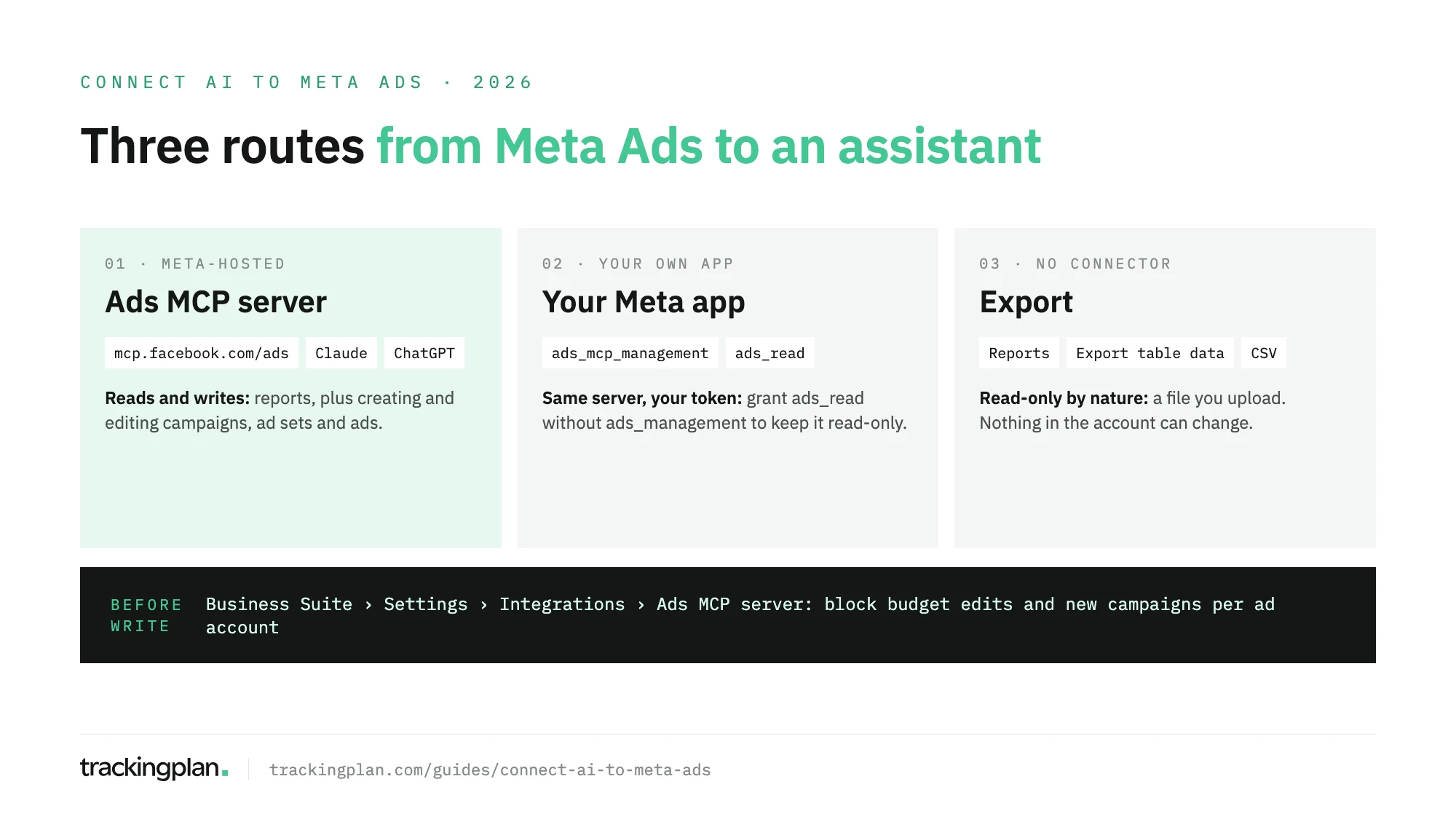
Meta opened its ads AI connectors in beta on April 29, 2026. The ads MCP server is the part you plug into a chat assistant. This guide covers the setup in Claude and ChatGPT, the option of using your own Meta app, the route without any connector, and the settings that decide what the assistant may change. It is part of a series on connecting AI assistants to marketing data.

What the ads MCP server can do
Meta’s developer documentation describes a Meta-hosted server that works with any MCP-compatible agent. Its tools fall into seven groups:
- Reporting: performance data for campaigns, ad sets and ads.
- Ad creation and management: create and edit campaigns, ad sets and ads.
- Catalogs: create a catalog, add product data, troubleshoot feeds.
- Signals and datasets: signal health and quality.
- Help: searches Meta’s Business Help Center.
- A/B tests and conversion lift studies: create, manage, read results.
- Activity logs: the same history as the campaign history page in Ads Manager.
Meta’s Business Help Center adds custom audiences (create, update, delete) and a draft mode: new campaign work is saved for review before it goes live.
This is a read and write connection. A prompt like “shift budget to the best ad set” can turn into an actual budget change.
What you need
Meta’s product page lists three things: an ad account you have permission to manage, a supported AI tool, and your Facebook login. No developer app, no API setup. It names ChatGPT, Claude and Perplexity as supported tools.
The connection acts with your access. If you can edit campaigns in an ad account, the assistant can try to as well. If you can only see a subset of accounts, that is all it sees.
Claude: add the server as a custom connector
In Claude, Meta’s server goes in by URL. Free, Pro, Max and Ultra plans can add it themselves. Anthropic’s help center notes that Free accounts get one custom connector.
- Go to Customize > Connectors.
- Select Add, then Add custom connector.
- Enter a name, such as
Meta Ads, and the URLhttps://mcp.facebook.com/ads. Select Continue. - Leave authentication on Claude’s recommended option, select Add, then Connect.
- Sign in with Facebook and approve the permissions Meta asks for.
On Team and Enterprise plans, an Owner adds it under Organization settings > Connectors, and each member then signs in with their own Facebook account.
Before your first chat, open the connector in Customize > Connectors and look at Tool permissions. Set the write tools to Needs approval, or Blocked if you only want reports. One more catch from Anthropic’s docs: during Research, Claude can call connector tools without asking, so turn write tools off before you use it there.
If you work in Claude Code, Meta documents this command for its server, which needs your own Meta app (see below):
claude mcp add --transport http --client-id <META_APP_ID> meta-ads https://mcp.facebook.com/ads
ChatGPT: add it as a custom MCP server
OpenAI’s help center sets the plan limits. Full custom MCP support is for Business, Enterprise and Edu, on ChatGPT web. Pro can connect custom MCP servers with read and fetch permissions only, which here works in your favor. On Business, only admins and owners can create the connection.
- Go to Plugins.
- Select the plus button, then Add custom MCP server.
- Enter a name and the URL
https://mcp.facebook.com/ads. - Set the authentication to OAuth, as Meta’s docs do.
- Tick I understand and want to continue, then select Create as a plugin.
- Sign in with Facebook when ChatGPT asks.
Then set the app’s permission. The options include Always ask and Allow read actions. Keep it on one of those two. Custom MCP servers can’t be added from the mobile apps.
Your own Meta app
Meta’s get-started page is for teams that want the connection under an app they control, for example to use a system user instead of a person’s login.
- Create or open an app at developers.facebook.com/apps.
- Add the use case Create & manage ads with ads MCP server.
- Pick the authentication: OAuth through Facebook Login for Business, a user access token, or a system user access token. Only Employee-role system user tokens work. Admin-role ones are refused.
- Grant at least
ads_mcp_managementplusads_readorads_management.
This is the cleanest read-only setup Meta documents: a token with ads_read and without ads_management. Extra permissions such as catalog_management or business_management add more tools, so leave them out unless you need them.
No connector: export a report
No connector, no write access, and it works with any assistant that accepts a file. Meta’s Business Help Center gives the steps:
- Open Ads Manager and find Reports at the top right of the table.
- Select Export table data, choose CSV or Excel, then Export.
- Upload the file to the chat.
The trade-off is freshness. The file is a snapshot, and the assistant can’t pull a breakdown you didn’t export.
Decide what the assistant may change
Three controls, on three sides of the connection. Use all three for an account with real spend.
- In Meta. Anyone with full control of the business portfolio can go to Settings in Meta Business Suite, then Ads MCP server under Integrations, pick an ad account or catalog and allow or block actions. Set Create campaigns to Blocked, set Edit or set budget to Blocked, or keep budget edits but block Budgets set above this amount. Meta enforces these rules on the server, whatever the assistant asks. If you don’t see the option, your portfolio doesn’t have it yet.
- In the assistant. Needs approval in Claude, Always ask in ChatGPT. Every write stops for a click.
- In Meta’s defaults. New campaigns arrive as drafts, so nothing goes live until someone reviews it in Ads Manager.
Agencies have one more detail. When a client shares an ad account, the agency can set its own rules for that account, and they apply to the agency’s people only.
Trackingplan MCP: know whether the numbers deserve your budget
Ask a connected assistant which ad set to scale and it will pick the best cost per purchase. If that purchase is counted twice by the Pixel and the Conversions API, or the Pixel stopped firing on half the checkouts after a release, you move money on a wrong lesson, and so does Meta’s bidding. Your ad platforms are only as smart as the conversion data you feed them.
Trackingplan watches that data continuously on real traffic. It checks that every purchase reaches the Pixel, CAPI and GA4 once, with the same value and currency. It shows where you’re losing match rate, where value is missing and where CAPI double-counts, with the gap quantified in money and sent to whoever owns the tag before bidding acts on it.
It keeps attribution in view too. The fbclid, the event_id and your UTMs are the signals that connect a conversion back to an ad, and Trackingplan watches them on every hit, so a campaign credited to the wrong source shows up the day it starts.
To improve what Meta learns from, its audits check the events each pixel receives, on demand or scheduled daily or weekly, and end with the fix to ask for: the tag, the trigger or the variable in GTM, or wherever it lives.
Trackingplan MCP brings all of that into Claude, ChatGPT, Cursor or your IDE, next to spend, clicks and reported conversions per campaign from Meta Ads and ten other ad networks: Google Ads, LinkedIn Ads, TikTok Ads, Snapchat Ads, Pinterest Ads, Microsoft Ads, X Ads, Amazon Ads, Apple Search Ads and Reddit Ads. Each person signs in as themselves, with no key to paste, and an admin connects the ad accounts once (Ad Platforms). It reads; it doesn’t bid or change campaigns.
What to ask once it’s connected
Start with questions that only read. Check the first answers against Ads Manager before you trust the pattern.
- “List my ad accounts and the campaigns that spent money in the last 7 days.”
- “Summarize the top-spending campaigns in this account over the last 30 days, with cost per result.”
- “Which ad sets had rising cost per purchase this week compared with last week?”
- “What changed in this account’s activity log since Monday, and who made each change?”
- “How healthy are the signals on our dataset, and what does Meta suggest fixing first?”
- “Draft, but don’t publish, a traffic campaign that copies the settings of our best one.”
The last prompt writes. With approvals on, you see it before anything is saved.
Before you trust the answers
The assistant reads what Meta reports. It does not see how a purchase got there. If the Meta Pixel stopped firing on the checkout after a release, if the pixel and the Conversions API both send the same purchase without a shared event_id, or if consent signals are lost on the way, the reports carry that error, and the assistant analyses it with full confidence. Our guide to Meta CAPI validation covers the checks on the sending side.
An AI agent can only reason about what it can see. With Trackingplan MCP connected, the assistant sees the sending side as well, and a recommendation to move budget comes with the state of the signal behind it. TikTok works the same way, with its own server: see how to connect TikTok Ads to Claude or ChatGPT.
FAQ
How do I connect an AI assistant to Meta Ads Manager?
Add Meta’s ads MCP server, https://mcp.facebook.com/ads, to your assistant and sign in with Facebook. In Claude it goes in as a custom connector; in ChatGPT as a custom MCP server. You need an ad account you have permission to manage. No Meta developer app is required.
Can Claude or ChatGPT change my Meta campaigns?
Yes, if your account can. Meta’s server can create and edit campaigns, ad sets, ads, budgets, audiences and catalogs. New campaigns are saved as drafts by default, and someone with full control of the business portfolio can block actions such as campaign creation or budget edits for each ad account.
Is there a read-only way to connect Meta Ads to an AI assistant?
Yes. Set the connector’s write tools to Blocked in Claude, or use a ChatGPT plan whose custom MCP access is read and fetch only. With your own Meta app, grant ads_read without ads_management. Or export the report from Ads Manager and upload the file.
Does Meta have its own AI assistant in Ads Manager?
Yes. Meta describes the Meta AI business assistant as guidance, troubleshooting and campaign recommendations inside Ads Manager. The ads MCP server is the other half: it brings your Meta ad account into AI tools you use elsewhere.