Master Meta CAPI validation with our step-by-step guide. Learn to use Test Events, fix deduplication errors, improve EMQ, and automate QA for accurate ad data.
Your campaign is live, spend is climbing, and Meta is reporting numbers that don’t line up with orders, leads, or CRM records. The instinct is usually to blame the creative, the audience, or the bid strategy. A lot of the time, the underlying problem sits lower in the stack. Your Meta Conversions API is firing, but it isn’t validated well enough to be trusted.
That’s the part many teams skip. They confirm that an event reached Meta once, then move on. Weeks later, they discover duplicated purchases, weak match quality, missing identifiers, or consent-related gaps that distorted optimization. By then, the account has already been learning from bad data.
Meta CAPI validation is what separates a setup that merely sends events from one that supports bidding, attribution, and reporting with confidence. It’s not glamorous work. It is, however, the work that keeps CPA and ROAS discussions grounded in reality.
Why Your Meta CAPI Might Be Silently Failing
A silent CAPI failure rarely looks dramatic. Events still appear in Events Manager. Campaigns still deliver. Reports still populate. What changes is trust. Conversion counts drift away from actual outcomes, retargeting pools get thinner, and Meta optimizes against partial or corrupted signals.
That gap got larger as browser-side tracking became less reliable. A hybrid setup matters because Meta CAPI alongside Pixel can recover tracking from 60-70% of conversions to as high as 95%, and businesses report 20-50% ROAS uplift plus 15-20% campaign improvements after implementation. But those gains only happen when the implementation is validated, not when it’s merely enabled.
A lot of teams working on scaling small businesses with Meta Ads hit this exact wall. They improve offer, creative, and landing page work, then find the tracking layer is undercutting everything upstream. If the event stream is wrong, the media strategy ends up arguing with bad instrumentation.
What silent failure looks like in practice
The common pattern is one of these:
- Inflated conversions: Browser and server events both fire, but deduplication fails.
- Under-attribution: CAPI sends incomplete user data, so Meta struggles to match events.
- Schema drift: A release changes parameter names or formatting, and nobody notices quickly.
- Consent breakage: Events still flow, but key fields disappear under certain privacy states.
Practical rule: If Ads Manager performance moved sharply and nothing changed in media strategy, inspect tracking before touching bids.
This is also why passive confidence is dangerous. “We installed CAPI” doesn’t mean much. You need evidence that events are complete, deduplicated, and still behaving after site updates, checkout changes, and consent banner revisions. That’s where ongoing checks for silent tracking errors become useful, especially when the failure mode is gradual rather than obvious.
Laying the Groundwork for Successful Validation
The fastest way to waste time on Meta CAPI validation is to start testing before the plumbing is stable. Good validation starts with access, visibility, and one clean event design.

Get the right access before you debug
You need more than Meta Events Manager access. In practice, reliable debugging requires:
- Meta permissions: Admin or equivalent access to the pixel, dataset, and Events Manager diagnostics.
- Server visibility: Access to server logs or your server-side tagging environment so you can inspect outbound payloads.
- Frontend visibility: The ability to inspect the browser event that originated the conversion.
- Change ownership: Clarity on who owns checkout code, consent management, CRM enrichment, and server forwarding.
Without that, validation becomes guesswork. You’ll see that something is wrong in Meta, but you won’t know whether the issue came from the browser event, the server payload, or the transformation layer in between.
Map the full event path
Write down the path for one high-value event, usually Purchase or Lead. Keep it concrete.
- User action happens on site or app.
- Pixel event fires in the browser.
- Client-side identifiers are captured, including the event ID and browser cookies.
- Your server receives the event context from the site, app, backend, or tagging server.
- The server formats and forwards the payload to Meta CAPI.
- Meta receives, processes, and attempts to match and deduplicate the event.
That map sounds basic, but most debugging sessions get shorter the moment someone draws the data path and labels each handoff.
event_id is the hinge point
If you only harden one field before validation starts, harden event_id.
A critical pre-validation step is generating a unique event_id client-side for every conversion event, then passing that exact same ID to both the Pixel event and the server-side payload. One cited implementation guide says 70% of initial CAPI setups fail deduplication because event IDs are mismatched.
That failure is common for predictable reasons:
- The browser generates one ID and the server generates another.
- A template strips or rewrites the ID.
- The Pixel fires before the ID is available.
- Developers reuse order numbers inconsistently across event types.
- Retries create a new ID instead of preserving the original one.
The server can’t “figure out” what the browser meant. Deduplication depends on the same identifier reaching Meta from both sides.
fbp and fbc are often mishandled
The other recurring issue is fbp and fbc. These should be captured and passed without hashing. Teams used to hashing personal identifiers sometimes hash everything reflexively, which breaks matching for these fields.
That mistake shows up more often than people expect because engineering standards for privacy can be applied too broadly. Meta expects hashed personal fields like email or phone where appropriate, but fbp and fbc are different and need to arrive in their raw cookie form.
A short readiness checklist
Before active testing, confirm this checklist:
| Check | What “ready” looks like |
|---|---|
| Event naming | Browser and server use the same event name |
| event_id | Generated once and reused identically |
| fbp and fbc | Captured when available and not hashed |
| User data handling | Personal identifiers normalized and hashed where required |
| Server logging | You can inspect outgoing payloads |
| Ownership | Someone can change frontend, backend, and tag configuration quickly |
For teams building through a tagging server or mixed martech stack, a practical reference is this guide to server-side tagging for Meta CAPI, Google Ads, and TikTok. It’s useful because the failure points usually happen at the handoff layer, not in Meta itself.
Using Meta's Tools for Initial CAPI Checks
Meta’s native tools are good at one thing. They tell you whether the platform is seeing what you think you’re sending. That’s enough for an initial pass, and not enough for long-term quality control.

Start with Test Events, not live reporting
Use the Test Events tab in Events Manager first. Send a controlled event through your actual implementation path. If possible, trigger a real action on staging or a safe production flow so you’re testing the same code path your users hit.
What you want to verify is simple:
- Meta received the event.
- The event source shows the expected browser and server origins.
- Required fields are present.
- The payload doesn’t show formatting or processing issues.
- The event behaves like one conversion, not two.
A clean test event is more than “received.” Received only means the request arrived. It doesn’t mean the payload was complete, matchable, or deduplicated correctly.
What a good event looks like
A good Meta CAPI validation check usually has these characteristics:
- Matching event name: The browser and server versions use the same event name.
- Shared event_id: The exact same ID appears on both versions.
- Customer data present: The payload includes the identifiers your setup is supposed to send.
- No obvious diagnostics warnings: Especially around formatting or missing fields.
- Source consistency: The event appears from Browser and Server without inflated counts.
What a bad event often looks like
Bad events usually fall into familiar buckets:
| Event symptom | Likely issue |
|---|---|
| Server event received, browser event missing | Frontend trigger failed or consent blocked it |
| Browser and server both received, count looks doubled | event_id mismatch |
| Event received but not useful for matching | Missing customer identifiers |
| Event appears inconsistently across tests | Race condition, delayed server processing, or unstable trigger |
A lot of practitioners still use browser plugins and ad hoc console checks for the frontend side. That’s fine for first-pass verification. For cleaner browser debugging, this walkthrough on using the Meta Pixel Helper for ad tracking QA is useful because it helps isolate whether the browser event itself is malformed before you chase server issues.
Inspect the payload, not just the status
The most common rookie mistake in Meta CAPI validation is trusting green indicators without inspecting the actual payload. Open the received event details. Check the event name, user data presence, event time, action source, and custom fields relevant to your implementation.
At this stage, you catch issues like:
- wrong parameter casing
- empty values passed as strings
- IDs arriving in one source but not the other
- data transformations dropping key fields
- consent states removing fields on some sessions but not others
A payload can be syntactically accepted and still be operationally weak.
Later in the process, review the Diagnostics tab as well. It’s good for spotting recurring warnings that don’t always appear during one-off tests, especially after deployments.
A practical walkthrough of data inspection principles helps here:
Don’t test only one path
Initial checks should cover more than one conversion path. At minimum, test:
- A standard browser flow from a normal device and browser.
- A consent-denied or restricted state if your site supports it.
- A high-value event path such as purchase confirmation or qualified lead submission.
- A path with known complexity like embedded checkout, SPA navigation, or redirect-heavy funnels.
That’s where you stop assuming the implementation is stable and start confirming it.
Deep Dive into Data Integrity and Deduplication
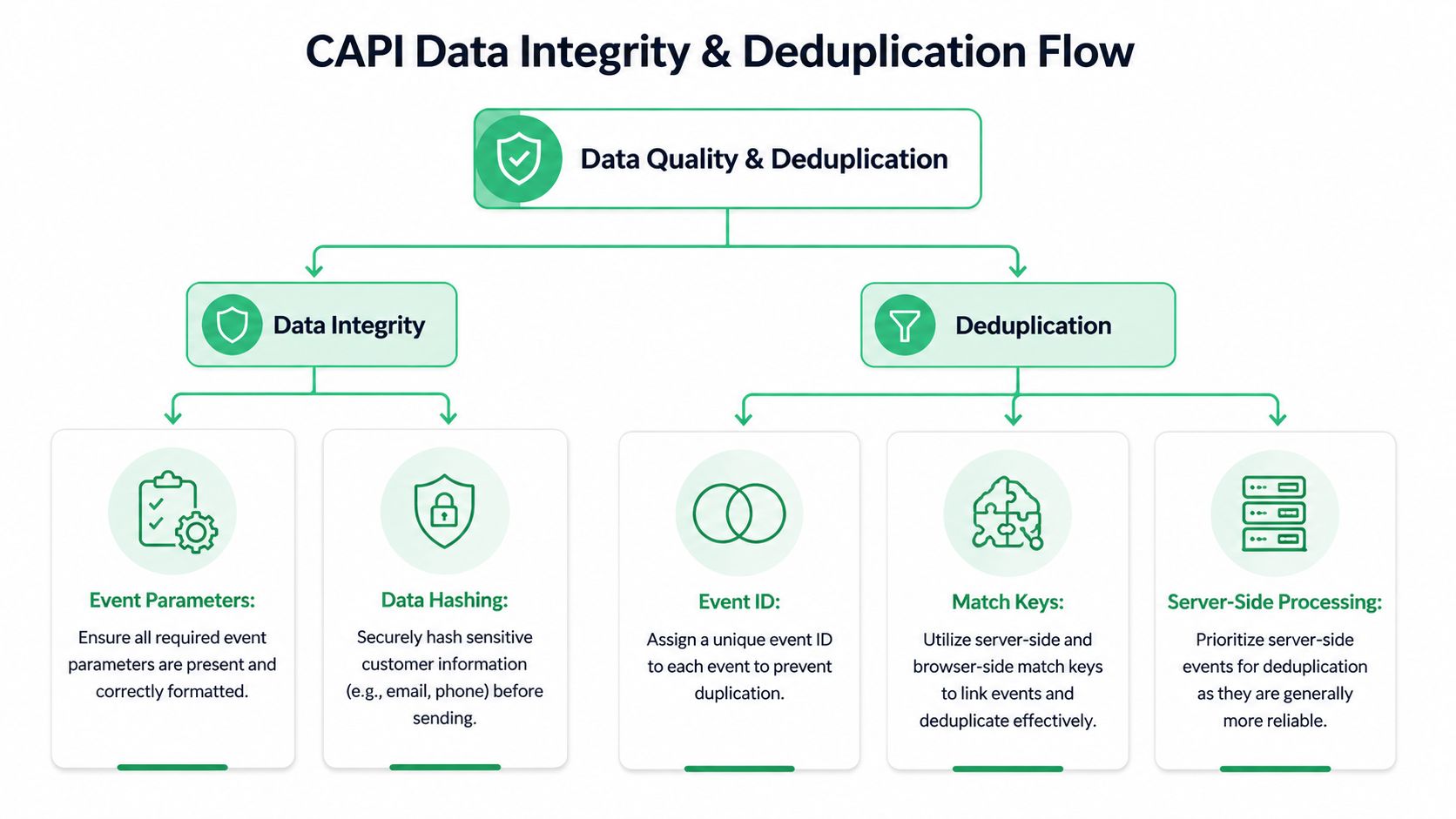
Most Meta CAPI validation problems reduce to two questions. First, can Meta match the event to a person well enough to use it effectively? Second, can Meta understand that the browser and server versions represent the same conversion?
The first question is Event Match Quality, or EMQ. The second is deduplication.
EMQ is not a vanity metric
Meta’s Event Match Quality score is graded on a 1 to 10 scale. It’s one of the clearest indicators of whether your CAPI events are useful for targeting, auction performance, and attribution. A score below 6/10 signals poor data quality, and one cited source says 87% of advertisers lose up to 40% of conversions under poor EMQ conditions. Scores above 8 are considered excellent, and aiming there can lead to 15-20% performance gains after 2-4 weeks as Meta’s systems adapt.
That’s why low EMQ should be treated as an engineering issue, not just a media-side inconvenience. If Meta can’t match the event reliably, optimization quality suffers downstream.
How to improve EMQ without gaming it
The practical path is usually straightforward:
- Send stronger user data for high-value events: Purchase and qualified lead events should carry richer match keys than lightweight page interactions.
- Normalize before hashing: Hashing bad input only preserves bad input.
- Pass what the business owns consistently: Email and phone often matter more than adding scattered optional fields inconsistently.
- Keep browser identifiers intact where appropriate: Mishandling technical identifiers weakens matching.
One cited source notes that sending hashed email alone can lift EMQ by up to 4 points, and that CAPI commonly reaches 8-10 compared with lower browser-based tracking quality in restricted environments, especially when blockers reduce pixel tracking below 70%. That same source also notes benchmark ranges by event type, with stronger expectations for purchase events than for page views. I wouldn’t use those numbers as rigid targets for every implementation, but the directional lesson is correct. Richer events should carry richer data.
Better EMQ doesn’t come from adding random fields. It comes from sending the right identifiers, formatted consistently, on the events that matter.
A useful analogy comes from complex API-based businesses. If your backend is already integrating operational systems, such as the Amax Marketing self-storage API, you already know that clean field mapping matters more than the transport layer alone. CAPI is no different. Reliable payload structure beats “it sends” every time.
Deduplication is where false confidence lives
Deduplication sounds simple. Same event name. Same event_id. Browser and server send both. Meta merges them.
In production, it fails for ordinary reasons:
| Failure mode | What it causes |
|---|---|
| Browser and server use different event_id values | Double counting |
| One side drops the event_id entirely | Meta can’t merge the two records |
| Event names differ slightly | They won’t deduplicate as the same event |
| Timing is inconsistent | Debugging gets messy and confidence drops |
| Retries alter the payload identity | Duplicate or fragmented reporting |
One implementation guide states that 70% of initial setups fail deduplication due to mismatched event_id and that improper hashing or omitted technical context can also damage matching. Those are believable failure patterns because they show up constantly in the field.
What to verify in Events Manager
When validating deduplication, don’t stop at “I see both sources.” Verify the relationship.
Check for:
- Browser and Server labels on the same logical event
- No inflation in conversion totals
- Stable event behavior across repeated tests
- Consistent parameter presence across both delivery paths
If your reporting suddenly looks better after CAPI launch, be suspicious before you celebrate. Some of the biggest “wins” I’ve seen were double-counted purchase events.
Data integrity needs repeatable standards
Teams achieve benefits through formal QA rules. Define expected event names, required parameters, approved transformations, and ownership for every high-value event. Then review against that baseline whenever product or checkout changes ship.
For teams building that discipline, these data integrity best practices for analytics implementations are a practical reference because they push validation out of one-time setup and into repeatable governance.
Troubleshooting Common CAPI Validation Errors
Most Meta CAPI validation problems are not mysterious. They’re repetitive. The value is in recognizing the symptom quickly and checking the right layer first.
Common Meta CAPI errors and fixes
| Symptom | Likely Cause | Solution |
|---|---|---|
| EMQ stays below 6 | Missing user data or badly prepared identifiers | Verify that expected customer identifiers are present where your business can legally collect them. Normalize and hash personal identifiers correctly, and keep technical identifiers in the format Meta expects. |
| Conversions appear doubled | Browser and server events are not deduplicating | Confirm the same event_id is generated once and passed unchanged to both delivery paths. Also confirm the event name matches exactly. |
| Events show in Test Events but reporting looks inconsistent later | The setup passes isolated tests but breaks under real traffic conditions | Compare browser, server, and business-side records across multiple conversion paths. Check whether consent state, redirects, or asynchronous checkout steps change payload contents. |
| Purchase events are received but matching is weak | High-value events lack rich user data | Make purchase payloads more complete than low-intent events. Focus on consistent identifiers rather than sporadic optional fields. |
| Events are received but diagnostics show formatting warnings | Payload structure or parameter formatting is off | Inspect the exact request payload and clean up nulls, wrong casing, malformed values, and field names that don’t match your schema. |
| Deduplication works sometimes and fails other times | Race conditions or multiple code paths generate events differently | Audit all trigger locations. Single-page apps, embedded checkouts, and thank-you page scripts often create parallel implementations. |
| Counts drift after a site release | Schema drift or tagging regressions | Compare the current payload against the last known good version. Check release notes for frontend, backend, and consent manager changes. |
| Browser events look fine but server events are thin | Enrichment is being lost between collection and forwarding | Inspect the handoff between frontend, backend, and server-side tagging. Missing fields often disappear there rather than inside Meta. |
Fix the source, not the symptom
A lot of teams patch around errors. They add fallback rules, duplicate triggers, or ad hoc transforms just to make Diagnostics look cleaner. That usually creates a second problem a month later.
Use this order when debugging:
- Check the originating browser event
- Check the server payload
- Compare both against your expected schema
- Review what Meta received
- Test again on the same user flow
If one event behaves differently across browsers, consent states, or checkout paths, you don’t have a Meta problem yet. You have an implementation consistency problem.
The recurring failure points
Three patterns deserve extra suspicion:
- Deduplication breakage: Usually tied to
event_idgeneration or propagation. - Weak match quality: Usually tied to missing or incorrectly handled user data.
- Operational drift: Usually caused by code releases, CMP changes, or ecommerce plugin updates.
Treat CAPI like a production data pipeline. The fix is almost never “try again and hope Meta catches up.”
Automating CAPI Monitoring for Continuous QA
Friday afternoon, a checkout release goes live. By Monday, Purchase volume in Ads Manager is down, but orders in the ecommerce platform look normal. Events are still arriving in Meta, so nobody treats it as an incident right away. Then you trace it back to the underlying problem: event_id stopped lining up between browser and server for one checkout path, deduplication broke, and match quality fell at the same time.
That pattern is common. Initial validation catches whether CAPI can send an event. Continuous QA catches whether the implementation stays correct after releases, consent changes, template edits, and vendor updates.

Why manual QA stops scaling
Manual testing answers a narrow question: did this test flow work right now?
Production needs a broader answer. Are the right events firing across devices, regions, consent states, and checkout variants? Are browser and server payloads still aligned after the last deployment? Did a backend change strip hashed user data from one event type but not others?
As noted earlier, standard validation misses edge cases like server-side delays, consent misfires, and implementation drift after privacy-related changes. Those problems rarely show up on launch day. They show up a week later, in one market, on one browser, under one release.
What continuous QA should monitor
A useful monitoring layer watches for three failure classes:
- Event health: Missing events, volume drops, rogue events, unexpected spikes
- Schema health: New parameters, missing required fields, changed formats, broken hashing
- Privacy and consent health: Consent-state anomalies, regulated-flow differences, unexpected PII exposure
For Meta CAPI, I would add two checks that teams skip too often:
- Deduplication health: Browser and server events sharing the same
event_nameandevent_idwhen they should - Match quality health: Stable presence and formatting of identifiers that affect Event Match Quality
If you only monitor event volume, you miss the failures that hurt optimization while keeping counts superficially intact.
Automated monitoring earns its place when the stack starts changing
Teams with multiple brands, multiple developers, or both web and server-side tagging usually outgrow manual QA fast. Trackingplan fits this use case because it discovers the implementation, tracks changes in events and parameters, and alerts on schema drift, volume anomalies, consent issues, and rogue tracking. The value is operational, not cosmetic. It helps teams catch breakage before marketing notices attribution gaps.
You can build a good portion of this in-house with request logs, warehouse checks, payload diffing, scheduled QA scripts, and alerting. I’ve seen that work well in mature teams. The trade-off is coverage and upkeep. Internal checks tend to focus on known failure modes, while CAPI breakage often comes from the weird interaction between a frontend release, a CMP rule, and a server-side transform nobody revisited.
A practical monitoring model
For ongoing Meta CAPI QA, monitor four layers together:
| Layer | What to watch |
|---|---|
| Browser | Trigger presence, consent effects, client identifiers, event_id generation |
| Server | Payload completeness, retries, schema consistency, identifier enrichment |
| Destination | Meta receipt, diagnostics shifts, deduplication behavior, EMQ changes |
| Business outcome | Orders or leads versus attributed conversions, by key flow or market |
Set alerts for changes with direct downstream impact:
- Sudden drops in high-value events
- New event names that were never approved
- Missing parameters on Purchase, Lead, or other optimization events
- Deduplication anomalies, especially browser-server count divergence
- Loss of match keys after consent or checkout changes
- Unexpected PII appearing in payloads
Good monitoring does more than confirm that Meta received something. It tells you whether the data is still usable for matching, deduplication, and optimization.
That distinction matters in production. The hard part of CAPI is rarely first setup. The hard part is keeping it accurate while the site, app, consent logic, and backend keep changing underneath it.
Frequently Asked Questions About Meta CAPI Validation
How long should I wait before judging EMQ changes
Don’t judge it immediately after one test. One cited source notes that EMQ updates appear within 48 hours, and stronger performance effects can take 2-4 weeks as Meta’s systems adapt. Use the first window to validate data quality, not campaign success.
Should I send only CAPI and remove the Pixel
Usually no. For most web implementations, the hybrid model is safer because the browser and server complement each other. Removing the Pixel can reduce redundancy and make debugging harder unless you have a very deliberate architecture.
What’s the first event to validate
Start with the event that matters most to optimization or revenue. For most advertisers, that’s Purchase or Lead. Validate one event end to end before expanding to secondary events like AddToCart or ViewContent.
What if Events Manager shows the event, but Ads Manager still looks wrong
Seeing an event in Events Manager only proves receipt. It doesn’t prove clean matching, correct deduplication, stable consent behavior, or business alignment. Compare Meta counts to your actual orders or qualified leads, then inspect browser and server payloads for the same flow.
Do I need server logs for Meta CAPI validation
If you want to debug efficiently, yes. Without logs or equivalent visibility into the outbound payload, you’re relying too heavily on Meta’s interpretation of what arrived. That slows everything down.
How often should I revalidate
Revalidate after any meaningful change to checkout, lead forms, consent management, server-side tagging, or event schema. Even if nothing major changed, periodic validation still matters because integrations drift over time.
If your team is tired of finding CAPI issues only after reports break, Trackingplan is worth evaluating as a practical QA layer. It gives analysts, marketers, and engineers a shared view of tracking behavior and flags implementation changes before they turn into attribution problems.