
TL;DR Google publishes an official Google Ads MCP server, and Claude reaches it two ways: run it on your computer for Claude Code, or deploy it on Google Cloud Run and add its URL as a custom connector in claude.ai. Both need a Google Cloud project with the Google Ads API enabled and Explorer access or higher, because developer tokens were retired on September 9, 2026. For a one-off look, download a report as a Google Sheet and let Claude read it through the Google Drive connector. Before acting on what Claude finds, add Trackingplan MCP: it checks the conversion tags, click IDs and consent behind each Google Ads number, so budget doesn’t follow a broken signal.
Most results for this question point you to a connector service. You don’t need one. Google maintains the server, documents the setup for Claude and Claude Code, and the only thing you host is a small Python process. This guide is part of a series on connecting AI assistants to marketing data.

First, the access model changed
If you set up the Google Ads API before September, forget the developer token. Google’s access levels page says developer tokens “were sunset on September 9, 2026”, and access now belongs to the Google Cloud project that owns your OAuth client or service account.
| Level | How you get it | What it allows |
|---|---|---|
| Test | Enable the Google Ads API in the project | Test accounts only |
| Explorer | Apply in the Cloud console; Google may approve it automatically | 2,880 operations a day on production accounts |
| Basic | Apply after brand verification of the project | 15,000 operations a day |
| Standard | Apply after Basic; a manual audit follows | No daily cap |
To apply, open the Google Ads API overview page in the Cloud console, expand Upgrade access level and click Apply for access. For one person asking questions, that is usually plenty. Without it, every call to a real account fails with CLOUD_PROJECT_NOT_APPROVED_FOR_PRODUCTION.
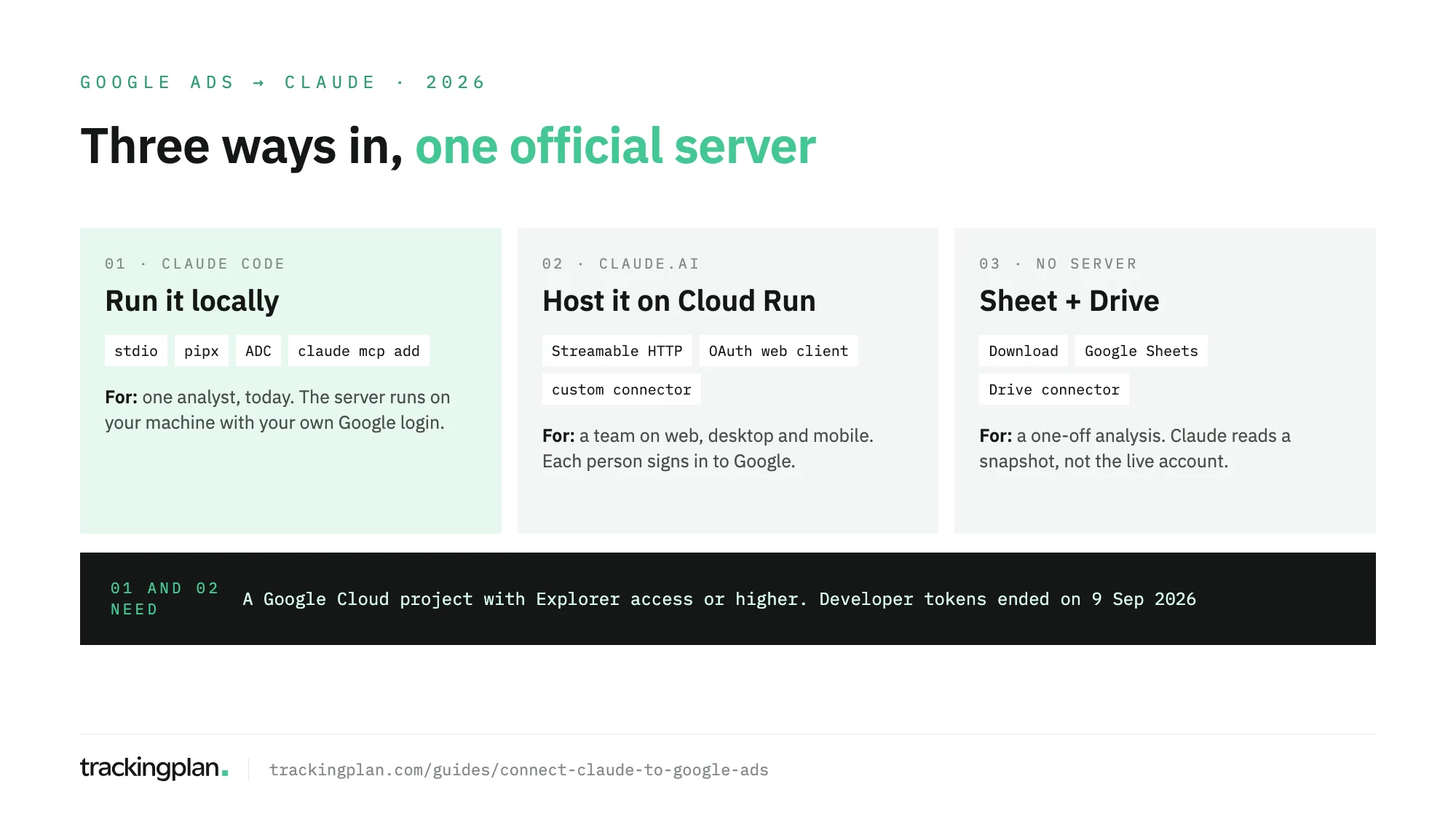
Route 1: Claude Code, with the server on your machine
For: an analyst or marketer who is comfortable in a terminal and wants answers today. Nothing is exposed to the internet, and the server runs with your own Google credentials.
You need: Python 3.10 or later, pipx, the gcloud CLI, and an OAuth client from your API-enabled project, downloaded as a JSON file. The steps follow Google’s Google Ads MCP server page.
-
Create Application Default Credentials with the Google Ads scope:
gcloud auth application-default login \
  --scopes=https://www.googleapis.com/auth/adwords,https://www.googleapis.com/auth/cloud-platform \
  --client-id-file=PATH_TO_CLIENT_SECRET_JSON
The command prints where it saved the credentials file.
-
Add the server to Claude Code. The
--separates Claude’s options from the command that starts the server, as Claude Code’s MCP docs explain:claude mcp add \ --env GOOGLE_CLOUD_PROJECT=PROJECT_ID \ --env GOOGLE_APPLICATION_CREDENTIALS=PATH_TO_CREDENTIALS_JSON \ --transport stdio --scope user google-ads-mcp \ -- pipx run --spec google-ads-mcp==0.0.6 google-ads-mcp--scope usermakes it available in every project. If you reach client accounts through a manager account, add--env GOOGLE_ADS_LOGIN_CUSTOMER_ID=followed by its 10 digits without hyphens. -
Start Claude Code and run
/mcpto check thatgoogle-ads-mcpis connected.
Google’s page also gives the same server as a JSON block for ~/.claude/settings.json, if you prefer to edit the file.
Route 2: claude.ai, with the server on Cloud Run
For: a team that wants Google Ads in the Claude web, desktop and mobile apps, where each person signs in with their own Google account.
You need: someone who can deploy to Cloud Run, an OAuth client of type Web application, and a Claude plan that allows custom connectors. Anthropic’s connector docs list Free (one custom connector), Pro, Max, Ultra, Team and Enterprise.
- In the OAuth client, add
https://claude.ai/api/mcp/auth_callbackas an authorized redirect URI. Under APIs & Services > OAuth consent screen > Data Access, add thehttps://www.googleapis.com/auth/adwordsscope. If the consent screen is still in Testing, add each person under Audience > Test users. - Build the image with Cloud Build and deploy it with
gcloud run deploy, passing the client ID and the secret asGOOGLE_ADS_MCP_OAUTH_CLIENT_IDandGOOGLE_ADS_MCP_OAUTH_CLIENT_SECRET. Google’s page has both commands. - Copy the service URL Cloud Run assigns and set it as
GOOGLE_ADS_MCP_BASE_URLwithgcloud run services update. - In Claude, go to Customize > Connectors, select Add, then Add custom connector. Enter a name and the service URL with
/mcpat the end, then click Continue. - For OAuth client, choose Use your own OAuth client and enter the client ID and secret. Click Add, then Connect, and sign in with Google.
On Team and Enterprise, an Owner adds it under Organization settings > Connectors and members connect with their own accounts.
One warning from Google’s page matters here. The deploy uses --allow-unauthenticated so Claude can reach the service, and the OAuth variables are what protect it. Deploy without them and the server falls back to the container’s service account credentials, open to anyone with the URL.
What the server can read and change
Reads: search_search runs any Google Ads Query Language (GAQL) query, so campaigns, ad groups, keywords, search terms, assets and conversions are all in reach. customers_list_accessible_customers returns the accounts your login can see, and metadata_get_resource_metadata tells Claude which fields a resource has.
Writes: creating assets (text, image, sitelink, callout and others), uploading videos (local only) and managing labels. Each write is proposed first as a dry run with a checksum, and only committed after you approve and Claude sends the same checksum back.
Not there: budgets, bids, campaign status, keywords and audiences. In this release, Claude can read them and can’t change them.
To lock it down further, set labels: false and assets: false in a tools_config.yaml, and list the read categories as true, since Google warns that categories left out of the list are turned off. In Claude, the connector’s Tool permissions can also set any tool to Needs approval or Blocked.
No server: a Google Sheet and the Drive connector
For: a single analysis, or a team without a Cloud project.
- In Google Ads, open the page with the table you want, such as campaigns or search terms.
- Click the download icon above the table, then Download, and choose Google Sheets. Google Ads Help lists the formats.
- In Claude, connect Google Drive under Customize > Connectors, then ask about the sheet by name.
The Drive connector is built and run by Google and reads Sheets. The trade-off is that Claude sees a snapshot, with the columns you chose, and nothing it can query again. If your Google Ads data already lands in a warehouse, the BigQuery route gives Claude history it can query; the ChatGPT version of this guide sets up that transfer step by step.
Trackingplan MCP: check the signal before you shift budget
Claude will tell you which campaign has the best cost per conversion. It can’t tell you that the conversion tag stopped firing on mobile last Tuesday, that gtag and GTM both count the same purchase, or that Consent Mode drops signals in one market. Smart Bidding learns from those same numbers, so a broken signal costs twice: once in the decision you make, once in the bids Google makes.
Trackingplan closes that gap. It monitors every conversion, UTM and consent signal on real traffic, without pause: missing values, duplicates, wrong currency, a gclid lost on a redirect. Each gap comes quantified in money and routed to whoever owns the tag, before bidding acts on it.
Attribution is part of that watch. Auto-tagging, the gclid and your UTM naming are what tie a conversion to a campaign, and when one breaks, Trackingplan flags the campaigns attributed to the wrong source instead of leaving it to the next month’s report.
Its audits, run on demand or scheduled daily or weekly, go further: they check what each conversion tag receives and end with the fix to ask for in GTM, so the signal Google Ads optimizes on gets better, not only watched.
Trackingplan MCP puts that evidence in Claude, next to spend, impressions, clicks and reported conversions per campaign from Google Ads and ten other ad networks: Meta Ads, LinkedIn Ads, TikTok Ads, Snapchat Ads, Pinterest Ads, Microsoft Ads, X Ads, Amazon Ads, Apple Search Ads and Reddit Ads. No Cloud project or credentials to set up: an admin connects the accounts once (Ad Platforms) and each person signs in as themselves. It reads; it never bids or changes a campaign.
What to ask once it’s connected
| Ask | What Claude does |
|---|---|
| “List the accounts I can access and their currency.” | Lists the accounts, then a GAQL query per account |
| “Search terms with spend and no conversions in the last 30 days, sorted by cost.” | Writes and runs the GAQL, then groups the waste |
| “Which Performance Max campaigns lost the most conversions week over week?” | Compares two date ranges and names the campaigns |
| “Check which ad groups have fewer than three headlines.” | Reads the assets and lists the gaps |
| “Write the GAQL for this report and save it as a CSV in this folder.” | In Claude Code, saves both the query and the file |
Ask Claude to show the GAQL it ran. It is short, readable, and the quickest way to see whether the date range or the filter is the one you meant.
Before you trust the answers
Claude reads the conversions Google Ads reports. It doesn’t see the tag that produced them. A conversion tag that stopped firing after a release, a purchase counted twice by gtag and GTM, or consent that never reaches Google: each one arrives as a clean number, and Claude explains it with the same confidence as a real trend. If the figures already disagree with GA4, this checklist is the place to start.
An AI agent can only reason about what it can see. Connect Trackingplan MCP next to Google’s server and Claude sees the tag behind the number before you act on it.
FAQ
How do I connect Claude to Google Ads?
Use Google’s official Google Ads MCP server. Run it on your computer and add it to Claude Code with claude mcp add, or deploy it on Google Cloud Run and add its URL as a custom connector in claude.ai. Both need a Google Cloud project with the Google Ads API enabled and Explorer access or higher.
Do I still need a Google Ads developer token?
No. Google sunset developer tokens on September 9, 2026. API access levels now belong to the Google Cloud project that owns your OAuth client or service account: Test when you enable the API, then Explorer, Basic and Standard.
Can Claude change my Google Ads campaigns?
Only in a narrow way. The server can create assets, upload videos and manage labels, each with a propose-and-confirm step. It has no tools for budgets, bids or campaign status, and a read-only mode turns off the asset and label tools.
Is there a Google Ads connector in Claude’s directory?
Google’s own instructions don’t use one. For claude.ai they add the server you deploy as a custom connector, and for Claude Code a local server. If you find a Google Ads listing in the directory, check who publishes it: Anthropic notes that verification isn’t a security audit.