
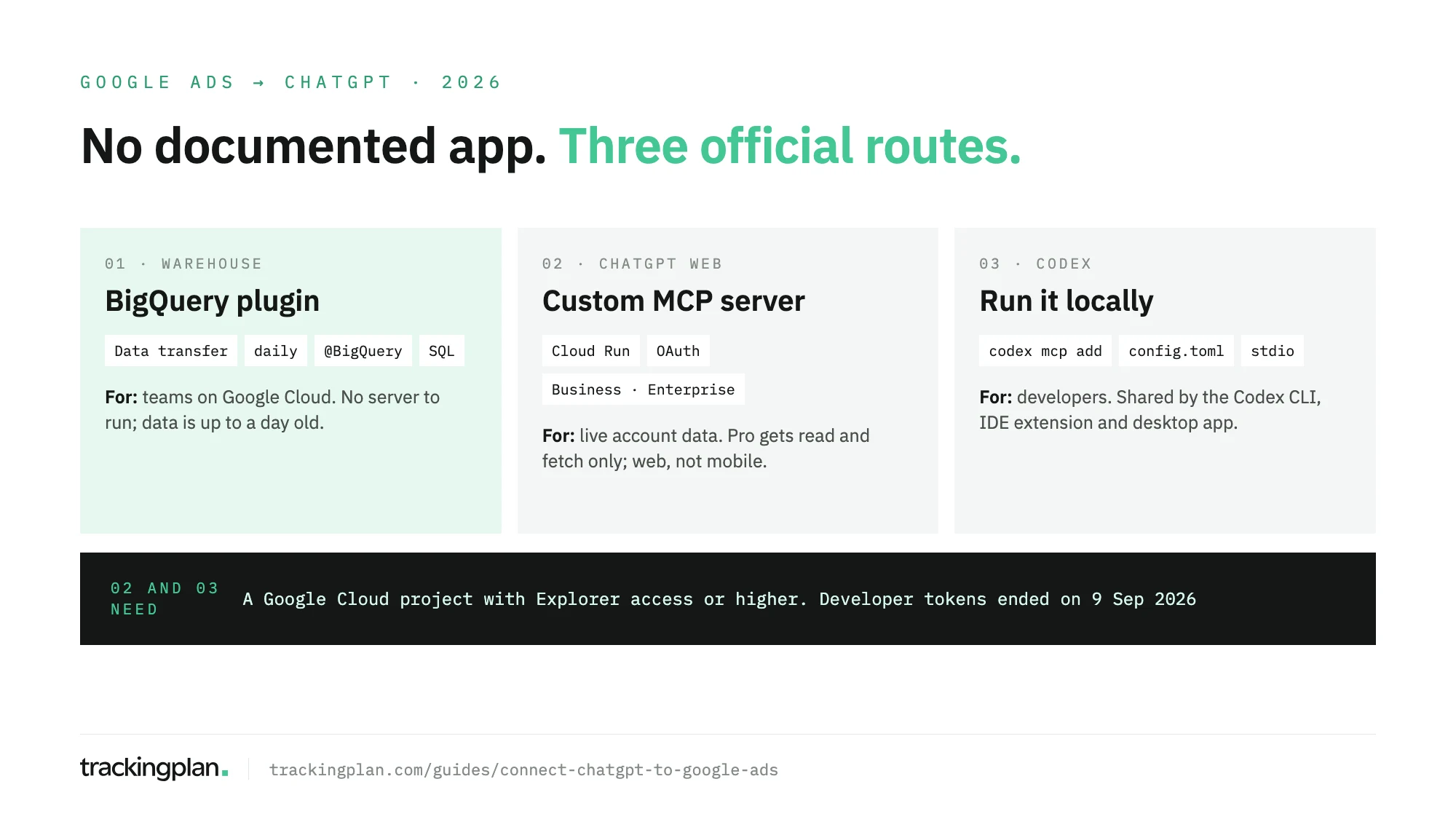
TL;DR ChatGPT has no documented Google Ads app, so you bring the data in one of three official ways. The lightest for most teams: Google’s BigQuery data transfer copies Google Ads into BigQuery every day, and ChatGPT’s BigQuery plugin queries it. For live access, deploy Google’s Google Ads MCP server on Cloud Run and add it as a custom MCP server, which needs ChatGPT Business, Enterprise or Edu (Pro gets read and fetch only). Developers can run the same server locally for Codex. Whichever route you use, add Trackingplan MCP before you act on the answers: it tells ChatGPT whether the conversion signals behind each campaign are sound, so you don’t spend on a broken tag.
The three routes differ in who sets them up, how fresh the data is, and what ChatGPT can touch. Pick by those three. If you also use Claude, the Claude version covers Claude Code and claude.ai connectors. This guide is part of a series on connecting AI assistants to marketing data.

Copy Google Ads into BigQuery, then ask the BigQuery plugin
This route suits a team that already has a Google Cloud project and would rather not run a server. The data is daily. Google’s BigQuery documentation says a Google Ads transfer runs at most once every 24 hours, and re-reads the last 7 days by default, a refresh window you can set from 1 to 30.
- Get the BigQuery Admin role on the project, and read access to the Google Ads account or to the manager account that holds it.
- In the Cloud console, open Data transfers and click Create transfer.
- For Source, choose Google Ads, and enter the Customer ID. A single transfer on a manager account covers up to 8,000 client accounts, and Google recommends that over one transfer per account.
- Backfill as far as Google Ads retention allows, if you want history.
- In ChatGPT, open Settings > Plugins, select BigQuery, then Install plugin and Connect, and approve the Google permissions.
- In a chat, type
@BigQueryand ask about the dataset.
The plugin is built by OpenAI, and OpenAI’s plugin page says availability depends on your plan and workspace settings, and some connections need an admin to approve them. Connecting doesn’t grant new access: a dataset you can’t open in BigQuery stays closed in ChatGPT.
The upside is SQL over clean tables with dates you control. The downside is a day of lag, and a schema to learn: the transfer writes Google Ads API reports as tables, not the views you see in the Google Ads interface.
Add Google’s MCP server to ChatGPT
This is the route for live account data, with each person signing in to Google as themselves. It depends on your plan. OpenAI’s help center says full MCP support is for Business and Enterprise/Edu on ChatGPT web. “Pro users can connect custom MCP servers with read/fetch permissions.” There is no mobile setup, and deep research uses custom apps for read and fetch actions only. On Business, only admins and owners create and publish these plugins; on Enterprise and Edu, admins can grant Create plugins with MCPs to selected members.
On the Google side, following Google’s Google Ads MCP server page:
- Create an OAuth client of type Web application and add
https://chatgpt.com/connector_platform_oauth_redirectas an authorized redirect URI. - Add the
https://www.googleapis.com/auth/adwordsscope under APIs & Services > OAuth consent screen > Data Access. While the screen is in Testing, list each user under Audience > Test users. - Build the image, deploy it to Cloud Run with the client ID and secret, then set
GOOGLE_ADS_MCP_BASE_URLto the service URL. Never deploy with--allow-unauthenticatedand without the OAuth variables: the server would fall back to the container’s own credentials.
Then in ChatGPT:
- Go to Plugins, select +, then Add custom MCP server.
- Enter a name. Under Connection, paste the service URL with
/mcpat the end. - Configure OAuth with the client ID and secret from step 1.
- Tick I understand and want to continue, then select Create as a plugin and review the tools it found.
- Start a new conversation, type
@and pick the plugin.
Run the server locally for Codex
For developers and technical analysts who already work in Codex, this skips hosting altogether. Generate Application Default Credentials with the Google Ads scope (the gcloud auth application-default login command is on Google’s page), then add the server. The syntax is from OpenAI’s Codex MCP docs:
codex mcp add google-ads-mcp \
  --env GOOGLE_CLOUD_PROJECT=PROJECT_ID \
  --env GOOGLE_APPLICATION_CREDENTIALS=PATH_TO_CREDENTIALS_JSON \
  -- pipx run --spec google-ads-mcp==0.0.6 google-ads-mcp
Or write it by hand in ~/.codex/config.toml:
[mcp_servers.google-ads-mcp]
command = "pipx"
args = ["run", "--spec", "google-ads-mcp==0.0.6", "google-ads-mcp"]

[mcp_servers.google-ads-mcp.env]
GOOGLE_CLOUD_PROJECT = "PROJECT_ID"
GOOGLE_APPLICATION_CREDENTIALS = "PATH_TO_CREDENTIALS_JSON"
OpenAI says the ChatGPT desktop app, the Codex CLI and the IDE extension share this configuration, so you set it once.
The access every MCP route needs
The MCP server and Codex routes call the Google Ads API, and since September 9, 2026 that access belongs to a Google Cloud project. Google’s access levels page says developer tokens “were sunset” that day. Enabling the API gives Test access, which only reaches test accounts. For real accounts, apply for Explorer from the API’s overview page in the Cloud console (Upgrade access level > Apply for access): it allows 2,880 operations a day, and Google may approve it automatically. Basic (15,000 a day) needs brand verification first, and Standard has no daily cap after a manual audit. Skip this and every call returns CLOUD_PROJECT_NOT_APPROVED_FOR_PRODUCTION.
What ChatGPT can change
Through the MCP routes, ChatGPT can query anything Google Ads Query Language reaches, and change three things: assets, video uploads (local only) and labels. Each change is proposed as a dry run first and committed only after you confirm. Budgets, bids and campaign status have no tool. For a read-only server, set labels: false and assets: false in tools_config.yaml and keep the read categories listed.
On the ChatGPT side, app permissions decide when it asks: Always ask is the cautious setting, Allow read actions lets queries run without a prompt. The BigQuery route can’t touch the Google Ads account at all: it works on a copy.
If your team lives in Google’s tools instead, Google’s Gemini Apps help lists Google Ads as a connected app in Gemini, for personal Google accounts and in English only.
A fourth route: Trackingplan MCP, so you don’t spend on bad data
The three routes above give ChatGPT the conversions Google Ads reports. None of them says whether those conversions are real. A purchase tag that lost its trigger, an order counted by two tags, a gclid stripped by a redirect: ChatGPT will still recommend where to put the budget, and Smart Bidding will keep learning from the same broken signal.
Trackingplan watches those signals continuously, on real traffic. It checks every conversion, UTM and consent signal, spots where value is missing or a purchase is counted twice, and quantifies each gap in money before bidding acts on it. It keeps watching attribution as well: when auto-tagging or a UTM breaks, the campaigns credited to the wrong source show up right away.
To make the signal better, not just watched, its audits check what each conversion tag receives, scheduled daily or weekly or on demand, and end with the fix to ask for in GTM.
With Trackingplan MCP, ChatGPT gets that evidence next to spend, clicks and reported conversions per campaign from Google Ads and ten other ad networks: Meta Ads, LinkedIn Ads, TikTok Ads, Snapchat Ads, Pinterest Ads, Microsoft Ads, X Ads, Amazon Ads, Apple Search Ads and Reddit Ads. No warehouse or Cloud project: an admin connects the accounts once (Ad Platforms). It reads; it never changes a campaign.
What to ask once it’s connected
- BigQuery: “@BigQuery Using the Google Ads transfer dataset, show cost, conversions and cost per conversion by campaign for the last 90 days, by week.”
- BigQuery: “Which campaigns spent more this month than last while conversions fell? Explain the SQL.”
- MCP: “Which search terms cost more than 50 in the last 14 days without a conversion?”
- MCP: “Compare conversions by device for my top five campaigns, this week against last.”
- Codex: “Write a GAQL query for asset performance by ad group, run it, and save the result as a CSV.”
Ask it to show the query each time. With a transfer schema or GAQL, the wrong table or date filter is the most common reason an answer looks odd.
Before you trust the answers
Whichever route you pick, ChatGPT ends up with Google’s reported conversions. A conversion action that lost its tag, an order counted by two tags, a consent update that drops signals on one browser: Google Ads reports all of them as conversions or their absence, and ChatGPT builds a confident analysis on top. This post on conversion accuracy covers what to check by hand.
An AI agent can only reason about what it can see. With Trackingplan MCP in the same chat, the question about a number and the question about its tracking get answered together.
FAQ
How can I use ChatGPT with my Google Ads data?
Three official routes. Send Google Ads to BigQuery with Google’s data transfer and query it with ChatGPT’s BigQuery plugin. Deploy Google’s Google Ads MCP server on Cloud Run and add it to ChatGPT as a custom MCP server. Or run the same server locally for Codex.
Which ChatGPT plan do I need for a custom MCP server?
Business, Enterprise or Edu for full support, on ChatGPT web. Pro users can connect custom MCP servers with read and fetch permissions only. Custom MCP servers can’t be added from mobile.
Does ChatGPT have a Google Ads app?
OpenAI’s help center doesn’t document one. Google’s own instructions connect ChatGPT through a custom connector pointing at the Google Ads MCP server you deploy.
Can ChatGPT edit my Google Ads campaigns?
Not budgets, bids or campaign status. Google’s server can create assets, upload videos and manage labels, after a propose-and-confirm step, and it can run read-only. The BigQuery route works on a copy and never reaches the account.