
You're probably looking at three numbers that should match, but don't.
Google Ads says one thing. GA4 says another. Your CRM says something else again. Meanwhile, the campaigns are spending real money, automated bidding is making decisions from that data, and nobody wants to explain to leadership why reported conversions jumped, dropped, or drifted for no obvious reason.
That's usually when the question becomes urgent: are my Google Ads conversions accurate?
The honest answer is that they can be accurate enough to trust for optimization, but only if you audit the full measurement path, accept the limits of modern attribution, and put governance around the setup so it doesn't degrade unmonitored. Most bad audits stop at “the tag is installed.” Real audits go further. They test whether the right conversion action exists, whether it fires at the right time, whether it fires once, whether consent suppresses it, whether offline outcomes make it back into Ads, and whether discrepancies are stable and explainable rather than random.
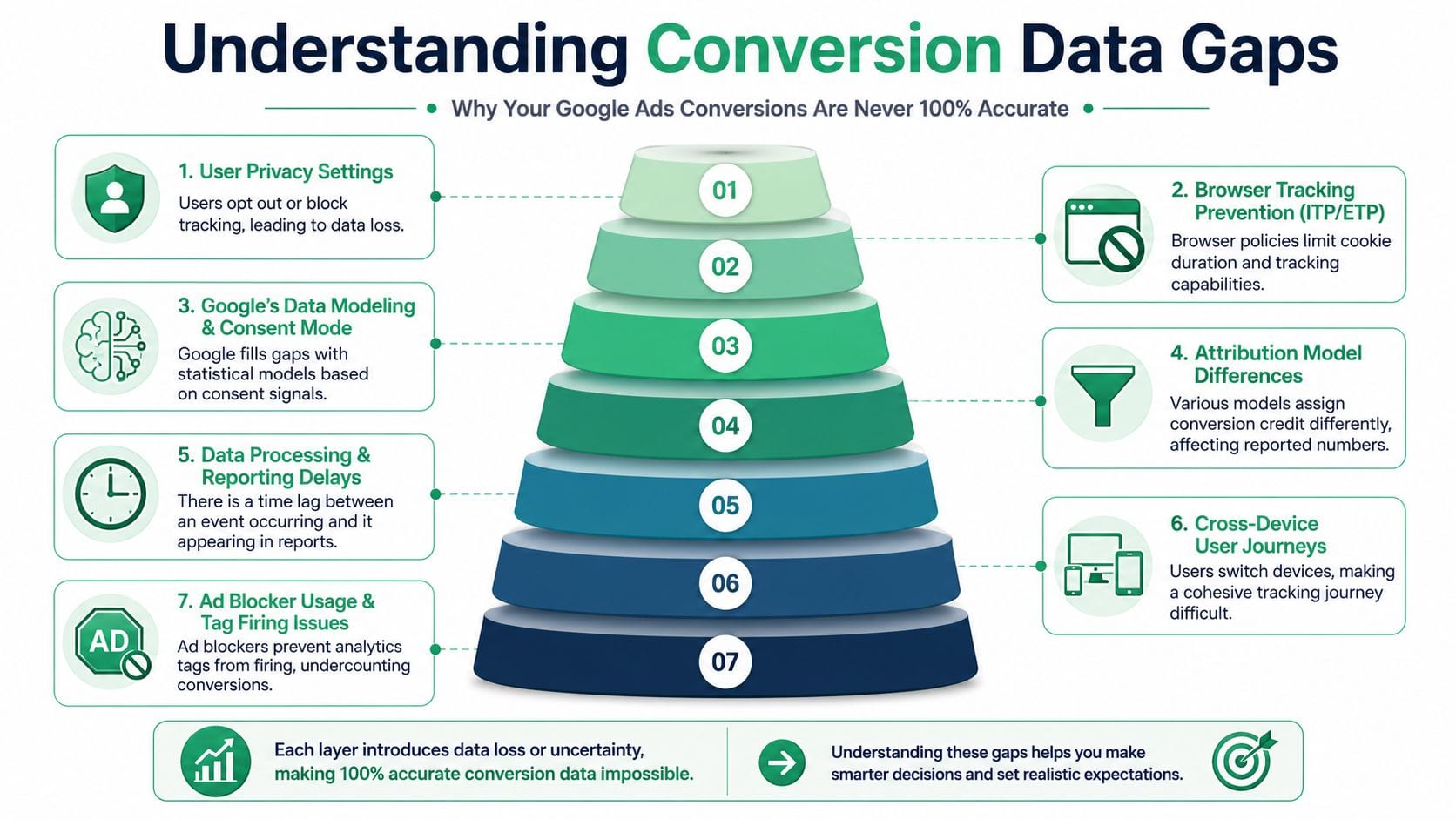
Why Your Google Ads Conversions Are Never 100% Accurate
A leadership team sees Google Ads reporting one number, GA4 another, and the CRM a third. Budget is still being allocated. Smart Bidding is still using those signals. The question is not whether one platform is lying. It is whether the measurement system is reliable enough to guide spend.
Google Ads conversions are an attributed record of measured outcomes, not a perfect census of everything that happened after a click. Even with a clean implementation, the final number is shaped by processing delays, attribution settings, identity limits, privacy controls, click identifier loss, and whether the conversion could still be connected to the ad interaction. That is why experienced analysts judge accuracy in context, not by demanding an exact one-to-one match with another platform.
A common source of confusion is timing. Recent conversions can appear late, especially when the path includes imported events, offline steps, or modeled recovery. Enhanced conversions can reduce some loss by sending hashed first-party data to improve match quality, but they do not remove the underlying constraints around consent, browser behavior, or channel attribution. Teams that want cleaner optimization signals often end up having to balance measurement coverage against legal, technical, and operational constraints. That trade-off shows up in product teams too, which is why broader measurement discipline matters beyond paid media, as discussed in metrics for product managers.
The number is the output of a measurement chain
A reported conversion usually depends on several conditions being met in sequence:
- A user clicks an ad.
- The click identifier and session context persist long enough.
- The site loads the required tags or server-side endpoints.
- The intended action happens.
- The conversion event is sent once, with the right parameters.
- Google can process, match, and attribute that event.
- Reporting applies the selected counting and attribution rules.
One weak link changes the output. That does not always mean the setup is broken. It often means the setup is operating inside a constrained environment.
The practical test is simple. Ask whether the measurement path is coherent, repeatable, and aligned with your business definition of a conversion.
Accuracy is a governance issue, not just a tagging issue
Basic setup errors still matter, but modern conversion loss often starts after the tag is installed. Consent mode can suppress or model behavior. Server-side tagging can improve control while introducing its own mismatch risks if event IDs, timestamps, or deduplication rules are not handled carefully. CRM imports can repair blind spots from longer sales cycles, but only if the join keys are preserved and uploads stay consistent.
This is why one-time implementation checks miss so much. A conversion setup can pass an initial QA review and still drift over time after a cookie banner change, a checkout redesign, a GTM publish, a form vendor update, or a backend release. If you have seen unexplained variance between platforms, this breakdown of Google Ads conversion discrepancies covers the kinds of gaps that show up in production.
Different systems are answering different questions
Google Ads is designed to credit ad interactions. GA4 is designed to analyze events and user behavior across a broader reporting model. Your CRM records sales and pipeline outcomes based on business process rules. Those systems are related, but they are not interchangeable.
Comparing them without matching definitions creates noise. A monthly Google Ads conversion total may include attribution logic, counting settings, and modeled behavior that do not exist in GA4 or the CRM in the same way. If the business uses lead qualification, offline stages, or imported revenue, the gap widens further.
The standard to aim for is stable, explainable variance.
Privacy and infrastructure now shape data quality
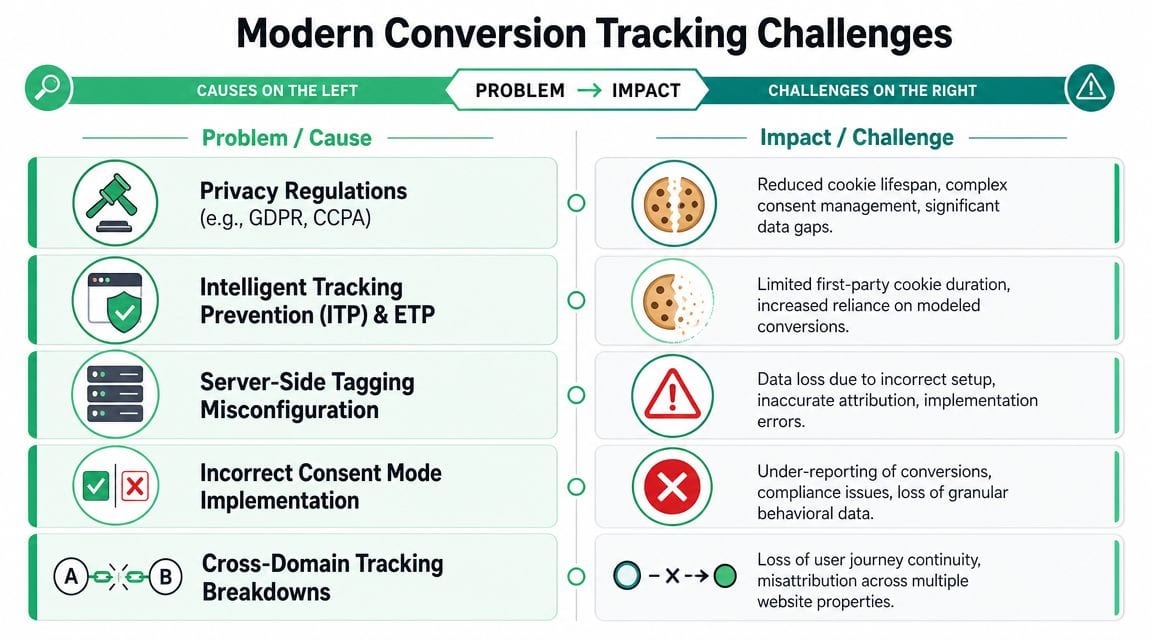
Conversion accuracy is now tied to consent, browser restrictions, ad blockers, cross-domain handling, and whether your first-party infrastructure is set up to preserve identifiers lawfully and consistently. A web tag that fires on the thank-you page can still undercount badly if consent blocks storage, if redirects strip parameters, or if a server-side endpoint drops event metadata before Ads can reconcile it.
That is why “the tag fired” is weak evidence. The harder question is whether the event stayed attributable all the way from click to reporting.
What accuracy means in practice
For a high-stakes Google Ads account, accurate usually means:
- The business event is defined correctly
- The same conversion is not being counted twice through overlapping methods
- Consent and privacy behavior are understood, not ignored
- Imported offline outcomes map back to ad clicks where expected
- Platform differences stay within a range your team can explain
- Bidding is trained on signals that reflect business value rather than implementation noise
That is the realistic standard. Reliable enough to optimize. Governed well enough to trust.
The Definitive Google Ads Conversion Audit
Monday morning, the sales team says lead quality fell off a cliff. Google Ads says conversions are up. GA4 shows something else. The CRM cannot tie half the form fills back to paid traffic. That is the point where a real audit starts.
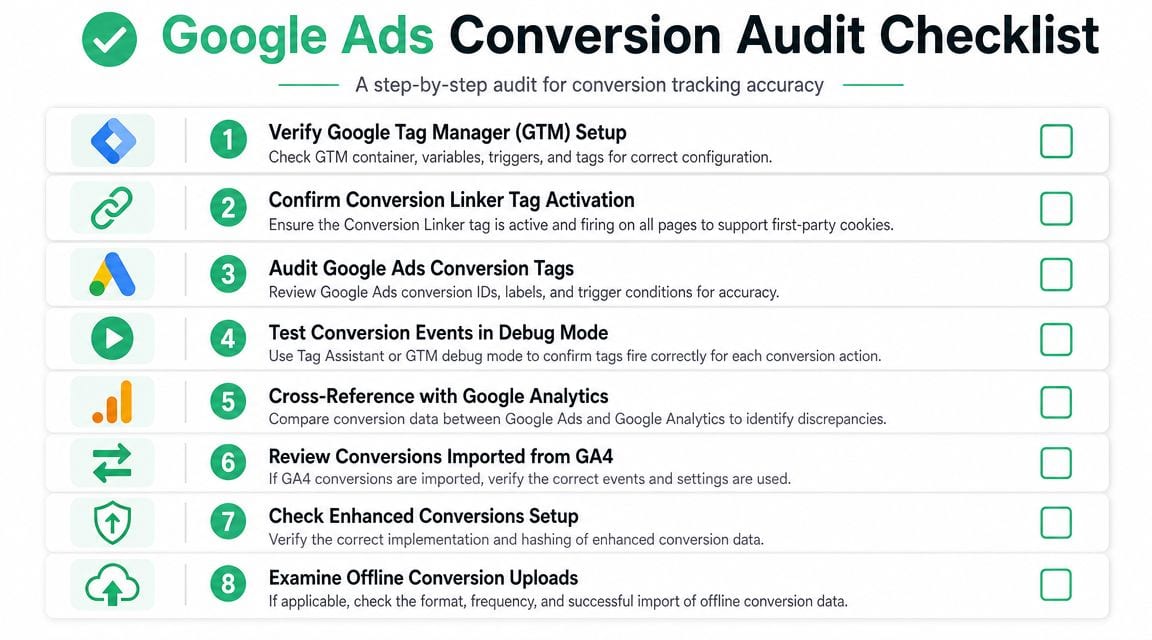
The job is not to prove that a tag exists. The job is to trace one business event from ad click to reported conversion, then identify where the chain breaks, duplicates, or changes meaning. Basic setup errors still matter, but modern audits also have to account for consent behavior, imported offline outcomes, enhanced conversions, and client-side versus server-side differences.
Start with the conversion definition
Audit the business event before the tag.
A weak definition creates clean-looking but useless reporting. I see this constantly in lead gen accounts: every form fill is treated as equal, thank-you pageviews stand in for confirmed submissions, and low-intent actions are marked primary because they produce volume fast. Google can optimize against that. It just will not optimize toward what the business actually wants.
Check three things first:
- Is the action commercially meaningful? A demo request, financing application, and newsletter signup should not share the same optimization status.
- Does the trigger represent a confirmed outcome? Backend-confirmed submission beats button click. Completed order beats checkout step.
- Should it be a primary Google Ads conversion? Some actions belong in analysis, QA, or product reporting, not in bidding.
If the conversion name is vague, inherited from an old setup, or reused across different outcomes, fix that before touching GTM.
Check the site-wide measurement layer
After the definition is clean, inspect the plumbing across the full site, not just the pages marketing uses most.
Confirm the Google tag or GTM container loads on all relevant templates, subdomains, and post-login states. Check whether the conversion linker is present where it needs to be. Review consent behavior in the actual environment. A banner update, CMP misconfiguration, or regional consent rule can change attribution quality without breaking the visible page experience.
This is also where infrastructure problems surface. Cross-domain journeys often lose click identifiers. Redirects strip parameters. Server-side endpoints receive events but drop metadata needed for attribution or deduplication. A tag audit that ignores those paths misses the failures that affect bidding.
Test the true success event, not the convenient trigger
The success trigger has to match the actual completion state once, and only once.
That means testing with realistic inputs and following the actual journey. Form start is not a conversion. Submit click is not a conversion if validation fails. A thank-you URL is not a safe proxy if users can refresh it, bookmark it, or reach it through multiple flows. SPA route changes and AJAX submissions add another layer of risk because the page may not reload at all.
Use Tag Assistant, GTM preview, and a live submission. Watch the trigger conditions, the event order, and whether the tag can fire again on reload, back-button behavior, or duplicate listeners.
Here's a Trackingplan video that helps illustrate how teams validate tracking behavior in practice:
A fired tag is only one checkpoint. The harder question is whether the right event fired once, with the right identifiers, under the consent conditions users experience.
Audit duplication across collection methods
Duplicate counting is one of the fastest ways to poison Smart Bidding.
The common patterns are familiar:
- A native Google Ads tag and an imported GA4 event for the same business action
- A thank-you pageview and a custom event both mapped to the same outcome
- Client-side and server-side sends without deduplication logic
- Multiple GTM containers or leftover hardcoded scripts after a migration
- Enhanced conversions added on top of an unclear base setup
These problems often survive for months because totals look strong and trend lines look stable. Stability does not mean accuracy. It can mean the same mistake is happening every day.
A useful companion for product and growth teams is Aakash Gupta's breakdown of metrics for product managers, especially if your organization mixes decision metrics with diagnostic metrics. That distinction matters here. Not every event you can measure should train bidding.
Inspect conversion settings inside Google Ads
An implementation can be technically sound and still produce misleading optimization signals because the settings do not match sales reality.
Start with count settings. For many lead generation actions, One is the safer choice because repeat submissions from the same user usually do not represent new demand. For ecommerce, Every often makes more sense because multiple purchases can be legitimate revenue events. Then review the click-through conversion window against actual buying behavior. If the window is too long, old clicks get more credit than they deserve. If it is too short, delayed but valid outcomes disappear from Ads reporting.
Use the sales process, not habit.
| Conversion Goal | Recommended Count Setting | Typical Click-Through Window | Rationale |
|---|---|---|---|
| Lead form submission | One | Aligned to the actual lead-to-close cycle | Prevents repeated submissions from inflating lead volume |
| Phone lead | One | Aligned to the actual lead-to-close cycle | Keeps reporting focused on unique lead generation events |
| Ecommerce purchase | Every | Aligned to the purchase cycle | Multiple purchases from the same user can be legitimate revenue events |
| Demo request | One | Aligned to the actual sales cycle | Avoids duplicate requests overstating demand |
| Qualified offline sale import | One or Every, based on sales reality | Aligned to offline close timing | Depends on whether repeated closed outcomes from one user are expected |
Also review attribution model choice, primary versus secondary inclusion, and whether old conversion actions are still eligible for bidding. I regularly find accounts optimizing to retired actions because nobody cleaned up the settings after a CRM or website change.
Validate enhanced conversions and offline imports
If lead quality matters after the form fill, the audit has to continue past the website event.
Check how the account captures and stores click identifiers such as GCLID. Verify whether the CRM preserves them through qualification and sale stages. If offline conversions are imported, confirm the mapped event names, timestamps, values, and statuses match the business process. A clean web conversion setup does not solve poor offline mapping.
Enhanced conversions need the same scrutiny. Confirm that the implementation sends the expected hashed first-party data from the intended form or checkout flow, and that changes to the front end have not broken field capture. If consent mode is in play, test accepted and declined states separately. The event path often differs more than teams expect.
For teams troubleshooting platform gaps during audit triage, this guide on conversion discrepancies in Google Ads is a useful reference. It helps frame whether the issue is expected variance, implementation error, or a reconciliation problem that needs a longer governance process.
Advanced Validation and Reconciliation Techniques
An audit checks whether the setup looks correct. Validation checks whether the data behaves correctly under pressure.
This work starts in the browser and ends in a reconciliation table. If you skip the first part, you won't know whether the event is technically sent. If you skip the second, you won't know whether the reports are trustworthy over time.
Validate one conversion at the payload level
Take a single conversion path and inspect it like QA, not like a marketer.
Use GTM preview mode, Tag Assistant, and your browser's developer tools during a real test conversion. Watch the sequence from landing page to success event. Confirm the click context persists, the right tag fires, and the event doesn't fire twice because of a page reload, SPA route change, or duplicate trigger.
You're looking for consistency across three layers:
- The browser layer where the user action happens
- The tagging layer where GTM or the Google tag sends measurement
- The platform layer where Google Ads reports the result later
When a conversion is missing, isolate which layer failed. That narrows the fix fast.
Don't jump straight to report screenshots. First prove that the intended event was actually generated and sent.
Reconcile by day, campaign, and conversion action
Once the event path is validated, move to reconciliation. At this stage, many teams make the wrong comparison.
A sound method is to compare Google Ads against GA4 by day, campaign, and conversion action, not by a single aggregate total, because discrepancies are expected from attribution differences and settings. One recommended approach is to inspect individual tables and trend graphs to isolate days with major disparities. For lead generation, the conversion counting mode matters. Choosing One avoids inflating numbers when a user submits a form multiple times, while Every fits scenarios where multiple purchases are expected, as described in Rows' guide to Google Ads conversion discrepancies.
Here's the pattern that works in practice:
- Pull Ads and GA4 data for the same date range.
- Break out the same conversion action or closest equivalent event.
- Compare by day first.
- Then compare by campaign.
- Investigate only the periods with the largest gaps.
- Check whether those gaps align with releases, consent changes, landing page changes, or campaign launches.
That method tells you whether the discrepancy is structural or incidental. Structural gaps are usually explainable. Incidental spikes often signal an implementation problem.
Use trends to find breakpoints
Trend lines matter more than total differences.
If Ads is consistently above GA4 or below it within a narrow band, that's usually manageable. If the relationship changes suddenly, something changed in the environment. Maybe a thank-you page was redesigned. Maybe a form plugin update altered the success state. Maybe a new region-specific consent default suppressed tags. Maybe an imported event was marked primary in Ads.
Create a small issue log when you reconcile. For each date anomaly, note:
- What changed on the site
- What changed in GTM
- What changed in Ads conversion settings
- What changed in consent behavior
- What changed in campaign or landing page mix
That log turns a frustrating “numbers don't match” conversation into a controlled investigation.
Cross-check with business outcomes, not just analytics tools
If you have backend data, use it.
For ecommerce, compare Ads purchases against confirmed orders using the same business definition. For lead generation, compare reported conversions against valid submissions in the CRM. Don't expect exact identity matching from every record, but do expect directionality and stable patterns.
If backend records trend normally and Ads collapses, the tracking path likely broke. If Ads spikes and backend outcomes don't, duplication or misfiring is likely. If both decline after a consent change, the problem may be configuration rather than tag logic.
Continuous validation beats periodic detective work
Manual reconciliation works, but it's reactive. The problem is timing. By the time a person notices a discrepancy in a dashboard, campaigns may have been optimizing on bad signals for days.
That's why many teams add observability tooling alongside manual QA. A platform such as Trackingplan's conversion tracking validation approach is useful because it focuses on ongoing monitoring of analytics and marketing tags, traffic anomalies, schema changes, missing events, and implementation drift across web and server-side setups. That doesn't replace analyst judgment. It reduces the time between breakage and detection.
For high-stakes accounts, that gap matters more than another static audit checklist.
Diagnosing the Toughest Conversion Tracking Problems
The hardest conversion problems usually don't announce themselves as obvious tag failures. They show up as strange reporting behavior that seems plausible enough to ignore.
That's what makes them dangerous. The setup looks “mostly fine,” campaigns keep spending, and nobody realizes the measurement is drifting until optimization quality drops or finance questions the numbers.
Consent and privacy suppression
Symptom: Conversions decline or become patchy by region, browser, or landing page group, even though forms still work and no obvious tag errors appear.
Root cause: A growing share of undercounting comes from privacy controls, consent requirements, blocked cookies, or missing consent signals. Google positions conversion tracking as privacy-protective, which means measurement quality now depends on privacy configuration as much as on tag firing. A setup can appear operational while consent defaults or region-specific requirements suppress observed or modeled conversions, as reflected in Google's conversion tracking guidance.
Fix: Audit the consent state before and after user interaction. Confirm that the tag behavior reflects your legal and implementation choices, not accidental suppression. Then test across regions, browsers, and banner states. Don't assume “accepted on my machine” reflects real traffic.
Diagnostic shortcut: If conversion loss appears uneven across geographies or device/browser segments, investigate consent behavior before rewriting tags.
Cross-domain and subdomain breaks
Symptom: Paid traffic lands on one domain or subdomain, but conversions occur on another property and attribution looks weaker than expected.
Root cause: The user journey loses continuity when click information, identifiers, or tag configuration doesn't survive domain transitions. This often happens during checkout handoffs, booking flows, external lead forms, or migrations where one property uses a different container or inconsistent consent rules.
Fix: Trace the journey end to end with a live test. Confirm the Google tag behavior and linker-related setup across every domain involved. Also verify that each domain uses the same event naming and conversion logic. If one property measures a button click and another measures a final confirmation, you'll get an attribution fracture disguised as a reporting issue.
Duplicate conversions that look like strong performance
Symptom: Google Ads reports conversion growth, but the business doesn't see a matching lift in orders, qualified leads, or revenue.
Root cause: One user action is being counted more than once. The usual culprits are imported GA4 events plus native Ads tags, thank-you page reloads, multiple triggers, or parallel client-side and server-side implementations without deduplication. This is especially common after hurried migrations where old tags were never retired.
Fix: Map each business conversion to each technical event that can send it. Then remove overlap. Keep one authoritative pathway for each optimization goal unless you have explicit deduplication logic. For lead generation, use the stricter counting logic that avoids repeated submissions from overstating performance.
A practical troubleshooting reference for these cases is this article on Google Ads conversion tracking not working, especially when symptoms point to implementation drift rather than a single visible bug.
Server-side mismatches
Symptom: Server-side tagging was introduced to improve resilience, but Ads and analytics numbers became harder to explain, not easier.
Root cause: Server-side implementations don't automatically improve data quality. They can create a second event stream with different timing, parameters, or identifiers. If event names, deduplication keys, or success criteria don't match the browser-side logic, you end up with new discrepancies rather than cleaner measurement.
Fix: Treat server-side tagging as a separate implementation that needs its own QA. Confirm that the event represents the same business action, that deduplication is designed deliberately, and that the server event isn't firing on an earlier or broader condition than the browser event.
Offline conversion import failures
Symptom: Leads are closing in the CRM, but Google Ads doesn't reflect those outcomes or reflects them inconsistently.
Root cause: The original click identifier wasn't captured reliably, the imported event definition doesn't match the online conversion, or the upload process is incomplete and difficult to monitor. In other cases, teams import low-quality status changes instead of the true sales milestone they care about.
Fix: Start with the source data. Confirm that the identifier tied to the ad interaction is captured at lead creation and preserved through the CRM lifecycle. Then verify that the imported conversion represents a real downstream business outcome, not an administrative update. If you can't explain what should appear in Ads after a closed-won event, the import design is still too vague.
The pattern across all five problems is the same. The symptom appears in reporting, but the root cause usually lives in implementation logic, privacy behavior, or process design. Treat the report as the alarm, not the proof.
From One-Time Fix to Continuous Data Governance
The audit is done. Numbers line up. Then a new CMP configuration rolls out, the site team changes the checkout flow, sales adds a CRM status, and paid media starts optimizing against a conversion that no longer means what the team thinks it means.
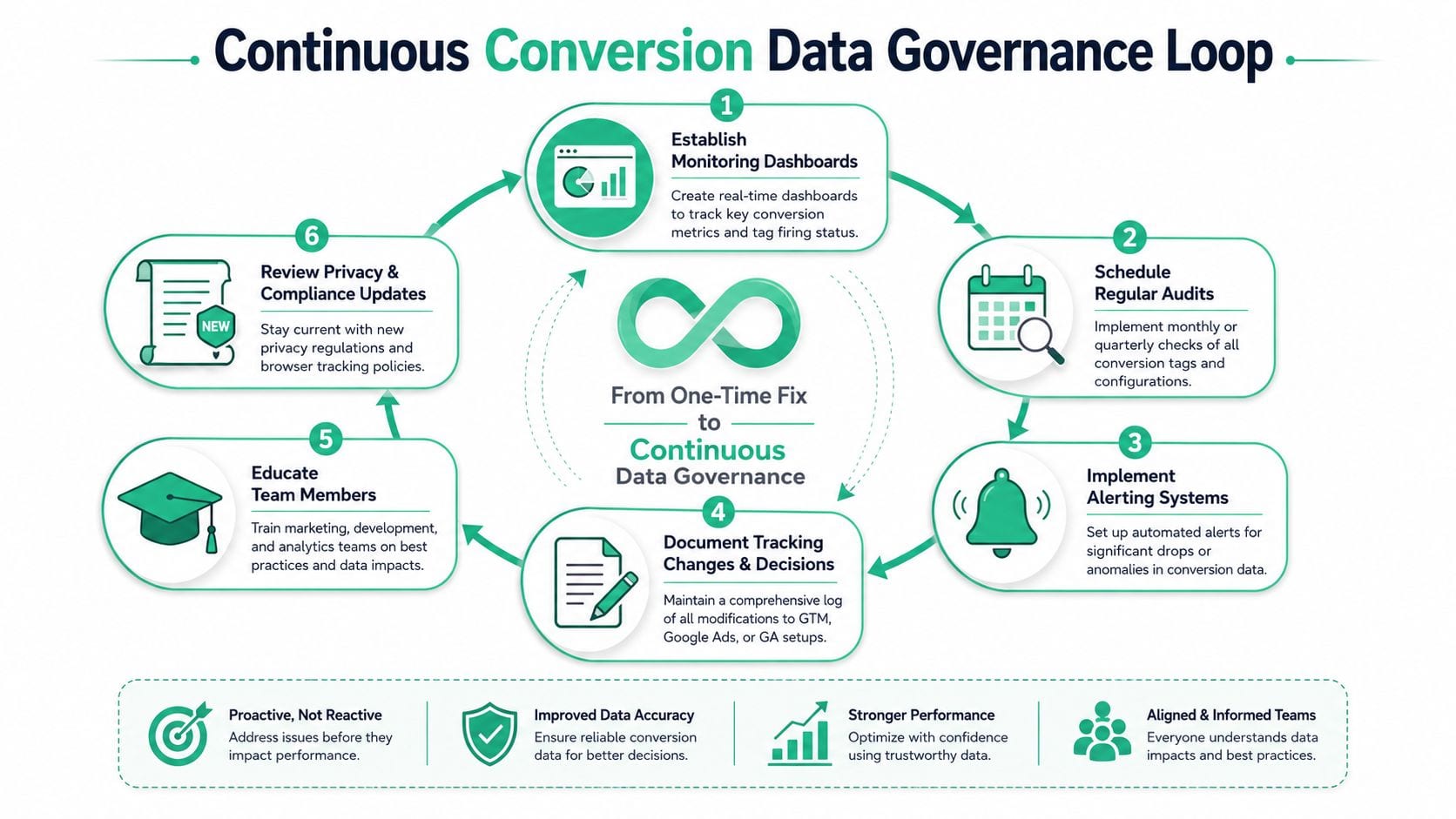
That is how conversion accuracy slips. Not from one dramatic failure, but from small changes across product, privacy, media, and CRM systems that no one reviews together. A tracking audit fixes today's defects. Governance keeps next quarter's data from drifting.
Build one definition of truth
Define each conversion in business terms first, then map it to the systems that record it.
Google Ads may be the bidding and optimization layer, while the CRM remains the authority for qualified pipeline or closed revenue. In ecommerce, the backend often holds the final transaction record, especially when refunds, fraud checks, or order edits can change what looked like a completed purchase in the browser. The important decision is not which platform reports the bigger number. It is which platform settles disputes for each conversion stage.
Write that down. If teams skip this step, every discrepancy turns into a debate about whose dashboard is right.
Document the decisions that change reporting
A useful tracking plan does more than list tags and trigger names. It records the business event, firing conditions, dependencies, deduplication logic, count setting, attribution choices, consent behavior, import method, and owner.
Reporting usually drifts through settings, not just broken tags. A click-through window that matched the sales cycle six months ago may now overstate delayed conversions, or undercount them after a change in lead qualification. A server-side event may still fire after the browser event logic was tightened. An imported offline conversion may keep its old definition even after sales changed stage names in the CRM.
Good documentation makes those changes visible before bidding logic starts using bad inputs.
Set a review cadence that survives reorganizations
Governance needs scheduled checks tied to real operating risk. Release reviews after site or app changes. Monthly checks on primary conversion actions. Quarterly reviews of attribution windows, consent behavior, imported goals, and naming conventions.
Keep the checklist short enough to run consistently.
Useful recurring checks include:
- Definition drift: Does each conversion still represent the same business outcome it represented at setup?
- Settings changes: Did count mode, primary status, attribution, or windows change without review?
- Consent impact: Have banner updates, regional rules, or modeling changes altered what gets measured?
- Cross-system alignment: Do Ads, analytics, backend, and CRM still agree on event timing and qualification logic?
- Lifecycle hygiene: Are deprecated tags, old goals, and legacy imports still sending noise into reporting?
Monitoring catches drift earlier than manual audits
Teams usually find broken tracking too late. They see it in a pacing issue, a lead quality complaint, or a bidding swing that started weeks earlier.
A better model watches for change as it happens. Monitor missing events, duplicate spikes, schema changes, tagging errors, sudden drops by browser or region, and gaps between browser, server-side, and imported conversions. That is where modern conversion governance differs from a basic setup checklist. It has to account for privacy behavior, modeled measurement, and multiple data collection paths that can diverge subtly.
For teams building that process, these data governance best practices give a practical framework for ownership, review cycles, and change control.
Good Google Ads conversion data comes from process discipline. The implementation matters, but the operating model matters just as much.
If your team needs a practical way to keep Google Ads tracking reliable after the audit, Trackingplan is one option to evaluate. It monitors analytics and marketing implementations across web, app, and server-side environments, helps detect missing or rogue events, schema mismatches, traffic anomalies, campaign tagging issues, and consent-related problems, and alerts teams when something changes before bad data spreads into reporting and bidding.