
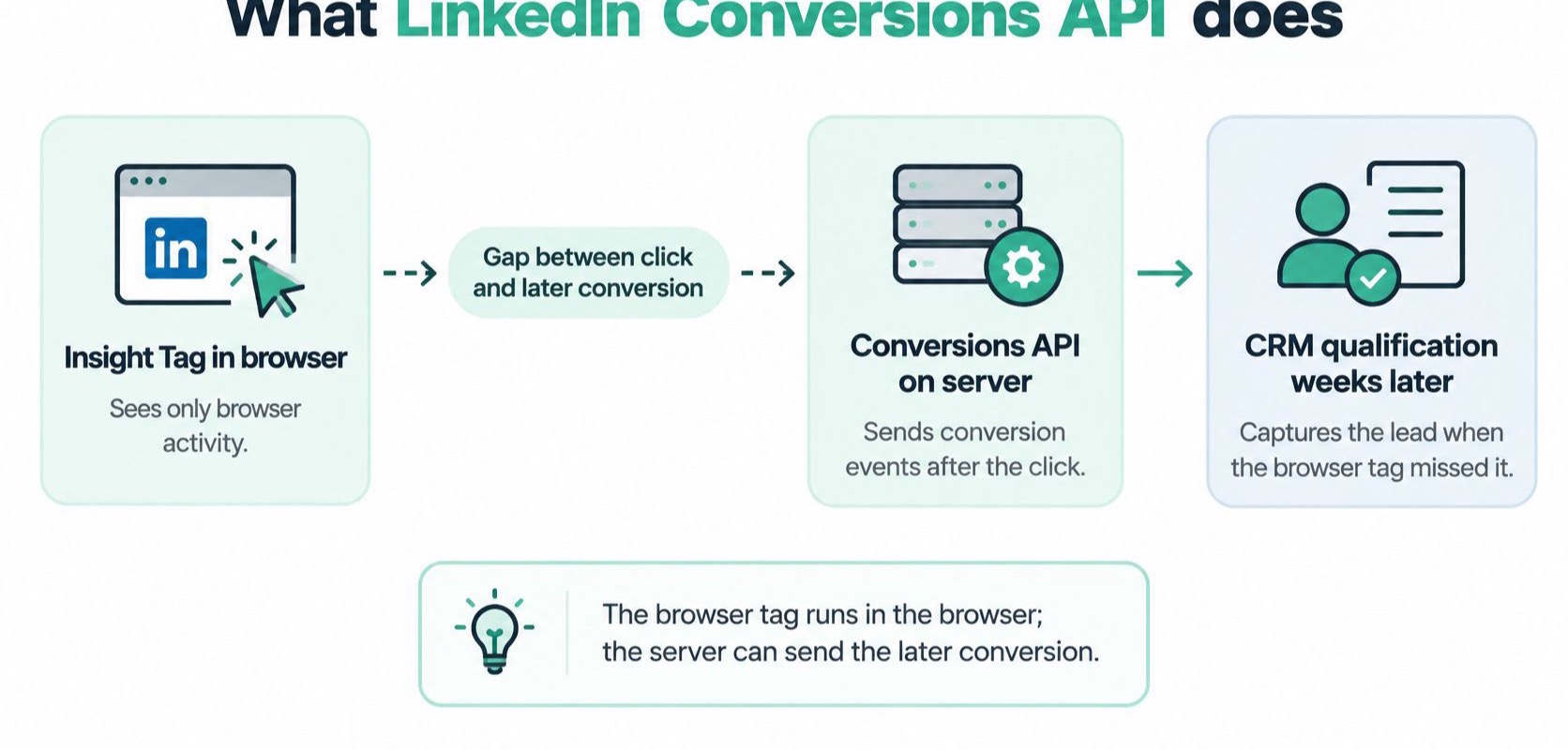
A marketer clicks your LinkedIn ad on a Tuesday and submits a demo form. Then she closes the tab. Three weeks later a rep marks her as qualified in the CRM, and two months after that the contract is signed. Nothing on your website fires at either moment. The Insight Tag is a snippet in the page, so it sees page loads, clicks and form submits. A qualification lives in a database, not in a page.
The LinkedIn Conversions API exists for that gap. It's a server-to-server integration that sends conversion events from your own backend to LinkedIn rather than relying only on browser-side tracking, and LinkedIn's Conversions API documentation describes the job as measuring campaign performance wherever the conversion happens, including website actions and offline outcomes such as phone sales or in-person leads. Your server posts each event to the /conversionEvents endpoint with one or more user identifiers attached, and LinkedIn matches it to a member profile before the conversion can be attributed to a campaign.
Three reasons sending moves to the server
- Blocked browser tags. An ad blocker stops the snippet from loading. A server call doesn't wait for a snippet.
- Consent limits what the page can send. When a visitor rejects marketing cookies, the browser has little left to give. The backend may still hold a first-party record of the confirmed action.
- The conversion happens off the website. A phone sale, an in-person lead, a deal that closes inside a sales pipeline. None of these touch a page.
The payoff is a different level of reporting. LinkedIn attributes qualified leads and reports them through metrics such as qualifiedLeads and costPerQualifiedLead, which separates the outcomes that matter from raw lead submissions.
The two paths cover different halves of the journey, and neither one replaces the other.
A server integration doesn't remove data-quality risk by itself. Missing identifiers lower match quality, and flawed event logic still produces missing, duplicated or misattributed conversions. Check five places: event delivery, conversion-rule mapping, timestamps, event identifiers and usable match identifiers. The rest of the account, from the click to the CRM, is in the LinkedIn Ads audit checklist.
Before you build anything, write down every conversion that happens outside the page, then mark the ones that need a server event.
Which conversions to send and from which source
The endpoint accepts most things you post to it. That's not a reason to post everything. LinkedIn documents the API across several funnel stages and data types, and the stage you choose decides what the delivery system learns from, as LinkedIn's guide to Conversions API conversion types sets out.
| Funnel stage | Example conversion | Documented source or method |
|---|---|---|
| Upper funnel | Page view or website visit | Insight Tag and Conversions API |
| Middle funnel | Form fill or offline event attendance | Conversions API |
| Lower funnel | Lead or qualified lead | Conversions API |
| CRM outcomes | Qualified lead, opportunity or closed-won deal | CRM-based conversions |
| Lower volume | Outcomes sent less often | CSV upload |
Three of those rows carry most of the weight. The middle funnel is where teams usually start, because a form fill is easy to catch in the browser and easy to confirm on the server. The lower funnel is where measurement gets interesting. A Lead is a form submission. A Qualified Lead is a judgement a human made days later, and the two shouldn't share a conversion rule.
Where B2B teams find the real outcome
The CRM rows hold the business result. Qualified leads, pipeline progression, opportunities and closed-won deals are the events that tell LinkedIn which clicks turned into revenue, and none of them happen on a page. For a B2B team this is the entire point of the integration, since a form fill costs the same to acquire whether or not the lead ever buys.
CSV upload is the low-effort path for outcomes that arrive rarely, like a monthly batch of won deals or a list of event attendees. It's manual and slower, so it fits programmes with modest volume rather than a live pipeline connection.
A worked split: a SaaS team counts the demo request in the browser through the Insight Tag and the Conversions API. When sales accepts the lead in the CRM, the server sends a qualified lead. Closed-won goes out only after finance confirms payment.
The stage also changes what bidding learns. Send only form fills and LinkedIn optimises toward people who fill forms, including the ones your team rejects. Send qualified leads and it optimises toward people who resemble the leads sales accepts. Send closed-won and you're optimising toward revenue, but you'll wait longer for signal and collect fewer events, which slows learning. Every choice trades volume against value.
If you're still deciding how much of the pipeline to move off the browser, the trade-offs between server-side tracking and pixel tracking are worth settling before you map rules.
Map each conversion rule to exactly one stage and one source before anyone writes a payload.
Deduplicate browser and server events with one event ID
Two paths now report the same purchase. Without a shared marker, LinkedIn has no way to know they describe one event, so it counts both. The marker is the event ID, and LinkedIn's deduplication documentation sets out the shape of the setup: a separate conversion rule for the browser source and another for the server source, with one shared eventId tying the two records together. It's the same problem as duplicate conversion tracking on any other ad platform.
Five steps to a stable event ID
- Create two rules. One for the browser data source, one for the server source. They can describe the same conversion, but LinkedIn expects separate rules for each data source.
- Generate the ID when the business action happens. A checkout confirmation, a form submit, a CRM stage change. Not on page render, and not again on a retry.
- Pass it with the browser event. Push the same value into the
dataLayernext to the conversion so the Insight Tag sends it along. - Send the identical value from the server. Same characters, same case, in the Conversions API payload for the matching rule.
- Compare both rules. Open the conversion breakdown in Campaign Manager before you report on the numbers. When deduplication works, the Insight Tag rule usually shows the higher count.
The direction matters, and it isn't symmetrical. When an Insight Tag event and a Conversions API event from the same account carry the same event ID, LinkedIn discards the Conversions API event and counts the Insight Tag event.
Two mistakes cause most of the damage. Reuse an ID across separate purchases and LinkedIn treats the second one as a duplicate, which suppresses a real conversion. Generate a fresh ID for the same purchase and both events count, which inflates the total. The ID has to identify one conversion, so derive it from the order and the action, never from the user or the page view.
Order 1042 shows how it should look. The dataLayer carries event-1042-checkout on the confirmation page. The server webhook fires with the same string twenty seconds later, and again when the webhook retries at 2am. One conversion, three deliveries, one counted event.
Before you assume the browser half is right, verify what the Insight Tag actually sends. Then test the paths where IDs break:
- Retries. Fire the webhook twice and check the second delivery carries the same value.
- Delayed server delivery. A queue that holds events for an hour must not regenerate the ID on flush.
- Consent denial. When the browser event is blocked, the server still sends its copy, and no deduplication partner arrives.
- Duplicate webhooks. Two systems listen to the same order event and both post it.
- Partial checkout failures. A completed payment with an unfinished session is where order IDs get rewritten.
Identifiers that decide whether events match
An accepted event is not a counted conversion. LinkedIn has to match it to a member profile, and only matched events can be used for attribution and optimization. So a successful API response tells you the payload parsed. It doesn't tell you a human was found on the other side.
| Identifier | Where it goes in the payload | What it is |
|---|---|---|
| Hashed email | userIds, type SHA256_EMAIL | The email, normalised and hashed with SHA-256 |
| LinkedIn click ID | userIds, type LINKEDIN_FIRST_PARTY_ADS_TRACKING_UUID | The li_fat_id value LinkedIn adds to the landing page URL on an ad click |
| Hashed phone | userIds, type SHA256_PHONE | The phone number hashed with SHA-256, in API versions from 202611 |
| IP address | userIds, type PLAINTEXT_IP_ADDRESS | The visitor's IP address, sent as it is |
| Google advertising ID | userIds, type GOOGLE_AID | The mobile advertising ID of an Android device |
| Acxiom ID | userIds, type ACXIOM_ID | An identifier from the Acxiom data partner |
| Profile fields | userInfo | First name, last name, job title, company and country, in plain text |
| Lead | lead | The response ID of a LinkedIn Lead Gen Form |
| External ID | externalIds | Your own user ID or an external cookie ID |
The Conversions API Playbook sets out the same list of matching parameters. LinkedIn recommends sending several identifiers when you have them, because each one raises the chance of a match, and pairing the hashed email with li_fat_id is the combination its developer FAQ names. More identifiers help only when they're correct and permitted.
Normalise before you hash
Trim the address, lowercase it, then apply SHA-256. If one system hashes Jane@Company.com with a trailing space and the browser hashed jane@company.com, the two values never meet. LinkedIn receives a valid hash, matches nothing, and raises no error. The same applies to a CRM that stores a plus-addressed variant or an uppercase domain.
Treat delivery success, deduplication success and match quality as three separate numbers. Match quality is the one nobody watches. Delivery success means the request returned OK. Deduplication success means one event was counted per conversion. Identity match quality is the share of events that matched a LinkedIn member, and it can fall while your server event count climbs. A rising stream with a falling match rate shows up as weaker campaign reporting, and the logs look clean the whole time.
Identifiers also have to be lawful. Send only what the user has consented to, and don't treat "more parameters" as automatically appropriate.
List the identifiers each conversion rule sends, then check that list against what arrives in the payload.
Fix duplicate, missing and low-match conversions
The first complaint is nearly always the same. LinkedIn reports more conversions than the CRM has records. The second is the reverse, and it usually arrives a week later. Both are diagnosable, and neither is fixed by changing bids.
| Symptom | Likely cause | Fix |
|---|---|---|
| Conversions higher than the CRM | Different event IDs for the same conversion in the browser and server paths | Generate one event ID per business conversion and reuse it in both paths |
| Missing conversions after accepted API calls | Event ID reused across separate orders, so LinkedIn discards real events | Create the ID per conversion instance, not per user or page |
| Low match rate | Identifiers missing, consent denied or email not normalized before hashing | Normalize and hash email, send the first-party UUID, check consent state before sending |
| LinkedIn totals below GA4 or CRM | Different lookback windows and deduplication rules | Compare conversion definition, attribution window and data source across systems |
| Drop after a release or CRM migration | Changed order IDs or a recreated conversion rule | Retest event ID persistence and rule mapping after each change |
Work through the symptoms in order of frequency
Duplicates come from a second ID in one path. The usual culprit is a thank-you page that regenerates its ID on reload, or a tag manager variable that falls back to a timestamp when the order ID is empty. The fix lives in the template, not in reporting.
Missing conversions after a successful API call are more frustrating, because the logs show 200 responses and healthy volume. Common causes are an ID reused across orders, or a conversion rule deleted and rebuilt with a new identifier while the server kept posting to the old one. Both discard events that look fine on the sending side.
Low match rate has a shorter list. Identifiers are absent, consent was denied, or the email wasn't normalised before hashing. Check the raw payload for the field, not the dashboard.
When LinkedIn sits below GA4 or the CRM
This one usually isn't a tracking bug. LinkedIn's guidance on metric differences attributes them to different lookback windows, conversion deduplication rules and configuration settings, which means a LinkedIn conversion total doesn't have to equal a total in analytics or another ad platform even when the same people acted.
Compare the conversion definition, the attribution window and the duplicate-handling logic on each system before you blame the tag.
Drops after a release, a CRM migration or an API version change are the easiest to prevent and the easiest to miss. Order IDs change format, a rule gets recreated, or the integration calls a version with a deprecation notice. Retest persistence and rule mapping every time code ships.
Say a team sees LinkedIn leads running ahead of CRM leads by a steady margin. They trace it to a second event ID generated on thank-you page reload, fix the template so the ID is created once per submission, and the gap closes within one reporting cycle.
Validate each conversion with a per-conversion audit
A conversion either has a browser event, a server event, matching IDs, timestamps, a delivery response and a count on the right rule, or the number in your report is a coincidence. LinkedIn's deduplication guidance sets the rule and tells you to check the conversion counts of each rule, but it doesn't hand you a per-conversion check.
Deduplication gets described as a configuration task. The harder problem is lifecycle integrity from the browser hit through checkout, CRM ingestion, server retries and delayed uploads, and it can break unnoticed.
The six fields every conversion record needs
- Browser event ID. What the Insight Tag sent, captured from the hit, not from the spec.
- Server event ID. The value in the Conversions API payload for the same business action.
- Timestamp in both paths. The moment of the action. LinkedIn rejects a server event older than 90 days.
- Conversion rule ID. Which rule fired, so a recreated rule is visible.
- Delivery response code. Including retries and any error body.
- Count per rule in Campaign Manager. Whether the conversion shows up once, on the rule you expect.
Run twenty conversions in an afternoon
- Pick about twenty recent CRM conversions from two or three consecutive days. Mix lead types if you run more than one rule.
- Find each one's browser and server events using the order ID or CRM record ID as the join key.
- Compare the event IDs. They should be identical strings, not two values that look similar.
- Check the timestamps describe the same moment in both paths, and that no server event is older than 90 days.
- Read the delivery response for each server call, including any retry.
- Compare the counts of both rules in Campaign Manager's conversion breakdown, where the Insight Tag rule usually shows more when deduplication works. Then log each mismatch by cause rather than by count.
Logging by cause is the part teams skip. "Fourteen missing" tells you nothing on Monday. "Nine missing because the email field arrived unhashed after the CRM migration" tells you who to call. If you'd rather run the reconciliation as a script than a spreadsheet, conversion tracking validation covers the checks worth automating.
Three questions after every release
Ask these after any change to the site, the consent banner, the CRM or the API version:
- Did the event IDs persist? Same ID in the browser hit, the webhook and the retry.
- Did the identifiers still arrive? Hashed email and
li_fat_idpresent in the payload, not just in the mapping document. - Does the rule still map to the right stage? A demo request rule shouldn't start receiving closed-won events.
Then give each conversion rule an owner and a review date, and keep a checklist entry per rule with owner, date and result.
Sending both sources doesn't improve data quality on its own. It widens diagnostic coverage only while identifiers, rule mappings and retries stay stable, which is why the audit belongs on a schedule rather than in a launch checklist.
Trackingplan fits that need. It monitors conversions, UTM and consent signals across ad platforms, spots lost match rate, missing value and CAPI double-counting, and routes a double-counted or identifier-poor conversion to whoever owns the tag. Checks run on daily or weekly schedules, and each finding links to the tracking hits behind it. It only observes data your site already sends to analytics and marketing tools, and only to check tracking quality. It makes sure campaigns are optimized on conversion data the team can trust. For 2 days Trackingplan learns your tracking specs from your real traffic, then you get 7 days free.
Conversions that close weeks after the click are the ones most likely to be counted twice or not at all, and a monthly look at Campaign Manager won't catch it. Trackingplan runs these per-conversion checks across more than 170 analytics and ad providers, compares the LinkedIn signal against the other ad platforms and GA4, and sends the mismatch to the tag owner with the underlying tracking hits attached. Visit Trackingplan when you're ready to audit LinkedIn conversions the way you audit everything else.