
Your paid media dashboard says one thing. GA4 says another. Your backend revenue report says something else again. Marketing thinks the platform is underreporting. Finance thinks marketing is overstating results. Devs say nothing changed. QA checked the checkout flow last sprint and “it looked fine.”
That’s the normal starting point for teams with broken attribution.
The problem usually isn’t one dramatic failure. It’s a pile of small failures that nobody sees in time. A purchase pixel stops firing on one browser. A form event loses a required parameter after a site release. A duplicated event inflates reported conversions in one ad platform while another platform misses half the funnel. Manual QA catches some of it, but only after someone notices a dashboard looks wrong. By then, budgets have already been shifted, tests have already been judged, and bad data has already shaped campaign optimization.
That accumulated mess is data debt. It behaves like technical debt, except it hits marketing efficiency, analytics trust, and compliance risk at the same time. An ad pixel monitoring tool exists to stop that debt from compounding.
The Unseen Data Crisis in Your Ad Spend
A familiar scenario plays out every week. A performance marketer opens Meta Ads Manager on Monday morning and sees a healthy weekend. The analyst opens GA4 and sees fewer conversions. The ecommerce manager checks the order system and gets a third number. Nobody can answer the basic question: which number should the business trust?

When this happens once, teams call it noise. When it happens every month, it becomes operational drag. People start building side spreadsheets, creating caveats in every report, and spending more time explaining data than using it.
Why the gap keeps getting worse
Tracking pixels used to be fragile but workable. That environment is gone. Tracking pixels have experienced a significant decline in effectiveness, with privacy tools and browser changes like Safari’s ITP reducing pixel reliability by an estimated 40 to 60% in major markets, while 81% of Americans express concern over data privacy, fueling higher opt-out rates, according to Prescient AI’s tracking pixel guide.
That decline doesn’t stay isolated inside one dashboard. It spills into every decision that depends on event quality:
- Budget allocation breaks down because channels with cleaner tracking often look stronger than channels with weaker signal capture.
- A/B test results become questionable when conversion events don’t fire consistently across variants or devices.
- Retargeting pools get distorted when audience-building pixels miss key actions or count the same action twice.
- Forecasting gets softer because last month’s reported inputs were already compromised.
Broken pixels don’t just create reporting errors. They train teams to distrust their own measurement stack.
Data debt is expensive even before finance sees it
Tracking QA is often still treated as a cleanup task. It isn’t. It’s infrastructure. Every release that changes templates, dataLayer logic, consent behavior, checkout steps, or campaign tagging can subtly damage attribution. Manual QA can catch obvious failures, but it doesn’t scale across multiple browsers, apps, environments, agencies, and platform-specific tags.
The cost of inaction is operational before it’s financial. Analysts burn time reconciling numbers. Developers investigate vague bug reports with no reproduction path. Marketers make spend decisions based on partial evidence. Legal and privacy teams inherit risk when unexpected parameters or personal data slip into outbound requests.
An ad pixel monitoring tool matters because this isn’t a single debugging problem. It’s a continuous observability problem.
What Is an Ad Pixel Monitoring Tool
The simplest way to think about an ad pixel monitoring tool is this: it’s a smoke detector for your marketing data.
It doesn’t replace your tag manager. It doesn’t replace GA4, Adobe Analytics, or your ad platforms. It doesn’t buy media or build reports for leadership. It sits above that stack and checks whether the tracking layer is working the way your team thinks it is working.
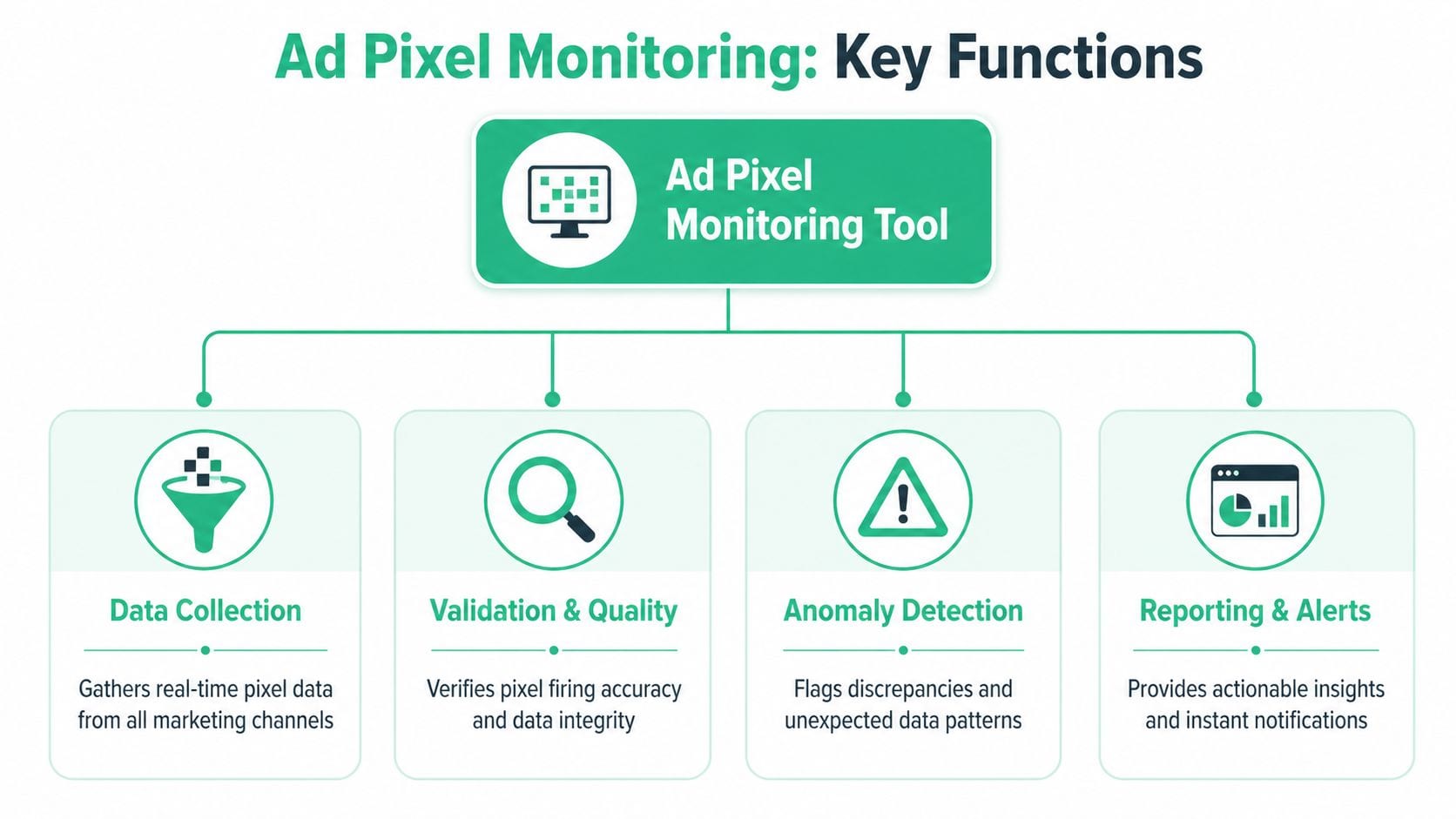
What the tool actually watches
A real monitoring layer continuously checks the health of your measurement setup across websites, apps, and server-side implementations. That includes common ad and analytics destinations such as Meta, Google Ads, TikTok, LinkedIn, GA4, Segment, and Adobe Analytics.
At a practical level, it answers questions teams usually discover too late:
- Did the expected pixel fire on the right page or event?
- Did it fire with the right payload, including event names, IDs, values, and campaign parameters?
- Did something unexpected appear, such as a rogue tag, duplicated event, or broken schema?
- Did a release change behavior in a way nobody intended?
If you need a quick refresher on the underlying mechanic, this explanation of what pixel tracking is is useful before looking at monitoring in more depth.
What it is not
Teams often confuse monitoring tools with adjacent categories. That confusion causes bad buying decisions.
| Tool type | Primary job | What it misses |
|---|---|---|
| Tag manager | Deploys and manages tags | Doesn’t continuously validate business logic or downstream data quality |
| Analytics platform | Reports behavior and outcomes | Usually shows the symptom after damage is already live |
| Ad platform | Uses received events for optimization | Assumes incoming signals are trustworthy |
| Ad pixel monitoring tool | Validates implementation quality and alerts on issues | Doesn’t replace reporting or media buying tools |
That distinction matters. A tag manager can publish a broken tag very efficiently. An analytics platform can chart a broken event beautifully. An ad network can optimize aggressively against flawed signals. Monitoring is the layer that catches the problem early enough to matter.
Why this category exists now
Client-side tracking has become less reliable, while marketing stacks have become more complex. Teams run browser pixels, server-side events, consent logic, app SDKs, agency-managed tags, and CDP routing at the same time. That complexity creates blind spots.
An ad pixel monitoring tool gives each function something concrete:
- Marketers get confidence that campaign signals are arriving.
- Developers get reproducible technical evidence instead of “the numbers look off.”
- Analysts get governance over schemas, naming conventions, and tracking-plan drift.
- QA teams get automation instead of brittle one-time test scripts.
If your stack sends data to ten places, you don’t need ten times more dashboards. You need one layer that tells you when the plumbing changed.
That’s why monitoring belongs in the stack as a separate discipline. It addresses reliability, not just deployment or reporting.
Why Pixel Monitoring Is Critical for Attribution and ROI
Attribution doesn’t fail only because models are imperfect. It also fails because the input data is unreliable.
That distinction matters. Teams often argue about attribution philosophy before they’ve solved basic collection quality. Last-click versus data-driven. Platform-reported versus blended. Media mix versus incrementality. Those are valid debates, but none of them rescue a broken conversion signal.
Dirty inputs distort platform optimization
Ad platforms use event data to learn. When the event stream is healthy, the algorithm can refine delivery and audience selection. According to Cometly’s analysis of real-time ad performance monitoring, ad platforms’ machine learning fed by pixel events can boost conversion rates by 20 to 30%, but that depends on data accuracy. The same source notes that global ad tech spend is nearing $722 billion, which makes bad input quality a very expensive problem.
Here’s the operational consequence:
- If conversions are missing, platforms optimize toward weaker proxies.
- If events are duplicated, campaigns can look efficient when they aren’t.
- If values or parameters are wrong, bidding logic learns from distorted economics.
- If campaign metadata is messy, channel and creative analysis breaks downstream.
That’s why clean event collection isn’t a reporting preference. It’s a performance input.
Pixel attribution is flawed, but broken pixels are worse
There’s an uncomfortable truth here. Pixel-based attribution has limits even when the implementation is perfect. It can over-credit retargeting and miss the actual contribution of upper-funnel channels. Recent incrementality work highlighted by Measured’s critique of pixel-based attribution argues that pixel measurement can capture only 1/4th of net-new sales in some contexts.
That doesn’t make monitoring less important. It makes it more important.
If your measurement model already has structural limits, feeding it inconsistent event data only compounds the error. You can’t graduate into incrementality testing, holdouts, or blended ROI modeling if the foundation is unstable. For teams trying to align spend and outcomes, a solid practical guide to marketing ROI is helpful, but the math only holds if the underlying conversion events are trustworthy.
Reliable attribution starts one layer below attribution. It starts with whether the event happened, whether it was captured, and whether the payload was valid.
Monitoring is the prerequisite for trustworthy reporting
A monitoring layer changes the sequence of work. Instead of waiting for a discrepancy to appear in reporting, the team gets alerted when the implementation shifts. That means fewer retrospective investigations and fewer budget decisions made on stale assumptions.
This is especially important when multiple teams touch the funnel. Paid media changes landing pages. Product changes checkout. Engineering changes dataLayer logic. Agencies add tags. Consent tooling changes behavior by region. No one person sees the whole surface area.
That’s why accurate ad attribution for smarter campaigns depends on observability, not just cleaner dashboards. Before a team debates which attribution model deserves the most trust, it needs to know whether the collection layer deserves any trust at all.
Core Capabilities Your Team Needs to Understand
It's not more dashboards that are needed. It's fewer surprises. The right ad pixel monitoring tool reduces surprises by automating the checks people currently do inconsistently or not at all.

According to Improvado’s overview of tracking pixels, modern monitoring tools use automation to cross-verify pixel presence and firing status, with root-cause analysis detecting schema mismatches and UTM errors with 95% precision. The same source reports 80% less manual audit time and recovery of 15 to 25% of lost conversion data when dataLayer pushes are checked against predefined tracking plans.
Automated discovery across the full stack
This is the capability teams underestimate until they don’t have it.
A monitoring tool should automatically discover what’s present across your site or app, including analytics tags, ad pixels, consent signals, and routed events. That matters because documented setups and live setups diverge quickly. A tag that “shouldn’t be there” often is. A destination that “everyone thought was removed” often still fires.
For each team, the value is different:
- Marketing sees whether campaign-critical tags exist on the intended journeys.
- Analytics gets visibility into undocumented event sprawl.
- Engineering gets a current map of what the implementation really looks like.
Real-time alerting for failures and anomalies
Manual audits are always late. By the time someone opens a browser extension and checks a page, the issue may already have damaged reporting.
A useful monitoring tool should alert when a key pixel stops firing, starts firing in the wrong place, loses a required property, or spikes unexpectedly. Good alerting also needs context. “Purchase event missing on checkout confirmation in production after release” is actionable. “Something changed” is not.
This benefits teams differently:
- Paid media managers can react before platform optimization drifts.
- QA can verify whether a release introduced the break.
- Analysts can annotate affected reporting windows early instead of doing forensic cleanup later.
Practical rule: If an alert can’t tell the receiving team what changed, where it changed, and who needs to respond, it’s just another notification.
Validation rules that enforce governance
Here, monitoring becomes data infrastructure rather than debugging support.
The best tools let you define what “correct” means for your business. That includes event names, parameter types, allowed values, required campaign tags, consent conditions, and privacy checks. A purchase event without value, a lead event with the wrong schema, or a UTM convention mismatch should trigger a clear signal.
This capability matters most to analysts and data governance owners because it turns tribal knowledge into enforceable rules. It also helps developers because validation logic becomes explicit instead of living in old tickets and partial documentation.
Root-cause analysis instead of symptom reporting
A lot of tools can tell you an event didn’t arrive. Fewer can help explain why.
Root-cause analysis should connect the failure back to the implementation layer. Maybe the dataLayer property changed. Maybe a conditional trigger stopped evaluating after a template update. Maybe consent logic suppressed one destination but not another. Maybe browser and server events aren’t deduplicating correctly.
When one tool can surface those patterns, the handoff gets tighter:
- Marketers stop filing vague “numbers are down” tickets.
- Developers get evidence tied to a release or event payload.
- Analysts can separate collection issues from true demand shifts.
Integrations that fit how teams already work
A monitoring tool only helps if the right people see the right signal in time. That’s why integrations matter.
Alerts should flow into the systems teams already use, such as Slack, Microsoft Teams, or email. Event quality checks should align with GA4, Adobe Analytics, Mixpanel, Amplitude, Segment, and ad platforms. This is also where a platform like Trackingplan fits. It’s an observability and analytics QA layer that monitors web, app, and server-side tracking, detects issues such as missing or rogue events, schema mismatches, UTM errors, and potential PII leaks, and sends alerts into collaboration tools.
Without integrations, monitoring becomes another tab that no one checks. With integrations, it becomes part of release management, incident response, and reporting governance.
Evaluating and Choosing the Right Tool for Your Stack
Buying an ad pixel monitoring tool without a clear evaluation framework creates a different kind of mess. Marketing wants easy dashboards. Engineering wants evidence and low overhead. Analysts want schema controls. Agencies want multi-client visibility. If the buying team only optimizes for one of those needs, adoption usually stalls.
The right choice depends less on feature count and more on fit. A tool should match your stack, your workflow, and the way your teams already respond to issues.
What marketers, developers, and analysts should each test
Marketers should focus on whether the tool helps them answer campaign questions quickly. Can they tell if a Meta purchase pixel, LinkedIn Insight Tag, or TikTok event is missing on a priority landing page or conversion flow? Can they see whether campaign tagging broke after a launch without opening browser tools?
Developers should test for technical depth. Does the tool expose request-level evidence, payload differences, environment comparisons, and enough context to reproduce a bug? Lightweight setup matters too. If implementation is painful, it won’t stay current.
Analysts need stronger governance controls than either group. They should check how the tool handles schema validation, event versioning, property rules, destination coverage, and tracking-plan drift. If the tool can’t enforce standards, it won’t reduce data debt. It will just document it.
For teams comparing categories as much as vendors, this overview of marketing campaign performance monitoring tools in 2026 is a useful reference point because it helps separate observability needs from general reporting tools.
Ad Pixel Monitoring Tool Evaluation Checklist
| Evaluation Criterion | Why It Matters | Key Questions to Ask Vendors |
|---|---|---|
| Breadth of integrations | Your stack likely spans ad platforms, analytics tools, CDPs, and collaboration apps | Which marketing, analytics, and messaging platforms are supported natively? |
| Automation depth | Manual review doesn’t scale across releases and channels | What is discovered and validated automatically versus configured manually? |
| Alert quality | Teams need actionable alerts, not noise | Do alerts explain the issue, affected event, environment, and likely cause? |
| Validation flexibility | Governance requires business-specific rules | Can we define required parameters, naming conventions, consent conditions, and PII checks? |
| Root-cause visibility | Debugging speed matters when spend is live | Can the tool trace failures back to dataLayer changes, tag logic, or payload mismatches? |
| Server-side support | Many teams now run hybrid client and server collection | Can the platform monitor browser and server events together, including deduplication issues? |
| Ease of setup | Slow onboarding kills momentum | How much engineering work is required to start getting reliable signals? |
| Multi-team usability | The tool has to work across functions | Are there views or workflows suited to marketers, analysts, developers, and QA? |
| Governance and privacy | Tracking quality and compliance are now linked | Can the tool detect unexpected parameters, rogue destinations, and consent misconfigurations? |
| Multi-site or agency support | Many organizations manage several properties | Can it handle multiple brands, apps, environments, or client accounts cleanly? |
Trade-offs that are worth being honest about
Not every team needs the deepest technical feature set on day one. But many teams do need stronger automation than they think. If your current process depends on someone remembering to check production after every release, you don’t have a process. You have hope.
There are also trade-offs between ease and control. Lightweight deployment is attractive, but not if it means shallow validation. Rich diagnostics are valuable, but not if marketers can’t understand the findings without engineering. The best buying decisions happen when all three groups review the same workflow and agree that the tool reduces friction instead of shifting it to another team.
Implementing Your Ad Pixel Monitoring Solution
Implementation goes wrong when teams treat monitoring like a tag install instead of an operating model. The install is the easy part. The harder part is deciding what counts as healthy tracking, who owns alerts, and how the tool fits into release, QA, and privacy workflows.

Start with the events that affect money
Don’t begin by trying to monitor everything. Start with the events that directly affect spend decisions and revenue reporting. That usually means purchase, lead, sign-up, checkout, add-to-cart, and the campaign parameters required to classify traffic correctly.
Create an initial rule set around a short list:
- Critical conversion events that must always fire
- Required properties such as value, currency, or event identifiers
- Consent-dependent behavior so collection changes when user preferences change
- Campaign tagging standards to catch UTM drift before reporting breaks
This first pass should be narrow and strict. Broad monitoring with vague rules creates noise.
Use a baseline audit before you trust alerts
Before teams rely on live notifications, they need a baseline. Run the tool across core journeys and compare what it finds with your documented tracking plan, your tag manager setup, and your analytics outputs. It is common to discover at least one undocumented tag, one missing parameter, and one event that fires in a place no one intended.
That baseline also tells you where your stack is fragile. Sometimes it’s checkout. Sometimes it’s single-page application navigation. Sometimes it’s consent mode behavior by region. You want to learn that before a campaign launch, not during one.
A visual walkthrough can help during rollout. If you want implementation examples and demos from the vendor side, Trackingplan’s YouTube video library is a practical place to see how observability and analytics QA workflows are handled in real environments.
Build alert ownership before launch
Monitoring fails when alerts go to everyone or to no one. Assign ownership by issue type.
A workable split often looks like this:
- Marketing owns campaign tagging and destination coverage
- Analytics owns tracking-plan rules, schema quality, and reporting impact
- Engineering or QA owns implementation regressions and release-related breaks
- Privacy or compliance reviews PII leaks and consent anomalies
A monitoring alert should land with the team that can act on it first, not the team most likely to forward it.
Plan for hybrid tracking, not pixel-only tracking
Modern implementations increasingly rely on server-side collection for critical events. According to Usercentrics’ guide to tracking pixels, advanced implementations utilize server-side tracking to achieve 90 to 98% data capture rates. The same source recommends running dual-tracking, meaning pixel plus server-side tracking, for 2 to 4 weeks during migration while using a monitoring tool to correlate discrepancies. It also notes potential ROAS lifts of 15 to 30% from server-side tracking.
That guidance matters because migrations often create duplicate events or mismatched payloads if teams move too fast. A dual-run period gives analysts and developers time to compare browser and server signals, validate deduplication logic, and confirm that the new setup is stable before they deprioritize browser-only collection.
For teams planning that migration path, this server-side tagging guide for Meta CAPI, Google Ads, and TikTok is a useful technical reference.
Treat privacy checks as part of implementation
Privacy and data quality now overlap. Your monitoring setup should include checks for potential PII leakage, unexpected query parameters, and consent state mismatches. That’s not just legal hygiene. It also protects platform integrations from receiving data they shouldn’t get and preserves trust across teams that rely on the stack.
If you only use the tool to confirm pixels are firing, you’re using half of its value. The stronger implementation uses monitoring to protect accuracy, governance, and compliance at the same time.
Justifying the Investment Real-World ROI and Examples
The fastest way to lose this budget request internally is to position an ad pixel monitoring tool as “better visibility.” That sounds optional. The stronger case is that it reduces waste, protects reporting integrity, and lowers the labor cost of keeping attribution usable.
The return usually shows up in three places at once.
Where the ROI actually comes from
First, there’s spend protection. If a purchase or lead event breaks and nobody catches it quickly, ad platforms optimize on weaker signals. That doesn’t just hurt reporting. It changes bid behavior, audience learning, and campaign pacing.
Second, there’s labor reduction. Manual QA and reconciliation consume expensive analyst and engineering time. Teams create recurring checklists, browser tests, and spreadsheet comparisons because they lack observability. That effort doesn’t disappear, but it shrinks sharply when the monitoring layer catches changes automatically.
Third, there’s decision quality. Leadership doesn’t need perfect attribution to make better calls. It needs confidence that the core event stream is intact and that known issues are surfaced quickly. That confidence affects budget planning, test interpretation, and agency accountability.
Practical examples stakeholders understand
The most persuasive examples are the ones your own team has already lived through:
- A checkout release removed a required event parameter. Reporting didn’t fail loudly. It just got worse. Monitoring would have flagged the payload change immediately.
- An agency added a tag outside normal governance. The issue wasn’t only duplication risk. It was also a privacy and ownership problem.
- A consent update changed destination behavior by region. Marketing saw lower conversion counts, but the root issue was implementation, not demand.
- UTM conventions drifted across campaigns. Channel reporting fragmented, and analysts spent days cleaning classifications that could have been validated upfront.
If your business depends on local lead gen or service-area performance, the same logic applies at smaller scale. A useful companion read is this guide to boosting local business conversions. Conversion improvements only become actionable when the tracking behind them is dependable.
The ROI case isn’t “this tool gives us nicer analytics.” It’s “this tool stops us from making budget decisions with broken instrumentation.”
Teams that frame monitoring as a cost center usually keep paying for the same failures in hidden ways. Teams that treat it as data infrastructure usually find that it pays back through fewer incidents, faster debugging, stronger governance, and more trustworthy attribution.
If your team is tired of reconciling conflicting dashboards and discovering broken pixels after spend has already been committed, Trackingplan is worth evaluating. It provides an automated observability layer for analytics and marketing tracking across web, app, and server-side stacks, helping teams detect broken or missing pixels, rogue events, schema mismatches, UTM errors, consent issues, and potential PII leaks before those problems distort attribution and ROI.