
Your paid media team launches a major campaign on Monday. By Tuesday, traffic is up, ad platforms are spending, and dashboards look strangely calm. No spike in conversions. No meaningful movement in assisted revenue. The team assumes attribution lag, then campaign mix, then maybe a reporting issue.
On Thursday, someone opens Google Tag Manager and spots the problem. A recent release broke a conversion pixel on a key checkout step. The traffic happened. The spend happened. The user actions happened. But the measurement did not. That lost data won't come back.
This is why a tag management audit tool matters. Modern analytics setups aren't a few scripts on a marketing site anymore. They span GTM, GA4, Meta Pixel, consent tools, app SDKs, server-side forwarding, data layers, and event schemas owned by different teams. A basic preview mode check or occasional spreadsheet audit can't keep up with that level of change.
The hard part isn't adding tags. It's knowing, every day, whether they still work, whether they send the right data, whether they respect consent, and whether the same event stays consistent across web, app, and server-side destinations. That's the fundamental job of analytics QA in 2026.
The Real Problem with Your Marketing Data
The majority of teams do not have a reporting problem. They have a measurement reliability problem.
A dashboard can look polished and still be wrong. A weekly performance deck can be neatly organized and still hide broken conversion logic, duplicate purchase events, or campaign parameters that never reached the destination platform. When that happens, marketers keep optimizing against bad inputs, analysts spend hours reconciling numbers, and developers get pulled into urgent investigations that should have been preventable.
Why silent failures are so dangerous
Tagging failures rarely announce themselves. Your site still loads. Forms still submit. Orders still process. The only thing broken is the data trail.
That creates a false sense of confidence. Teams see a healthy website and assume the analytics stack is healthy too. In reality, one release can alter a CSS selector, rename a data layer field, change consent timing, or remove a trigger dependency. From that point on, your reports may be incomplete or inflated.
You can recover from a failed campaign. You usually can't recover the missing measurement from that campaign.
The old response was manual QA. Someone clicked through pages, watched browser tools, and compared a few hits against a requirements document. That approach still has value for spot checks, but it breaks down fast when you manage multiple domains, single-page applications, native apps, or server-side event routing.
Why basic tools aren't enough anymore
Google Tag Assistant, browser developer tools, and GTM preview mode help with debugging. They don't give you durable governance.
A dedicated audit tool fills that gap. It watches your implementation continuously, checks what fires against what should fire, flags deviations, and preserves a record of changes over time. Modern platforms are moving beyond browser-only checks. They help teams validate the full path from the event source to the destinations that use it.
That matters because today's failures often happen between layers. The browser event may exist, but the server-side destination may receive a malformed payload. The app may send the event, but a downstream schema mismatch may break reporting. If your audit process stops at the page level, you miss the deeper problem.
The Hidden Costs of Unaudited Marketing Tags
Unaudited tags create four business problems at once. They distort metrics, waste media budget, increase privacy risk, and slow your digital experience. Teams often feel these symptoms before they identify the root cause.

The scale of the issue is bigger than many teams expect. In a detailed analysis, audits found that enterprise websites were initially missing critical tags on more than 20% of their pages on average, and automated audits reduced that data loss to virtually 0%, according to ObservePoint data cited by Tealium.
Data inflation and data loss
Bad tagging doesn't only undercount. It also overcounts.
A missing purchase pixel makes paid social look weak. A duplicate transaction event can make paid social look brilliant. Both are dangerous because both produce confident but false conclusions. Analysts then waste time trying to reconcile platform numbers with backend sales or warehouse data instead of trusting the implementation in the first place.
A common example is the event that fires twice on a refreshed confirmation page. Another is the pixel that disappears from a new landing page template because nobody copied the shared container logic correctly. These problems aren't exotic. They happen in normal release cycles.
Wasted marketing spend
Media optimization depends on clean feedback loops. If ad platforms don't receive accurate conversion data, bidding models learn from noise.
When attribution is broken, the team doesn't stop spending. It reallocates spend using incomplete evidence. High-performing campaigns may be paused because the signal is missing. Weak campaigns may stay live because duplicate or accidental events make them appear profitable. Finance sees rising costs. Marketing sees conflicting reports. Nobody can answer the simplest question, which is whether spend is producing the intended outcome.
Practical rule: If you don't trust your conversion data, you shouldn't trust your optimization decisions either.
Compliance and privacy exposure
Privacy failures often start with old tags that no one remembers adding.
A legacy heatmap script, retired ad pixel, or unauthorized collector can remain active long after the business stopped using it. Those so-called zombie tags can still receive data, still load third-party resources, and still create consent issues. The risk becomes more serious when page URLs, query parameters, or form fields accidentally expose personally identifiable information.
This is one reason modern audit programs include consent validation and PII checks, not just firing checks. Data governance isn't separate from tagging governance anymore.
Slower pages and worse user experience
Marketing tags are code. Code has weight and execution cost.
Too many tags, or the wrong tags loading at the wrong time, can drag down page performance. The user experiences that delay directly, especially on mobile or script-heavy landing pages. Performance, privacy, and data quality all intersect here. The same cluttered implementation that makes audits difficult also tends to make websites slower and harder to maintain.
A set-it-and-forget-it tagging approach always becomes more expensive over time. The costs just show up in different departments.
Core Capabilities of a Modern Audit Tool
A modern tag management audit tool shouldn't be a crawler with a prettier dashboard. It should act like an observability layer for analytics.
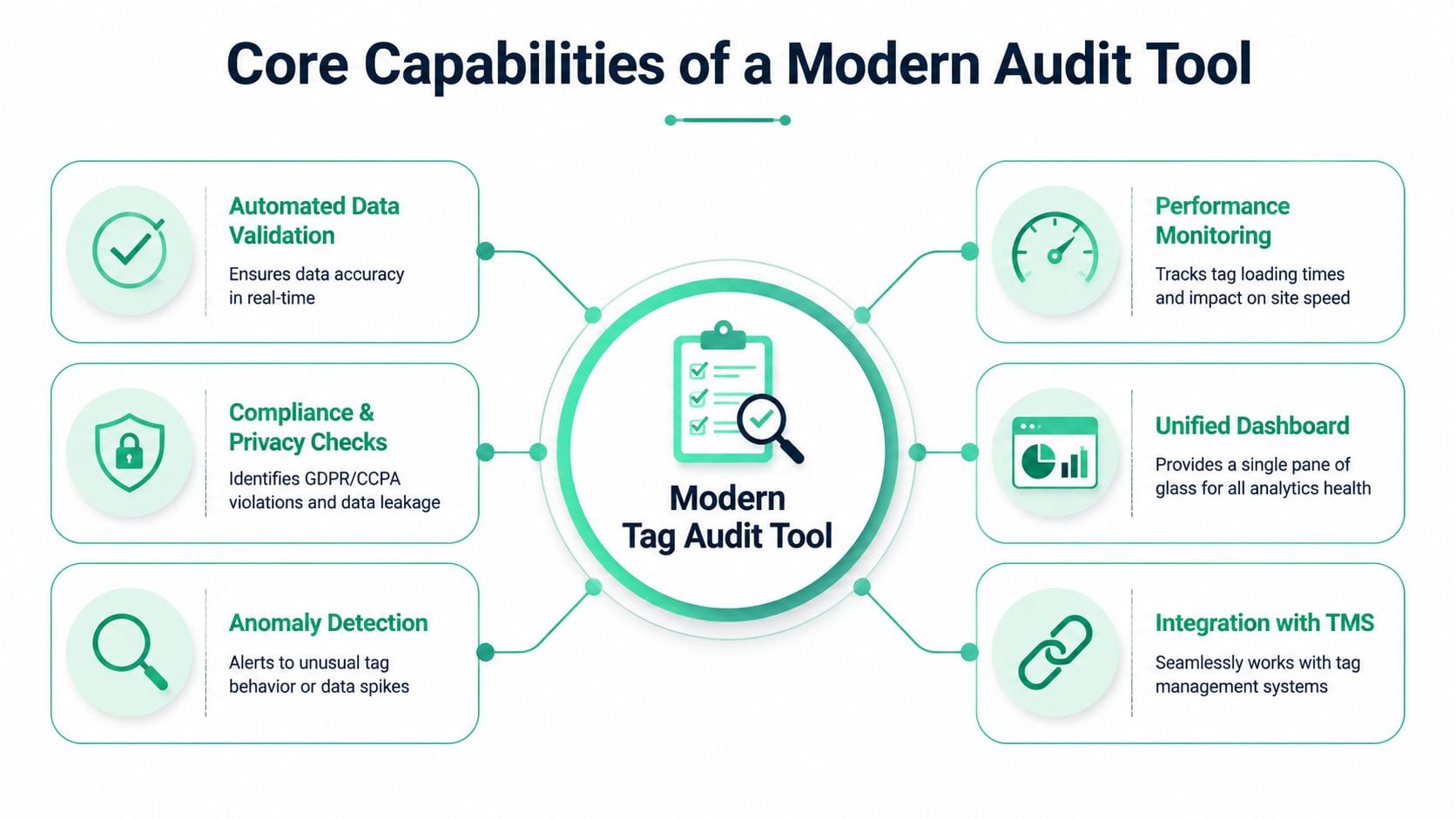
At a minimum, the tool needs to help teams answer five questions. What exists in the implementation? What changed? What broke? What data is being sent? And who needs to act on it?
According to Trackingplan's overview of audit tools, automated tag management audit tools can improve data accuracy by up to 30-50% by detecting missing, duplicate, or broken tags that manual debugging misses across large websites.
Automated discovery across the stack
The first capability is inventory. If your team can't see the full implementation, it can't govern it.
A strong tool automatically discovers tags, pixels, events, variables, requests, and destinations without requiring someone to maintain a giant spreadsheet by hand. On the web side, that includes GTM, dataLayer structures, GA4 events, and advertising pixels. In broader implementations, it should also account for app events and server-side pathways.
Many legacy products stop too early. They inspect page behavior but don't help teams map how the same event travels through the larger stack.
Real-time monitoring and alerts
Periodic audits are useful. Real-time monitoring is what protects campaigns.
If a purchase event disappears after a deployment, your team shouldn't learn about it during a quarterly review. A modern tool should alert the right people quickly, ideally in the systems they already use for operations, such as Slack or email. The alert also needs context. "Event missing" is less useful than "purchase missing on checkout confirmation after release" or "parameter changed from string to array."
That context is what turns alerts into action instead of noise.
Schema and data layer validation
Many implementations don't fail because the tag is absent. They fail because the data is malformed.
An event name changes slightly. A required property becomes null. A revenue value switches type. A product array loses a field that downstream reports expect. The browser may still show activity, but the business meaning of the event is broken.
Good platforms validate against the tracking plan, not just against firing behavior. That means checking whether the event structure still matches what analytics, product, and marketing teams agreed to collect. For a useful breakdown of this discipline, see analytics tag compliance auditing for reliable data.
Privacy and consent checks
Modern auditing has to inspect more than measurement correctness.
A capable platform should flag suspicious parameters, possible PII exposure, and consent-related issues. That includes data being sent before consent state is resolved, data flowing to destinations that shouldn't receive it, and old vendor scripts still active after deprecation.
From a governance perspective, this is one of the biggest changes in the category. Tag auditing used to be a technical cleanup exercise. Now it's part of compliance operations.
Integration and unified visibility
A practical audit tool has to fit the systems your team already runs.
That means integration with tag management systems such as GTM, analytics tools such as GA4 and Adobe Analytics, destination layers such as Segment, and messaging workflows used by marketing and engineering. The tool should also give non-technical stakeholders a readable dashboard. Analysts need detail. Marketers need clarity. Developers need root-cause clues. One interface has to support all three.
What good capability coverage looks like
- Discovery that stays current: The inventory updates as deployments change.
- Alerts with useful context: Teams can see what changed, where, and why it matters.
- Validation against a plan: Events are checked against expected names and properties.
- Privacy review built in: PII and consent issues surface alongside measurement issues.
- Cross-stack visibility: Web, app, and server-side flows are not treated as separate worlds.
Your Step-by-Step Tag Auditing Workflow
Strong analytics QA isn't a once-a-year cleanup. It's a cycle. The most reliable teams run that cycle continuously, with automation doing the repetitive watching and people handling prioritization and fixes.

A practical workflow has four parts.
Build the baseline
Start by documenting what your implementation does, not what the old tracking spec says it should do.
An audit tool can crawl and observe the implementation, then assemble a live inventory of tags, events, properties, and destinations. That becomes your working baseline. Without this step, teams end up arguing from stale docs. Marketing thinks a conversion event exists because it was requested months ago. Development thinks it's fine because the trigger still fires. Analytics discovers that the property names changed two sprints ago.
The baseline should also capture conventions. Event names, required fields, consent expectations, UTM standards, and approved destinations all belong here.
Monitor for drift
Once the baseline exists, the essential work begins. The tool watches for drift.
Drift includes missing pixels, new rogue requests, changed parameter formats, spikes in duplicate events, or pages where expected tags stop firing. Automation handles these tasks effectively because humans struggle with repetitive oversight. No one is going to manually re-check every funnel step after every content release, checkout tweak, SDK update, or consent change.
For teams auditing marketing pixels specifically, this guide on how to audit marketing pixels for accurate analytics is a useful companion.
Triage the issue
Not every alert deserves the same response. Some issues break reporting immediately. Others are cleanup items.
A good triage process asks three things:
- What is the business impact: Did the problem affect conversions, attribution, compliance, or performance?
- Where did the failure begin: Was it the tag, the trigger, the data layer, the app SDK, or the server-side mapping?
- Who owns the fix: Marketing ops, analytics engineering, web development, mobile development, or privacy?
That ownership piece matters. Many teams lose time because alerts arrive, but nobody knows whether the problem belongs to a GTM admin, a frontend developer, or a data engineer.
The fastest fix is rarely the team that found the issue. It's the team that can see the cause clearly enough to act.
Verify the remediation
After the team ships a fix, verify it automatically.
This closes a common gap in manual QA. A developer says the issue is resolved. Marketing says platform numbers still look odd. Analytics starts another round of checking. An automated audit loop removes that uncertainty by confirming whether the expected tag now fires, whether the event payload matches the agreed schema, and whether the destination receives the corrected data.
That verification also reveals hidden wins. According to Analytico Digital's review of GTM audit metrics, initial audits often find that removing redundant and zombie tags can yield 15-25% faster page speeds, while fixing data layer inconsistencies in e-commerce funnels can resolve discrepancies in over 25% of tracked events.
A product walkthrough helps make this operational model concrete:
Common Tagging Issues Uncovered by Audits
When teams first automate analytics QA, they usually expect a few broken pixels. What they find is broader. The recurring issues tend to fall into a handful of categories, and each one affects a different part of the business.
Broken conversion signals
The most obvious problem is the event that never reaches the destination that needs it.
This can happen because a trigger no longer fires, a page template changed, consent blocks the request unexpectedly, or a dependency in the data layer vanished. In paid media, the consequence is immediate. Platforms optimize with incomplete feedback. In analytics, dashboards understate performance. In finance, the channel starts looking less efficient than it is in reality.
Rogue tags and unauthorized collection
Audits also surface scripts that nobody currently owns.
Sometimes they're leftovers from prior agencies, old vendors, pilot programs, or partial migrations. Sometimes they're harmless. Sometimes they're still collecting data and sending it to third parties outside the current governance model. This is one of the strongest arguments for routine auditing. You can't manage what you don't know exists.
PII leaks and consent mistakes
One of the most sensitive findings is data that should never have been sent.
That might be an email address embedded in a URL parameter, form content exposed in a request, or a destination receiving data before consent is honored. These failures often sit at the boundary between marketing operations and privacy compliance, which is why they can remain unresolved if ownership is unclear.
Campaign taxonomy and schema drift
Not all damage comes from missing events. A lot comes from messy events.
UTM conventions drift. Event properties change. One team renames a parameter for readability and breaks a downstream report. Another adds a new property only on mobile. The implementation still "works," but the reporting layer becomes inconsistent and harder to trust.
A manual review can catch some of this. It just doesn't catch it fast enough across large environments. That's the economic argument for automation. According to Xerago's tag audit template discussion, quarterly manual audits can take 20-40 hours and cost $2K-$5K in labor, while automated platforms cut that to under 2 hours. The same source says fully automated observability can deliver 3-5x faster fixes and improve campaign ROI by 15-20% through more reliable attribution.
A quick way to think about issue severity
| Issue type | Typical business consequence | Best response |
|---|---|---|
| Missing conversion event | Misleading ROI and weak bidding signals | Immediate fix and post-release validation |
| Duplicate tag firing | Inflated metrics and false channel performance | Investigate trigger logic and page state |
| Rogue third-party tag | Privacy and governance exposure | Remove or formally approve |
| Schema mismatch | Broken dashboards and analysis inconsistency | Update tracking plan and destination mappings |
Selecting the Right Tag Management Audit Tool
Many tools in this category still reflect an older reality. They scan pages, list tags, and help with browser-side debugging. That's useful, but it isn't enough for teams running analytics across websites, apps, and server-side pipelines.
The first filter is architectural. If the tool only inspects client-side web behavior, it leaves large blind spots. Guideflow's overview of tag management tools notes a major gap in current audit solutions around server-side tracking and app analytics, while over 65% of enterprise martech setups now use hybrid environments.
Questions that separate older tools from modern ones
A strong buying process starts with practical questions, not feature slogans.
- Does it monitor continuously or just scan periodically: Scheduled scans help, but release-driven environments need faster detection.
- Can it cover web, app, and server-side flows: If not, your team will still need separate QA processes.
- Does it validate schemas and properties: Firing status alone won't protect dashboard quality.
- Can it flag privacy issues: PII and consent mistakes should be visible alongside tracking bugs.
- Does it support collaboration: Marketing, analytics, and engineering need different views of the same issue.
If you're comparing tools oriented toward GA4 work specifically, this overview of GA4 audit tools can help frame the differences.
Tag management audit tool selection checklist
| Capability | Description | Essential for 2026? |
|---|---|---|
| Continuous monitoring | Detects issues after releases and during campaigns, not only during scheduled reviews | Yes |
| Web coverage | Observes browser-side tags, pixels, and data layer behavior | Yes |
| App visibility | Validates mobile event consistency and SDK-related tracking changes | Yes |
| Server-side observability | Checks what happens after collection, including routing and payload consistency | Yes |
| Schema validation | Confirms event names and properties match the tracking plan | Yes |
| Privacy checks | Flags possible PII exposure and consent-related problems | Yes |
| Change history | Shows what changed over time so teams can trace breakage | Yes |
| Collaboration workflow | Helps analysts, marketers, and developers work from the same evidence | Yes |
What to avoid
Be careful with tools that create more checking work than they remove.
If the product gives you a long export but no prioritization, it isn't solving the operational problem. If it scans pages but can't help explain destination mismatches, it only covers part of the stack. If it can't adapt to mobile and server-side patterns, you'll still be stitching together partial truths from multiple systems.
The right tool should reduce ambiguity. That's the standard worth buying against.
How Trackingplan Delivers Unified Analytics Observability
The biggest shift in this category is simple. Teams no longer need just a site scanner. They need unified analytics observability.

That means one system watching how tracking behaves across web, mobile apps, and server-side destinations. It also means connecting the operational dots. Not just "an event changed," but where it changed, what payload was affected, which destination is impacted, and which team should act.
What unified observability changes in practice
In a conventional workflow, teams use separate methods for each layer.
The web analyst checks GTM or browser tools. The app team checks SDK logs. The data engineer checks downstream payloads or warehouse tables. Marketing waits for someone to explain whether the issue is real. This is slow, and it creates handoff delays because nobody starts with a complete view.
A unified observability approach replaces that fragmentation with shared evidence. The platform keeps an up-to-date picture of the implementation, monitors events and pixels continuously, and highlights anomalies that matter to analytics quality. That includes missing events, rogue tags, schema mismatches, campaign tagging errors, and privacy-related issues.
One platform in this space is Trackingplan's product workflow. Based on the publisher information provided for this article, it uses a lightweight tag or SDK to discover implementations across the stack, monitor destinations such as GA4, Adobe Analytics, Amplitude, Mixpanel, Segment, Snowplow, and ad platforms, and alert teams through systems such as Slack, email, or Microsoft Teams when measurement issues appear.
How this helps the teams who actually own the work
The reason observability matters isn't that dashboards become prettier. It's that ownership becomes clearer.
For marketers, the priority is campaign confidence. They need to know whether attribution pixels, UTM conventions, and conversion destinations are behaving before spend is optimized around bad data.
For analysts, the priority is trust in the data model. They need event names, properties, and consent behavior to remain stable enough that reporting doesn't break every sprint.
For developers, the priority is efficient debugging. They need to know whether a release changed a selector, removed a property, or altered a payload format in a way that affects downstream systems.
A useful audit platform doesn't just say something failed. It gives each team enough context to fix the right thing first.
Why the web-only approach now falls short
This is the gap many older audit tools still leave open.
A browser scan can confirm that an event appeared on a page. It can't always confirm that the same event survived app instrumentation, server-side forwarding, schema validation, and destination-specific formatting. As stacks become more distributed, browser-only assurance becomes less representative of the actual implementation.
That is why the category is moving toward observability rather than simple audits. Audits are moments in time. Observability is ongoing evidence.
A short product demo makes that distinction easier to see in action:
For teams trying to modernize analytics QA, that shift changes the operating model. Instead of waiting for reports to look wrong, they can catch implementation drift near the source. Instead of documenting the stack once and hoping it stays accurate, they maintain a live view of what is being collected and where it is going. Instead of treating web, app, and server-side tracking as separate QA projects, they manage them as one governed system.
That is the practical value of a modern tag management audit tool in 2026. Not more dashboards. Fewer unknowns.
If your team is tired of finding analytics bugs after campaigns launch or reports break, Trackingplan is worth evaluating. It focuses on automated analytics QA and observability across web, apps, and server-side implementations, so teams can detect tracking issues early, validate changes continuously, and work from a shared source of truth.