
To run a pixel audit for Meta, Google Ads and TikTok, list every pixel on the site, then check five things on each one in the same order: what fires on which page, the values and IDs it sends, deduplication between browser and server events, consent, and the click IDs that tie a conversion to its ad. Do all three platforms in one pass, because the same purchase reaches all of them, and an error in the checkout rarely stays on one.
Most pixel checklists are written for one platform. This one runs across them, with the platform rules side by side, and ends where an audit ends: on one day. What happens between one audit and the next is PPC monitoring. For a deeper check of Meta alone, the Meta Pixel audit goes event by event.

What a pixel audit checks on each platform
The steps are the same everywhere. The names, the keys and the tools change. For the account side of each platform, see the Meta audit, the Google Ads audit and the TikTok audit.
| Check | Meta | Google Ads | TikTok |
|---|---|---|---|
| Browser tag | Meta Pixel | Google tag | TikTok Pixel |
| Server or first-party data | Conversions API | Enhanced conversions (hashed customer data) | Events API |
| Counted once by | Event name and event_id, within 48 hours | transaction_id per conversion action | Event name and event_id, within 48 hours |
| Click ID | fbclid | gclid, from auto-tagging | ttclid |
| Browser checker | Meta Ads Data Advisor, Test Events | Network tab, a test click on your ad | TikTok Pixel Helper, ad Preview |
LinkedIn and Microsoft Ads follow the same pattern with fewer events. LinkedIn’s help center asks for the tag on the pages of your domain, preferably right before the end of the body in the global footer. Microsoft’s documentation asks for one UET tag on every page, and calls it a prerequisite for conversion tracking. Their account-level checks are in the LinkedIn Ads audit and the Microsoft Ads audit.
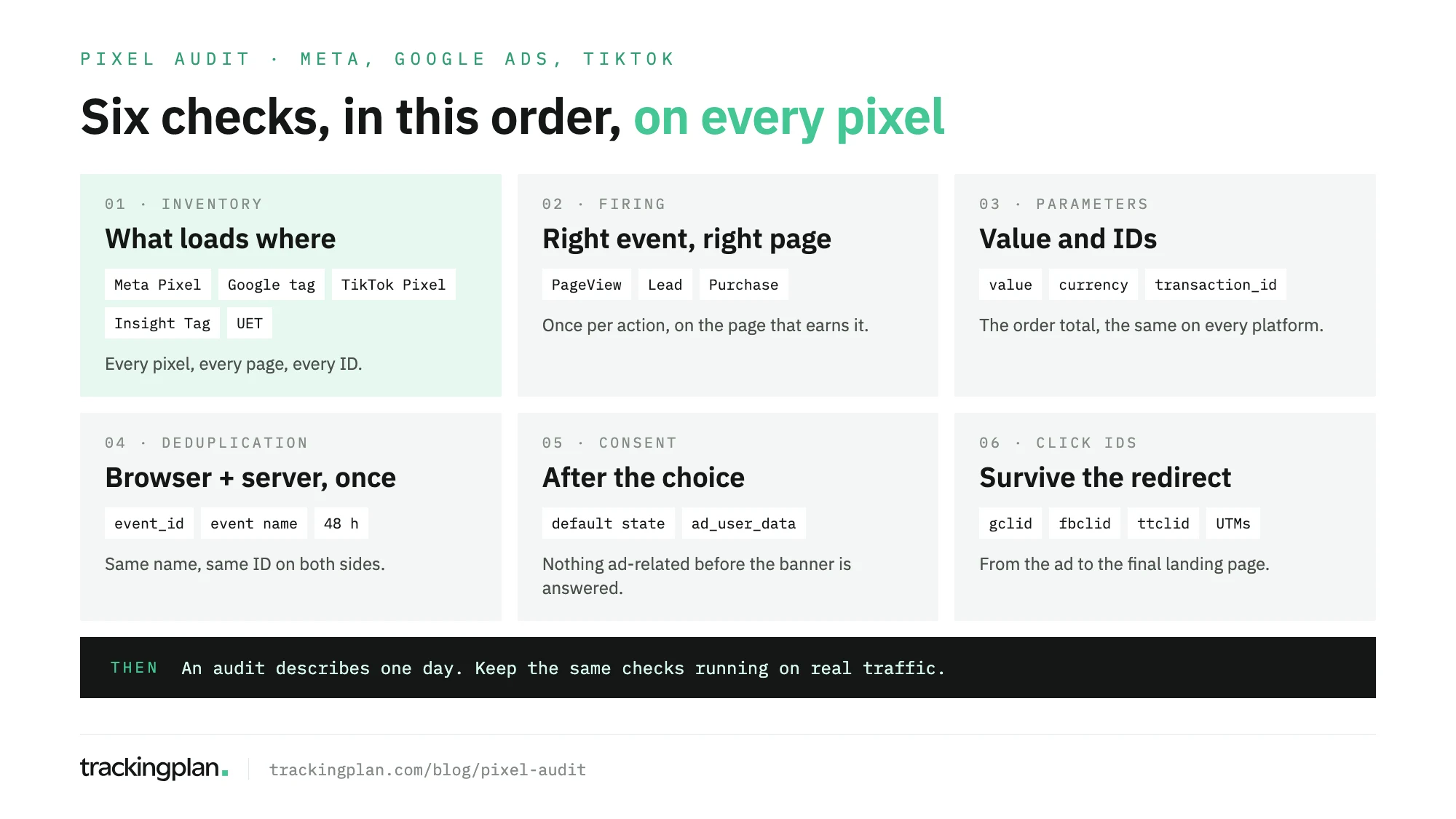
Step 1: build the pixel inventory
Start with a list, not a debugger. For every pixel, write down its ID, where it’s loaded (hard-coded, Google Tag Manager, a platform app or plugin) and the pages it loads on.
This is also the first half of a website tracking audit, and it is where the odd findings live:
- Two IDs for one platform. An old Meta Pixel from a previous agency next to the current one, both receiving purchases.
- One pixel loaded twice. Hard-coded in the theme and again in GTM, so every event fires double.
- A pixel missing where you pay for traffic. The campaign landing page built outside the main template, without the tag.
- Pixels nobody owns. A tag for a platform you stopped buying, still collecting data.
Mark which pixel each campaign optimizes for. That is the list the next five steps work through.
Step 2: check what fires, and where
Walk the funnel on each platform: page view, product view, add to cart, checkout, purchase or lead. Each action should fire once, on the page that earns it. A purchase that fires again when the thank-you page is reloaded is the classic miss.
The browser checkers help here, within limits:
- Meta. Meta’s developer docs say Meta Pixel Helper is now Meta Ads Data Advisor, for Chrome and Edge. Ad blockers must be off, and custom conversions and some advanced event types may not appear in it. Meta points to Test Events in Events Manager for those.
- TikTok. TikTok’s help center describes TikTok Pixel Helper, a Chrome extension that reports errors at three levels: pixel, event and parameter.
- Google Ads. Complete a test conversion and find the Google tag’s conversion request on the confirmation page, in the browser’s Network tab.
All three show your visit, in your browser. Note what you saw; Step 6 and the last section come back to it.
Step 3: check parameters and values
A pixel that fires with the wrong value is worse than one that doesn’t fire: the campaign learns from it. On a test order, compare what each platform receives with the order itself.
- Value equals the order total, with tax and shipping treated the same way on every platform.
- Currency is set on every purchase. TikTok Pixel Helper flags an invalid or unsupported currency code at the parameter level.
- Google Ads gets a transaction ID. Google Ads Help explains that a second conversion with the same
transaction_idfor the same conversion action is a duplicate and won’t be counted. In the request, it usually shows up asoid. - Customer data is hashed. For enhanced conversions, Google Ads Help says the first-party data (email, name, address or phone) is hashed with SHA256 before it’s sent. Check it is present on conversions, and never in plain text.
Step 4: check deduplication between browser and server
When the same conversion travels through the browser pixel and a server API, each platform needs a key to count it once.
- Meta. Meta’s developer docs require the Pixel’s
eventIDto match the Conversions API’sevent_id, and the event name to match too. Meta merges matching pairs that arrive within 48 hours of the first. - TikTok. TikTok’s help center asks for the same event and
event_idthrough Pixel and Events API. It keeps the first event it receives, and merges a Pixel and Events API pair that arrives after 5 minutes and within 48 hours of the first. - Google Ads. The
transaction_idfrom Step 3 does this job.
The usual failures: an ID generated separately in the browser and on the server, an ID sent on one side only, or a server event renamed during a migration. Each one turns one purchase into two. The patterns are in our post on CAPI deduplication issues.
Step 5: check consent
Run the funnel three times: before answering the banner, after accepting, and after rejecting. For each pixel, note what fires in each state.
Google’s developer docs sets the order: the default consent state goes on every page before any command that sends measurement data. ad_user_data covers sending user data for advertising to Google, and ad_personalization covers personalized ads. With ad_storage denied, no new advertising cookies are set.
Two findings matter most: a pixel that fires before the visitor chooses, and a pixel that keeps firing after a rejection. Both are compliance problems, and both are easy to miss in a browser that accepted the banner months ago. Server events need the same check, because they don’t see the banner unless someone passes the choice along.
Step 6: check click IDs and UTMs
A conversion without its click ID still counts somewhere, but not against the ad that earned it.
- Google Ads. Google Ads Help says the
gclidmust reach the final landing page when the site uses redirects. A small share of sites serve an error page on unknown URL parameters, so Google suggests testing by clicking your ad. - TikTok. TikTok’s help center says
ttclidis added to the landing page URL, and recommends the Preview button in Ads Manager to validate final URLs. - Meta. Follow each ad URL and check that
fbclidarrives on the final page.
Then the UTMs. Open every active ad URL, follow it through shorteners, country redirects and consent walls, and confirm the parameters are still there at the end. Check naming too: facebook, fb and meta are three sources in your analytics.
Keeping it checked after the audit
The audit is now true for the browser you tested, on the day you tested it. The next release can rename an event, drop the transaction ID or load a second pixel, and nothing in the ad platform says so.
That is the part Trackingplan covers. It reads the conversion, UTM and consent signals your real visitors send to Meta, Google, TikTok, Bing and the rest of the 170+ analytics and ad providers it recognizes, browser and server side. It checks Pixel against CAPI against GA4, so the same purchase is counted once with the same value, and it watches the click IDs and event_id that connect a conversion to its ad. When a pixel disappears from a page you send paid traffic to, you get a warning. With your ad accounts connected, it also reads spend, clicks, CPC, conversions and the UTMs and auto-tagging of each ad per campaign, so a pixel problem shows up next to the campaigns and the money it affects. Consent checks, on web and server-side traffic, are part of the Compliance add-on.
It names a cause only when two independent pieces of evidence agree, and if it can’t find one, it says so. It doesn’t touch campaigns, budgets or bids: it checks the signal they run on. Specific checks can be scheduled to run daily or weekly. The pixel checker shows which pixels and CAPI events fire on your real traffic.
FAQ
What is a pixel audit?
A pixel audit is a review of every advertising pixel on a website and of what each one sends: which pixels load on which pages, which events fire, the values and IDs they carry, whether browser and server events are counted once, whether they respect consent, and whether the click IDs that link a conversion to its ad survive the trip to the landing page.
Is a pixel helper extension enough for a pixel audit?
No. Meta Ads Data Advisor and TikTok Pixel Helper are good for step two, checking what fires on a page. They run in your browser, on your visit, with your consent choice. They don’t show server events, other browsers, or visitors who answered the banner differently.
How often should I run a pixel audit?
Run a full one when you take over an account, before a site migration or a checkout change, and after a new consent banner or a server-side setup goes live. Between audits, watch the same checks on real traffic, because one release can change what a pixel sends.
What is the difference between a pixel audit and a website tracking audit?
A website tracking audit covers everything the site sends, analytics included. A pixel audit is the part that feeds the ad platforms: Meta, Google Ads, TikTok, LinkedIn, Microsoft Ads and the rest. It is the part where an error changes what bidding learns.