
You’re usually not looking for a Meta pixel audit because things feel calm.
You’re looking because results stopped making sense. Meta says purchases are strong, GA4 disagrees, your ecommerce platform tells a third story, and nobody can say with confidence whether performance dropped because the campaign got worse or because tracking broke. That’s where most audits start.
In real accounts, the biggest problem isn’t just a missing Purchase event. It’s conflict. A site has a browser pixel, Conversions API, GTM changes, consent tooling, a Shopify app, GA4, maybe Segment or another server-side layer, and two old tags nobody removed. Meta still receives data, but the signal gets noisy. Once that happens, bidding logic starts learning from a distorted version of the customer journey.
A proper Meta pixel audit has to do more than confirm that a tag exists. It has to verify whether the data Meta receives is complete, deduplicated, privacy-safe, and consistent with the rest of your stack. That’s the difference between a cosmetic check and an audit that protects spend.
Why a Flawed Meta Pixel Is Silently Wasting Your Budget
A flawed Meta pixel rarely fails in a dramatic way. More often, it keeps firing just enough to create false confidence.
Teams see events in Events Manager and assume tracking is healthy. But if the domain isn’t verified, if key events fire inconsistently, or if the Event Match Quality is weak, Meta’s delivery system is optimizing on bad input. According to No Fluff’s Meta ads hygiene checklist), a broken Meta pixel or unverified domain can delay optimization by days and inflate CPC by up to 30%, and the recommended target is Event Match Quality ≥ 7/10.
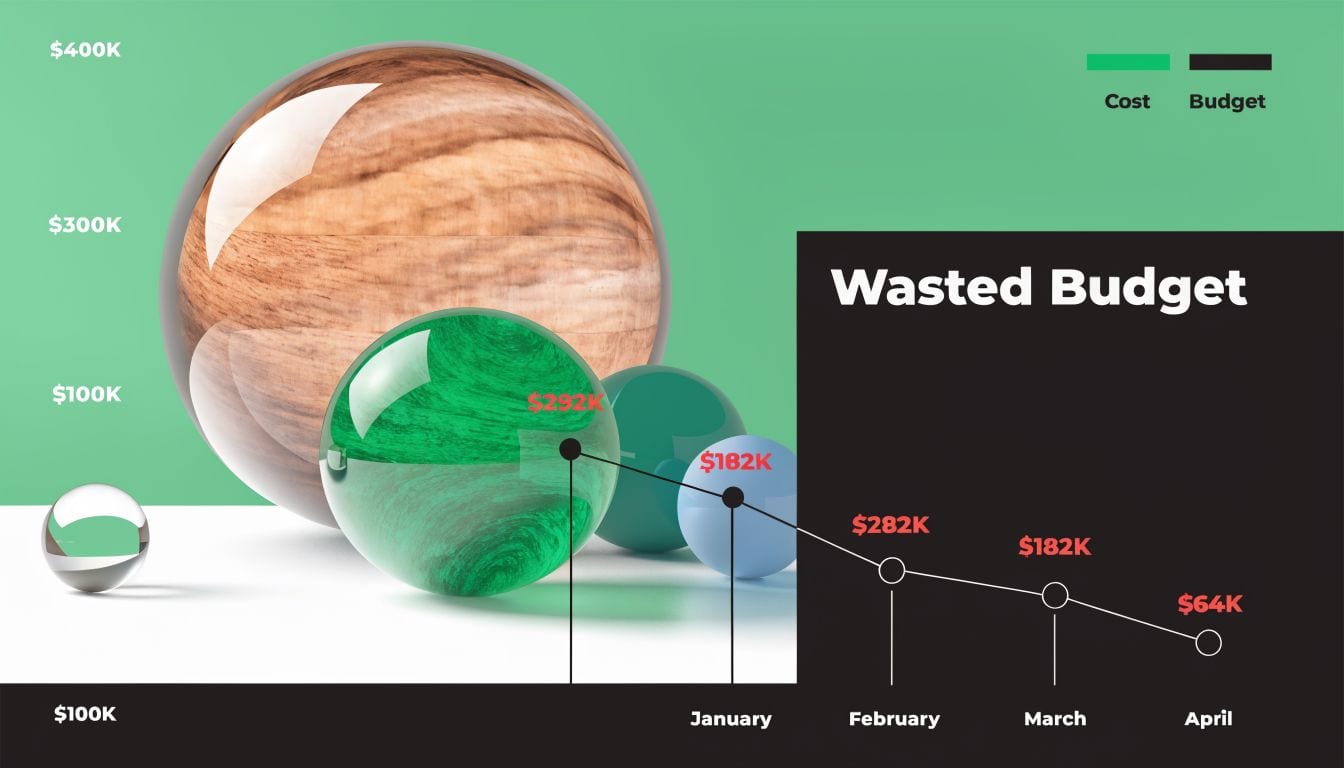
Bad tracking changes how Meta spends your money
Meta doesn’t optimize for what happened on your site. It optimizes for what it believes happened on your site.
If AddToCart fires twice, if Purchase is missing on Safari, or if your server event arrives without the identifiers Meta needs, the platform starts favoring the wrong users and placements. That usually shows up as unstable CPA, weak scale, and reporting debates that waste more time than the original bug.
Practical rule: If reporting across Meta, analytics, and backend revenue starts drifting, assume the signal is compromised before you assume the media strategy failed.
The business impact goes beyond media buying. Finance loses confidence in attribution. Growth teams stop trusting test results. Agencies spend weekly calls defending numbers instead of improving them. Good reporting only works when the underlying events deserve trust, which is why a disciplined review of tracking and reconciliation matters as much as campaign setup. If you want a cleaner view of how reporting affects return, Facebook Ads Reporting for a Larger ROAS is a useful companion read.
Event quality matters more than event volume
More events don’t automatically mean better optimization. Clean events do.
I’ve seen accounts with plenty of volume but poor signal because the same purchase was sent from a plugin, GTM, and a server connector at once. Meta had data. It just wasn’t reliable data. That’s a dangerous state because dashboards still look active while the algorithm learns from duplicates, mismatched values, or missing parameters.
A healthy audit ties every technical fix back to one question: does this make the conversion signal more trustworthy? If the answer is no, it’s busywork. If the answer is yes, it protects budget, speeds up learning, and gives your team something rare in paid social reporting, numbers people can use.
Assembling Your Audit Toolkit and Discovering Pixels
Before testing anything, get visibility into what’s firing on the site. Most broken audits start with a bad assumption: that the only pixel present is the one everyone knows about.
That’s often wrong on sites with agency transitions, app integrations, plugin-based tracking, or multiple containers. Start with a browser, a test plan, and access to the right places in Meta.

What I use first
At minimum, have these ready before the audit begins:
- Meta Events Manager access: You need to inspect incoming events, compare browser and server activity, and use Test Events.
- Meta Pixel Helper: The Chrome extension gives fast page-level feedback on what fires and where errors appear. If you need a refresher on how it works, this guide on Meta Pixel Helper is worth keeping open during testing.
- Tag manager access: GTM is the usual one, but the same logic applies if the site uses another tag deployment layer.
- A staging-safe test path: Ideally a live path where test transactions won’t trigger operational issues.
- Consent management visibility: If Cookiebot, OneTrust, or another CMP controls marketing consent, you need to know what should happen before and after user choice.
Discovery comes before diagnosis
Don’t begin in Ads Manager. Begin in the browser.
Load the homepage, product pages, cart, checkout, and confirmation page with Meta Pixel Helper active. Note every pixel ID that appears. Then inspect GTM or the site code and match what you saw against what should be there. You’re looking for the official implementation, but also for old pixel IDs, hardcoded remnants, app-injected scripts, and events triggered outside your main tracking logic.
Three patterns show up constantly:
- Legacy pixels still firing after a migration or agency handoff.
- Duplicate event triggers where a platform app and GTM both send the same action.
- Partial implementations where some events live in the browser and others only exist server-side.
If you can’t map every active Meta-related data source on the site, you’re not auditing yet. You’re guessing.
That’s also why video walkthroughs help. This one gives a useful visual reference for analytics QA workflows during setup:
Build a pixel inventory before you test conversions
Create a simple audit sheet with these columns:
| Item | What to record |
|---|---|
| Pixel ID | Which Meta pixel is firing |
| Location | Which pages or templates trigger it |
| Deployment method | GTM, hardcoded script, app/plugin, server integration |
| Expected events | PageView, ViewContent, AddToCart, Purchase, or custom events |
| Owner | Marketing, dev, agency, ecommerce platform, or analytics team |
| Risk notes | Duplicate, unknown source, legacy tag, consent-sensitive |
This inventory sounds basic, but it changes the quality of the whole Meta pixel audit. Once you know every implementation path, event testing stops being abstract. You can trace failures to a specific system and fix the right layer instead of patching symptoms.
Validating Events and Deduplication End-to-End
This is where the audit becomes real. Open Meta Events Manager, use Test Events, and walk through the funnel as a user would. Don’t check events in isolation. Check the story they tell from landing page to purchase.
For ecommerce, I like to test one complete path: homepage, product page, add to cart, begin checkout, complete order. Then I repeat across a different browser or device if possible. The point isn’t volume. It’s confirming consistency.
Run the funnel like a customer
A proper pass should verify these things at each step:
- The expected event appears:
PageView,ViewContent,AddToCart,InitiateCheckout, andPurchaseif those are part of your setup. - It fires once per action: Not twice, not after a refresh loop, and not from multiple containers.
- Parameters make sense:
value,currency, product identifiers, and event names should reflect the actual action. - Browser and server both show up when intended: In Events Manager, check whether both delivery paths are represented for the same conversion event.
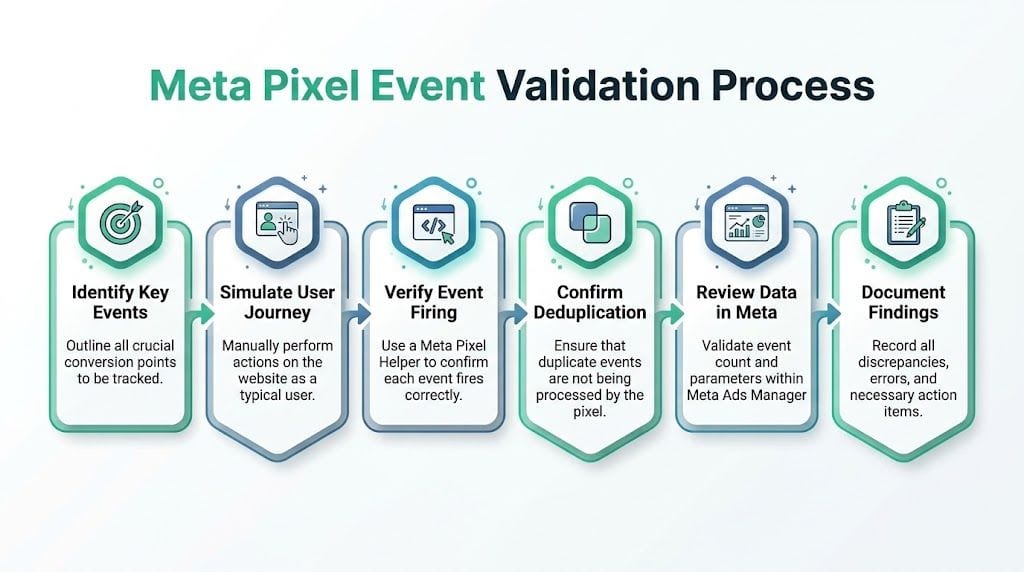
The browser event and the server event must agree
A lot of teams stop once they see the browser pixel fire. That’s not enough anymore.
When browser Pixel data and Conversions API data align correctly, ad optimization success rates can improve by 30-50%, and incorrect deduplication affects 40% of setups according to The Brand Amp’s paid media audit checklist. That’s why I always check both paths together, not separately. If you’re working through server-side validation in parallel, this overview of the Meta Conversions API is a good reference.
Here’s the practical test. Trigger a purchase. In Events Manager, confirm the purchase arrives from the browser source and the server source if both are implemented. Then inspect whether they share the identifiers needed for deduplication. If they don’t, Meta may count what should be one conversion as two.
What usually breaks in real accounts
The failures are usually boring, which is why they survive so long.
| Failure | What it looks like in testing | What it usually means |
|---|---|---|
| Duplicate Purchase | One order appears as multiple conversions | Browser and server events aren’t deduplicated correctly |
| Missing value or currency | Event fires but revenue reporting is unusable | Parameter mapping is incomplete or broken |
| Wrong event sequence | Purchase appears without checkout steps | Event logic is tied to page loads, not real actions |
| One browser works, another doesn’t | Event inconsistency across test runs | Consent, script loading, or browser-specific blocking is involved |
| Custom event drift | Old event names still appear in Test Events | Legacy code or app logic was never removed |
Audit the funnel in order. When you skip straight to
Purchase, you miss the weaker signals that shape optimization long before a user buys.
Use a repeatable test routine
A clean workflow beats improvisation. This is the sequence I use most often:
- Start in Test Events and enter the site URL you’re validating.
- Clear browser noise by using a fresh session where possible.
- Perform the journey deliberately. Visit a product, add it to cart, begin checkout, and complete the purchase.
- Check live event arrival in Events Manager as each step happens.
- Open Pixel Helper on each page to catch duplicate fires, missing tags, or script errors.
- Compare event payload logic against the business action. A purchase should carry purchase-level detail, not just a generic page load.
- Document every discrepancy immediately with page URL, event name, and likely source system.
That last step matters more than people think. Audits often fail because nobody writes down whether the issue came from GTM, an ecommerce app, or the server connector. Without that, fixes stall between teams.
Deduplication is a business problem, not just a technical one
When deduplication fails, Meta thinks the account is generating more conversions than it really is. That skews bidding, audience learning, and your internal understanding of what’s profitable. The media buyer scales too early, the client gets overconfident, and the next budget review becomes painful.
A reliable Meta pixel audit doesn’t stop at “event received.” It asks a stricter question: did Meta receive one accurate version of the event you intended to send? That standard is what keeps reported performance connected to actual revenue.
Auditing for Advanced Data Quality and Privacy Compliance
Once the core event flow works, the next question is whether the data is safe and usable.
A surprising number of implementations pass this basic test: events fire, conversions appear, campaigns run. But under the surface, the setup is still leaking quality. Parameters arrive malformed, personally identifiable information slips into payloads, consent rules aren’t enforced consistently, and Meta discards part of what it receives.
According to Pixis’ audit guide, broken tracking, including PII leaks such as unhashed emails, can trigger 15-30% data loss under GDPR/CCPA and cause Meta to discard events. The same source says that implementing CAPI correctly can raise event deduplication accuracy to 90%, versus 65% with a pixel-only setup.
Where advanced audits usually uncover risk
This stage isn’t about whether an event exists. It’s about whether the event deserves to be trusted.
Here are the issues I see most often:
| Issue | Symptom / How to Detect | Impact | Fix |
|---|---|---|---|
| PII in event payloads | Inspect request payloads and look for unhashed email or other direct identifiers | Meta may discard data, and compliance risk increases | Hash or remove sensitive fields before sending |
| Consent misfires | Marketing events fire before consent, or don’t stop after opt-out | Tracking becomes non-compliant and reporting gets distorted | Align tag firing with CMP state and test both consent states |
| Weak Event Match Quality | Events Manager shows poor or okay signal quality | Meta has less usable identity context for optimization | Improve parameter completeness and consistency |
| Schema mismatch across tools | Meta, GA4, and backend data describe the same action differently | Analysts can’t reconcile performance confidently | Standardize event names, values, and product identifiers |
| Browser-only reliance | Server-side backup is absent or incomplete | More events are lost when browser conditions block tracking | Strengthen CAPI and verify parity with browser events |
Better data quality usually comes from boring discipline. Stable schemas, clear consent logic, and payload reviews beat quick fixes every time.
If your broader team is formalizing governance around event hygiene, this practical guide on how to improve data quality is useful context beyond Meta alone.
Event Match Quality is a performance issue
People often treat Event Match Quality as a diagnostic label that sits in Events Manager and doesn’t need immediate action. That’s a mistake.
If the score is weak, Meta has less confidence in connecting site behavior to ad exposure. You’ll still get data, but the signal is thinner and less dependable. That hurts optimization most when the account relies on automated bidding and broad targeting, because those systems need clean feedback loops.
Focus on consistency. The same purchase shouldn’t have one shape in the browser, another on the server, and a third in your warehouse. Fix the mapping once, then test after every material site change.
Privacy checks belong inside the audit, not after it
Teams still split “tracking validation” and “privacy review” into separate workstreams. In practice, that creates blind spots.
Consent logic changes event volume. PII handling changes whether events are usable. Server-side enrichment changes what Meta receives. These aren’t adjacent topics. They are part of the same Meta pixel audit because they directly affect what the platform can optimize against and what your team can safely defend.
Moving from Manual Audits to Automated Monitoring
Manual audits still matter. They force you to inspect the funnel closely and understand how the implementation works. But they’re snapshots.
The problem is that your tracking stack keeps changing after the audit ends. Developers push a checkout update. A plugin changes how product IDs are formatted. Someone adds a new tag in GTM. Consent rules shift. Suddenly the setup you validated last month is already different.
In multi-tracking environments, overlapping martech stacks can create event duplication and schema mismatches that degrade Meta’s algorithm, and automated platforms can detect broken pixels or consent issues in real time, helping prevent the 30-50% signal loss seen on complex sites according to Leadenforce’s analysis of hidden Meta campaign problems.
Why periodic audits stop being enough
The bigger your stack, the less practical it is to rely on calendar-based checks alone.
A quarterly Meta pixel audit can absolutely catch major issues. What it won’t do is alert you the day a release causes Purchase events to disappear from one browser family, or when a rogue custom event starts firing from a new app integration. By the time someone notices in reporting, the media team has already optimized on bad data.
That’s why mature teams shift from audit projects to monitoring systems.
What automated monitoring should actually watch
Many teams often overcomplicate things. You don’t need alerts for everything. You need alerts for the failures that change business decisions.
A useful monitoring setup should flag:
- Missing core events: If
Purchase,AddToCart, or lead events stop arriving or drop unexpectedly. - Rogue events: New event names or parameters that appear without approval.
- Schema drift: Product IDs, values, currencies, or event properties changing format.
- Consent failures: Marketing events firing when they shouldn’t, or being blocked when they should fire.
- Campaign tagging errors: UTM changes that break downstream attribution and reporting.
- PII risk signals: Payload changes that introduce sensitive data into destinations.
One option teams use for this is Trackingplan, which continuously discovers martech implementations and monitors analytics and marketing destinations for issues such as broken pixels, schema mismatches, UTM errors, consent misconfigurations, and potential PII leaks. That’s materially different from a manual checklist because it focuses on change detection, not just one-time validation.
The real shift is operational
The value of automation isn’t convenience. It’s response time.
When a manual audit finds a problem, the issue may have existed for weeks. When monitoring catches it early, the analyst can route the alert to dev, marketing, or data engineering before campaign learning degrades. That changes the operating model from reactive cleanup to controlled governance.
The best audit outcome isn’t a cleaner spreadsheet. It’s a system that tells you when the spreadsheet is about to become wrong.
If you manage multiple client sites or a large in-house stack, this also reduces the political friction around attribution. Instead of arguing about whose dashboard is right, teams can inspect the exact change that introduced the discrepancy. That makes root-cause analysis faster and prevents the same category of error from recurring.
For teams that want a stronger handle on automated analytics QA, Trackingplan’s YouTube channel is worth browsing for product walkthroughs and monitoring examples. The useful part isn’t the interface. It’s the operational mindset: treat tracking as a production system that needs observability, not as a tag you install once and trust forever.
A good Meta pixel audit gets you back to a known-good state. Continuous monitoring helps you stay there.
If your team is tired of finding broken Meta tracking only after reporting goes sideways, take a look at Trackingplan. It gives analysts, marketers, developers, and agencies a way to detect broken pixels, rogue events, schema mismatches, consent issues, UTM errors, and potential PII leaks as they happen, so you can fix tracking before it starts distorting campaign performance.