
TL;DR:
- Properly configured Consent Mode v2 can recover up to 40% of lost data through accurate audits.
- Auditing involves checking default consent settings, parameter firing order, and real user scenarios regularly.
- Treat Consent Mode as a living system, continually monitoring and involving legal and technical teams for compliance and data accuracy.
Enabling Google Consent Mode v2 feels like checking a compliance box, but most teams discover too late that a misconfigured implementation quietly drains their data. Some organizations recover up to 40% of lost data after fixing their setup, which tells you just how much is silently slipping away before the audit happens. This guide walks digital marketing teams and analytics professionals through exactly how Consent Mode v2 works, what a rigorous audit looks like, and the specific mistakes that trip up even experienced practitioners. You will leave with actionable steps, not just theory.
Table of Contents
- Understanding Google Consent Mode v2 fundamentals
- Step-by-step audit methodology for Consent Mode v2
- Common pitfalls and real-world edge cases
- Maximizing compliance and analytics performance post-audit
- The uncomfortable truth about Consent Mode audits
- Audit smarter: Unify compliance and analytics with Trackingplan
- Frequently asked questions
Key Takeaways
| Point | Details |
|---|---|
| Audit every parameter | All four Consent Mode v2 parameters must be audited for compliance and accurate analytics. |
| Advanced mode boosts data | Switching to Advanced mode with legal approval can recover significant lost conversions and modeling accuracy. |
| Include edge-case tests | Testing rare scenarios and using runtime tools helps catch common misconfigurations and regional gaps. |
| Regular reviews required | Quarterly audits and ongoing monitoring are essential to maintain both compliance and data integrity. |
Understanding Google Consent Mode v2 fundamentals
Before you can run an effective audit, it is critical to understand exactly how Consent Mode v2 works at a technical and legal level. Getting this foundation right changes how you interpret audit results and prioritize fixes.
Consent Mode v2 operates through four consent parameters: "analytics_storage, ad_storage, ad_user_data, and ad_personalization`. Each controls a distinct slice of what Google tags are allowed to do based on a user’s consent choices. Miss one, and you are either over-collecting data or under-reporting it.
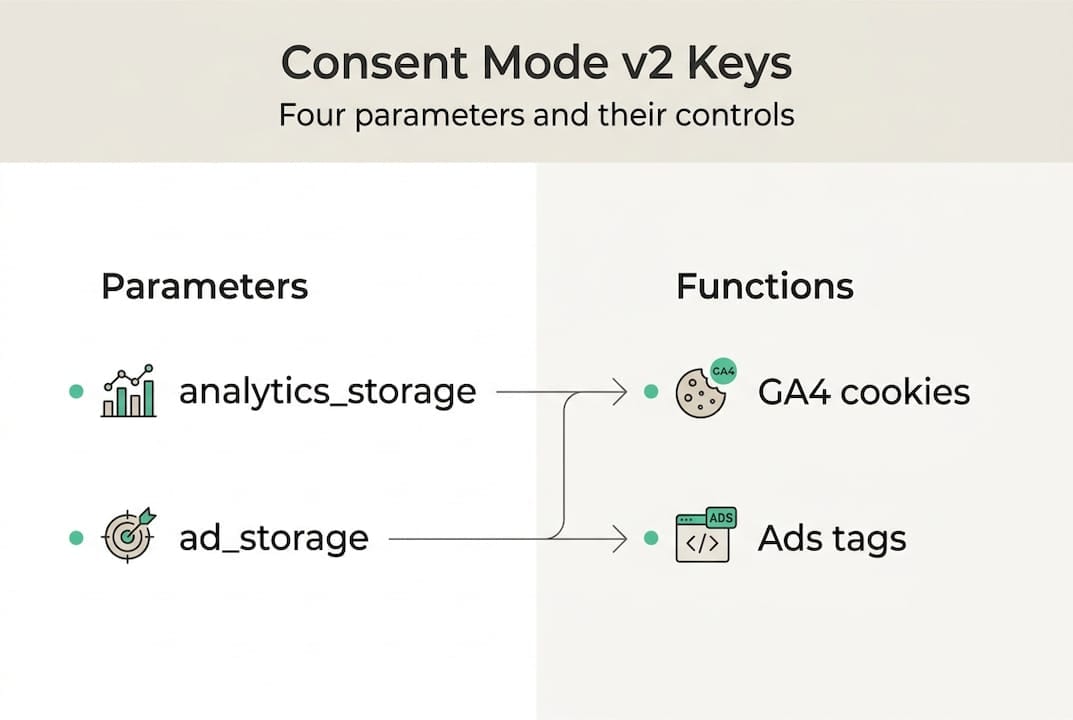
Here is a quick reference for each parameter:
| Parameter | Controls | Default risk if misconfigured |
|---|---|---|
| analytics_storage | GA4 measurement cookies | Gaps in session and event data |
| ad_storage | Advertising cookies | Broken remarketing audiences |
| ad_user_data | Sending user data to Google Ads | Missing conversion signals |
| ad_personalization | Personalized ad targeting | Compliance violations |
The platform also runs in two distinct modes. Basic mode blocks all tags until the user grants consent, sending no data to Google before that point. Advanced mode allows cookieless pings to fire even before consent, enabling Google’s modeling algorithms to fill in gaps. Advanced mode is more powerful for data recovery, but it requires a legal review under GDPR because those pings still transmit behavioral signals.
Key behaviors to understand before auditing:
- Default values fire before any user interaction, so incorrect defaults immediately skew your data.
- Consent choices must update parameters in real time, not after a page reload.
- Advanced mode’s Google Ads consent parameters govern how conversion modeling works across campaigns.
- A solid consent management overview helps clarify where technical config ends and legal obligation begins.
Pro Tip: Always involve your Data Protection Officer (DPO) before enabling Advanced mode. The cookieless pings it sends can raise GDPR questions that your legal team needs to evaluate, not just your analytics team.
Understanding these fundamentals is not optional. Every audit decision you make downstream depends on knowing which mode you are in, which parameters are active, and what your legal team has signed off on.
Step-by-step audit methodology for Consent Mode v2
With the basics in mind, you are ready to systematically audit your Consent Mode v2 implementation. A structured approach prevents you from missing the subtle issues that cause the biggest data losses.
Follow these steps in order:
- Verify default consent status. Open Google Tag Assistant and check the Consent tab before any user interaction. You should see all four parameters with their default values. If the tab is empty, your implementation has not fired at all.
- Confirm parameters fire before tags. In the Tag Assistant timeline, consent parameters must appear before any GA4 or Google Ads tags. If tags fire first, your defaults are late and your data is already compromised.
- Check GA4 Data Streams for consent signals. Navigate to Admin > Data Streams > your stream, and review the consent settings. Confirm that the stream is receiving properly gated events.
- Review Google Ads Diagnostics. Inside Google Ads, go to Tools > Diagnostics and check for consent-related warnings. This surfaces missing
ad_user_dataandad_personalizationsignals that are invisible in GA4. - Run decline and accept scenarios. Manually decline consent in your banner, then inspect the Network tab for cookieless pings. Accept consent and verify that full cookies and tags fire correctly. Use an incognito window to reset state between tests.
- Check for duplicate consent updates. Multiple consent update calls can override each other unpredictably. Look for repeated
gtag('consent', 'update', ...)calls in the Tag Assistant log.
For a broader context, the complete web analytics audit steps and the GA4 audit checklist cover complementary checks that pair well with this process. If you run paid campaigns, the Google Ads Audit Tool adds another layer of verification.
A consent audit is only as good as its test scenarios. If you only test the happy path, you will miss the edge cases that affect real users.
Pro Tip: Include edge-case scenarios such as users who dismiss the banner without choosing, users on slow connections where the CMP loads late, and users returning with an existing consent cookie from a previous session.
Common pitfalls and real-world edge cases
Even the best-planned audits can miss details. Let’s highlight where most teams get tripped up and how to spot those hidden gaps.

The most common misconfigurations versus ideal setups look like this:
| Issue | What teams do | What they should do |
|---|---|---|
| Missing EEA defaults | No default set for EU traffic | Set denied defaults for EEA regions |
| Non-certified CMP | Using an uncertified consent platform | Use a Google-certified CMP |
| Late consent updates | Parameters update after tags fire | Ensure consent loads synchronously before tags |
| Ignoring ad_user_data | Only configuring analytics_storage | Audit all four parameters explicitly |
Real-world edge cases that regularly catch teams off guard include:
- Empty consent tab in Tag Assistant. This means either no implementation exists or the CMP tag is being blocked by an ad blocker or browser extension during testing.
- Region-specific defaults not configured. GDPR applies to EEA users, but many implementations set global defaults rather than region-specific ones, creating legal exposure.
- Server-side tracking gaps. Server-side setups do not automatically inherit consent signals. You need to explicitly pass consent state to your server-side container. Learn more about server-side tracking consent to avoid this gap.
- Iframe complications. Embedded iframes from third-party tools often operate outside your CMP’s scope, sending data regardless of user consent.
- Low consent rates from poor banner UX. If fewer than 60% of users accept, your modeled data quality drops significantly. Banner design and copy directly affect your analytics accuracy.
For a deeper look at the regulatory side, privacy compliance best practices covers the legal landscape that shapes these technical decisions. You can also consult the official Consent Mode v2 troubleshooting guide for Google’s own diagnostic recommendations.
One underappreciated insight: runtime scanners consistently outperform manual scenario testing because they observe real user behavior across thousands of sessions, not just your curated test cases. Manual testing catches obvious errors. Runtime monitoring catches the ones that only appear in production.
Maximizing compliance and analytics performance post-audit
Once you have run your audit and patched the gaps, the next challenge is maximizing impact and proving results.
The first thing to set realistic expectations about is timing. Advanced mode recovers 30 to 70% of lost conversions through modeling, but that modeling takes at least seven days to stabilize and is typically visible in reports four weeks after implementation. Do not panic if you do not see immediate gains.
Key actions to sustain performance after your audit:
- Run quarterly audits using Tag Assistant combined with runtime monitoring tools. Consent Mode configurations break silently when CMP vendors push updates or when new tags are added to your container.
- Monitor consent rates by region. If rates drop below 80%, prioritize Advanced mode after your legal team approves it, since modeling fills more of the gap.
- Optimize your consent banner. A/B test button placement, copy, and color contrast. A 10% improvement in opt-in rate can meaningfully reduce your reliance on modeled data.
- Check page coverage. If Consent Mode is only firing on some pages, your modeling will be incomplete. Verify that your CMP and GTM container load on every page type, including checkout, thank-you pages, and blog posts.
- Integrate results into review cycles. Use GA4 anomaly detection to flag sudden drops in consent signals or conversion modeling, and connect those findings to your marketing data governance process.
Pro Tip: Blend scenario-based testing with runtime monitoring for the highest reliability. Scenario testing validates your setup at a point in time. Runtime monitoring tells you whether it stays valid as your site evolves.
Tracking the benchmarks for data recovery over time gives your stakeholders concrete evidence that the audit investment paid off.
The uncomfortable truth about Consent Mode audits
All the how-tos and best practices matter little if your overall audit mindset is off. Here is what most experts will not say out loud.
Most organizations treat Consent Mode v2 as a one-time technical deployment. They configure it, test it once, and move on. The problem is that consent configurations degrade. CMP vendors push updates, new tags get added, regional regulations shift, and nobody notices until a compliance review or a sudden data drop triggers an investigation.
Manual audits, even thorough ones, only catch surface-level errors. They cannot observe how real users interact with your consent banner across different devices, browsers, and network conditions. That gap is where the real risk lives. As Consent Mode v2 configurations grow more complex, the distance between what you tested and what users actually experience widens.
The teams that get this right treat consent configuration as a living system, not a project deliverable. They involve their DPO in every significant change, use automated monitoring to catch regressions, and connect their data governance in audits process to real compliance outcomes. Technical accuracy and legal alignment have to move together, or neither holds.
Audit smarter: Unify compliance and analytics with Trackingplan
If you want to avoid repeating the same mistakes and move from reactive fixes to proactive control, purpose-built solutions can transform your approach.
Trackingplan continuously monitors your analytics and marketing implementations, catching Consent Mode misconfigurations, missing parameters, and broken tags before they affect your data or your compliance posture. Instead of waiting for a quarterly manual audit to surface problems, you get real-time alerts the moment something breaks. Explore how Trackingplan integrates with your digital analytics tools to automate the monitoring layer your team is missing, and visit the privacy hub to see how privacy compliance fits into a broader analytics quality strategy.
Frequently asked questions
Which Consent Mode v2 parameters need to be audited?
You should audit all four consent parameters: analytics_storage, ad_storage, ad_user_data, and ad_personalization, verifying that each correctly reflects the user’s consent choice before any tags fire.
How often should I audit Google Consent Mode v2?
A quarterly audit using Tag Assistant combined with runtime monitoring tools is the recommended cadence, since CMP updates and new tag deployments can silently break your configuration between reviews.
Can server-side tracking bypass Consent Mode v2 restrictions?
No. Server-side tracking still requires explicit consent, and you must pass consent state to your server-side container manually since it does not inherit signals from your client-side CMP automatically.
What are the signs of a Consent Mode v2 misconfiguration?
The clearest warning signs include an empty consent tab in Tag Assistant, parameters updating after tags have already fired, duplicate consent update calls, and consent rates that drop unexpectedly below your regional baseline.