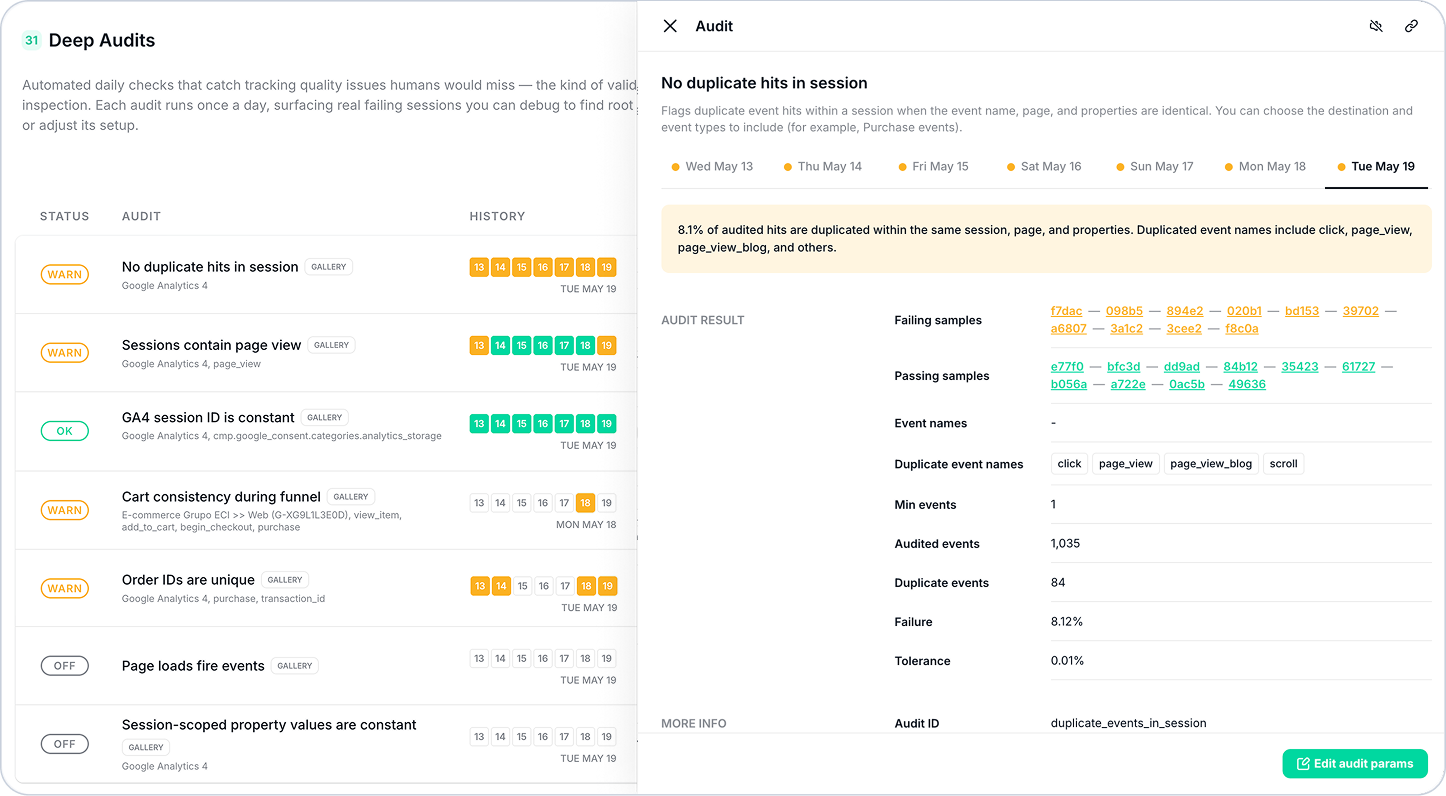
Deep Audits run a comprehensive set of complex validations across your tracking data while you sleep, so results are waiting by the time you open your laptop.
The Gap That Deep Audits Fill
Trackingplan has always monitored your data in real time, flagging individual event issues as they arrive. But a significant category of tracking problems is invisible at the event level; they only surface when you analyze full sessions, compare sequences of events, or cross-reference data across providers over time.
Finding these issues manually means navigating multiple views, writing queries, and running checks that depend on data that isn't easy to surface quickly. Most teams only do it periodically, during formal audits, which means problems can accumulate silently between reviews.
The Solution: Deep Audits
Deep Audits run every morning, automatically, across your entire plan. Minimal setup required to get started – Trackingplan ships with a gallery of pre-built validations covering the most impactful scenarios.
No duplicated hits in sessions
Flags duplicate event hits within a session when the event name, page, and properties are identical. You can choose the destination and event types to include (for example, Purchase events).
Sessions contain page view
Checks that every GA4 session contains at least one page_view event (anywhere in the session, any position). You can choose the destination and which events count as required.
GA4 session ID is constant
Validates that the GA4 session_id property does not change within a session, considering only hits where analytics consent was granted. Sessions without consent are excluded to avoid false positives.
Cart consistency during funnel
Checks that the product cart stays the same across funnel events (by default: begin_checkout, add_payment_info, purchase).
You can choose the destination and funnel events, or tune the tolerance for out-of-stock removals, validating that cart data — pricing, product information, applied discounts — remains consistent from the first funnel step through to order confirmation.
Order IDs are unique
Ensures each order ID appears only once across your tracked data, detecting duplicate order IDs within a day, where a duplicate means the same order ID appears in more than one matching order-completion event. You can choose the destination, your own order-completion events, and order ID field (default: transaction_id for GA4).
Page loads fire events
Detects page loads that don’t fire any of the configured events for the chosen destination. Use this to catch pages missing tracking (e.g., a GA4 page_view that did not fire).
Session-scoped property values are constant
Detects sessions where selected fields change within the same session. To run this audit, you’ll have to choose the destination and which fields to check (for example, GA4 and session_id).
How It Works
- Open your dashboard each morning: Deep Audits have already runo vernight. Each validation card shows its current status at a glance.
- Review results: Green means the audit has passed across all validated sessions. Yellow means one or more sessions failed, with an explanation of exactly why.
- Dig into failures: Click any failing audit to see the audit definition, affected providers, sessions validated, sessions failed, and tolerance details.
- Jump to the evidence: Click See tracks to open a failing session directly in Tracks Explorer and begin your investigation.
- Customize or mute: Adjust tolerance, minimum sessions, and destination scope by clicking on "Edit audit Params"
Need a Specific Validation?
The gallery covers the most universal scenarios, but every implementation has its own rules. Click Request new deep audit, describe the validation you need, and our support team will configure it for you.
For a full overview of all available audit types and configuration options, visit our documentation.
Need further assistance? Our support team is here to help!
Happy Tracking!