Deep Audits run a set of automated, complex validations across your tracking data every morning — checking session-level rules, multi-event relationships, and cross-provider consistency that would otherwise require extensive manual investigation.
Unlike Trackingplan’s real-time monitoring, which flags individual events as they arrive, Deep Audits operate across full sessions, time windows, and combinations of data that only become meaningful when analyzed together.
This makes it possible to catch issues that standard per-event checks fundamentally cannot:
- Broken funnel sequences
- Duplicate hits within a session
- Inconsistent attribution chains
- Or complex dependencies between events
How Deep Audits Work
Each morning, before the start of the working day, Trackingplan runs a predefined set of validations against your plan’s data.
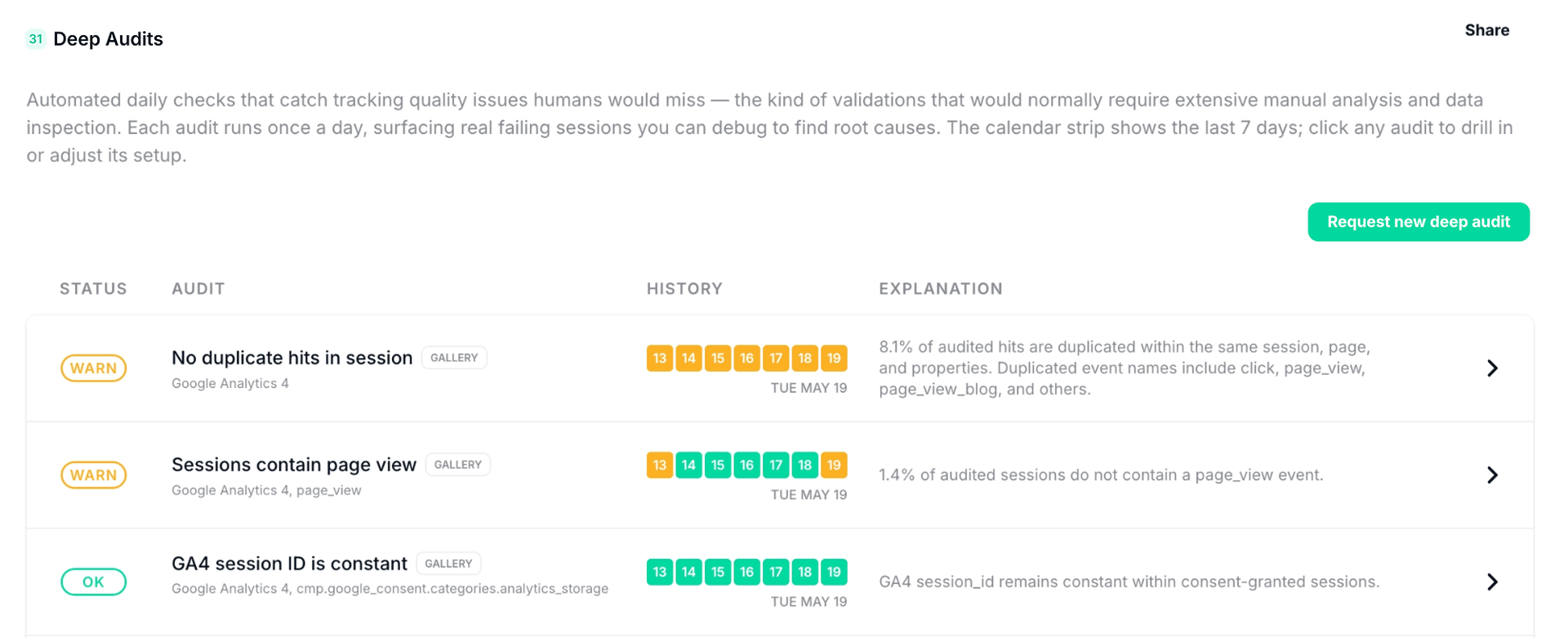
Every audit applies a specific validation and returns a daily status:
- OK (green): The audit is being met across all validated sessions.
- KO (yellow): One or more sessions did not meet the audit's conditions.
Predefined Audits
Trackingplan includes a set of pre-built audits labeled as Gallery, covering the most common and high-impact validation scenarios. These are active by default and can be used immediately, with a minimal setup to ensure the correct destinations, accounts, events, or fields are properly validated.
You can always mute them if they don’t match your business needs, tracking setup, or simply aren’t relevant to your team.
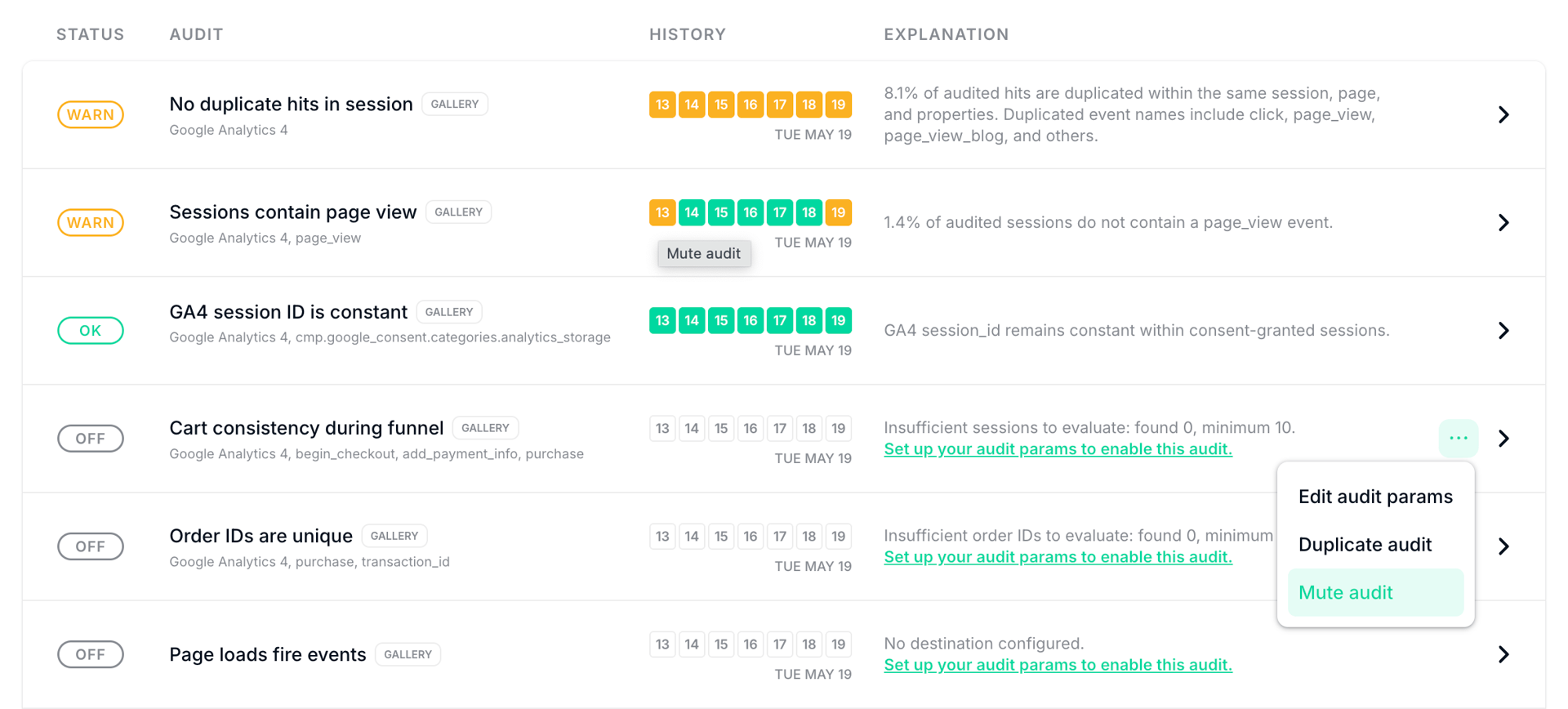
Available gallery audits include:
No duplicated hits in sessions
Flags duplicate event hits within a session when the event name, page, and properties are identical. You can choose the destination and event types to include (for example, Purchase events).
Sessions contain page view
Checks that every GA4 session contains at least one page_view event (anywhere in the session, any position). You can choose the destination and which events count as required.
GA4 session ID is constant
Validates that the GA4 session_id property does not change within a session, considering only hits where analytics consent was granted. Sessions without consent are excluded to avoid false positives.
Cart consistency during funnel
Checks that the product cart stays the same across funnel events (by default: begin_checkout, add_payment_info, purchase).
You can choose the destination and funnel events, or tune the tolerance for out-of-stock removals, validating that cart data — pricing, product information, applied discounts — remains consistent from the first funnel step through to order confirmation.
Order IDs are unique
Ensures each order ID appears only once across your tracked data, detecting duplicate order IDs within a day, where a duplicate means the same order ID appears in more than one matching order-completion event. You can choose the destination, your own order-completion events, and order ID field (default: transaction_id for GA4).
Page loads fire events
Detects page loads that don’t fire any of the configured events for the chosen destination. Use this to catch pages missing tracking (e.g., a GA4 page_view that did not fire).
Session-scoped property values are constant
Detects sessions where selected fields change within the same session. To run this audit, you’ll have to choose the destination and which fields to check (for example, GA4 and session_id).
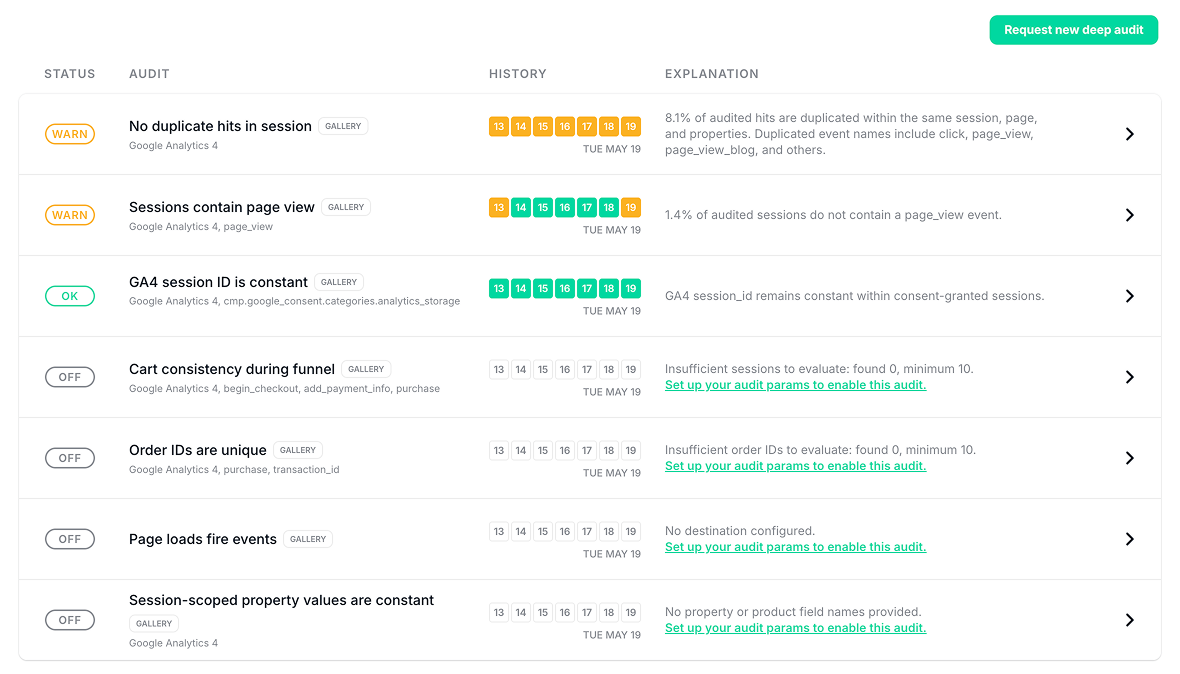
If you need a validation that isn't in the gallery, click Request new deep audit in your dashboard, describe what you need, and our support team will configure it for you.
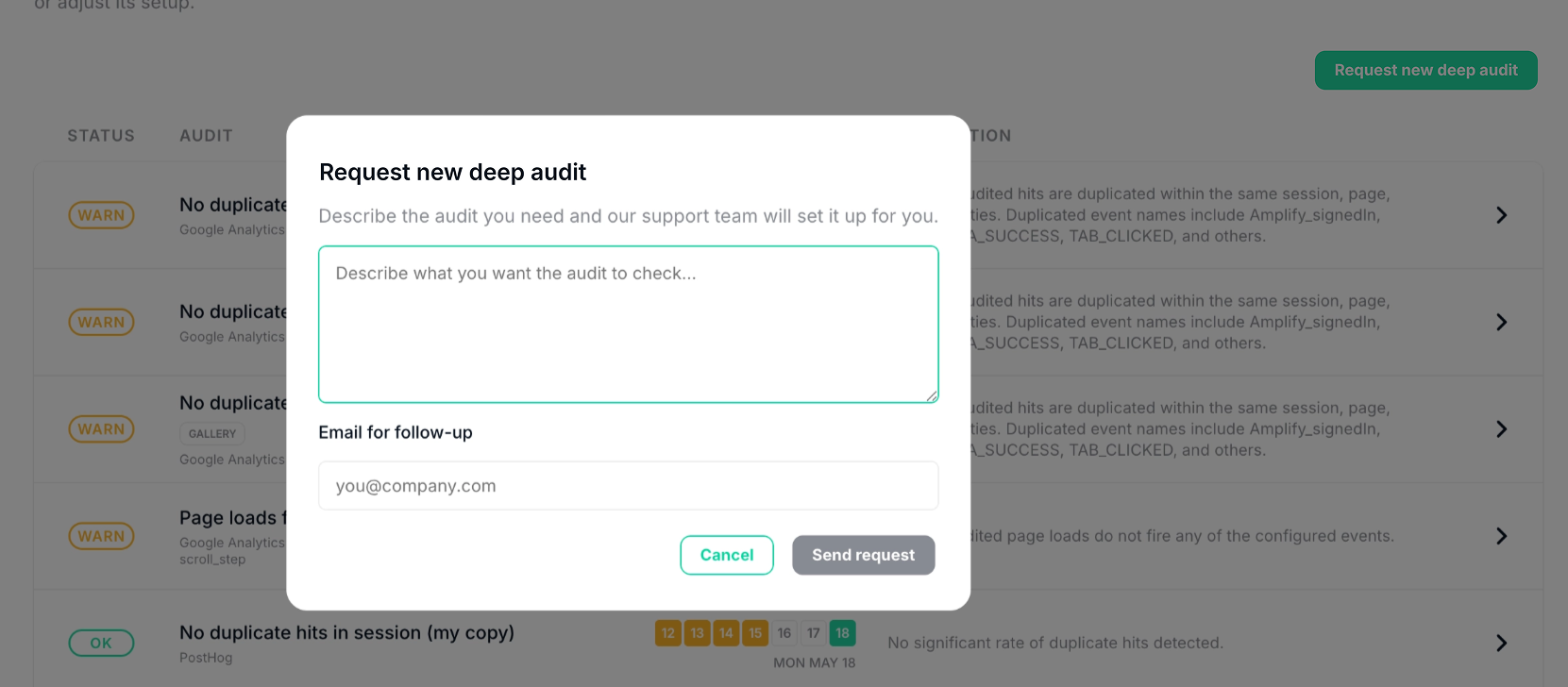
Reading Audit Results
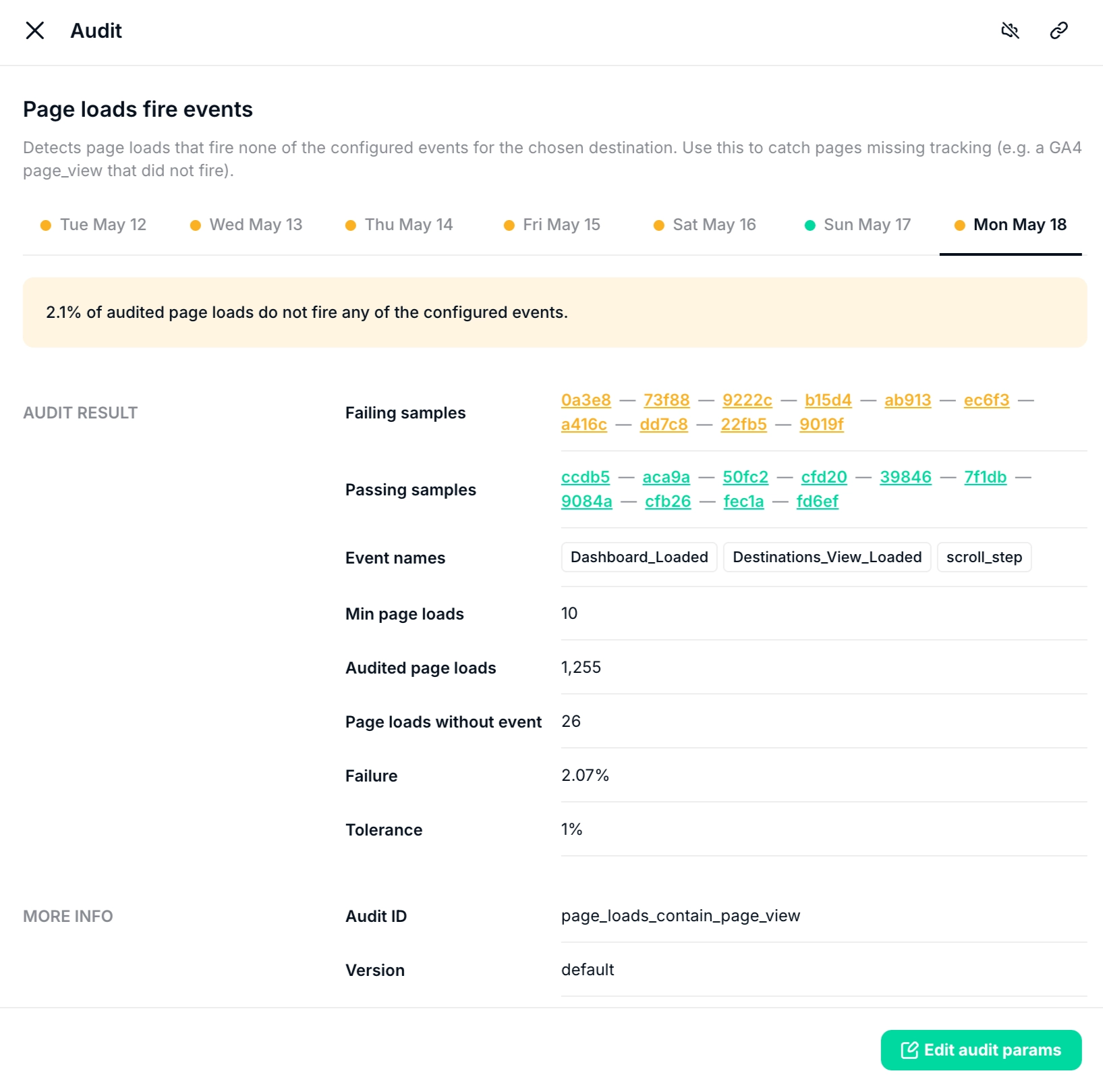
Selecting an audit opens its detailed view, where you can analyze its results in depth. Each audit detail includes the following sections:
Daily view
You can navigate results by day to track how validation behavior evolves over time.

Audit results
- Failing samples: A set of sessions where the validation did not pass. You can click any sample to inspect the exact tracks and identify the root cause of the failure.
- Passing samples: A representative set of sessions where the validation passed. These help you compare correct scenarios against failing cases.
- Event names: A list of all events monitored within the scope of the audit.
- Failure rate: The percentage of sessions that did not meet the validation criteria.
- Tolerance: The configured tolerance threshold used to determine whether deviations are acceptable. You can adjust this setting at any time by selecting “Edit audit parameters.”
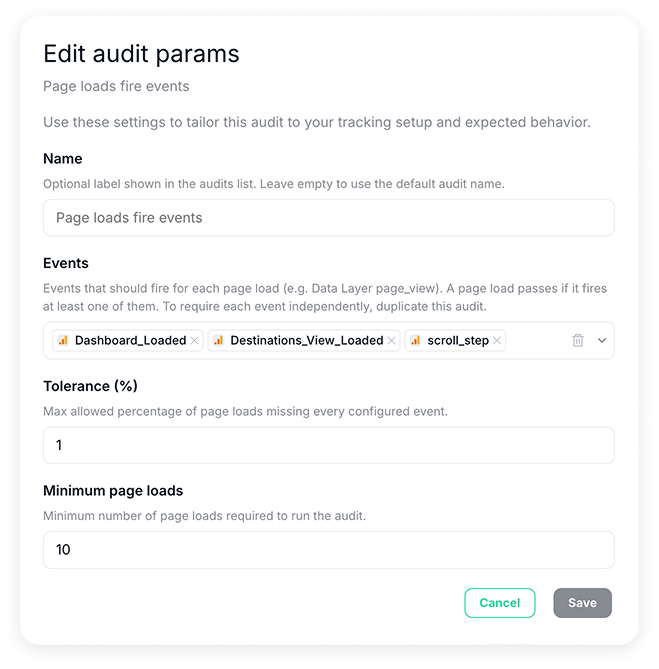
In the same configuration panel, you’ll also be able to modify the events monitored within the audit, limiting the audit scope to a specific analytics or marketing provider, or adjust the minimum number of page loads required for the audit to run.
More info
- Audit ID: A unique identifier assigned to each audit, used for tracking, debugging, and referencing the configuration across the system.
- Version: Indicates the current version of the audit configuration. This helps track changes over time and ensures you are reviewing or working with the correct setup.
Result History
Each audit maintains a history of daily results, allowing you to determine whether a failing validation represents a new issue or a recurring pattern. This is especially useful for distinguishing between a recent deployment introducing a regression and a long-standing problem that has gone undetected.
Investigating Failures
When an audit fails, click on Failing Samples to inspect a representative session that did not meet the audit’s conditions.
This will open Tracks Explorer with the relevant session context, where you can examine the full event sequence and identify the root cause.

Use Cases
Validate Purchase Funnel Integrity
Ensure that critical properties — pricing, currency, product identifiers, or discount codes — remain consistent from the first step of a purchase funnel through to the confirmation event.
Funnel inconsistencies are invisible to per-event monitoring because they only surface when multiple events are analyzed in sequence. A price change between the product page and the checkout confirmation, for example, might indicate a broken dataLayer push that's silently corrupting revenue attribution.
Deep Audits catch these cross-event discrepancies automatically every morning.
Enforce Universal Session Rules
Define conditions that every session must meet, such as always starting with a page view, or never containing two consecutive purchase events. That way, you’ll be alerted automatically whenever they're violated.
Universal rules are particularly useful for ensuring that fundamental implementation standards hold across your entire traffic, regardless of device, browser, or user path. Rather than periodically sampling sessions manually, Deep Audits run these checks exhaustively every day and surface any violations with the context needed to act.
Detect Duplicate Hits Before They Distort Paid Channel Performance
Automatically identify sessions where the same event fires twice with identical properties; a frequent cause of inflated conversion counts and incorrect attribution across Google Ads, Meta, and other paid channels.
Duplicate hits are notoriously difficult to detect because they require comparing multiple events within the same session context, something that isn't possible with real-time, per-event alerts.
Deep Audits run this check across your full session data before you start your day, flagging affected sessions with direct links so you can trace the root cause without any manual investigation.