
What is GA4’s Traffic Acquisition Report?
The Traffic Acquisition report in GA4 is a fundamental tool for digital analysts, providing a detailed breakdown of how users arrive at your website or app. Unlike previous versions of Google Analytics, GA4 enhances this report by offering more granular data on user activity, including traffic sources, channels, and mediums. This allows analysts to gain a comprehensive understanding of the user journey and pinpoint the traffic sources that generate the highest engagement and conversions.
One key feature of the GA4 Traffic Acquisition report is its flexibility—it lets you filter and segment data to focus on specific traffic channels, whether they are organic, paid, or referral sources. By comparing the performance of these channels, analysts can make data-driven decisions to optimize campaigns and improve user experience.
For those unfamiliar with setting up GA4’s traffic tracking, we recommend referring to our step-by-step GA4 setup guide, which covers the essentials of configuring acquisition reports effectively. You can also explore more technical details about this report in Google’s official documentation.
Learning how to effectively navigate and interpret GA4's Traffic Acquisition report helps digital analysts track the most critical metrics, improving both user journey analysis and overall marketing effectiveness.
Key Distinction: User Acquisition vs. Traffic Acquisition
While the User Acquisition report focuses on where users first interacted with your site, the Traffic Acquisition report tracks all sources of traffic during a session. Grasping the distinction between these reports helps you segment session data and analyze traffic sources more accurately.
For instance, you can use first-click attribution in the User Acquisition report to assess initial touchpoints, while the Traffic Acquisition report utilizes last-click attribution to analyze the final interaction before conversion.
For a deeper dive into how sessions and engagement metrics in GA4 can be leveraged for optimization, we recommend exploring our Sessions & Engagement guide for digital analysts. Additionally, you can find more insights on data-driven marketing strategies in this McKinsey report.
By using the actionable data from the Traffic Acquisition report, you can continually optimize your marketing efforts to enhance both user engagement and business outcomes.
Analyzing Traffic Sources in GA4
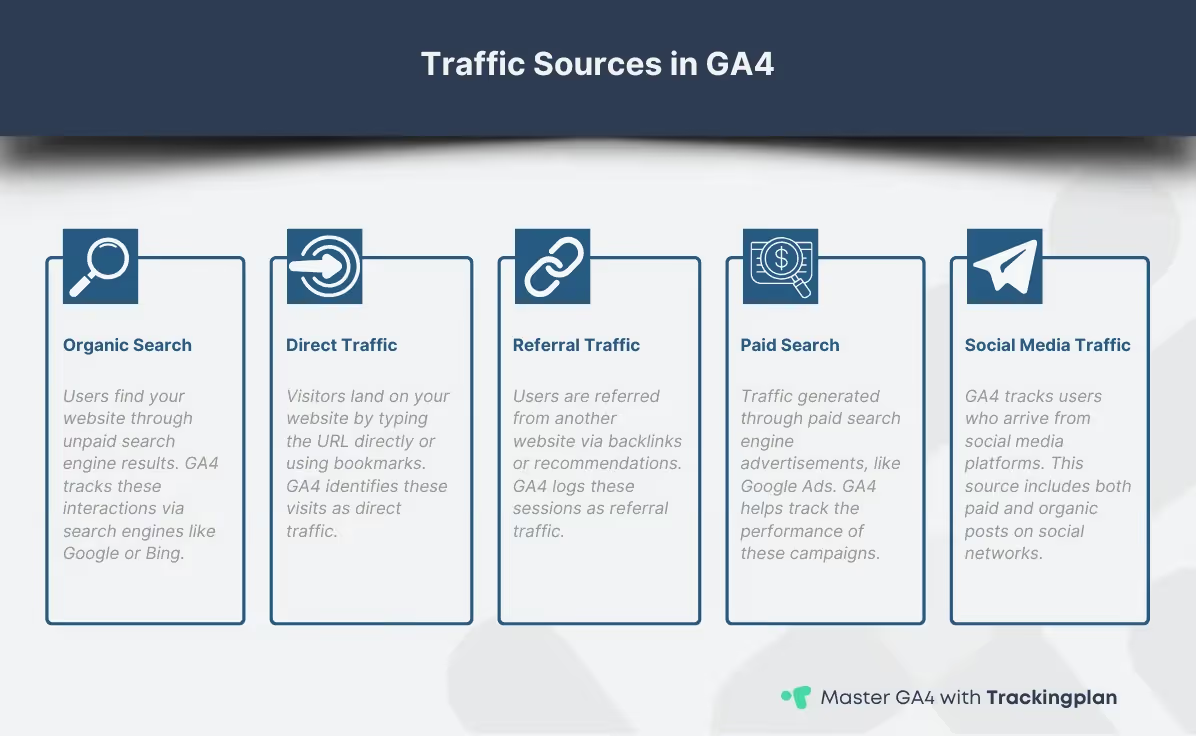
The Traffic Acquisition report in GA4 allows digital analysts to break down how different sources contribute to website traffic, helping you understand which channels perform best. Whether users are coming through direct, organic, or referral sources, each provides critical insights into your overall marketing efforts. Knowing how to interpret this data is essential for optimizing both the user journey and campaign effectiveness.
In GA4, traffic sources are categorized into channels like organic search, paid search, direct traffic, and referral links. For example, organic search might represent users arriving from search engines, while referral traffic tracks users coming from other websites. When you analyze the performance of these sources, you can assess which channels bring in the most valuable traffic, based on engagement, conversions, or session duration.
You can also customize your analysis by filtering or segmenting data according to your business needs using the report. This enables analysts to focus on specific marketing channels and adjust their strategies accordingly, ensuring they are driving quality traffic that enhances user engagement.
For those migrating from Universal Analytics, we recommend reviewing our checklist for transitioning to GA4, which provides detailed insights on adapting traffic source tracking. Additionally, our advanced traffic analysis guide delves deeper into the specifics of analyzing and optimizing these channels. Be sure to also check our upcoming post on analyzing user behavior with GA4 to further refine your approach.
By leveraging the Traffic Acquisition report in GA4, analysts can make data-driven decisions that enhance marketing performance and improve the user journey across all channels.
Attribution Models in GA4's Traffic Acquisition Report
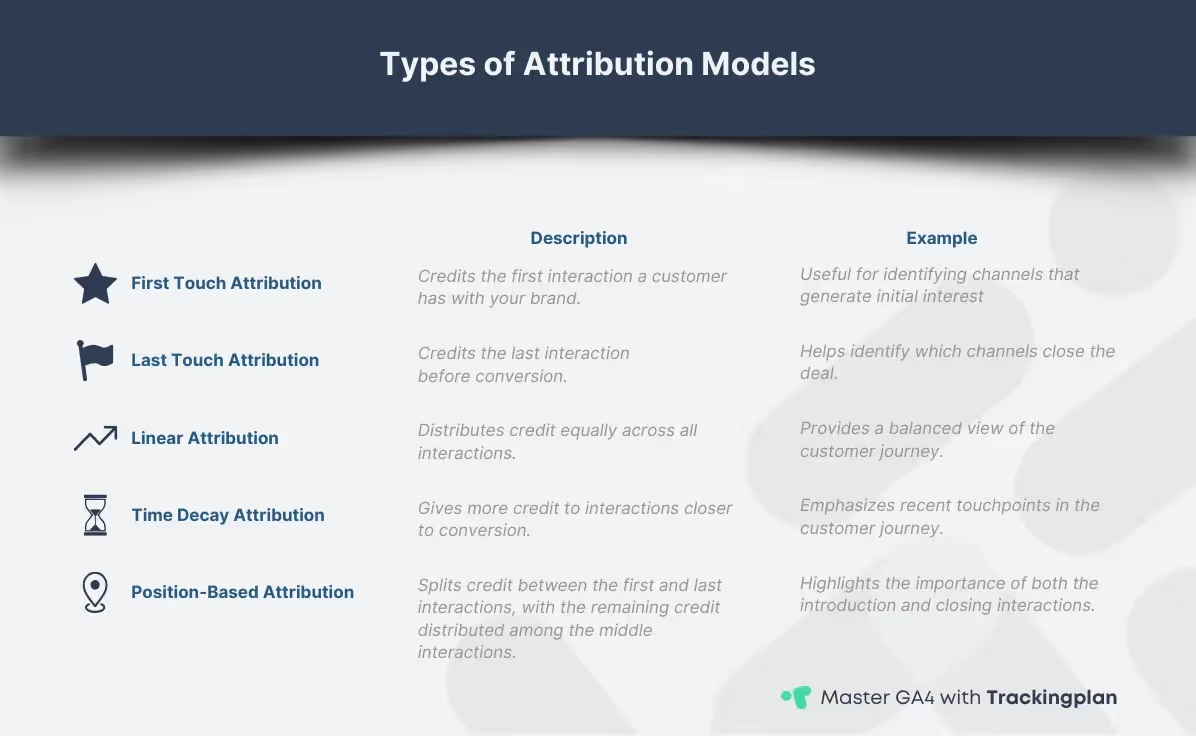
Attribution models in GA4 play a critical role in helping digital analysts understand the user journey and how different traffic sources contribute to conversions. These models determine how credit is assigned to various touchpoints in a user’s path, allowing analysts to evaluate the effectiveness of their marketing channels.
GA4 offers several attribution models, including last-click, first-click, and the more advanced data-driven attribution model, which uses machine learning to distribute credit across multiple interactions. Understanding these models is essential for interpreting the Traffic Acquisition report and making informed decisions about which channels are driving the most valuable traffic.
Choosing the right attribution model lets you examine how users engage with touchpoints throughout their journey, unlocking deeper insights into behavior and engagement. For instance, while the last-click model attributes credit to the final interaction, data-driven attribution provides a more holistic view of the entire journey, distributing credit based on each touchpoint’s impact.
To explore these attribution models in more detail, we recommend reviewing our in-depth guide to GA4 attribution models, which covers their practical applications for enhancing conversion tracking. You can also find further information in Google's official documentation on attribution models.
By leveraging attribution data from the Traffic Acquisition report, analysts can optimize their marketing strategies, ensuring that resources are allocated to the channels that truly influence the user journey.
Attribution Models Deep Dive: Last-Click vs. Data-Driven (DDA)
Attribution models determine how credit is assigned to different touchpoints. Your choice of model fundamentally changes how you interpret the Traffic Acquisition report, making this a critical optimization decision.
Using Traffic Acquisition Data for Optimization
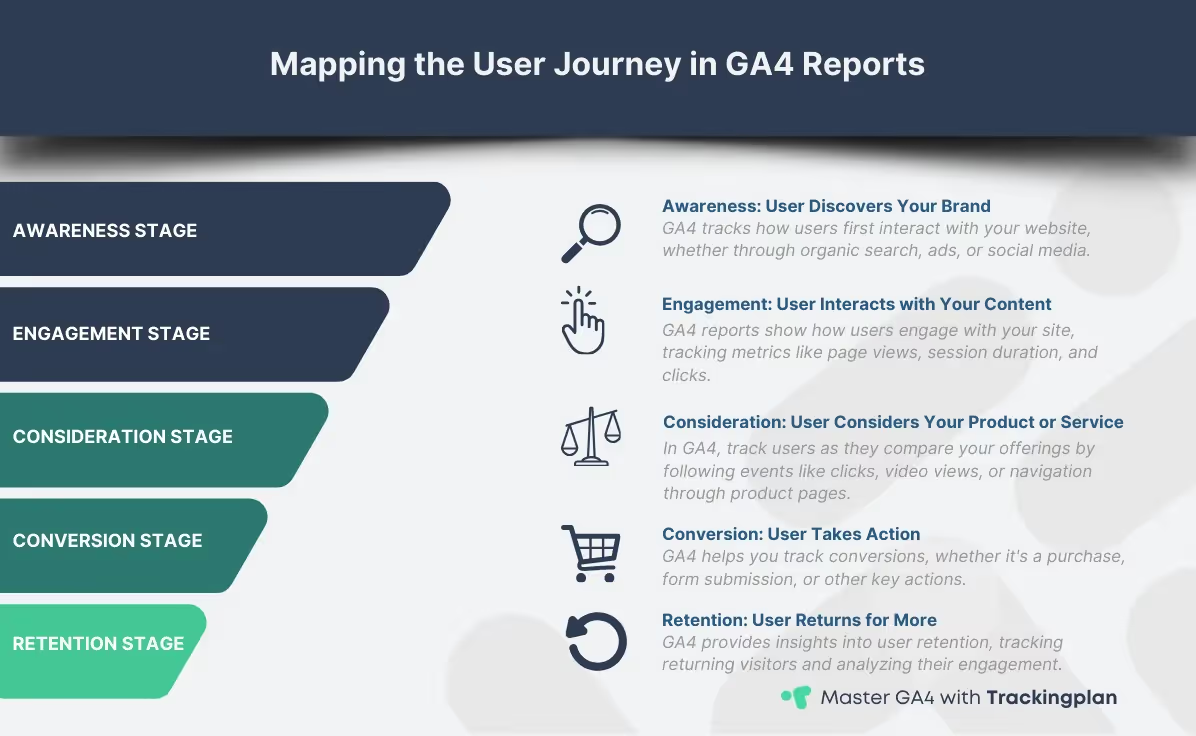
The Traffic Acquisition report in GA4 provides valuable insights that can be directly applied to improve both marketing strategies and the user journey. By focusing on key metrics like new users, sessions, and engagement rate, digital analysts can identify which channels are driving quality traffic and where improvements are needed.
An effective approach is to segment traffic data and analyze how different user groups progress through their user journey, enabling you to craft campaigns for better engagement. This allows you to refine campaigns for different audience segments, ensuring your resources are targeted towards high-value users. Custom segments can reveal important trends, like which channels are bringing in users with higher engagement rates, enabling you to adjust your marketing spend accordingly.
It’s also important to avoid common pitfalls, such as over-reliance on basic metrics like raw traffic volume. Instead, focus on meaningful data that aligns with your business goals, such as conversion rates and session quality.
Navigating GA4 Reports
Navigating GA4 reports can sometimes feel complex, but understanding the basic steps helps simplify the process. First, select the appropriate properties and apply relevant filters to ensure you're working with the right data. Using the date range selector ensures your reports are aligned with the correct analysis period.
You can also compare traffic sources using referral sources and utm parameters, or focus on user retention graphs to track returning visitors.
For more information on GA4 reports, refer to our Advanced Reporting Features guide.
Customizing GA4 Reports
GA4 offers the flexibility to customize reports according to your needs. By changing the primary and secondary dimensions, you can fine-tune your acquisition reports to gain more precise insights. GA4’s Explorations feature also allows you to replicate and extend the scope of your analysis using free form exploration, providing a detailed breakdown of session source/medium or ecommerce purchases.
You can also add custom metrics or dimensions and comparisons to better suit specific business cases, making your GA4 custom reports a powerful tool for deep analysis.
5 Steps to Improve Traffic Source Performance
The Traffic Acquisition report is an engine for optimization. Instead of just reviewing the data, follow this sequence of five steps for maximum impact.
- Step 1: Segment Traffic by Engagement Quality: Do not rely on "Sessions" alone. Immediately add the Engagement Rate and Conversions metrics. Segmenting the data to focus on channels with high engagement (e.g., sessions lasting over 2 minutes) allows you to allocate budget toward sources that bring in quality users, not just volume.
- Step 2: Apply the Data-Driven Attribution (DDA) ModelSwitch from the default Last-Click model to Data-Driven Attribution (DDA) in the GA4 settings. This ensures you are optimizing traffic based on true value, not just the final click.
- Step 3: Conduct a Content Performance ReviewHigh-traffic, low-conversion pages identified through the report indicate a misalignment between the traffic source and the content. Use the
Landing Page + query stringdimension to pinpoint friction points where traffic quality fails to meet content expectations. - Step 4: Leverage Custom Segments for Audience RefinementCreate custom segments (e.g., "Users from Paid Search who converted") and apply them to the Traffic Acquisition report. This reveals which specific campaigns are truly driving high-value user behavior, enabling precise budget adjustments.
- Step 5: Prioritize Fixing Data Quality Issues: Flawed data, often appearing as
(not set)or traffic miscategorization, cripples optimization. Before making budget cuts, audit the integrity of your tags and UTMs.
How to Fix Critical GA4 Reporting Errors
Data analysis is only as good as the data itself. Digital analysts must actively prevent and solve these common reporting pitfalls.
Common Mistakes in GA4 Reporting
When using GA4 acquisition reports, it’s easy to make mistakes that can skew your data analysis. One common error is selecting incompatible dimensions and metrics, which can lead to incomplete or inaccurate reporting. Another issue is failing to select the appropriate date range, which can result in misleading insights due to partial data warnings.
Misuse of UTM tagging is another frequent problem, as improper tags can miscategorize traffic sources. Additionally, keeping an eye on data thresholding and data retention settings is essential to avoid discrepancies. Lastly, remember to check if your session source/medium and user flow analysis are aligned with the attribution models you’re using for more accurate results.
How to Solve the dreaded '(not set)' Traffic
The presence of (not set) in your Traffic Acquisition report is a critical data integrity failure. It usually means GA4 couldn't categorize the session source. The top two causes are:
- Improper/Missing UTM Tagging: Missing
utm_sourceorutm_mediumparameters on campaign links, especially in email or non-standard marketing channels. - Missing or Delayed GA4 Configuration: The GA4 base tag is either failing to fire or is delayed, preventing the capture of critical referral information before the session starts.
Fix: Audit your UTMs using a standardized tool. For complex tracking failures, immediately check your data layer and tag firing sequence.
For more guidance, watch this video from Trackingplan Academy: Not Set' or Direct traffic in GA4? Here’s how to fix it.
Mastering UTM Tagging and Data Quality Checks
Improper UTM usage is the single largest contributor to chaotic Traffic Acquisition reports, leading to traffic being miscategorized as Direct or (not set). Consistency is key: Standardize spelling, capitalization, and naming conventions (e.g., always using paid_social instead of alternating between Paid Social, paid social, or Social_Media).
FAQs and Tips for GA4 Traffic Acquisition Reports
When working with GA4 acquisition reports, common questions include how to properly segment data by first user source/medium, how to interpret new users acquired by channel, and how to handle channel groupings. Use the Help Menu and Help Panel within GA4 for quick tips and troubleshooting.
For more detailed insights, focus on conversions and top conversion events, which highlight crucial touchpoints in the user journey that drive engagement and conversions.
Conclusion
Mastering the Traffic Acquisition report in GA4 is essential for any digital analyst aiming to optimize marketing efforts and better understand the user journey. By analyzing traffic sources, applying appropriate attribution models, and segmenting key metrics, you gain valuable insights that can directly improve your campaign performance.
The next step in refining your data analysis is to dive deeper into user interactions. Stay tuned for our upcoming guide on analyzing user behavior with GA4, where we’ll explore how to further enhance your reporting with actionable behavioral insights.
For a more comprehensive understanding of GA4’s capabilities, make sure to revisit our complete guide to mastering GA4 for data analysts, where you’ll find additional resources to help you get the most out of your data.