
Server-to-server tracking has quietly become the mainstream standard for performance marketing, yet many professionals still rely on outdated client-side methods that miss up to 30% of conversion data. As browsers tighten privacy controls and ad blockers proliferate, the shift to server-side architectures isn’t just a trend, it’s essential for maintaining accurate attribution and campaign ROI. This guide walks you through what server-side tracking is, why it outperforms traditional approaches, and how to implement it effectively to ensure your analytics reflect reality, not just what browsers allow you to see.
Table of Contents
- Understanding Server-Side Tracking And Its Role In Digital Analytics
- Comparing Server-Side Tracking With Client-Side And Hybrid Models
- Implementing Server-Side Tracking: Key Components And Best Practices
- Measuring Success And Troubleshooting Common Server-Side Tracking Issues
- Enhance Your Server-Side Tracking With Trackingplan Solutions
Key takeaways
| Point | Details |
|---|---|
| Server-side tracking improves accuracy | Moving attribution logic from browser to server bypasses ad blockers and browser restrictions, capturing more complete data. |
| Click IDs enable reliable user tracking | A unique identifier binds the entire user journey across multiple touchpoints, ensuring consistent attribution. |
| Hybrid models are transitional | Combining client-side and server-side methods is a stepping stone, not the ultimate solution for future-proof tracking. |
| Implementation requires systematic planning | Proper setup of Click ID flows, data pipelines, and monitoring ensures tracking integrity and compliance. |
| Proactive monitoring prevents data loss | Regular audits and automated alerts catch anomalies early, maintaining campaign performance and decision-making quality. |
Understanding server-side tracking and its role in digital analytics
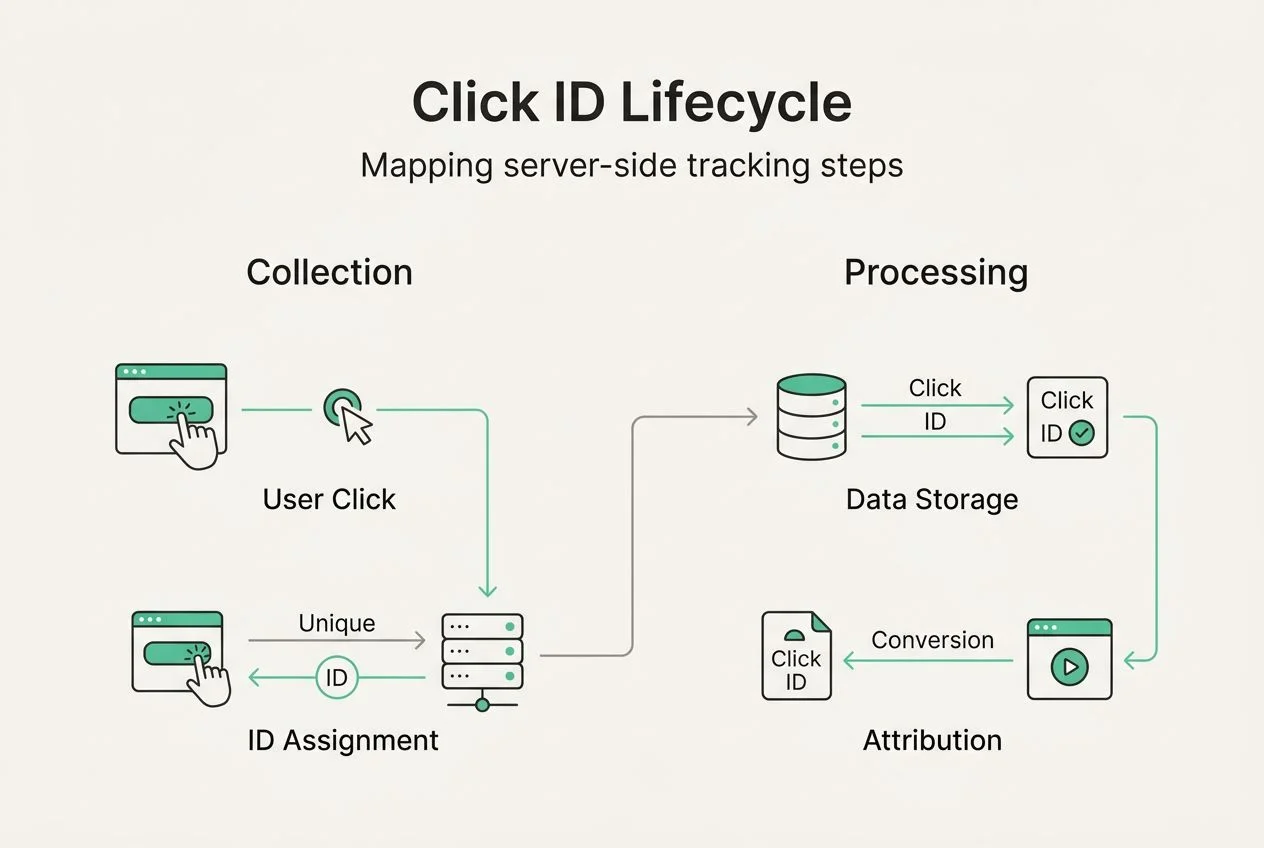
Server-to-server tracking is becoming the default architecture for performance marketing and attribution, fundamentally changing how we collect and validate user data. Unlike traditional client-side tracking, which executes JavaScript in the user’s browser to fire pixels and send events, server-side tracking moves this entire process to a controlled server environment. The browser simply passes a unique Click ID to your server, which then handles all attribution logic, event firing, and data transmission to analytics platforms.
This architectural shift solves critical problems plaguing client-side implementations. Ad blockers can’t interfere with server-to-server communication. Browser privacy features like Intelligent Tracking Prevention don’t limit cookie lifespans or block third-party requests. Network issues on the user’s device don’t cause data loss. The result is dramatically improved data accuracy and completeness across your entire measurement stack.
The Click ID serves as the foundational element binding user interactions together. When someone clicks your ad, the platform generates a unique identifier and appends it to the landing page URL. Your server captures this ID, stores it, and uses it to track every subsequent action, conversion, or event that user triggers. This creates a reliable thread connecting initial click to final conversion, even across multiple sessions or devices.
Benefits extend beyond just avoiding blockers. Server-side tracking provides predictable, deterministic attribution instead of probabilistic guesswork. You control data formatting and validation before sending to analytics tools. Privacy compliance becomes easier because you manage what data leaves your infrastructure. Performance improves because heavy tracking scripts don’t slow down page loads.
Pro Tip: Map out your entire Click ID lifecycle before implementing server-side tracking, documenting exactly how the identifier flows from ad click through every conversion point to ensure no gaps in attribution.
Comparing server-side tracking with client-side and hybrid models
Client-side tracking dominated digital analytics for years because it was simple to implement. Drop a JavaScript tag on your pages, and the browser handles everything: firing pixels, setting cookies, sending events to Google Analytics or Facebook. This convenience came with serious drawbacks. Ad blockers eliminate 20 to 40% of tracking requests. Browser updates constantly break implementations. Privacy features delete cookies after seven days. Network latency causes event loss. You’re essentially trusting the user’s device to reliably execute your measurement code, which it increasingly refuses to do.
Hybrid tracking emerged as a transitional solution, attempting to combine client-side convenience with server-side reliability. In this model, the browser fires some events while the server handles others, typically with the server picking up conversions that client-side tracking missed. While better than pure client-side, hybrid approaches introduce complexity without solving fundamental problems. You’re maintaining two parallel tracking systems, debugging becomes harder, and you still lose data to browser restrictions on the client-side portion.
Server-side tracking complements client-side methods by handling attribution and conversion tracking server-to-server while allowing browsers to collect behavioral data like pageviews and engagement metrics. This division of labor plays to each method’s strengths. The key difference is that critical business events, conversions, and attribution happen on your server where nothing can interfere.

| Tracking Model | Accuracy | Ad Blocker Resistance | Implementation Complexity | Future Viability |
|---|---|---|---|---|
| Client-side | Low to Medium | Poor | Low | Declining |
| Hybrid | Medium | Moderate | High | Transitional |
| Server-side | High | Excellent | Medium | Strong |
When choosing your tracking architecture, consider these factors:
- Data completeness requirements for attribution and ROI measurement
- Technical resources available for implementation and maintenance
- Privacy regulations affecting your markets and data handling
- Ad platform requirements and API capabilities for server-side integration
- Long-term scalability as privacy restrictions continue tightening
The trend is clear. Browsers will continue restricting client-side tracking capabilities. Comparing tracking approaches reveals server-side methods provide the only path to maintaining measurement accuracy as the digital landscape evolves.
Implementing server-side tracking: key components and best practices
The Click ID binds the entire user journey through multiple URLs, making its proper handling critical to implementation success. When a user clicks your ad, the platform appends a unique identifier like gclid, fbclid, or a custom parameter to the destination URL. Your landing page must capture this ID immediately, typically storing it in a first-party cookie or session storage. As the user navigates your site or completes actions, every event submission to your server includes this Click ID, allowing you to attribute all activity back to the original ad click.
Follow these steps for effective server-side tracking implementation:
- Configure ad platforms to append Click IDs to all destination URLs and verify parameter passing works correctly across redirects.
- Build server-side endpoints to receive and validate Click IDs, storing them securely with timestamp and source information.
- Implement conversion event APIs for each advertising platform, ensuring your server can send attribution data directly to Google, Meta, TikTok, and other networks.
- Create data pipelines to forward events to analytics platforms like Google Analytics 4 using Measurement Protocol or similar server-side APIs.
- Establish monitoring and logging to track Click ID capture rates, API response codes, and data transmission success rates.
- Test thoroughly across different user paths, devices, and scenarios to verify attribution accuracy before scaling.
Server-side tracking improves data completeness by up to 30% compared to client-side methods, but only if implemented correctly. Best practices ensure you capture this value. Always validate Click IDs before processing to catch malformed or suspicious identifiers. Implement retry logic for API calls because network issues happen even server-to-server. Use first-party cookies for Click ID storage to avoid browser restrictions. Document your data schema so everyone understands what information flows where.
Security and compliance matter as much as accuracy. Encrypt Click IDs in transit and at rest. Implement access controls limiting who can view or modify tracking data. Respect user privacy choices by honoring opt-outs and consent signals. Build audit trails showing exactly what data you collected and where you sent it. Server-side tracking implementation requires treating user data as the valuable, sensitive asset it is.
Pro Tip: Set up automated alerts for Click ID capture rate drops or API error spikes, because tracking issues compound quickly and early detection prevents major data loss.
The shift to server-side architecture eliminates data loss from ad blockers and browser limitations entirely. Your server controls the entire measurement process. Users can install every privacy extension available, their browser can delete all cookies, and your attribution still works because the critical tracking happens server-to-server where they can’t interfere. This reliability transforms campaign optimization from guesswork into data-driven decision making.
Measuring success and troubleshooting common server-side tracking issues
Key performance indicators reveal whether your server-side tracking delivers the accuracy and completeness it promises. Monitor Click ID capture rate, the percentage of landing page visits where you successfully grab and store the identifier from the URL. This should exceed 95% in a healthy implementation. Track conversion API success rates, measuring how many events your server successfully transmits to advertising platforms. Aim for 99% or higher. Compare conversion counts between server-side and client-side tracking to quantify the data gap you’re recovering.
Server-side tracking significantly increases conversion event completeness, but several issues can undermine this advantage. Click ID mismatches occur when the identifier gets corrupted during URL parsing or storage, breaking attribution chains. Delayed data happens when server processing lags cause events to arrive hours or days late, skewing real-time reporting. Data loss results from API failures, network timeouts, or improper error handling that silently drops events instead of retrying.
Troubleshooting steps to resolve common problems:
- Verify Click ID parameter names match exactly what ad platforms send, including capitalization and special characters
- Check server logs for URL parsing errors or cookie storage failures that prevent Click ID capture
- Test API credentials and permissions to ensure your server can authenticate with advertising platforms
- Monitor API rate limits and implement queuing to avoid exceeding platform thresholds
- Validate event payload formats against platform documentation because schema mismatches cause silent rejections
- Review network configurations and firewall rules that might block server-to-server communication
| Problem | Symptoms | Resolution Strategy |
|---|---|---|
| Missing Click IDs | Attribution gaps, low capture rate | Audit URL parameter handling and cookie implementation |
| API authentication failures | 401 or 403 errors in logs | Regenerate credentials, verify permissions and scopes |
| Event schema errors | Events sent but not appearing in platform | Compare payload against API documentation, validate data types |
| Rate limiting | 429 errors, delayed processing | Implement exponential backoff and request queuing |
| Data latency | Events arrive hours late | Optimize server processing, add asynchronous handling |
Pro Tip: Deploy automated monitoring tools that continuously validate tracking data quality, alerting you immediately when Click ID capture drops, API errors spike, or conversion counts deviate from expected patterns.
Systematic monitoring prevents small issues from becoming major data disasters. Set up dashboards showing real-time Click ID capture rates, API success percentages, and conversion event volumes. Create alerts for anomalies like sudden drops in tracked conversions or spikes in error rates. Schedule regular audits comparing server-side data against client-side baselines to catch drift. Troubleshooting server-side tracking becomes straightforward when you have visibility into every step of the data pipeline.
The investment in proper monitoring pays dividends through maintained data accuracy. When you catch a Click ID parsing bug within minutes instead of days, you lose hours of attribution data instead of weeks. When you detect an API credential expiration immediately, you fix it before missing thousands of conversion events. Proactive monitoring transforms tracking from a fragile, unreliable system into a robust foundation for campaign optimization and business decisions.
Enhance your server-side tracking with Trackingplan solutions
Maintaining accurate server-side tracking at scale requires continuous monitoring and validation that manual processes can’t deliver. Trackingplan automates the discovery, auditing, and monitoring of your entire analytics implementation, catching tracking errors, schema mismatches, and data quality issues before they impact campaign performance. The platform provides real-time alerts via email, Slack, or Teams when Click ID capture rates drop, conversion events fail, or attribution breaks.
Key capabilities supporting your server-side tracking efforts include automated root cause analysis that pinpoints exactly where tracking failures occur, comprehensive dashboards showing data quality metrics across your Martech stack, and privacy compliance checks ensuring your implementation meets regulatory requirements. Integration with digital analytics tools means Trackingplan works seamlessly with your existing platforms, providing an oversight layer that validates everything functions correctly.
Web tracking monitoring specifically addresses the challenges of maintaining accurate measurement as browsers evolve and privacy restrictions tighten. Instead of discovering tracking problems when campaign performance mysteriously drops, you get immediate notification of issues with actionable guidance for resolution. See how Trackingplan works to understand how automated tracking quality assurance complements your server-side implementation, ensuring the data accuracy and completeness that justify the architectural investment.
FAQ
What is the main advantage of server-side tracking over client-side?
Server-side tracking ensures more accurate, reliable data by moving tracking processes from the browser to the server, completely avoiding ad blockers and browser privacy restrictions. This architectural change typically recovers 20 to 30% of conversion data that client-side methods miss. The result is better attribution accuracy, more complete user journey mapping, and campaign optimization based on actual performance rather than partial data.
Can server-side tracking completely replace client-side tracking?
Server-side tracking complements client-side methods rather than replacing them entirely for most implementations. Client-side tracking still excels at capturing behavioral data like scroll depth, engagement metrics, and real-time user interactions. A thoughtful approach uses server-side for critical attribution and conversion tracking while maintaining client-side collection for engagement analytics, leveraging the strengths of both architectures.
What is a Click ID and why is it important in server-side tracking?
A Click ID is a unique identifier that advertising platforms append to landing page URLs when users click ads, enabling precise attribution of subsequent actions back to the original click. This identifier binds the entire user journey together, allowing your server to track conversions, purchases, and other events even when browser restrictions prevent client-side tracking. Without reliable Click ID capture and handling, server-side tracking cannot accurately attribute campaign performance.
How can I troubleshoot common server-side tracking data issues?
Start by checking Click ID consistency across your data pipeline, verifying that identifiers captured from URLs match those sent to conversion APIs. Monitor conversion event tracking regularly through dashboards showing capture rates, API success percentages, and error logs. Use systematic troubleshooting steps: validate URL parameters, check API credentials, review event schemas, and test network connectivity. Automated monitoring tools provide the fastest path to identifying and resolving tracking problems before they significantly impact data quality.
Recommended
- Why tracking is crucial for marketing success in 2026 | Trackingplan
- Server Side Tracking: Analytics in a Cookieless World (server side tracking) | Trackingplan
- Explore what is server side tracking: A Practical, Privacy-First Guide | Trackingplan
- Server-side tag guide 2026: boost data accuracy and ROI | Trackingplan