
What are marketing campaign performance monitoring tools and why do teams need them?
Marketing campaign performance monitoring tools collect, organize, and analyze campaign data across channels. They measure KPIs such as conversion rates, ROAS, and customer acquisition cost, giving teams the visibility needed to optimize spend and prove results.
Without proper monitoring, marketing teams operate with incomplete information. They struggle to attribute conversions accurately, map customer journeys, and justify budget decisions. Campaign monitoring tools solve these problems by centralizing data and surfacing the signals that matter.
The business case is direct: teams that monitor campaign performance rigorously achieve better ROI, reduce wasted ad spend, and make faster optimizations. They can identify underperforming campaigns within hours rather than days, enabling quick course corrections before budget is burned.
"Before Trackingplan, issues could easily go unnoticed for two or three weeks," says Rasmus Frølund of Fact, a digital analytics agency.
Which top brands dominate the marketing campaign performance monitoring space?
Google Analytics, HubSpot, Adobe Analytics, Amplitude, and Mixpanel are where most teams start. Trackingplan sits underneath them: it checks that the data those tools report is right before anyone acts on it.
The marketing campaign performance monitoring landscape spans both generalist platforms and specialized solutions. Here is how the leading brands break down by focus area:
Google Analytics dominates web analytics with comprehensive traffic and conversion tracking, making it the default starting point for most teams. HubSpot provides an integrated CRM and marketing automation suite with built-in campaign analytics, appealing to teams that want a single platform for lead management and reporting. Adobe Analytics delivers enterprise-grade analytics with advanced segmentation and multi-touch attribution modeling.
Amplitude and Mixpanel focus on product and user behavior analytics, excelling at event-level cohort analysis and retention tracking. Buffer and Hootsuite specialize in social media campaign monitoring, tracking engagement metrics across platforms. Sprout Social adds social listening and competitive benchmarking to the mix.
Beyond traditional analytics, a second layer has become part of the stack: tools that check the data itself. Trackingplan is a digital analytics agent that audits your tracking where the data is produced: the hit, the dataLayer, the SDK, the pixel, the CAPI payload, the consent state, the GTM release. It does not replace your analytics or ad platforms. It tells you when a number they show is wrong, why, and what to change, so you don’t judge a campaign on a broken tag.
Leading marketing campaign performance monitoring platforms compared by primary focus and best-fit use case, from each vendor’s documentation.
| Platform | Primary focus | Best for |
|---|---|---|
| Google Analytics | Web traffic and conversion tracking | Website analytics and audience insights |
| HubSpot | Marketing automation and CRM | Integrated campaign and lead management |
| Adobe Analytics | Enterprise analytics and attribution | Complex multi-channel attribution modeling |
| Amplitude | Product and user behavior analytics | Event-level customer journey analysis |
| Mixpanel | User analytics and retention | Cohort analysis and retention tracking |
| Hootsuite / Sprout Social | Social media monitoring | Cross-platform social campaign reporting |
| Trackingplan | Digital analytics agent that audits tracking at the source | Knowing every campaign number is right, and why when it is not |
Where Trackingplan fits in your campaign monitoring stack
Your analytics and ad platforms tell you how a campaign performs. Trackingplan tells you whether you can believe them. Most campaign reports that look wrong are not a campaign problem: a tag stopped firing, a parameter went missing, or a release changed what the dataLayer sends. Trackingplan watches for exactly that, on your real traffic.
- Installs in one step. One tag, SDK, or server-side hook. There is no schema to define and no rules to write: it learns your events, properties, and platforms from real traffic.
- Watches every hour. It learns a baseline per hour of day and day of week, then compares every hour against it, per event, per property, and per platform. Missing properties, dead tags, duplicate fires, broken triggers, and vendors firing before consent are caught as they appear.
- Knows what changed. It finds your GTM containers in your own traffic and captures every published release, so the first question after a drop, "what changed?", already has an answer.
- Finds the cause. Click Analyze on an issue and the agent narrows it down in the hits, finds the tag, trigger, and variable that send the event, and, when a live check could settle it, reproduces the flow in a real browser.
- Lives where your team works. Alerts and answers reach Slack, email, or your app, with the hits behind them.
Here is what that looks like on a campaign. Since July 12, every purchase arrives without its transaction_id, and the campaign’s conversion numbers stop adding up. The obvious suspect is the campaign. The agent finds the real cause: the purchase tag changed in the GTM release detected that day, and it now fires on the order confirmation page view, before the checkout pushes transaction_id to the dataLayer.
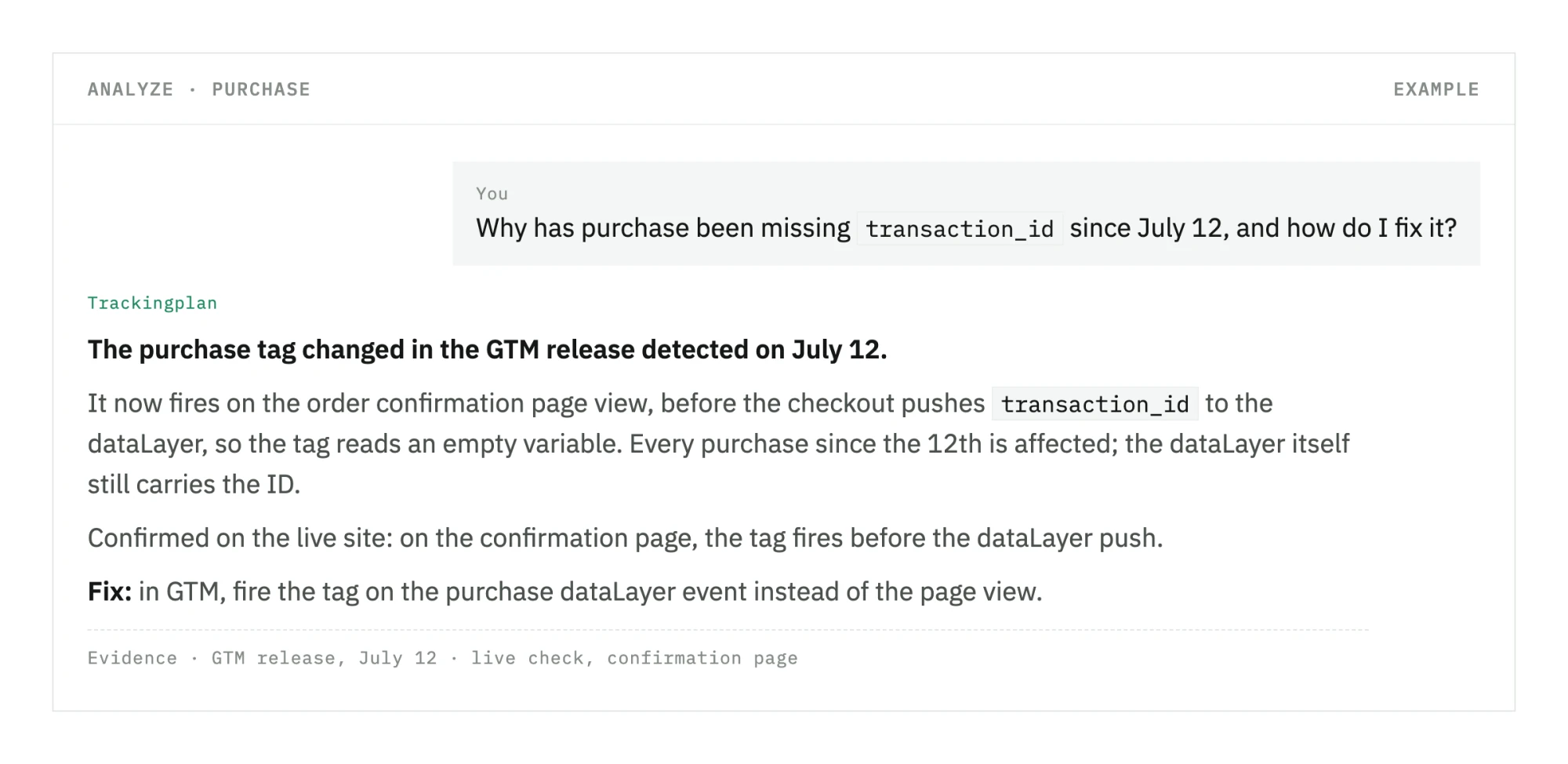
The campaign was not the problem. The tag was. The fix is one change in GTM: fire the tag on the purchase dataLayer event instead of the page view.
How do modern campaign monitoring tools detect and prevent data errors?
Modern platforms use AI-powered monitoring and automated audits to catch pixel failures, missing events, and configuration errors in real time. Instant alerts let teams fix issues before faulty data distorts campaign decisions.
Data quality is the foundation of reliable campaign performance insights. Yet many marketing teams do not realize their data has problems until weeks of decisions have already been made on incomplete or inaccurate information. Modern campaign monitoring tools address this through proactive, automated error detection.
Continuous automated monitoring validates that tracking implementations are working correctly at all times. When pixels fail to fire, event data stops flowing, or configuration changes break data collection, the system detects it immediately. Real-time alerts notify the right team members, whether developers, digital analysts, or marketers, so issues are resolved quickly.
AI-powered anomaly detection identifies unusual patterns that may signal underlying problems: a sudden drop in tracked conversions, unexpected traffic spikes from specific sources, or unusual user behavior patterns. These systems learn what normal looks like for your specific campaigns and flag meaningful deviations.
The difference shows in detection time. With Trackingplan in place, MicroAnalytics hears about a broken implementation "within 24 hours at most", and Rethink "sometimes even just a couple of hours after a release."
What measurable benefits can teams expect from campaign performance monitoring tools?
Teams gain time savings on manual data validation, faster error resolution, higher confidence in reporting, and more effective ad spend optimization. These improvements translate directly into better campaign ROI and stronger operational efficiency.
The benefits of comprehensive campaign performance monitoring extend well beyond better dashboards. Organizations see tangible improvements across team productivity, data reliability, and campaign outcomes.
Time savings are among the most immediate gains. Digital analysts typically spend significant hours each week manually checking whether data is flowing correctly, investigating discrepancies between platforms, and validating that implementations match specifications. Automated monitoring eliminates much of this work, freeing analysts to focus on strategic analysis instead of data firefighting.
Faster decision-making follows naturally. When errors surface in hours rather than days, teams can respond to campaign performance issues the same day. A poorly performing ad campaign can be paused or restructured before it burns additional budget across multiple days of investigation.
Data confidence rises substantially when teams know their data is continuously validated. Stakeholders trust the insights more, leading to faster approval of strategic recommendations. Executives can make budget allocation decisions knowing the underlying data is accurate.
Campaign optimization also becomes more effective, and ad spend stops being driven by broken conversion data. A/B tests produce trustworthy results. Attribution models reflect actual customer behavior rather than implementation errors. Marketing mix modeling yields accurate insights about channel contribution.
12 hours a month per user That is the time Elogia saves with Trackingplan, about two full workdays, according to its customer story.
How should you evaluate and select the right campaign monitoring tool for your organization?
Start by mapping your data sources, team structure, and technical capacity. Then assess integration support, ease of implementation, and whether you need specialized data quality monitoring alongside a primary analytics platform.
Selecting the right campaign monitoring tool requires a clear understanding of your organization's specific requirements. Different teams have different priorities, and no single platform is the right fit for every situation.
Begin by auditing your data sources. If you primarily care about website traffic and conversions, Google Analytics may be sufficient. For complex multi-channel campaigns with sophisticated attribution needs, Adobe Analytics or a combination of specialized tools is likely a better fit. For product analytics alongside campaign analytics, Amplitude or Mixpanel are strong candidates.
Consider your team's technical capacity. Some platforms require significant developer involvement for implementation and ongoing maintenance. Others are more self-service. HubSpot, for example, appeals to teams that want marketing automation and analytics integrated without complex technical setup.
Treat data quality as a requirement, not an afterthought. If your organization has had tracking issues before, or runs complex implementations with many integrations, add a layer that checks the data itself, such as Trackingplan, next to your primary analytics platform.
Integration coverage is also critical. Your monitoring tool must connect with your existing marketing stack: email platforms, ad networks, CRM systems, and data warehouses. Verify that the platform supports all your critical integrations before committing.
For the practical side, see our campaign tracking checklist and these campaign monitoring best practices. Finally, weigh support and onboarding requirements. Some tools demand significant vendor-led implementation. Others are largely self-service. Match the support model to your team's capacity and timeline.
Tip: The most resilient monitoring stacks use a layered approach: a primary analytics platform such as Google Analytics or HubSpot for core campaign tracking, plus a tool that continuously validates the data quality. This combination provides both breadth of insight and confidence in the underlying data.
FAQ
What is the difference between campaign monitoring tools and analytics platforms?
Campaign monitoring tools focus specifically on tracking campaign performance metrics such as ROAS, conversion rates, and channel attribution. Analytics platforms provide broader insights into user behavior and traffic patterns. Neither is built to check that the data they receive is correct; that is the job of a tool like Trackingplan.
How much do marketing campaign performance monitoring tools cost?
Pricing varies widely. Google Analytics is free for standard use, and HubSpot has free tools alongside its paid Marketing Hub plans. Enterprise platforms such as Adobe Analytics are quoted on data volume. Trackingplan starts at $99/month on its Starter plan, priced by the sessions it monitors plus credits for the agent’s work; see pricing.
Can I use multiple campaign monitoring tools at the same time?
Yes, and most organizations do. A common approach is using Google Analytics for website analytics, HubSpot for marketing automation and CRM reporting, and Trackingplan to check that the data reaching both is right. Each tool handles a distinct layer of the monitoring stack.
How do I know if my campaign data is accurate?
Monitor it continuously instead of checking it once. Cross-reference data across platforms to surface discrepancies, and test implementations after any code or configuration change. Trackingplan does this automatically on your real traffic: it alerts you when a pixel stops firing, an event loses a property, or a release changes what the dataLayer sends, and shows you the hits and the GTM change behind it.