
TL;DR:
- A structured, evidence-based process helps diagnose and address website traffic declines effectively.
- Confirm the drop’s authenticity by cross-checking data in GA4 and Search Console before making assumptions.
You’re staring at a chart that’s pointing the wrong direction. Sessions are down 30%, your boss wants answers by end of day, and you have no idea where to start. This is what a traffic drop investigation guide is designed for: a structured, evidence-based approach to diagnosing sudden or gradual website traffic declines before you waste days chasing the wrong cause. The process borrows from the discipline of root cause analysis, a standard diagnostic framework used in engineering and operations, adapted here for the realities of modern SEO, analytics, and AI-driven search. What follows gives you that process, step by step.
Key Takeaways
| Point | Details |
|---|---|
| Verify before you act | Confirm the drop is real by cross-checking GA4 against Google Search Console before investigating causes. |
| Segment relentlessly | Break traffic down by channel, device, geography, and query type to isolate exactly where the loss is occurring. |
| Use a decision tree for root causes | Work through indexation, algorithm updates, technical errors, content decay, and backlink loss as separate branches. |
| AI traffic is a new blind spot | Monitor GA4’s AI Assistant channel separately so AI-driven referral losses don’t hide inside organic numbers. |
| Document everything | A timestamped record of events, fixes, and data gaps speeds up both the current investigation and future ones. |
Your Traffic Drop Investigation Guide Starts Here
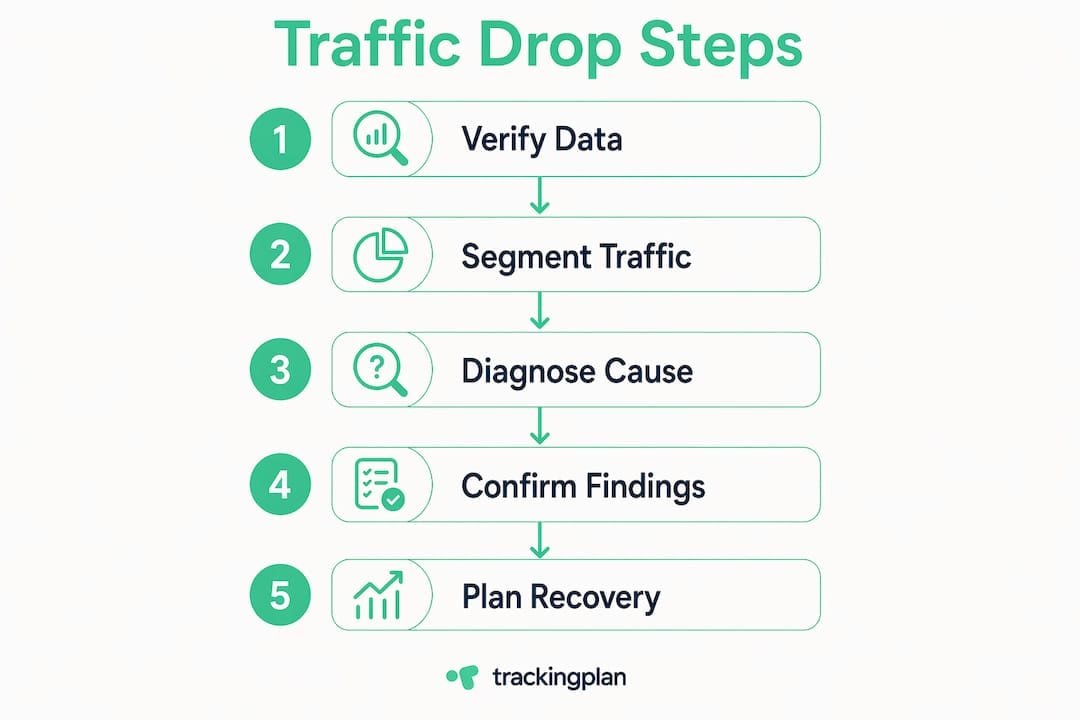
Before you open any report, stop. The single biggest mistake in investigating traffic loss is skipping straight to assumptions. You assume it was the last deploy, or the algorithm update you read about on LinkedIn, and you start making changes based on a hunch. What you should do first is confirm the drop is actually happening.
Validating data consistency across GA4 and Google Search Console before starting any fix is the correct first move. These two tools measure fundamentally different things. GA4 measures browser-side sessions based on JavaScript firing. Search Console measures clicks from Google’s search results. If both show a decline in the same date window, the drop is almost certainly real. If only one shows it, you likely have a tracking problem, not a traffic problem.
This distinction matters more than most guides acknowledge. A broken analytics tag can create a “traffic drop” that is entirely fictitious. GA4 Realtime reports are your fastest early-warning tool here: if you see zero active users during a period when you’d expect normal activity, your tag or GTM configuration has failed, not your SEO.
Pro Tip: Check your GTM version history immediately if you suspect a tracking failure. The most common cause of sudden GA4 data loss is an accidental GTM container publish that overwrites a working tag configuration. Roll back the container version and verify in DebugView before spending another minute on SEO diagnostics.
Also run a quick manual actions check in Search Console. Manual penalties are rare, but they cause severe, immediate traffic drops. Ruling this out takes two minutes and removes one of the most serious possibilities from your list. There is no other official place Google notifies you of a penalty, so this check is non-negotiable.
If you want a thorough baseline, Trackingplan’s 10-point analytics audit checklist walks through the most common GA4 misconfigurations that masquerade as traffic drops before any investigation begins.
Segmenting the data to pinpoint the loss
Once you’ve confirmed the drop is real and your tracking is intact, your job is to narrow the problem from “traffic is down” to “this specific segment is down, by this much, starting on this date.” That specificity is what makes a fix possible.
Here’s a structured sequence for segmenting your traffic data:
-
Separate channels. In GA4, break down sessions by Default Channel Grouping. Look at Organic Search, Direct, Referral, Paid Search, and the newer AI Assistant channel individually. A drop in Organic Search requires a completely different response than a drop in Direct traffic.
-
Split branded vs. non-branded queries. In Google Search Console, filter your Queries report to exclude your brand name. Year-over-year query comparisons are the most accurate way to strip out seasonality and see real performance shifts. If non-branded impressions are down but branded is stable, the issue is discoverability, not brand reputation.
-
Isolate by landing page. Filter Search Console performance by page URL. A single template change can tank dozens of pages at once. If you see a cluster of URLs that all share a URL pattern or page template, you’ve found your scope.
-
Check device type. A mobile-specific drop often points to Core Web Vitals failures or a mobile rendering issue. A desktop-only drop is less common but can indicate a redirect chain or session attribution problem.
-
Run geographic filters. If the drop is concentrated in one country or region, it could be a geo-targeted algorithm update, a CDN issue, or a localized content problem. A global drop is typically algorithmic or technical.
-
Monitor the AI Assistant channel. GA4 now groups AI referral traffic distinctly, which is significant because AI search traffic is a growing channel that most marketers still aren’t tracking separately. If your AI referral numbers have fallen, that’s a separate investigation from traditional organic SEO. For deeper context on attributing this traffic correctly, this guide to tracking LLM traffic in GA4 gives you a practical setup.
The goal of this entire phase is to produce a single sentence: “Organic non-branded traffic from mobile users in the US dropped 40% starting on March 14th, affecting all pages on the /blog/ subdirectory.” That sentence is your investigation target.
Diagnosing the root cause systematically

This is where most investigations get messy. People run one check, find something that looks suspicious, and declare it the cause. Effective root cause analysis means working through multiple branches of a decision tree and collecting evidence for each before drawing conclusions.
The major diagnostic branches you need to evaluate are:
Indexation and crawling errors
Google’s crawling-to-indexing pipeline has multiple stages where pages can fall out. The distinction between “Crawled — currently not indexed” and “Discovered — currently not indexed” is critical here. The first means Google fetched your page but chose not to include it. The second means Google found the URL but hasn’t gotten to it yet. These require different fixes, and confusing them wastes time. Check the Coverage report in Search Console and look for spikes in either status that correlate with your drop date.
Algorithm updates and SERP changes
Cross-reference your traffic drop date with Google’s confirmed algorithm update releases using the Google Search Status Dashboard. If a broad core update landed within a few days of your drop, the cause is likely ranking-related. Look at which queries lost impressions first, not just clicks, since impression loss precedes click loss by a meaningful margin.
Technical regressions
A site deploy, a CMS update, or a CDN configuration change can introduce crawl blocks, noindex tags, broken canonical references, or redirect chains overnight. Check your robots.txt and meta robots tags directly. Compare your current sitemap against the version from before the drop.
Content decay vs. sudden drops
Content decay causes gradual decline over months, not sudden drops overnight. If your Search Console data shows a slow erosion of clicks and impressions across several months, that’s a content freshness issue, not a penalty or technical failure. The fix is refreshing and expanding existing content, not emergency technical remediation.
Backlink profile changes
A sudden loss of high-authority referring domains can shift rankings for competitive terms. Use a backlink analysis tool to check for lost links in the weeks before your drop. This is especially relevant if you recently ran a disavow file update or if a major referring site changed its linking behavior.
Here’s a comparison table to help you match symptoms to likely causes:
| Symptom | Most likely cause |
|---|---|
| Sudden drop on a single date, site-wide | Algorithm update or technical regression (noindex, robots.txt) |
| Drop affecting only one URL cluster | Template change, canonical error, or content quality issue |
| Gradual decline over 3+ months | Content decay or slow backlink erosion |
| Zero sessions but Search Console clicks normal | GA4 tag or GTM configuration failure |
| Drop in one country or device type only | Localized algorithm update, rendering issue, or CDN problem |
| Impressions stable but clicks falling | SERP feature change (featured snippets, AI Overviews displacing clicks) |
Pro Tip: When AI Overviews or zero-click SERP features appear for your top queries, click-through rates can drop even when your rankings hold steady. Before assuming a ranking loss, check whether new SERP features have appeared for your highest-volume queries. Screenshot the current SERP and compare it against archived versions.
Confirming findings and building a recovery plan
You’ve segmented the data and worked through the diagnostic branches. Now you need to convert your findings into a recovery plan that other people can execute and track against.
Start by building a timeline. List every significant event from 30 days before the drop: deploys, content changes, link building campaigns, algorithm update dates, and any tracking configuration changes. Place your traffic data on the same timeline. Patterns become obvious when you lay them out this way.
Then quantify the impact with precision:
- Calculate the percentage and absolute session loss per channel and per page cluster
- Estimate keyword ranking changes using position data from Search Console
- If you have revenue attribution set up, convert session loss into estimated revenue impact using your historical conversion rate and average order value
- Note which queries dropped from page one to page two, since that shift typically causes a 50 to 70% click loss on its own
Next, prioritize your fixes. Not everything you found carries the same recovery potential. A broken noindex tag affecting 200 pages is worth fixing today. A gradual content decay issue affecting three blog posts from 2021 can wait a week. The prioritization should be driven by estimated traffic impact, not by which fix is easiest.
For ongoing monitoring, set up alerts for traffic volume changes. Real-time notifications when sessions drop below a threshold catch new problems before they compound. GA4’s AI Assistant channel should have its own alert threshold since AI-driven traffic behaves differently from traditional organic and will otherwise distort your channel benchmarks.
Pro Tip: Document this entire investigation as a timestamped incident report: what you found, what you ruled out, what you fixed, and which data periods are unreliable. Marking impacted data periods as incomplete in your reporting prevents stakeholders from making decisions based on corrupted numbers months later, and it gives you a head start the next time something breaks.
Recovery timelines vary significantly by cause. A tracking fix restores accurate data immediately. A penalty recovery after a successful reconsideration request typically takes 2 to 4 weeks. An algorithm-related recovery after content improvements can take 3 to 6 months. Setting honest expectations with stakeholders at this stage prevents pressure to make unnecessary changes while you wait for Google to recrawl and re-rank.
My honest take on where investigations go wrong
I’ve reviewed a lot of post-mortems on traffic drops, and the pattern that keeps appearing is premature certainty. Someone sees a correlation between a deploy date and a traffic drop and immediately rolls back the deploy. Meanwhile, the actual cause was a GTM container change that happened at the same time. Two weeks later, the rollback has caused new problems and the traffic still hasn’t recovered.
What I’ve found is that the decision tree approach isn’t just a nice framework. It’s the only way to avoid wasting resources on the wrong fix. You have to treat each branch as innocent until proven guilty and gather actual evidence before closing it out.
The other thing I want to be direct about: AI search traffic is no longer a rounding error. I’ve seen sites where 12 to 15% of what used to be organic traffic is now arriving through AI interfaces that aren’t captured in traditional channel reports. If you’re not monitoring AI referral channels as a distinct segment, you’re operating with a growing blind spot in your traffic analysis. The sites that are adapting well are treating AI visibility as a separate optimization track alongside traditional SEO.
The final thing most guides skip: the difference between sudden drops and gradual declines should shape your entire approach from the first five minutes. Sudden drops are almost always technical or algorithmic. Gradual declines are almost always content, competition, or link-profile related. Start with that distinction and you’ll cut your investigation time in half.
— David
Stop guessing. Let Trackingplan catch it first.
The hardest part of any traffic drop investigation isn’t the analysis. It’s the fact that by the time you notice the drop, the damage has already been building for days or weeks. Tracking failures, broken pixels, and misconfigured tags quietly corrupt your data long before anyone opens a dashboard.
Trackingplan monitors your web tracking implementations continuously, sending real-time alerts via Slack, email, or Teams the moment something breaks. Whether it’s a GA4 tag that stopped firing after a deploy, a pixel misconfigured during a campaign launch, or a schema mismatch silently skewing your attribution data, Trackingplan catches it before it compounds into a full-scale investigation. The platform’s web tracking monitoring solution gives you a live view of your entire Martech stack, so you spend less time diagnosing and more time recovering. For teams that rely on accurate data to make spend decisions, explore Trackingplan’s digital analytics data quality tools and see what you’re currently missing.
FAQ
How do I confirm a traffic drop is real?
Cross-check GA4 session data against Google Search Console clicks for the same date range. If both tools show a consistent decline, the drop is real. If only GA4 shows it, you likely have a tracking or tag configuration issue rather than an actual traffic loss.
What are the most common causes of sudden organic traffic drops?
The most frequent causes are Google algorithm updates, technical regressions such as an accidental noindex tag or robots.txt block, and GA4 tracking failures caused by broken GTM configurations. Correlating the drop date with algorithm update releases and recent site deploys helps narrow down the cause quickly.
How do I distinguish a tracking failure from a real traffic drop?
Check GA4’s Realtime report for zero or near-zero active users during a period when traffic should be normal. If Search Console still shows clicks but GA4 shows no sessions, your tag is broken, not your traffic.
What is the AI Assistant channel in GA4 and why does it matter?
GA4’s AI Assistant channel groups traffic arriving from AI-powered search interfaces separately from traditional organic search. Monitoring this channel independently prevents AI-driven referral losses from being invisible inside your broader organic numbers.
How long does traffic recovery take after finding the root cause?
Recovery time depends entirely on the cause. A tracking fix restores accurate data the same day. Recovering from a Google algorithm update after making content improvements typically takes 3 to 6 months, depending on how often Google recrawls and re-evaluates the affected pages.