
Validation is the second half of conversion tracking: once the tags are in place, this playbook is how you prove that every conversion is counted, once, with the right value, on every platform.
You’re probably dealing with one of two situations.
Either your ad platforms report conversions that your CRM can’t fully explain, or your CRM shows revenue and leads that never make it back into GA4, Google Ads, Meta, or your BI layer. In both cases, teams usually react the same way. They test one thank-you page, see one event fire, and declare tracking “working.”
That isn’t validation. That’s a spot check.
Conversion tracking validation means proving that the right event fires, with the right payload, under the right consent state, tied to the right campaign context, and lands in the right downstream system without mutating on the way. That standard matters more now because modern stacks are fragmented by browser restrictions, server-side routing, consent controls, app and web overlap, and constant releases from product, engineering, and marketing teams.
Manual checking still has a role. It’s useful for implementation QA, debugging a broken release, and verifying edge cases. It just doesn’t scale as a system of record. If you want trustworthy conversion reporting in 2026, you need a playbook that starts with a documented source of truth, moves through repeatable validation workflows, and ends in continuous observability.
Pre-Validation Planning Your Single Source of Truth
Most tracking problems start before a single tag fires. They start when teams never agree on what a conversion is, what fields belong to it, which platform owns the final number, or how campaign data should be passed from click to CRM.
A tracking plan fixes that. It’s the operational document that defines events, parameters, naming conventions, ownership, and expected destinations. If your analysts call it generate_lead, your dev team ships form_submit, and your CRM team stores “MQL Created,” you don’t have one measurement system. You have three partial ones.
A proper plan becomes the reference point for implementation and for later validation. Trackingplan has a useful explanation of what a tracking plan is and why it matters if you want a practical framing for cross-team use.
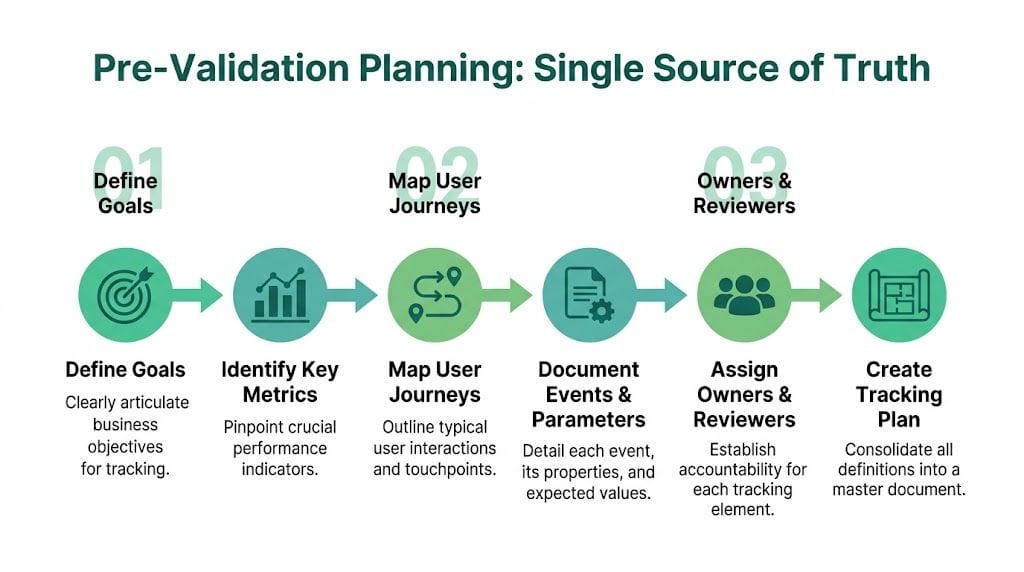
Define the business event before the analytics event
Teams often jump straight into GTM, GA4, or a server container. That’s backwards. Start with the business action that matters.
For example, “lead” is too vague. You need to specify whether the conversion is:
- A form submission success: The user reached a confirmed thank-you state, not just clicked a submit button
- A qualified lead creation: The CRM created a record with required fields present
- A booked meeting: The scheduling tool returned a confirmed booking event
- A purchase: Payment was authorized and order creation succeeded
Those are different states in the funnel. If you collapse them into one event, validation becomes impossible because the implementation has no clear truth condition.
Practical rule: If a developer or analyst can’t tell whether an event should fire from one sentence of documentation, the definition isn’t ready.
Map the full journey, not just the endpoint
A resilient plan follows the user path from acquisition to outcome. That means documenting where campaign parameters arrive, where identifiers are stored, where consent is checked, where data moves from browser to server, and where the final business outcome is confirmed.
That map should include:
- Entry context such as landing page, source, medium, campaign, click IDs, and consent state
- Mid-funnel interactions like product view, start checkout, form start, CTA click, step progression
- Conversion confirmation such as thank-you page load, backend success response, CRM record creation
- Downstream destinations including GA4, Google Ads, Meta, CRM, warehouse, and reporting tools
Without this map, teams validate isolated moments instead of validating the chain.
Document fields like a data contract
The strongest tracking plans behave like lightweight schema documentation. Each conversion event should list the expected parameters, allowed values, formatting rules, and destination-specific notes.
Use a structure like this:
| Component | What to document |
|---|---|
| Event name | Canonical name used across tools where possible |
| Trigger condition | Exact rule for firing |
| Parameters | Required and optional fields |
| Data type | String, number, boolean, array |
| Example payload | A realistic sample event |
| Destination mapping | Which tools receive it |
| Owner | Team responsible for changes |
| QA notes | What to verify before release |
Naming conventions save you later. If campaign fields use inconsistent casing, if revenue values arrive as strings in one place and numbers in another, or if product arrays vary by template, validation gets buried in preventable noise.
Assign ownership before launch
Tracking breaks when everyone assumes someone else is watching it. The plan needs named owners.
Use clear responsibility lines:
- Marketing owns campaign taxonomy and platform import requirements
- Analytics owns event definitions, schema, QA criteria, and reconciliation rules
- Engineering owns dataLayer quality, backend event delivery, and release controls
- RevOps or CRM owners own lead status mapping and source-of-truth business outcomes
This is also the moment to decide what “good enough” means operationally. Not every discrepancy is a bug. Some differences come from attribution logic, reporting windows, or privacy constraints. But those acceptable differences need to be discussed up front, not argued over after a campaign launch.
A related discipline is page and funnel quality review. If you’re refining conversion paths at the same time as your measurement model, it helps to pair analytics planning with broader CRO work like this guide on how to improve website conversion rates, because event design should mirror actual user journeys, not imaginary ones.
The Core Validation Workflow Client-Side and Server-Side
When the tracking plan is solid, validation becomes a technical exercise instead of a political one. You’re no longer debating intent. You’re checking whether the implementation matches the contract.

Client-side and server-side validation should be treated as separate but connected workflows. One checks what the browser emits. The other checks whether the event survives transit, transformation, and delivery to final destinations.
Client-side validation in the browser
The browser is still your first line of inspection. If the user interaction never creates the right signal at source, nothing downstream will fix it.
For browser-side QA, use a combination of Chrome DevTools, GTM Preview, Tag Assistant, platform debug tools, and network inspection. The goal isn’t only to see a tag “fire.” The goal is to confirm that the payload is correct and context-rich.
Start with these checks:
- Trigger integrity: Does the event fire on the actual success state, or on a button click that can fail?
- dataLayer quality: Does the push contain the expected event name and required parameters?
- Network request inspection: Are requests sent to the expected endpoints with the correct payload structure?
- Consent behavior: Does the event respect consent states and suppression rules?
- Identity continuity: Are session, click, or user identifiers present where expected?
For forms, avoid validating on the happy path only. Test field errors, duplicate submissions, browser back behavior, and SPA route changes. Many implementations pass one clean test and fail under real user behavior.
GA4 key event validation needs precision
GA4 changed the model. It replaced Universal Analytics goals with key events after Universal Analytics sunset on July 1, 2023. That shift matters because event collection alone isn’t enough. The event also has to be marked correctly in GA4 before it can be treated as a conversion in reporting and imports.
Optimize Smart notes that in GA4, if you have 1000 sessions and 50 of them include at least one key event, your session key event rate is 5%. The same source also notes that 20-30% of GA4 setups have validation issues such as duplicate events or missing parameters, which directly affect ad spend allocation (GA4 key events tutorial).
That example is useful because it highlights a common mistake. Teams often compare event count to session-based conversion logic and think the report is wrong. It isn’t always wrong. Sometimes the implementation is duplicating events, and sometimes the analyst is comparing metrics built on different scopes.
If GA4 is part of your stack, validate the trigger, the payload, and the admin configuration. Missing any one of those three creates misleading success.
For more implementation patterns, this guide to advanced conversion tracking techniques in GA4 is a practical reference.
A disciplined client-side workflow usually looks like this:
- Run the interaction in preview mode: Complete the actual flow, not an abbreviated version.
- Inspect the dataLayer push: Confirm exact names, parameter presence, and value format.
- Check network requests: Verify the event request leaves the browser once, not twice.
- Review platform debug views: Confirm the receiving platform accepts the event.
- Retest on edge paths: SPA states, mobile layouts, consent-denied mode, and repeated actions.
Server-side validation after the browser
Server-side tracking adds resilience, but it also adds failure points. Events can arrive from the browser correctly and still break in routing, transformation, enrichment, or destination mapping.
That’s why browser validation isn’t enough. You need to trace the event through the server container or event pipeline and verify the handoff to downstream endpoints.
Check these server-side layers:
| Layer | What to verify |
|---|---|
| Event intake | Request received with expected schema |
| Identifier mapping | Click IDs, user IDs, order IDs, and session context preserved |
| Transformations | No field renaming, type coercion, or dropped parameters |
| Consent logic | Suppression and masking applied correctly |
| Destination delivery | Event sent to intended analytics and ad platforms |
| Deduplication | Browser and server events don’t double count |
Logs matter. In a server container or event gateway, inspect what was received versus what was forwarded. If revenue is present in the dataLayer but missing in the destination hit, the browser isn’t your problem. The transform layer is.
What works in practice
The strongest validation process uses paired test scenarios. For each business-critical conversion, create one browser-level test and one backend reconciliation test.
A purchase example makes this concrete:
- Browser-side test: Confirm
purchasefires only on confirmed completion, includes transaction ID, value, currency, and product data - Server-side test: Confirm the same transaction ID lands in your server logs, downstream analytics tools, and your order system with no mutation
Do the same for lead generation. Don’t validate only the front-end event. Reconcile it against the CRM record that should exist after submission.
What doesn’t work is relying on one tool to answer every question. GTM Preview won’t show you whether the CRM got the lead. GA4 DebugView won’t tell you whether your Google Ads import mapped the conversion correctly. Browser DevTools won’t expose server-side schema drift.
Use each tool for its job:
- DevTools for network and request-level inspection
- GTM Preview and Tag Assistant for trigger behavior
- GA4 DebugView for incoming event confirmation
- Server logs or event gateways for post-browser tracing
- CRM and order systems for source-of-truth reconciliation
Test the failure modes on purpose
Senior teams don’t just test whether tracking works. They test how it fails.
Run validation under these conditions:
- Consent denied or partially granted
- Ad blocker active
- Safari or privacy-restricted browser
- Cross-domain navigation
- Logged-in and anonymous sessions
- Single-page application route changes
- Duplicate form submission attempts
These tests expose implementation assumptions that normal happy-path QA misses. If your conversion only survives one browser, one consent state, and one ideal route, it isn’t production-ready.
Common Conversion Tracking Failures and Fixes
Most conversion tracking failures aren’t dramatic. They don’t always produce a visible outage. They create subtle corruption. Attribution drifts, conversion counts soften, campaign reports diverge, and eventually the team loses confidence in every dashboard.
The pattern matters. Once you know the failure category, the fix gets much faster.
Attribution chain failures
These are the hardest issues because the conversion often exists. It’s just credited to the wrong source, campaign, or channel.
Analyzify notes that 30-50% of post-iOS 14.5 data loss occurs from unvalidated server-side event schemas. The same analysis highlights that inconsistent UTM casing can drop 10-15% of attributions, and unvalidated GCLID passing required by GA4 enhanced conversions can cause 20% underreporting. It also notes that automated root-cause analysis can cut troubleshooting time by 70% compared with manual audits (Google Ads conversion tracking validation).
This is why “the tag fired” is not a meaningful success criterion. The event can fire and still lose the campaign context needed for attribution.
Typical root causes include:
- UTM inconsistency:
Emailin one campaign andemailin another - Missing click IDs: GCLID or equivalent identifiers stripped on redirects or not passed server-side
- Cross-domain breaks: Session context lost between site and checkout or booking domain
- Late enrichment logic: Backend adds campaign fields after the event has already been forwarded
The fix starts with traceability. Follow one real conversion path from ad click through landing page, cookie or storage write, browser event, server event, CRM record, and platform import.
A valid attribution chain is sequential. If you can’t inspect each handoff, you can’t explain the discrepancy.
Schema mismatch failures
Schema problems usually appear after launches, redesigns, or third-party script changes. The event name survives, but the payload degrades.
Examples include:
| Failure | Why it breaks reporting | Practical fix |
|---|---|---|
| Revenue sent as text | Calculations fail or values are dropped | Enforce numeric typing in the dataLayer and server transform |
| Product array changes by template | Ecommerce reports fragment | Standardize one schema for all templates |
| Missing transaction ID | Deduplication breaks | Make transaction ID mandatory before event dispatch |
| Renamed parameter | Downstream mapping fails silently | Version control your schema and validate against the plan |
These bugs are expensive because they often don’t trigger obvious alerts. Platforms may still accept the event while quietly ignoring key fields.
A disciplined solution is to define required fields as mandatory. If value, currency, or transaction_id is missing for a purchase, don’t pass the event as a valid conversion.
Privacy and consent failures
Privacy-related failures sit at the intersection of legal risk and data quality risk. They usually show up in one of two forms. Either the site sends data it shouldn’t, or it suppresses data it should have sent after consent was granted.
Common examples:
- PII in query strings or event parameters
- Consent mode misfires
- Pixels loading before consent state is resolved
- Server events sent even when browser-side consent is denied
These issues are hard to catch with one-time manual checks because they can depend on geography, device, consent banner timing, and route-specific behavior. That’s why they keep resurfacing in mature stacks.
Rogue event and duplication failures
Duplication is one of the most common causes of inflated conversion counts. It often comes from overlapping browser and server events, multiple triggers on a thank-you page, or third-party scripts pushing duplicate dataLayer events.
Watch for these signals:
- One order ID associated with multiple purchase events
- Form submissions counted on both button click and success callback
- SPA route changes retriggering page-level conversion logic
- Imported offline conversions colliding with online ones
The fix isn’t “remove one tag and hope.” It’s explicit deduplication logic using stable identifiers and clear precedence rules.
Platform-specific checks: GA4, ad pixels, apps, and server-side
A universal workflow keeps audits organized. Platform-specific checks are where most hidden errors surface. Different systems fail in different ways, so the inspection has to match the environment.
Web and GA4
GA4 often looks healthy when the event stream is merely incomplete. The event exists, but key parameters are wrong, missing, duplicated, or inconsistent across pages.
The two most useful places to inspect are:
- DebugView, to confirm event arrival and sequence during testing
- BigQuery export, to trace parameter-level consistency and compare raw event records over time
Advanced verification guidance from DMM Online Agency highlights the importance of DebugView and BigQuery because errors in custom event and parameter definitions can cause up to 35% data loss, while overlapping GA4 and Google Ads tags can create 25% conversion inflation in their GA4 verification article.
What to check in GA4:
- Event naming consistency:
purchaseshould always bepurchase, notPurchase,order_complete, andcheckout_successdepending on template. - Critical parameters: Revenue, transaction ID, currency, item data, lead type, or other fields your reporting depends on.
- Import hygiene: If GA4 events feed Google Ads, verify that only the right events are marked for import and optimization.
- Duplicate sources: Make sure you’re not recording the same conversion via GA4 import and a native ad tag without a clear deduplication strategy.
For teams working extensively in GA4 implementations, this guide on optimizing GA4 conversion tracking methods and best practices is worth keeping nearby during audits.
Advertising pixels
Meta Pixel and Google Ads tags often fail for opposite reasons. Sometimes they don’t fire at all. Other times they fire too often.
Common checks:
- Deduplication logic: If browser and server events both send the same conversion, confirm they share the same deduplication key where applicable.
- Event match inputs: Make sure the event is carrying the identifiers your setup expects.
- Trigger precision: A pageview trigger on a thank-you URL can break if the path changes after a redesign.
- Test tools: Use each platform’s native test environment to confirm event ingestion during your validation session.
What doesn’t work well is relying on the platform’s green status indicators alone. Those indicators usually confirm that something arrived, not that it was complete, unique, or mapped properly.
Mobile app SDKs
App tracking breaks differently from web tracking. The event may be queued, batched, retried later, or blocked until the app returns online. Version fragmentation also matters more because users stay on older releases.
Checks that matter in mobile:
- SDK version alignment: Ensure old app versions aren’t sending outdated event schemas.
- Event batching behavior: Confirm the event appears after expected sync intervals.
- Offline handling: Test whether conversions persist when users lose connectivity mid-flow.
- Cross-platform consistency: Compare iOS and Android implementations for naming and parameter parity.
A lot of teams verify app tracking as if it were a webpage in a browser. That misses the timing, queueing, and release-management realities that make mobile analytics harder to trust.
Server-side tracking
Server-side setups reduce some client-side fragility, but they also add another place for data to go wrong. A clean browser event can still be transformed badly on the server before it reaches the destination.
Inspect these layers:
- Incoming request: Confirm the original event arrived with the expected fields.
- Transformation rules: Check whether mapping logic changes names, values, or consent flags.
- Destination response: Make sure the API accepted the payload.
- Enrichment fields: Verify identifiers, campaign data, and consent states survive the handoff.
Server-side tracking helps most when you verify the full chain. Browser to server is only half the path.
The biggest mistake here is assuming server-side means self-healing. It doesn’t. It just moves failure into a more technical layer where marketers often have less visibility.
Automating Your Validation with Observability Platforms
Manual validation is useful for debugging. It’s weak as an operating model.
The problem is coverage. Tag Assistant, DevTools, and platform debug screens only show you the moment you tested. They don’t watch every template, campaign, browser, release, consent branch, and server transformation after you close the tab. In modern stacks, that gap is where most data quality problems live.
Cometly notes that 100% alignment between platforms is often impossible, that GA4 vs. Google Ads variances can hit 20-30% before optimization, and that privacy tools can inflate those gaps by an additional 15-25%. The same source argues for KPI dashboards tied to a CRM baseline and notes that focusing on probabilistic modeling over rigid matching can boost ROI by 15-20% (fixing conversion tracking errors).
That point matters because teams often set the wrong target. They chase perfect parity instead of controlled discrepancy. The right question isn’t “Why don’t these tools match exactly?” The right question is “Which differences are expected, and which indicate a break in the system?”
Why manual-only QA collapses at scale
Manual validation fails for structural reasons:
- It’s episodic: You test after releases, not continuously.
- It’s selective: People validate priority flows and miss edge cases.
- It’s person-dependent: Quality changes based on who ran the test.
- It’s weak on trend detection: It rarely catches gradual degradation.
- It’s poor at root cause: It tells you something looks off, not where the chain broke.
That’s why automated observability exists. It monitors the implementation continuously, detects deviations from expected behavior, and alerts teams when data changes in a meaningful way.
Trackingplan is one example in this category. It continuously discovers tracking across the dataLayer and destinations, monitors analytics and marketing tags, and alerts teams to anomalies such as rogue events, schema mismatches, campaign tagging errors, missing pixels, and potential PII leaks. If you want a category-level overview, this guide on automated marketing observability explains the operating model well.
Manual Validation vs. Automated Observability
| Aspect | Manual Validation (e.g., Tag Assistant, DevTools) | Automated Observability (e.g., Trackingplan) |
|---|---|---|
| Coverage | Limited to tested pages and flows | Continuous monitoring across sites, apps, and server-side flows |
| Timing | Reactive, often after a bug affects reporting | Proactive, with alerts when anomalies appear |
| Schema control | Human review of payloads | Automatic detection of missing, rogue, or changed properties |
| Attribution QA | Hard to trace end-to-end repeatedly | Better suited to monitor campaign and UTM consistency over time |
| Privacy checks | Easy to miss route-specific leaks | Ongoing monitoring for PII and consent-related issues |
| Root-cause speed | Slower, depends on specialist debugging | Faster when anomalies are tied to payload and destination changes |
| Scalability | Weak for agencies and multi-brand stacks | Stronger for large, changing implementations |
What automation should actually monitor
Not every alert deserves to exist. A useful automated system should focus on high-signal checks tied to business impact.
Good observability rules usually include:
- Critical conversion presence: Purchase, lead, signup, and booking events still arrive
- Required field validation: Transaction ID, value, currency, campaign fields, product metadata
- Schema drift detection: New parameters, missing parameters, or changed data types
- Attribution hygiene: UTM formatting, click ID persistence, destination mapping continuity
- Consent and privacy controls: Events suppressed or fired according to policy, no PII leakage
- Anomaly monitoring: Sudden drops, spikes, or destination-specific outages
Manual checks answer “did it work when I looked?” Automated observability answers “is it still working everywhere that matters?”
Automation also changes team behavior. Instead of running quarterly fire drills and rebuilding trust in dashboards after each incident, teams can work from a live quality layer with defined thresholds, baselines, and alerts. That’s the only sustainable approach when product releases, landing pages, and campaign configurations change every week.
Establishing a Continuous QA and Validation Runbook
A strong validation program runs on cadence, not memory. If nobody knows what gets checked daily, weekly, and monthly, conversion tracking validation turns into a reactive scramble every time reporting looks off.
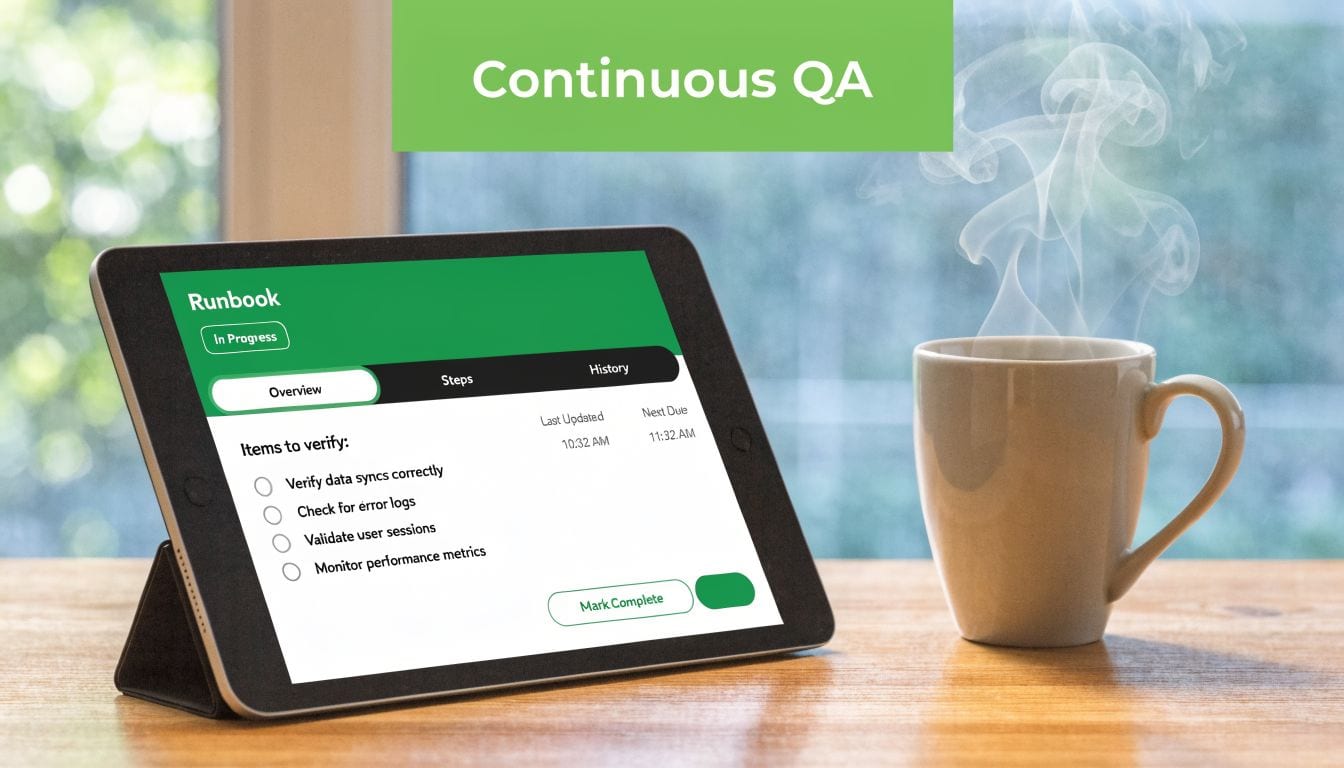
Cometly describes a validation methodology with daily, weekly, and monthly cadences. It reports that these routines can drive a 15-25% uplift in reported ROAS accuracy, reduce underreporting by up to 35% in e-commerce, and that 62% of discrepancies stem from unvalidated server-side tracking or consent misconfigurations. It also notes that automation can cut manual audit time by 80% (best practices for tracking conversions accurately).
That cadence works because each interval answers a different question. Daily checks confirm functionality. Weekly checks look for drift. Monthly checks reconcile business truth.
Daily checks for signal health
Daily review should be fast. If it takes an analyst half a day, it won’t happen consistently.
Daily tasks:
- Review alert feed: Broken pixels, missing key events, consent anomalies, schema violations
- Confirm critical conversions still arrive: Purchase, lead, or booking events from live traffic
- Inspect one or two live payloads: Verify required parameters are still present
- Check post-release pages: Any newly launched funnel step, landing page, or checkout variant
This is also where test design matters. If your team doesn’t have structured validation scenarios, build them. A practical resource on how to create test cases can help standardize QA inputs so analysts, QA engineers, and developers test the same success and failure states.
Weekly checks for trends and discrepancies
Weekly review is where you compare current behavior to a baseline. You’re not looking for isolated bugs only. You’re looking for directional changes.
Use a recurring checklist:
| Weekly review area | What to inspect |
|---|---|
| Conversion volumes | Meaningful drops or spikes by source and conversion type |
| Attribution patterns | Channel mix changes that don’t match media reality |
| Payload quality | Missing fields or new properties introduced by releases |
| Destination parity | Differences between analytics tools and CRM or order systems |
| Consent impact | Region or browser segments with unusual tracking loss |
A shift-left mindset helps here. If engineering and analytics review instrumentation before release, many of these issues never reach production. Trackingplan’s piece on shifting left in analytics testing is useful for teams trying to embed data QA earlier in the delivery cycle.
Monthly checks for source-of-truth reconciliation
Monthly review should be deeper and slower. Reconcile platform reporting against your source-of-truth systems such as CRM, billing, ecommerce platform, or subscription backend.
Focus on:
- Lead lifecycle mapping: Did tracked leads become CRM records as expected?
- Revenue validation: Do transaction IDs, values, and currencies line up with commerce data?
- Attribution sanity checks: Are platform discrepancies stable, worsening, or newly broken?
- Change log review: Which product, consent, or tagging releases correlate with shifts?
Treat the monthly review as a diagnosis meeting, not a reporting meeting. The purpose is to explain variance and assign fixes.
A good runbook names owners for each cadence, defines escalation paths, and records what was checked and what changed. Once that discipline is in place, data quality stops being tribal knowledge and becomes a repeatable operating process.
Reliable reporting starts before the first tag and continues long after launch day. If you need a system that continuously monitors your tracking stack, alerts your team to anomalies, and helps maintain a current source of truth across web, app, and server-side data, take a look at Trackingplan.
Frequently asked questions
How do you track conversions when cookies, browser limits, and iOS restrictions get in the way?
Use a mixed model. Keep browser-side measurement where it's useful, but don't rely on it alone for critical conversion events. Server-side delivery improves resilience, and governance matters just as much as collection. The goal isn't to capture every possible signal. It's to build a setup that still records trustworthy business outcomes when client-side collection gets constrained.
For privacy-sensitive environments, minimize unnecessary data transfer and validate each destination's specific needs.
What's the most efficient way for an agency to manage tracking across many clients?
Standardize the tracking plan first. If every client uses different event names, parameter rules, and QA habits, the work won't scale. Agencies need shared naming conventions, repeatable release checks, and a monitoring layer that flags anomalies without requiring constant manual testing.
This matters even more when different clients use different stacks. One may rely on GTM and GA4, another on Segment and app SDKs, another on server-side tagging with multiple ad destinations. The process has to be portable even if the tooling isn't identical.
How do you stop developer releases from silently breaking conversion tracking?
Treat analytics as a production dependency, not as a marketing add-on. That means maintaining an explicit tracking plan, checking event contracts during releases, and validating conversion behavior before and after deployments. The stronger setup also watches for drift automatically after code ships.
The release isn't done when the UI works. It's done when the business event still reaches every system that depends on it.
A lot of teams only test visual regressions. Conversion tracking breaks in the invisible layer, so the QA process has to include event and payload validation too.
What's the difference between a pixel and a tag?
In practice, people use the terms loosely. A pixel often refers to a platform-specific tracking snippet tied to ad measurement. A tag is broader. It can be any analytics or marketing script, rule, or container-managed implementation that sends data somewhere.
For validation, the distinction matters less than the delivery path. You need to know what triggers it, what data it sends, and where it goes.
How do you create a tracking plan that survives change?
Keep it specific and owned. Every important conversion should have a business definition, technical trigger, required properties, destination list, and owner. Then use that plan as the source of truth for QA and monitoring.
Plans fail when they're generic. "Track lead submissions" isn't enough. "Fire lead_submit after successful CRM acknowledgment with form_type and consent_state, then send it to GA4 and Google Ads" is much more durable.
Should you trust imported conversions or direct platform tags more?
Neither by default. Trust the implementation you can validate most clearly and govern most reliably. Imported conversions can simplify some reporting but create lag or definition drift. Direct tags can be immediate but may duplicate or diverge from analytics definitions.
The answer isn't ideological. It's operational. Pick the model your team can test, document, and monitor with confidence.