
Think of a tracking cookie as a small digital nametag that a website clips onto your browser. Its job is to remember your activity across the internet. While standard cookies only work on the site you're currently visiting, these specialized trackers follow you around, building a detailed profile of your interests and online habits to power personalized advertising.
What Is a Tracking Cookie in Simple Terms
Let's try an analogy. Imagine you have a special loyalty card, but instead of working at just one coffee shop, it tracks every single purchase you make at coffee shops, bookstores, and clothing stores all over town. Every business you visit adds a little stamp, noting what you bought and when. Over time, the company that issued that card gets a rich, detailed history of your preferences.
That’s basically what a tracking cookie does online.
This small text file’s main job is to remember your browsing habits, interests, and actions across a whole bunch of different websites. It quietly gathers information to piece together a user profile, which then fuels the personalized ads and customized content that seem to follow you everywhere.
Helpful Assistants vs. Cross-Site Observers
Not all cookies are the same, and it’s a critical distinction to make. Think of a first-party cookie as a friendly concierge at a hotel you frequent. It's set by the website you’re actively on (the hotel) to remember helpful details like your login info, language preference, or what’s in your shopping cart. These cookies create a smooth, convenient experience on that specific site. Without them, you’d have to log in on every single page.
A third-party tracking cookie, on the other hand, is more like an unseen observer who follows you long after you’ve left the hotel. It's placed on your browser by a domain other than the one you're visiting—usually an ad network or an analytics service.
Key Insight: The fundamental difference lies in scope. A first-party cookie's memory is confined to one website. A third-party cookie's memory spans across thousands of different websites, creating a web of your activity.
Let's take a look at a brief summary of a tracking cookie's main attributes.
Tracking Cookie at a Glance
This table neatly sums up why these cookies are so powerful and, for many, so concerning.
This video from Trackingplan shows how different analytics and marketing tools are connected to a website, many of which use cookies to function.
This setup shows the complex web of external services that can place third-party trackers on a user's browser, really highlighting the need for visibility into what's going on behind the scenes.
This cross-site capability is what makes third-party cookies so valuable to advertisers and so troubling for privacy advocates. As you browse, these trackers report back to their home base, linking your visit to a fashion blog with your search for vacation deals and the time you spent on a news site. This collected data is what allows advertisers to show you ads for sandals moments after you were just reading about beach destinations.
Getting this distinction is the first real step in understanding how your digital life is being monitored and measured.
How Tracking Cookies Actually Work
To really get how tracking cookies operate, let’s pull back the curtain on the technical process. It all happens in the milliseconds it takes for a webpage to load, and it’s a surprisingly simple sequence of events powered by tiny text files and standard internet communication.
Picture this: you’re browsing a popular news blog. That blog displays ads from a third-party ad network, which we'll call 'Global Ad Network'. As the blog page loads, your browser doesn’t just fetch the news content; it also sends a request to Global Ad Network's servers to load the ads.
This flowchart breaks down how your interaction with just one website can kickstart the process of building a detailed data profile.
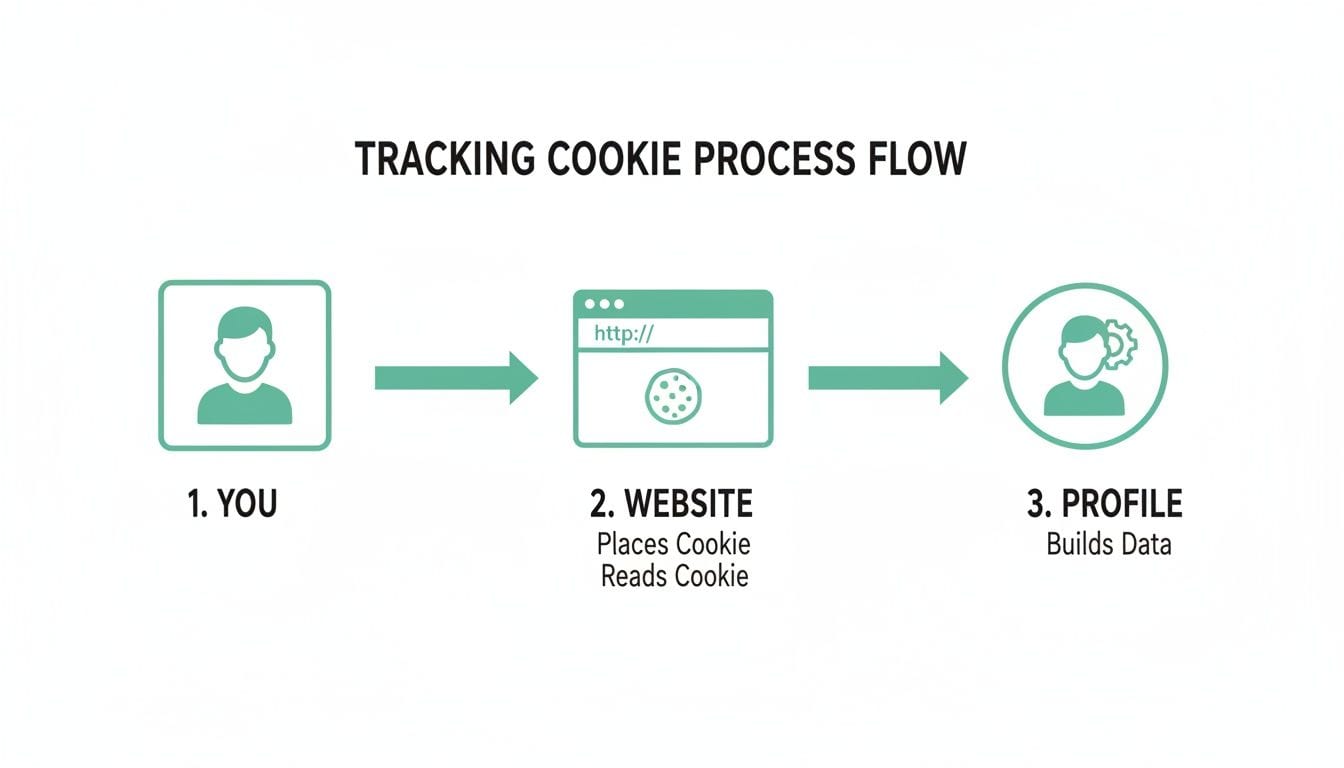
As you can see, your browsing activity is collected and pieced together, forming the foundation of the profiles used for targeted advertising and analytics.
The Technical Handshake
So, when your browser contacts Global Ad Network for that ad, the network's server does something clever. It responds not just with the ad image, but also with a command tucked inside the HTTP header. This command tells your browser to create a small text file—the third-party cookie.
Inside this file is the key to everything: a unique user ID. This ID is just a random string of characters, something like ID-98765xyz, that means nothing on its own. Its only job is to act like a digital nametag for your browser.
Now, fast forward a week. You visit a completely different site, an e-commerce store that sells shoes. As luck would have it, this store also uses Global Ad Network to serve its ads.
As the shoe store’s page loads, your browser makes another request to Global Ad Network. This time, it sends along any cookies it has from that network's domain. The server at Global Ad Network spots the cookie with the ID ID-98765xyz and instantly recognizes you.
The Core Mechanism: A tracking cookie works by creating a persistent, unique identifier for a user's browser. This identifier is then read by the same third party across multiple, unrelated websites, allowing them to connect the dots of the user's browsing journey.
The network now knows that the same browser that was on a news site last week is now looking at shoes. Repeat this simple read-and-write process across thousands of websites, and the ad network can build an incredibly detailed profile of your interests, habits, and what you’re likely to buy.
For a great real-world breakdown of how this affects your analytics, this video from Trackingplan shows how crucial it is to monitor your data quality, which is directly impacted by how these cookies and other trackers operate.
Session vs. Persistent Cookies
A cookie's lifespan is another critical piece of the puzzle. This is where the distinction between cookie types comes in.
-
Session Cookies: These are temporary. They live in your browser's memory only for as long as you're on a website. The moment you close your browser, they’re gone. Think of them as the digital equivalent of a shopping basket you use in a store—it’s only useful for that one trip.
-
Persistent Cookies: These are built to last. When a persistent cookie is created, it gets an expiration date that could be days, months, or even years away. It’s stored on your device’s hard drive and stays there until it expires or you decide to delete it manually.
Third-party tracking cookies are almost always persistent cookies. Their longevity is what makes them so powerful for building long-term behavioral profiles. It allows ad networks and analytics platforms to recognize you over extended periods, track repeat visits, and understand your interests far beyond a single browsing session. This makes them the backbone of many retargeting and attribution models.
The Rise and Fall of the Third-Party Cookie
For nearly three decades, the third-party cookie was the undisputed engine of digital advertising. Its story is a classic tale of accidental genius, explosive growth, and an eventual privacy reckoning that is now forcing the entire internet to evolve. It’s what turned the web from a collection of static pages into the dynamic, personalized environment we know today.
The journey kicked off in 1994 when Netscape invented the cookie alongside the very first banner ad on HotWired. Though its original purpose was simple state management—like remembering items in a shopping cart—advertisers quickly saw its true potential. This tiny text file let them follow users across the internet, enabling cross-site behavior tracking that completely revolutionized advertising.
This capability fueled the rise of programmatic advertising, a system where ads are bought and sold in real-time auctions. Ads could now be targeted to individuals based on their inferred interests, demographics, and purchase intent. The result was a hyper-efficient, data-rich ecosystem that powered the growth of countless online businesses.
The Privacy Turning Point
For years, this complex system hummed along in the background, largely invisible to the average person. But as data collection grew more aggressive, public awareness—and unease—began to build. High-profile privacy scandals created a groundswell of demand for more control over personal data.
This public pressure finally boiled over into landmark privacy legislation, shifting the concept of data ownership back to the user.
The New Mandate: Laws like Europe's General Data Protection Regulation (GDPR) and the California Consumer Privacy Act (CCPA) fundamentally rewrote the rules. They required companies to get explicit user consent before placing tracking cookies, turning a default practice into a deliberate choice.
All at once, the hidden machinery of the web was dragged into the spotlight, and the third-party cookie was cast as the main villain in the digital surveillance drama.
The Browser Wars and the Cookiepocalypse
While new laws provided the legal teeth, the real “cookiepocalypse” was ignited by the browsers themselves. Seeing the shift in public sentiment, browser developers decided to take matters into their own hands.
- Apple's First Move: In September 2017, Apple fired the first major shot by launching Intelligent Tracking Prevention (ITP) in Safari 11. This feature began actively blocking third-party cookies by default.
- Mozilla Follows Suit: Mozilla took a similar path in September 2019, enabling Enhanced Tracking Protection in Firefox and making third-party cookie blocking the default for all its users.
These were big moves, but the final nail in the coffin depended on the market leader. With its Chrome browser holding over 65% of the global market share, Google's next step would decide the third-party cookie's fate.
Google's Turbulent Deprecation Journey
In early 2020, Google dropped a bombshell on the ad-tech world: it announced a plan to phase out third-party cookies in Chrome. The idea was to replace them with a new set of technologies under its "Privacy Sandbox" initiative.
The road since has been anything but smooth. The deadline was pushed back multiple times as the industry scrambled to find workable alternatives. In January 2024, Google kicked off a trial, disabling cookies for 1% of Chrome users—about 30 million people. This test exposed just how deep the technical and business challenges ran, ultimately leading to the plan's abandonment in July 2024.
This whole saga highlights a new reality: building a business on unstable, third-party tracking is no longer a viable strategy. As the industry moves on, it's become crystal clear that a strong first-party data strategy is the only path forward. For more on this, you might be interested in our article on why you should care about first-party data. This shift forces businesses to build direct, trust-based relationships with their customers instead of relying on invisible trackers.
The Real Impact on Digital Analytics and Attribution
As third-party cookies crumble, their absence is sending shockwaves through the very foundation of digital analytics and marketing attribution. For years, these trackers were the invisible threads connecting user actions across different websites, devices, and sessions. Now, with those threads snipped by browsers and privacy regulations, the clear picture of the customer journey has shattered into a thousand disconnected pieces.
Think about a typical customer path. A user sees your ad on a social media app on their phone during their morning commute. Later, at work, they research your product on their laptop. Finally, that evening, they complete the purchase on their home tablet. With third-party cookies, stitching those three touchpoints together was straightforward. Without them, you’re left with what looks like three separate, anonymous visitors—not one person on a single, coherent journey.
This fragmentation makes multi-touch attribution, a cornerstone of modern marketing analytics, nearly impossible to execute reliably. The last-click model, already criticized for its simplicity, becomes the default out of sheer necessity, not strategy. This leaves marketers blind to the true value of their top-of-funnel efforts.

The Rise of Data Integrity Crises
The consequences go far beyond just attribution models. The decay of cookie-based tracking is fueling a crisis in data integrity, creating problems that erode trust in your analytics reports. Your data starts telling you lies—not because the tools are broken, but because the information they receive is incomplete and corrupted.
Key issues that are popping up everywhere include:
- Broken Marketing Pixels: Pixels from advertising platforms like Meta or Google lean heavily on cookies to track conversions and build retargeting audiences. When cookies are blocked, these pixels fail silently, leading to underreported conversions and wasted ad spend.
- Rogue Marketing Tags: As teams scramble to patch tracking gaps, they often rush to implement new tools or scripts without proper vetting. This can lead to “rogue” tags firing incorrectly, polluting analytics platforms with bad data, or even creating security vulnerabilities.
- Inconsistent Reporting: Your analytics platforms, like Google Analytics or Amplitude, may start showing conflicting data. One tool might report 1,000 users from a campaign, while another reports 750, because each is grappling with data loss differently.
This growing unreliability turns dashboards from a source of truth into a source of confusion. The death of third-party cookies didn’t just remove a tracking method; it introduced a systemic level of chaos into the data supply chain.
The Statistical Fallout of Cookie Blocking
The scale of this disruption is staggering. Before browsers began their crackdown, third-party cookies were the engine behind 70-80% of all display ad targeting. When Apple introduced Intelligent Tracking Prevention (ITP) in 2017, it slashed cross-site tracking by an estimated 90% on its devices. The 2021 App Tracking Transparency (ATT) framework, which required explicit user opt-in, saw consent rates plummet to around 25%, costing mobile apps a reported $10 billion in a single year.
Data from observability reports showed that rogue events and broken pixels spiked by 30-50% in major markets like the US and EU following these changes. You can discover more insights about the cookie timeline on The Bridge Corp.
This is where the need for a new approach becomes undeniable. If you can no longer trust the data flowing into your systems, you need a way to watch the flow itself.
This is exactly the role of an analytics observability platform. Instead of trying to resurrect old tracking methods, these systems monitor the entire data implementation—from the dataLayer on your site to the final destination in your analytics tools. Platforms like Trackingplan can automatically detect broken pixels, rogue tags, and data inconsistencies in real-time, alerting you the moment an issue occurs. By providing a single source of truth for your data implementation, they help you maintain trust and accuracy, even in a world without reliable cookies.
Navigating Data Privacy Laws and User Consent
Tracking cookies sit right at the epicenter of today's data privacy regulations. For any organization collecting user data, understanding and following these rules isn’t just good practice—it's a legal requirement. Navigating this world means getting a firm handle on what "valid user consent" truly means.
At the core of laws like Europe's General Data Protection Regulation (GDPR) and the California Consumer Privacy Act (CCPA) is a simple yet powerful principle: users must give you clear, informed permission before you can place non-essential tracking cookies on their devices. The old days of assuming consent or burying the details deep in a terms of service document are long gone.

What Compliant Consent Looks Like
A compliant cookie banner is more than just an FYI. It's an active choice. Under GDPR, pre-checked boxes for marketing or analytics cookies are a big no-no, since consent has to be freely given, not nudged. Likewise, "dark patterns"—tricky UI designs meant to confuse users into accepting cookies—can lead to some eye-watering fines.
Proper consent management boils down to a few key things:
- Clarity: Explain what your cookies are for in simple, plain language. No jargon.
- Granularity: Let users pick and choose. They should be able to accept analytics cookies but reject advertising ones, for example.
- Accessibility: Your "Accept All" button can't be the only star of the show. A "Reject All" or "Customize" option needs to be just as easy to find and click.
This whole shift toward explicit consent didn't happen overnight. Tracking cookies have been around since 1994, but public outrage really boiled over after scandals like Cambridge Analytica in 2018. The big browsers took notice. Firefox started blocking third-party cookies by default on September 3, 2019, and Apple's Safari did the same on March 24, 2020. The impact was immediate. While cookies once tracked over 90% of web users, their cross-device reach plunged by 40% after the browser blocks went live.
Beyond the Banner: The Importance of Governance
Just getting consent is only half the battle. Your organization also needs to keep an accurate, auditable log of those choices. This is where a lot of companies stumble. What if a user changes their mind and revokes consent? Your systems have to be ready to honor that decision instantly and stop collecting their data.
This is also where we get into legal gray areas. Regulators are heavily scrutinizing "cookie walls," which block all access to a site unless the user agrees to all cookies. The general feeling is that you shouldn't have to trade your privacy just to access a service.
When you're trying to wrap your head around data privacy, it helps to look at the whole picture. For instance, knowing the rules for user consent in email marketing can shed light on broader strategies for GDPR compliance.
The Modern Challenge: The real test isn't just showing a banner; it's ensuring your entire data ecosystem—from your website's dataLayer to your analytics platforms—respects the user's decision in real-time.
A simple misconfiguration in your consent management platform (CMP) can easily lead to non-compliant data collection or even an accidental leak of Personally Identifiable Information (PII). For any team that's serious about compliance, an automated monitoring tool is a must-have. Modern data governance platforms can automatically spot consent misconfigurations, making sure your tracking aligns with user permissions and helping you steer clear of penalties.
If you're ready to dive deeper, take a look at our guide on how to eliminate tracking cookies and build a more privacy-first data strategy.
How to Prepare for a Cookieless Future
The end of the third-party cookie isn't an apocalypse. It’s a fundamental reset that requires a real action plan. For years, businesses have leaned on these trackers as a crutch for understanding user behavior. Now, it's time to build a more resilient, transparent, and effective strategy—one based on data you own and control.
Getting ready for this shift starts with a candid audit of how much you currently rely on third-party cookies. You need a clear map of your exposure. This means digging into your website's data collection, from manually checking browser cookies to mapping every single marketing pixel and tag firing on your site.
The goal is to answer one critical question: Where will the data gaps appear when third-party trackers are gone for good?
Auditing Your Cookie Dependence
A comprehensive audit is your first step toward building a post-cookie strategy. This isn't just about finding cookies; it's about understanding their function and how they impact your business.
Your audit checklist should include:
- Browser Inspection: Use the developer tools in Chrome or Firefox to see exactly which cookies are being set on your site. Pay close attention to the "Domain" column to tell the difference between your own first-party cookies and third-party trackers from ad networks, social media platforms, and other martech vendors.
- Marketing Pixel Mapping: Catalog every marketing pixel implemented across your site. Figure out which ones rely on third-party cookies for conversion tracking, audience building, and retargeting. This will reveal which campaigns are most at risk.
- Attribution Model Review: Take a hard look at your current attribution models. If you’re heavily dependent on multi-touch attribution that stitches together cross-site journeys, you must start planning for the loss of that visibility.
Exploring Cookieless Alternatives
The future of digital tracking isn't about finding a single replacement for the third-party cookie. Instead, it’s about building a hybrid strategy that combines several privacy-first methods. As the industry moves toward a cookieless environment, understanding alternative approaches like cross-platform identifier matching techniques becomes essential.
Here are some of the leading alternatives that are reshaping the industry.
The Key Takeaway: The post-cookie world prioritizes direct relationships and technical control. The focus is shifting from borrowing third-party data to building and leveraging your own first-party data assets within a secure, privacy-compliant framework.
Comparing Cookieless Tracking Alternatives
As teams move away from third-party cookies, a few primary methods have emerged. The table below compares these alternatives, showing how they work and their main pros and cons.
Ultimately, most teams will adopt a hybrid approach, combining several of these methods to create a robust and privacy-conscious tracking strategy.
The Role of Automated Observability
As you transition to this new hybrid model, your data implementation will get more complicated. You'll be managing client-side events, server-side data streams, and multiple first-party data sources all at once. This complexity introduces a significant risk of data errors.
An automated observability platform acts as your safety net during this critical period. Instead of relying on manual audits or brittle tests, it continuously monitors your entire analytics setup.
Such a platform can automatically detect issues across all your implementations—client-side, server-side, or hybrid. It ensures your data stays accurate and trustworthy, giving you a single source of truth as you navigate the cookieless future. This proactive monitoring lets you innovate with confidence, knowing your data foundation is solid.
Common Questions About Tracking Cookies
Even after getting the basics down, a few common questions always pop up when we talk about tracking cookies. Let's clear up some of the lingering confusion and give you practical answers for navigating digital privacy and analytics.
Are All Cookies Bad for My Privacy?
No, not all cookies are bad. The real privacy headaches come from third-party tracking cookies, which are designed to follow you across many different websites. In contrast, first-party cookies are set by the website you're actually visiting and are often essential for a good user experience.
These helpful first-party cookies do the basic but critical work, like keeping you logged into your account or remembering what you put in your shopping cart. The web would be a clunky, frustrating place without them. The issue isn't the cookie technology itself—it's how third-party cookies are used for cross-site surveillance.
How Can I See Which Tracking Cookies a Website Uses?
You can easily peek behind the curtain and see a site's cookies using your browser's built-in developer tools. It's surprisingly straightforward.
- In Chrome: Right-click anywhere on the page, select "Inspect," and then head to the "Application" tab.
- In Firefox: Right-click, choose "Inspect," and then navigate to the "Storage" tab.
In either browser, look for the "Cookies" section. You'll find a list of every cookie stored for that site. Just look at the "Domain" column to quickly tell the difference between first-party cookies (from the site you’re on) and third-party cookies from other domains.
What Does a Cookieless Future Mean for My Analytics?
When people talk about a "cookieless future" in analytics, they're almost always referring to the end of reliable cross-site identification through third-party tracking cookies. It doesn't mean all cookies are going away.
This shift is forcing a necessary evolution in analytics. It means your strategy has to pivot toward first-party data—information you collect directly from user logins, newsletter sign-ups, and on-site interactions. Techniques like server-side tagging are also becoming more important for maintaining control and accuracy over your data.
This transition also makes automated data observability tools essential. They help ensure the data you can collect is complete and trustworthy, identifying gaps and errors left by blocked trackers.
Can I Just Block All Cookies in My Browser?
You can, but it will likely lead to a pretty frustrating time online. Blocking all cookies breaks a lot of essential website functionality. Sites will forget your login details, language preferences, and shopping cart items every time you visit.
A much better approach is to configure your browser to block third-party cookies specifically while allowing first-party cookies. This move preserves website functionality while dramatically boosting your privacy by stopping most cross-site tracking. Most modern browsers now offer this as a default or an easy-to-find setting.
Stop flying blind with your analytics. Trackingplan offers a single source of truth that automatically discovers your entire marketing and analytics implementation, monitors all data in real time, and alerts you to critical issues before they corrupt your reports. See how you can maintain complete data integrity by visiting https://trackingplan.com.